
Professional Minecraft Inventory Rendering and Asset Mirroring library
Verified details
These details have been verified by PyPIProject links
GitHub Statistics
Maintainers

Project description
🎒 Exo-Inventory
A powerful, high-performance Minecraft inventory rendering library for Python.
exo-inventory is a professional-grade library designed to fetch, mirror, and render Minecraft item icons and player inventories with 100% customizability. Whether you need a standard player inventory or a completely custom 9x6 chest layout, exo-inventory handles the assets and coordinates for you.
✨ Features
- 🔄 Smart Asset Mirroring: Local mirror of Jemsire's Minecraft icons with automatic version detection (1.13.2 to 1.21.10+).
- 🖼️ Flexible Rendering Engine: Support for arbitrary item placement (
render_custom) or standard Minecraft layouts (render_player). - 🤖 Automated Maintenance: Integrated GitHub Actions workflow to sync assets and rebuild metadata daily.
- 🎨 UI Customization: Download and cache UI themes (backgrounds, empty slot icons) from remote repositories.
- 👤 Player Models: Automatic integration with
mc-heads.netfor rendering 3D player skins. - ⚡ High Performance: Path caching, recursive item lookup, and asynchronous asset fetching.
🖼️ Visual Previews
| Standard Inventory | Custom Transparent Grid |
|---|---|
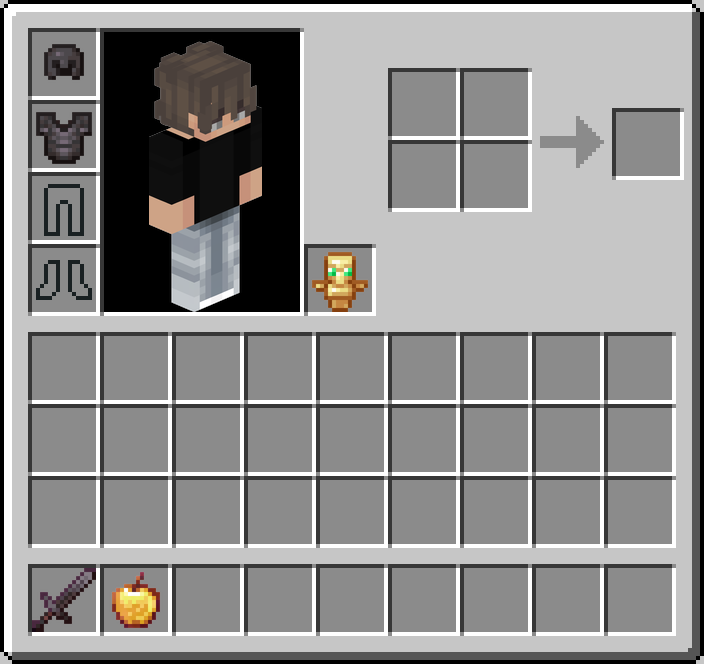 |
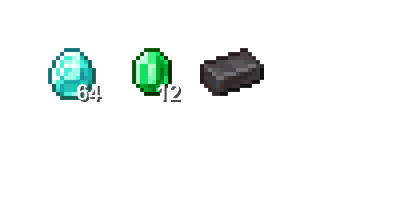 |
🚀 Installation
Install the library directly from your local path or git:
# Git installation (Recommended)
pip install git+https://github.com/zKauaFerreira/Exo-Lib.git
Note: The library already comes with 1400+ Minecraft icons and UI assets bundled in the package. You can start rendering immediately after installation!
⚡ Quick Start (Plug & Play)
1. Minimalistic Rendering
Since assets are bundled, you don't even need to provide a path!
import asyncio
from exo_inventory import InventoryRenderer

async def main():
    # USES BUILT-IN ASSETS AUTOMATICALLY
    renderer = InventoryRenderer()
    await renderer.initialize()

    player_data = {
        "uuid": "caf29aa7-b3f6-494f-b44f-66cdd3fb9a42",
        "armor": [{"id": "diamond_helmet", "slot": 39}],
        "hotbar": [{"id": "netherite_sword", "slot": 0}],
        "main_inventory": [],
        "off_hand": {"id": "shield"}
    }

    render = await renderer.render_player(player_data)
    # Save or send to Discord...

    await renderer.close()

asyncio.run(main())
📂 Examples Folder
We provided a dedicated examples/ directory in our repository to help you get started with common use cases.
standard_inventory.py: Demonstrates standard player inventory rendering with the requested skin.custom_grid.py: Shows how to create 100% custom grids with transparent backgrounds.manage_assets.py: Advanced usage: how to sync assets to a custom external folder instead of using the library internal one.
🛠️ Advanced Usage
🎨 Customizing Asset Locations
If you want to manage your icons in a specific shared folder across multiple projects:
# Pass a path to use an external cache
assets = AssetsManager("./shared_assets")
renderer = InventoryRenderer(assets_dir="./shared_assets")
🧩 Custom Layouts
# background=None generates a transparent PNG
image = await renderer.render_custom(
    items_map=[{"id": "apple", "x": 10, "y": 10}],
    width=100,
    height=100,
    background=None
)
📦 Asset Utilities & Exporting
Need the icons for something else? You can export assets from the cache to any directory.
# Export specific icons and UI elements to a folder
await assets.export_assets(
    target_dir="./my_resource_pack",
    items_list=["diamond", "netherite_sword"],
    include_ui=True
)

# Or just download icons to the internal cache without rendering
await assets.download_assets(["stone", "grass_block", "dirt"])
👤 Advanced Player Rendering
Customizing the player model render (poses/angles).
# Get a 3D body render with a 45-degree rotation
body_img = await renderer.get_player_render(
    uuid="zKauaFerreira",
    render_type="body", # options: 'body', 'head', 'avatar', 'player'
    size=400,
    angle=45
)
🛰️ Remote Asset Synchronization
The library can automatically pull UI themes from your GitHub repo:
| Asset | Source |
|---|---|
inventory_bg.png |
zKauaFerreira/Exo-Lib/main/src/assets |
jemsire_index.json |
Remote metadata mirror |
empty_armor_slots |
PrismarineJS official assets |
🤖 Automation (CI/CD)
The library includes a pre-configured GitHub Action (.github/workflows/update_assets.yml) that:
- Runs every day at midnight.
- Checks Jemsire for new Minecraft versions.
- Downloads new ZIPs and extracts them recursively.
- Generates a new
jemsire_index.json. - Commits changes back to your repository automatically.
📂 Project Structure
exo-inventory/
├── src/
│   └── exo_inventory/
│       ├── __init__.py    # Main exports
│       ├── assets.py      # Jemsire & Remote Sync logic
│       └── renderer.py    # Pillow-based rendering engine
├── pyproject.toml         # Build & Dependency config
└── README.md              # You are here
🛠️ Requirements
- Python 3.10+
- Pillow: For image processing.
- aiohttp: For asynchronous asset downloads.
- discord.py: Compatible for bot integrations.
🖥️ CLI Commands
exo-inventory provides built-in CLI commands for easy maintenance and asset extraction.
# Sync all assets to the library's internal storage
python -m exo_inventory.assets sync

# Export all icons AND UI elements to your current project folder
python -m exo_inventory.assets export ./assets
📜 License & Acknowledgments
- Icons: Provided by Jemsire.
- Player Heads: Powered by mc-heads.net.
- Core Developers: zKauaFerreira.
Maintained with ❤️ for the Minecraft Discord community.
Project details
Verified details
These details have been verified by PyPIProject links
GitHub Statistics
Maintainers
Release history Release notifications | RSS feed


Download files
Download the file for your platform. If you're not sure which to choose, learn more about installing packages.
Source Distribution
Built Distribution
Filter files by name, interpreter, ABI, and platform.
If you're not sure about the file name format, learn more about wheel file names.
Copy a direct link to the current filters
File details
Details for the file exo_inventory-0.1.5.tar.gz.
File metadata
- Download URL: exo_inventory-0.1.5.tar.gz
- Upload date:
- Size: 8.0 MB
- Tags: Source
- Uploaded using Trusted Publishing? Yes
- Uploaded via: twine/6.1.0 CPython/3.13.7
File hashes
| Algorithm | Hash digest | |
|---|---|---|
| SHA256 |
07b40cb7a1e3982f46b5ac3f5fbb498e8b5e1022e6879ca65fac662220fb68b9
|
|
| MD5 |
7dabc2baced75368194e46f71c86cc43
|
|
| BLAKE2b-256 |
e8841966fe3daf22896bf8bc180c41c3d03fe28778421d46ec1f5fd0de8be10b
|
Provenance
The following attestation bundles were made for exo_inventory-0.1.5.tar.gz:
Publisher:
publish.yml on zKauaFerreira/Exo-Lib
-
Statement:
-
Statement type:
https://in-toto.io/Statement/v1 -
Predicate type:
https://docs.pypi.org/attestations/publish/v1 -
Subject name:
exo_inventory-0.1.5.tar.gz -
Subject digest:
07b40cb7a1e3982f46b5ac3f5fbb498e8b5e1022e6879ca65fac662220fb68b9 - Sigstore transparency entry: 988103252
- Sigstore integration time:
-
Permalink:
zKauaFerreira/Exo-Lib@04b706a339d225ffef9c2f582d6e73cd0a190f77 -
Branch / Tag:
refs/tags/v0.1.5 - Owner: https://github.com/zKauaFerreira
-
Access:
public
-
Token Issuer:
https://token.actions.githubusercontent.com -
Runner Environment:
github-hosted -
Publication workflow:
publish.yml@04b706a339d225ffef9c2f582d6e73cd0a190f77 -
Trigger Event:
push
-
Statement type:
File details
Details for the file exo_inventory-0.1.5-py3-none-any.whl.
File metadata
- Download URL: exo_inventory-0.1.5-py3-none-any.whl
- Upload date:
- Size: 8.7 MB
- Tags: Python 3
- Uploaded using Trusted Publishing? Yes
- Uploaded via: twine/6.1.0 CPython/3.13.7
File hashes
| Algorithm | Hash digest | |
|---|---|---|
| SHA256 |
9c58f30d1e46e07156bea789177eae307a70668e667cf79e70179fdcbc79b948
|
|
| MD5 |
6caef8c8aa5dd8fc898a000a8cf6413a
|
|
| BLAKE2b-256 |
5ed6b92fdf5e45f303812140820f91cad7c561e63272674f7917b1936455ca91
|
Provenance
The following attestation bundles were made for exo_inventory-0.1.5-py3-none-any.whl:
Publisher:
publish.yml on zKauaFerreira/Exo-Lib
-
Statement:
-
Statement type:
https://in-toto.io/Statement/v1 -
Predicate type:
https://docs.pypi.org/attestations/publish/v1 -
Subject name:
exo_inventory-0.1.5-py3-none-any.whl -
Subject digest:
9c58f30d1e46e07156bea789177eae307a70668e667cf79e70179fdcbc79b948 - Sigstore transparency entry: 988103315
- Sigstore integration time:
-
Permalink:
zKauaFerreira/Exo-Lib@04b706a339d225ffef9c2f582d6e73cd0a190f77 -
Branch / Tag:
refs/tags/v0.1.5 - Owner: https://github.com/zKauaFerreira
-
Access:
public
-
Token Issuer:
https://token.actions.githubusercontent.com -
Runner Environment:
github-hosted -
Publication workflow:
publish.yml@04b706a339d225ffef9c2f582d6e73cd0a190f77 -
Trigger Event:
push
-
Statement type:






