
Production-quality Whole Exome Sequencing analysis pipeline

Project description

ExomeFlow: A Production-Quality Python WES Analysis Toolkit

| Testing |   |
| Package |     |
| Container |   |
| Meta |      |
| Author |   |
What is it?
ExomeFlow is a Python package that provides a complete, automated Whole Exome Sequencing (WES) analysis workflow from raw FASTQ files to functionally annotated variants in a single reproducible CLI command.
It aims to be the standard high-level pipeline for WES analysis in Python, combining GATK best-practice variant calling, hard filtering, and ANNOVAR annotation into one modular, maintainable package. It handles cohort-level processing (multiple samples), checkpointing for resumable runs, structured logging, and parallel execution out of the box.
Table of Contents
- What is it?
- Main Features
- Pipeline Workflow
- Benchmarks
- Where to get it
- System Requirements
- Python Dependencies
- Quick Start
- Commands
- Reference Files
- Input Convention
- Output Files
- Getting Help
- License
- Citation
Main Features
Here are the things ExomeFlow does well:
- Zero-config first run —
exomeflow runauto-detects bundled GATK/ANNOVAR, installs missing tools, and downloads reference data + ANNOVAR databases on first use, saving everything to~/.exomeflow/config.jsonso later runs need no extra flags - Automatic sample detection — scans an input directory and detects all paired-end samples from FASTQ filenames; no manifest file required
- Per-sample by default — any number of samples processed together still produces one separate annotated output file per sample, exactly like running them one at a time
- Complete GATK best-practice workflow — fastp QC → BWA MEM alignment → coordinate sorting → duplicate marking → BQSR → HaplotypeCaller → hard filtering → ANNOVAR annotation
- Cohort joint genotyping (opt-in) —
--joint-genotypingswitches to GenomicsDBImport + GenotypeGVCFs, producing one shared cohort VCF/annotation instead of per-sample files - Somatic mode —
--mode somaticcalls variants tumor-only with Mutect2 instead of HaplotypeCaller (tumor-normal pairing is on the roadmap, not yet supported) - Read-depth CNV calling (opt-in) —
--cnvadds GATK CollectReadCounts/DenoiseReadCounts/ PlotDenoisedCopyRatios per sample (no panel-of-normals required) - GRCh37/hg19 or hg38 —
--genome-buildselects the reference build; ANNOVAR buildver and resource-bundle downloads follow automatically - HPO + ACMG enrichment — every annotated table is automatically joined with HPO gene-to-phenotype terms and ACMG/AMP pathogenicity classification (via InterVar)
- Cohort QC rollup — a MultiQC report aggregating fastp/flagstat/GATK metrics across all samples, generated automatically at the end of each run
- Cohort processing — processes any number of samples sequentially or in parallel
with
--max-workers - Checkpointing and resume — every completed step is recorded; an interrupted run resumes exactly where it left off without repeating work
- Automatic requirements check — every tool/database this pipeline needs is auto-detected and, if missing, auto-installed or auto-downloaded — no manual setup step
- Structured logging — per-sample log files plus a pipeline-wide log with INFO / WARNING / ERROR / SUCCESS levels
- GATK hard filters — applies GATK best-practice SNP and INDEL hard-filter thresholds and extracts PASS-only variants automatically
- ANNOVAR functional annotation — annotates variants against 8 databases: refGene, ClinVar, gnomAD, dbNSFP, COSMIC, ExAC, avSNP150, and dbscSNV
- Modular architecture — each pipeline step is an independent Python module composed through a pluggable step registry; easy to extend without touching the rest
- PyPI installable —
pip install exomeflow; no Docker or Nextflow required
Pipeline Workflow
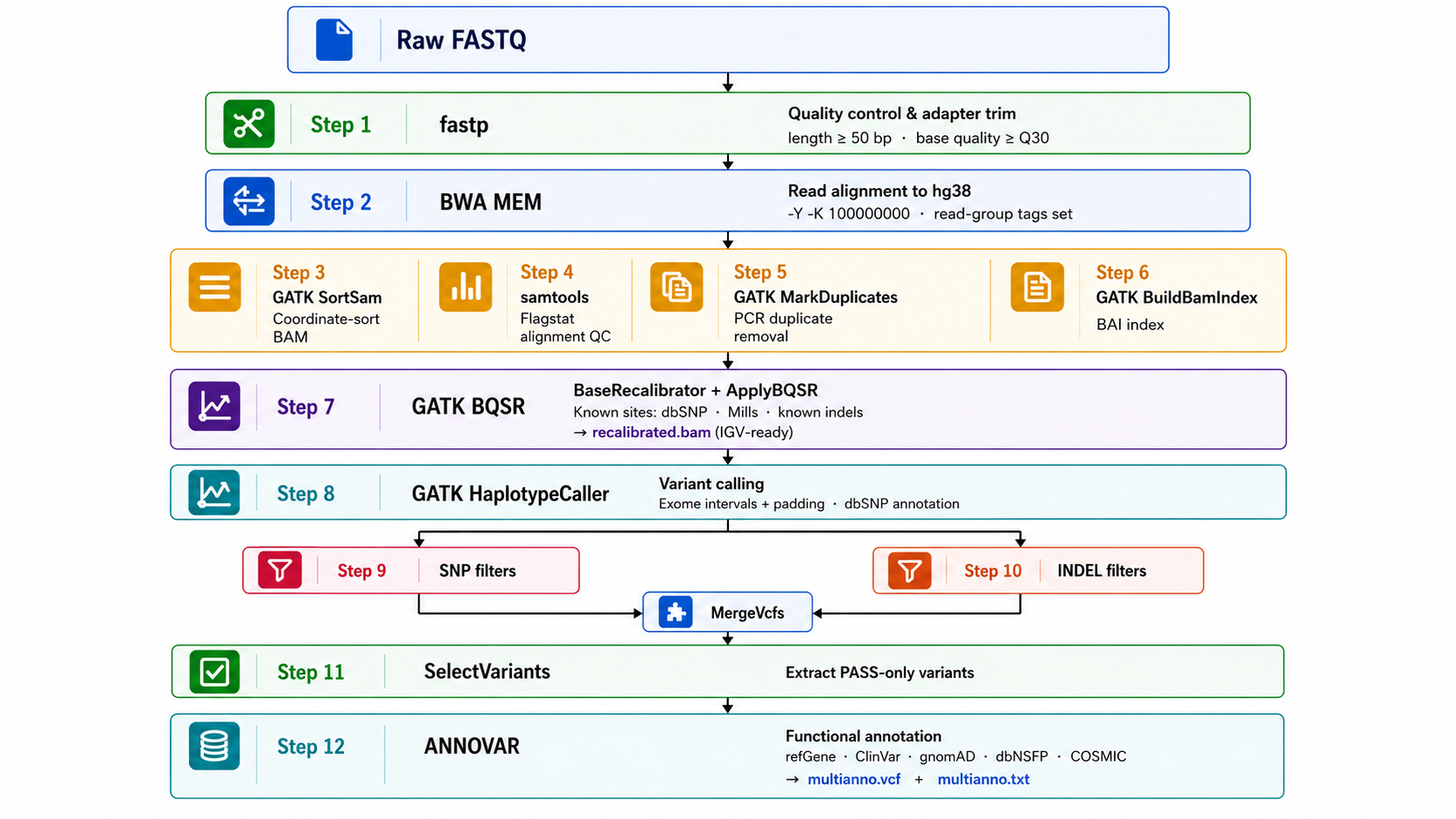
Text version
Raw FASTQ
    │
    ▼
┌─────────────────────────────────────────────────────────┐
│  Step 1   fastp         Quality control & adapter trim   │
│           length ≥ 50 bp · base quality ≥ Q30            │
└──────────────────────────┬──────────────────────────────┘
                           │
                           ▼
┌─────────────────────────────────────────────────────────┐
│  Step 2   BWA MEM        Read alignment to hg38          │
│           -Y -K 100000000 · read-group tags set          │
└──────────────────────────┬──────────────────────────────┘
                           │
                           ▼
┌─────────────────────────────────────────────────────────┐
│  Step 3   GATK SortSam   Coordinate-sort BAM             │
│  Step 4   samtools       Flagstat alignment QC           │
│  Step 5   GATK MarkDuplicates   PCR duplicate removal    │
│  Step 6   GATK BuildBamIndex    BAI index                │
└──────────────────────────┬──────────────────────────────┘
                           │
                           ▼
┌─────────────────────────────────────────────────────────┐
│  Step 7   GATK BQSR      BaseRecalibrator + ApplyBQSR    │
│           Known sites: dbSNP · Mills · known indels      │
│           → recalibrated.bam  (IGV-ready)                │
└──────────────────────────┬──────────────────────────────┘
                           │
                           ▼
┌─────────────────────────────────────────────────────────┐
│  Step 8   GATK HaplotypeCaller   Variant calling         │
│           Exome intervals + padding · dbSNP annotation   │
└──────────────────────────┬──────────────────────────────┘
                           │
                    ┌──────┴──────┐
                    ▼             ▼
               SNP filters   INDEL filters
               (Step 9)       (Step 10)
                    └──────┬──────┘
                           │  MergeVcfs
                           ▼
┌─────────────────────────────────────────────────────────┐
│  Step 11  SelectVariants  Extract PASS-only variants     │
└──────────────────────────┬──────────────────────────────┘
                           │
                           ▼
┌─────────────────────────────────────────────────────────┐
│  Step 12  ANNOVAR         Functional annotation          │
│           refGene · ClinVar · gnomAD · dbNSFP · COSMIC   │
│           → multianno.vcf  +  multianno.txt              │
└─────────────────────────────────────────────────────────┘
Benchmarks
Benchmarked on NA12878 (HG001) whole-exome sequencing data (Agilent SureSelect V8 Clinical Exome, hg38). Accuracy evaluated against GIAB NISTv4.2.1 truth set restricted to Agilent V8 capture regions.
Performance
| Metric | Value |
|---|---|
| Total runtime (12 steps) | 218.4 min |
| Slowest step | BQSR (141.3 min) |
| Threads | 24 |
Variant Quality (PASS variants)
| Metric | Value | Expected range |
|---|---|---|
| SNPs called | 38,413 | — |
| INDELs called | 5,971 | — |
| Ts/Tv ratio | 2.58 | 2.0–3.3 ✓ |
| Het/Hom ratio | 3.10 | 1.5–2.5 |
| dbSNP concordance | 44.7% | — |
Accuracy (vs GIAB NISTv4.2.1, PASS-only)
| Variant type | Precision | Recall | F1 score | TP | FP | FN |
|---|---|---|---|---|---|---|
| SNP | 99.41% | 64.67% | 78.36% | 7,787 | 46 | 4,255 |
| INDEL | 89.38% | 66.14% | 76.02% | 623 | 74 | 319 |
Recall reflects PASS-only evaluation (conservative hard filters applied). PASS-only extraction is unconditional in ExomeFlow — there is no flag to disable it; the raw pre-filter VCF (
<sample>.vcf/.g.vcf.gz) is also kept if you need it.
Functional Annotation (NA12878)
| Category | Count |
|---|---|
| Total annotated variants | 44,673 |
| Exonic | 15,466 (34.6%) |
| Nonsynonymous SNV | 6,957 |
| Synonymous SNV | 8,158 |
| Stopgain | 57 |
| Frameshift indel | 224 |
| Splicing | 62 |
| ClinVar pathogenic/likely-pathogenic | 5 |
| Novel (not in dbSNP avSNP150) | 658 |
Where to get it
ExomeFlow is available via three installation methods:
Option 1 — Python Package (recommended)
pip install exomeflow
Option 2 — Docker
# Pull
docker pull itsrobintomar/exomeflow:2.0.0

# Run
docker run --rm -it \
  -v /path/to/fastq:/data/fastq \
  -v /path/to/refs:/refs \
  -v /path/to/vcf:/vcf \
  -v /path/to/annovar:/annovar \
  -v /path/to/results:/data/results \
  itsrobintomar/exomeflow:2.0.0 run \
    --input-dir    /data/fastq \
    --output       /data/results \
    --reference    /refs/Homo_sapiens_assembly38.fasta \
    --dbsnp        /vcf/Homo_sapiens_assembly38.dbsnp138.vcf.gz \
    --mills        /vcf/Mills_and_1000G_gold_standard.indels.hg38.vcf.gz \
    --known-indels /vcf/Homo_sapiens_assembly38.known_indels.vcf.gz \
    --annovar-bin  /annovar \
    --annovar-db   /annovar/humandb \
    --threads      24
| Volume mount | Host path | Container path |
|---|---|---|
| Input FASTQs | /your/fastq/ |
/data/fastq |
| Reference FASTA + BWA index | /your/refs/ |
/refs |
| VCF files (dbSNP, Mills, known indels) | /your/vcf/ |
/vcf |
| ANNOVAR scripts | /your/annovar/ |
/annovar |
| ANNOVAR humandb | /your/annovar/humandb/ |
/annovar/humandb |
| Output | /your/results/ |
/data/results |
Note: ANNOVAR must be mounted — it cannot be bundled due to licensing. Register and download at annovar.openbioinformatics.org
Option 3 — Singularity (HPC clusters)
# Option A — Pull directly from Docker Hub (easiest)
singularity pull exomeflow-2.0.0.sif docker://itsrobintomar/exomeflow:2.0.0

# Option B — Build from definition file (contact author for .def file)
singularity build exomeflow-2.0.0.sif exomeflow.def

# Run
singularity exec \
  --bind /path/to/fastq:/data/fastq \
  --bind /path/to/refs:/refs \
  --bind /path/to/vcf:/vcf \
  --bind /path/to/annovar:/annovar \
  --bind /path/to/results:/data/results \
  exomeflow-2.0.0.sif exomeflow run \
    --input-dir    /data/fastq \
    --output       /data/results \
    --reference    /refs/Homo_sapiens_assembly38.fasta \
    --dbsnp        /vcf/Homo_sapiens_assembly38.dbsnp138.vcf.gz \
    --mills        /vcf/Mills_and_1000G_gold_standard.indels.hg38.vcf.gz \
    --known-indels /vcf/Homo_sapiens_assembly38.known_indels.vcf.gz \
    --annovar-bin  /annovar \
    --annovar-db   /annovar/humandb \
    --threads      24
SLURM job script example
#!/bin/bash
#SBATCH --job-name=exomeflow
#SBATCH --cpus-per-task=24
#SBATCH --mem=90G
#SBATCH --time=24:00:00
#SBATCH --output=exomeflow_%j.log

singularity exec \
  --bind $FASTQ_DIR:/data/fastq \
  --bind $REFS_DIR:/refs \
  --bind $VCF_DIR:/vcf \
  --bind $ANNOVAR_DIR:/annovar \
  --bind $RESULTS_DIR:/data/results \
  exomeflow-2.0.0.sif exomeflow run \
    --input-dir    /data/fastq \
    --output       /data/results \
    --reference    /refs/Homo_sapiens_assembly38.fasta \
    --dbsnp        /vcf/Homo_sapiens_assembly38.dbsnp138.vcf.gz \
    --mills        /vcf/Mills_and_1000G_gold_standard.indels.hg38.vcf.gz \
    --known-indels /vcf/Homo_sapiens_assembly38.known_indels.vcf.gz \
    --annovar-bin  /annovar \
    --annovar-db   /annovar/humandb \
    --threads      $SLURM_CPUS_PER_TASK
System Requirements
ExomeFlow calls the following external tools via the command line.
They must be installed separately and available on your PATH.
| Tool | Minimum Version | Install |
|---|---|---|
| BWA | ≥ 0.7.17 | conda install -c bioconda bwa |
| SAMtools | ≥ 1.13 | conda install -c bioconda samtools |
| GATK | ≥ 4.6.0 | conda install -c bioconda gatk4 |
| fastp | ≥ 0.20.1 | conda install -c bioconda fastp |
| Perl | ≥ 5.26 | conda install perl |
| ANNOVAR | latest | Register + download from website |
Tip: Run
exomeflow setupafter installation to automatically verify tools, download hg38 reference files, and populate ANNOVAR databases in one step.
Python Dependencies
- typer — Builds the CLI interface
- rich — Provides coloured terminal output and structured logging
- pandas — Data handling, variant count summaries, HPO/ACMG enrichment joins
All Python dependencies are installed automatically with pip install exomeflow.
matplotlib (needed only for --cnv plots) is an optional extra
(pip install exomeflow[viz]) — the dependency checker installs it automatically
the first time you run with --cnv, so you never need to install it by hand.
Quick Start
1. Install ExomeFlow
pip install exomeflow
2. Prepare FASTQ files
fastq/
├── sample1_1.fastq.gz
├── sample1_2.fastq.gz
├── sample2_1.fastq.gz
└── sample2_2.fastq.gz
3. Run the pipeline
exomeflow run --input-dir fastq/ --output results/
That's it. On first run, ExomeFlow detects bundled GATK/ANNOVAR, installs any missing
system tools, and walks you through fetching (or locating) reference data, ANNOVAR
databases, the HPO gene-to-phenotype mapping, and InterVar — then saves everything to
~/.exomeflow/config.json so every later run needs nothing but --input-dir/--output.
Prefer to control every path explicitly (e.g. on a shared HPC where refs already exist)? Every auto-resolved value can still be set explicitly:
exomeflow run \
  --input-dir    fastq/ \
  --output       results/ \
  --reference    /data/references/hg38/hg38.fa \
  --dbsnp        /data/references/hg38/dbsnp.vcf.gz \
  --mills        /data/references/hg38/Mills_and_1000G_gold_standard.indels.hg38.vcf.gz \
  --known-indels /data/references/hg38/Homo_sapiens_assembly38.known_indels.vcf.gz \
  --intervals    refs/Illumina_Exome_TargetedRegions_v1.2.hg38.bed \
  --annovar-bin  /opt/annovar \
  --annovar-db   /opt/annovar/humandb \
  --threads      32 \
  --max-workers  2
exomeflow setup still exists if you'd rather run provisioning as its own step (or
re-run it later to change reference paths / download new databases) — it's optional,
not a prerequisite.
Cohort, somatic, CNV, and GRCh37 modes
# Cohort joint genotyping instead of per-sample VCFs (opt-in)
exomeflow run --input-dir fastq/ --output results/ --joint-genotyping --intervals targets.bed

# Somatic tumor-only calling with Mutect2
exomeflow run --input-dir fastq/ --output results/ --mode somatic --germline-resource af-only-gnomad.vcf.gz

# Read-depth CNV calling alongside the normal germline workflow
exomeflow run --input-dir fastq/ --output results/ --cnv --intervals targets.bed

# GRCh37/hg19 instead of hg38
exomeflow run --input-dir fastq/ --output results/ --genome-build GRCh37
Commands
exomeflow run — Execute the WES pipeline
exomeflow run [OPTIONS]
| Option | Default | Description |
|---|---|---|
--input-dir, -i |
required | Directory containing paired FASTQ files |
--output, -o |
results/ |
Root output directory |
--reference, -r |
auto-resolved | BWA-indexed reference FASTA |
--dbsnp |
auto-resolved | dbSNP VCF (bgzipped + tabix-indexed) |
--mills |
auto-resolved | Mills and 1000G gold standard indels VCF |
--known-indels |
auto-resolved | Known indels VCF for BQSR |
--intervals |
(optional) | Exome capture BED file — required for --joint-genotyping/--cnv |
--interval-padding |
100 |
Base-pair padding around each target interval |
--annovar-bin |
auto-resolved | Directory containing table_annovar.pl |
--annovar-db |
auto-resolved | ANNOVAR humandb directory |
--mode |
germline |
germline (HaplotypeCaller) or somatic (tumor-only Mutect2) |
--genome-build |
hg38 |
hg38 or GRCh37 |
--joint-genotyping |
off | Cohort mode: one shared VCF/annotation instead of per-sample files |
--cnv |
off | Also call read-depth CNVs per sample (needs --intervals) |
--germline-resource |
(optional) | gnomAD AF-only VCF for Mutect2, used by --mode somatic |
--threads, -t |
24 |
Threads for BWA MEM and GATK HaplotypeCaller |
--fastp-threads |
8 |
Threads for fastp |
--annovar-threads |
24 |
Threads for ANNOVAR |
--max-workers |
1 |
Number of samples to process in parallel |
--java-opts |
-Xmx80g |
JVM options passed via JAVA_OPTS |
exomeflow setup — Optional: run provisioning as its own step
exomeflow setup [--refs-dir PATH] [--annovar-bin PATH] [--annovar-db PATH] [--genome-build hg38|GRCh37] [--existing-refs PATH]
Not required before exomeflow run — first-run auto-setup covers the same ground.
Useful for re-provisioning (switching reference builds, refreshing databases) without
running the pipeline itself.
Reference Files
| File | Source | Size |
|---|---|---|
hg38.fa + BWA index |
UCSC / GATK resource bundle | ~10 GB |
dbsnp.vcf.gz |
GATK resource bundle | ~10 GB |
Mills_and_1000G_gold_standard.indels.hg38.vcf.gz |
GATK resource bundle | ~200 MB |
Homo_sapiens_assembly38.known_indels.vcf.gz |
GATK resource bundle | ~100 MB |
| Exome capture BED | Your sequencing kit vendor | varies |
| ANNOVAR humandb (8 databases) | ANNOVAR download server | ~100 GB |
exomeflow setup downloads all GATK resource bundle files automatically.
Manual download:
gsutil -m cp -r gs://gcp-public-data--broad-references/hg38/v0/ /data/refs/
Input Convention
ExomeFlow automatically detects samples from paired-end FASTQ filenames. Files must follow the pattern:
<sample_id>_1.fastq.gz   ← Read 1
<sample_id>_2.fastq.gz   ← Read 2
The sample_id can be any string — SRR accession, patient ID, etc.
Output Files
Per-sample output (default — one full set of these per sample, regardless of how many samples are in the run):
| File | Description |
|---|---|
Mapsam/<sample>_recalibrated.bam |
Analysis-ready BAM — open in IGV |
VCF/<sample>.vcf |
Raw HaplotypeCaller output (germline) |
VCF/<sample>_unfiltered.vcf.gz |
Raw Mutect2 output (--mode somatic) |
VCF/<sample>_PASS.vcf |
PASS-only filtered variants |
VCF/<sample>.annovar.<buildver>_multianno.{vcf,txt} |
ANNOVAR-annotated variants |
VCF/<sample>.annovar.hpo.txt |
Annotated table + HPO terms + ACMG classification |
filtered_fastp/<sample>_fastp.html |
fastp QC report |
Mapsam/<sample>_flagstat.txt |
Alignment statistics |
CNV/<sample>_denoised_cr.tsv + plot |
Read-depth CNV calls (--cnv only) |
logs/analysis_<timestamp>.log |
Full pipeline log |
logs/<sample>_<timestamp>.log |
Per-sample log |
Cohort output (--joint-genotyping only — replaces the per-sample VCF/annotation files
above with one shared set):
| File | Description |
|---|---|
VCF/cohort/cohort.vcf.gz |
Joint-genotyped multi-sample VCF |
VCF/cohort/cohort_PASS.vcf |
PASS-only filtered cohort variants |
VCF/cohort/cohort.annovar.<buildver>_multianno.{vcf,txt} |
Annotated cohort variants |
VCF/cohort/cohort.annovar.hpo.txt |
Annotated cohort table + HPO/ACMG |
Always generated at the end of a run:
| File | Description |
|---|---|
multiqc/exomeflow_report.html |
Cohort-wide QC rollup (fastp, flagstat, GATK metrics) |
Getting Help
For usage questions and bug reports, contact:
Robin Kumar — itsrobintomar@gmail.com AIIMS New Delhi
License
MIT — see pypi.org/project/exomeflow for details.
Citation
If you use ExomeFlow in your research, please cite:
Robin Kumar. (2026). ExomeFlow (2.0.0). Zenodo. https://doi.org/10.5281/zenodo.20155767
ORCID: 0009-0002-9084-2019 · PyPI: pypi.org/project/exomeflow
Built for the bioinformatics community · Robin Kumar, AIIMS New Delhi
Project details


Download files
Download the file for your platform. If you're not sure which to choose, learn more about installing packages.
Source Distribution
Built Distribution
Filter files by name, interpreter, ABI, and platform.
If you're not sure about the file name format, learn more about wheel file names.
Copy a direct link to the current filters
File details
Details for the file exomeflow-2.0.0.tar.gz.
File metadata
- Download URL: exomeflow-2.0.0.tar.gz
- Upload date:
- Size: 60.3 kB
- Tags: Source
- Uploaded using Trusted Publishing? No
- Uploaded via: twine/6.2.0 CPython/3.13.13
File hashes
| Algorithm | Hash digest | |
|---|---|---|
| SHA256 |
3d9e26e19798948b11e59cb4abd9cf802db86b047482724b36a5d30db788494f
|
|
| MD5 |
628745a73f2dadcc9ad7a3e663613ab4
|
|
| BLAKE2b-256 |
0fbc113fda110ca30fa402a9a3f2d0eb3a3305a3eb2344917f2dabe05d25ca4f
|
File details
Details for the file exomeflow-2.0.0-py3-none-any.whl.
File metadata
- Download URL: exomeflow-2.0.0-py3-none-any.whl
- Upload date:
- Size: 56.4 kB
- Tags: Python 3
- Uploaded using Trusted Publishing? No
- Uploaded via: twine/6.2.0 CPython/3.13.13
File hashes
| Algorithm | Hash digest | |
|---|---|---|
| SHA256 |
4ab35c3475be1b2edf9ec0e9eec98db8b35b0d017e83f63ca68dca220c078e32
|
|
| MD5 |
263e289903cc5407cc7e979e32c279c9
|
|
| BLAKE2b-256 |
5721564de306beeab7649dbcb8068ebf69b25c6afcf6b40618a96ad778a3673a
|






