

ExperimentHQ is a Python package that allows you to track and manage experiments directly from your Python code, and seamlessly sync the results to a Notion database. With ExperimentHQ, you can easily monitor the performance of your models, log custom metrics, and compare experiments with ease, all from a single, intuitive interface.
The purpose of this document is to provide a guide for using ExperimentHQ to track experiments and sync the results to Notion.
Prerequisites
Before you can use ExperimentHQ, you need to set up the following prerequisites:
- Set up a Notion account.
- Set up an ExperimentHQ account.
- Connect you Notion account with ExperimentHQ
- Copy your personal API token from ExperimentHQ
- Install ExperimentHQ.
Installation
To install ExperimentHQ, simply run the following command:
pip install experimenthq
Usage
Creating an Experiment
To create an experiment and log it to Notion, you can use the following code snippet as an example:
import experimenthq as ex

experiment = ex.Experiment(
    name="My First Experiment",
    project="Project A",
    api_key="YOUR_API_KEY"
)

experiment.log_parameter("accuracy", 0.85)
experiment.log_parameter("loss", 0.05)
This code creates an experiment with the name "My First Experiment" and tags it with the project "Project A". It then logs two parameters, "accuracy" and "loss", with values 0.85 and 0.05 respectively.
Viewing Experiments in Notion
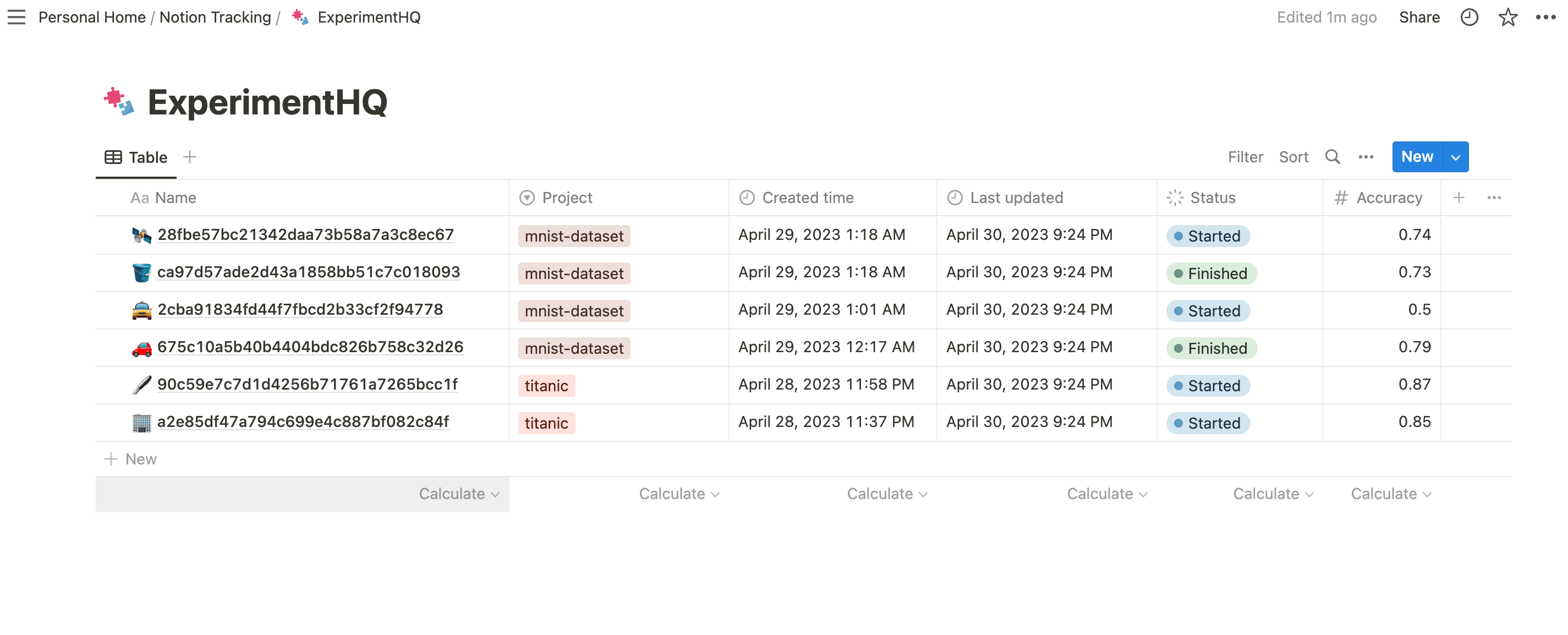
To view the experiments that you've logged with ExperimentHQ in Notion go to the Notion page that you've linked to ExperimentHQ. You should see a table with the experiments that you've logged.
Conclusion
ExperimentHQ provides a simple and intuitive way to track and manage your experiments in Python and sync the results to Notion. By using ExperimentHQ, you can streamline your experiment tracking and make your work more efficient and effective. Try it out today and see the difference it can make in your workflow!
1 maintainer

Metadata
1 maintainer
Release files for experimenthq 0.2.1
For a detailed explanation of source distributions (sdists) and built distributions (wheels), please see the package formats documentation.
Source distribution (sdist)
| File | Size | Uploaded | Provenance | |
|---|---|---|---|---|
| experimenthq-0.2.1.tar.gz | 9.1 kB | Without provenance | Details |
Built distribution (wheel)
| File | Interpreter | ABI | Platform | Reset |
|---|---|---|---|---|
| experimenthq-0.2.1-py3-none-any.whl | Python 3 | none | any | Details |
Total release size: 16.3 kB
Release files / experimenthq-0.2.1.tar.gz
| Download URL | experimenthq-0.2.1.tar.gz |
|---|---|
| Size | 9.1 kB |
| Tags | Source |
|
SHA-256 checksum How to use checksums |
60c35adb95d1e0478d7de82bd1b778cba32d5e0e2d05832f75c79a446f5facb5
|
|
BLAKE2b-256 checksum How to use checksums |
9e89fa6009644e80d537e9db055459b51d22e5a2d3e596bd9a4835527a43f4f0
|
| Upload date | |
|
Uploaded using Trusted Publishing? What is trusted publishing? |
No |
| Uploaded via |
twine/4.0.2 CPython/3.11.2
|
Release files / experimenthq-0.2.1-py3-none-any.whl
| Download URL | experimenthq-0.2.1-py3-none-any.whl |
|---|---|
| Size | 7.2 kB |
| Tags | Python 3 |
|
SHA-256 checksum How to use checksums |
3d407f3fde09d5a2b404420668e119b8ff9a2d0470add74b013192fa9a888c35
|
|
BLAKE2b-256 checksum How to use checksums |
aff36b314a8dc176086ae11883033ae46d77b80179d75de4f7680d3b454fbd3a
|
| Upload date | |
|
Uploaded using Trusted Publishing? What is trusted publishing? |
No |
| Uploaded via |
twine/4.0.2 CPython/3.11.2
|
Security for experimenthq 0.2.1
Provenance
Provenance describes where a file came from. On PyPI, provenance is shared via attestations, which provide a verifiable record of the build or publishing details. View details, limitations and caveats.
No provenance found
None of the files in this release were uploaded with provenance metadata.
A note on package security
PyPI is a repository for distributing packages, not a service for auditing them. While third-party security researchers and our staff do their best to detect and remove malicious packages, PyPI cannot guarantee the quality, security or suitability of any given package.
To learn more about protecting yourself from malicious actors, visit our package security documentation.














