
eXplore CT 120 Reconstruction


Cone-beam CT reconstruction for the GE eXplore CT 120 micro-CT scanner. Point it at a scan folder and get a calibrated HU volume back.
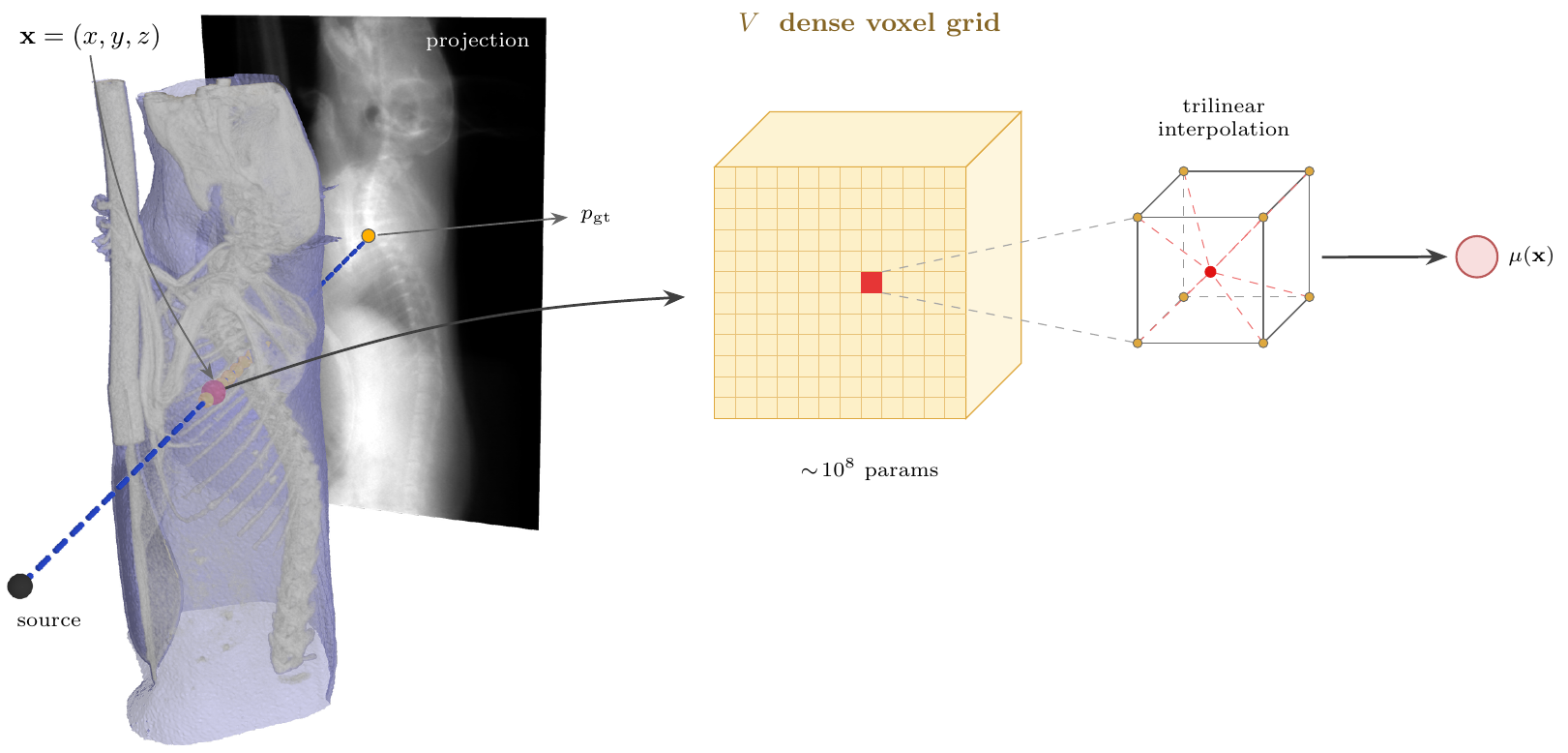
Each detector pixel measures a line integral of the attenuation μ along a ray from the source. Reconstruction recovers the volume, here a dense voxel grid, from those measurements.
| Family | Algorithms | Needs |
|---|---|---|
Analytic (fdk/) |
FDK with ramp / Shepp-Logan / cosine / Hamming windows, Parker weighting | PyTorch |
Classical iterative (iterative/) |
ASTRA: SIRT, CGLS, SART. TIGRE: OS-SART, SART, SIRT, MLEM, +TV | CUDA + ASTRA or TIGRE |
Learning-based (learning_based_iterative/) |
Differentiable projector + gradient descent; voxel grid by default, other representations pluggable | CUDA |
All three share the same loading, preprocessing, geometry calibration, HU calibration and output format, so their volumes are directly comparable.
Install
pip install eXplore_CT_120_reconstruction_algorithms
# or the development version
pip install git+https://github.com/UBC-Ford-lab/eXplore_CT_120_reconstruction_algorithms.git
Optional backends and logging:
pip install astra-toolbox                                            # ASTRA
pip install "git+https://github.com/CERN/TIGRE.git#subdirectory=Python"   # TIGRE (not on PyPI)
pip install wandb                                                    # experiment logging
Python 3.10+ and PyTorch 2.0+. The import name is explore_ct120_recon.
Usage
Six commands are installed:
ct120-fdk data/scans/Scan_1988
ct120-iterative data/scans/Scan_1988 --backend astra --algorithm SIRT3D_CUDA --iterations 100
ct120-iterative data/scans/Scan_1988 --backend tigre --algorithm ossart --tv-lambda 10
ct120-learned data/scans/Scan_1988 --downsample 3
ct120-volume-report VOLUME.vff
ct120-projection-report data/scans/Scan_1988 --volume a.vff --volume b.vff
ct120-geometry-calibration data/scans/Scan_1988
(python -m explore_ct120_recon.run_fdk_recon ... is the same thing.)
A scan folder holds the projection .vff files, scan.xml, and the
bright.vff / dark.vff flat-field frames. Each run writes a .vff
volume next to the scan folder, a .json sidecar with the grid and the
fitted HU map, and a _plots/ folder with slices, histogram and projection
diagnostics. --help lists every flag.
Pipeline
raw projections → flat-field + log → air normalization + ring correction
  → detector rotation calibration (measured once per scan, cached)
  → FDK | ASTRA / TIGRE | learned
  → μ (mm⁻¹) → HU calibration → .vff + .json + plots
Defaults that matter, each with a --no-... or explicit override:
- Field of view and ROI are
auto: the grid is what the detector subtends, tightened to the object; the export region is the scanner's ownSubVolumeCoordinates.xmlbox, so results line up with the vendor volume. - Model domain
auto(iterative and learned): backends that fit the projections cover everything a ray crosses, bed included, otherwise the missing attenuation becomes a smooth HU bias.--roithen only crops the output. - HU calibration fits two anchors from the volume's own histogram: air
at −1000 HU and bulk soft tissue at
--tissue-hu(default +120, use 0 for a water phantom). No phantom or scanner constant needed. - Preflight estimates VRAM and RAM before allocating anything.
--preflight-onlyjust prints the report. - Weights & Biases logging is on when
--wandb-projector$WANDB_PROJECTnames a project; nothing is hardcoded and nothing is uploaded otherwise.
Learning-based reconstruction
Fits a volume model to the line integrals through a differentiable ray
tracer, with Adam, non-negativity, LR warmup and plateau reduction, and a
held-out projection for early stopping. Main flags: --loss (mse,
huber, ssim, msssim, sart, ...), --iterations, --rays-per-batch
(sized from free VRAM by default), --emulate-sart, --compile.
A new representation only has to answer three hooks in a
LearnedReconstructor subclass: build_model, build_domain,
export_volume. Register it with a LearnedAlgorithm descriptor and it
becomes an --algorithm choice; voxel/ is the 100-line example. A
representation in another package works the same way via
--algorithm-module my_package.algorithms.
Report tools
ct120-volume-report draws slices, the HU histogram and the fitted anchors
for any finished volume, including the vendor's. ct120-projection-report
forward-projects one or more volumes and scores them against the measured
projections on the same angles and detector window.
ct120-geometry-calibration pre-measures the detector rotation, for
example on a GPU node before submitting long jobs. Use --vendor with the
report tools for a GE volume; it applies the vendor's axis conventions and
locates the ROI from the scan.
Everything is importable too:
from explore_ct120_recon.ct_core.vff_io import read_vff, write_vff
from explore_ct120_recon.learning_based_iterative import LearnedReconstructor
Layout
src/explore_ct120_recon/
  run_*.py                    drivers, one per family plus the report tools
  ct_core/                    shared: scan loading, preprocessing, geometry
                              calibration, HU calibration, preflight, VFF I/O
  fdk/                        filtered backprojection
  iterative/{astra,tigre}/    toolbox wrappers
  learning_based_iterative/   trainer, ray sampler, renderer, losses, voxel/
Detector calibrations measured from a scan are cached in data/calibration/
of the checkout when running from source, in the per-user data directory
(~/.local/share/explore_ct120_recon/calibration on Linux) for an installed
copy, or wherever $CT_CALIBRATION_DIR points.
Development
git clone https://github.com/UBC-Ford-lab/eXplore_CT_120_reconstruction_algorithms.git
cd eXplore_CT_120_reconstruction_algorithms
pip install -e ".[dev]"
License
MIT, see LICENSE.
1 maintainer

Metadata
1 maintainer
Release files for eXplore-CT-120-reconstruction-algorithms 0.1.0
For a detailed explanation of source distributions (sdists) and built distributions (wheels), please see the package formats documentation.
Source distribution (sdist)
| File | Size | Uploaded | Provenance | Actions |
|---|---|---|---|---|
| explore_ct_120_reconstruction_algorithms-0.1.0.tar.gz | 342.2 kB | Without provenance | Details for explore_ct_120_reconstruction_algorithms-0.1.0.tar.gz |
Built distribution (wheel)
| File | Interpreter | ABI | Platform | Actions Reset |
|---|---|---|---|---|
| explore_ct_120_reconstruction_algorithms-0.1.0-py3-none-any.whl | Python 3 | none | any | Details for explore_ct_120_reconstruction_algorithms-0.1.0-py3-none-any.whl |
Total release size: 720.9 kB
Release files / explore_ct_120_reconstruction_algorithms-0.1.0.tar.gz
| Download URL | explore_ct_120_reconstruction_algorithms-0.1.0.tar.gz |
|---|---|
| Size | 342.2 kB |
| Tags | Source |
|
SHA-256 checksum How to use checksums |
af58903835918040b24ea5ccf12090e504ee3f31a8be12d855f2519e98f6bfb3
|
|
BLAKE2b-256 checksum How to use checksums |
fef253ff4edcb039a95e9477b896aad3931e4077fcaf664ff28349d4511b6a89
|
| Upload date | |
|
Uploaded using Trusted Publishing? What is trusted publishing? |
No |
| Uploaded via |
twine/7.0.0 CPython/3.10.12
|
Release files / explore_ct_120_reconstruction_algorithms-0.1.0-py3-none-any.whl
| Download URL | explore_ct_120_reconstruction_algorithms-0.1.0-py3-none-any.whl |
|---|---|
| Size | 378.7 kB |
| Tags | Python 3 |
|
SHA-256 checksum How to use checksums |
f1e4dc932208867df9667588372babb31e46957f33ed6ff9fe418eaf2d3c772f
|
|
BLAKE2b-256 checksum How to use checksums |
72a98e77a8f35a337ec1b0ad80074b578291effc7d04c68ff125afa671644199
|
| Upload date | |
|
Uploaded using Trusted Publishing? What is trusted publishing? |
No |
| Uploaded via |
twine/7.0.0 CPython/3.10.12
|
Security for eXplore-CT-120-reconstruction-algorithms 0.1.0
Provenance
Provenance describes where a file came from. On PyPI, provenance is shared via attestations, which provide a verifiable record of the build or publishing details. View details, limitations and caveats.
No provenance found
None of the files in this release were uploaded with provenance metadata.
A note on package security
PyPI is a repository for distributing packages, not a service for auditing them. While third-party security researchers and our staff do their best to detect and remove malicious packages, PyPI cannot guarantee the quality, security or suitability of any given package.
To learn more about protecting yourself from malicious actors, visit our package security documentation.














