
A library for quickly applying symbolic expressions to NumPy arrays

Project description
expressive
A library for quickly applying symbolic expressions to NumPy arrays
Enabling callers to front-load and validate sample data, developers can move the runtime cost of Numba's JIT to applications' initial loading and avoid exec during user-interactable runtime (otherwise needed when "lambdifying" SymPy expressions) .. additionally, Expressive can identify and handle indexing (x[i], x[i-1]) during input parsing, which allows expressions to have offset data references, which can be annoying and isn't automatically handled by SymPy's parse_expr() et al.
Inspired in part by this Stack Overflow Question Using numba.autojit on a lambdify'd sympy expression
Internally this relies heavily on SymPy, NumPy, and Numba, along with coverage.py to maintain its 100% coverage test suite and MathJax (jsDelivr CDN) for LaTeX rendering in Notebooks
major features
- feedback and result seeding via result array passing and referencing
a[n] + result[n-1] - automatic indexer detection and offsetting
a[i+1] + b[i-1](i -> Idx('i')andresult[0]and[-1]ignored) - result array type discovery and creation if not passed
- support for unevaluated summation function
Sum(f(x), (x, start, end))(both via loop codegen and attempted algebraic decomposition) - global and per-instance config tunables (detailed in
src/exressive/config.py) - expr pretty print display in Notebooks
- validation to help discover type overflowing and more during builds - optionally sample data results from NumPy, SymPy, and build expr are compared, which slows the initial build, but provides good coverage, especially if data extremas are included
installation
install via pip https://pypi.org/project/expressive/
pip install expressive
usage
refer to tests for examples for now
when using, follow a workflow like
- create instance
E = Expressive("log(a + log(b))") - build instance
E.build(sample_data) - directly use callable
E(full_data)
data should be provided as dict of NumPy arrays and the types and shapes of sample data must match the expected runtime data
data_sample = {  # simplified data to build and test expr
   "a": numpy.array([1,2,3,4], dtype="int64"),
   "b": numpy.array([4,3,2,1], dtype="int64"),
}
data = {  # real data user wants to process
   "a": numpy.array(range(1_000_000), dtype="int64"),
   "b": numpy.array(range(1_000_000), dtype="int64"),
}
E = Expressive(expr)  # string or SymPy expr
E.build(data_sample)  # types used to compile a fast version
E(data)  # very fast callable
simple demo
import time
import contextlib
import numpy
import matplotlib.pyplot as plt
from expressive import Expressive

# simple projectile motion in a plane
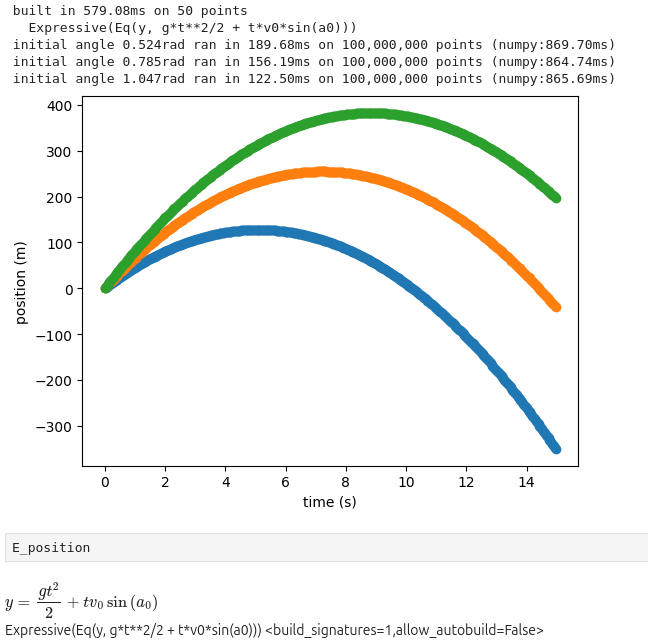
E_position = Expressive("y = v0*t*sin(a0) + 1/2(g*t^2)")

# expr is built early in the process runtime by user
def build():
    # create some sample data and build with it
    # the types are used to compile a fast version for full data
    data_example = {
        "v0": 100,  # initial velocity m/s
        "g": -9.81, # earth gravity m/s/s
        "a0": .785,  # starting angle ~45° in radians
        "t": numpy.linspace(0, 15, dtype="float64"),  # 15 seconds is probably enough
    }
    assert len(data_example["t"]) == 50  # linspace default
    time_start = time.perf_counter()
    E_position.build(data_example)  # verify is implied with little data
    time_run = time.perf_counter() - time_start

    # provide some extra display details
    count = len(data_example["t"])
    print(f"built in {time_run*1000:.2f}ms on {count:,} points")
    print(f"  {E_position}")

def load_data(
    point_count=10**8,  # 100 million points (*count of angles), maybe 4GiB here
    initial_velocity=100,  # m/s
):
    # manufacture lots of data, which would be loaded in a real example
    time_array = numpy.linspace(0, 15, point_count, dtype="float64")
    # collect the results
    data_collections = []
    # process much more data than the build sample
    for angle in (.524, .785, 1.047):  # initial angles (30°, 45°, 60°)
        data = {  # data is just generated in this case
            "v0": initial_velocity,  # NOTE type must match example data
            "g": -9.81, # earth gravity m/s/s
            "a0": angle,  # radians
            "t": time_array,  # just keep re-using the times for this example
        }
        data_collections.append(data)

    # data collections are now loaded (created)
    return data_collections

# later during the process runtime
# user calls the object directly with new data
def runtime(data_collections):
    """ whatever the program is normally up to """

    # create equivalent function for numpy compare
    def numpy_cmp(v0, g, a0, t):
        return v0*t*numpy.sin(a0) + 1/2*(g*t**2)

    # TODO also compare numexpr demo

    # call already-built object directly on each data
    results = []
    for data in data_collections:
        # expressive run
        t_start_e = time.perf_counter()  # just to show time, prefer timeit for perf
        results.append(E_position(data))
        t_run_e = time.perf_counter() - t_start_e

        # simple numpy run
        t_start_n = time.perf_counter()
        result_numpy = numpy_cmp(**data)
        t_run_n = time.perf_counter() - t_start_n

        # provide some extra display details
        angle = data["a0"]
        count = len(data["t"])
        t_run_e = t_run_e * 1000  # convert to ms
        t_run_n = t_run_n * 1000
        print(f"initial angle {angle}rad ran in {t_run_e:.2f}ms on {count:,} points (numpy:{t_run_n:.2f}ms)")

    # decimate to avoid very long matplotlib processing
    def sketchy_downsample(ref, count=500):
        offset = len(ref) // count
        return ref[::offset]

    # display results to show it worked
    for result, data in zip(results, data_collections):
        x = sketchy_downsample(data["t"])
        y = sketchy_downsample(result)
        plt.scatter(x, y)
    plt.xlabel("time (s)")
    plt.ylabel("position (m)")
    plt.show()

def main():
    build()
    data_collections = load_data()
    runtime(data_collections)

main()
compatibility matrix
generally this strives to only rely on high-level support from SymPy and Numba, though Numba has stricter requirements for NumPy and llvmlite
| Python | Numba | NumPy | SymPy | commit | coverage | ran |
|---|---|---|---|---|---|---|
| 3.7.17 | 0.56.4 | 1.21.6 | 1.6 | d2a9e76 | {'codegen.py': '🟠 99% m 487,518,533'} 🟢 100% (12path) | 140s |
| 3.8.20 | 0.58.1 | 1.24.4 | 1.7 | d2a9e76 | {'codegen.py': '🟠 99% m 487,518,533'} 🟢 100% (12path) | 138s |
| 3.9.19 | 0.53.1 | 1.23.5 | 1.7 | d2a9e76 | {'codegen.py': '🟠 99% m 487,518,533'} 🟢 100% (12path) | 139s |
| 3.9.19 | 0.60.0 | 2.0.1 | 1.13.2 | d2a9e76 | {'codegen.py': '🟠 99% m 487,533'} 🟢 100% (12path) | 140s |
| 3.10.16 | 0.61.2 | 2.2.6 | 1.14.0 | d2a9e76 | {'codegen.py': '🟠 99% m 487,533'} 🟢 100% (12path) | 141s |
| 3.11.11 | 0.61.2 | 2.2.6 | 1.14.0 | d2a9e76 | {'codegen.py': '🟠 99% m 487,533'} 🟢 100% (12path) | 147s |
| 3.12.7 | 0.59.1 | 1.26.4 | 1.13.1 | d2a9e76 | {'codegen.py': '🟠 99% m 487,533', 'test.py': '🟠 99% m 1414'} 🟢 100% (11path) | 120s |
| 3.12.8 | 0.61.2 | 2.2.6 | 1.14.0 | d2a9e76 | {'codegen.py': '🟠 99% m 487,533'} 🟢 100% (12path) | 157s |
| 3.13.1 | 0.61.2 | 2.2.6 | 1.14.0 | d2a9e76 | {'codegen.py': '🟠 99% m 487,533'} 🟢 100% (12path) | 162s |
| 3.13.1 | 0.61.2 | 2.2.6 | 1.14.0 | d2a9e76 | {'codegen.py': '🟠 99% m 487,533'} 🟢 100% (12path) | 162s |
NOTE differences in test run times are not an indicator of built expr speed, more likely the opposite and more time spent represents additional build step effort, likely improving runtime execution! please consider the values arbitrary and just for development reasons
further compatibility notes
these runs build the package themselves internally, while my publishing environment is currently Python 3.11.2
though my testing indicates that this works under a wide variety of quite old versions of Python/Numba/SymPy, upgrading to the highest dependency versions you can will generally be best
- Python 3 major version status https://devguide.python.org/versions/
- https://numba.readthedocs.io/en/stable/release-notes-overview.html
NumPy 1.x and 2.0 saw some major API changes, so older environments may need to adjust or discover working combinations themselves
- some versions of Numba rely on
numpy.MachAr, which has been deprecated since at least NumPy 1.22 and may result in warnings
TBD publish multi-version test tool
testing
Only docker and docker-buildx are required in the host and used to generate and host testing
Currently expressive builds fine without buildx https://docs.docker.com/reference/cli/docker/build-legacy/, but beware that support for building without it may be silently lost in the future as installing buildx overrides docker build with an alias of docker buildx build making it frustrating for me to test with the legacy docker build at all
sudo apt install docker.io docker-buildx  # debian/ubuntu
sudo usermod -aG docker $USER
sudo su -l $USER  # login shell to self (reboot for all shells)
Run the test script from the root of the repository and it will build the docker test environment and run itself inside it automatically
./test/runtests.sh
build + install locally
Follows the generic build and publish process
- https://packaging.python.org/en/latest/tutorials/packaging-projects/#generating-distribution-archives
- build (builder) https://pypi.org/project/build/
python3 -m build
python3 -m pip install ./dist/*.whl
contributing
The development process is currently private (though most fruits are available here!), largely due to this being my first public project with the potential for other users than myself, and so the potential for more public gaffes is far greater
Please refer to CONTRIBUTING.md and LICENSE.txt and feel free to provide feedback, bug reports, etc. via Issues, subject to the former
additional future intentions for contributing
improve internal development history as time, popularity, and practicality allowsmove to parallel, multi-version CI over all-in-1, single-version dev+test containergreatly relax dependency version requirements to improve compatibility- publish majority of ticket ("Issue") history
- add a workflow for importing handwritten expressions
version history
v3.10.20250908
- block using
prangefor self-referential exprs (uses offsets of the result array) as it can (will) result in incomplete or invalid result arrays
v3.9.20250819
- greatly improved modulo parsing support, allowing operator
mod->% - new warning when using the name
modas a Symbol - when creating an Expressive instance, a passed
configargument can now be another config object (E._config) or any other validUserDict, previously onlydictwas accepted - new test script args to provide fastfail (end on first non-passing) and verbose to
unittest
v3.8.20250807
- warn when input string atoms separated by whitespace can become joined like
a cos(b)->acos(b)instead of their intention (probably multiplication)
v3.7.20250801
- dynamic result arrays (user did not provide result array) are created in a Python-space wrapper rather than the (compiled) JIT'd function
- config changes now have a schema checker and global changes can be applied to
expressive.CONFIG(affects new instances) - passing data which is not used warns instead of always raising (
TypeError: expressive_wrapper() got an unexpected keyword argument 'm'), controlled by the new config optiondata.runtime.unused_data_callbackaccepting "warn" (default), "raise", or "ignore" - testing now relies on docker-buildx from
build - testing has a new helper for managing the global
CONFIG,modify_config_global()
v3.6.20250717
- support for modulo
%andMod - new string functions
p%qormod(p,q)are transformed toMod(p,q), while existing non-function namemodare left unchanged - fixed a bug where the internal result array builder could choose a name from
extendor another 0-dim Symbol when determining its length
v3.5.20250711
- support for
SumtoPiecewisetransforms, ideally avoiding an additional loop for each row - initial support for adding additional values or functions via new
extendarg (dictmapping{str: number or function})- numbers can be any reasonable number-like, while functions must be strings or callables
- all functions are embedded into the template as closures, with callables stringified via
inspect.getsource(), even if they're some Numba instance via.py_func(for now)
v3.4.20250523
- basic/experimental version of
native_threadpoolparallelization model Sumsimplifications which results inPiecewiseare ignored (for now)
v3.3.20250508
- improved README with major features and links to major dependency projects
- explicitly name
translate_simplify.build.sum.try_algebraic_converttunable in stuckSum()builder condition warning
v3.2.20250425
- improved smaller types handling
- automatic dtype determination with
Pow()is improved - give a dedicated warning when an exception related to setting
dtype_resultto a type with a small width that a function (such asPow()) automatically promotes occurs
- automatic dtype determination with
- improve autobuilding experience with new config tunables
- easily enable autobuild globally
builder.autobuild.allow_autobuild - option to disable build-time usage warning
builder.autobuild.usage_warn_nag
- easily enable autobuild globally
- minor version is now a datestamp
Release history Release notifications | RSS feed


Download files
Download the file for your platform. If you're not sure which to choose, learn more about installing packages.
Source Distribution
Built Distribution
Filter files by name, interpreter, ABI, and platform.
If you're not sure about the file name format, learn more about wheel file names.
Copy a direct link to the current filters
File details
Details for the file expressive-3.10.20250908.tar.gz.
File metadata
- Download URL: expressive-3.10.20250908.tar.gz
- Upload date:
- Size: 93.7 kB
- Tags: Source
- Uploaded using Trusted Publishing? No
- Uploaded via: twine/6.1.0 CPython/3.11.2
File hashes
| Algorithm | Hash digest | |
|---|---|---|
| SHA256 |
fcc239747e9bbdd810361ae1fee0d6e15c91387c70d373f8fb86e8d53e1d7f1b
|
|
| MD5 |
a533260def8718c21fad010d76099d04
|
|
| BLAKE2b-256 |
0e363e1b0cc9aa5e5efb355c664bd645f14c4dc8689c14327ecd7a0ddaadc165
|
File details
Details for the file expressive-3.10.20250908-py3-none-any.whl.
File metadata
- Download URL: expressive-3.10.20250908-py3-none-any.whl
- Upload date:
- Size: 60.3 kB
- Tags: Python 3
- Uploaded using Trusted Publishing? No
- Uploaded via: twine/6.1.0 CPython/3.11.2
File hashes
| Algorithm | Hash digest | |
|---|---|---|
| SHA256 |
0967709d566dcf3227a5d899a8723ec4cd50c3e81402e16baeb252f44d081772
|
|
| MD5 |
5a15e2391212025071691642d5178af1
|
|
| BLAKE2b-256 |
7aac42b0867ff5268b188a79a51517273acbefc2fbd57ed102bce0b16da860a1
|






