
Extended XYZ specification and parsing tools
This repository contains a specification of the extended XYZ (extxyz) file format, and tools for reading and writing to it from programs written in C, Fortran, Python and Julia.
Using ASE? As of v0.3.0,
extxyzis the standalone C parser with no ASE dependency, and a separatease-extxyzpackage registers it as an ASE I/O plugin. Install both withpip install ase-extxyzand usease.io.read("file.xyz", format="cextxyz").
Installation
Python
The latest development version can be installed via
pip install git+https://github.com/libAtoms/extxyz
This builds the C extension from source, so it needs Python 3.10+ and a C compiler (C only — the Fortran fextxyz bindings are optional and off by default). libcleri is bundled (a git submodule in the repo, vendored into the sdist) and always compiled from source. PCRE2 is the one external native library: the build uses a system PCRE2 if pkg-config finds one (install it with a command below), otherwise it downloads and compiles PCRE2 from the bundled meson wrap (this needs network access). NumPy is also a build-time dependency (it is already a runtime one): its C headers build the _extxyz fast read path — a build without them still works, falling back to the slower ctypes path. The remaining build tools (meson, ninja, pyleri for the grammar codegen) are installed automatically by pip.
brew install pcre2          # macOS with Homebrew
sudo apt-get install libpcre2-dev   # Ubuntu / Debian
vcpkg install pcre2:x64-windows     # Windows (via vcpkg)
Binary wheels (CPython 3.10–3.14) for Linux, macOS (arm64 and x86_64), and Windows are built in the GitHub CI for each tagged release and bundle PCRE2 and libcleri, so an end-user pip install extxyz needs no compiler or system libraries. A source distribution (sdist) is also published; installing from it (e.g. on a platform without a wheel) builds from source and needs the toolchain above.
Stable releases are made to PyPI, so you can install with
pip install extxyz                # standalone parser, no ASE
pip install ase-extxyz            # ASE plugin (pulls in extxyz + ase)
The Python API on extxyz itself is the dict/array based Frame parser:
import extxyz
for frame in extxyz.iread_dicts('trajectory.xyz'):
    print(frame.natoms, frame.cell, list(frame.arrays))
For ASE-aware reading/writing see the ase-extxyz sibling package.
Performance: cextxyz vs ASE built-in extxyz reader
ASE already ships a regex-based extxyz reader. The cextxyz plugin
re-parses with the libcleri-based C grammar, with PCRE2 JIT
compilation enabled both on the per-atom data regex
(PCRE2_JIT_COMPLETE + PCRE2_ANCHORED) and on libcleri's internal
regexes (so the comment-line grammar walk also runs JIT'd code).
Benchmark on a single-frame file with N Cu atoms (positions,
forces, and a couple of info keys):
| atoms / frame | file size | ASE built-in extxyz |
cextxyz plugin |
extxyz.read_dicts (no Atoms) |
speedup, plugin / built-in | speedup, parser / built-in |
|---|---|---|---|---|---|---|
| 10 | 0.00 MB | 0.130 ms | 0.073 ms | 0.111 ms | 1.77× | 1.18× |
| 100 | 0.01 MB | 0.220 ms | 0.086 ms | 0.138 ms | 2.56× | 1.60× |
| 1 000 | 0.11 MB | 1.177 ms | 0.240 ms | 0.350 ms | 4.89× | 3.36× |
| 4 000 | 0.44 MB | 4.429 ms | 0.705 ms | 0.943 ms | 6.28× | 4.70× |
| 16 000 | 1.74 MB | 17.8 ms | 2.59 ms | 3.40 ms | 6.87× | 5.24× |
| 64 000 | 6.98 MB | 72.6 ms | 11.5 ms | 14.7 ms | 6.30× | 4.96× |
| 200 000 | 21.80 MB | 224.8 ms | 35.9 ms | 44.2 ms | 6.26× | 5.09× |
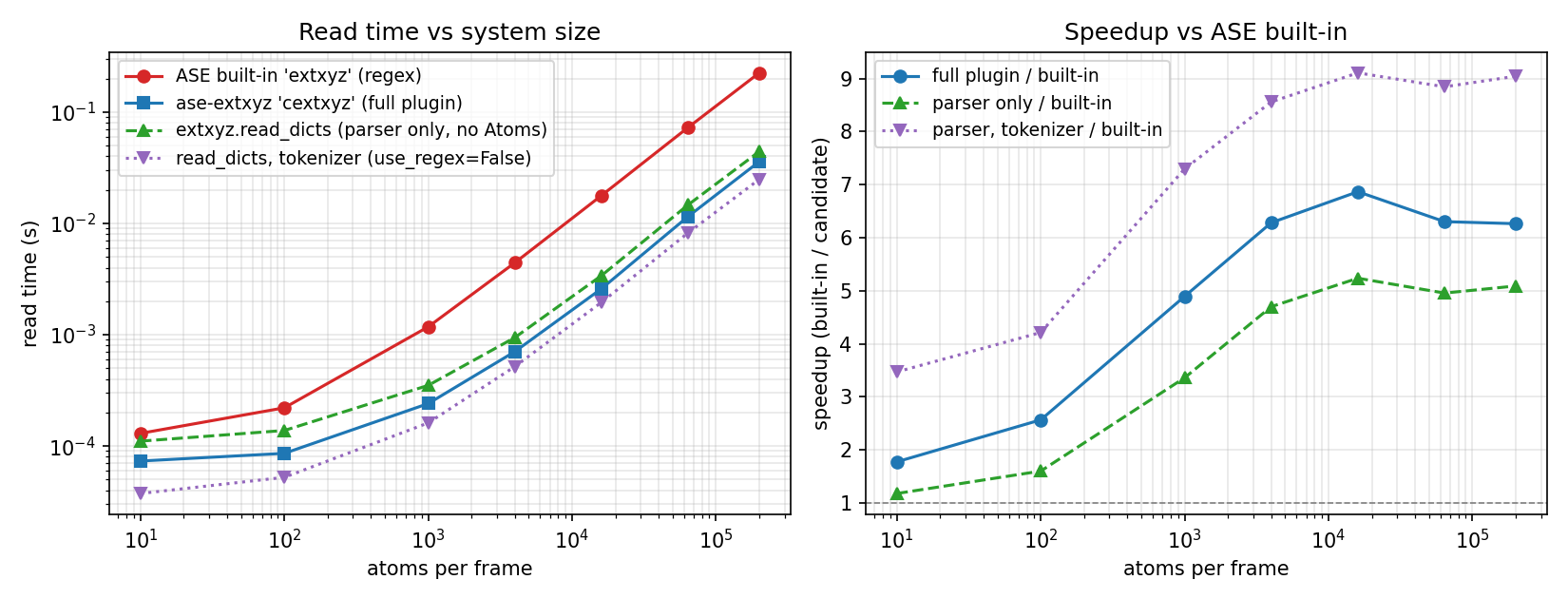
Below ~100 atoms per frame the per-call setup (file open, PCRE2 JIT
compile, libcleri grammar walk for the comment line) is a larger share
of the work, so the margin shrinks on tiny files. From ~1 000 atoms
upwards the parser dominates and cextxyz runs at a steady ~6× over
the built-in end-to-end (~5× for the regex parser alone).
The two cextxyz curves track each other closely: the Frame → Atoms
translation in the ASE plugin is kept cheap by aliasing the parser's
per-atom buffers directly into atoms.arrays (so Atoms.__init__
doesn't memcpy positions) and vectorising the species → atomic-number
lookup with np.unique instead of a per-atom dict walk.
The parser-side numbers also reflect three later read-path changes:
dropping a redundant per-frame array copy; storing each per-atom
string column as one contiguous fixed-width buffer (so the C reader
does a single allocation per column instead of one malloc per atom,
and Python decodes the whole column with a single np.frombuffer
instead of a per-atom loop); and a fast path for parsing the per-atom
floats — a plain [+-]?int[.frac] with ≤ 15 significant digits is
parsed as one correctly-rounded mant / 10^frac division (bit-exact
with strtod, falling back to strtod for exponents or higher
precision). Together these are worth ~40% on a 200k-atom read (the
float fast path alone ~1.4×).
Default tokenizer (use_regex=False)
The single biggest remaining cost is the per-line pcre2_match. The default
use_regex=False in read_dicts/iread_dicts (C backend only) skips it: the
per-atom lines are split on whitespace and each field is parsed and validated by
its column type, with no regex compile or match. It is the default since
v0.4.2 (pass use_regex=True for the strict regex parser), and a further
~1.8× on top of everything above:
| atoms / frame | read_dicts (regex) |
read_dicts (use_regex=False) |
tokenizer / regex | tokenizer / built-in |
|---|---|---|---|---|
| 1 000 | 0.350 ms | 0.161 ms | 2.17× | 7.30× |
| 16 000 | 3.40 ms | 1.95 ms | 1.74× | 9.11× |
| 64 000 | 14.7 ms | 8.21 ms | 1.79× | 8.85× |
| 200 000 | 44.2 ms | 24.8 ms | 1.78× | 9.05× |
It validates each field (a malformed numeric/bool or the wrong field count is a
clear parse error, not a silent 0) and is bit-identical to the regex parser on
valid input. The trade-off is that it is marginally more lenient than the grammar
on a few numeric edge cases (e.g. leading-zero integers 007, 1./.5); pass
use_regex=True if you need the grammar enforced exactly.
Comment-line parser (use_cleri=False)
The remaining per-frame cost is parsing the comment line. By default this walks
the libcleri grammar (PCRE2-backed). use_cleri=False (C backend only) instead
uses a hand-written first-char-dispatch parser that accepts the same language
— validated bit-identical against the grammar by a differential conformance test
(tests/test_dispatch_parity.py), with libcleri kept as the canonical grammar /
oracle / fallback — but builds the dicts in a single pass instead of constructing
and re-walking a generic parse tree.
Because the win is per comment line, it is amortised away on single huge frames (the tables above are unchanged) and grows as frames get smaller. Sweeping atoms-per-frame at a fixed ~1 M total atoms (C reader, whitespace tokenizer in both; only the comment parser differs):
| atoms / frame | frames | read_dicts (cleri) |
(use_cleri=False) |
dispatch / cleri | full ASE read |
|---|---|---|---|---|---|
| 5 | 200 000 | 3.54 s | 2.00 s | 1.77× | 1.36× |
| 10 | 100 000 | 1.86 s | 1.07 s | 1.74× | 1.34× |
| 20 | 50 000 | 1.01 s | 0.613 s | 1.65× | 1.30× |
| 50 | 20 000 | 0.490 s | 0.332 s | 1.47× | 1.26× |
| 100 | 10 000 | 0.310 s | 0.231 s | 1.34× | 1.19× |
| 500 | 2 000 | 0.170 s | 0.153 s | 1.11× | 1.07× |
| 2 000 | 500 | 0.144 s | 0.135 s | 1.07× | 1.02× |
It is the libcleri grammar (use_cleri=True) by default for now; pass
use_cleri=False for the dispatch parser. ~75 % of its speedup is from not
building/walking a generic cleri parse tree (the matching itself is a small part
of the cost), so it stays grammar-faithful while skipping cleri's machinery.
Marshalling in C
Once the C reader has parsed a frame it has to hand the info/arrays data
back to Python. This is done inside the _extxyz extension (numpy C-API):
each frame's dict of scalars and numpy arrays is built directly in C, rather
than walking the C linked list one field at a time through ctypes. It is
bit-identical to the previous path (and falls back to it automatically if the
extension was built without numpy). The win is per-frame, so it matters most on
files with many small frames and/or rich comment lines, where per-frame
overhead — not per-atom parsing — dominates. On the large single-frame Cu
benchmark above the effect is small; on a 76k-frame, ~27-atom-per-frame training
set it cut the dict-level parse from ~3.6 s to ~2.3 s (~1.5×) and the
full ASE read from ~4.8 s to ~3.3 s, removing essentially all of the
former per-field ctypes cost.
The big parser-side lever was PCRE2 JIT (pcre2_jit_compile(re, PCRE2_JIT_COMPLETE) after pcre2_compile); a sample-based profile
of the pre-JIT code attributed ~38 % of CPU to the per-atom
pcre2_match and another ~14 % to libcleri's regex matching during
the comment-line grammar walk. The same JIT call now wraps both call
sites (the libcleri side via libAtoms/libcleri PR #2). On Linux,
both call sites detect when running under valgrind via the
LD_PRELOAD it injects and skip JIT compilation — PCRE2 JIT
intentionally reads bytes past the input end as a speed trick, which
valgrind reports as uninitialised-value warnings (PCRE2 docs
explicitly call this out).
Reproduce locally (requires extxyz, ase-extxyz, ase, matplotlib):
python benchmarks/bench_read.py --max-atoms 200000 --repeats 3
python benchmarks/plot_bench.py
# comment-line parser, many small frames (use_cleri table above):
python benchmarks/bench_cleri_frames.py --total 1000000 --repeats 3
# writing (see below):
python benchmarks/bench_write.py --max-atoms 200000 --repeats 5
python benchmarks/plot_bench.py --in benchmarks/write_results.csv --out benchmarks/write_speedup.png
Writing
The same cextxyz machinery writes too, a steady ~5–6× faster than ASE's
built-in extxyz writer across the same single-frame Cu files (and ~3× faster
than extxyz-ng):
| atoms / frame | file size | ASE built-in extxyz |
cextxyz plugin |
extxyz.write_dicts (no Atoms) |
speedup, plugin / built-in | speedup, writer / built-in |
|---|---|---|---|---|---|---|
| 1 000 | 0.11 MB | 2.794 ms | 0.630 ms | 0.565 ms | 4.44× | 4.95× |
| 4 000 | 0.44 MB | 10.8 ms | 2.104 ms | 1.957 ms | 5.11× | 5.50× |
| 16 000 | 1.74 MB | 41.4 ms | 8.681 ms | 7.667 ms | 4.77× | 5.41× |
| 64 000 | 6.98 MB | 167.3 ms | 33.5 ms | 28.8 ms | 4.99× | 5.80× |
| 200 000 | 21.80 MB | 509.7 ms | 102.6 ms | 88.2 ms | 4.97× | 5.78× |
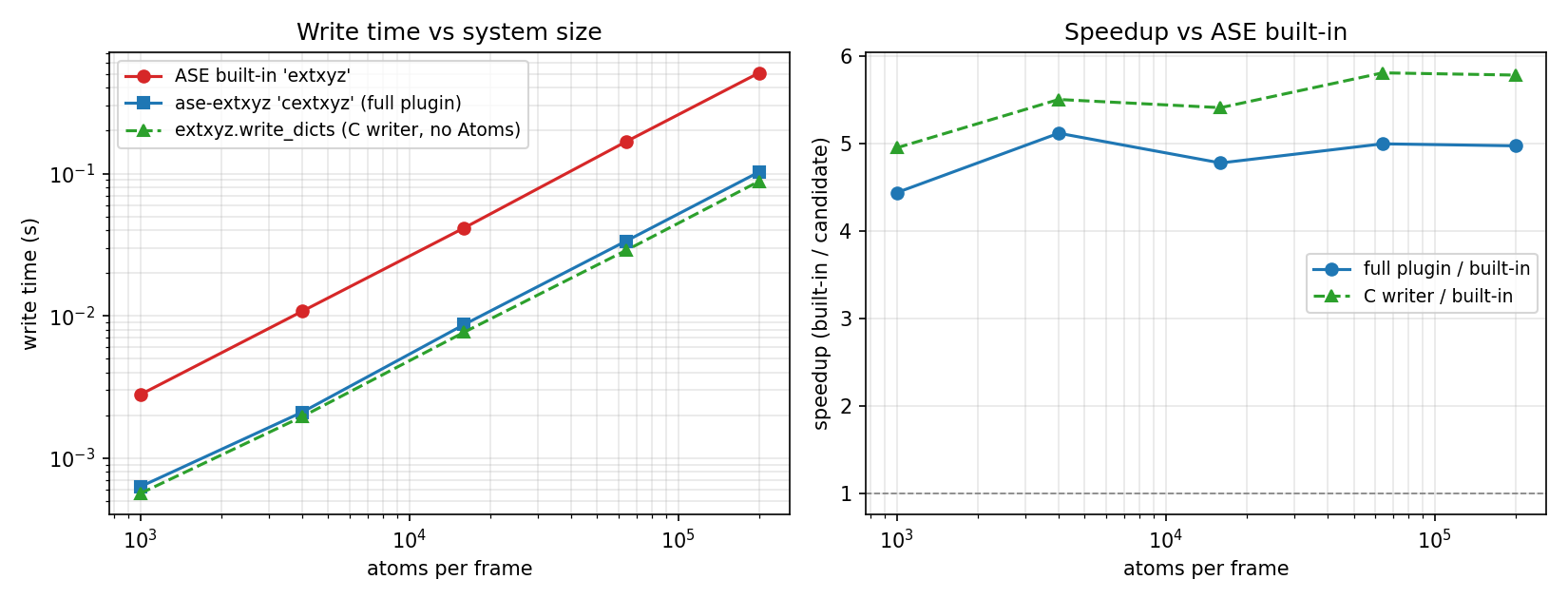
Writing is bounded by formatting the per-atom floats, not I/O. The C writer (a)
builds each line in a memory buffer and fwrites it in blocks rather than one
fprintf per value, and (b) formats the default "%16.8f" floats with a custom
exact integer routine instead of snprintf. A double is m·2^e exactly and
10^8 = 2^8·5^8, so v·10^8 = m·390625·2^(e+8) is an exact rational that we round
to nearest (ties to even) with integer-only arithmetic — bit-for-bit identical
to printf, validated against snprintf over tens of millions of values
(libextxyz/test_fmt_float.c, run by meson test). It falls back to snprintf
for non-finite / very large values, for any custom format_dict, and on compilers
without 128-bit ints (MSVC). The pure-Python (np.savetxt) writer matches ASE;
benchmarks/bench_write.py reproduces the comparison (and times extxyz-ng if
EXTXYZ_NG_PYTHON points at a venv with it).
libextxyz C library and standalone executables
The C parser, the standalone libextxyz shared library, and the C-only
cextxyz test driver are all Meson targets. To build them outside of the
Python wheel flow:
meson setup builddir
meson compile -C builddir extxyz cextxyz       # libextxyz.{so,dylib,dll} + cextxyz
meson install -C builddir                      # installs libextxyz under --prefix
The Meson build picks up PCRE2 via pkg-config, falling back to a bundled WrapDB build of PCRE2 if no system copy is found.
Fortran bindings
To build the fextxyz executable demonstrating the Fortran bindings, you
first need to compile QUIP's libAtoms
library. QUIP now uses Meson too:
git clone --recursive https://github.com/libAtoms/QUIP
meson setup QUIP/builddir QUIP -Dgap=true -Dmpi=false
meson compile -C QUIP/builddir libAtoms f90wrap_stub
Then point this project's Meson build at the resulting library and module
directories — the fextxyz target is opt-in via the quip_lib_dir and
quip_mod_dir options:
QUIP_LIB_DIR=$PWD/QUIP/builddir/src/libAtoms
QUIP_MOD_DIR=$(find "$QUIP_LIB_DIR" -iname 'libatoms_module.mod' -printf '%h\n' | head -1)
meson setup builddir \
  -Dquip_lib_dir="$QUIP_LIB_DIR" \
  -Dquip_mod_dir="$QUIP_MOD_DIR"
meson compile -C builddir fextxyz
The Fortran bindings will later be moved to QUIP, since they are tied to QUIP's Dictionary and Atoms types.
Julia bindings
Julia bindings are distributed in a separate package, named ExtXYZ.jl. See its documentation for further details.
Usage
As of v0.3.0 the extxyz package is a standalone parser with no ASE
dependency; ASE integration lives in the separate
ase-extxyz plugin.
Native API — Frame dicts (no ASE)
read_dicts / iread_dicts / write_dicts work with lightweight Frame
objects exposing .natoms, .cell, .pbc, .info and .arrays:
import extxyz

# read every frame (eager) or stream them lazily
frames = extxyz.read_dicts("filename.xyz")          # Frame, or list[Frame]
for frame in extxyz.iread_dicts("trajectory.xyz"):
    print(frame.natoms, frame.cell, frame.info, list(frame.arrays))

# read just the first frame, then write it back out
frame = extxyz.read_dicts("filename.xyz", index=0)
extxyz.write_dicts("newfile.xyz", frame)
index accepts an int, a slice, or ':' (negative indices are not
supported). Pass use_cextxyz=False for the pure-Python parser, or
use_regex=True (C backend) for the strict regex parser instead of the
default whitespace tokenizer.
With ASE — the ase-extxyz plugin
Once ase-extxyz is installed, ASE discovers the cextxyz format
automatically (no explicit import needed):
import ase.io
from ase.build import bulk

frames = [bulk("Cu") * 3 for _ in range(3)]
for f in frames:
    f.rattle()

ase.io.write("filename.xyz", frames, format="cextxyz")
atoms  = ase.io.read("filename.xyz", format="cextxyz", index=0)    # first frame
images = ase.io.read("filename.xyz", format="cextxyz", index=":")  # all frames
To attach to an ASE optimizer or dynamics (keeps the file open across steps
instead of re-opening it each iteration), use ExtXYZTrajectoryWriter:
from ase_extxyz.io import ExtXYZTrajectoryWriter
from ase.optimize import LBFGS

with ExtXYZTrajectoryWriter("opt.xyz", atoms=atoms) as traj:
    opt = LBFGS(atoms)
    opt.attach(traj, interval=1)
    opt.run(fmax=1e-3)
Command-line tool
The extxyz package installs an extxyz command-line tool (equivalently
python -m extxyz) for quick reading and round-tripping; see extxyz -h.
Remaining issues
make treatement of 9 elem old-1d consistent: now extxyz.py always reshapes (not just Lattice) to 3x3, but extxyz.c does not.- Since we're using python regexp/PCRE, we could make per-atom strings be more complex, e.g. bare or quoted strings from key-value pairs. Should we?
- Decide what to do about unparseable comment lines. Just assume an old fashioned xyz with an arbitrary line, or fail? I don't think we really want every parsing breaking typo to result in plain xyz.
- Used to be able to quote with {}. Do we want to support this?
Extended XYZ specification
General formatting
- Allowed characters: printable subset of ASCII, single byte
- Allowed whitespace: plain space and tab (no fancy unicode nonbreaking space, etc)
- Allowed end-of line (EOL) characters set by implementation + OS
- pure python: whatever is used to return lines by file object iterator
- low level c: fgets()
- Blank lines: allowed only as 2nd line of each frame (for plain xyz) and at end of file
General definitions
- regex: PCRE/python regular expression
- Whitespace: regex \s, i.e. space and tab
Primitive Data Types
String
Sequence of one or more allowed characters, optionally quoted, but must be quoted in some circumstances.
- Allowed characters - all except newline
- Entire string may be surrounded by double quotes, as first and last characters (must match). Quotes inside string that are same as containing quotes must be escaped with backslash. Outermost double quotes are not considered part of string value.
- Strings that contain any of the following characters must be quoted (not just backslash escaped)
- whitespace (regex \s)
- equals =
- double quote ", must be represented by \"
- comma ,
- open or close square bracket [ ] or curly brackets { }
- backslash, must be represented by double backslash \\
- newline, must be represented by \n
- Backslash \: only present in quoted strings, only used for escaping next character. All backslash escaped characters are the following character itself except \n, which encodes a newline.
- Must conform to one of the following regex
- quoted string: (")(?:(?=(\\?))\2.)*?\1
- bare (unquoted) string: (?:[^\s=",}{\]\[\\]|(?:\\[\s=",}{\]\[\\]))+
- only used in comment line key-value pairs, not per-atom data
Simple string
Sequence of one or more allowed characters, unquoted (so even outermost quotes are part of string), and without whitespace
- allowed characters - regex \S, i.e. all except newline and whitespace
- regex \S+
- only used in per-atom data, not comment line key-value pairs
Logical/boolean
- T or F or [tT]rue or [fF]alse or TRUE or FALSE
- regex
- true: (?:[tT]rue|TRUE|T)\b
- false: (?:[fF]alse|FALSE|F)\b
Integer number
string of one or more decimal digits, optionally preceded by sign
- regex [+-]?+(?:0|[1-9][0-9]*)+\b
Floating point number
- optional leading sign [+-], decimal number including optional decimal point ., optional [dDeE] folllowed by exponent consisting of optional sign followed by string of one or more digits
- regex
- integer without leading sign bare_int = '(?:0|[1-9][0-9]*)'
- optional sign opt_sign = '[+-]?'
- floating number with decimal point float_dec = '(?:' + bare_int + '\.|\.)[0-9]*'
- exponent exp = '(?:[dDeE]'+opt_sign+'[0-9]+)?'
- end of number num_end = '(?:\b|(?=\W)|$)'
- combined float regexp opt_sign + '(?:' + float_dec + exp + '|' + bare_int + exp + '|' + bare_int + ')' + num_end
Order for identifying primitive data types, accept first one that matches
- int
- float
- bool
- bare string (containing no whitespace or special characters)
- quoted string (starting and ending with double quote and containing only allowed characters)
one dimensional array (vector)
sequence of one or more of the same primitive type
- new style: opens with [, one or more of the same primitive type separated by commas and optional whitespace, ends with ]
- backward compatible: opens with ", ' or {, one or more of the same primitive types (all types allowed in {}, all except string in "" and '') separated by whitespace, ends with matching ", ' or }. Single and double quotes are equivalent containers (ints/floats/bools, no strings). For backward compatibility, a single element backward compatible array is interpreted as a scalar of the same type.
- primitive data type is determined by same priority as single primitive item, but must be satisfied by entire list simultaneously. E.g. all integers will result in an integer array, but a mix of integer and float will result in a float array, and a mix of integer and valid strings will results in a string array.
two dimensional array (matrix)
sequence of one or more new style one dimensional arrays of the same length and type
- opens with [, one or more new style one dimensional arrays separated by commas, ends with ]
- all contained one dimensional arrays in a single two dimensional array must have same number and primitive data type elements, and will be promoted to other possible types if necessary to parse entire array. E.g. a row of integers followed by a row of strings will be promoted to a 2-d string array.
XYZ file
A concatenation of 1 or more FRAMES (below), with optional blank lines at the end (but not between frames)
FRAME
- Line 1: a single integer <N> preceded and followed by optional whitespace
- Line 2: zero or more per-config key=value pairs (see key-value pairs below)
- Lines 3..N+2: per-atom data lines with M columns each (see Properties and Per-Atom Data below)
key=value pairs on second ("comment") line
Associates per-configuration value with key. Spaces are allowed around = sign, which do not become part of the key or value.
Key: bare or quoted string
Value: primitive type, 1-D array, or 2-D array. Type is determined from context according to order specified above.
Special key "Properties”: defines the columns in the subsequent lines in the frame.
- Value is a string with the format of a series of triplets, separated by “:”, each triplet having the format: “<name>:<T>:<m>”.
- The <name> (string) names the column(s), <T> is a one of “S”, “I”, “R”, “L”, and indicates the type in the column, “string”, “integer”, “real”, “logical”, respectively. <m> is an integer > 0 specifying how many consecutive columns are being referred to.
- The sum of the counts "m" must equal number of per-atom columns M (as defined in FRAME)
- If after full parsing the key “Properties” is missing, the format is retroactively assumed to be plain xyz (4 columns, Z/species x y z), the entire second line is stored as a per-config “comment” property, and columns beyond the 4th are not read.
Per-atom data lines
Each column contains a sequence of primitive types, except string, which is replaced with simple string, separated by one or more whitespace characters, ending with EOL (optional for last line). The total number of columns in each row must be equal to the M and to the sum of the counts "m" in the "Properties" value string.
READING ase.atoms.Atoms FROM THIS FORMAT
Specific keys indicate special values, with specific order for overriding
Key-value pairs:
- Lattice -> Atoms.cell, optional [do we want to accept "cell" also?]
- 3x3 matrix - rows are cell vectors [preferred]
- 9-vector - 3 cell vectors concatenated [only for backward compat]
- 3-vector - diagonal entries of cell matrix [?]
- pbc -> Atoms.pbc, optional
- 3-vector of bool
- default [False]*3 if no Lattice, otherwise [True]*3
- Calculator results, used to set SinglePointCalculator.results dict
- all per-config properties in ase.calculator.all_properties, with same name
- scalars, vectors - directly stored
- stress
- 6-vector Voigt
- 9-vector, 3x3 matrix, stored as stress Voigt-6, fail if not symmetric
- virial -> stress (to convert multiply by -1/cell_vol), same format as stress [warn/fail if stress also present, perhaps only if inconsistent?]
Properties keys (all types are per-atom), types are simple
- Atoms
- Z -> numbers
- species -> numbers, fail if not valid chemical symbol [warn/fail if conflict with Z?]
- pos -> positions
- mass -> masses
- velo -> momenta (get mass from atomic number if missing)
- same name: initial_charges, initial_magmoms
- Calculator.results
- local_energy -> energies
- forces -> forces [also support “force”? What about overriding, complain if inconsistent?]
- same name: magmoms (scalar or 3-vector), charges
WRITING ase.atoms.Atoms TO THIS FORMAT
General considerations
- platform-appropriate EOL
- [require some specific whitespace convention?]
- scalars
- all strings are quoted
- otherwise stored unquoted
- arrays
- use {} [or []?] container marks, comma separated (not backward compatible " and space separated forms)
- Definitely store (naming as described below)
- all "first-class" Atoms properties (cell, pbc, numbers, masses, positions, momenta [any others?])
- all info keys that are scalar, 1-D, 2-D array of prim type
- all arrays that are scalar (Natoms x 1) or 1-D array( Natoms x (m > 1)) of prim type, shape[1] mapped to number of columns and space separated, not using regular array notation
- [optionally warn about un-representable quantities?]
- all Calculator.results key-value pairs, per-config same as info, per-atom same as arrays
- Perhaps store
- all info keys, per-config calculator results that are not representable (i.e. not prim type scalar, 1-D, or 2-D for per-config only) but can be mapped to JSON, as string starting with "_JSON "
- same for arrays [?]
- In general, keep ASE data type/dimension, invert mapping of names for reading. For quantities that have multiple possible names, use:
- Lattice, not cell, 3x3 matrix
- velo, not momenta
- stress, not virial, as 3x3 matrix [are we OK with this?]
1 maintainer

Metadata
1 maintainer
Release files for extxyz 0.4.6
For a detailed explanation of source distributions (sdists) and built distributions (wheels), please see the package formats documentation.
Source distribution (sdist)
| File | Size | Uploaded | |
|---|---|---|---|
| extxyz-0.4.6.tar.gz | 414.0 kB | Details |
Built distributions (wheels)
Total release size: 7.5 MB
Release files / extxyz-0.4.6.tar.gz
| Download URL | extxyz-0.4.6.tar.gz |
|---|---|
| Size | 414.0 kB |
| Tags | Source |
|
SHA-256 checksum How to use checksums |
c209077d8db9a39b3bfd3e49dcbedb10fd2ddc5d613edb1a08478af1bcb96d90
|
|
BLAKE2b-256 checksum How to use checksums |
df9763502bea7ead1e34ce20a8f14027de54cd72f3cc87bcb67a05f50aabb33b
|
| Upload date | |
|
Uploaded using Trusted Publishing? What is trusted publishing? |
No |
| Uploaded via |
twine/7.0.0 CPython/3.13.14
|
Release files / extxyz-0.4.6-cp314-cp314-win_amd64.whl
| Download URL | extxyz-0.4.6-cp314-cp314-win_amd64.whl |
|---|---|
| Size | 310.3 kB |
| Tags | CPython 3.14 Windows x86-64 |
|
SHA-256 checksum How to use checksums |
5a6d87b393c60bc6273fcaccf8e7faa57760abe643ba4612b585732ebc49082a
|
|
BLAKE2b-256 checksum How to use checksums |
ed95bbc6888fbe67f5fc152a1a1a616574c8236f188c6c865e3b0d30d702197b
|
| Upload date | |
|
Uploaded using Trusted Publishing? What is trusted publishing? |
No |
| Uploaded via |
twine/7.0.0 CPython/3.13.14
|
Release files / extxyz-0.4.6-cp314-cp314-manylinux2014_x86_64.manylinux_2_17_x86_64.manylinux_2_28_x86_64.whl
| Download URL | extxyz-0.4.6-cp314-cp314-manylinux2014_x86_64.manylinux_2_17_x86_64.manylinux_2_28_x86_64.whl |
|---|---|
| Size | 281.2 kB |
| Tags | CPython 3.14 Linux glibc 2.17+ x86-64 Linux glibc 2.28+ x86-64 |
|
SHA-256 checksum How to use checksums |
c4b63831c6e99c9f340d7545703fd65dcc4a6485fc1456fc08f1a959eb2c51eb
|
|
BLAKE2b-256 checksum How to use checksums |
767da878a20d2cfed6190d9b037761fe26c789501f994842c2c2bc440cd8a193
|
| Upload date | |
|
Uploaded using Trusted Publishing? What is trusted publishing? |
No |
| Uploaded via |
twine/7.0.0 CPython/3.13.14
|
Release files / extxyz-0.4.6-cp314-cp314-manylinux2014_aarch64.manylinux_2_17_aarch64.manylinux_2_28_aarch64.whl
| Download URL | extxyz-0.4.6-cp314-cp314-manylinux2014_aarch64.manylinux_2_17_aarch64.manylinux_2_28_aarch64.whl |
|---|---|
| Size | 265.5 kB |
| Tags | CPython 3.14 Linux glibc 2.17+ ARM64 Linux glibc 2.28+ ARM64 |
|
SHA-256 checksum How to use checksums |
656bbe9bdcc1eb091837ff94acb1460cf2ba69da01b5c8603335847fd788cc79
|
|
BLAKE2b-256 checksum How to use checksums |
16c50b4d39c69b17646c63ace8739b7ed7798fd7fb28bb8d3095abf728861a68
|
| Upload date | |
|
Uploaded using Trusted Publishing? What is trusted publishing? |
No |
| Uploaded via |
twine/7.0.0 CPython/3.13.14
|
Release files / extxyz-0.4.6-cp314-cp314-macosx_11_0_x86_64.whl
| Download URL | extxyz-0.4.6-cp314-cp314-macosx_11_0_x86_64.whl |
|---|---|
| Size | 273.3 kB |
| Tags | CPython 3.14 macOS 11.0+ x86-64 |
|
SHA-256 checksum How to use checksums |
3c60527beb3492ae3624c0cf5cdfc157f4102df7f3fc7ff3b80ff4e5bd88af21
|
|
BLAKE2b-256 checksum How to use checksums |
3be4c72ee21e0668741ada0340a7f1da62ead8fbdc254085e6dfedf5d413aee7
|
| Upload date | |
|
Uploaded using Trusted Publishing? What is trusted publishing? |
No |
| Uploaded via |
twine/7.0.0 CPython/3.13.14
|
Release files / extxyz-0.4.6-cp314-cp314-macosx_11_0_arm64.whl
| Download URL | extxyz-0.4.6-cp314-cp314-macosx_11_0_arm64.whl |
|---|---|
| Size | 285.6 kB |
| Tags | CPython 3.14 macOS 11.0+ ARM64 |
|
SHA-256 checksum How to use checksums |
bd245ba1f40d24f6ce9690799a661fa58fdcb812bb204b90396bad8f15ce3d76
|
|
BLAKE2b-256 checksum How to use checksums |
19be4e42bd89c70651d91f13e6b90c838f1fd697398d4a06874d76ded607c1bb
|
| Upload date | |
|
Uploaded using Trusted Publishing? What is trusted publishing? |
No |
| Uploaded via |
twine/7.0.0 CPython/3.13.14
|
Release files / extxyz-0.4.6-cp313-cp313-win_amd64.whl
| Download URL | extxyz-0.4.6-cp313-cp313-win_amd64.whl |
|---|---|
| Size | 302.3 kB |
| Tags | CPython 3.13 Windows x86-64 |
|
SHA-256 checksum How to use checksums |
0552ea51f20f3dee1e9a9126dabaf96868934ba31f04d3f07774a7c7f3f26898
|
|
BLAKE2b-256 checksum How to use checksums |
f3e0f25c8b2e8ef49139457f610ed9ddb7505f545d7a3dad2b1d3f8c28270d75
|
| Upload date | |
|
Uploaded using Trusted Publishing? What is trusted publishing? |
No |
| Uploaded via |
twine/7.0.0 CPython/3.13.14
|
Release files / extxyz-0.4.6-cp313-cp313-manylinux2014_x86_64.manylinux_2_17_x86_64.manylinux_2_28_x86_64.whl
| Download URL | extxyz-0.4.6-cp313-cp313-manylinux2014_x86_64.manylinux_2_17_x86_64.manylinux_2_28_x86_64.whl |
|---|---|
| Size | 281.2 kB |
| Tags | CPython 3.13 Linux glibc 2.17+ x86-64 Linux glibc 2.28+ x86-64 |
|
SHA-256 checksum How to use checksums |
e7627b582d5499a5132a00e1609795b8a634fa04d4da5a19d2213f91f9d24ff8
|
|
BLAKE2b-256 checksum How to use checksums |
7fb312ad346a8f72312183e6f2b4b75de9363a75edfc4716fc06a067dc00c6f2
|
| Upload date | |
|
Uploaded using Trusted Publishing? What is trusted publishing? |
No |
| Uploaded via |
twine/7.0.0 CPython/3.13.14
|
Release files / extxyz-0.4.6-cp313-cp313-manylinux2014_aarch64.manylinux_2_17_aarch64.manylinux_2_28_aarch64.whl
| Download URL | extxyz-0.4.6-cp313-cp313-manylinux2014_aarch64.manylinux_2_17_aarch64.manylinux_2_28_aarch64.whl |
|---|---|
| Size | 265.4 kB |
| Tags | CPython 3.13 Linux glibc 2.17+ ARM64 Linux glibc 2.28+ ARM64 |
|
SHA-256 checksum How to use checksums |
0bac0c93c4974b1ffa859c30c260645e889d901c50dd91393ec37ebc1b3b5a79
|
|
BLAKE2b-256 checksum How to use checksums |
465dedf4892367a28a365989c217e0b67295c2b20c91fb2a7e674b4633dd6a4e
|
| Upload date | |
|
Uploaded using Trusted Publishing? What is trusted publishing? |
No |
| Uploaded via |
twine/7.0.0 CPython/3.13.14
|
Release files / extxyz-0.4.6-cp313-cp313-macosx_11_0_x86_64.whl
| Download URL | extxyz-0.4.6-cp313-cp313-macosx_11_0_x86_64.whl |
|---|---|
| Size | 273.3 kB |
| Tags | CPython 3.13 macOS 11.0+ x86-64 |
|
SHA-256 checksum How to use checksums |
3c893633f2d66a557a4fd9f695ed148d299ada4e12b1ac47d3e6db42855f2744
|
|
BLAKE2b-256 checksum How to use checksums |
9c4fc168e1fd0bebb44a82e3b63728faa3f3de6486012297eaf49e1625df9abd
|
| Upload date | |
|
Uploaded using Trusted Publishing? What is trusted publishing? |
No |
| Uploaded via |
twine/7.0.0 CPython/3.13.14
|
Release files / extxyz-0.4.6-cp313-cp313-macosx_11_0_arm64.whl
| Download URL | extxyz-0.4.6-cp313-cp313-macosx_11_0_arm64.whl |
|---|---|
| Size | 285.6 kB |
| Tags | CPython 3.13 macOS 11.0+ ARM64 |
|
SHA-256 checksum How to use checksums |
73d79f1c11788af20d05b19f97b13b62bdb355b8e6fde6800fb2eb66511e04cc
|
|
BLAKE2b-256 checksum How to use checksums |
b0b8b721e9459bc46cd1e64512ebb712f9a120ddeed39b4b8d038cb87e8fc625
|
| Upload date | |
|
Uploaded using Trusted Publishing? What is trusted publishing? |
No |
| Uploaded via |
twine/7.0.0 CPython/3.13.14
|
Release files / extxyz-0.4.6-cp312-cp312-win_amd64.whl
| Download URL | extxyz-0.4.6-cp312-cp312-win_amd64.whl |
|---|---|
| Size | 302.3 kB |
| Tags | CPython 3.12 Windows x86-64 |
|
SHA-256 checksum How to use checksums |
ca1d27ab67d1df49343b95c55656a03137f2f130b6d72ec7122e35448acca5c5
|
|
BLAKE2b-256 checksum How to use checksums |
8c9dcb606d88b676f63beb50db47331c898c08252147418300bb427d22c39e43
|
| Upload date | |
|
Uploaded using Trusted Publishing? What is trusted publishing? |
No |
| Uploaded via |
twine/7.0.0 CPython/3.13.14
|
Release files / extxyz-0.4.6-cp312-cp312-manylinux2014_x86_64.manylinux_2_17_x86_64.manylinux_2_28_x86_64.whl
| Download URL | extxyz-0.4.6-cp312-cp312-manylinux2014_x86_64.manylinux_2_17_x86_64.manylinux_2_28_x86_64.whl |
|---|---|
| Size | 281.2 kB |
| Tags | CPython 3.12 Linux glibc 2.17+ x86-64 Linux glibc 2.28+ x86-64 |
|
SHA-256 checksum How to use checksums |
f1f868c9ddf90fe4922d786b124503d2e1c34a024d0ddcc7145d5c766ec6f3fa
|
|
BLAKE2b-256 checksum How to use checksums |
534b680e37b918013168a12410f7b54910ab79e2c92e469bf35ef4fd9076ef7b
|
| Upload date | |
|
Uploaded using Trusted Publishing? What is trusted publishing? |
No |
| Uploaded via |
twine/7.0.0 CPython/3.13.14
|
Release files / extxyz-0.4.6-cp312-cp312-manylinux2014_aarch64.manylinux_2_17_aarch64.manylinux_2_28_aarch64.whl
| Download URL | extxyz-0.4.6-cp312-cp312-manylinux2014_aarch64.manylinux_2_17_aarch64.manylinux_2_28_aarch64.whl |
|---|---|
| Size | 265.5 kB |
| Tags | CPython 3.12 Linux glibc 2.17+ ARM64 Linux glibc 2.28+ ARM64 |
|
SHA-256 checksum How to use checksums |
59c318227d5a184199a1de60ac888cbea0cfb8d733f48faa85a40a43e38d5813
|
|
BLAKE2b-256 checksum How to use checksums |
30cf76b5fb6492e962ea4cd82a3d2b03dc2bf57df59e7ea0cb16569a2be1b70e
|
| Upload date | |
|
Uploaded using Trusted Publishing? What is trusted publishing? |
No |
| Uploaded via |
twine/7.0.0 CPython/3.13.14
|
Release files / extxyz-0.4.6-cp312-cp312-macosx_11_0_x86_64.whl
| Download URL | extxyz-0.4.6-cp312-cp312-macosx_11_0_x86_64.whl |
|---|---|
| Size | 273.3 kB |
| Tags | CPython 3.12 macOS 11.0+ x86-64 |
|
SHA-256 checksum How to use checksums |
8200feeb77dd7c6f6ed5a62ed712e3e8b704dcc8079ea8b3859a45a6c28b9bbb
|
|
BLAKE2b-256 checksum How to use checksums |
a6ffe78fcbd56bf840a70777ae63cb1086bf7df8009a62c31f9f360c8829e8a9
|
| Upload date | |
|
Uploaded using Trusted Publishing? What is trusted publishing? |
No |
| Uploaded via |
twine/7.0.0 CPython/3.13.14
|
Release files / extxyz-0.4.6-cp312-cp312-macosx_11_0_arm64.whl
| Download URL | extxyz-0.4.6-cp312-cp312-macosx_11_0_arm64.whl |
|---|---|
| Size | 285.6 kB |
| Tags | CPython 3.12 macOS 11.0+ ARM64 |
|
SHA-256 checksum How to use checksums |
f95105108c53bc29147552bd56eb52d0c5d1e58702b7361a7051893267806309
|
|
BLAKE2b-256 checksum How to use checksums |
444b20d97ed60f54fd1e5195c5acbee20a9c101657fce62c67dd4ea81281765a
|
| Upload date | |
|
Uploaded using Trusted Publishing? What is trusted publishing? |
No |
| Uploaded via |
twine/7.0.0 CPython/3.13.14
|
Release files / extxyz-0.4.6-cp311-cp311-win_amd64.whl
| Download URL | extxyz-0.4.6-cp311-cp311-win_amd64.whl |
|---|---|
| Size | 302.3 kB |
| Tags | CPython 3.11 Windows x86-64 |
|
SHA-256 checksum How to use checksums |
432170a67d78973e909fad66ff4e912a9c9833d6f83c26a9ad7ffa959260da35
|
|
BLAKE2b-256 checksum How to use checksums |
6df5b70233e994570b5b4cd4baf45d11587b65a6b2bc5e62051df82f0165c2e5
|
| Upload date | |
|
Uploaded using Trusted Publishing? What is trusted publishing? |
No |
| Uploaded via |
twine/7.0.0 CPython/3.13.14
|
Release files / extxyz-0.4.6-cp311-cp311-manylinux2014_x86_64.manylinux_2_17_x86_64.manylinux_2_28_x86_64.whl
| Download URL | extxyz-0.4.6-cp311-cp311-manylinux2014_x86_64.manylinux_2_17_x86_64.manylinux_2_28_x86_64.whl |
|---|---|
| Size | 281.2 kB |
| Tags | CPython 3.11 Linux glibc 2.17+ x86-64 Linux glibc 2.28+ x86-64 |
|
SHA-256 checksum How to use checksums |
1ba06337bfb1d0f7674d62157063fdd9b6c59c10746261765bce707a1633ecfd
|
|
BLAKE2b-256 checksum How to use checksums |
d8f663457cc655a85993235070785f2b8a518879aab1117d66620673b09fedfd
|
| Upload date | |
|
Uploaded using Trusted Publishing? What is trusted publishing? |
No |
| Uploaded via |
twine/7.0.0 CPython/3.13.14
|
Release files / extxyz-0.4.6-cp311-cp311-manylinux2014_aarch64.manylinux_2_17_aarch64.manylinux_2_28_aarch64.whl
| Download URL | extxyz-0.4.6-cp311-cp311-manylinux2014_aarch64.manylinux_2_17_aarch64.manylinux_2_28_aarch64.whl |
|---|---|
| Size | 265.4 kB |
| Tags | CPython 3.11 Linux glibc 2.17+ ARM64 Linux glibc 2.28+ ARM64 |
|
SHA-256 checksum How to use checksums |
1f37e4ac9d1b6716b822dcd0e989a530d248f489c97eefd9746f3b65e4f35041
|
|
BLAKE2b-256 checksum How to use checksums |
09c8e63c5114fa55795e4e0a74d5ff21a527d05874a808ba7c974b461ee7f23c
|
| Upload date | |
|
Uploaded using Trusted Publishing? What is trusted publishing? |
No |
| Uploaded via |
twine/7.0.0 CPython/3.13.14
|
Release files / extxyz-0.4.6-cp311-cp311-macosx_11_0_x86_64.whl
| Download URL | extxyz-0.4.6-cp311-cp311-macosx_11_0_x86_64.whl |
|---|---|
| Size | 273.2 kB |
| Tags | CPython 3.11 macOS 11.0+ x86-64 |
|
SHA-256 checksum How to use checksums |
0263824eb19bb8213f5ee8fbe4387a2d3943340e015675323ee47a7b27116101
|
|
BLAKE2b-256 checksum How to use checksums |
4686071594d05a7d0b4aa01157dc25b009b4dbb03a6408522c3c795d008b1160
|
| Upload date | |
|
Uploaded using Trusted Publishing? What is trusted publishing? |
No |
| Uploaded via |
twine/7.0.0 CPython/3.13.14
|
Release files / extxyz-0.4.6-cp311-cp311-macosx_11_0_arm64.whl
| Download URL | extxyz-0.4.6-cp311-cp311-macosx_11_0_arm64.whl |
|---|---|
| Size | 285.6 kB |
| Tags | CPython 3.11 macOS 11.0+ ARM64 |
|
SHA-256 checksum How to use checksums |
16ef6dc5ef4257ffe53d35e7f091ab0601c405159ca7896b404bb4baa99b4568
|
|
BLAKE2b-256 checksum How to use checksums |
ae97e43bc2ba8b4111d66af71fa52b6ca90605562d7a71e071d80a03db30522e
|
| Upload date | |
|
Uploaded using Trusted Publishing? What is trusted publishing? |
No |
| Uploaded via |
twine/7.0.0 CPython/3.13.14
|
Release files / extxyz-0.4.6-cp310-cp310-win_amd64.whl
| Download URL | extxyz-0.4.6-cp310-cp310-win_amd64.whl |
|---|---|
| Size | 302.3 kB |
| Tags | CPython 3.10 Windows x86-64 |
|
SHA-256 checksum How to use checksums |
dd5e1d7a81c2958913d975856e58f4cc055ec86650dcb1a6a06bf442c23de616
|
|
BLAKE2b-256 checksum How to use checksums |
857152b28ef95ef71a7e9b593cdd8e42bc8258a995f932f7a0100b83973ed821
|
| Upload date | |
|
Uploaded using Trusted Publishing? What is trusted publishing? |
No |
| Uploaded via |
twine/7.0.0 CPython/3.13.14
|
Release files / extxyz-0.4.6-cp310-cp310-manylinux2014_x86_64.manylinux_2_17_x86_64.manylinux_2_28_x86_64.whl
| Download URL | extxyz-0.4.6-cp310-cp310-manylinux2014_x86_64.manylinux_2_17_x86_64.manylinux_2_28_x86_64.whl |
|---|---|
| Size | 281.2 kB |
| Tags | CPython 3.10 Linux glibc 2.17+ x86-64 Linux glibc 2.28+ x86-64 |
|
SHA-256 checksum How to use checksums |
a90bc57e90a773a0157bb5da204030b5c7c05832e717b16020a4f3ea7694cd28
|
|
BLAKE2b-256 checksum How to use checksums |
d6a668894c5c6a558ebf867aac64dbd2fad9b61100bc3e67f2c2d34945626010
|
| Upload date | |
|
Uploaded using Trusted Publishing? What is trusted publishing? |
No |
| Uploaded via |
twine/7.0.0 CPython/3.13.14
|
Release files / extxyz-0.4.6-cp310-cp310-manylinux2014_aarch64.manylinux_2_17_aarch64.manylinux_2_28_aarch64.whl
| Download URL | extxyz-0.4.6-cp310-cp310-manylinux2014_aarch64.manylinux_2_17_aarch64.manylinux_2_28_aarch64.whl |
|---|---|
| Size | 265.4 kB |
| Tags | CPython 3.10 Linux glibc 2.17+ ARM64 Linux glibc 2.28+ ARM64 |
|
SHA-256 checksum How to use checksums |
c5369f60d60bb7401bc94524d95172fe5b76343ca68557394649fb02dd7265d7
|
|
BLAKE2b-256 checksum How to use checksums |
95ac5e235ebe7565e322d3035050c851a436210feb576877481cac752a2c8bc6
|
| Upload date | |
|
Uploaded using Trusted Publishing? What is trusted publishing? |
No |
| Uploaded via |
twine/7.0.0 CPython/3.13.14
|
Release files / extxyz-0.4.6-cp310-cp310-macosx_11_0_x86_64.whl
| Download URL | extxyz-0.4.6-cp310-cp310-macosx_11_0_x86_64.whl |
|---|---|
| Size | 273.2 kB |
| Tags | CPython 3.10 macOS 11.0+ x86-64 |
|
SHA-256 checksum How to use checksums |
cfa0776fc81f47b019f7fdca66c77d3c687a5348857a0861592d03f06ea64ef7
|
|
BLAKE2b-256 checksum How to use checksums |
d700b62b6487059f50b897094e9fe12d26322af4f1e021badc2fba1491135e7b
|
| Upload date | |
|
Uploaded using Trusted Publishing? What is trusted publishing? |
No |
| Uploaded via |
twine/7.0.0 CPython/3.13.14
|
Release files / extxyz-0.4.6-cp310-cp310-macosx_11_0_arm64.whl
| Download URL | extxyz-0.4.6-cp310-cp310-macosx_11_0_arm64.whl |
|---|---|
| Size | 285.6 kB |
| Tags | CPython 3.10 macOS 11.0+ ARM64 |
|
SHA-256 checksum How to use checksums |
1380e4de4d55efcf7ab8e5cc342ebd3a2c2d5d3b69ad932bb467e2a04fca3330
|
|
BLAKE2b-256 checksum How to use checksums |
ed5185ec35b530db48992c00a17cadddece40bd68123b925b1b610582a28c1ce
|
| Upload date | |
|
Uploaded using Trusted Publishing? What is trusted publishing? |
No |
| Uploaded via |
twine/7.0.0 CPython/3.13.14
|














