
fakeplc




A fake PLC for your test suite. One YAML file gives you a PLC that speaks OPC UA and Modbus TCP at the same time, plus a pytest plugin, so code that talks to PLCs (SCADA, HMIs, Django and FastAPI dashboards, gateways, data loggers) can be tested in CI without hardware.
import pytest

pytestmark = pytest.mark.fakeplc("line1.yaml")

def test_start_button_starts_the_motor(fake_plc):
    start_line(fake_plc.modbus_host, fake_plc.modbus_port)   # your code
    assert fake_plc.writes("Motor.Start") == [True]           # what it wrote
    fake_plc.scan(5)                                          # five PLC scans, no sleep()
    assert fake_plc.get("Motor.Speed") == 750.0
Why fakeplc
- One tag, two protocols.
Tank.Levelis OPC UA nodens=2;s=Tank.Leveland holding registers 0 to 1. Write it over Modbus, read it over OPC UA, as on a real PLC. - Assert what your app did. Every client write is recorded with tag, value
and protocol:
fake_plc.writes("Pump.Setpoint") == [12.5]. - No flaky sleeps. Simulated signals and logic run on PLC scans. Tests call
scan(n)and get the same result every time, however slow the CI runner is. - Fast. One server per config for the whole test session, reset before each test in milliseconds.
- PLC logic without Python. One-line rules such as
Motor.Running = Motor.Start and not Motor.Fault, checked by a safe expression evaluator (noeval).
Install
pip install fakeplc
Python 3.10 or newer. OPC UA comes from asyncua; the Modbus TCP server is built in and has no extra dependencies.
Quick start
line1.yaml:
plc: line1
scan_ms: 100            # one PLC scan every 100 ms
opcua:  {port: 4840}    # 0 = any free port, false = off
modbus: {port: 5020, word_order: big}

tags:
  Motor.Start:   {type: bool, modbus: coil 0}
  Motor.Fault:   {type: bool, modbus: coil 1}
  Motor.Running: {type: bool, modbus: discrete 0}
  Motor.Speed:   {type: real, modbus: input 0, unit: rpm}
  Tank.Level:    {type: real, modbus: holding 0, value: 42.5}
  Pump.Setpoint: {type: real, modbus: holding 2}
  Batch.Count:   {type: dint, modbus: holding 4}
  Line.Temp:     {type: real, modbus: input 2, sim: "noise(21.5, 0.3)"}

logic:
  - Motor.Running = Motor.Start and not Motor.Fault
  - Motor.Speed = min(Motor.Speed + 150, 1500) if Motor.Running else 0
  - Batch.Count = Batch.Count + 1 if Motor.Running else Batch.Count
Run it:
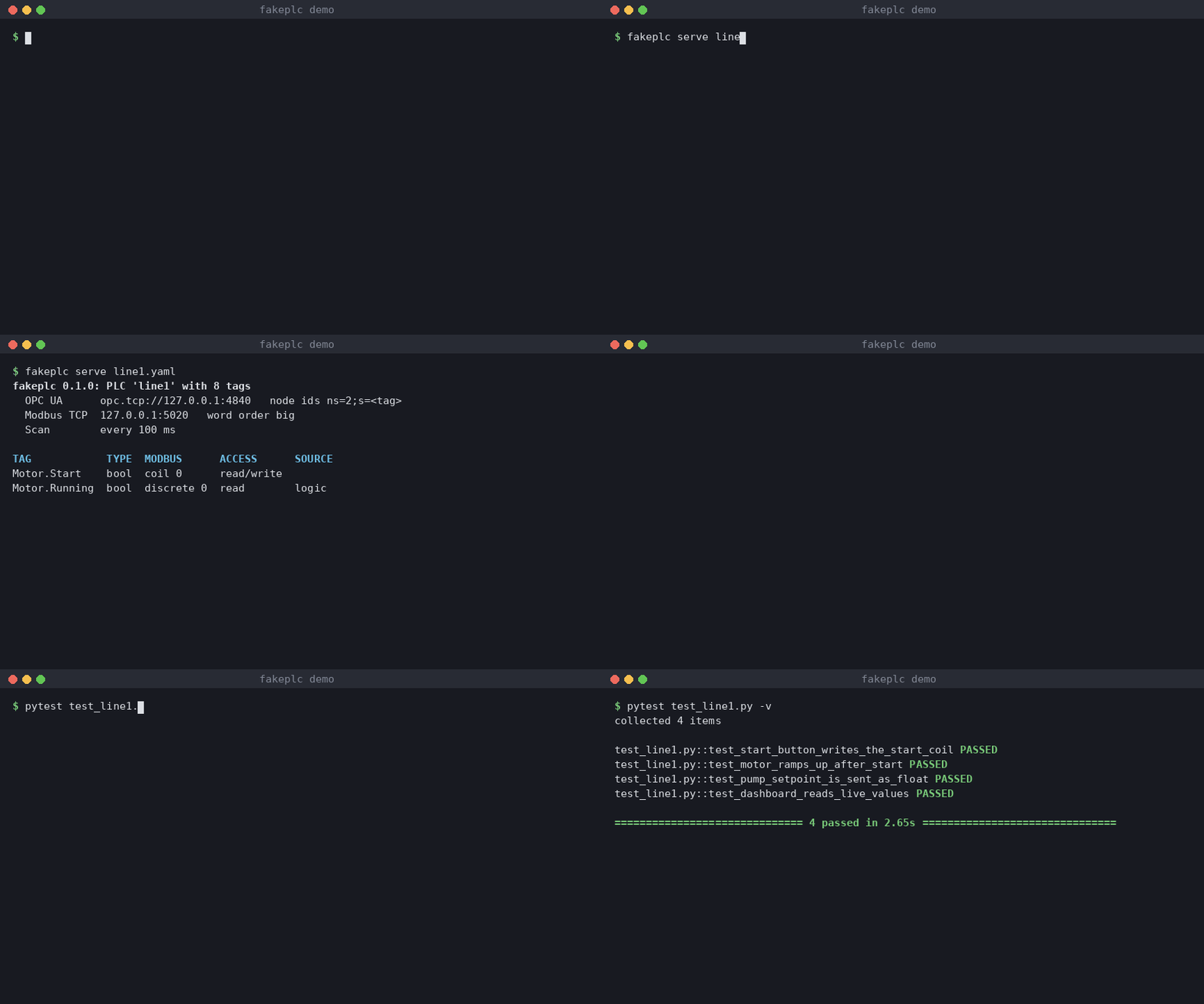
$ fakeplc serve line1.yaml
fakeplc 0.1.0: PLC 'line1' with 8 tags
  OPC UA      opc.tcp://127.0.0.1:4840   node ids ns=2;s=<tag>
  Modbus TCP  127.0.0.1:5020   word order big
  Scan        every 100 ms

TAG            TYPE  MODBUS      ACCESS      START  SOURCE
Motor.Start    bool  coil 0      read/write  False
...
Press Ctrl+C to stop.
14:02:11.480  modbus wrote Motor.Start = True
14:02:15.122  opcua  wrote Pump.Setpoint = 12.5
Point any OPC UA or Modbus client at it (UaExpert, Node-RED, Ignition, pymodbus, asyncua). Client writes are printed as they happen.
In pytest
Installing fakeplc adds two fixtures.
| Fixture | What you get |
|---|---|
fake_plc |
A running PLC, reset to its start values before the test. One server per config for the whole session. |
fake_plc_factory(config, **kwargs) |
Extra PLCs (path or dict), stopped when the test ends. |
Choose the config, in order of priority:
@pytest.mark.fakeplc("line1.yaml") # relative to the test file, or a dict
pytest --fakeplc tests/line1.yaml
[pytest]
fakeplc_config = tests/line1.yaml           # relative to rootdir
Under pytest, ports are picked free (so pytest-xdist works) and scans only run
when the test calls scan(). Use @pytest.mark.fakeplc("x.yaml", keep_ports=True)
to keep the ports from the file, and autoscan=True for a free-running PLC.
Give the addresses to the code under test, for example with pytest-django:
@pytest.fixture(autouse=True)
def plc_settings(settings, fake_plc):
    settings.PLC_OPCUA_URL = fake_plc.opcua_url
    settings.PLC_MODBUS_PORT = fake_plc.modbus_port
The PLC API
| Call | Does |
|---|---|
get(tag), values() |
Current value of one tag, or all |
set(tag, value), set_many({...}) |
Force values, as the PLC program would (not journaled) |
scan(n=1) |
Run n scans: sim signals, then logic rules in order |
writes(tag, protocol=None) |
Values clients wrote to a tag, oldest first |
journal(tag=None, protocol=None) |
Full Write records: tag, value, protocol, timestamp, scan |
wait_for(tag, value_or_predicate, timeout=5, written=False) |
Wait for a value, or for a client write with written=True |
await wait_for_async(...) |
The same for async tests |
reset() |
Start values back, journal cleared, simulated time to zero |
opcua_url, node_id(tag), modbus_host, modbus_port |
Where to connect |
FakePLC also works outside pytest:
from fakeplc import FakePLC

with FakePLC("line1.yaml", autoscan=False) as plc:
    ...
YAML reference
| Key | Default | Meaning |
|---|---|---|
plc |
plc |
Name; the OPC UA folder under Objects |
scan_ms |
100 |
Scan period; simulated time t advances by this per scan |
autoscan |
true |
Scan on a timer (fakeplc serve); pytest turns it off |
seed |
0 |
Seed for noise() |
opcua.port / host / namespace |
4840 / 127.0.0.1 / urn:fakeplc |
port: false turns OPC UA off |
modbus.port / host |
5020 / 127.0.0.1 |
port: false turns Modbus off |
modbus.word_order |
big |
big = high word first (AB CD), little = CD AB |
modbus.unmapped |
error |
Reads of unmapped addresses: error (exception 02) or zero |
Tags. Names are dotted (Area.Machine.Signal); the dots become OPC UA
folders. Each tag has:
| Field | Values |
|---|---|
type |
bool, int (16 bit), uint, dint (32 bit), udint, real (float32), lreal (float64) |
modbus |
coil N, discrete N, holding N, input N (0-based); 32-bit types take 2 registers, lreal 4 |
value |
Start value |
readonly |
Default: true for discrete inputs, input registers and tags driven by sim or logic |
sim |
Expression evaluated every scan |
unit, description |
Free text; description shows in OPC UA |
Expressions (sim and logic) use tag names, t (simulated seconds),
numbers, + - * / // % **, comparisons, and or not, x if cond else y, and
these functions:
| Function | Value |
|---|---|
sine(amplitude=1, period=10, offset=0) |
Sine wave over t |
ramp(low=0, high=100, period=10) |
Sawtooth from low to high |
square(low=0, high=1, period=10) |
Square wave |
noise(center=0, spread=1) |
Random within ±spread, repeatable with seed |
counter(step=1, period=1) |
Counts up every period |
limit(x, low, high), min, max, abs, round, int, float, bool |
Helpers |
Logic rules run in order every scan, each seeing the results of the rules before it, like rungs in a PLC program.
fakeplc check line1.yaml validates a file and prints its tag table.
Modbus details
Function codes 1, 2, 3, 4, 5, 6, 15 and 16. Any unit id is answered. A write that touches an unmapped or read-only address is rejected with exception 02 and changes nothing, even when it spans several tags. Writing one half of a 32-bit value with function 6 updates that half.
When to use something else
- opcua-sim simulates OPC UA devices with alarms, NE 107 health and fault injection. Pick it when you test OPC UA edge cases in depth; pick fakeplc when you need a PLC tag table over both protocols and test assertions on what your app wrote.
- pymodbus ships a Modbus simulator with a web UI, without OPC UA.
Related projects
- tagbridge bridges Modbus and OPC UA tags to MQTT (Sparkplug B). Its demo runs against
examples/line1.yaml.
Roadmap
- Docker image
ghcr.io/danshinde/fakeplc - String and array tags
- Siemens S7 protocol (snap7)
- OPC UA security and users
- Record from a real PLC and replay
Ideas and bug reports are welcome in the issues.
Development
git clone https://github.com/DanShinde/fakeplc
cd fakeplc
pip install -e ".[test]" ruff mypy
pytest
ruff check . && ruff format --check . && mypy
Contributing
See CONTRIBUTING.md. Issues labelled good first issue are a good place to start.
License
MIT
1 maintainer

Metadata
1 maintainer
Release files for fakeplc 0.1.0
For a detailed explanation of source distributions (sdists) and built distributions (wheels), please see the package formats documentation.
Source distribution (sdist)
| File | Size | Uploaded | Provenance | Actions |
|---|---|---|---|---|
| fakeplc-0.1.0.tar.gz | 32.4 kB | With provenance | Details for fakeplc-0.1.0.tar.gz |
Built distribution (wheel)
| File | Interpreter | ABI | Platform | Actions Reset |
|---|---|---|---|---|
| fakeplc-0.1.0-py3-none-any.whl | Python 3 | none | any | Details for fakeplc-0.1.0-py3-none-any.whl |
Total release size: 60.8 kB
Release files / fakeplc-0.1.0.tar.gz
| Download URL | fakeplc-0.1.0.tar.gz |
|---|---|
| Size | 32.4 kB |
| Tags | Source |
|
SHA-256 checksum How to use checksums |
a959081e1f0d5f8cc2ee87d9333a20c3a8450265e3f968da47795da947e2f71f
|
|
BLAKE2b-256 checksum How to use checksums |
f296f18545792178c1cfe223f6a74be16b4f9f3942b6ca54ad87c57a81db3c41
|
| Upload date | |
|
Uploaded using Trusted Publishing? What is trusted publishing? |
Yes |
| Uploaded via |
twine/7.0.0 CPython/3.13.16
|
Provenance
Provenance describes where a file came from. On PyPI, provenance is shared via attestations, which provide a verifiable record of the build or publishing details. View details, limitations and caveats.


PyPI Publish Attestation
PyPI verified that this artifact, at this checksum, originated from the publisher listed below.
Signed by GitHub Actions, verified by PyPI on Nov 22, 2026.
Transparency logRelease files / fakeplc-0.1.0-py3-none-any.whl
| Download URL | fakeplc-0.1.0-py3-none-any.whl |
|---|---|
| Size | 28.4 kB |
| Tags | Python 3 |
|
SHA-256 checksum How to use checksums |
521a1e5208a874010b30ee7b8071658f2d5d1e93eec3cb59024fdd40d2651d1f
|
|
BLAKE2b-256 checksum How to use checksums |
543fb3d9cc328a3fa06ab6f829497836e20fddf0aa7edeb8e041c663172437d8
|
| Upload date | |
|
Uploaded using Trusted Publishing? What is trusted publishing? |
Yes |
| Uploaded via |
twine/7.0.0 CPython/3.13.16
|
Provenance
Provenance describes where a file came from. On PyPI, provenance is shared via attestations, which provide a verifiable record of the build or publishing details. View details, limitations and caveats.
PyPI Publish Attestation
PyPI verified that this artifact, at this checksum, originated from the publisher listed below.
Signed by GitHub Actions, verified by PyPI on Nov 22, 2026.
Transparency logSecurity for fakeplc 0.1.0
Provenance
Provenance describes where a file came from. On PyPI, provenance is shared via attestations, which provide a verifiable record of the build or publishing details. View details, limitations and caveats.
Full provenance
Both files in this release have been uploaded with provenance metadata.
Attestation for fakeplc-0.1.0.tar.gz
PyPI Publish Attestation
PyPI verified that this artifact, at this checksum, originated from the publisher listed below.
Signed by GitHub Actions, verified by PyPI on Nov 22, 2026.
Transparency logA note on package security
PyPI is a repository for distributing packages, not a service for auditing them. While third-party security researchers and our staff do their best to detect and remove malicious packages, PyPI cannot guarantee the quality, security or suitability of any given package.
To learn more about protecting yourself from malicious actors, visit our package security documentation.













