
Neural Question Answering & Semantic Search at Scale. Use modern transformer based models like BERT to find answers in large document collections

This project has been archived.
The maintainers of this project have marked this project as archived. No new releases are expected.
Project description










Haystack is an end-to-end framework that enables you to build powerful and production-ready pipelines for different search use cases. Whether you want to perform Question Answering or semantic document search, you can use the State-of-the-Art NLP models in Haystack to provide unique search experiences and allow your users to query in natural language. Haystack is built in a modular fashion so that you can combine the best technology from other open-source projects like Huggingface's Transformers, Elasticsearch, or Milvus.

What to build with Haystack
- Ask questions in natural language and find granular answers in your documents.
- Perform semantic search and retrieve documents according to meaning, not keywords
- Use off-the-shelf models or fine-tune them to your domain.
- Use user feedback to evaluate, benchmark, and continuously improve your live models.
- Leverage existing knowledge bases and better handle the long tail of queries that chatbots receive.
- Automate processes by automatically applying a list of questions to new documents and using the extracted answers.
Core Features
- Latest models: Utilize all latest transformer-based models (e.g., BERT, RoBERTa, MiniLM) for extractive QA, generative QA, and document retrieval.
- Modular: Multiple choices to fit your tech stack and use case. Pick your favorite database, file converter, or modeling framework.
- Pipelines: The Node and Pipeline design of Haystack allows for custom routing of queries to only the relevant components.
- Open: 100% compatible with HuggingFace's model hub. Tight interfaces to other frameworks (e.g., Transformers, FARM, sentence-transformers)
- Scalable: Scale to millions of docs via retrievers, production-ready backends like Elasticsearch / FAISS, and a fastAPI REST API
- End-to-End: All tooling in one place: file conversion, cleaning, splitting, training, eval, inference, labeling, etc.
- Developer friendly: Easy to debug, extend and modify.
- Customizable: Fine-tune models to your domain or implement your custom DocumentStore.
- Continuous Learning: Collect new training data via user feedback in production & improve your models continuously
| :ledger: Docs | Components, Pipeline Nodes, Guides, API Reference |
| :floppy_disk: Installation | How to install Haystack |
| :mortar_board: Tutorials | See what Haystack can do with our Notebooks & Scripts |
| :beginner: Quick Demo | Deploy a Haystack application with Docker Compose and a REST API |
| :vulcan_salute: Community | Discord, Twitter, Stack Overflow, GitHub Discussions |
| :heart: Contributing | We welcome all contributions! |
| :bar_chart: Benchmarks | Speed & Accuracy of Retriever, Readers and DocumentStores |
| :telescope: Roadmap | Public roadmap of Haystack |
| :newspaper: Blog | Read our articles on Medium |
| :phone: Jobs | We're hiring! Have a look at our open positions |
:floppy_disk: Installation
1. Basic Installation
You can install a basic version of Haystack's latest release by using pip.
pip3 install farm-haystack
This command will install everything needed for basic Pipelines that use an Elasticsearch Document Store.
2. Full Installation
If you plan to be using more advanced features like Milvus, FAISS, Weaviate, OCR or Ray, you will need to install a full version of Haystack. The following command will install the latest version of Haystack from the main branch.
git clone https://github.com/deepset-ai/haystack.git
cd haystack
pip install --upgrade pip
pip install -e '.[all]' ## or 'all-gpu' for the GPU-enabled dependencies
If you cannot upgrade pip to version 21.3 or higher, you will need to replace:
'.[all]'with'.[sql,only-faiss,only-milvus,weaviate,graphdb,crawler,preprocessing,ocr,onnx,ray,dev]''.[all-gpu]'with'.[sql,only-faiss-gpu,only-milvus,weaviate,graphdb,crawler,preprocessing,ocr,onnx-gpu,ray,dev]'
For an complete list of the dependency groups available, have a look at the haystack/pyproject.toml file.
To install the REST API and UI, run the following from the root directory of the Haystack repo
pip install rest_api/
pip install ui/
3. Installing on Windows
pip install farm-haystack -f https://download.pytorch.org/whl/torch_stable.html
4. Installing on Apple Silicon (M1)
M1 Macbooks require some extra dependencies in order to install Haystack.
# some additional dependencies needed on m1 mac
brew install postgresql
brew install cmake
brew install rust

# haystack installation
GRPC_PYTHON_BUILD_SYSTEM_ZLIB=true pip install git+https://github.com/deepset-ai/haystack.git
5. Learn More
See our installation guide for more options. You can find out more about our PyPi package on our PyPi page.
:mortar_board: Tutorials
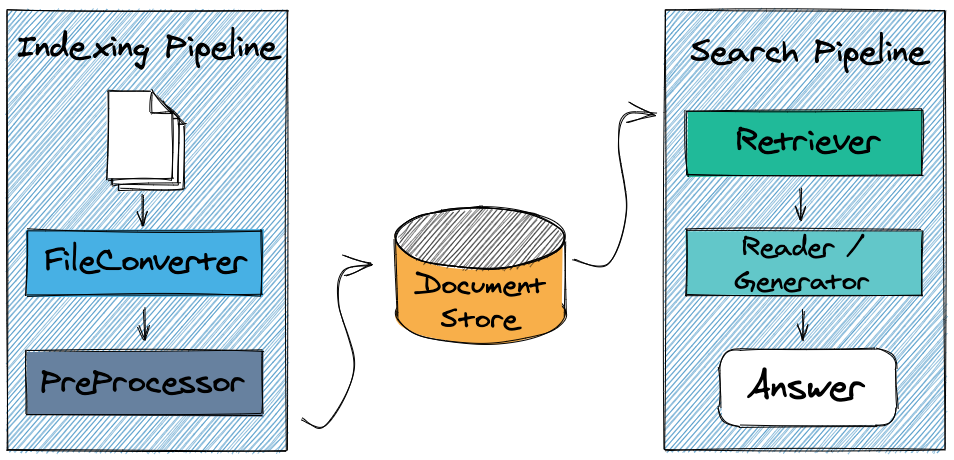
Follow our introductory tutorial to setup a question answering system using Python and start performing queries! Explore the rest of our tutorials to learn how to tweak pipelines, train models and perform evaluation.
:beginner: Quick Demo
Hosted
Try out our hosted Explore The World live demo here! Ask any question on countries or capital cities and let Haystack return the answers to you.
Local
To run the Explore The World demo on your own machine and customize it to your needs, check out the instructions on Explore the World repository on GitHub.
:vulcan_salute: Community
There is a very vibrant and active community around Haystack which we are regularly interacting with! If you have a feature request or a bug report, feel free to open an issue in Github. We regularly check these and you can expect a quick response. If you'd like to discuss a topic, or get more general advice on how to make Haystack work for your project, you can start a thread in Github Discussions or our Discord channel. We also check Twitter and Stack Overflow.
:heart: Contributing
We are very open to the community's contributions - be it a quick fix of a typo, or a completely new feature! You don't need to be a Haystack expert to provide meaningful improvements. To learn how to get started, check out our Contributor Guidelines first.
You can also find instructions to run the tests locally there.
Thanks so much to all those who have contributed to our project!

Who uses Haystack
Here's a list of organizations who use Haystack. Don't hesitate to send a PR to let the world know that you use Haystack. Join our growing community!
Release history Release notifications | RSS feed


Download files
Download the file for your platform. If you're not sure which to choose, learn more about installing packages.
Source Distribution
Built Distribution
Filter files by name, interpreter, ABI, and platform.
If you're not sure about the file name format, learn more about wheel file names.
Copy a direct link to the current filters
File details
Details for the file farm_haystack-1.13.2.tar.gz.
File metadata
- Download URL: farm_haystack-1.13.2.tar.gz
- Upload date:
- Size: 516.3 kB
- Tags: Source
- Uploaded using Trusted Publishing? No
- Uploaded via: python-httpx/0.23.3
File hashes
| Algorithm | Hash digest | |
|---|---|---|
| SHA256 |
48d8ce862ed22373f43bba988d78b76a8439b6e6b0e457835b392fc22914290c
|
|
| MD5 |
82ae720b5404d7e4328e542a1a73e23e
|
|
| BLAKE2b-256 |
502e51b278f196203b6d77664992e1f19a22a9af3002aad655e3c826d8e901f4
|
File details
Details for the file farm_haystack-1.13.2-py3-none-any.whl.
File metadata
- Download URL: farm_haystack-1.13.2-py3-none-any.whl
- Upload date:
- Size: 620.6 kB
- Tags: Python 3
- Uploaded using Trusted Publishing? No
- Uploaded via: python-httpx/0.23.3
File hashes
| Algorithm | Hash digest | |
|---|---|---|
| SHA256 |
3bbc637da5f8b878cf4e8309e28350f1a05ba16a2d51ae48e8cc94d7b8488657
|
|
| MD5 |
edaf4ccecd499cb2f308453e72ca3966
|
|
| BLAKE2b-256 |
995b3f4efe7cb9e21d14ccb9f940a84f2b95e9c1f3058a010f8466400a71617b
|






