
fast_trimul
Fused Triangle Multiplicative Update (AlphaFold2 / AlphaFold3 family) on CUTLASS CuTe DSL kernels — a drop-in nn.Module for the structural-biology stacks. Hardware Agnostic library!





Works with OpenFold, OpenFold-3, Boltz, Chai, and Protenix.
At a glance
These numbers are for the Triangle Multiplicative Update op — an 8-block
OpenFold-3 Pairformer trunk with only its TriMul swapped for fast_trimul, not
the full OpenFold pipeline. FastTriangleMultiplication drops into any model
that uses a triangle multiply.
Speed — the graphed fast kernel beats the stock (native) trunk at every N:
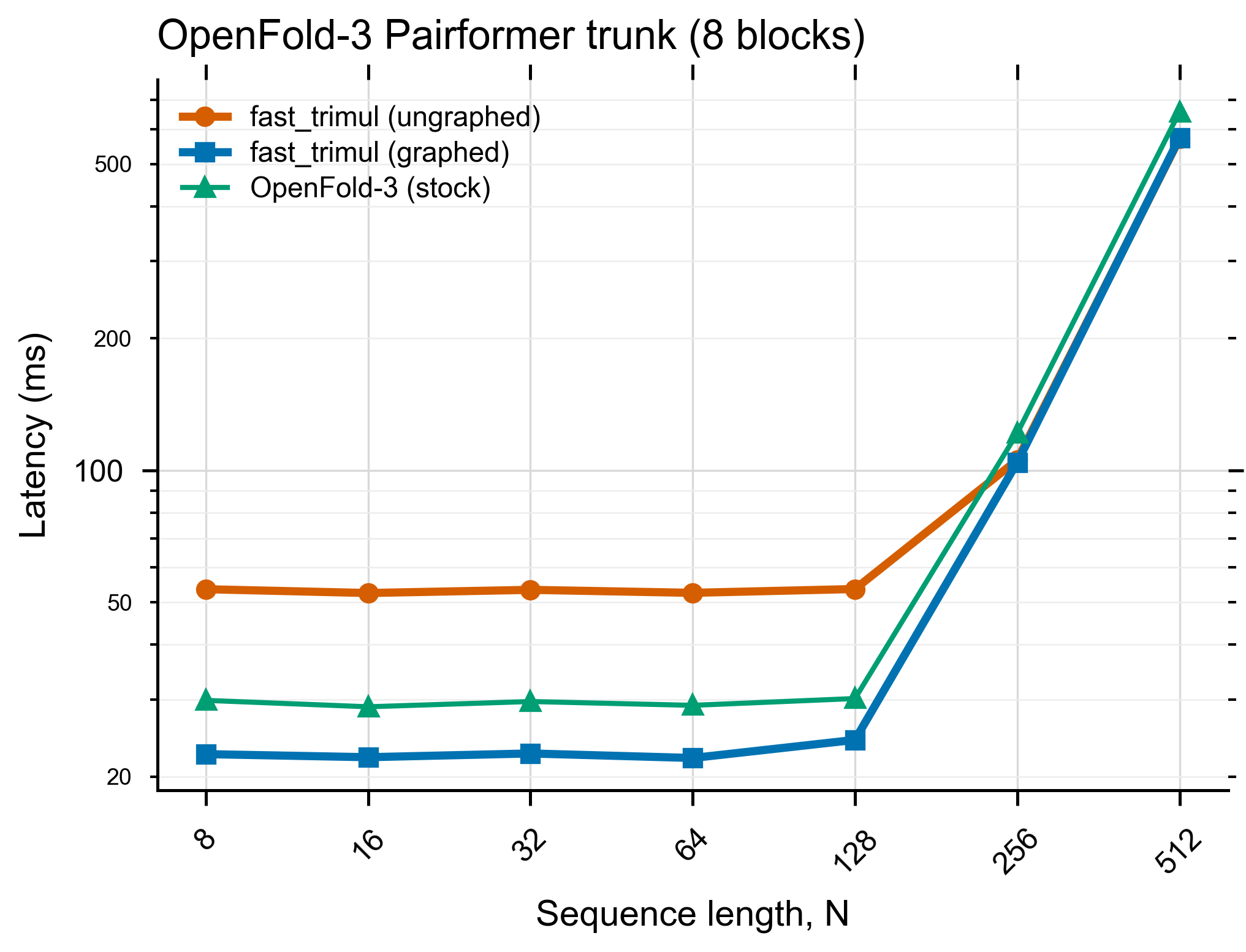
| N | 8 | 16 | 32 | 64 | 128 | 256 | 512 |
|---|---|---|---|---|---|---|---|
| graphed vs native — faster by | 33% | 30% | 31% | 32% | 24% | 17% | 15% |
Memory — but graphed's peak VRAM is higher:
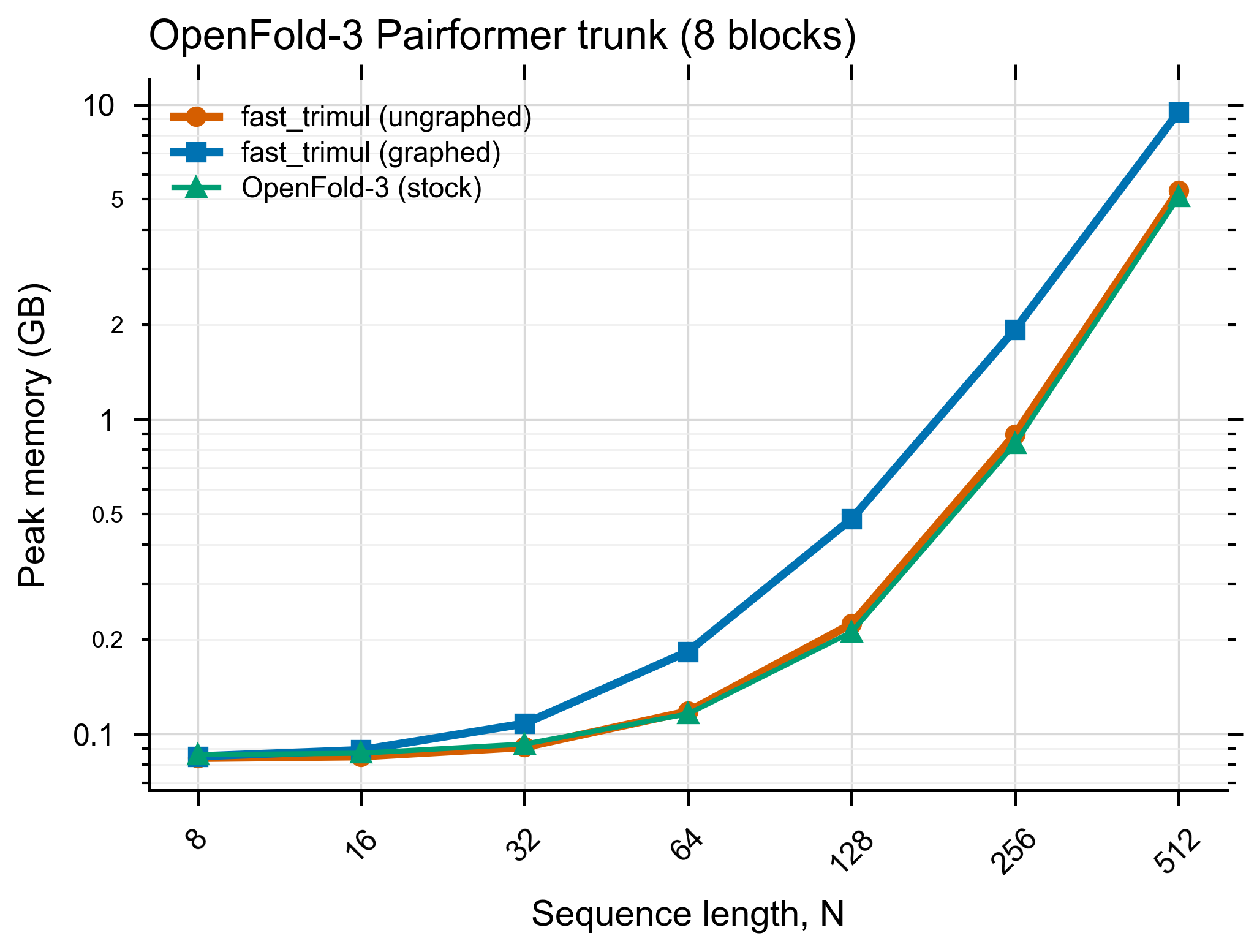
Why more memory? Each captured CUDA graph reserves its own private buffers, so memory isn't reused across layers — that's the speed-for-memory trade-off.
Star History

Table of Contents
- Why fast_trimul?
- Quickstart: accelerate OpenFold-3 in one line
- Install
- Quick start
- Swap into a real model (whole-trunk example)
- Gradients (training)
- Benchmark
- Benchmark results
- Architecture
- API
- Limitations
- Contributing
- Related Resources
- Built With
- Contact
- License
Why fast_trimul?
- Numerically matches the stock module (fp16 tolerance) — verified against OpenFold, OpenFold-3, Boltz-1, Protenix, and an AF3/Chai-style reference by loading their weights and comparing outputs.
- Roughly halves peak memory versus the stock eager module (kernel fusion + CUDA-graph buffer reuse).
- Fastest at small N, where per-launch overhead dominates and the captured CUDA graph removes it.
- Modular, vendor-agnostic backends with a fallback chain (
cuda → torch): the fast CUTLASS kernel when it fits, an always-correct pure-torch path otherwise, so an unsupported shape/dtype degrades gracefully instead of crashing. New hardware (TPU/Intel/…) is a plug-in, not a rewrite. - Drop-in on any shape, no whole-model compilation.
Quickstart: accelerate OpenFold-3 in one line
One line — patch_openfold3() — swaps OpenFold-3's TriMul for the fast kernel
before you build the model. This exact script is verified on an NVIDIA A100 —
both Lightning AI and Google Colab:
uv pip install --system openfold3 fast_trimul "cuda-python<13"
import fast_trimul
fast_trimul.patch_openfold3()          # <-- That is it!! OpenFold-3 now runs on the fast kernel.

# build and run OpenFold-3 exactly as you always would:
import torch
from openfold3.core.model.latent.pairformer import PairFormerStack

model = PairFormerStack(c_s=384, c_z=128, no_blocks=8, c_hidden_pair_bias=32, no_heads_pair_bias=4,
                        c_hidden_mul=128, c_hidden_pair_att=32, no_heads_pair=4,
                        transition_type="swiglu", transition_n=4, pair_dropout=0.25,
                        fuse_projection_weights=False, blocks_per_ckpt=None, inf=1e9).cuda().eval()

N = 64
s = torch.randn(1, N, 384, device="cuda")
z = torch.randn(1, N, N, 128, device="cuda")
with torch.no_grad():
    _, out_z = model(s, z, torch.ones(1, N, device="cuda"), torch.ones(1, N, N, device="cuda"))
print("OpenFold-3 running on fast_trimul ->", tuple(out_z.shape))    # (1, 256, 256, 128)
Same one-liner for the other stacks: patch_openfold(), patch_boltz(),
patch_protenix(). Ready-to-run copies are in quickstart/ — one for
Lightning AI (the snippet above) and one for Google Colab (adds a tiny
fake-scipy shim so OpenFold-3 imports without Colab's numpy quirk; the
patch_openfold3() integration is identical).
Prefer no global patch?
Use the module directly (FastTriangleMultiplication, see
Quick start), and use @accelerate / with accelerated("cuda"): to pin which
backend runs your own code (they control cuda-vs-torch selection, not the swap).
Run the shipped benchmark on your own GPU for numbers — see Benchmark below, and
read Limitations for where torch.compile is the better choice.
Install
pip install fast_trimul # or: uv pip install fast_trimul
Or install the latest straight from GitHub (no PyPI release needed — pure-Python package, so there's no compile step):
pip install git+https://github.com/tiagomonteiro0715/fast_trimul
Requires a CUDA GPU, torch, nvidia-cutlass-dsl, and cuda-python.
Kernels JIT-compile on first use (one-time cost, then cached in-process).
Driver note: cuda-python must match your CUDA driver. If nvidia-smi
shows CUDA 12.x (e.g. driver 570), pin the CUDA-12 line — otherwise you get
cudaErrorInsufficientDriver (35):
pip install "cuda-python<13"
fast_trimul pins cuda-python<13 by default (most drivers are still CUDA 12.x);
override it if your driver is CUDA 13+.
Quick start
On Google Colab (Runtime → Change runtime type → GPU), install first:
!pip install -q uv
!uv pip install fast_trimul
Then use it:
import torch
from fast_trimul import FastTriangleMultiplication

module = FastTriangleMultiplication(d_z=128, d_c=128, mode="outgoing").cuda()
z = torch.randn(1, 256, 256, 128, device="cuda")          # (B, N, N, d_z)
mask = torch.ones(1, 256, 256, device="cuda")             # optional (B, N, N)
out = module(z, mask=mask)                                 # same dtype as z
For fastest inference at a fixed shape, capture a CUDA graph once — this removes the per-launch overhead of the internal kernels, which dominates the runtime at small N:
module.graphed(z, mask)      # capture once at this shape (inference only)
out = module(z, mask=mask)   # subsequent calls replay the graph
Low-level functional API (FlashAttention style):
from fast_trimul import functional
out = functional.triangle_multiplication(z, module._impl, mask=mask)
Load pretrained weights from a target library — one call, pick the source
(names are remapped, and fused a/b projections are split, for you):
module.load_weights(ref.state_dict(), source="openfold") # or: openfold3 / protenix / boltz / chai
The five named helpers (load_openfold_state_dict, …) still work as thin aliases.
These target modules apply their residual (+ z) outside the triangle block,
so build with residual=False when matching their output exactly:
module = FastTriangleMultiplication(d_z=128, d_c=128, mode="outgoing", residual=False).cuda()
Pick or force a backend (default is "auto" — fastest available, then torch):
from fast_trimul import list_backends
list_backends()                                            # e.g. ['torch', 'cuda']
FastTriangleMultiplication(d_z=128, backend="cuda")        # force the fast path (still falls back)
FastTriangleMultiplication(d_z=128, backend="torch")       # force the portable reference
Opt in explicitly, without any global monkeypatching (safe under strict
runtime policies) — @accelerate on a function, or the scoped accelerated():
from fast_trimul import accelerate, accelerated

@accelerate                    # runs this function with the accelerated backend
def infer(z): ...

with accelerated("cuda"):      # scoped: reverts on exit, never leaks
    out = model(z)
One-line correctness check — build your library's TriMul, then:
import fast_trimul
fast_trimul.verify("openfold", my_openfold_trimul)         # -> True if outputs match (fp16 tol)
verify stays a one-liner even when a library changes its API, because you pass
the reference module and only the (registered) name-remap is library-specific.
Swap into a real model (whole-trunk example)
Drop fast_trimul into a library's trunk by replacing its TriMul class with a
thin adapter, then capturing a CUDA graph per layer. Verified end-to-end on the
OpenFold-3 Pairformer trunk (A100).
import torch
import openfold3.core.model.latent.base_blocks as blocks
from openfold3.core.model.latent.pairformer import PairFormerStack
from fast_trimul import FastTriangleMultiplication

# 1) a thin adapter: match the library's constructor, swallow its extra forward kwargs,
#    and use residual=False (the block adds the residual itself).
class FastTriMul(FastTriangleMultiplication):
    def __init__(self, c_z, c_hidden=None, *args, **kw):
        super().__init__(d_z=c_z, d_c=c_hidden or c_z, mode="outgoing", residual=False)
    def forward(self, z, mask=None, **kw):
        return super().forward(z, mask=mask)

# 2) patch the library's TriMul classes BEFORE building the model
blocks.TriangleMultiplicationOutgoing = FastTriMul
blocks.TriangleMultiplicationIncoming = FastTriMul
blocks.FusedTriangleMultiplicationOutgoing = FastTriMul
blocks.FusedTriangleMultiplicationIncoming = FastTriMul

model = PairFormerStack(c_s=384, c_z=128, no_blocks=8, ...).cuda().eval()

# 3) capture a CUDA graph for each swapped-in layer (fixed shape, inference only)
dummy_z = torch.randn(1, N, N, 128, device="cuda")
dummy_mask = torch.ones(1, N, N, device="cuda")
for m in model.modules():
    if isinstance(m, FastTriangleMultiplication):
        m.graphed(dummy_z, dummy_mask)

# ... now run model(s, z, single_mask, pair_mask) as usual ...
Install for this example (note the CUDA-12 driver pin — see Install):
uv pip install --system openfold3 fast_trimul "cuda-python<13"
Whole-trunk results (OpenFold-3 Pairformer, 8 blocks)
Full forward of the Pairformer trunk, random weights + inputs, 100 timed passes. Measured on NVIDIA A100-SXM4-40GB (Lightning AI). Latency in ms (lower is better), peak VRAM in GB; bold = fastest at that N.
| N | native | eager | graphed | native VRAM | eager VRAM | graphed VRAM |
|---|---|---|---|---|---|---|
| 8 | 29.86 | 53.55 | 22.51 | 0.086 | 0.084 | 0.085 |
| 16 | 28.87 | 52.49 | 22.15 | 0.087 | 0.085 | 0.089 |
| 32 | 29.68 | 53.37 | 22.59 | 0.093 | 0.091 | 0.108 |
| 64 | 29.09 | 52.54 | 22.06 | 0.116 | 0.118 | 0.183 |
| 128 | 30.15 | 53.60 | 24.26 | 0.211 | 0.224 | 0.483 |
| 256 | 121.56 | 105.61 | 104.29 | 0.837 | 0.897 | 1.933 |
| 512 | 657.51 | 571.46 | 573.98 | 5.092 | 5.340 | 9.481 |
Reading it honestly — when to use each:
- graphed is fastest at every N (1.15–1.35× over native) with near-deterministic latency, but reserves memory — one CUDA graph per layer, so peak VRAM grows to ~1.9× native at N=512. Use it when you're latency-bound and have VRAM headroom.
- eager matches native's memory (~equal), and is faster than native only at larger N (256+); at small N it's slower than native, because the un-graphed fused kernel is launch-bound across the trunk's ~16 TriMul layers.
- So: graphed for latency, eager for large-N at native-level memory. The whole-trunk win here is speed (graphed), not memory — the per-op memory advantage doesn't stack across many graphed layers.
Gradients (training)
The forward runs the fused fp16 kernel; the backward is a correct torch recompute
(correct, not yet fast), so gradients flow and you can train / fine-tune with it. Do
not call .graphed() for training — graphs are inference only. Verified on A100:
import torch
from fast_trimul import FastTriangleMultiplication

trimul = FastTriangleMultiplication(d_z=128, d_c=128, mode="outgoing").cuda()
z = torch.randn(1, 64, 64, 128, device="cuda", requires_grad=True)   # N a multiple of 8
out = trimul(z, mask=torch.ones(1, 64, 64, device="cuda"))
out.sum().backward()                                                 # gradients recomputed through the kernel
assert z.grad is not None and torch.isfinite(z.grad).all()           # input grads flow
assert all(p.grad is not None for p in trimul.parameters())          # parameter grads flow
Benchmark
The package ships a benchmark that measures machine ceilings (memory bandwidth,
fp16 tensor-core peak, launch floor), a per-iteration median timer, achieved
TFLOP/s, peak memory, and a size sweep. It reports fast_trimul both un-graphed
and graphed, next to torch.compile and an eager reference, so you can compare
on your own hardware:
!pip install -q uv
!uv pip install fast_trimul
from fast_trimul.benchmark import run_benchmark
run_benchmark()              # or: run_benchmark(head_size=384, sweep=(128, 256, 512))
Or from a shell:
python -m fast_trimul.benchmark
It reports these variants:
fast no-graph— the kernel, fp16, un-graphed (shows the launch-overhead cost),fast +graph— the same kernel with a captured CUDA graph (.graphed()),compile—torch.compile(mode="reduce-overhead")and default mode,torch eager— the eager reference.
Use CUDA events + synchronize() (as the shipped benchmark does) so timing
reflects when the GPU finishes the work, not when the launch is queued. Warm up
(or call .graphed()) before timing to exclude the one-time JIT/autotune cost.
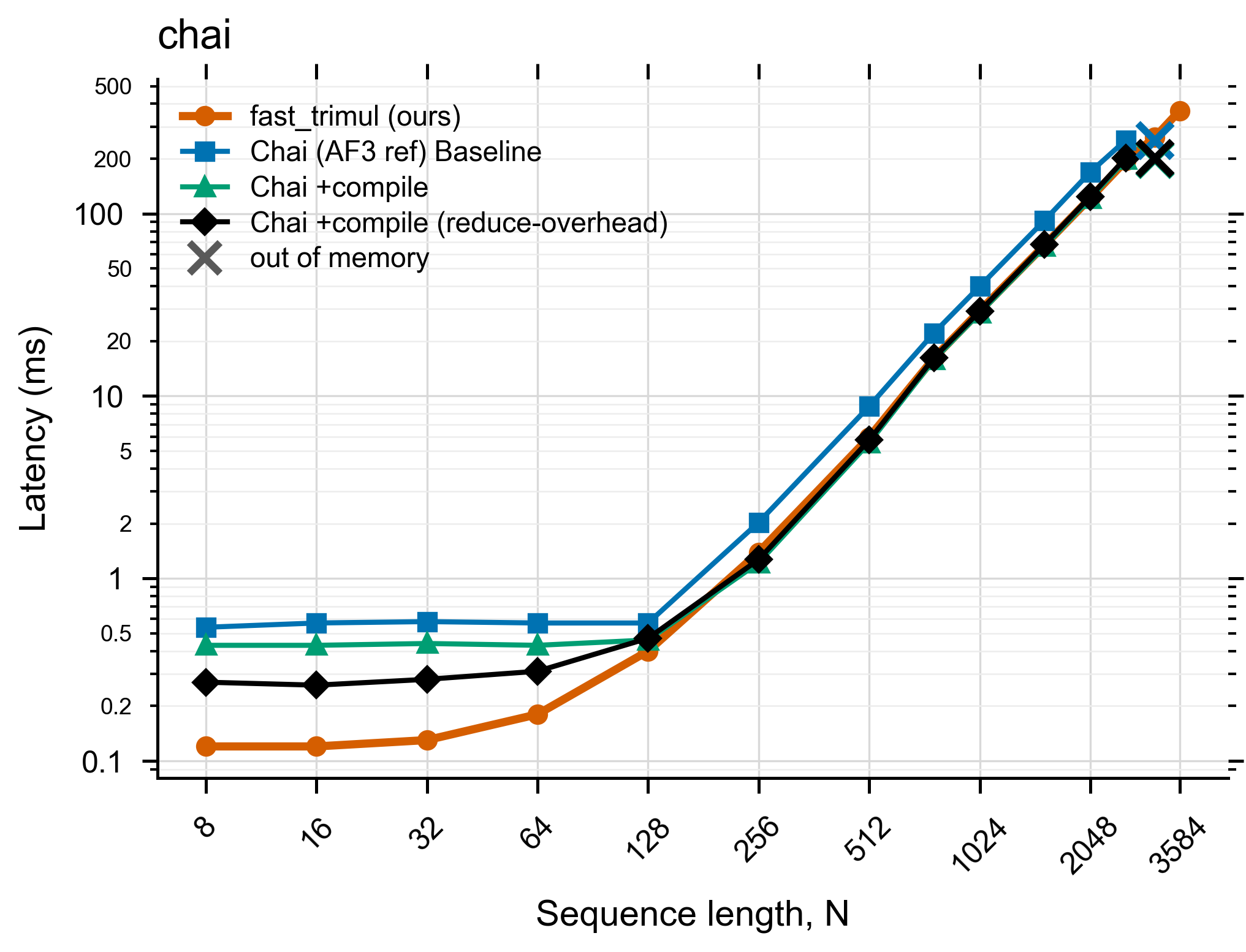
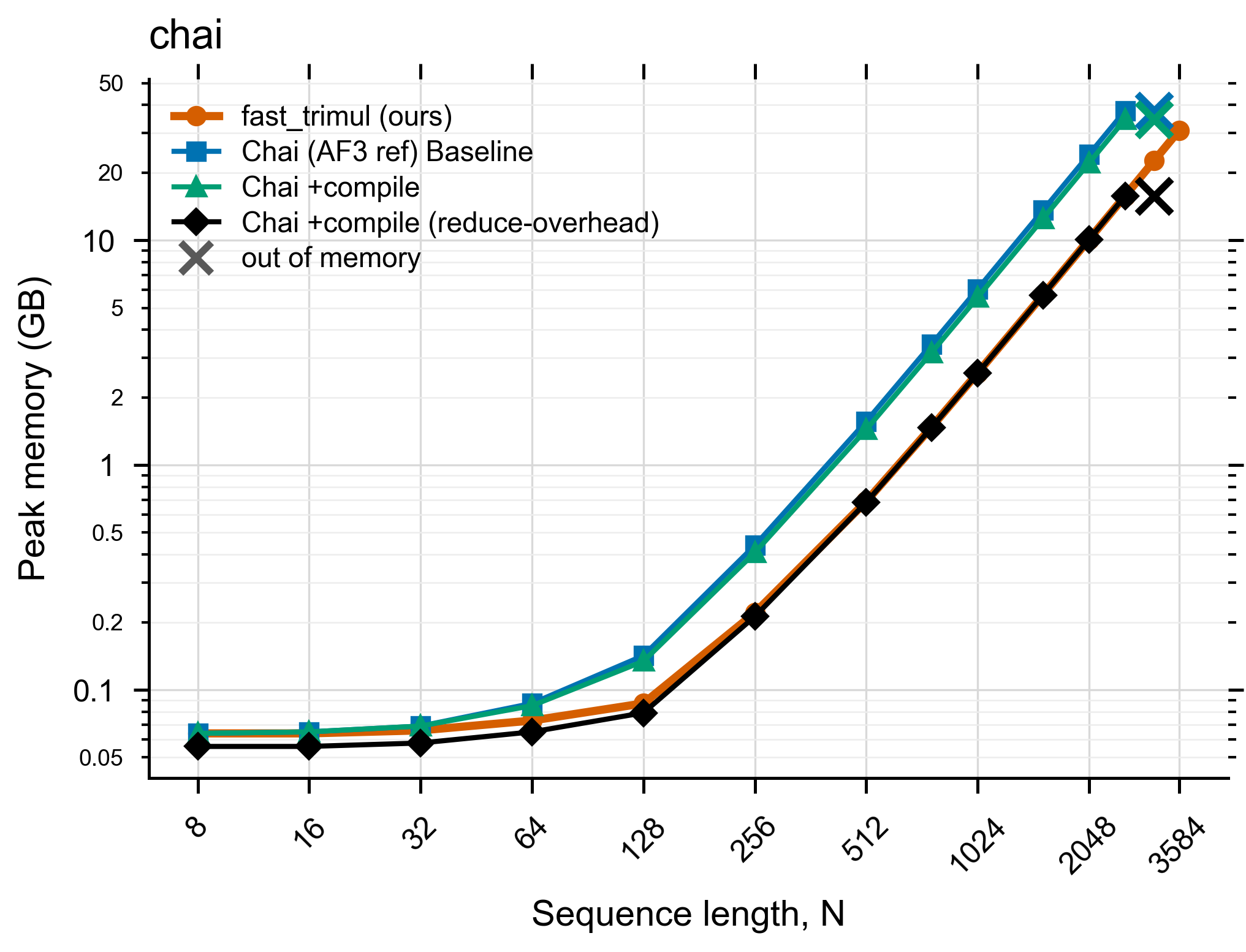
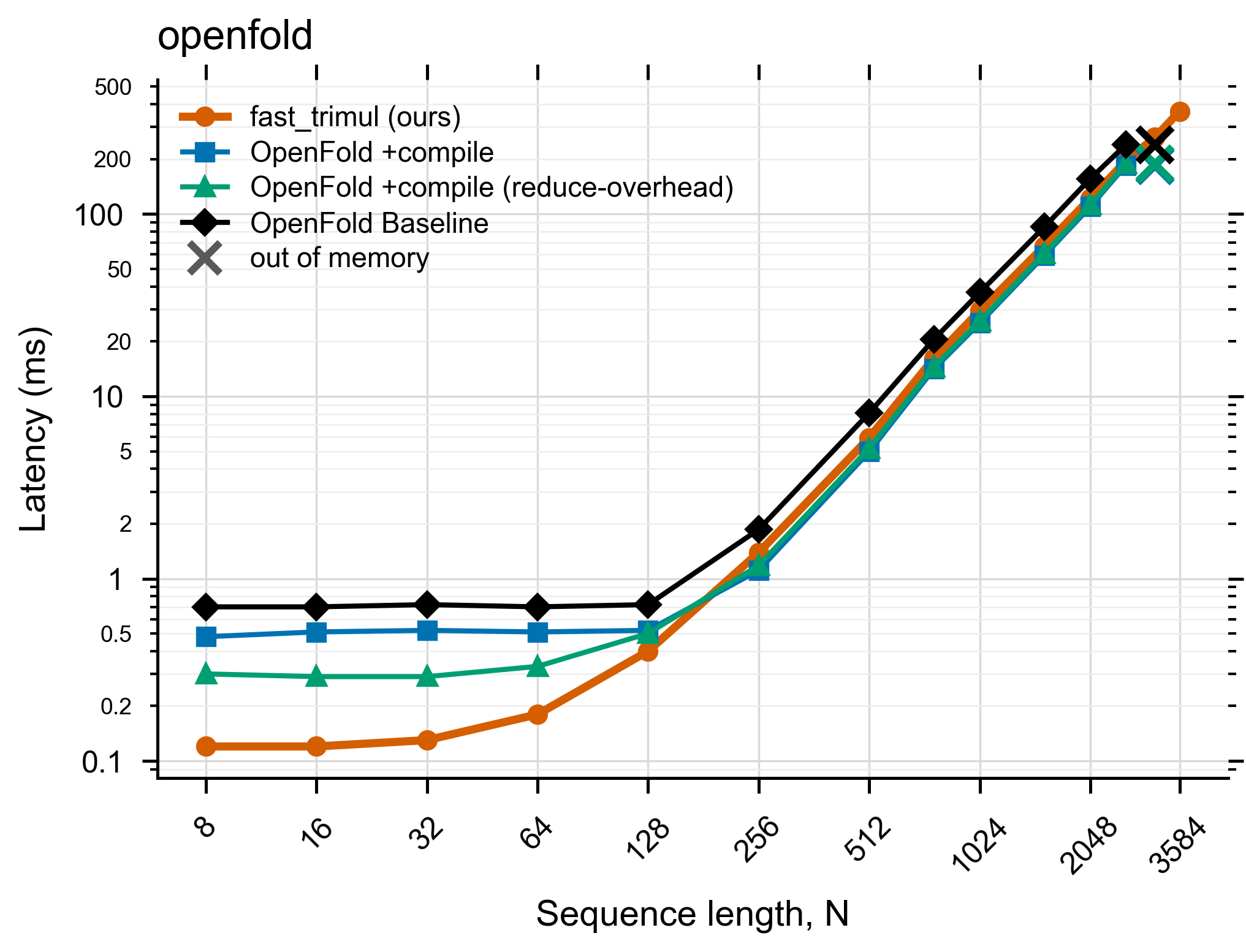
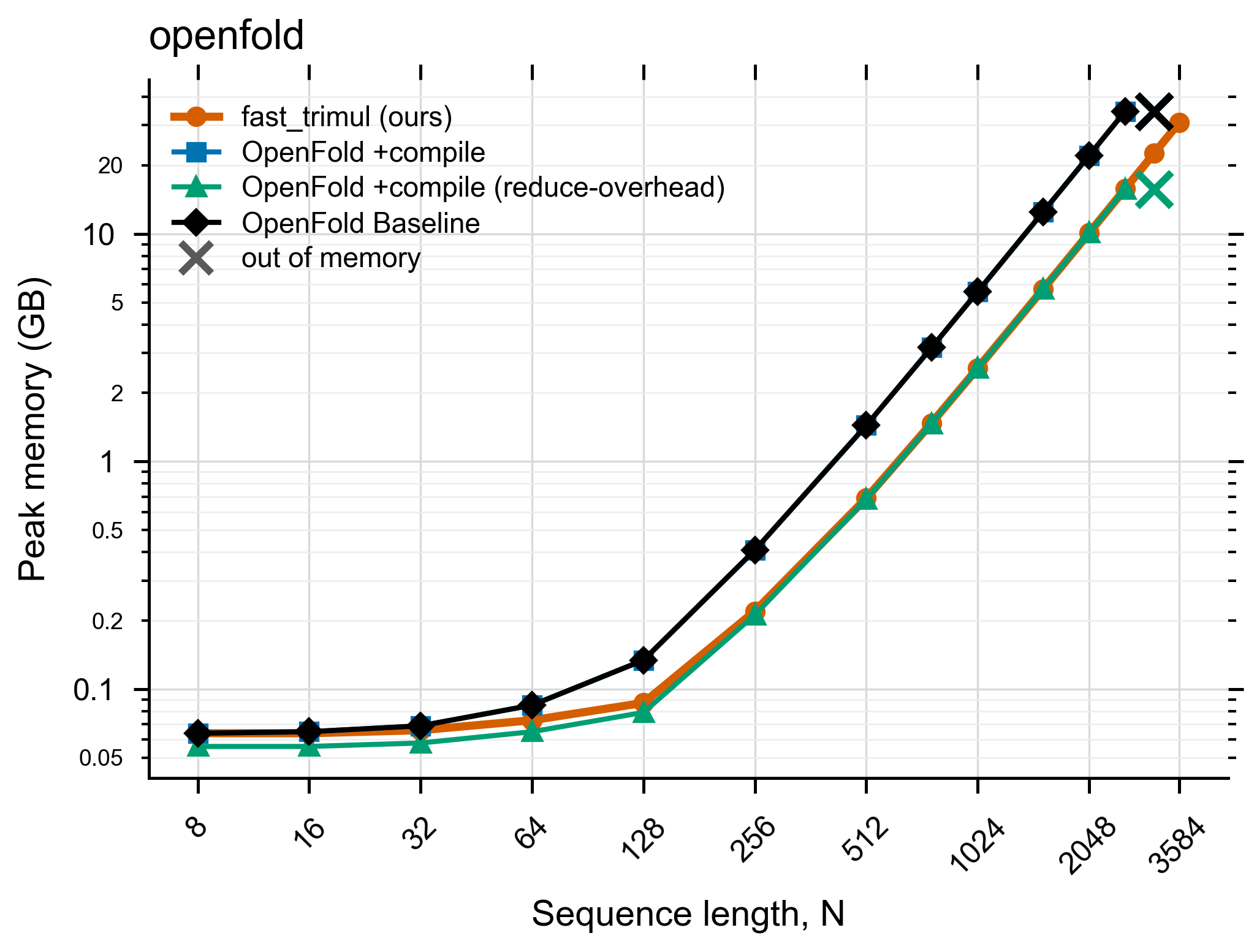
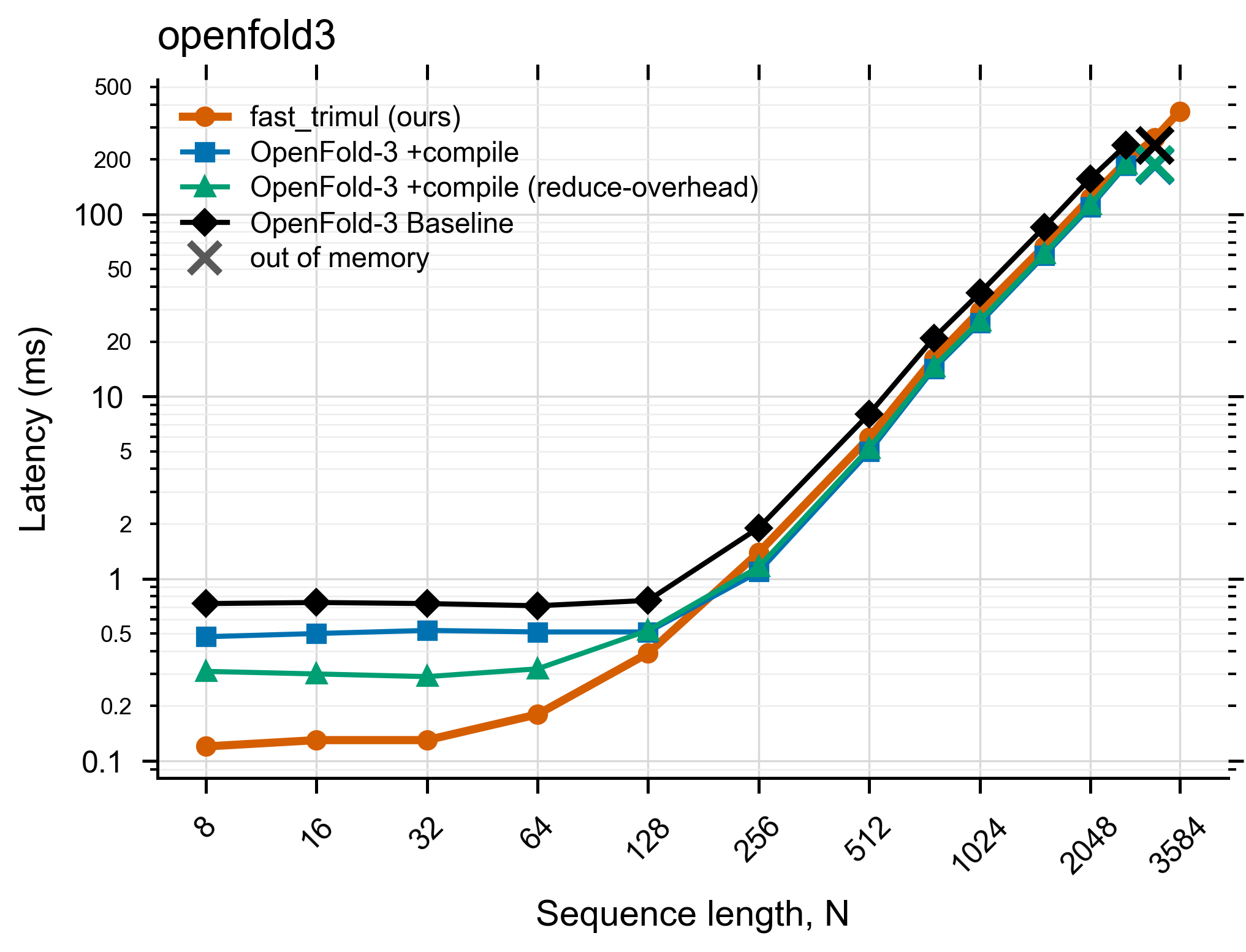
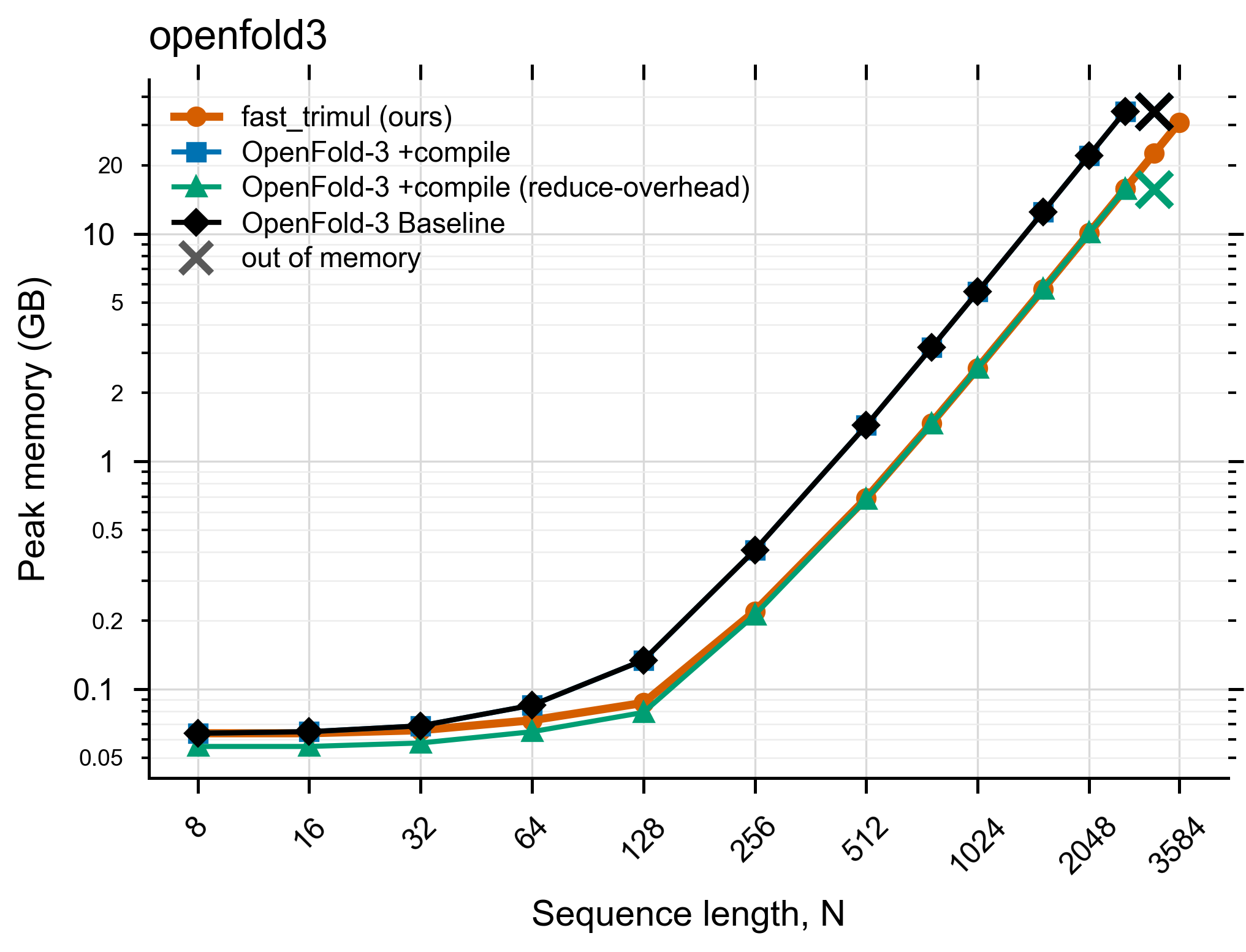
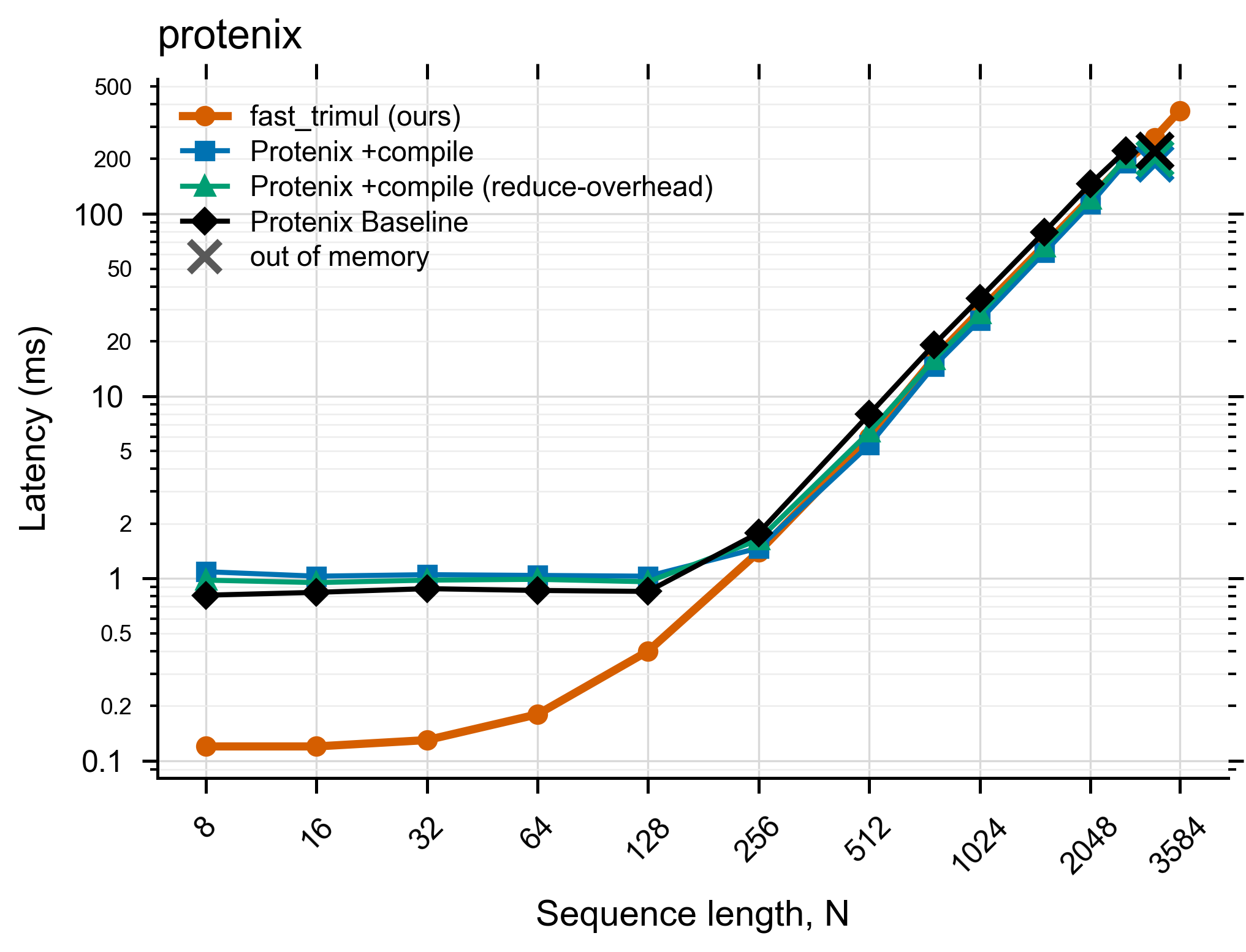
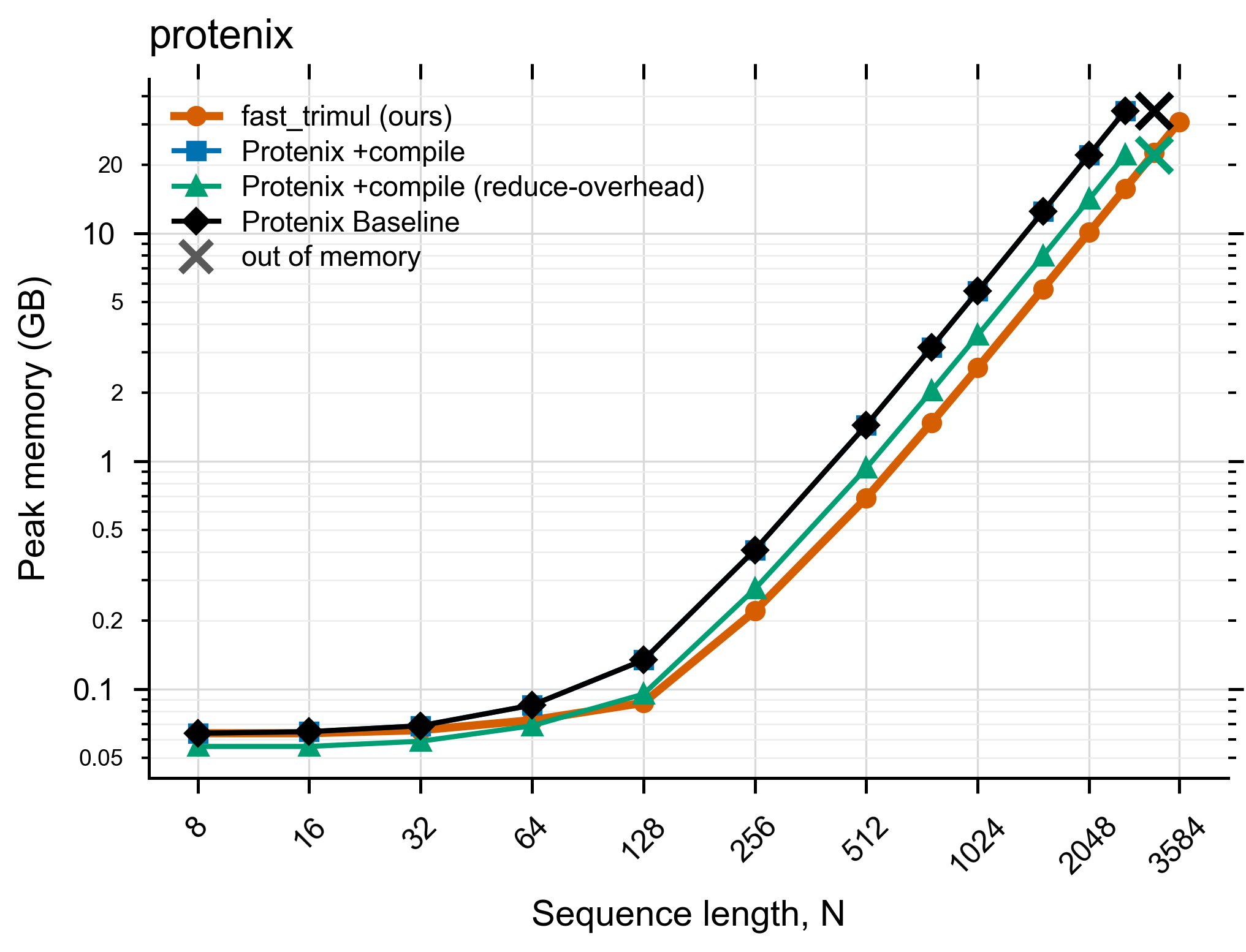
Benchmark results
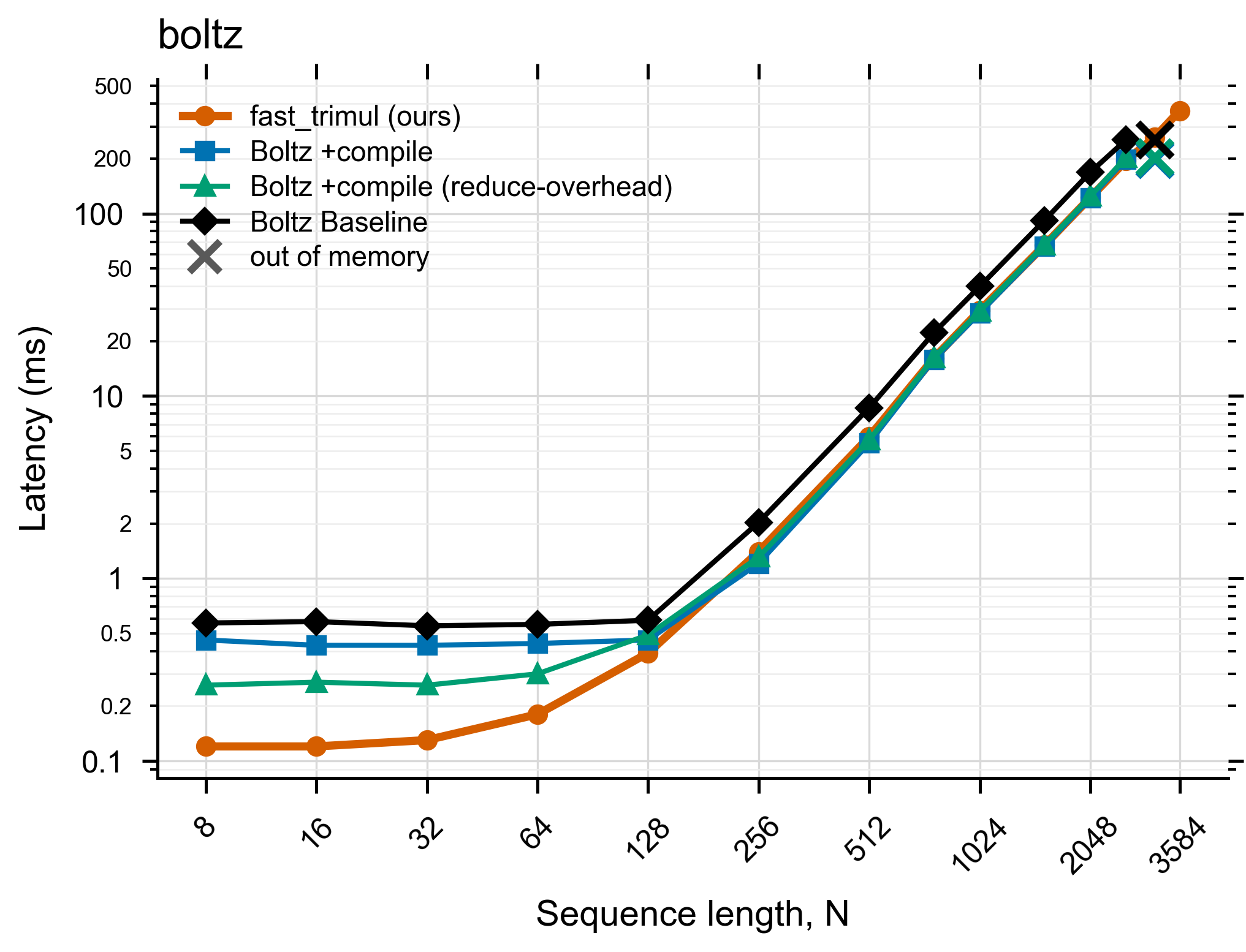
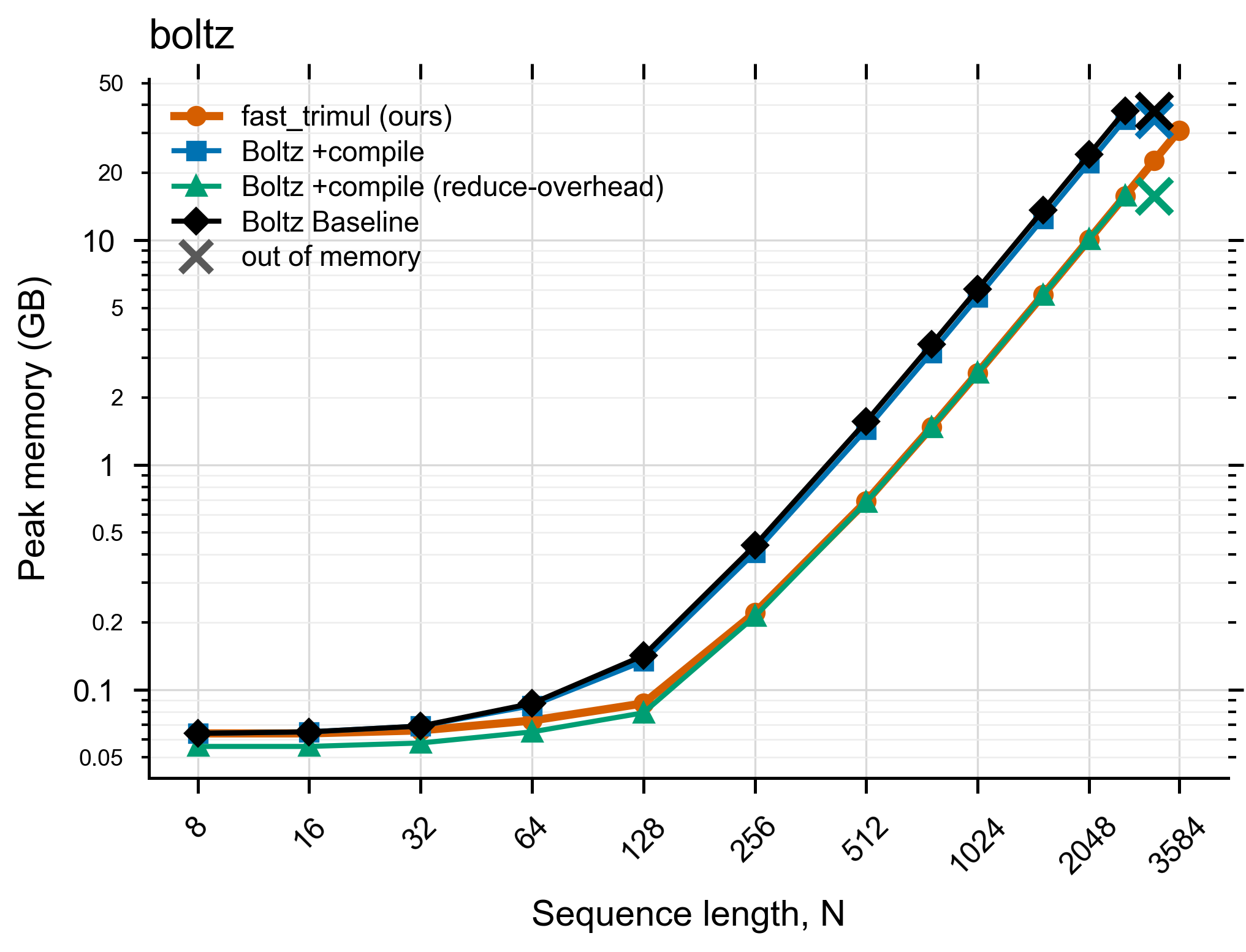
Speed (latency) and peak-memory scaling for a single Triangle-Multiplicative
Update across five stacks, plus the OpenFold-3 Pairformer whole-trunk (8
blocks). fast_trimul is the vermilion line; an ✕ marks where a baseline ran
out of memory. Single-op runs on an NVIDIA A100-SXM4-80GB (PyTorch 2.13 / CUDA
13.0, B=1, d_z=d_c=128, medians of 30 timed / 5 warmup runs); the whole-trunk on an
A100-40GB, 100 passes.
Full tables live in reports/results/, one-click reproduction
notebooks in reports/colab_reproduce/, and the figures
are regenerated by reports/plot_results.py.
Boltz-1
 |
 |
Chai / AF3
 |
 |
OpenFold (AF2)
 |
 |
OpenFold-3
 |
 |
Protenix
 |
 |
Whole-trunk — OpenFold-3 Pairformer (8 blocks)
cuda ungraphed = un-graphed fused kernel; graphed = with a captured CUDA graph;
native = the library's stock trunk.
|
|
Architecture
The library is a small stable front-end over a registry of interchangeable backends. CUDA is one backend; a pure-torch backend is the universal fallback. Adding new hardware or a new library is a plug-in (one decorated class/function), not a core edit.
  front-end   @accelerate  accelerated()  verify()          # stable, tiny
      │
  guard        contiguous · dtype · align · int64 strides   # NormalizedInput
      │
  dispatch     pick backend, then FALL BACK: cuda -> torch  # never crashes on a bad shape
      │
  backends     cuda_cute (CUTLASS)   torch_ref (portable)   # + future: xla/tpu, xpu/intel
| Module | Role |
|---|---|
core/registry.py |
@backend / @weights_for decorators + O(1) lookup tables |
core/context.py |
the input guard → NormalizedInput (contiguous, dtype, alignment, int64 strides) |
core/dispatch.py |
picks a backend and walks the fallback chain (cuda → torch) |
core/decorators.py |
@accelerate + accelerated() — explicit, scoped, no global patching |
backends/torch_ref.py |
universal pure-torch backend (any device torch supports) |
backends/cuda_cute.py |
thin wrapper over the existing CUTLASS kernels (unchanged) |
ops/triangle.py |
FastTriangleMultiplication (dispatch + graph capture + load_weights) |
integrations/loaders.py |
the five per-library weight maps (@weights_for) |
integrations/checks.py |
verify() |
Everything the architecture adds — registries, guard, dispatch, decorators — is
O(1) overhead; only the op itself scales with N. The CUDA kernels
(_kernels.py) are untouched.
Adding a new backend
from fast_trimul.core.registry import backend

@backend("mybackend", dtypes={torch.float16}, min_align=8)
class MyBackend:
    def __init__(self, caps): self.caps = caps
    def execute(self, inp, params): ...   # inp.tensor is guarded (contiguous, right dtype)
That one file makes backend="mybackend" selectable and slots it into the
fallback chain — no changes to the dispatcher or the module.
API
fast_trimul.FastTriangleMultiplication(d_z, d_c=None, mode="outgoing", residual=True, backend="auto")— the module.forward(z, mask=None),.graphed(z, mask=None),.load_weights(state_dict, source=...)(plus the named aliases.load_openfold_state_dict/.load_openfold3_state_dict/.load_protenix_state_dict/.load_boltz_state_dict).fast_trimul.accelerate/fast_trimul.accelerated(backend="auto")— explicit opt-in decorator / scoped context manager.fast_trimul.verify(source, reference, ...)— one-line correctness check against a reference module.fast_trimul.list_backends()— backends registered on this machine.fast_trimul.functional.triangle_multiplication(z, params, mask=None)— low-level functional call.fast_trimul.core.registry.{backend, weights_for}— decorators to register a new backend or library weight-map.
Limitations (read before relying on it)
torch.compile(mode="reduce-overhead")is competitive and often faster above small N. On an A100 it is frequently faster per call in the mid-range and, on several stacks, uses similar peak memory. These kernels are not yet epilogue-fused (future work), so the reasons to prefer this are drop-in-ness and robustness, not raw latency:reduce-overheadneeds static shapes and recompiles per sequence length (awkward for variable-length inputs) and can break on some models, whereas this is a plainnn.Modulethat works on any shape with no compilation step. Benchmark both on your workload.- First call is slow: JIT compile + GEMM autotune. On the first forward at a
new shape, the GEMM configs are auto-tuned (one-time, cached). Disable with the
env var
FAST_TRIMUL_AUTOTUNE=0. Warm up (or call.graphed()) before timing. - fp16 only. bf16/fp32 inputs are cast to fp16 and back; keep the module in
fp16 (do not call
.float()/.bfloat16()on it). - Pretrained weights need name remapping. Each library names its
projections/norms differently, so a strict checkpoint load will not line up.
Automated for the common stacks via
load_weights(sd, source=...):openfold(OpenFold/AF2),openfold3(separate or fused variant),protenix,boltz, andchai(Boltz/Chai/AF3 fuse the a/b projections). Other stacks: supply a@weights_forremap. - Mask semantics are approximate. The mask is applied to the pair tensor in and out; validate against each library's exact masking before production use.
- Backward is correct but not fast (torch recompute), so it helps inference more than training throughput.
- The CUDA kernel is Ampere (sm80) tested; fp16 only. On other hardware, or for
bf16/fp32, or non-multiple-of-8
N, the dispatcher falls back to the pure-torch backend (correct, slower). Hopper/Blackwell + fp8 are future work. - Building a module needs a CUDA GPU + CUTLASS (the fused kernel weights live in
a CUTLASS module).
import fast_trimulitself is lazy and does not require CUTLASS until you constructFastTriangleMultiplication.
Contributing
Contributions, bug reports, and benchmark numbers from your own hardware are welcome!
- Found a bug, a shape that falls back unexpectedly, or a stack whose weights don't remap? Open an issue, or reach out at monteiro.t@northeastern.edu.
- Added a new backend or a
@weights_formap for another library? Send a pull request — a new backend or weight-map is one decorated class/function and needs no changes to the core (see Architecture → Adding a new backend). - Enjoyed it? Star the repository — it helps others find the project.
Related Resources
- The Math Behind Artificial Intelligence — a guide to AI's mathematical foundations from an engineering perspective.
- My FreeCodeCamp Articles — tutorials and deep dives on AI and programming.
- Signal Processing Guide — companion resource on signal processing.
Built With
- Python — the front-end, dispatcher, backends, and integrations.
- NVIDIA CUTLASS CuTe DSL — the fused GEMM / kernel core.
- PyTorch — tensors, autograd, and CUDA-graph capture.
- cuda-python — the driver bindings the kernels launch through.
- uv — fast Python package installer used throughout the docs.
Contact
Tiago Monteiro
- Email: monteiro.t@northeastern.edu
- GitHub: @tiagomonteiro0715
- FreeCodeCamp: Author Profile
License
Apache License 2.0 (this project) — see LICENSE. The GEMM core is derived from NVIDIA CUTLASS and is licensed under BSD 3-Clause — see NOTICE.
If you find fast_trimul useful, please consider starring the repository!
Your support helps others discover this project.
1 maintainer

Download files
Download the file for your platform. If you're not sure which to choose, learn more about installing packages.
Source Distribution
Built Distribution
Filter files by name, interpreter, ABI, and platform.
If you're not sure about the file name format, learn more about wheel file names.
Copy a direct link to the current filters
File details
Details for the file fast_trimul-2.4.1.tar.gz.
File metadata
- Download URL: fast_trimul-2.4.1.tar.gz
- Upload date:
- Size: 2.4 MB
- Tags: Source
- Uploaded using Trusted Publishing? No
- Uploaded via:
uv/0.9.18 {"installer":{"name":"uv","version":"0.9.18","subcommand":["publish"]},"python":null,"implementation":{"name":null,"version":null},"distro":null,"system":{"name":null,"release":null},"cpu":null,"openssl_version":null,"setuptools_version":null,"rustc_version":null,"ci":null}
File hashes
| Algorithm | Hash digest | |
|---|---|---|
| SHA256 |
21bc63f39832d591e6cd223f3e6ddc4dce8c9cfc09ca8459ffdb05cca89f07bf
|
|
| MD5 |
2ae78319c1f811788486dfba99c9b997
|
|
| BLAKE2b-256 |
9d8cbea533841998a605709e52a67b5dbe2f85d5f85b5eaf4712e36b1ea9a9e6
|
File details
Details for the file fast_trimul-2.4.1-py3-none-any.whl.
File metadata
- Download URL: fast_trimul-2.4.1-py3-none-any.whl
- Upload date:
- Size: 54.9 kB
- Tags: Python 3
- Uploaded using Trusted Publishing? No
- Uploaded via:
uv/0.9.18 {"installer":{"name":"uv","version":"0.9.18","subcommand":["publish"]},"python":null,"implementation":{"name":null,"version":null},"distro":null,"system":{"name":null,"release":null},"cpu":null,"openssl_version":null,"setuptools_version":null,"rustc_version":null,"ci":null}
File hashes
| Algorithm | Hash digest | |
|---|---|---|
| SHA256 |
85498a06e21218cc680060342ee5255a611f225494ff409c41c05bf9511d011a
|
|
| MD5 |
15c34850344ee7a544ffee49f9342e2e
|
|
| BLAKE2b-256 |
00c7b9022075c18e54ee7b83b978dfb3451aa059f0431a07b635639f2c24f498
|







