
🚀 FastAPI-Forge
⚡ UI Based FastAPI Project Generator
✨ Define your database models through a UI, select services, and get a complete production-ready containerized project with tests and endpoints!
🔥 Features
🖌️ UI Power
- 🖥️ NiceGUI-based interface for project design
- 📊 Visual model creation and configuration
- ✅ Checkbox additional services to be integrated
- 🚀 Quick-add common fields
- ⚙️ One-click project generation
⚡ Auto-Generated Components
- 🗄️ SQLAlchemy Models
- 📦 Pydantic Schemas
- 🌐 RESTful Endpoints (CRUD + more)
- 🧪 Comprehensive Test Suite (pytest)
- 🏗️ DAOs (Database Access Objects)
- 🏭 Factory Boy Test Factories
- 🐳 Docker Compose Setup
🎛️ Advanced Features
- 🎚️ Custom Enum support as data types
- 📥 YAML project import/export
- 🐘 Convert existing databases into FastAPI projects via connection string!
- Basically lets you quickly create an API for any database.
🔄 CI/CD Automation
- ⚙️ GitHub Workflows for automated testing and linting
- 🧪 Runs pytest suite
- ✨ Executes code formatting checks
- ✅ Ensures code quality before merging
🧩 Optional Integrations
| Category | Technologies |
|---|---|
| Messaging | RabbitMQ |
| Caching | Redis |
| Task Queues | Celery, TaskIQ |
| Auth | JWT Authentication |
| Monitoring | Prometheus |
| Storage | S3 |
| Migrations | Alembic |
Much more to come!
UI for designing your API projects

Generated project example
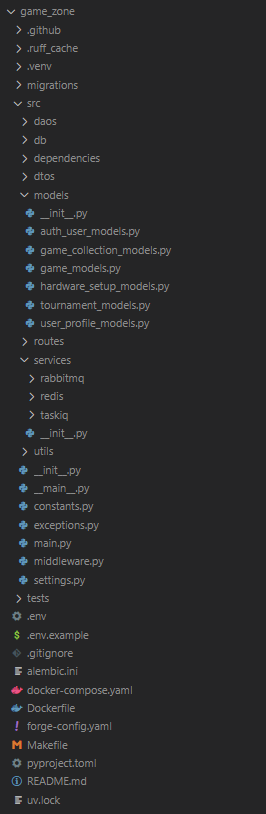
✅ Requirements
- Python 3.12+
- UV
- Docker and Docker Compose (for running the generated project)
🚀 Quick Start
Install FastAPI-Forge:
pip install fastapi-forge
🛠 Usage
Start the project generation process:
fastapi-forge start
- A web browser will open automatically.
- Define your database schema and service specifications.
- Once done, click
Generateto build your API.
To start the generated project and its dependencies in Docker:
make up # Builds and runs your project along with additional services
- The project will run using Docker Compose, simplifying your development environment.
- Access the SwaggerUI/OpenAPI docs at:
http://localhost:8000/docs.
⚙️ Command Options
Customize your project generation with these options:
--use-example
Quickly spin up a project using one of FastAPI-Forge’s prebuilt example templates:
fastapi-forge start --use-example
--no-ui
Skip the web UI and generate your project directly from the terminal:
fastapi-forge start --no-ui
--from-yaml
Load a custom YAML configuration (can be generated through the UI):
fastapi-forge start --from-yaml=~/path/to/config.yaml
--conn-string
Load an existing Postgres database schema:
fastapi-forge start --conn-string=postgres://user:pass@localhost/db_name
Combine Options
Load a YAML config and skip the UI:
fastapi-forge start --from-yaml=~/Documents/project-config.yaml --no-ui
🧰 Using the Makefile
The generated project includes a Makefile to simplify common dev tasks:
Start the Application
make up
Run Tests
Tests are automatically generated based on your schema. Once the app is running (make up):
make test
Run Specific Tests
make test-filter filter="test_name"
Format and Lint Code
Keep your code clean and consistent:
make lint
📦 Database Migrations with Alembic
If you chose Alembic for migrations during project setup, these commands will help manage your database schema:
Generate a New Migration
make mig-gen name="add_users_table"
Apply All Migrations
make mig-head
Apply the Next Migration
make mig-up
Roll Back the Last Migration
make mig-down
1 maintainer

Metadata
1 maintainer
Release files for fastapi-forge 0.13.0
For a detailed explanation of source distributions (sdists) and built distributions (wheels), please see the package formats documentation.
Source distribution (sdist)
| File | Size | Uploaded | |
|---|---|---|---|
| fastapi_forge-0.13.0.tar.gz | 142.6 kB | Details |
Built distribution (wheel)
| File | Interpreter | ABI | Platform | Reset |
|---|---|---|---|---|
| fastapi_forge-0.13.0-py3-none-any.whl | Python 3 | none | any | Details |
Total release size: 253.1 kB
Release files / fastapi_forge-0.13.0.tar.gz
| Download URL | fastapi_forge-0.13.0.tar.gz |
|---|---|
| Size | 142.6 kB |
| Tags | Source |
|
SHA-256 checksum How to use checksums |
aa3f113575cb565e426254dad6ebd5d40ac832e2a809b470608ef12344634d26
|
|
BLAKE2b-256 checksum How to use checksums |
de117d1bf0fab41f09fa49e953d9d3247b5ee0ba9fd9bfa1efaf082bc02a7df5
|
| Upload date | |
|
Uploaded using Trusted Publishing? What is trusted publishing? |
No |
| Uploaded via |
twine/6.1.0 CPython/3.12.10
|
Release files / fastapi_forge-0.13.0-py3-none-any.whl
| Download URL | fastapi_forge-0.13.0-py3-none-any.whl |
|---|---|
| Size | 110.4 kB |
| Tags | Python 3 |
|
SHA-256 checksum How to use checksums |
3dea10b945b54a4c284e965548e3217a589e6f4a4248a75a1a430d16742b4094
|
|
BLAKE2b-256 checksum How to use checksums |
a3a7ba3efbac852c87d8a19b4756a397f3f0cbdffc51961faf5bb22eb3878da9
|
| Upload date | |
|
Uploaded using Trusted Publishing? What is trusted publishing? |
No |
| Uploaded via |
twine/6.1.0 CPython/3.12.10
|














