
Generate FastAPI projects based on database schema.

Project description
🚀 FastAPI-Forge
⚡ UI Based FastAPI Project Generator
✨ Define your database models through a UI, select services, and get a complete production-ready containerized project with tests and endpoints!
🔥 Features
🖌️ UI Power
- 🖥️ NiceGUI-based interface for project design
- 📊 Visual model creation and configuration
- ✅ Checkbox additional services to be integrated
- 🚀 Quick-add common fields
- ⚙️ One-click project generation
⚡ Auto-Generated Components
- 🗄️ SQLAlchemy Models
- 📦 Pydantic Schemas
- 🌐 RESTful Endpoints (CRUD + more)
- 🧪 Comprehensive Test Suite (pytest)
- 🏗️ DAOs (Database Access Objects)
- 🏭 Factory Boy Test Factories
- 🐳 Docker Compose Setup
🎛️ Advanced Features
- 🎚️ Custom Enum support as data types
- 📥 YAML project import/export
- 🐘 Convert existing databases into FastAPI projects via connection string!
- Basically lets you quickly create an API for any database.
🔄 CI/CD Automation
- ⚙️ GitHub Workflows for automated testing and linting
- 🧪 Runs pytest suite
- ✨ Executes code formatting checks
- ✅ Ensures code quality before merging
🧩 Optional Integrations
| Category | Technologies |
|---|---|
| Messaging | RabbitMQ |
| Caching | Redis |
| Task Queues | Celery, TaskIQ |
| Auth | JWT Authentication |
| Monitoring | Prometheus |
| Storage | S3 |
| Migrations | Alembic |
Much more to come!
UI for designing your API projects

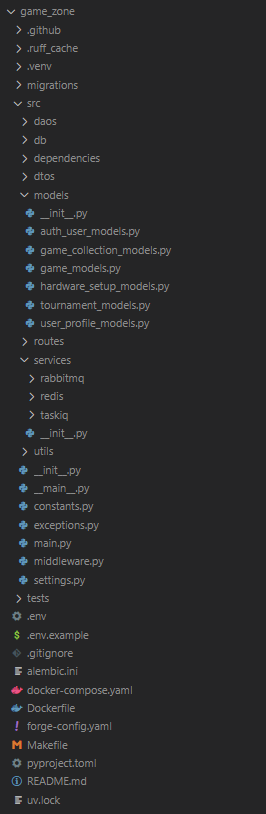
Generated project example
✅ Requirements
- Python 3.12+
- UV
- Docker and Docker Compose (for running the generated project)
🚀 Quick Start
Install FastAPI-Forge:
pip install fastapi-forge
🛠 Usage
Start the project generation process:
fastapi-forge start
- A web browser will open automatically.
- Define your database schema and service specifications.
- Once done, click
Generateto build your API.
To start the generated project and its dependencies in Docker:
make up # Builds and runs your project along with additional services
- The project will run using Docker Compose, simplifying your development environment.
- Access the SwaggerUI/OpenAPI docs at:
http://localhost:8000/docs.
⚙️ Command Options
Customize your project generation with these options:
--use-example
Quickly spin up a project using one of FastAPI-Forge’s prebuilt example templates:
fastapi-forge start --use-example
--no-ui
Skip the web UI and generate your project directly from the terminal:
fastapi-forge start --no-ui
--from-yaml
Load a custom YAML configuration (can be generated through the UI):
fastapi-forge start --from-yaml=~/path/to/config.yaml
--conn-string
Load an existing Postgres database schema:
fastapi-forge start --conn-string=postgres://user:pass@localhost/db_name
Combine Options
Load a YAML config and skip the UI:
fastapi-forge start --from-yaml=~/Documents/project-config.yaml --no-ui
🧰 Using the Makefile
The generated project includes a Makefile to simplify common dev tasks:
Start the Application
make up
Run Tests
Tests are automatically generated based on your schema. Once the app is running (make up):
make test
Run Specific Tests
make test-filter filter="test_name"
Format and Lint Code
Keep your code clean and consistent:
make lint
📦 Database Migrations with Alembic
If you chose Alembic for migrations during project setup, these commands will help manage your database schema:
Generate a New Migration
make mig-gen name="add_users_table"
Apply All Migrations
make mig-head
Apply the Next Migration
make mig-up
Roll Back the Last Migration
make mig-down
Release history Release notifications | RSS feed


Download files
Download the file for your platform. If you're not sure which to choose, learn more about installing packages.
Source Distribution
Built Distribution
Filter files by name, interpreter, ABI, and platform.
If you're not sure about the file name format, learn more about wheel file names.
Copy a direct link to the current filters
File details
Details for the file fastapi_forge-0.13.0.tar.gz.
File metadata
- Download URL: fastapi_forge-0.13.0.tar.gz
- Upload date:
- Size: 142.6 kB
- Tags: Source
- Uploaded using Trusted Publishing? No
- Uploaded via: twine/6.1.0 CPython/3.12.10
File hashes
| Algorithm | Hash digest | |
|---|---|---|
| SHA256 |
aa3f113575cb565e426254dad6ebd5d40ac832e2a809b470608ef12344634d26
|
|
| MD5 |
65424d020fedba270a398d842e76942b
|
|
| BLAKE2b-256 |
de117d1bf0fab41f09fa49e953d9d3247b5ee0ba9fd9bfa1efaf082bc02a7df5
|
File details
Details for the file fastapi_forge-0.13.0-py3-none-any.whl.
File metadata
- Download URL: fastapi_forge-0.13.0-py3-none-any.whl
- Upload date:
- Size: 110.4 kB
- Tags: Python 3
- Uploaded using Trusted Publishing? No
- Uploaded via: twine/6.1.0 CPython/3.12.10
File hashes
| Algorithm | Hash digest | |
|---|---|---|
| SHA256 |
3dea10b945b54a4c284e965548e3217a589e6f4a4248a75a1a430d16742b4094
|
|
| MD5 |
76e2a893417b40a48641bb179b378d58
|
|
| BLAKE2b-256 |
a3a7ba3efbac852c87d8a19b4756a397f3f0cbdffc51961faf5bb22eb3878da9
|






