
FastCommit
AI 生成 Git Commit Message - 使用大模型自动分析暂存区修改并生成标准的提交信息
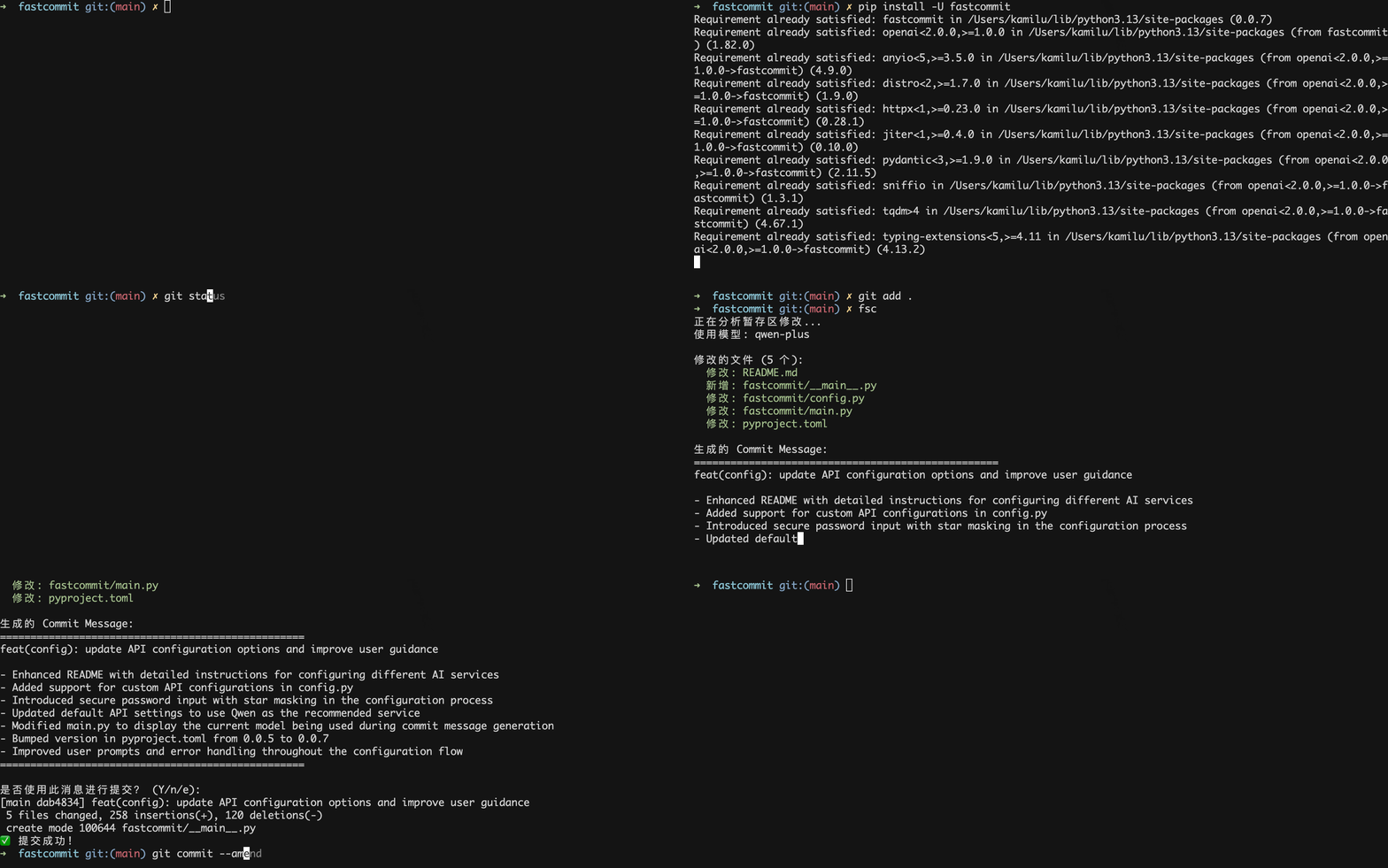
安装
pip install fastcommit
快速开始
1. 首次运行配置
第一次运行 fsc 时,会自动提示你输入 API 配置信息:
$ fsc
检测到首次运行,需要配置 API 信息...
==================================================
🚀 欢迎使用 FastCommit!
==================================================
首次运行需要配置 API 信息

支持的 AI 服务提供商:
1. 通义千问 (Qwen) (推荐)
   📖 API 文档: https://help.aliyun.com/zh/model-studio/first-api-call-to-qwen
   💡 API Key 申请: https://bailian.console.aliyun.com/?tab=api#/api

2. DeepSeek
   📖 API 文档: https://api-docs.deepseek.com/zh-cn/
   💡 API Key 申请: https://platform.deepseek.com/api_keys

3. 自定义
   💡 配置其他 OpenAI 兼容的 API 服务

请选择服务提供商 (1-通义千问, 2-DeepSeek, 3-自定义):
初始化时需要您提供对应的大模型 api, 如果您之前尚未使用过可以选择 通义千问 或者 deepseek 进行注册然后申请 api
- 通义千问(推荐,新用户每个模型100万免费token):
- deepseek(需要充值,响应速度略慢):
- API 文档: https://api-docs.deepseek.com/zh-cn/
- API Key 申请: https://platform.deepseek.com/api_keys
如果您使用其他大模型,例如claude/openai等只需要选择 3 并填入对应的 API Base URL, API key 即可
申请完 api key 之后填入对应的 API Key 即可
请输入以下信息:
API Base URL (默认: https://dashscope.aliyuncs.com/compatible-mode/v1/):
通义千问 API Key (必填): 1
模型名称 (默认: qwen-plus):
语言 (默认: en):

✅ 配置已保存!
📁 配置文件位置: /Users/kamilu/Desktop/fastcommit/fastcommit/user_config.json
🎯 使用模型: 通义千问 (qwen-plus)
💡 可以使用 'fsc config' 命令来更新配置
==================================================
2. 使用
# 1. 添加文件到暂存区
git add .

# 2. 生成 commit message
fsc
其他命令行选项
fsc --help                      # 显示帮助信息
fsc --version                   # 显示版本信息
fsc status                      # 显示暂存区文件状态
fsc see <commit>                # 总结指定commit的修改内容
fsc see -1                      # 总结上一个commit
fsc see abc123                  # 总结指定commit号
fsc config                      # 交互式配置
fsc config --show               # 显示当前配置
fsc config --api-key KEY        # 设置 API Key
fsc config --api-base URL       # 设置 API Base URL
fsc config --model MODEL        # 设置模型
fsc config --language LANG      # 设置语言 (zh/en)
配置管理
配置文件
配置文件自动保存在 fastcommit 模块安装目录下:fastcommit/user_config.json
{
    "api_base": "https://dashscope.aliyuncs.com/compatible-mode/v1",
    "api_key": "sk-xxx",
    "model": "qwen-plus",
    "language": "en"
}
您可以通过 fsc config 进行修改
配置选项说明
| 选项名 | 描述 | 默认值 |
|---|---|---|
api_base |
API 基础 URL | https://dashscope.aliyuncs.com/compatible-mode/v1 |
api_key |
API 密钥 (必填) | 无 |
model |
使用的模型 | qwen-plus |
language |
提交信息语言 (zh/en) | en |
重新配置
# 交互式重新配置
fsc config

# 或单独设置某个选项
fsc config --api-key your_new_api_key
fsc config --api-base https://api.openai.com/v1
fsc config --model gpt-4
fsc config --language zh
参考
1 maintainer

Release files for fastcommit 0.0.9
For a detailed explanation of source distributions (sdists) and built distributions (wheels), please see the package formats documentation.
Source distribution (sdist)
| File | Size | Uploaded | |
|---|---|---|---|
| fastcommit-0.0.9.tar.gz | 15.3 kB | Details |
Built distribution (wheel)
| File | Interpreter | ABI | Platform | Reset |
|---|---|---|---|---|
| fastcommit-0.0.9-py3-none-any.whl | Python 3 | none | any | Details |
Total release size: 33.2 kB
Release files / fastcommit-0.0.9.tar.gz
| Download URL | fastcommit-0.0.9.tar.gz |
|---|---|
| Size | 15.3 kB |
| Tags | Source |
|
SHA-256 checksum How to use checksums |
dcacab4761f7486a4df16bee40750d2a2d227c10579995b0400131a648f1b9cf
|
|
BLAKE2b-256 checksum How to use checksums |
8b8898673483e4121a50375b21bbec715925af69dde0ab165f197eb94bd28461
|
| Upload date | |
|
Uploaded using Trusted Publishing? What is trusted publishing? |
No |
| Uploaded via |
poetry/2.1.3 CPython/3.13.3 Darwin/23.4.0
|
Release files / fastcommit-0.0.9-py3-none-any.whl
| Download URL | fastcommit-0.0.9-py3-none-any.whl |
|---|---|
| Size | 17.9 kB |
| Tags | Python 3 |
|
SHA-256 checksum How to use checksums |
58cff53bcf7bd57a5b5a20b27f1e4fa6eeef5707d1b5add1b955e6bf51636f09
|
|
BLAKE2b-256 checksum How to use checksums |
06a42a06f903a755fe5aa90460b49438ab496e644d9d1191b69ac4a50407f191
|
| Upload date | |
|
Uploaded using Trusted Publishing? What is trusted publishing? |
No |
| Uploaded via |
poetry/2.1.3 CPython/3.13.3 Darwin/23.4.0
|














