
AI 生成 commit message

Project description
FastCommit
AI 生成 Git Commit Message - 使用大模型自动分析暂存区修改并生成标准的提交信息
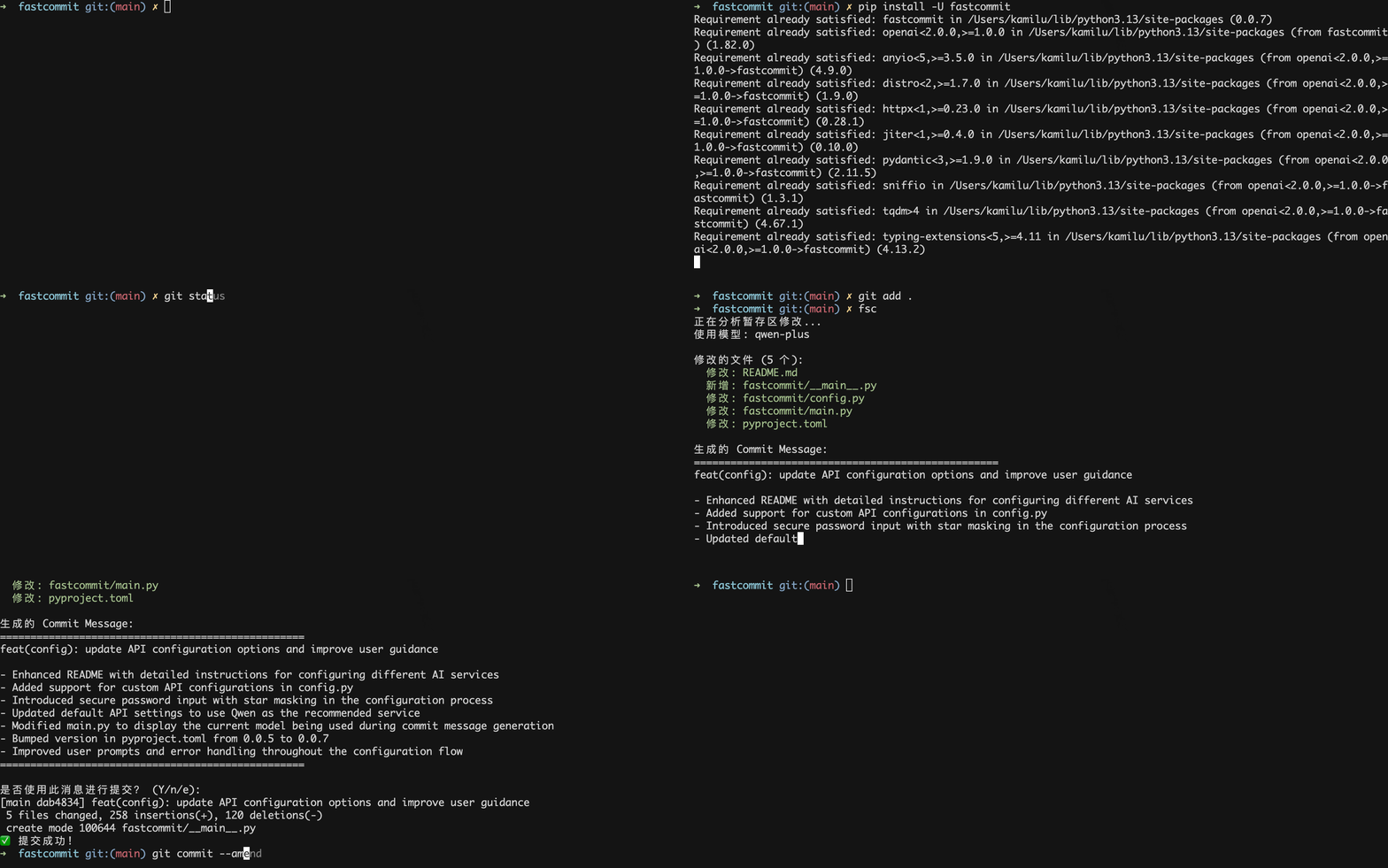
安装
pip install fastcommit
快速开始
1. 首次运行配置
第一次运行 fsc 时,会自动提示你输入 API 配置信息:
$ fsc
检测到首次运行,需要配置 API 信息...
==================================================
🚀 欢迎使用 FastCommit!
==================================================
首次运行需要配置 API 信息

支持的 AI 服务提供商:
1. 通义千问 (Qwen) (推荐)
   📖 API 文档: https://help.aliyun.com/zh/model-studio/first-api-call-to-qwen
   💡 API Key 申请: https://bailian.console.aliyun.com/?tab=api#/api

2. DeepSeek
   📖 API 文档: https://api-docs.deepseek.com/zh-cn/
   💡 API Key 申请: https://platform.deepseek.com/api_keys

3. 自定义
   💡 配置其他 OpenAI 兼容的 API 服务

请选择服务提供商 (1-通义千问, 2-DeepSeek, 3-自定义):
初始化时需要您提供对应的大模型 api, 如果您之前尚未使用过可以选择 通义千问 或者 deepseek 进行注册然后申请 api
- 通义千问(推荐,新用户每个模型100万免费token):
- deepseek(需要充值,响应速度略慢):
- API 文档: https://api-docs.deepseek.com/zh-cn/
- API Key 申请: https://platform.deepseek.com/api_keys
如果您使用其他大模型,例如claude/openai等只需要选择 3 并填入对应的 API Base URL, API key 即可
申请完 api key 之后填入对应的 API Key 即可
请输入以下信息:
API Base URL (默认: https://dashscope.aliyuncs.com/compatible-mode/v1/):
通义千问 API Key (必填): 1
模型名称 (默认: qwen-plus):
语言 (默认: en):

✅ 配置已保存!
📁 配置文件位置: /Users/kamilu/Desktop/fastcommit/fastcommit/user_config.json
🎯 使用模型: 通义千问 (qwen-plus)
💡 可以使用 'fsc config' 命令来更新配置
==================================================
2. 使用
# 1. 添加文件到暂存区
git add .

# 2. 生成 commit message
fsc
其他命令行选项
fsc --help                      # 显示帮助信息
fsc --version                   # 显示版本信息
fsc status                      # 显示暂存区文件状态
fsc see <commit>                # 总结指定commit的修改内容
fsc see -1                      # 总结上一个commit
fsc see abc123                  # 总结指定commit号
fsc config                      # 交互式配置
fsc config --show               # 显示当前配置
fsc config --api-key KEY        # 设置 API Key
fsc config --api-base URL       # 设置 API Base URL
fsc config --model MODEL        # 设置模型
fsc config --language LANG      # 设置语言 (zh/en)
配置管理
配置文件
配置文件自动保存在 fastcommit 模块安装目录下:fastcommit/user_config.json
{
    "api_base": "https://dashscope.aliyuncs.com/compatible-mode/v1",
    "api_key": "sk-xxx",
    "model": "qwen-plus",
    "language": "en"
}
您可以通过 fsc config 进行修改
配置选项说明
| 选项名 | 描述 | 默认值 |
|---|---|---|
api_base |
API 基础 URL | https://dashscope.aliyuncs.com/compatible-mode/v1 |
api_key |
API 密钥 (必填) | 无 |
model |
使用的模型 | qwen-plus |
language |
提交信息语言 (zh/en) | en |
重新配置
# 交互式重新配置
fsc config

# 或单独设置某个选项
fsc config --api-key your_new_api_key
fsc config --api-base https://api.openai.com/v1
fsc config --model gpt-4
fsc config --language zh
参考


Download files
Download the file for your platform. If you're not sure which to choose, learn more about installing packages.
Source Distribution
Built Distribution
Filter files by name, interpreter, ABI, and platform.
If you're not sure about the file name format, learn more about wheel file names.
Copy a direct link to the current filters
File details
Details for the file fastcommit-0.0.9.tar.gz.
File metadata
- Download URL: fastcommit-0.0.9.tar.gz
- Upload date:
- Size: 15.3 kB
- Tags: Source
- Uploaded using Trusted Publishing? No
- Uploaded via: poetry/2.1.3 CPython/3.13.3 Darwin/23.4.0
File hashes
| Algorithm | Hash digest | |
|---|---|---|
| SHA256 |
dcacab4761f7486a4df16bee40750d2a2d227c10579995b0400131a648f1b9cf
|
|
| MD5 |
61ca22d8c45053c10f552c3998ac95e5
|
|
| BLAKE2b-256 |
8b8898673483e4121a50375b21bbec715925af69dde0ab165f197eb94bd28461
|
File details
Details for the file fastcommit-0.0.9-py3-none-any.whl.
File metadata
- Download URL: fastcommit-0.0.9-py3-none-any.whl
- Upload date:
- Size: 17.9 kB
- Tags: Python 3
- Uploaded using Trusted Publishing? No
- Uploaded via: poetry/2.1.3 CPython/3.13.3 Darwin/23.4.0
File hashes
| Algorithm | Hash digest | |
|---|---|---|
| SHA256 |
58cff53bcf7bd57a5b5a20b27f1e4fa6eeef5707d1b5add1b955e6bf51636f09
|
|
| MD5 |
1a398f0e8c3e8b5089fe9f7f47ca923b
|
|
| BLAKE2b-256 |
06a42a06f903a755fe5aa90460b49438ab496e644d9d1191b69ac4a50407f191
|






