
faster-whisper-dictation



Real-time speech-to-text dictation powered by faster-whisper. Speak and watch text appear instantly in any application -- fully offline, no cloud APIs, no data leaves your machine.
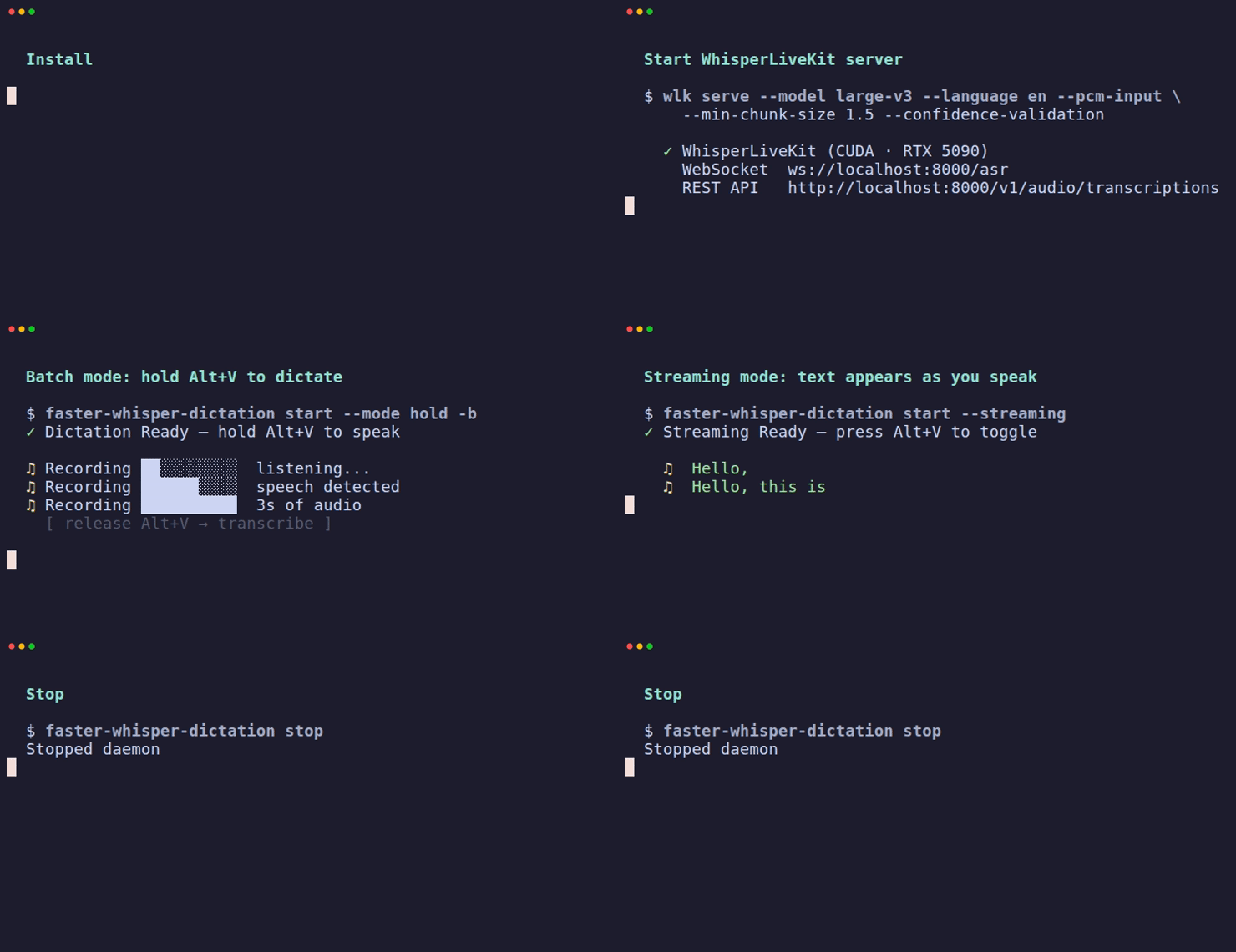
How it works
Microphone --> Silero VAD --> WhisperLiveKit Server --> Type into focused app
(sounddevice)  (local)       (WebSocket / REST)        (platform-native)
Audio is captured from your microphone, speech boundaries are detected locally using Silero VAD, each complete utterance is sent to a WhisperLiveKit server via WebSocket for transcription, and the result is typed into whatever application has focus.
Why local Whisper?
Cloud dictation services (Google, Apple, Microsoft) send your audio to remote servers. Every word you speak is processed, stored, and potentially used for training -- even sensitive conversations, passwords spoken aloud, or private thoughts.
faster-whisper-dictation keeps everything on your machine:
- Zero network dependency -- audio never leaves your computer
- No accounts or API keys -- install and run, no sign-up required
- No telemetry -- the tool collects nothing about your usage
- Full model control -- you choose which Whisper model to run and where
- Audit-friendly -- open source, read every line of what handles your audio
Even in server mode, the default configuration binds to localhost -- your audio stays on your machine.
Recent live benchmarks on the current build showed the daemon averaging 0.00% CPU while idle in server mode.
Features
- Batch transcription -- speak a full utterance, release the hotkey, and the complete text is typed at once (default, most accurate)
- Hold-to-talk -- hold the hotkey to dictate, release to stop
- Toggle mode -- press hotkey to start, press again to stop
- Configurable hotkey -- default
Alt+V, fully customizable - Background daemon --
start -bdetaches from terminal, logs to file - Cross-platform -- Linux (X11 + Wayland), macOS, Windows
- WhisperLiveKit backend -- server mode uses WhisperLiveKit via WebSocket (int16 PCM); also exposes an OpenAI-compatible REST API
- Local engine fallback -- optional built-in faster-whisper engine, no server needed
- Fully offline -- all processing happens on your machine
- Privacy-first -- no cloud, no accounts, no telemetry
- Streaming mode --
--streamingsends audio in real-time for live text output; best with fast, continuous speech (see Streaming mode below)
Install
Requires Python 3.10+ and uv (recommended) or pip.
# Install with uv (recommended — isolated env, globally available)
uv tool install faster-whisper-dictation

# Or with pip
pip install faster-whisper-dictation
Optional: local engine (no server needed)
# CPU only
uv tool install "faster-whisper-dictation[local]"

# With NVIDIA GPU acceleration
uv tool install "faster-whisper-dictation[local-gpu]"
Platform dependencies
Linux (X11)
sudo apt install -y xdotool xclip libportaudio2 libnotify-bin python3-evdev

# Recommended: enable evdev for reliable hold-to-talk mode
sudo usermod -aG input $USER   # then re-login
Linux (Wayland)
sudo apt install -y wl-clipboard ydotool libportaudio2 libnotify-bin
sudo systemctl enable --now ydotool
sudo usermod -aG input $USER   # then re-login
macOS / Windows
No additional system dependencies needed.
Quick start
Option A: WhisperLiveKit server (recommended)
WhisperLiveKit is a separate Whisper transcription server that must be installed and running before starting the dictation client. No Docker required — it's pip/uv installable.
# 1. Install WhisperLiveKit (separate from the dictation client)
uv tool install whisperlivekit

# 2. Start the server (Terminal 1) — must be running before the client
wlk serve --model large-v3 --language en --pcm-input \
  --min-chunk-size 1.5 --confidence-validation

# If your system has CUDA 13+ but needs CUDA 12 libs (e.g. from Ollama):
LD_LIBRARY_PATH=/usr/local/lib/ollama/cuda_v12:$LD_LIBRARY_PATH \
  wlk serve --model large-v3 --language en --pcm-input \
  --min-chunk-size 1.5 --confidence-validation

# 3. Install and start dictation (Terminal 2)
uv tool install faster-whisper-dictation
faster-whisper-dictation start              # batch mode (most accurate)
faster-whisper-dictation start --streaming  # real-time streaming mode

# 4. Press Alt+V to start/stop dictation
Note: The WhisperLiveKit server (
wlk) and the dictation client (faster-whisper-dictation) are installed separately. The server must be running before starting the client. If you see "Server not reachable", make surewlk serveis running in another terminal.
Option B: Local engine (no server needed)
# Install with built-in faster-whisper engine
uv tool install "faster-whisper-dictation[local]"

# Start (downloads model on first run, ~3GB)
faster-whisper-dictation start --engine local
Generate a config file (optional)
# Create a commented config file with all defaults
faster-whisper-dictation config --generate

# View current settings
faster-whisper-dictation config
Usage
# Start the dictation daemon (toggle mode, default)
faster-whisper-dictation start

# Start in hold-to-talk mode
faster-whisper-dictation start --mode hold

# Use a custom hotkey
faster-whisper-dictation start --hotkey "ctrl+shift+d"

# Use a different server
faster-whisper-dictation start --server-url http://my-server:8000

# Use local engine instead of server
faster-whisper-dictation start --engine local

# Real-time streaming (requires server tuning, see Streaming mode section)
faster-whisper-dictation start --streaming
faster-whisper-dictation start --streaming --mode hold

# Run as a background daemon (Unix only, no need for &)
faster-whisper-dictation start -b
faster-whisper-dictation start --background --mode hold

# Check status
faster-whisper-dictation status

# Stop the daemon
faster-whisper-dictation stop

# List audio devices
faster-whisper-dictation devices

# Transcribe a file
faster-whisper-dictation transcribe recording.wav

# Record and transcribe
faster-whisper-dictation transcribe --record 5

# Show current config
faster-whisper-dictation config

# Generate default config file
faster-whisper-dictation config --generate
Configuration
Settings can be configured via CLI flags, environment variables, or config file. Priority: CLI flags > env vars > config file > defaults.
Config file location: ~/.config/faster-whisper-dictation/config.toml
[server]
url = "http://localhost:8000"
model = "Systran/faster-whisper-large-v3"
language = "en"
timeout = 10            # request timeout in seconds
# prompt = ""           # domain vocabulary or style example (not instructions)
# temperature = 0.0     # 0.0 = accurate, higher = creative
# hotwords = ""         # comma-separated words to boost recognition

[hotkey]
binding = "alt+v"       # modifiers + single letter, e.g. "alt+v" or "ctrl+shift+d"
mode = "toggle"         # "toggle" or "hold"

[vad]
threshold = 0.6         # Silero VAD confidence threshold (0.0-1.0)
silence_ms = 200        # silence duration to end an utterance
min_speech_ms = 250     # minimum speech duration to accept
max_speech_s = 90.0     # max single utterance duration (seconds)

[audio]
sample_rate = 16000
channels = 1
device = null           # null = system default, or device name/index

[engine]
type = "server"         # "server" or "local"
compute_type = "auto"    # "auto", "float16" (GPU), "int8" (CPU)
device = "auto"          # "auto", "cuda", "cpu"

[websocket]
reconnect_attempts = 3  # retries on connection failure
reconnect_delay = 1.0   # seconds between retries
Environment variables
| Variable | Default | Description |
|---|---|---|
WHISPER_SERVER_URL |
http://localhost:8000 |
Whisper server URL |
WHISPER_MODEL |
Systran/faster-whisper-large-v3 |
Model name |
WHISPER_LANG |
en |
Language code |
WHISPER_TIMEOUT |
10 |
Request timeout (seconds) |
WHISPER_PROMPT |
(empty) | Domain vocabulary or style example for Whisper |
WHISPER_TEMPERATURE |
0.0 |
Transcription temperature (0.0 = accurate) |
WHISPER_HOTWORDS |
(empty) | Comma-separated words to boost recognition |
DICTATION_HOTKEY |
alt+v |
Hotkey binding |
DICTATION_MODE |
toggle |
toggle or hold |
DICTATION_ENGINE |
server |
server or local |
DICTATION_ENGINE_COMPUTE |
auto |
Compute type: float16, int8, auto |
DICTATION_ENGINE_DEVICE |
auto |
Device: cuda, cpu, auto |
DICTATION_AUDIO_DEVICE |
(system default) | Audio input device name |
DICTATION_SAMPLE_RATE |
16000 |
Audio sample rate (Hz) |
DICTATION_VAD_THRESHOLD |
0.6 |
VAD confidence threshold (0.0-1.0) |
DICTATION_VAD_SILENCE_MS |
200 |
Silence duration to end utterance (ms) |
DICTATION_VAD_MIN_SPEECH_MS |
250 |
Minimum speech duration to accept (ms) |
DICTATION_VAD_MAX_SPEECH_S |
90.0 |
Maximum single utterance duration (s) |
DICTATION_VAD_MODEL_URL |
(pinned release) | Custom Silero VAD ONNX model URL |
DICTATION_VAD_VERIFY_HASH |
false |
Enable SHA-256 hash verification on model download |
DICTATION_PASTE_DELAY |
0.15 |
Clipboard paste delay in seconds (0.0-10.0) |
DICTATION_WS_RECONNECT_ATTEMPTS |
3 |
WebSocket reconnection attempts |
DICTATION_WS_RECONNECT_DELAY |
1.0 |
Delay between reconnection attempts (s) |
Architecture
faster-whisper-dictation/
├── src/whisper_dictation/
│   ├── cli.py              # CLI: start, stop, status, config, devices, transcribe
│   ├── config.py           # TOML config + env vars + CLI flags + validation
│   ├── daemon.py           # Main daemon: hotkey -> audio -> VAD -> engine -> typer
│   ├── engine/
│   │   ├── __init__.py     # create_engine() factory
│   │   ├── base.py         # TranscriptionEngine ABC
│   │   ├── server.py       # REST API engine (OpenAI-compatible, fallback)
│   │   ├── whisperlivekit.py # WhisperLiveKit WebSocket engine (batch + streaming)
│   │   └── local.py        # Local faster-whisper engine
│   ├── hotkey/
│   │   └── listener.py     # pynput + evdev hotkey detection
│   ├── audio.py            # Audio capture via sounddevice
│   ├── vad.py              # Silero VAD (ONNX, SHA-256 verified)
│   ├── typer.py            # Platform-aware text input (clipboard + paste)
│   └── notifier.py         # Cross-platform desktop notifications
├── tests/                  # 519 tests, 100% coverage
├── .github/workflows/      # CI: lint + test on Python 3.10-3.14
└── pyproject.toml          # Package config (uv/pip installable)
Engine modes
| Mode | Backend | Setup | Best for |
|---|---|---|---|
| Server (default) | WhisperLiveKit via WebSocket | uv tool install whisperlivekit && wlk serve --model large-v3 --pcm-input |
GPU users, streaming + batch, shared servers |
| Local | Built-in faster-whisper | uv tool install "faster-whisper-dictation[local]" |
Simple setup, single-user, offline |
Server mode uses WebSocket for both batch and streaming transcription (shared GPU model, lower latency). REST API is available as a fallback.
Platform support
| Feature | Linux X11 | Linux Wayland | macOS | Windows |
|---|---|---|---|---|
| Hotkey | evdev (preferred) / pynput | evdev | pynput | pynput |
| Text input | xdotool + xclip | ydotool + wl-clipboard | pbcopy + osascript | ctypes |
| Notifications | notify-send | notify-send | osascript | plyer |
| Audio capture | sounddevice | sounddevice | sounddevice | sounddevice |
WhisperLiveKit server
WhisperLiveKit is a pip-installable Whisper transcription server that exposes both a WebSocket endpoint (/asr) for streaming int16 PCM audio and an OpenAI-compatible REST endpoint (/v1/audio/transcriptions) for batch transcription.
Installation
# Recommended: install as a uv tool (isolated env, globally available)
uv tool install whisperlivekit

# Or with pip
pip install whisperlivekit
Running the server
# Recommended (works for both batch and streaming):
wlk serve --model large-v3 --language en --pcm-input \
  --min-chunk-size 1.5 --confidence-validation

# If CUDA 12 libs are not in default path (e.g. system has CUDA 13):
LD_LIBRARY_PATH=/usr/local/lib/ollama/cuda_v12:$LD_LIBRARY_PATH \
  wlk serve --model large-v3 --language en --pcm-input \
  --min-chunk-size 1.5 --confidence-validation

# Specify host and port
wlk serve --model large-v3 --language en --pcm-input --host 0.0.0.0 --port 8000
CUDA 12 required: WhisperLiveKit's faster-whisper backend needs
libcublas.so.12. If your system has CUDA 13+, setLD_LIBRARY_PATHto include CUDA 12 libraries. Without this, the model loads but silently produces empty transcriptions.
Server capabilities
| Feature | Description |
|---|---|
| WebSocket streaming | /asr endpoint, int16 PCM audio |
| REST API | /v1/audio/transcriptions (OpenAI-compatible) |
| GPU acceleration | CUDA via whisperlivekit[gpu] |
| CPU mode | Works without GPU, slower |
| Diarization | Speaker identification support |
| Translation | Translate speech to English |
| Multiple models | Any faster-whisper compatible model |
Resource usage
| Setting | GPU mode | CPU mode |
|---|---|---|
| Compute | NVIDIA CUDA (float16) | CPU (int8) |
| Memory | ~2GB VRAM | ~2GB RAM |
| Default port | 8000 |
8000 |
API compatibility
The server exposes an OpenAI-compatible transcription endpoint. You can point faster-whisper-dictation at any compatible server:
# Use with a remote server
faster-whisper-dictation start --server-url https://my-whisper.example.com

# Use with Groq
faster-whisper-dictation start --server-url https://api.groq.com/openai
Security
- No command injection -- all subprocess calls use list arguments, never
shell=True. Windows clipboard uses Win32 API directly (no PowerShell). Wayland uses--separator to prevent flag injection. - Clipboard hygiene -- previous clipboard is saved before paste and restored after via
finallyblocks, under a thread lock to prevent concurrent corruption. - PID file locking -- exclusive
fcntl.flockprevents duplicate daemon instances (falls back to simple PID on Windows). - Model integrity -- ONNX VAD model downloads use a 60s timeout. SHA-256 verification is opt-in (
DICTATION_VAD_VERIFY_HASH=true). Partial downloads are atomically cleaned up. Custom model URLs validated to use http/https. - Config validation -- all values validated with clear error messages. Server URLs checked for http/https scheme. Invalid env vars rejected at startup.
- Localhost by default -- the dictation client connects to
localhostby default. To restrict server network exposure, runwlk serve --host 127.0.0.1. - No telemetry -- zero data collection, no phone-home, no analytics.
- WebSocket safety -- message size capped at 1MB, lines per server message capped at 1000 to prevent memory exhaustion. Non-loopback unencrypted WebSocket connections trigger a warning.
Transcription quality
The default settings are tuned for accurate dictation out of the box. Whisper large-v3 handles punctuation and capitalization well without any prompt.
Batch vs streaming
| Batch (default) | Streaming (--streaming) |
|
|---|---|---|
| How it works | Record full utterance → send all audio → type result | Send audio in real-time → type words as they arrive |
| Accuracy | Excellent — full audio context | Good for fast speech, weaker for slow/paused speech |
| Latency | Wait until you stop speaking | ~1.5s behind real-time |
| Best for | Careful dictation, slow speech, accuracy-first | Fast continuous dictation, real-time feedback |
Recommendation: Start with batch mode. Switch to streaming only if you need real-time feedback and speak at a natural-to-fast pace.
Tuning tips
server.hotwords— Comma-separated list of words to boost recognition. Useful for proper nouns, technical terms, or words Whisper frequently gets wrong. Example:"FastAPI,PyTorch,Kubernetes,streaming,toggle".server.prompt— Empty by default. Whisper treats this as text to emulate (not instructions). Use it for domain vocabulary, e.g."We deployed the Kubernetes cluster and updated the Docker containers."— this helps the model recognize specific terms. Do not write instructions like "Use proper punctuation" — Whisper will misinterpret them and produce worse output.server.temperature— Defaults to0.0(most deterministic). Higher values (0.2-0.5) produce more varied output but less accurate transcription.vad.threshold— Defaults to0.6. Controls how aggressively Silero VAD detects speech. Higher values (0.7-0.8) reduce false triggers from background noise but may clip quiet speech. Lower values (0.3-0.5) are more sensitive.vad.silence_ms— Defaults to200. How long to wait after speech stops before considering the utterance complete. Increase to500-800if your speech has natural pauses that get cut off.
Model selection
| Model | Size | Speed | Accuracy | VRAM |
|---|---|---|---|---|
large-v3 |
3GB | Slower | Best | ~3GB |
large-v3-turbo |
1.6GB | Fast | Very good | ~2GB |
medium |
1.5GB | Fast | Good | ~2GB |
small |
500MB | Very fast | Acceptable | ~1GB |
Use large-v3 for best quality (default). Use large-v3-turbo for a good speed/quality balance. Smaller models are faster but less accurate, especially for accented speech or technical vocabulary.
# Example: use turbo model for faster processing
wlk serve --model large-v3-turbo --language en --pcm-input \
  --min-chunk-size 1.5 --confidence-validation
Streaming mode
Streaming mode (--streaming) sends audio to the server in real-time and types text as it arrives, instead of waiting for the full utterance. This trades some accuracy for lower latency.
Server setup for streaming
The default WhisperLiveKit config processes audio every 100ms, which produces garbled output for slow or paused speech. For dictation, increase the processing window:
# Optimized for streaming dictation:
wlk serve --model large-v3 --language en --pcm-input \
  --min-chunk-size 1.5 \
  --confidence-validation

# If CUDA 12 libs are not in default path (e.g. system has CUDA 13):
LD_LIBRARY_PATH=/usr/local/lib/ollama/cuda_v12:$LD_LIBRARY_PATH \
  wlk serve --model large-v3 --language en --pcm-input \
  --min-chunk-size 1.5 --confidence-validation

# Start the client in streaming mode (in another terminal):
faster-whisper-dictation start --streaming

# Or with hold-to-talk:
faster-whisper-dictation start --streaming --mode hold
Server tuning flags
| Flag | Default | Recommended | Why |
|---|---|---|---|
--min-chunk-size |
0.1s | 1.5 | Accumulates 1.5s of audio before running inference. Gives Whisper enough context for accurate decoding, especially with slow speech. |
--confidence-validation |
off | on | Commits high-confidence tokens immediately without waiting for LocalAgreement confirmation. Reduces text flip-flopping. |
--buffer_trimming |
segment | sentence | (optional) Sentence-based buffer trimming for cleaner output. |
--buffer_trimming_sec |
15 | 25-30 | (optional) Keeps more audio context. Tradeoff: higher VRAM usage. |
Do NOT use
--no-vac: VAC (server-side Voice Activity Controller) prevents silence from reaching Whisper. Disabling it causes hallucination loops where Whisper repeats phrases like "Thank you" during silence. Keep VAC enabled (the default). This is a known open issue in WhisperLiveKit.
Streaming quality notes
| Speaking style | Quality | Notes |
|---|---|---|
| Fast, continuous | Good | Enough audio context per processing window |
| Normal pace | Good with tuning | --min-chunk-size 1.5 is key |
| Slow with pauses | Acceptable | Some words may be delayed; batch mode is better for this |
Recommendation: Use batch mode (default, no --streaming) for highest accuracy. Streaming is best for fast, continuous dictation where real-time feedback matters.
Tips for best results
- Speak at a natural pace — streaming quality improves significantly with continuous speech vs. slow, fragmented speech with long pauses
- Use a good microphone — a headset or close-range mic reduces background noise and improves recognition
- Set hotwords for domain-specific vocabulary you use frequently (
server.hotwordsin config) - Restart the WLK server if quality degrades after extended use — each new WebSocket session gets fresh state, but the server process benefits from a periodic restart
- Use batch mode for important text — switch between streaming (fast drafts) and batch (accurate final text) depending on the task
Linux: hold mode requires evdev
On Linux, hold-to-talk in streaming mode works best with evdev (not pynput). evdev natively distinguishes real key releases from X11 auto-repeat, so hold mode works indefinitely.
# Add your user to the input group for evdev access:
sudo usermod -aG input $USER
# Then log out and log back in
Without evdev, pynput is used as a fallback. Hold mode with pynput has a 250ms debounce to handle X11 auto-repeat, but may still release prematurely on some systems. Toggle mode works with both backends.
Troubleshooting
| Problem | Solution |
|---|---|
| Hotkey not responding | Check faster-whisper-dictation status. On Linux, ensure your user is in the input group (sudo usermod -aG input $USER then re-login) for evdev support. |
| Hold mode releases early | On Linux, install evdev access (see above). Without it, pynput's X11 backend has auto-repeat issues. Tune with DICTATION_HOLD_DEBOUNCE_MS=300. |
| Streaming garbled/slow speech | Increase server --min-chunk-size (default 0.1s, try 1.5). See Streaming mode. |
| "Server not reachable" | Start the WhisperLiveKit server: wlk serve --model large-v3 --language en --pcm-input. Or use --engine local. |
| No text appears | Verify your mic: faster-whisper-dictation transcribe --record 5 |
| Wrong microphone | List devices with faster-whisper-dictation devices and set audio.device in config. |
| Text in wrong window | Text is typed into the focused window when transcription completes. Keep focus on target app. |
| Whisper hallucinations | Increase VAD threshold: vad.threshold = 0.7 in config. In streaming mode, repeated phrases (e.g. "Thank you") during silence are auto-suppressed after 2 occurrences. |
| Wrong words (e.g. "passed" instead of "fast") | Set server.prompt or server.hotwords in config to bias transcription. |
| ydotool not working | Run sudo systemctl start ydotool and add user to input group. |
Development
# Clone and install dev dependencies
git clone https://github.com/bhargavchippada/faster-whisper-dictation.git
cd faster-whisper-dictation
uv sync --extra dev

# Run tests
uv run pytest -v

# Run tests with coverage
uv run pytest tests/ --cov=whisper_dictation --cov-report=term-missing

# Build and install globally (editable — picks up code changes automatically)
uv build --clear --no-cache
uv tool install -e . --force

# Lint
uv run ruff check src/ tests/
Contributing
Contributions are welcome. Please open an issue first to discuss what you'd like to change.
- Fork the repository
- Create a feature branch (
git checkout -b feature/my-change) - Install dev dependencies:
uv sync --extra dev - Write tests first, then implement
- Ensure tests pass and coverage is maintained
- Open a pull request
License
1 maintainer

Download files
Download the file for your platform. If you're not sure which to choose, learn more about installing packages.
Source Distribution
Built Distribution
Filter files by name, interpreter, ABI, and platform.
If you're not sure about the file name format, learn more about wheel file names.
Copy a direct link to the current filters
File details
Details for the file faster_whisper_dictation-0.2.0.tar.gz.
File metadata
- Download URL: faster_whisper_dictation-0.2.0.tar.gz
- Upload date:
- Size: 224.7 kB
- Tags: Source
- Uploaded using Trusted Publishing? No
- Uploaded via:
twine/6.2.0 CPython/3.13.12
File hashes
| Algorithm | Hash digest | |
|---|---|---|
| SHA256 |
0bc22b0bd83018334961424535655159adf59f001f790fa3fb324e8d0edf027a
|
|
| MD5 |
725b77c102ec7086ef7b963e0e23f3ec
|
|
| BLAKE2b-256 |
5efa9c2fbcc13881e9a7e5e2bec6e6059f037d753eef077864e783559c6b0297
|
File details
Details for the file faster_whisper_dictation-0.2.0-py3-none-any.whl.
File metadata
- Download URL: faster_whisper_dictation-0.2.0-py3-none-any.whl
- Upload date:
- Size: 49.6 kB
- Tags: Python 3
- Uploaded using Trusted Publishing? No
- Uploaded via:
twine/6.2.0 CPython/3.13.12
File hashes
| Algorithm | Hash digest | |
|---|---|---|
| SHA256 |
85342ea23a496aeb8a12bce0fdee1f158ce83b50ad549b01241cd87fa72218ce
|
|
| MD5 |
b745fa193c9665422febeba2743727fa
|
|
| BLAKE2b-256 |
091296835744e1f925b98bc1d7e247a8c640a9791f118824d41ebe2451191eb1
|














