
Real-time speech-to-text dictation powered by faster-whisper

Project description
faster-whisper-dictation



Real-time speech-to-text dictation powered by faster-whisper. Speak and watch text appear instantly in any application — fully offline, no cloud APIs, no data leaves your machine.
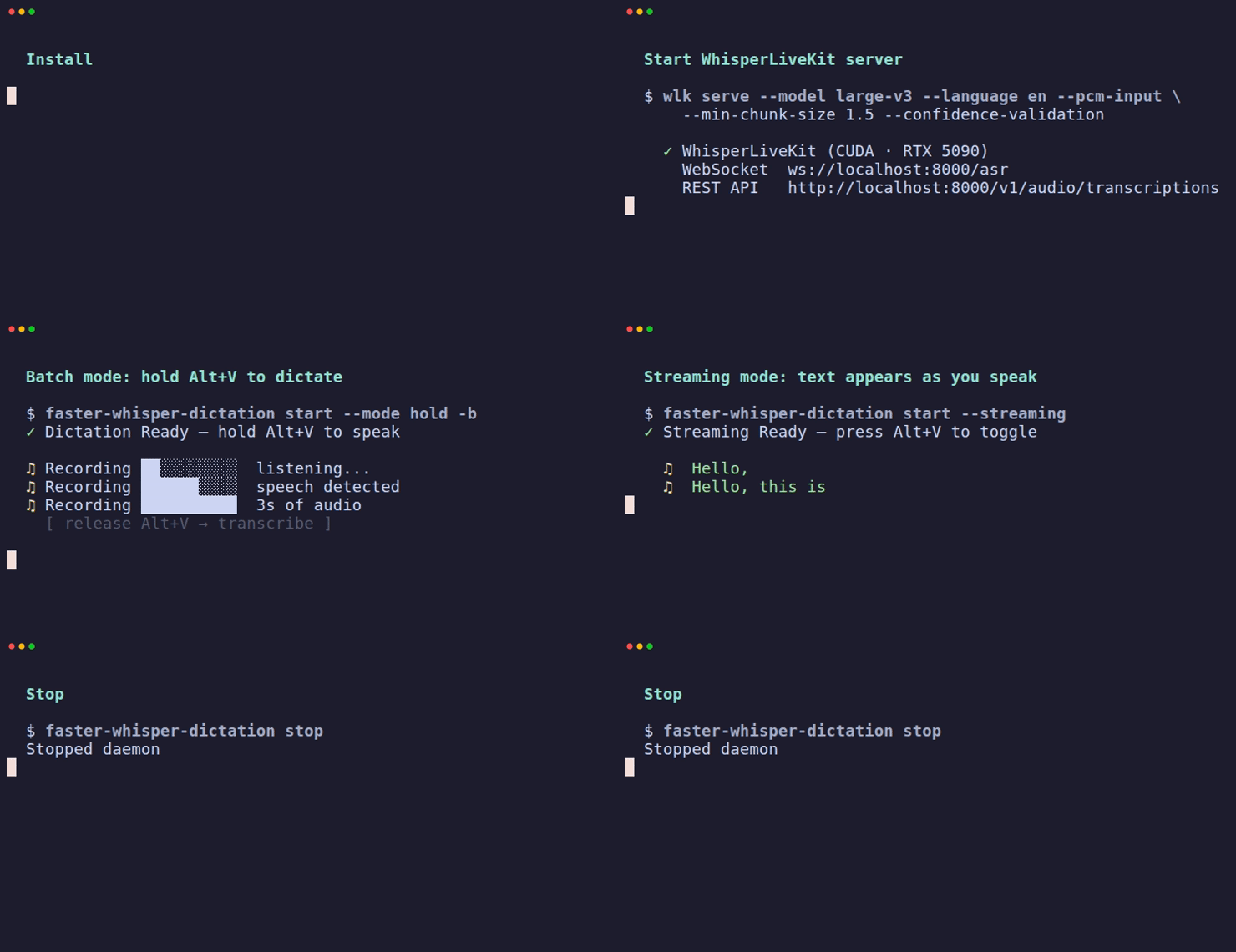
How it works
Microphone ──▶ Silero VAD ──▶ Whisper Server ──▶ Type into focused app
(sounddevice)  (local)        (REST API)         (platform-native)
Audio is captured from your microphone, speech boundaries are detected locally using Silero VAD, each complete utterance is sent to a Whisper server for transcription, and the result is typed into whatever application has focus.
Why local Whisper?
Cloud dictation services (Google, Apple, Microsoft) send your audio to remote servers. Every word you speak is processed, stored, and potentially used for training — even sensitive conversations, passwords spoken aloud, or private thoughts.
faster-whisper-dictation keeps everything on your machine:
- Zero network dependency — audio never leaves your computer (with local engine or local Docker)
- No accounts or API keys — install and run, no sign-up required
- No telemetry — the tool collects nothing about your usage
- Full model control — you choose which Whisper model to run and where
- Audit-friendly — open source, read every line of what handles your audio
Even in server mode, the default configuration binds the Docker container to localhost — your audio stays on your LAN at most.
Recent live benchmarks on the current build showed the daemon averaging 0.00% CPU while idle in server mode.
Features
- Batch transcription — speak a full utterance, release the hotkey, and the complete text is typed at once (default, most accurate)
- Hold-to-talk — hold the hotkey to dictate, release to stop
- Toggle mode — press hotkey to start, press again to stop
- Configurable hotkey — default
Alt+V, fully customizable - Background daemon —
start -bdetaches from terminal, logs to file - Cross-platform — Linux (X11 + Wayland), macOS, Windows
- Flexible backend — works with any OpenAI-compatible STT server (local Docker, remote, Groq, etc.)
- Local engine fallback — optional built-in faster-whisper engine, no server needed
- Fully offline — all processing happens on your machine
- Privacy-first — no cloud, no accounts, no telemetry
- Streaming mode (experimental) —
--streamingsends partial audio for real-time text, but quality is lower than batch mode
Install
Requires Python 3.10+.
# Install with uv (recommended)
uv tool install faster-whisper-dictation

# Or with pipx
pipx install faster-whisper-dictation

# Or with pip
pip install faster-whisper-dictation

# Build release artifacts from a checkout
uv build --clear --no-cache
Optional: local engine (no Docker server needed)
# CPU only
uv tool install "faster-whisper-dictation[local]"

# With NVIDIA GPU acceleration
uv tool install "faster-whisper-dictation[local-gpu]"
Platform dependencies
Linux (X11)
sudo apt install -y xdotool xclip libportaudio2 libnotify-bin
Linux (Wayland)
sudo apt install -y wl-clipboard ydotool libportaudio2 libnotify-bin
sudo systemctl enable --now ydotool
sudo usermod -aG input $USER   # then re-login
macOS / Windows
No additional system dependencies needed.
Quick start
Option A: With Docker server (recommended for GPU users)
# 1. Clone the repo (Docker compose files are not in the pip package)
git clone https://github.com/bhargavchippada/faster-whisper-dictation.git
cd faster-whisper-dictation

# 2. Start the whisper server
docker compose up -d          # GPU (NVIDIA CUDA)
# docker compose -f docker-compose.cpu.yml up -d   # CPU fallback

# 3. Install and start dictation
pip install faster-whisper-dictation
faster-whisper-dictation start

# 4. Press Alt+V to start/stop dictation
Option B: Local engine (no Docker, no clone needed)
# Install with built-in faster-whisper engine
uv tool install "faster-whisper-dictation[local]"

# Start (downloads model on first run, ~3GB)
faster-whisper-dictation start --engine local
Generate a config file (optional)
# Create a commented config file with all defaults
faster-whisper-dictation config --generate

# View current settings
faster-whisper-dictation config
Usage
# Start the dictation daemon (toggle mode, default)
faster-whisper-dictation start

# Start in hold-to-talk mode
faster-whisper-dictation start --mode hold

# Use a custom hotkey
faster-whisper-dictation start --hotkey "ctrl+shift+d"

# Use a different server
faster-whisper-dictation start --server-url http://my-server:10300

# Use local engine instead of server
faster-whisper-dictation start --engine local

# Experimental: real-time streaming (lower accuracy, WIP)
faster-whisper-dictation start --streaming

# Run as a background daemon (Unix only, no need for &)
faster-whisper-dictation start -b
faster-whisper-dictation start --background --mode hold

# Check status
faster-whisper-dictation status

# Stop the daemon
faster-whisper-dictation stop

# List audio devices
faster-whisper-dictation devices

# Transcribe a file
faster-whisper-dictation transcribe recording.wav

# Record and transcribe
faster-whisper-dictation transcribe --record 5

# Show current config
faster-whisper-dictation config

# Generate default config file
faster-whisper-dictation config --generate
Configuration
Settings can be configured via CLI flags, environment variables, or config file. Priority: CLI flags > env vars > config file > defaults.
Config file location: ~/.config/faster-whisper-dictation/config.toml
[server]
url = "http://localhost:10300"
model = "Systran/faster-whisper-large-v3"
language = "en"
timeout = 10            # request timeout in seconds
# prompt = ""           # bias transcription (e.g. domain vocabulary)
# temperature = 0.0     # 0.0 = accurate, higher = creative
# hotwords = ""         # comma-separated words to boost recognition

[hotkey]
binding = "alt+v"       # any key combo supported by your platform
mode = "toggle"         # "toggle" or "hold"

[vad]
threshold = 0.5         # Silero VAD confidence threshold (0.0-1.0)
silence_ms = 200        # silence duration to end an utterance
min_speech_ms = 250     # minimum speech duration to accept
max_speech_s = 90.0     # max single utterance duration (seconds)

[audio]
sample_rate = 16000
channels = 1
device = null           # null = system default, or device name/index

[engine]
type = "server"         # "server" or "local"
compute_type = "float16" # "float16" (GPU), "int8" (CPU), "auto"
device = "auto"          # "auto", "cuda", "cpu"
Environment variables
| Variable | Default | Description |
|---|---|---|
WHISPER_SERVER_URL |
http://localhost:10300 |
Whisper server URL |
WHISPER_MODEL |
Systran/faster-whisper-large-v3 |
Model name |
WHISPER_LANG |
en |
Language code |
WHISPER_TIMEOUT |
10 |
Request timeout (seconds) |
WHISPER_PROMPT |
(empty) | Bias transcription (e.g. domain vocabulary) |
WHISPER_TEMPERATURE |
0.0 |
Transcription temperature (0.0 = accurate) |
WHISPER_HOTWORDS |
(empty) | Comma-separated words to boost recognition |
DICTATION_HOTKEY |
alt+v |
Hotkey binding |
DICTATION_MODE |
toggle |
toggle or hold |
DICTATION_ENGINE |
server |
server or local |
DICTATION_ENGINE_COMPUTE |
auto |
Compute type: float16, int8, auto |
DICTATION_ENGINE_DEVICE |
auto |
Device: cuda, cpu, auto |
DICTATION_AUDIO_DEVICE |
(system default) | Audio input device name |
DICTATION_SAMPLE_RATE |
16000 |
Audio sample rate (Hz) |
DICTATION_VAD_THRESHOLD |
0.5 |
VAD confidence threshold (0.0-1.0) |
DICTATION_VAD_SILENCE_MS |
200 |
Silence duration to end utterance (ms) |
DICTATION_VAD_MIN_SPEECH_MS |
250 |
Minimum speech duration to accept (ms) |
DICTATION_VAD_MAX_SPEECH_S |
90.0 |
Maximum single utterance duration (s) |
DICTATION_VAD_MODEL_URL |
(pinned release) | Custom Silero VAD ONNX model URL |
DICTATION_VAD_VERIFY_HASH |
false |
Enable SHA-256 hash verification on model download |
DICTATION_PASTE_DELAY |
0.15 |
Clipboard paste delay in seconds (0.0-10.0) |
Architecture
faster-whisper-dictation/
├── src/whisper_dictation/
│   ├── cli.py              # CLI: start, stop, status, config, devices, transcribe
│   ├── config.py           # TOML config + env vars + CLI flags + validation
│   ├── daemon.py           # Main daemon: hotkey → audio → VAD → engine → typer
│   ├── engine/
│   │   ├── __init__.py     # create_engine() factory
│   │   ├── base.py         # TranscriptionEngine ABC
│   │   ├── server.py       # REST API engine (OpenAI-compatible)
│   │   └── local.py        # Local faster-whisper engine
│   ├── hotkey/
│   │   └── listener.py     # pynput + evdev hotkey detection
│   ├── audio.py            # Audio capture via sounddevice
│   ├── vad.py              # Silero VAD (ONNX, SHA-256 verified)
│   ├── typer.py            # Platform-aware text input (clipboard + paste)
│   └── notifier.py         # Cross-platform desktop notifications
├── tests/                  # 345 tests, 100% coverage
├── .github/workflows/      # CI: lint + test on Python 3.10-3.14
├── docker-compose.yml      # GPU server
├── docker-compose.cpu.yml  # CPU server
└── pyproject.toml          # Package config (uv/pip installable)
Engine modes
| Mode | Backend | Setup | Best for |
|---|---|---|---|
| Server (default) | Docker container with Speaches | docker compose up -d |
GPU users, shared servers, flexibility |
| Local | Built-in faster-whisper | pip install "faster-whisper-dictation[local]" |
Simple setup, single-user, offline |
Both engines expose the same interface — the dictation daemon doesn't care where transcription happens.
Platform support
| Feature | Linux X11 | Linux Wayland | macOS | Windows |
|---|---|---|---|---|
| Hotkey | pynput | evdev | pynput | pynput |
| Text input | xdotool + xclip | ydotool + wl-clipboard | pbcopy + osascript | ctypes |
| Notifications | notify-send | notify-send | osascript | plyer |
| Audio capture | sounddevice | sounddevice | sounddevice | sounddevice |
Docker server
The server component runs Speaches, which provides an OpenAI-compatible transcription API.
| Setting | GPU mode | CPU mode |
|---|---|---|
| Compose file | docker-compose.yml |
docker-compose.cpu.yml |
| Image | speaches:0.9.0-rc.3-cuda |
speaches:0.9.0-rc.3-cpu |
| Compute | NVIDIA CUDA (float16) | CPU (int8) |
| Memory | ~600MB VRAM | ~2GB RAM |
| Port | 10300 (localhost) |
10300 (localhost) |
docker compose up -d      # start
docker compose logs -f    # view logs
docker compose down       # stop
API compatibility
The server exposes an OpenAI-compatible transcription endpoint. You can point faster-whisper-dictation at any compatible server:
# Use with a remote server
faster-whisper-dictation start --server-url https://my-whisper.example.com

# Use with Groq
faster-whisper-dictation start --server-url https://api.groq.com/openai
Security
- No command injection — all subprocess calls use list arguments, never
shell=True. Windows clipboard uses Win32 API directly (no PowerShell). Wayland uses--separator to prevent flag injection. - Clipboard hygiene — previous clipboard is saved before paste and restored after via
finallyblocks, under a thread lock to prevent concurrent corruption. - PID file locking — exclusive
fcntl.flockprevents duplicate daemon instances (falls back to simple PID on Windows). - Model integrity — ONNX VAD model downloads use a 60s timeout. SHA-256 verification is opt-in (
DICTATION_VAD_VERIFY_HASH=true). Partial downloads are atomically cleaned up. Custom model URLs validated to use http/https. - Config validation — all values validated with clear error messages. Server URLs checked for http/https scheme. Invalid env vars rejected at startup.
- No network exposure — Docker server binds to
127.0.0.1only by default. - No telemetry — zero data collection, no phone-home, no analytics.
Troubleshooting
| Problem | Solution |
|---|---|
| Hotkey not responding | Check faster-whisper-dictation status. On Wayland, ensure your user is in the input group. |
| "Server not reachable" | Start the Docker server: docker compose up -d. Or use --engine local. |
| No text appears | Verify your mic: faster-whisper-dictation transcribe --record 5 |
| Wrong microphone | List devices with faster-whisper-dictation devices and set audio.device in config. |
| Text in wrong window | Text is typed into the focused window when transcription completes. Keep focus on target app. |
| Whisper hallucinations | Increase VAD threshold: vad.threshold = 0.7 in config. |
| Wrong words (e.g. "passed" instead of "fast") | Set server.prompt or server.hotwords in config to bias transcription. |
| ydotool not working | Run sudo systemctl start ydotool and add user to input group. |
| Docker volume permission error | docker compose down && docker volume rm faster-whisper-dictation_faster-whisper-models && docker compose up -d |
Development
# Clone and install dev dependencies
git clone https://github.com/bhargavchippada/faster-whisper-dictation.git
cd faster-whisper-dictation
uv sync --dev

# Run tests
uv run pytest -v

# Run tests with coverage
uv run pytest tests/ --cov=whisper_dictation --cov-report=term-missing

# Build fresh artifacts without cache
uv build --clear --no-cache

# Lint
uv run ruff check src/ tests/
Contributing
Contributions are welcome. Please open an issue first to discuss what you'd like to change.
- Fork the repository
- Create a feature branch (
git checkout -b feature/my-change) - Install dev dependencies:
uv sync --dev - Write tests first, then implement
- Ensure tests pass and coverage is maintained
- Open a pull request
License
Release history Release notifications | RSS feed


Download files
Download the file for your platform. If you're not sure which to choose, learn more about installing packages.
Source Distribution
Built Distribution
Filter files by name, interpreter, ABI, and platform.
If you're not sure about the file name format, learn more about wheel file names.
Copy a direct link to the current filters
File details
Details for the file faster_whisper_dictation-0.1.0.tar.gz.
File metadata
- Download URL: faster_whisper_dictation-0.1.0.tar.gz
- Upload date:
- Size: 196.5 kB
- Tags: Source
- Uploaded using Trusted Publishing? No
- Uploaded via: twine/6.2.0 CPython/3.13.12
File hashes
| Algorithm | Hash digest | |
|---|---|---|
| SHA256 |
753a7e2c9897278c5a1e17b4dc42b0795b588c100a0c4073204104a50761cb18
|
|
| MD5 |
fc952978e2880301ca7be92bd48bfb97
|
|
| BLAKE2b-256 |
527816e68e23f3002e926630643f88e02abaf93e8581515fa3a861136f993b21
|
File details
Details for the file faster_whisper_dictation-0.1.0-py3-none-any.whl.
File metadata
- Download URL: faster_whisper_dictation-0.1.0-py3-none-any.whl
- Upload date:
- Size: 34.7 kB
- Tags: Python 3
- Uploaded using Trusted Publishing? No
- Uploaded via: twine/6.2.0 CPython/3.13.12
File hashes
| Algorithm | Hash digest | |
|---|---|---|
| SHA256 |
e6baeeb17ddd1c22966090dadf2d8cddcda3a18cd6231f03b652d2fe4748a2d8
|
|
| MD5 |
8ff32c4558eddba07cbd7cfb504d74ee
|
|
| BLAKE2b-256 |
be5966ed5327bb6346deec34343c41d2dbff7ad46d198a86ee2e90a8c0b42cb0
|






