
FastTurbo
Watch two-dimensional turbulence evolve on your GPU.
FastTurbo combines an interactive desktop application with a Python API for simulating decaying, incompressible 2D flow. Explore swirling vorticity, inspect energy and enstrophy, and export fields for analysis. Native Metal / VkFFT on macOS and CUDA / VkFFT on Windows and Linux handle the simulation and rendering.
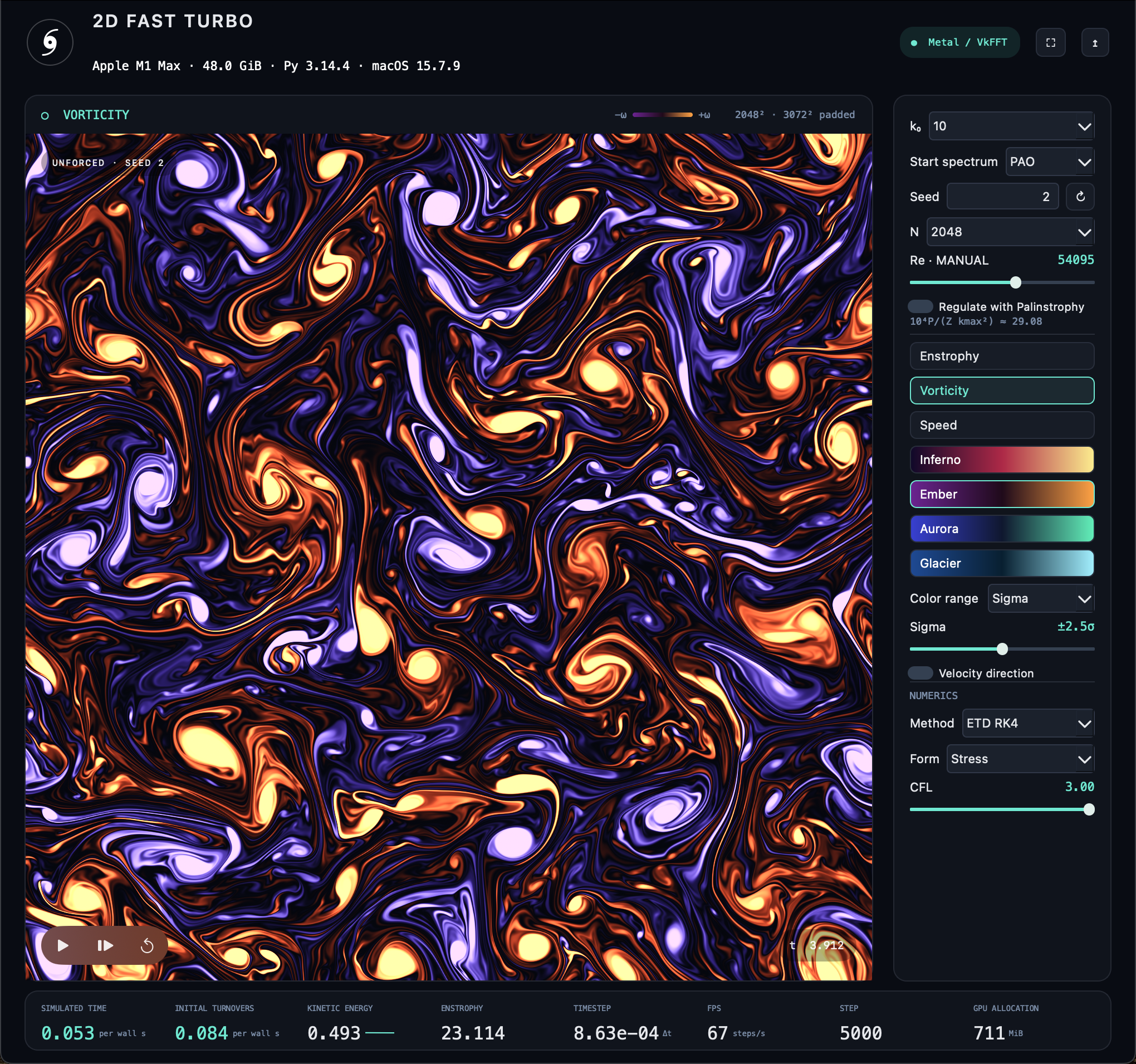
An actual run on Apple M1 Max after 5,000 iterations: a 2048 × 2048 grid, 3072 × 3072 padded workspace, k₀=10, seed 2, Palinstrophy regulation off, and the Ember palette.
Install and launch
Run with uv (recommended)
With uv installed, launch FastTurbo in an isolated environment:
uv tool run --python 3.13 --from fastturbo 2dfastturbo
Or use the equivalent uvx shortcut:
uvx --python 3.13 --from fastturbo 2dfastturbo
uv manages the environment, downloads Python 3.13 if needed, and installs
FastTurbo and PySide6 automatically. It prefers a compatible wheel and otherwise
builds the source archive locally. Add --no-build to require prebuilt wheels.
Add application options after 2dfastturbo, such as --help or
--benchmark --steps 200.
Install with pip
Use Python 3.13 or later in a virtual environment on a supported platform:
python -m pip install fastturbo
2dfastturbo
You can also launch with python -m fastturbo.
Prebuilt wheels include the native engine. No Xcode, CUDA Toolkit, C++
compiler, or source checkout is needed to install and run a wheel. uv or pip
installs the PySide6 desktop dependency automatically. Add --only-binary=:all:
to require wheels and disable the source fallback.
| Platform | Requirements |
|---|---|
| macOS | macOS 15 or later, Apple Silicon (arm64), Metal |
| Windows | Windows 10 or 11, x64 Python, NVIDIA GPU with compute capability 8.6 or later, and a driver supporting CUDA 13.4 and its NVRTC-generated PTX |
| Linux (manylinux) | x86-64, glibc 2.28 or later, NVIDIA GPU with compute capability 8.0 or later, and a driver supporting CUDA 13.1 and its NVRTC-generated PTX |
Windows and Linux wheels bundle the CUDA runtime, NVRTC and its matching builtins. Install the NVIDIA driver separately. The Windows wheel includes native code for RTX 30/40/50-series GPUs; the Linux wheel includes Ampere, Ada, Hopper and Blackwell targets. Both also include baseline PTX.
The Linux desktop uses the system's NVIDIA OpenGL driver through X11 or
Xwayland and needs Qt's xcb runtime libraries. PySide6/Qt has its own platform
requirements in addition to the native wheel's glibc baseline. 2dbench and
2dfastturbo --headless run without opening a display or initializing Qt.
Intel Macs, Windows ARM64 and CPU-only execution are not supported. If pip reports no matching distribution, check your Python version, operating system and CPU architecture. Wheel selection cannot detect an unsupported GPU or driver, so the GPU requirements above still apply after installation succeeds.
Linux source builds
When no compatible Linux wheel is available, pip or uv can build the source
distribution (sdist) locally. The archive includes the native sources and
vendored headers; no repository checkout is needed. --only-binary=:all: and
--no-build disable this fallback.
A source build requires CUDA Toolkit 13.x, a compatible C++ compiler,
CMake 3.26+ and Ninja. Desktop builds also need OpenGL, X11 and libpng
development files. Set CUDA_HOME if the toolkit is outside /usr/local/cuda.
Local source builds use the installed CUDA libraries.
Force a local source build when needed:
python -m pip install --no-binary=fastturbo fastturbo
The default build targets the visible GPU. Set FASTTURBO_CUDA_ARCH=90, for
example, to compile for H100 without a GPU on the build machine.
FASTTURBO_LINUX_RENDERER=OFF selects a headless build; ON requires the desktop
development libraries; the default AUTO detects them. A source build still
requires a supported NVIDIA GPU and driver to run. See DEVELOPMENT.md in the
source archive for build details.
Explore the flow
- Live visualization: switch between vorticity, enstrophy and speed; choose Ember, Inferno, Aurora or Glacier colors and adjust the display range.
- Interactive controls: pause, single-step, reset the flow or change the seed. Choose a PAO or KM3 start spectrum. Adjust resolution, Reynolds number, timestep control and integration method from the window.
- Native GPU computation: FFTs, simulation buffers, timesteps and field rendering stay in the native backend while Python provides the controls.
- Reproducible experiments: use a fixed seed, advance exact step counts, inspect diagnostics and export numerical fields or PNG images.
The GUI starts with a 2048 × 2048 grid, ETD RK4 integration, stress form, CFL 3, k₀=10, seed 2 and palinstrophy regulation off. Enable Regulate with Palinstrophy to adjust the Reynolds number automatically. Changing N or k₀ recalculates the initial Re from the calibration formula in either mode. Press Space to pause or resume, Right Arrow to single-step and R to reset. Press Ctrl+Q on Windows or Linux or Cmd+Q on macOS to quit the application. The title-bar close button (X, or the red button on macOS) also quits and stops the simulation on all three platforms. File → Close Window quits on macOS and Linux; on Windows it hides the window to the notification area while computing continues, and Alt+F4 quits. Minimizing keeps the simulation running.
Start spectrum defaults to PAO, the original exponentially decaying
spectrum. KM3 (k⁻³) redistributes its energy into a k⁻³ tail above k₀,
with a k⁴ rise below k₀ and deterministic seeded phases, matching cudaturbo's
KM3 construction. Changing the chooser restarts the flow; Reset repeats the
selected spectrum and seed. You can also launch with
2dfastturbo --start-spectrum KM3 or use
Configuration(start_spectrum="KM3") in Python. An imported initial field
overrides this choice for that initialization.
On macOS Metal and Linux CUDA, Method → CNAB2 selects
Crank–Nicolson / Adams–Bashforth 2, using the same native solver as the platform's
reference command (tools/sim on macOS, fastturbo_reference on Linux). It supports
PAO and KM3, keeps VkFFT, and defaults to CFL 0.25. CNAB2 uses stress form,
a power-of-two resolution, and seeds 1–5010; the GUI disables incompatible
choices. Reset, pause, single-step, live Reynolds/CFL edits and PNG export work
as with the other methods. Changing the method restarts the flow.
The CNAB2 controller updates after step 1 and each 100 steps, independently of GUI/headless batch boundaries. The positional reference runner additionally prints and updates the controller at its final step; this affects its reported next timestep, not the completed field. For matching the comparison case, use N512, Re10000, k₀=10, seed1, KM3, CFL0.25, and turn Reynolds regulation off:
2dfastturbo --integrator CNAB2 --start-spectrum KM3 --resolution 512 --reynolds 10000 --k0 10 --seed 1
The Python API also accepts Configuration(integrator="CNAB2"), with optional
fixed timesteps and imported initial vorticity. Application snapshots remain
on the N×N display grid; exports use the application's positive vorticity sign
and normalized N×N spectrum. CNAB2 retains its compact cutoff coefficient in
the spectrum, so use the real part of a complex inverse to reconstruct it.
Its historical PAO random sequence differs from the RK3/ETDRK4 initializer.
The CNAB2 option is advertised only by backends that implement it; Windows
retains its existing method choices. The macOS reference command also initializes
PAO/KM3 natively and requires no Python; see its usage and validation notes.
Use from Python
from fastturbo import Configuration, Engine, get_backend_info

print(get_backend_info())

with Engine(Configuration(resolution=1024, reynolds=50_000, seed=2)) as engine:
    engine.advance(steps=32)
    diagnostics = engine.inspect()
    print(diagnostics)

    engine.export(png="flow.png", display="vorticity", palette="ember")
    engine.export(spectrum="spectrum.c64", fields="fields.f32")
Engine is a synchronous batch API. create_engine is an alias for Engine.
Call inspect() after advancing to refresh energy, enstrophy and palinstrophy.
Use engine.set_parameters(reynolds=40_000, cfl=2) to change parameters while
preserving the field and clock, or engine.reset() to restart with the same seed.
Spectrum exports contain normalized, little-endian complex64 Fourier-series
coefficients in [ky, kx] order, with shape N × N. Field exports contain
little-endian float32 vorticity and the two velocity components, in
[omega, u, v] order, with shape 3 × N × N.
Initialize the native library on the main thread before creating engines from worker threads. GUI calls must stay on the main thread. For headless experiments, set Reynolds number explicitly when changing resolution or initial wavenumber; the GUI's automatic regulation is separate from the batch API.
Run a benchmark
Linux also has a standalone native 2dbench,
built with CMake and CUDA. It needs no Python or uv at build or runtime and uses
the same workload, public options and timing definition described below.
FastTurbo 0.1.2 wheels include the 2dbench command alongside 2dfastturbo.
After installing the wheel, run 2dbench directly. To run the published release
with uv on a platform with a prebuilt wheel:
uvx --python 3.13 --no-build --from "fastturbo>=0.1.2" 2dbench
The wheel contains the benchmark module and native engine; running it requires no source checkout or compiler toolchain.
For a comparable architecture benchmark from a source checkout:
cd python
uv run 2dbench
This runs retained 2048² → padded 3072² and 4096² → padded 6144² for
at least 20 seconds each. The device/platform header and table headings print
before benchmarking starts; each result row prints as its case finishes, followed
by the 4096/2048 timestep ratio. It reuses the existing
headless 2dfastturbo --benchmark harness and production native engine:
CUDA/VkFFT on Linux/Windows and Metal/VkFFT on macOS. It does not import Qt or
create a window; Linux works over SSH without DISPLAY, Wayland, X11 or a desktop.
uv run 2dbench                         # Standard architecture comparison
uv run 2dbench --seconds 2             # Quick test
uv run 2dbench --sizes 1024 2048 4096   # Custom retained sizes
uv run 2dbench --device 0              # CUDA visible-device / Metal device index
uv run 2dbench --json > h100.json       # Archive results
uv run 2dbench --help
The workload is fixed across devices: float32, ETDRK4, stress form, 3/2 padding,
seeded PAO initialization, k₀=10, seed=2, CFL=3, Re=27898.36614974335, adaptive
timesteps with palinstrophy regulation off, and batches of eight complete steps.
The existing eight-step warmup is followed by a reset and synchronous inspection.
--warmup K changes that step count. No workload setting changes with GPU model.
Seconds is the existing harness's synchronized wall time: batch submission,
completed native steps, and final diagnostic inspection. ms/step and steps/s
derive from that interval. Both backends wait for completed GPU work before
returning each batch. Startup, contexts, allocation, VkFFT plans, initialization,
warmup and reset are outside timing. The deadline is checked after each batch,
so overshoot is at most one batch plus final inspection. Expect roughly 40–50
seconds plus initialization. JSON also preserves the native report, GPU timing,
initialization time, exact configuration, per-case memory availability, Git
commit and dirty status.
Cases use separate processes to release native resources after failures. A lower
bound on the production buffers is checked against free CUDA memory where
available, or total unified memory on Metal. This is not a peak-memory guarantee:
VkFFT scratch and other allocations vary. Native allocation errors produce an
explicit SKIPPED: insufficient device memory row; other errors produce
FAILED. Sizes are never reduced, subsequent cases still run, and any
skipped/failed case returns exit status 1. JSON remains a single valid document;
native/build diagnostics go to stderr. An externally killed process is reported
as failed without guessing the cause.
Source checkouts build the existing backend automatically and need its normal
compiler/toolkit prerequisites; see python/DEVELOPMENT.md in the source repository. CUDA
source builds on Linux default to CMake's native architecture detection.
Windows builds default to 86-real;89-real;120-real;86-virtual, including
RTX 30/40/50-series machine code and forward-compatible PTX for portable wheels
and USB bundles. Explicit
FASTTURBO_CUDA_ARCH (Linux) or FASTTURBO_CUDA_ARCHITECTURES overrides remain
available for cross compilation, including 90 for H100. The toolkit must
support the selected architecture. Metal indices follow MTLCopyAllDevices;
CUDA indices respect CUDA_VISIBLE_DEVICES. VkFFT's version is recorded from
the header used at build time; unavailable metadata is reported as unknown.
The lower-level reference executables, legacy positional PAO/CNAB2 interface, parity tests, and existing benchmarks remain available.
Run 200 timesteps without opening the desktop window and save JSON diagnostics:
2dfastturbo --benchmark --resolution 1024 --reynolds 50000 --steps 200 --output results/benchmark.json
Save the final field as an image:
2dfastturbo --benchmark --steps 5000 --export flow.png
Use 2dfastturbo --help for all options, including integration methods, display
settings, field exports and visible GUI benchmarks.
License and included resources
FastTurbo's own code, documentation and screenshot are MIT licensed,
Copyright © 2026 Torbjörn Sjögren. Bundled VkFFT and nlohmann/json retain their
MIT notices; Apple metal-cpp uses Apache-2.0. The Windows/Linux CUDA components retain
the NVIDIA CUDA Toolkit agreement. License texts and component notices are
included under fastturbo-<version>.dist-info/licenses/ and in the native
package resources at fastturbo/_native/.
PySide6 and Qt are installed separately under their own licenses.
The screenshot above is hosted in the public
FastTurbo media repository, so
it is visible without access to the private application repository. A copy is
also included in the installed package at
fastturbo/assets/macos-5000-iterations.png.
1 maintainer

Release files for fastturbo 0.1.2
For a detailed explanation of source distributions (sdists) and built distributions (wheels), please see the package formats documentation.
Source distribution (sdist)
| File | Size | Uploaded | |
|---|---|---|---|
| fastturbo-0.1.2.tar.gz | 7.9 MB | Details |
Built distributions (wheels)
| File | Interpreter | ABI | Platform | Reset |
|---|---|---|---|---|
| fastturbo-0.1.2-py3-none-win_amd64.whl | Python 3 | none | Windows x86-64 | Details |
| fastturbo-0.1.2-py3-none-manylinux_2_28_x86_64.whl | Python 3 | none | Linux glibc 2.28+ x86-64 | Details |
| fastturbo-0.1.2-py3-none-macosx_15_0_arm64.whl | Python 3 | none | macOS 15.0+ ARM64 | Details |
Total release size: 120.0 MB
Release files / fastturbo-0.1.2.tar.gz
| Download URL | fastturbo-0.1.2.tar.gz |
|---|---|
| Size | 7.9 MB |
| Tags | Source |
|
SHA-256 checksum How to use checksums |
0837b301b7cde757270523febf4a9dc47d5f62da71c1fbf982c4c28659b8f271
|
|
BLAKE2b-256 checksum How to use checksums |
7a815afbf110236b994dced69e8fbfdef48b5b70dc389843938c7c846940a5bd
|
| Upload date | |
|
Uploaded using Trusted Publishing? What is trusted publishing? |
No |
| Uploaded via |
twine/7.0.0 CPython/3.14.4
|
Release files / fastturbo-0.1.2-py3-none-win_amd64.whl
| Download URL | fastturbo-0.1.2-py3-none-win_amd64.whl |
|---|---|
| Size | 53.1 MB |
| Tags | Python 3 Windows x86-64 |
|
SHA-256 checksum How to use checksums |
d58ae94d76476a4a80b0e7508b7aa96ffc60fcf2c7eba8ab233676f6adf946ea
|
|
BLAKE2b-256 checksum How to use checksums |
a768b8d62890f8ccc42e907dfac0132a40b69b3b0012d9934885af64c367d4d5
|
| Upload date | |
|
Uploaded using Trusted Publishing? What is trusted publishing? |
No |
| Uploaded via |
twine/7.0.0 CPython/3.14.4
|
Release files / fastturbo-0.1.2-py3-none-manylinux_2_28_x86_64.whl
| Download URL | fastturbo-0.1.2-py3-none-manylinux_2_28_x86_64.whl |
|---|---|
| Size | 53.1 MB |
| Tags | Linux glibc 2.28+ x86-64 Python 3 |
|
SHA-256 checksum How to use checksums |
f22f0a889666b9b37fe0691f4231a2dbd7c53aeb29cac6aec501c0d6d19da8b0
|
|
BLAKE2b-256 checksum How to use checksums |
b219838f02e319b2be91a074c69d5c99319dc22db91c135bd7671ba2a623a188
|
| Upload date | |
|
Uploaded using Trusted Publishing? What is trusted publishing? |
No |
| Uploaded via |
twine/7.0.0 CPython/3.14.4
|
Release files / fastturbo-0.1.2-py3-none-macosx_15_0_arm64.whl
| Download URL | fastturbo-0.1.2-py3-none-macosx_15_0_arm64.whl |
|---|---|
| Size | 5.9 MB |
| Tags | Python 3 macOS 15.0+ ARM64 |
|
SHA-256 checksum How to use checksums |
9864f4d060fef03eedda70c3e23efae1d891dec37d46ecac94e3f9649565368a
|
|
BLAKE2b-256 checksum How to use checksums |
02d2975f1541b047854cb39ae0648d9ba5817967e7f4379a6392eebea3e85551
|
| Upload date | |
|
Uploaded using Trusted Publishing? What is trusted publishing? |
No |
| Uploaded via |
twine/7.0.0 CPython/3.14.4
|














