
fdir



fdir is a program for finding and organizing anything on your system. It is a simple and user-friendly way to find the files that you need and do something with them.
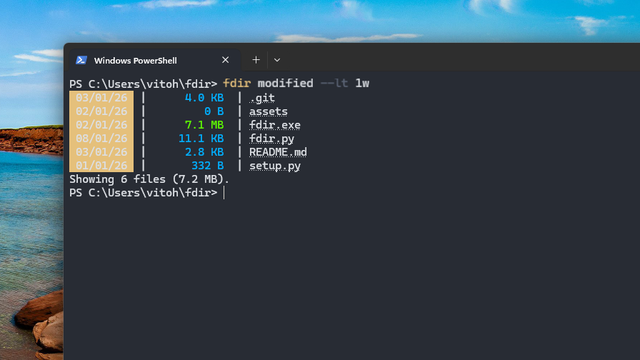
Features
- Intuitive syntax: Use operations like
sizeormodifiedinstead of complex flags. - Logical operators: Combine searches with
andoror. - Deep search: Traverse directories recursively.
- Batch processing: Convert file types or delete results directly from the search.
- Visual feedback: Heatmap coloring for file sizes and highlighting for matched patterns.
- Smart navigation: Includes hyperlinks to open matching files directly from the terminal.
Usage
You can get a list of all the commands by running fdir --help.
Searching by name
fdir provides specific flags to match filenames. You can search for a keyword anywhere in the name, or specify if the name starts or ends with a pattern:
fdir name --keyword report
fdir name --swith 2023_
Additionally, you can enable fuzzy (typo-tolerant) search using the --fuzzy flag:
fdir name --keyword reprot --fuzzy
Searching for a particular file extension
Use the type operation to find files with a specific extension (including the dot):
fdir type --eq .py
Filtering by modification time
You can filter files based on how long ago they were modified using units like h (hours), d (days), w (weeks), m (months), and y (years):
fdir modified --lt 1w
Searching by keywords inside files
You can even look inside files for keywords using the content operation:
fdir content --keyword main
[!NOTE] Only supported for textual files.
Searching for hidden files
fdir doesn't show hidden files by default. To show them, add the --hidden flag.
[!NOTE] This only shows files that weren't hidden using a
.fdirignorefile.
Logical operators
Unlike many search tools, fdir allows you to combine two different operations using and or or:
fdir modified --gt 1y or size --gt 1gb
Command execution
Instead of just listing files, you can execute another command for every result found using the --exec flag:
fdir type --eq .jpg --exec echo Hi! '{}'
File deletion
You can delete all the matching files using the --del flag:
fdir size --gt 1gb --del
File conversion
The type operation allows you to rename and convert the extensions of all matching files using the --convert flag:
fdir type --eq .wav --convert .mp3
Customizing output
Print order
You can sort the matching files using the --order flag:
fdir modified --gt 1y --order modified a
Column order
You can reorder the output columns using the --columns flag with n (name), d (date), and s (size):
fdir all --columns nsd
No color output
If you don't want the colored output enabled by default, you can use the --nocolor flag:
fdir all --nocolor
Excluding files
You can create a .fdirignore file in the directory you're running fdir from to exclude certain file names, directories, or extensions. They're like .gitignore files, but used by fdir.
Recursive search
By default, fdir doesn't search recursively. To enable that, you can use the --deep flag:
fdir all --deep
Options
Here are all fdir's options (this is the output of fdir --help):
usage: fdir [-h] [--deep] [--top NUMBER] [--fuzzy] [--case] [--order FIELD DIR] [--columns COLUMNS] [--del]
            [--convert EXTENSION] [--nocolor] [--exec ...] [--hidden]
            {modified,size,name,type,content,all,version} ...

positional arguments:
  {modified,size,name,type,content,all,version}
    modified            Filter by date
    size                Filter by size
    name                Filter by name
    type                Filter by extension
    content             Search inside file content
    all                 List all files
    version             Show version

options:
  -h, --help            show this help message and exit
  --deep                Search recursively
  --top NUMBER          Show only first N results
  --fuzzy               Search approximately
  --case                Case-sensitive search
  --order FIELD DIR     Sort: <name|size|modified> <a|d>
  --columns COLUMNS     Column order (e.g., nds)
  --del                 Delete matches
  --convert EXTENSION   Convert to new extension
  --nocolor             Disable colors
  --exec ...            Execute command (use {} for path)
  --hidden              Show hidden files in search
Installation
pip
pip install fdir-cli
1 maintainer

Release files for fdir-cli 3.3.1
For a detailed explanation of source distributions (sdists) and built distributions (wheels), please see the package formats documentation.
Source distribution (sdist)
| File | Size | Uploaded | |
|---|---|---|---|
| fdir_cli-3.3.1.tar.gz | 8.8 kB | Details |
Built distribution (wheel)
| File | Interpreter | ABI | Platform | Reset |
|---|---|---|---|---|
| fdir_cli-3.3.1-py3-none-any.whl | Python 3 | none | any | Details |
Total release size: 17.6 kB
Release files / fdir_cli-3.3.1.tar.gz
| Download URL | fdir_cli-3.3.1.tar.gz |
|---|---|
| Size | 8.8 kB |
| Tags | Source |
|
SHA-256 checksum How to use checksums |
face7e7f186c5387b176a863182d07dfbada59b5f8047f725298d772df0acd65
|
|
BLAKE2b-256 checksum How to use checksums |
bee1ab7733ce8bac23845efd76fa659acbd442b0df0b08da54d62f4c88f56820
|
| Upload date | |
|
Uploaded using Trusted Publishing? What is trusted publishing? |
Yes |
| Uploaded via |
twine/6.1.0 CPython/3.13.7
|
Provenance
Provenance describes where a file came from. On PyPI, provenance is shared via attestations, which provide a verifiable record of the build or publishing details. View details, limitations and caveats.


PyPI Publish Attestation
PyPI verified that this artifact, at this checksum, originated from the publisher listed below.
Signed by GitHub Actions, verified by PyPI on Jan 27, 2026.
Transparency logRelease files / fdir_cli-3.3.1-py3-none-any.whl
| Download URL | fdir_cli-3.3.1-py3-none-any.whl |
|---|---|
| Size | 8.8 kB |
| Tags | Python 3 |
|
SHA-256 checksum How to use checksums |
f53c6c5df56ade926b440b047694acca04554ff162d6812971ffd652a30c5e5c
|
|
BLAKE2b-256 checksum How to use checksums |
eb40ecb63684271adece846a8bf796d593379823a15fea7762dd5e70fbc391e0
|
| Upload date | |
|
Uploaded using Trusted Publishing? What is trusted publishing? |
Yes |
| Uploaded via |
twine/6.1.0 CPython/3.13.7
|
Provenance
Provenance describes where a file came from. On PyPI, provenance is shared via attestations, which provide a verifiable record of the build or publishing details. View details, limitations and caveats.
PyPI Publish Attestation
PyPI verified that this artifact, at this checksum, originated from the publisher listed below.
Signed by GitHub Actions, verified by PyPI on Jan 27, 2026.
Transparency log













