
Find and organize anything on your system
Verified details
These details have been verified by PyPIProject links
GitHub Statistics
Maintainers

Project description
fdir



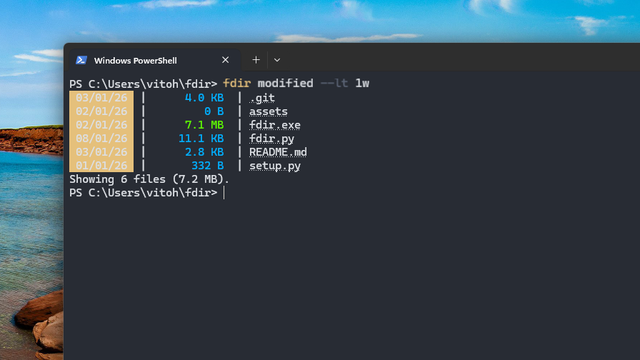
fdir is a program for finding and organizing anything on your system. It is a simple and user-friendly way to find the files that you need and do something with them.
Features
- Intuitive syntax: Use operations like
sizeormodifiedinstead of complex flags. - Logical operators: Combine searches with
andoror. - Deep search: Traverse directories recursively.
- Batch processing: Convert file types or delete results directly from the search.
- Visual feedback: Heatmap coloring for file sizes and highlighting for matched patterns.
- Smart navigation: Includes hyperlinks to open matching files directly from the terminal.
Usage
You can get a list of all the commands by running fdir --help.
Searching by name
fdir provides specific flags to match filenames. You can search for a keyword anywhere in the name, or specify if the name starts or ends with a pattern:
fdir name --keyword report
fdir name --swith 2023_
Additionally, you can enable fuzzy (typo-tolerant) search using the --fuzzy flag:
fdir name --keyword reprot --fuzzy
Searching for a particular file extension
Use the type operation to find files with a specific extension (including the dot):
fdir type --eq .py
Filtering by modification time
You can filter files based on how long ago they were modified using units like h (hours), d (days), w (weeks), m (months), and y (years):
fdir modified --lt 1w
Searching by keywords inside files
You can even look inside files for keywords using the content operation:
fdir content --keyword main
[!NOTE] Only supported for textual files.
Searching for hidden files
fdir doesn't show hidden files by default. To show them, add the --hidden flag.
[!NOTE] This only shows files that weren't hidden using a
.fdirignorefile.
Logical operators
Unlike many search tools, fdir allows you to combine two different operations using and or or:
fdir modified --gt 1y or size --gt 1gb
Command execution
Instead of just listing files, you can execute another command for every result found using the --exec flag:
fdir type --eq .jpg --exec echo Hi! '{}'
File deletion
You can delete all the matching files using the --del flag:
fdir size --gt 1gb --del
File conversion
The type operation allows you to rename and convert the extensions of all matching files using the --convert flag:
fdir type --eq .wav --convert .mp3
Customizing output
Print order
You can sort the matching files using the --order flag:
fdir modified --gt 1y --order modified a
Column order
You can reorder the output columns using the --columns flag with n (name), d (date), and s (size):
fdir all --columns nsd
No color output
If you don't want the colored output enabled by default, you can use the --nocolor flag:
fdir all --nocolor
Excluding files
You can create a .fdirignore file in the directory you're running fdir from to exclude certain file names, directories, or extensions. They're like .gitignore files, but used by fdir.
Recursive search
By default, fdir doesn't search recursively. To enable that, you can use the --deep flag:
fdir all --deep
Options
Here are all fdir's options (this is the output of fdir --help):
usage: fdir [-h] [--deep] [--top NUMBER] [--fuzzy] [--case] [--order FIELD DIR] [--columns COLUMNS] [--del]
            [--convert EXTENSION] [--nocolor] [--exec ...] [--hidden]
            {modified,size,name,type,content,all,version} ...

positional arguments:
  {modified,size,name,type,content,all,version}
    modified            Filter by date
    size                Filter by size
    name                Filter by name
    type                Filter by extension
    content             Search inside file content
    all                 List all files
    version             Show version

options:
  -h, --help            show this help message and exit
  --deep                Search recursively
  --top NUMBER          Show only first N results
  --fuzzy               Search approximately
  --case                Case-sensitive search
  --order FIELD DIR     Sort: <name|size|modified> <a|d>
  --columns COLUMNS     Column order (e.g., nds)
  --del                 Delete matches
  --convert EXTENSION   Convert to new extension
  --nocolor             Disable colors
  --exec ...            Execute command (use {} for path)
  --hidden              Show hidden files in search
Installation
pip
pip install fdir-cli
Project details
Verified details
These details have been verified by PyPIProject links
GitHub Statistics
Maintainers


Download files
Download the file for your platform. If you're not sure which to choose, learn more about installing packages.
Source Distribution
Built Distribution
Filter files by name, interpreter, ABI, and platform.
If you're not sure about the file name format, learn more about wheel file names.
Copy a direct link to the current filters
File details
Details for the file fdir_cli-3.3.0.tar.gz.
File metadata
- Download URL: fdir_cli-3.3.0.tar.gz
- Upload date:
- Size: 8.8 kB
- Tags: Source
- Uploaded using Trusted Publishing? Yes
- Uploaded via: twine/6.1.0 CPython/3.13.7
File hashes
| Algorithm | Hash digest | |
|---|---|---|
| SHA256 |
b91869ba81280215bd5c741ab589fba3a67d47159d9997b20df17e6a71ebe613
|
|
| MD5 |
d58895daf0721c3fdb5ea50b8f82b121
|
|
| BLAKE2b-256 |
c4708bd79042d9a792795527c78a1621b228459b13b328a457e6ccc5e7f276e0
|
Provenance
The following attestation bundles were made for fdir_cli-3.3.0.tar.gz:
Publisher:
python-publish.yml on VG-dev1/fdir
-
Statement:
-
Statement type:
https://in-toto.io/Statement/v1 -
Predicate type:
https://docs.pypi.org/attestations/publish/v1 -
Subject name:
fdir_cli-3.3.0.tar.gz -
Subject digest:
b91869ba81280215bd5c741ab589fba3a67d47159d9997b20df17e6a71ebe613 - Sigstore transparency entry: 854524541
- Sigstore integration time:
-
Permalink:
VG-dev1/fdir@12a939b6d7d0925a28b87e252b7ac84d1b7cfdec -
Branch / Tag:
refs/tags/v3.3.0 - Owner: https://github.com/VG-dev1
-
Access:
public
-
Token Issuer:
https://token.actions.githubusercontent.com -
Runner Environment:
github-hosted -
Publication workflow:
python-publish.yml@12a939b6d7d0925a28b87e252b7ac84d1b7cfdec -
Trigger Event:
release
-
Statement type:
File details
Details for the file fdir_cli-3.3.0-py3-none-any.whl.
File metadata
- Download URL: fdir_cli-3.3.0-py3-none-any.whl
- Upload date:
- Size: 8.8 kB
- Tags: Python 3
- Uploaded using Trusted Publishing? Yes
- Uploaded via: twine/6.1.0 CPython/3.13.7
File hashes
| Algorithm | Hash digest | |
|---|---|---|
| SHA256 |
048e427d7679c8edefdf6bf20377443a396e2adf73bc5fb74650baa8482ae5df
|
|
| MD5 |
2ea69cbd51bf5452fa1cd161d85f25c0
|
|
| BLAKE2b-256 |
4ab39e8d061189ad9e6e8a9b7ed1e0f0e993fb7706c4b76171f8409a51c40c9d
|
Provenance
The following attestation bundles were made for fdir_cli-3.3.0-py3-none-any.whl:
Publisher:
python-publish.yml on VG-dev1/fdir
-
Statement:
-
Statement type:
https://in-toto.io/Statement/v1 -
Predicate type:
https://docs.pypi.org/attestations/publish/v1 -
Subject name:
fdir_cli-3.3.0-py3-none-any.whl -
Subject digest:
048e427d7679c8edefdf6bf20377443a396e2adf73bc5fb74650baa8482ae5df - Sigstore transparency entry: 854524543
- Sigstore integration time:
-
Permalink:
VG-dev1/fdir@12a939b6d7d0925a28b87e252b7ac84d1b7cfdec -
Branch / Tag:
refs/tags/v3.3.0 - Owner: https://github.com/VG-dev1
-
Access:
public
-
Token Issuer:
https://token.actions.githubusercontent.com -
Runner Environment:
github-hosted -
Publication workflow:
python-publish.yml@12a939b6d7d0925a28b87e252b7ac84d1b7cfdec -
Trigger Event:
release
-
Statement type:






