
Fellow Aiden

This library provides an interface to the Fellow Aiden coffee brewer. An additional brew studio UI with support for AI-generated recipes is also included. You can run the Brew Studio locally on your system or make use of the hosted version: https://fellow-brew-studio.streamlit.app/
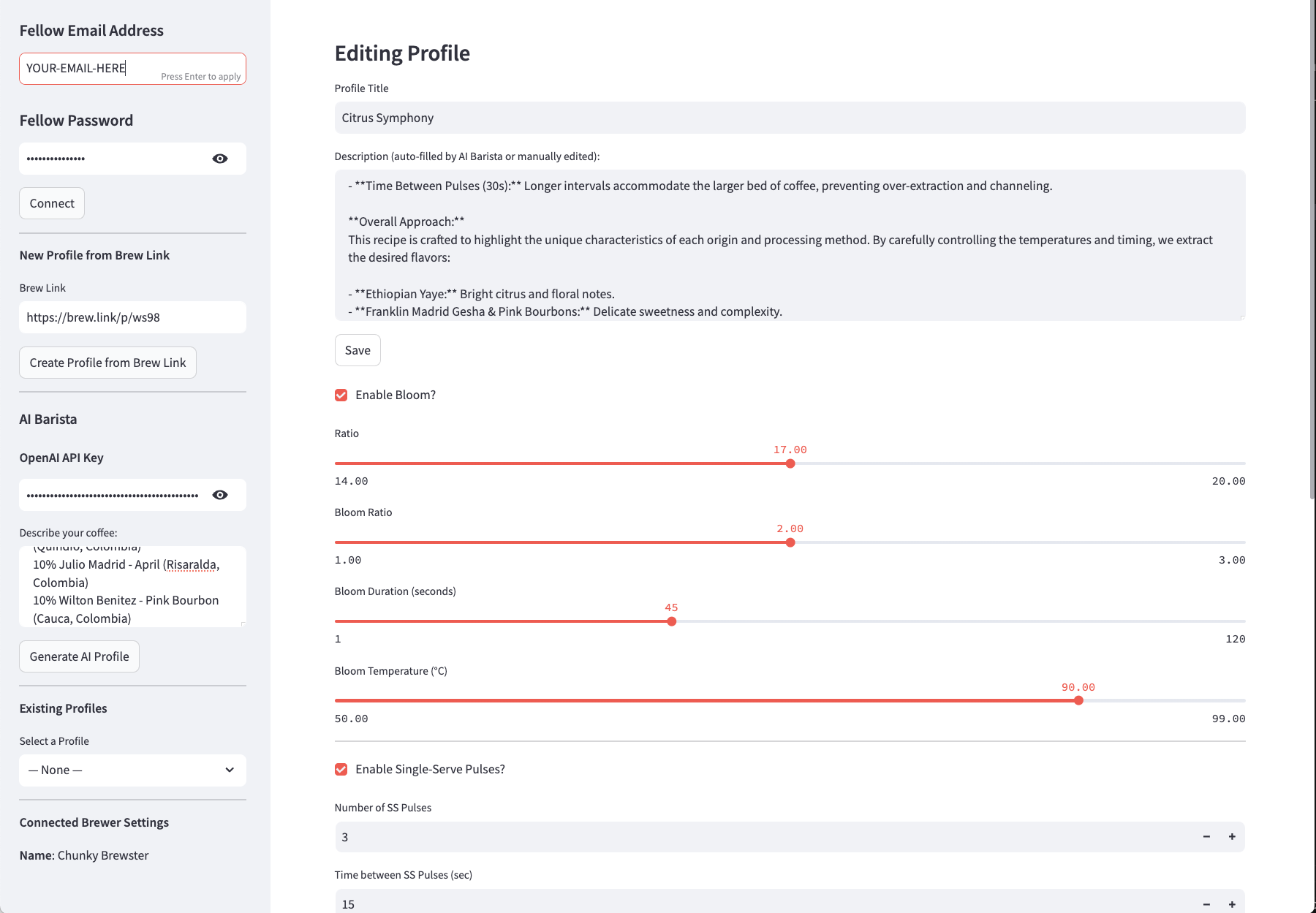
Quick Start
Install the library:
pip install fellow-aiden
# or
python setup.py install
Set ENV variables:
export FELLOW_EMAIL='YOUR-EMAIL-HERE'
export FELLOW_PASSWORD='YOUR-PASSWORD-HERE'
Sample Code
This sample code shows some of the range of functionality within the library:
import os
from fellow_aiden import FellowAiden

# EMAIL = "YOUR-EMAIL-HERE"
# PASSWORD = "YOUR-PASSWORD-HERE"

EMAIL = os.environ['FELLOW_EMAIL']
PASSWORD = os.environ['FELLOW_PASSWORD']

# Create an instance
aiden = FellowAiden(EMAIL, PASSWORD)

# Get display name of brewer
name = aiden.get_display_name()

# Get profiles
profiles = aiden.get_profiles()

# Add a profile
profile = {
    "profileType": 0,
    "title": "Debug-FellowAiden",
    "ratio": 16,
    "bloomEnabled": True,
    "bloomRatio": 2,
    "bloomDuration": 30,
    "bloomTemperature": 96,
    "ssPulsesEnabled": True,
    "ssPulsesNumber": 3,
    "ssPulsesInterval": 23,
    "ssPulseTemperatures": [96,97,98],
    "batchPulsesEnabled": True,
    "batchPulsesNumber": 2,
    "batchPulsesInterval": 30,
    "batchPulseTemperatures": [96,97]
}
aiden.create_profile(profile)

# Find profile
pid = None
option = aiden.get_profile_by_title('FellowAiden', fuzzy=True)
if option:
    pid = option['id'] # p0

# Share a profile
share_link = aiden.generate_share_link(pid)

# Delete a profile
aiden.delete_profile_by_id(pid)

# Add profile from shared brew link
aiden.create_profile_from_link('https://brew.link/p/ws98')

# Add a schedule
schedule = {
    "days": [True, True, False, True, False, True, False], // sunday - saturday
    "secondFromStartOfTheDay": 28800, // time since 12 am
    "enabled": True,
    "amountOfWater": 950, // 150 - 1500
    "profileId": "p7", // must be valid profile
}
aiden.create_schedule(schedule)

# Delete a schedule
aiden.delete_schedule_by_id('s0')
Features
- Access all settings and details from Aiden brewer
- Manage custom brewing profiles
- Add shared profiles from URL
- Generate share links from custom profiles
- Search profiles using title (match and fuzzy)
- Manage custom brewing schedules
- Brew Studio UI with support for AI, Brew Links and Profile adjustments
1 maintainer

Metadata
1 maintainer
Release files for fellow-aiden 0.2.2
For a detailed explanation of source distributions (sdists) and built distributions (wheels), please see the package formats documentation.
Source distribution (sdist)
| File | Size | Uploaded | |
|---|---|---|---|
| fellow_aiden-0.2.2.tar.gz | 27.0 kB | Details |
Built distribution (wheel)
| File | Interpreter | ABI | Platform | Reset |
|---|---|---|---|---|
| fellow_aiden-0.2.2-py3-none-any.whl | Python 3 | none | any | Details |
Total release size: 47.3 kB
Release files / fellow_aiden-0.2.2.tar.gz
| Download URL | fellow_aiden-0.2.2.tar.gz |
|---|---|
| Size | 27.0 kB |
| Tags | Source |
|
SHA-256 checksum How to use checksums |
34b97d8650f118db001a9179765f9cd5bc8f6d0247f5163bfcf5b8bab01c9d83
|
|
BLAKE2b-256 checksum How to use checksums |
4ca9f90adfad004c1064cd1fe97ece6bc46843fa4b149f70f6e69948d23d813a
|
| Upload date | |
|
Uploaded using Trusted Publishing? What is trusted publishing? |
No |
| Uploaded via |
twine/6.1.0 CPython/3.10.16
|
Release files / fellow_aiden-0.2.2-py3-none-any.whl
| Download URL | fellow_aiden-0.2.2-py3-none-any.whl |
|---|---|
| Size | 20.2 kB |
| Tags | Python 3 |
|
SHA-256 checksum How to use checksums |
8321d80b65858d90fbd490bfcd261ad9989b2d14995b22b79f6ea773ae5c057c
|
|
BLAKE2b-256 checksum How to use checksums |
4f82221d88541e98d224bde49513924097d94da46f1805ac175b451ab3f6c262
|
| Upload date | |
|
Uploaded using Trusted Publishing? What is trusted publishing? |
No |
| Uploaded via |
twine/6.1.0 CPython/3.10.16
|














