
Generate LVGL C source files from Figma XML exports

Project description
figma2lvgl — Figma to LVGL C Code Generator
A code-generation tool that converts Figma UI layouts into LVGL C source files ready to drop into any embedded project.
- Works with any LVGL v9 project (ESP-IDF, Zephyr, bare-metal, etc.)
- Installable via pip — no manual script setup
- Fully cross-platform — Windows, Linux, macOS
✨ Key Features
- 📐 Figma XML → Deterministic C code
- 🧵 Thread-safe UI updates via worker queue
- 🧱 Static metadata-driven UI (
ui_screen_t,ui_child_t) - 📦 Generates self-contained
ui_src/folder - 🔁 Versioned runtime (safe upgrades)
- 🧩 Extensible via template system
- 🎯 Zero dynamic layout parsing at runtime
🚀 Installation
pip install figma2lvgl
Prerequisite — LVGLImage.py
Image conversion requires LVGLImage.py from the official LVGL repository.
On first run, figma2lvgl will ask to download and cache it automatically.
You can also place it manually next to your XML file.
📖 Usage
figma2lvgl -x diagram.xml
All arguments:
| Argument | Description | Default |
|---|---|---|
-x |
Path to Figma XML file | Required |
-i |
Folder containing PNG images | Same directory as XML |
-d |
Destination for generated output | Same directory as XML |
Examples:
# Minimal — everything next to the XML
figma2lvgl -x /home/user/project/layout.xml

# Full control
figma2lvgl -x layout.xml -i assets/images -d build/output

# Windows
figma2lvgl -x E:\project\layout.xml -i E:\project\images -d E:\project\output
📁 Output Layout
Running the tool produces a ui_src/ folder at the destination:
ui_src/
  src/              ← Generated screen .c files
  include/          ← Generated screen .h files
  priv_src/         ← Converted image .c files
  priv_include/     ← Image header (assets.h) + and all struct definition header (ui_defs.h)
Drop ui_src/ into your project and add the source files to your build system manually.
🎨 Designing in Figma
figma2lvgl reads the Figma node name to identify each UI element. Three element types are currently supported:
Exporting XML from Figma
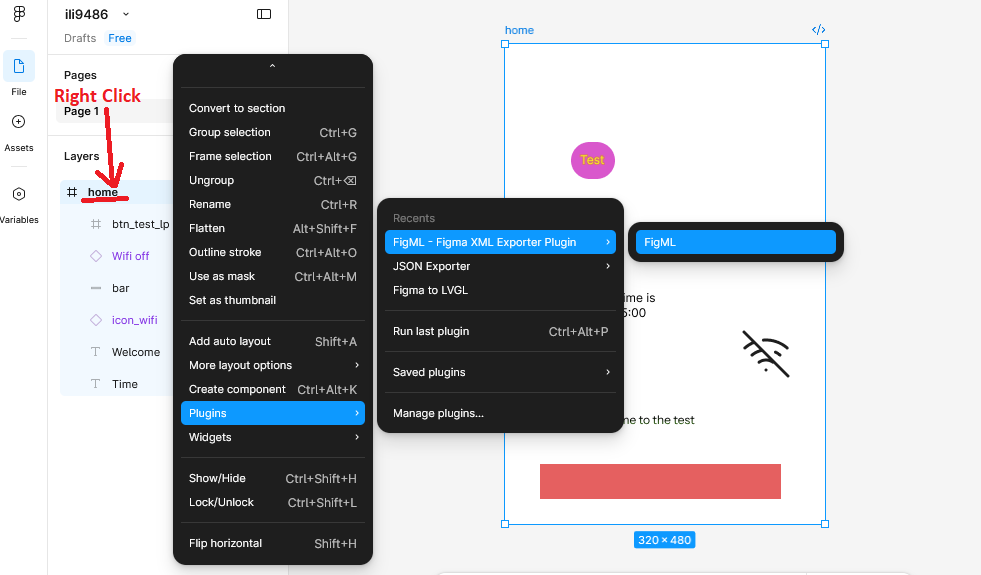
figma2lvgl reads XML exported via the FigML — Figma XML Exporter Plugin.
To export your design:
- Right-click on your frame in Figma
- Go to Plugins → FigML - Figma XML Exporter Plugin → FigML
- Export and save the
.xmlfile - Pass it to figma2lvgl using
-x
Text / Label
Any Text node is automatically mapped to an LVGL label.
Just create a text element in Figma — no special naming required.
Figma node type: Text
Figma name:      anything (e.g. "Time", "Welcome", "status_label")
Maps to:         LV_OBJ label
Image
Any node whose name contains icon or image is mapped to an LVGL image.
The name must match the PNG filename placed in your images folder.
Figma node type: INSTANCE or FRAME
Figma name:      must contain "icon" or "image" (e.g. "icon_wifi", "image_logo")
Maps to:         LV_OBJ image
Asset required:  icon_wifi.png / image_logo.png in your images folder
Bar
Any node whose name contains bar is mapped to an LVGL bar widget.
Figma node type: RECTANGLE
Figma name:      must contain "bar" (e.g. "bar", "progress_bar", "battery_bar")
Maps to:         LV_OBJ bar
Naming Rules Summary
| Element | Figma Type | Name Requirement |
|---|---|---|
| Label | Text | any name |
| Image | any | must contain icon or image |
| Bar | Rectangle | must contain bar |
Note: Names are case-insensitive.
Bar,BAR, andbarall work. The Figma frame name becomes the screen name in generated code.
Example Figma Files
| Display | Link |
|---|---|
| ILI9486 320x480 | Open in Figma |
| 128x32 OLED | Open in Figma |
🧠 Architecture Overview
Figma XML
    ↓
Parser
    ↓
Model (Screen + Children)
    ↓
Templates
    ↓
Generated Code (ui_src/)
    ├── src/
    ├── include/
    ├── priv_src/
    └── priv_include/
💡 Example Integrations
See the examples/ folder for ready-to-use project setups across different platforms:
examples/
  espidf/
    ili9486/        ← ESP32 + ILI9486 display
More platform examples (STM32, Zephyr, bare-metal) coming soon.
🏁 Design Philosophy
- Figma = layout only
- Naming conventions = semantics
- Generator = metadata builder
- Output = portable C, no runtime dependencies beyond LVGL
- All UI updates = thread-safe
Release history Release notifications | RSS feed


Download files
Download the file for your platform. If you're not sure which to choose, learn more about installing packages.
Source Distribution
Built Distribution
Filter files by name, interpreter, ABI, and platform.
If you're not sure about the file name format, learn more about wheel file names.
Copy a direct link to the current filters
File details
Details for the file figma2lvgl-0.1.2.tar.gz.
File metadata
- Download URL: figma2lvgl-0.1.2.tar.gz
- Upload date:
- Size: 118.7 kB
- Tags: Source
- Uploaded using Trusted Publishing? Yes
- Uploaded via: twine/6.1.0 CPython/3.13.7
File hashes
| Algorithm | Hash digest | |
|---|---|---|
| SHA256 |
1455de87300f29cf1976f651f2fc9c5cea283b4008a68e047da2dabd07c541a2
|
|
| MD5 |
80420c2e54560388ffe8d47e6ee9ec96
|
|
| BLAKE2b-256 |
7bd7a5c791e38a0d58abed8c691e723c27e7a8478f07e0861ccedba1f1a98759
|
Provenance
The following attestation bundles were made for figma2lvgl-0.1.2.tar.gz:
Publisher:
publish.yml on khiyamiftikhar/figma2lvgl
-
Statement:
-
Statement type:
https://in-toto.io/Statement/v1 -
Predicate type:
https://docs.pypi.org/attestations/publish/v1 -
Subject name:
figma2lvgl-0.1.2.tar.gz -
Subject digest:
1455de87300f29cf1976f651f2fc9c5cea283b4008a68e047da2dabd07c541a2 - Sigstore transparency entry: 1075146220
- Sigstore integration time:
-
Permalink:
khiyamiftikhar/figma2lvgl@f35e715b55e8f69dcdc0f3889650a9dca65ff3cf -
Branch / Tag:
refs/tags/v0.1.2 - Owner: https://github.com/khiyamiftikhar
-
Access:
public
-
Token Issuer:
https://token.actions.githubusercontent.com -
Runner Environment:
github-hosted -
Publication workflow:
publish.yml@f35e715b55e8f69dcdc0f3889650a9dca65ff3cf -
Trigger Event:
push
-
Statement type:
File details
Details for the file figma2lvgl-0.1.2-py3-none-any.whl.
File metadata
- Download URL: figma2lvgl-0.1.2-py3-none-any.whl
- Upload date:
- Size: 38.9 kB
- Tags: Python 3
- Uploaded using Trusted Publishing? Yes
- Uploaded via: twine/6.1.0 CPython/3.13.7
File hashes
| Algorithm | Hash digest | |
|---|---|---|
| SHA256 |
5950d16af05ef220b06fe32734399d91348211f65e0898808c8b5b348fd24943
|
|
| MD5 |
01732282b6a65f1c002e1e2d01b6d926
|
|
| BLAKE2b-256 |
540a7f5011f0c396b0be87246f8b03dd2bb364f9e37e52a97af075a30f04764b
|
Provenance
The following attestation bundles were made for figma2lvgl-0.1.2-py3-none-any.whl:
Publisher:
publish.yml on khiyamiftikhar/figma2lvgl
-
Statement:
-
Statement type:
https://in-toto.io/Statement/v1 -
Predicate type:
https://docs.pypi.org/attestations/publish/v1 -
Subject name:
figma2lvgl-0.1.2-py3-none-any.whl -
Subject digest:
5950d16af05ef220b06fe32734399d91348211f65e0898808c8b5b348fd24943 - Sigstore transparency entry: 1075146277
- Sigstore integration time:
-
Permalink:
khiyamiftikhar/figma2lvgl@f35e715b55e8f69dcdc0f3889650a9dca65ff3cf -
Branch / Tag:
refs/tags/v0.1.2 - Owner: https://github.com/khiyamiftikhar
-
Access:
public
-
Token Issuer:
https://token.actions.githubusercontent.com -
Runner Environment:
github-hosted -
Publication workflow:
publish.yml@f35e715b55e8f69dcdc0f3889650a9dca65ff3cf -
Trigger Event:
push
-
Statement type:






