
Generate LVGL9 C source files from Figma XML exports
Verified details
These details have been verified by PyPIProject links
GitHub Statistics
Maintainers

Project description
figma2lvgl — Figma to LVGL C Code Generator
A code-generation tool that converts Figma UI layouts into LVGL C source files ready to drop into any embedded project.
- Works with any LVGL v9 project (ESP-IDF, Zephyr, bare-metal, etc.)
- Installable via pip — no manual script setup
- Fully cross-platform — Windows, Linux, macOS
✨ Key Features
- 📐 Figma XML → Deterministic, reproducible C code
- 🎨 Figma styles (color, font, radius, border) → LVGL style calls, baked into the generated struct
- 🔤 Figma label text → baked into generated struct as design-time default
- 🧱 Per-screen typed C struct — firmware accesses
home.panel_top.time, notchildren[2] - 📦 Generates self-contained
ui_src/folder - 🧩 Buttons, sliders, bars, images, labels, panels, dynamic containers
- 🎯 Zero dynamic layout parsing at runtime
- 🔁 Named event callbacks — implement
ui_home_on_btn_ok_clicked()and it just works
🚀 Installation
pip install figma2lvgl
Prerequisites
- Figma with the FigML — Figma XML Exporter plugin installed
- Python 3.9+
- LVGLImage.py — LVGL's official image converter. Auto-downloaded and cached
on first use, or supply with
--lvgl-toolfor CI / air-gapped builds.
📖 Usage
figma2lvgl -x layout.xml
All Arguments
| Argument | Description | Default |
|---|---|---|
-x / --xml |
Path to Figma XML file | Required |
-i / --images |
Folder containing PNG images | Same directory as XML |
-d / --dest |
Destination for generated output | Same directory as XML |
-y / --yes |
Skip all prompts; auto-download LVGLImage.py if not cached | off |
--lvgl-tool PATH |
Path to LVGLImage.py — bypasses cache and download (for CI) | auto |
-f / --color-format |
PNG pixel encoding: RGB565, RGB888, ARGB8888, L8 |
RGB565 |
--patch-esp-includes |
Deprecated — ESP-IDF include patching is now applied automatically to all generated image files. Flag kept for backward compatibility, has no effect. | — |
-v / --verbose |
Enable debug-level logging | off |
--verify-compile |
Syntax-check generated C files with gcc after generation |
off |
¹ Prefer
target_compile_definitions(${COMPONENT_LIB} PUBLIC LV_LVGL_H_INCLUDE_SIMPLE=1)in yourCMakeLists.txtinstead of this flag.
Examples
# Minimal — everything next to the XML
figma2lvgl -x layout.xml

# Full control
figma2lvgl -x layout.xml -i assets/images -d build/output

# CI pipeline (no prompts, pinned tool, 32-bit display)
figma2lvgl -x layout.xml --yes --lvgl-tool ./tools/LVGLImage.py -f ARGB8888

# ESP-IDF — no special flags needed, include patching is automatic
figma2lvgl -x layout.xml
📁 Output Layout
ui_src/
  src/              ← Generated screen .c files (one per Figma frame)
  include/          ← Generated screen .h files
  priv_src/         ← Converted image .c files + ui_style.c
  priv_include/     ← assets.h, ui_config.h, ui_defs.h, ui_style.h
Drop ui_src/ into your project and add the source files to your build system.
Build system note: ensure
priv_include/is on the include path for all source files inui_src/. ESP-IDF and Zephyr handle this automatically. For bare-metal Makefiles, add-Iui_src/priv_includeto your CFLAGS.
Using a generated screen
#include "ui_home.h"

// Implement event callbacks in your application .c
// (linker error if missing — see Event Callbacks section below)
void ui_home_on_btn_ok_clicked(lv_event_t *e)    { /* navigate, update state */ }
void ui_home_on_btn_ok_long_pressed(lv_event_t *e) { /* hold action */ }

// In your app init:
ui_home_init();   // creates LVGL objects, applies styles, shows Figma text
ui_home_load();   // makes this screen active

// At runtime — update widgets:
ui_home_time_set_text("16:30");
ui_home_battery_bar_set_value(85, 300);   // animated over 300 ms
ui_home_icon_wifi_display();
ui_home_btn_ok_set_label("Confirm");
🎨 Designing in Figma
figma2lvgl reads the Figma node name to identify each UI element type and Figma styles to generate matching LVGL style calls.
Exporting XML from Figma
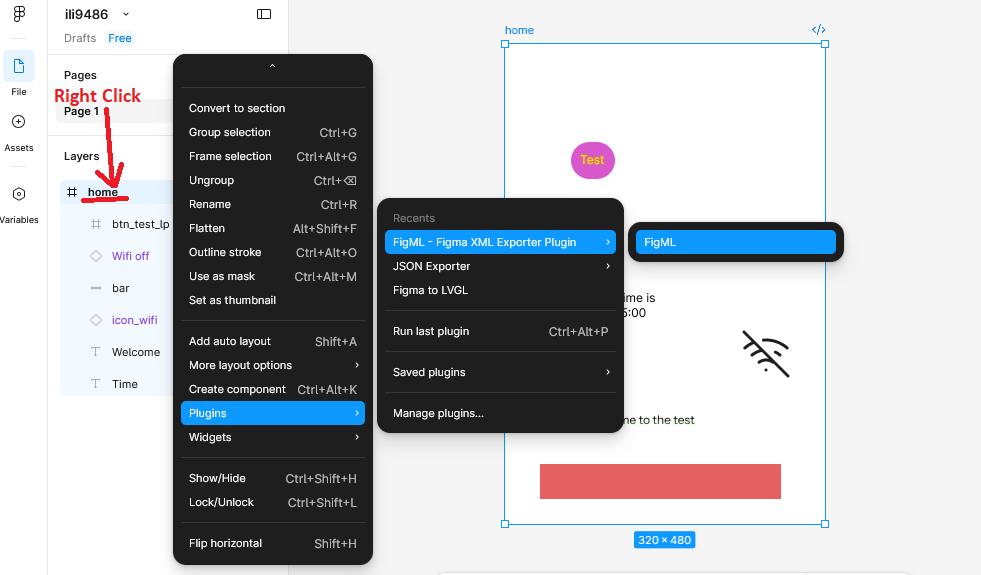
figma2lvgl reads XML exported via the FigML — Figma XML Exporter Plugin.
- Right-click your frame in Figma
- Go to Plugins → FigML - Figma XML Exporter Plugin → FigML
- Export and save the
.xmlfile - Pass it to figma2lvgl with
-x
Supported Widgets
Text / Label
Any Text node is automatically mapped to an LVGL label. The text content
typed in Figma is baked into the generated struct as the initial display value.
Figma node type: Text (automatic)
Figma name:      anything (e.g. "time", "welcome_label", "status")
Maps to:         lv_label_create()
Button
A Frame named with the btn_ or button_ prefix maps to an LVGL button.
The button's text is read from its first Text child node in Figma.
Figma node type: FRAME with fill/border/radius
Figma name:      must start with "btn_" or "button_" (e.g. "btn_ok", "button_cancel")
Maps to:         lv_button_create()
Event suffixes — append to the name to register additional events.
LV_EVENT_CLICKED is always registered regardless of suffix:
| Figma name | Extra event registered |
|---|---|
btn_ok |
click only (default) |
btn_ok_lp |
+ LV_EVENT_LONG_PRESSED |
btn_ok_lpr |
+ LV_EVENT_LONG_PRESSED_REPEAT |
btn_ok_press |
+ LV_EVENT_PRESSED |
btn_ok_release |
+ LV_EVENT_RELEASED |
The suffix is stripped before forming the struct field name — btn_ok_lp
and btn_ok both produce the same btn_ok struct field.
Image / Icon
Any node whose name contains icon or image maps to an LVGL image widget.
The node name (normalized) must match the PNG filename in your images folder.
Figma node type: INSTANCE or FRAME
Figma name:      must contain "icon" or "image" (e.g. "icon_wifi", "image_logo")
Maps to:         lv_image_create()
Asset required:  icon_wifi.png in your images folder
Bar
Any node whose name contains bar maps to an LVGL bar widget.
Encode the value range directly in the name — no code changes needed:
Figma name:      battery_bar          → range 0–100 (default)
                 battery_bar_0_100    → range 0–100
                 temp_bar_n20_50      → range −20–50  (prefix n = negative)
Maps to:         lv_bar_create()
Slider
Figma name:      must start with "slider_" or end with "_slider"
                 brightness_slider_0_255  → range 0–255
Maps to:         lv_slider_create()
Panel (Container)
Any Frame with a fill, border, or meaningful name that doesn't match other widget types is treated as a panel container. Its children are parsed recursively and appear as nested struct fields.
Figma node type: FRAME with visible style or semantic name
Maps to:         lv_obj_create()
Dynamic Container
Containers named with list_ or grid_ prefix are created as scrollable
containers. Their children are not parsed — firmware fills them at runtime.
Figma name:      must start with "list_" or "grid_"
Maps to:         lv_obj_create() with LV_SCROLLBAR_MODE_AUTO
Accessor:        ui_home_get_list_devices() → returns lv_obj_t*
Naming Rules Summary
| Widget | Name Requirement |
|---|---|
| Label | Any Text node — name doesn't matter |
| Button | Starts with btn_ or button_ |
| Image | Contains icon or image |
| Bar | Contains bar |
| Slider | Starts with slider_ or ends with _slider |
| Panel | Frame with fill/border/radius or meaningful name |
| Dynamic | Starts with list_ or grid_ |
Names are case-insensitive —
Bar,BAR, andbarall work.
Unknown nodes are skipped with a warning. figma2lvgl logs the screen name and node name and tells you exactly how to rename it.
Nesting depth limits — depth > 5 emits a warning; depth > 7 skips the subtree with an error. Aim for 2–3 levels in practice.
Structural frames — invisible grouping frames (no fill, no border, auto-generated Figma name like
Frame 12) are silently dropped and their children promoted to the parent level.
Supported Styles
Styles applied in Figma are extracted and baked into the generated C struct.
ui_apply_style() is called at init time — no manual style code needed.
| Figma Property | Applies To | LVGL Call |
|---|---|---|
| Fill color | All widgets | lv_obj_set_style_bg_color |
| Fill opacity | All widgets | lv_obj_set_style_bg_opa |
| Text color | Labels, button labels | lv_obj_set_style_text_color |
| Font size | Labels, button labels | lv_obj_set_style_text_font |
| Corner radius | All widgets | lv_obj_set_style_radius |
| Stroke color | All widgets | lv_obj_set_style_border_color |
| Stroke weight | All widgets | lv_obj_set_style_border_width |
| Opacity | All widgets | lv_obj_set_style_opa |
Button text styles are applied to the internal label child, not the button container — avoids relying on LVGL's style inheritance.
Text alignment is not extracted — FigML does not export horizontal text alignment. LVGL's default (left) applies.
Multiple fills — only the first visible fill is used. If you layer fills in Figma, set a single solid fill for the widget color.
Font Sizes
Figma font sizes are mapped to LVGL Montserrat fonts.
Supported: 10, 12, 14, 16, 18, 20, 22, 24. Any other size falls back to LV_FONT_DEFAULT.
Enable only what your design uses in lv_conf.h:
#define LV_FONT_MONTSERRAT_12  1
#define LV_FONT_MONTSERRAT_14  1
🔔 Event Callbacks
Every button and slider gets named event callback functions declared in its .h:
// Declared in ui_home.h — you must implement these
void ui_home_on_btn_ok_clicked(lv_event_t *e);
void ui_home_on_btn_ok_long_pressed(lv_event_t *e);   // only if btn_ok_lp in Figma
void ui_home_on_brightness_slider(lv_event_t *e);
The generated _init() registers them with lv_obj_add_event_cb() automatically.
You just implement the functions — no registration needed.
void ui_home_on_btn_ok_clicked(lv_event_t *e)
{
    lv_obj_t *btn = lv_event_get_target(e);
    ui_home_welcome_set_text("Button clicked!");
}
Linker error if not implemented. If a callback is declared but you haven't defined it, the linker will report an undefined reference. This is intentional — it makes missing handlers explicit rather than silently doing nothing. Implement a no-op body if you don't need the callback yet:
void ui_home_on_btn_ok_clicked(lv_event_t *e) { (void)e; }
MSVC / Visual Studio:
__attribute__((weak))is not supported on MSVC. figma2lvgl does not use weak linking — callbacks are plainexterndeclarations, so the same linker-error model applies on all compilers including MSVC.
🧠 Architecture Overview
Figma XML + PNG assets
        │
        ▼
    figma_parser.py     reads XML → ParsedScreen / ParsedNode tree
        │
        ▼
    node_emitter.py     emits per-screen typed C struct + initializer
    init_emitter.py     emits flat BFS _init() body
    setter_emitter.py   emits setters + callback declarations
        │
        ▼
    generator.py        assembles .c and .h per screen
        │
        ▼
  ui_src/
    src/            ← ui_home.c, ui_settings.c, ...
    include/        ← ui_home.h, ui_settings.h, ...
    priv_src/       ← image .c files + ui_style.c
    priv_include/   ← assets.h, ui_config.h, ui_defs.h, ui_style.h
The generated struct mirrors the Figma hierarchy exactly:
// Firmware accesses named fields — not generic arrays
s_home.panel_top.time.lv_obj
s_home.panel_top.icon_wifi.lv_obj
s_home.btn_ok.lv_obj
💡 Example Integrations
See the examples/ folder for ready-to-use project setups:
examples/
  espidf/
    ili9486/        ← ESP32 + ILI9486 320×480 display
More platform examples (STM32, Zephyr, bare-metal) coming soon.
🏁 Design Philosophy
| Principle | What it means |
|---|---|
| Figma = layout + style | All geometry, colors, fonts come from Figma — nothing hardcoded in C |
| Naming = semantics | Node name determines widget type; rename in Figma to change the generated widget |
| Struct mirrors hierarchy | Generated struct matches Figma's layer tree exactly — named fields, no generic arrays |
| Output = portable C | No dependencies beyond LVGL v9 |
| Initial state = Figma | Generated structs carry Figma text and styles as the design-time default; firmware updates from there |
Project details
Verified details
These details have been verified by PyPIProject links
GitHub Statistics
Maintainers
Release history Release notifications | RSS feed


Download files
Download the file for your platform. If you're not sure which to choose, learn more about installing packages.
Source Distribution
Built Distribution
Filter files by name, interpreter, ABI, and platform.
If you're not sure about the file name format, learn more about wheel file names.
Copy a direct link to the current filters
File details
Details for the file figma2lvgl-0.4.5.tar.gz.
File metadata
- Download URL: figma2lvgl-0.4.5.tar.gz
- Upload date:
- Size: 256.7 kB
- Tags: Source
- Uploaded using Trusted Publishing? Yes
- Uploaded via: twine/6.1.0 CPython/3.13.12
File hashes
| Algorithm | Hash digest | |
|---|---|---|
| SHA256 |
64dea50ec7229ce3599b2e330fb46dcb1c950f09e99ffce26e2282f7cf470180
|
|
| MD5 |
aa24b4966b6d1da11d73a7adba1c7d21
|
|
| BLAKE2b-256 |
545c393275b6ea5dd1c36ee276a0fd311e275747f72f5140daa5dc6ffa01eeb2
|
Provenance
The following attestation bundles were made for figma2lvgl-0.4.5.tar.gz:
Publisher:
publish.yml on khiyamiftikhar/figma2lvgl
-
Statement:
-
Statement type:
https://in-toto.io/Statement/v1 -
Predicate type:
https://docs.pypi.org/attestations/publish/v1 -
Subject name:
figma2lvgl-0.4.5.tar.gz -
Subject digest:
64dea50ec7229ce3599b2e330fb46dcb1c950f09e99ffce26e2282f7cf470180 - Sigstore transparency entry: 1560729026
- Sigstore integration time:
-
Permalink:
khiyamiftikhar/figma2lvgl@a19b86a40ce8eb466184f62af5840a127480ef27 -
Branch / Tag:
refs/tags/v0.4.5 - Owner: https://github.com/khiyamiftikhar
-
Access:
public
-
Token Issuer:
https://token.actions.githubusercontent.com -
Runner Environment:
github-hosted -
Publication workflow:
publish.yml@a19b86a40ce8eb466184f62af5840a127480ef27 -
Trigger Event:
push
-
Statement type:
File details
Details for the file figma2lvgl-0.4.5-py3-none-any.whl.
File metadata
- Download URL: figma2lvgl-0.4.5-py3-none-any.whl
- Upload date:
- Size: 47.4 kB
- Tags: Python 3
- Uploaded using Trusted Publishing? Yes
- Uploaded via: twine/6.1.0 CPython/3.13.12
File hashes
| Algorithm | Hash digest | |
|---|---|---|
| SHA256 |
296e7d6705629248b19ff4285c06d21a4caa4449cefa29a9a8d7d440b1a4f077
|
|
| MD5 |
2a7840c813a28b4aadac072594f39f5d
|
|
| BLAKE2b-256 |
fd9435f28cfaac4403fd60e8fbd84e31fc7928e421d5ae1be8fe6dacb911e5c5
|
Provenance
The following attestation bundles were made for figma2lvgl-0.4.5-py3-none-any.whl:
Publisher:
publish.yml on khiyamiftikhar/figma2lvgl
-
Statement:
-
Statement type:
https://in-toto.io/Statement/v1 -
Predicate type:
https://docs.pypi.org/attestations/publish/v1 -
Subject name:
figma2lvgl-0.4.5-py3-none-any.whl -
Subject digest:
296e7d6705629248b19ff4285c06d21a4caa4449cefa29a9a8d7d440b1a4f077 - Sigstore transparency entry: 1560729083
- Sigstore integration time:
-
Permalink:
khiyamiftikhar/figma2lvgl@a19b86a40ce8eb466184f62af5840a127480ef27 -
Branch / Tag:
refs/tags/v0.4.5 - Owner: https://github.com/khiyamiftikhar
-
Access:
public
-
Token Issuer:
https://token.actions.githubusercontent.com -
Runner Environment:
github-hosted -
Publication workflow:
publish.yml@a19b86a40ce8eb466184f62af5840a127480ef27 -
Trigger Event:
push
-
Statement type:






