
figmaclaw









Your coding agent can't open Figma. figmaclaw mirrors your Figma files into your git repo as plain markdown (every page, section, frame and prototype flow) and keeps that mirror in sync from GitHub Actions. Claude Code, Codex and plain rg can then read the design next to the code, instead of screenshots pasted into chat or slow, rate-limited API calls.
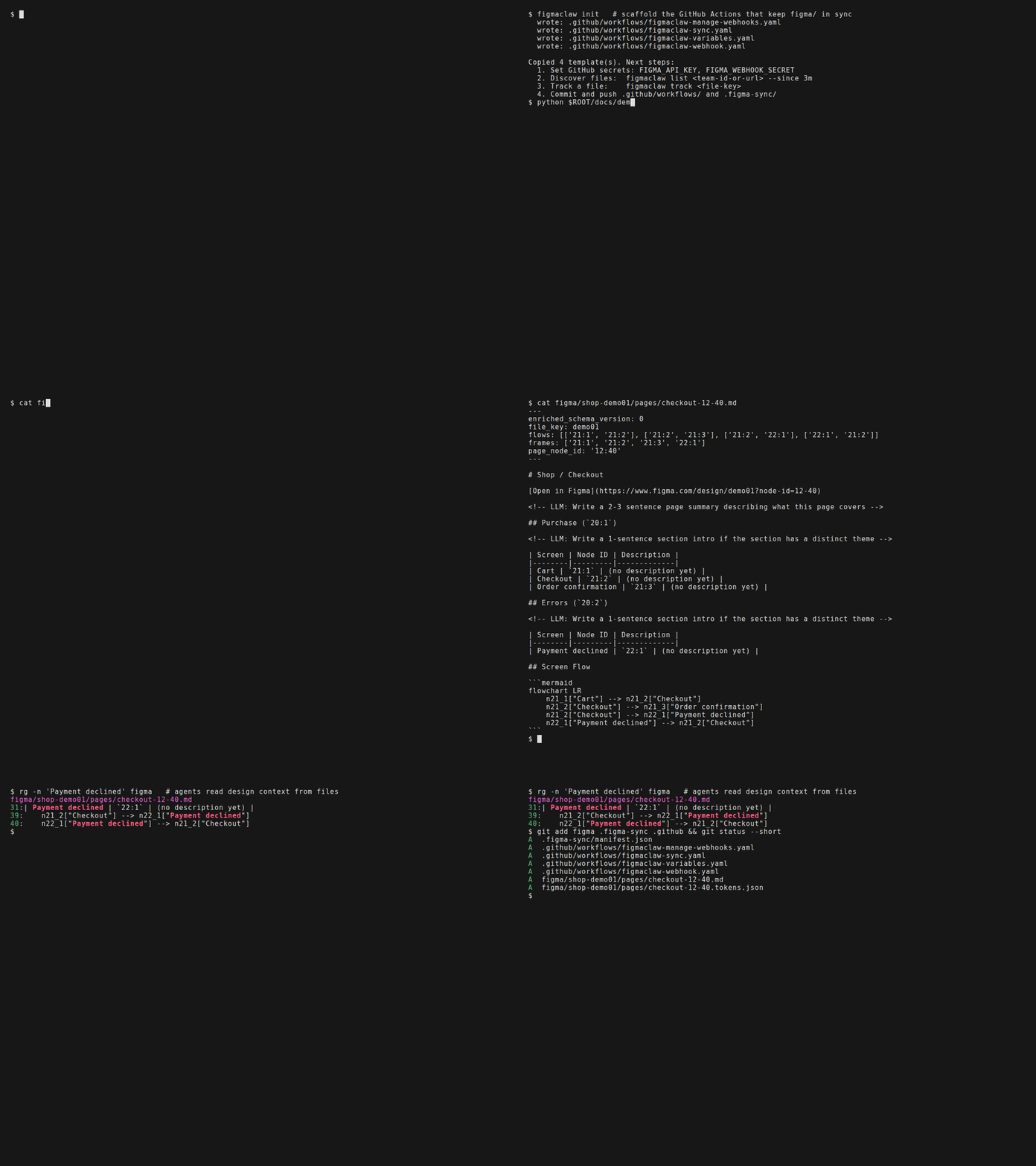
Recorded with docs/demo.tape. To run offline with no Figma token, docs/demo_fixture.py feeds a bundled page to figmaclaw's real pull code. On your own file, figmaclaw track <file-key> does that step.
Install
uv tool install figmaclaw     # or: pipx install figmaclaw
figmaclaw --version
Needs Python 3.12+ on Linux or macOS (CI runs on Linux). On Windows, run it inside WSL: the CLI uses POSIX file locks and does not start natively.
To run the latest main instead: uv tool install git+https://github.com/aviadr1/figmaclaw.
Quick Start
mkdir design-memory && cd design-memory && git init

figmaclaw init                   # writes 4 GitHub Actions workflows (sync, webhook, variables, webhook management)
export FIGMA_API_KEY=figd_...    # a Figma personal access token
figmaclaw track <file-key>       # key from figma.com/design/<file-key>/...; registers the file and pulls it
rg -n "Checkout" figma/          # the design is now files

git add . && git commit -m "Mirror Figma into git"
To keep the mirror fresh, push the repo to GitHub and add FIGMA_API_KEY as a repository secret. The installed sync workflow then runs every hour. Optional extras:
CLAUDE_CODE_OAUTH_TOKENsecret: CI also writes the frame descriptions.FIGMA_TEAM_IDvariable: new files in your team are tracked automatically.- Figma webhooks: re-sync on every save (needs a small webhook proxy).
docs/INSTALL.md covers all three. Then check the setup:
figmaclaw doctor              # install, API key, manifest, figma/ dir, workflows
figmaclaw workflows doctor    # are the installed workflows up to date with this figmaclaw?
What You Get
One markdown file per Figma page, at figma/<file>/pages/<page>.md. This is the page from the demo, exactly as figmaclaw wrote it:
---
enriched_schema_version: 0
file_key: demo01
flows: [['21:1', '21:2'], ['21:2', '21:3'], ['21:2', '22:1'], ['22:1', '21:2']]
frames: ['21:1', '21:2', '21:3', '22:1']
page_node_id: '12:40'
---

# Shop / Checkout

[Open in Figma](https://www.figma.com/design/demo01?node-id=12-40)

<!-- LLM: Write a 2-3 sentence page summary describing what this page covers -->

## Purchase (`20:1`)

<!-- LLM: Write a 1-sentence section intro if the section has a distinct theme -->

| Screen | Node ID | Description |
|--------|---------|-------------|
| Cart | `21:1` | (no description yet) |
| Checkout | `21:2` | (no description yet) |
| Order confirmation | `21:3` | (no description yet) |

## Errors (`20:2`)

<!-- LLM: Write a 1-sentence section intro if the section has a distinct theme -->

| Screen | Node ID | Description |
|--------|---------|-------------|
| Payment declined | `22:1` | (no description yet) |

## Screen Flow

```mermaid
flowchart LR
    n21_1["Cart"] --> n21_2["Checkout"]
    n21_2["Checkout"] --> n21_3["Order confirmation"]
    n21_2["Checkout"] --> n22_1["Payment declined"]
    n22_1["Payment declined"] --> n21_2["Checkout"]
```
- Frontmatter is machine state (node IDs, prototype flows, hashes). figmaclaw rewrites it on every sync.
- The body starts as a scaffold with
<!-- LLM: ... -->placeholders. Fill it in by hand, or runfigmaclaw claude-run, which launches Claude Code to screenshot the frames and write the descriptions. After the scaffold, code never rewrites the body, so that prose survives every re-sync. - Node IDs are Figma's own, so any
rghit maps straight back tofigma.com/design/<file-key>?node-id=<id>.
Why figmaclaw
- Files, not API calls. Agents search
figma/**withrgand read design history withgit log, with no Figma round-trip per question. - Incremental sync. A file whose Figma version hasn't changed is skipped outright. A page whose content hash hasn't changed is not rewritten. Per-frame hashes mark only the changed screens as stale, so screenshots and descriptions are redone only where the design moved.
- Prose is never clobbered. Sync touches frontmatter only. The body-preservation invariants are written down in docs/body-preservation-invariants.md and enforced by tests.
- Runs itself.
figmaclaw initinstalls thin caller workflows that call the reusable workflows in this repo.figmaclaw workflows doctor|upgradedetects and repairs drift after you upgrade figmaclaw. - Polite to the Figma API. Requests are paced, and
429 Retry-Afterresponses are honored.
For Design-System Migrations
Migrating a Figma file from one design system to another is where a one-shot agent pass looks right but produces silent corruption: inheritance leaks, frozen literals after an unbind, instances detached from their masters. Round 1 of a real-world migration produced 365 silently-incorrect bindings (write-up).
The audit-page / audit-pipeline / apply-tokens commands turn those passes into checked pipelines. Every change is a manifest that is linted against accumulated rules (the FCLAW namespace), emitted as use_figma batches (<prefix>-NNNN.{json,use_figma.js} + manifest.json), and verified via REST. apply-tokens and audit-page swap share a --dry-run / --emit-only / --execute mode switch. The emitted scripts catch errors per row, so one bad row doesn't roll back the rows that succeeded, and the swap scripts never call .detach().
| Command | Purpose |
|---|---|
audit-page emit-clone-script |
Clone a source page into an audit page (warns if the source looks inactive: archive, playground, prior audit clone, etc.). |
audit-page swap |
Apply component-instance swaps from a typed manifest, and persist the idMap so later apply-tokens runs target the new instances. |
audit-pipeline lint |
Validate component_migration_map.v3.json (nested and flat shapes). With --variants <taxonomy.json>, it also enforces variant-axis names, values, and coverage of the old axes. |
apply-tokens |
Apply variable-binding fixes. Accepts legacy compact rows and versioned manifests. Refusals list unrecognised and missing canonical fields, with a did_you_mean_token_name hint when a <library>: prefix is detected. |
See docs/migration-pipeline.md for the full pipeline.
How It Works
Designer saves in Figma
  -> Figma webhook  -> figmaclaw apply-webhook   (re-syncs the changed file)
  -> hourly cron    -> figmaclaw pull            (re-syncs every tracked file)
       updates frontmatter; scaffolds new pages; skips unchanged files and pages
  -> figmaclaw claude-run (optional enrichment with Claude Code)
       inspect           : which pages and frames need descriptions?
       screenshots --stale: download only the changed frames
       write-body        : write the prose, keeping frontmatter intact
       mark-enriched     : record what was described
  -> git commit + push
Common Commands
figmaclaw init: install the GitHub Actions workflows into a repo.figmaclaw track <file-key>: register a Figma file and run its first pull.figmaclaw list <team-id-or-url>: discover files in a Figma team.figmaclaw pull: sync all tracked files.figmaclaw sync <page.md>: re-sync one page file.figmaclaw diff: show what designers changed between Figma versions (frames added, removed, renamed; flow changes).figmaclaw inspect <page.md>: report structure and enrichment state.figmaclaw inspect-instance: diff one INSTANCE against its master.figmaclaw screenshots <page.md>: download frame screenshots.figmaclaw write-body/mark-enriched: write prose, then record that enrichment is done.figmaclaw census/variables: snapshot published components and the design-system variable catalog.figmaclaw workflows doctor|upgrade: detect or repair workflow template drift.figmaclaw self update/self skill: upgrade figmaclaw, or print the bundled agent skill.
Run figmaclaw --help for the full list. Global options such as --repo-dir PATH and --json go before the command: figmaclaw --repo-dir ../design-memory init.
Upgrade
Upgrade a PyPI install with uv tool upgrade figmaclaw (or pipx upgrade figmaclaw).
figmaclaw self update reinstalls from GitHub main (uv tool install --force --reinstall --upgrade git+https://github.com/aviadr1/figmaclaw@main), so use it only on a git install.
Documentation
- Installation and CI setup: docs/INSTALL.md
- Token auth and rotation: docs/token-auth-and-rotation.md
- Markdown schema: docs/figmaclaw-md-format.md
- Migration / lint / apply-tokens pipeline: docs/migration-pipeline.md
- Body preservation design: docs/body-preservation-design.md
- Body preservation invariants: docs/body-preservation-invariants.md
- Failure postmortem and lessons: docs/failure-postmortem-2026-04-03.md
Relationship To issueclaw
figmaclaw follows the same core architecture as issueclaw (webhook -> fetch -> render -> commit) but targets Figma. Consumer repos can use both (figma/ + linear/) together.
Development
git clone https://github.com/aviadr1/figmaclaw
cd figmaclaw
uv sync
uv run pre-commit install

uv run ruff format --check .
uv run ruff check .
uv run --group dev python -m basedpyright
uv run python -m pytest -q --cov=figmaclaw --cov-report=term-missing --cov-fail-under=70
To regenerate the demo GIF on Linux or macOS, install VHS (with ttyd and ffmpeg), rg and the DejaVu Sans Mono font, then from the repo root:
uv sync
vhs docs/demo.tape    # writes docs/demo.gif
Troubleshooting
ModuleNotFoundError: No module named 'fcntl': you are on native Windows. Run figmaclaw inside WSL.FIGMA_API_KEY environment variable is not set.:track,pullandsyncneed a Figma personal access token inFIGMA_API_KEY.Claude credentials file not foundorCould not find a Figma OAuth access token: the MCP-based commands needFIGMA_MCP_TOKEN, or Figma authenticated inside Claude Code (~/.claude/.credentials.json).- MCP servers without an
Mcp-Session-Id: supported.FigmaMcpClienthandles both sessionful and stateless MCP responses. pre-commitmissing locally: runuv run --with pre-commit python -m pre_commit install.
License
1 maintainer

Metadata
1 maintainer
Release files for figmaclaw 0.2.14
For a detailed explanation of source distributions (sdists) and built distributions (wheels), please see the package formats documentation.
Source distribution (sdist)
| File | Size | Uploaded | |
|---|---|---|---|
| figmaclaw-0.2.14.tar.gz | 238.7 kB | Details |
Built distribution (wheel)
| File | Interpreter | ABI | Platform | Reset |
|---|---|---|---|---|
| figmaclaw-0.2.14-py3-none-any.whl | Python 3 | none | any | Details |
Total release size: 526.1 kB
Release files / figmaclaw-0.2.14.tar.gz
| Download URL | figmaclaw-0.2.14.tar.gz |
|---|---|
| Size | 238.7 kB |
| Tags | Source |
|
SHA-256 checksum How to use checksums |
8cda6cccd9624868be76f6e42e4bfbcc647122dfbacbf37bc91d702d02d37e4c
|
|
BLAKE2b-256 checksum How to use checksums |
dde74140090bba0c1da5362015d55f2aa9e5a4e9dd8cd27809dbf5e51cdd02e5
|
| Upload date | |
|
Uploaded using Trusted Publishing? What is trusted publishing? |
Yes |
| Uploaded via |
twine/7.0.0 CPython/3.13.14
|
Provenance
Provenance describes where a file came from. On PyPI, provenance is shared via attestations, which provide a verifiable record of the build or publishing details. View details, limitations and caveats.


PyPI Publish Attestation
PyPI verified that this artifact, at this checksum, originated from the publisher listed below.
Signed by GitHub Actions, verified by PyPI on Sep 28, 2026.
Transparency logRelease files / figmaclaw-0.2.14-py3-none-any.whl
| Download URL | figmaclaw-0.2.14-py3-none-any.whl |
|---|---|
| Size | 287.4 kB |
| Tags | Python 3 |
|
SHA-256 checksum How to use checksums |
8ad9667184d4e79d2ccb4acefa8dfdf269086f76bb8847c2bfdab43239b25b54
|
|
BLAKE2b-256 checksum How to use checksums |
51122b26a7bd45ffe31e462f9ef941294b2e08635eed63255a96077e730252d6
|
| Upload date | |
|
Uploaded using Trusted Publishing? What is trusted publishing? |
Yes |
| Uploaded via |
twine/7.0.0 CPython/3.13.14
|
Provenance
Provenance describes where a file came from. On PyPI, provenance is shared via attestations, which provide a verifiable record of the build or publishing details. View details, limitations and caveats.
PyPI Publish Attestation
PyPI verified that this artifact, at this checksum, originated from the publisher listed below.
Signed by GitHub Actions, verified by PyPI on Sep 28, 2026.
Transparency log












