
This release is a pre-release and may not be stable for production use.

Standard cable assets generator for Physical AI.


Filaire generates cables of standard types (power cords, USB, Ethernet,
HDMI, audio, microphone, speaker wire, sensor, ribbon and coiled handset
cords, DC barrel and Micro-USB) with their real connectors, male and female, or with cut or
stripped ends, and exports them to OpenUSD as physics-ready assets: a
chain of rigid segments with UsdPhysics joints whose springs come from
the cable's bending and torsional stiffness. Every connector comes with the
receptacle it plugs into (device port, inlet, wall socket, panel connector,
or the female end of an extension), derived from the plug so that the two
always mate. The assets are checked in MuJoCo (dropped on the ground,
sagging like a beam, plugged in at the right and wrong angles) and in
Blender, where an add-on sets the rigid bodies and joints up by itself
when a file is imported. Every file passes OpenUSD's own validators.
It is built for Physical AI: robots that route, plug and unplug cables are trained and tested in simulation, and they need many different cables with exact ground truth, not one capsule chain. Everything can run on CPU. Filaire belongs to a series with Granulaire (granular assets), Maillage (textiles) and Quincaillerie (fasteners, cells and holders), and follows the same approach: distributions instead of one shape, measured outputs, honest limits.
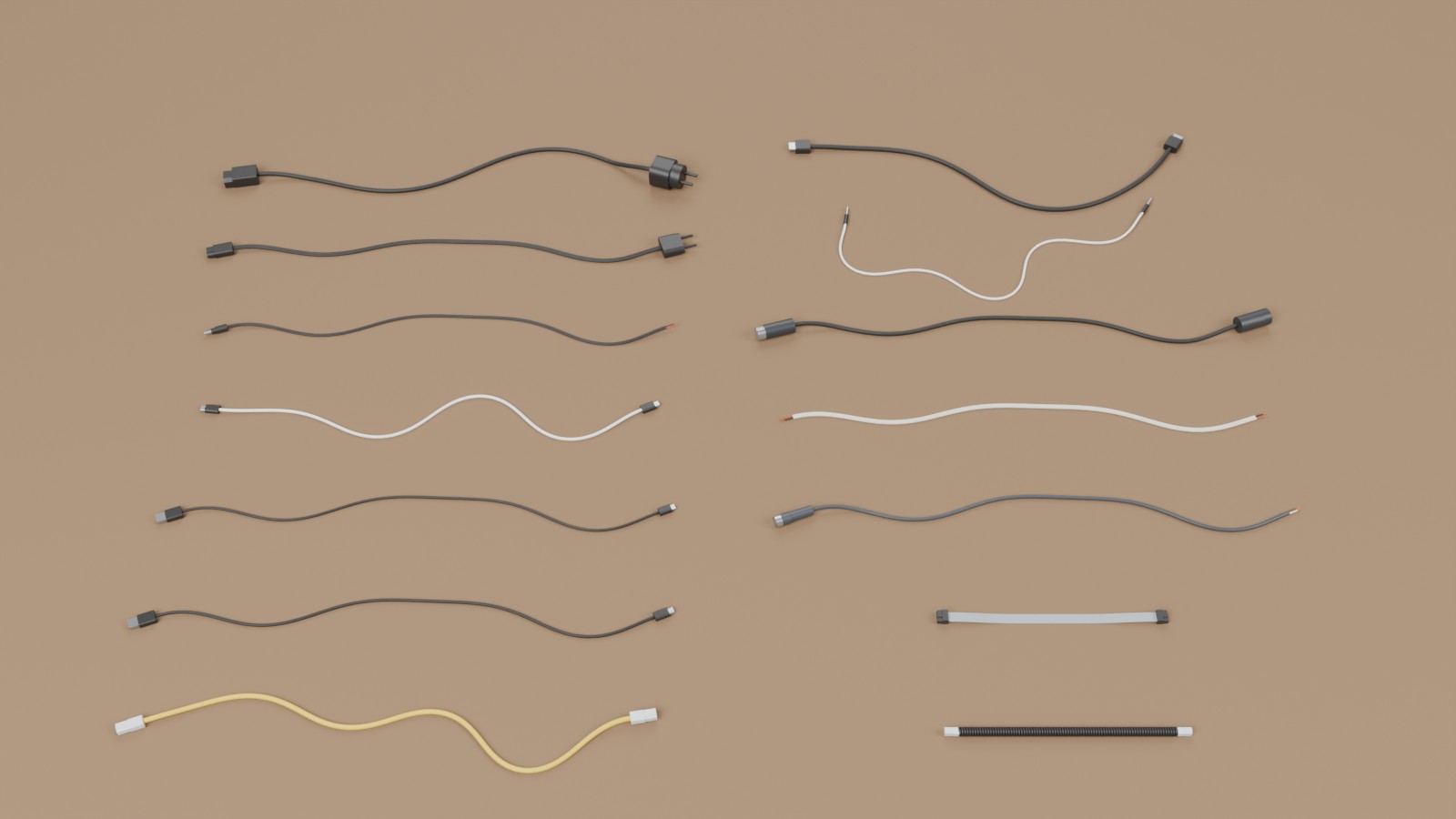
One cable of each of the 14 presets, with its usual ends (left: power cords C13 and C7, DC barrel, USB-C, USB-A to C, USB-A to Micro-B, Ethernet; right: HDMI, 3.5 mm jack, XLR microphone cable, speaker wire, M12 sensor cable, IDC ribbon, coiled handset cord), imported from the OpenUSD files into Blender and rendered with Cycles.
What it does
- Generates N cables of a preset, 1 m long by default (
--lengthfor another length, or the preset's retail lengths), lying straight, as a slack random curve or coiled on the floor. - Puts on each end, independently, a connector plug, a receptacle on a cable (the female end of an extension or a coupler), a clean cut or a stripped end with the cores out: 17 connector families, 28 end variants, any of them on any cable.
- Models the cable as a Kirchhoff rod: rigid segments of 1.5 cable
widths, joints with twist and bending springs
G·J / LandE·I / Lcomputed from the cross-section (round, figure-8 zip cord, flat ribbon; coiled cords as a helical spring), real masses. - Derives every receptacle from its plug, layer by layer, with a clearance; the keying (any angle, reversible, one orientation) is found from the geometry and checked against the standard.
- Exports OpenUSD: one rigid body per segment and per connector, each
with one visual mesh (so every DCC imports one object per body), mass,
centre of mass and inertia, convex collision parts, joints with drives,
PhysX attributes for Isaac Sim, a variant set per end (all the end
variants of a cable in one asset), a
MateFrameon each connector with its insertion axis, depth, clearance, keying and contact gender; and asockets.usdcfile with the fixed receptacles.--no-physicswrites visual assets only. Every file passes the OpenUSD validators (UsdValidation). - Checks the assets in MuJoCo (
filaire sim-test), read back from the files: drop on the ground, cantilever sag against beam theory, coil extension against spring theory, insertion at 0°, 90° and 180°. - A Blender add-on (
filaire blender-addon): rigid bodies and constraints set up on every USD import, and the same drop check in Blender (filaire blender-test).
Installation
From PyPI:
pip install "filaire[render,sim]"
From a clone, for development:
python -m venv .venv && source .venv/bin/activate
pip install -e ".[render,sim]"      # add ",dev" for tests and linting
Requires Python 3.10+. Dependencies: NumPy, SciPy, Shapely 2.1+ and the
OpenUSD bindings (usd-core); matplotlib for the previews, MuJoCo for the
checks. The Blender checks need Blender as a Python module
(pip install -e ".[blender]", Python 3.13 only) or a Blender executable.
Usage
filaire list                                         # presets
filaire ends                                         # every end variant
filaire generate --preset usb_c                      # 6 cables, 1 m each
filaire generate --preset ethernet --length 3 --layout coil
filaire generate --preset power_c13 --end-a c13_plug --end-b stripped
filaire generate --preset usb_c --end-a usb_c_plug --end-b usb_c_inline   # an extension cord
filaire generate --preset hdmi --length preset --count 12 --seed 4        # retail lengths
filaire generate --preset audio_jack --color "#c0392b" --modulus 45
filaire preview output/usb_c                         # top view (matplotlib)
filaire connectors --out connectors.png              # plug faces and receptacles
filaire generate --preset hdmi --no-physics          # visual assets only
filaire sim-test output/usb_c                        # MuJoCo checks
filaire blender-test output/usb_c                    # the drop check in Blender (add-on)
filaire blender-addon                                # filaire_physics.zip, for Blender 4.4+
python -m filaire ... works too. From Python:
from filaire import generate_scene, write_outputs

cables = generate_scene("usb_c", count=6, seed=1)  # 1 m, ends drawn from the preset
write_outputs(cables, "output")  # -> output/usb_c/

# 2.5 m power cords coiled on the floor, C13 on one end and a stripped end on the other
cords = generate_scene(
    "power_c13", count=4, length=2.5, layout="coil", ends={"a": "c13_plug", "b": "stripped"}
)
write_outputs(cords, "output")
Options of filaire generate
| Option | Default | Effect |
|---|---|---|
--preset |
usb_c |
cable type (table below) |
--count N, --seed S |
6, 1 | number of cables, random seed; same options and seed give the same cables |
--length L |
1 |
length in m of every cable; preset draws the preset's retail lengths (± tolerance) |
--end-a V, --end-b V |
preset's draw | end variant of each end, independently: any filaire ends entry, on any cable |
--layout |
preset's draw | straight, slack (random smooth curve) or coil (flat spiral on the floor) |
--color "#rrggbb" |
preset's draw | jacket colour of every cable |
--modulus E |
preset's draw | effective Young's modulus of the cable in MPa (sets the stiffness) |
--max-segments N |
400 | upper bound on the rigid segments per cable (longer segments beyond it) |
--no-physics |
visual assets only: no rigid bodies, colliders, joints, physics scene or ground | |
--no-vary-… |
turn one random aspect off, the others unchanged: layout, ends, color, stiffness, density, length |
Each random aspect has its own stream: turning one off or forcing it leaves the others as they were (same layouts with plain colours, same colours with other ends…).
Presets
| Category | Preset | Cross-section | End A | End B (default draw) |
|---|---|---|---|---|
| Power | power_c13 |
round Ø6.4 mm, 3 cores | C13 | CEE 7/7 plug, C14 (extension), stripped |
power_c7 |
figure-8, 2 × Ø3.4 mm | C7 | Europlug, stripped | |
dc_barrel |
figure-8, 2 × Ø2.4 mm | DC plug 5.5 × 2.1, 5.5 × 2.5 or 4.0 × 1.7 | stripped, cut, DC jack (extension) | |
| Data | usb_c |
round Ø4.0 mm | USB-C plug | USB-C plug, USB-C receptacle (extension) |
usb_a_to_c |
round Ø3.8 mm | USB-A plug | USB-C plug | |
usb_micro |
round Ø3.5 mm | USB-A plug | Micro-B plug | |
ethernet |
round Ø6.0 mm, 4 pairs | RJ45 plug | RJ45 plug, RJ45 coupler | |
hdmi |
round Ø7.0 mm | HDMI plug | HDMI plug, HDMI receptacle (extension) | |
| Audio | audio_jack |
round Ø3.5 mm | 3.5 mm plug | 3.5 mm plug, 3.5 mm socket (extension) |
xlr_mic |
round Ø6.0 mm | XLR3 female | XLR3 male | |
speaker_wire |
figure-8, 2 × Ø3.2 mm | stripped, cut | stripped, cut | |
| Industrial | m12_sensor |
round Ø5.0 mm, PUR | M12 female | stripped, cut |
ribbon_idc |
flat, 10 × 1.27 mm | IDC socket 2 × 5 | IDC socket, cut | |
| Telephone | coiled_handset |
coil Ø8.5 mm of Ø2.8 mm wire | RJ9 plug | RJ9 plug |
Every cable also carries cut and stripped variants on both ends, and any
other variant forced with --end-a / --end-b. Diameters, densities
(8–90 g/m) and moduli (20–300 MPa, drawn per cable) are realistic orders of
magnitude, not measurements of a specific product.
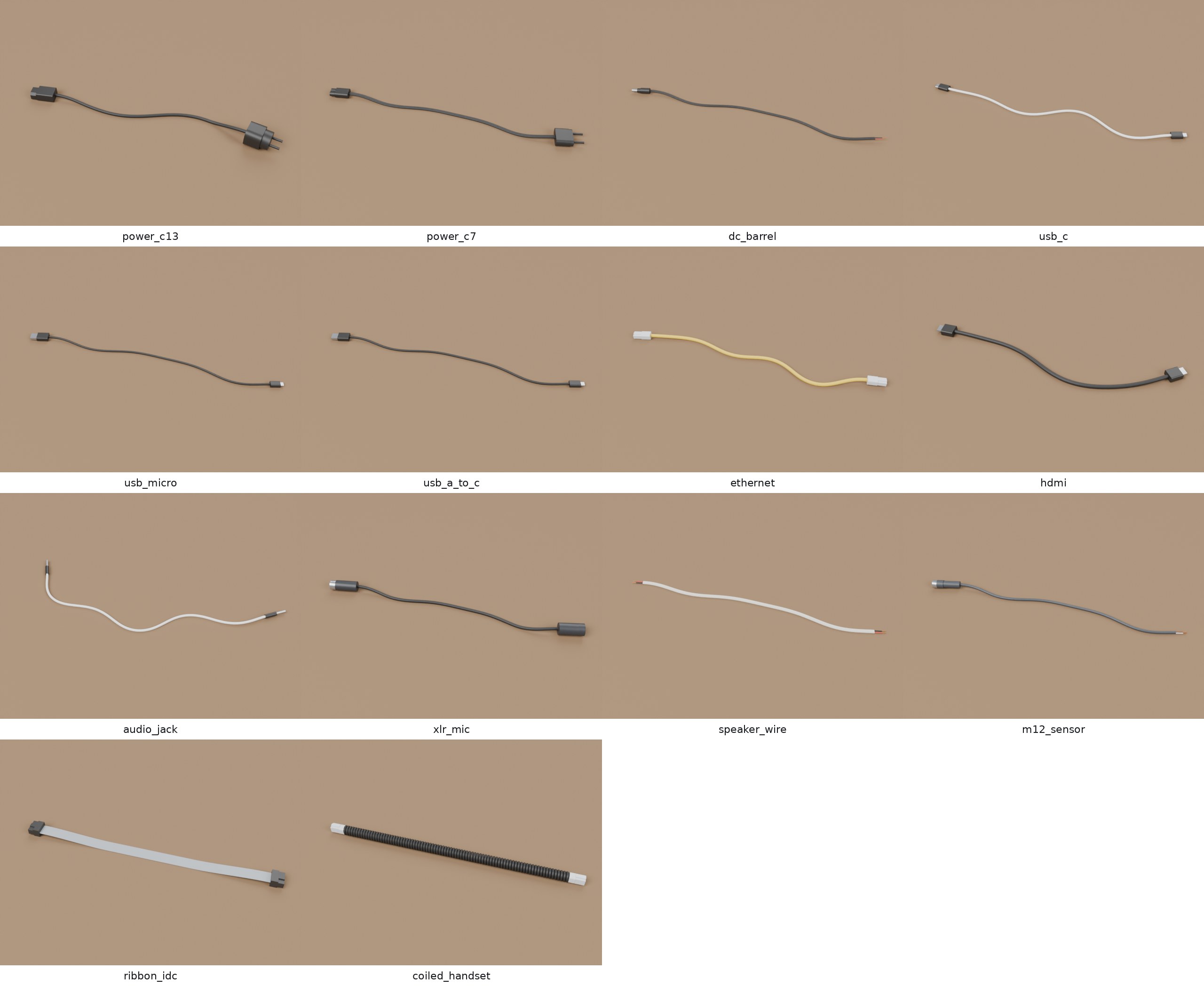
Each preset with its usual ends (the first variant of each end), 40 cm long (25 cm for the ribbon and the coiled cord), rendered in Blender.
Connectors
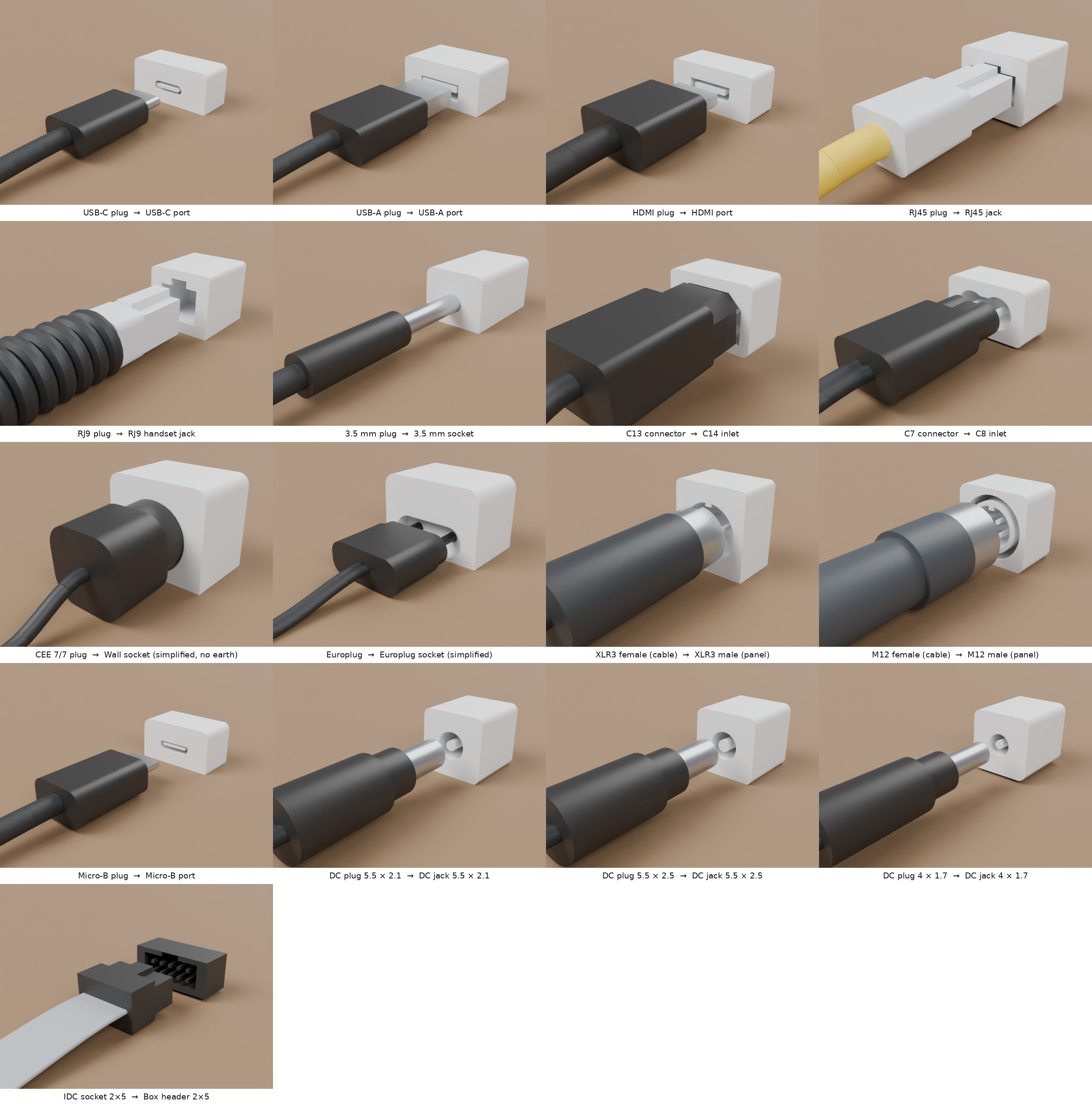
The 17 connector families: each plug on a short piece of its cable, 15 mm
in front of the fixed receptacle derived from it (sockets.usdc), rendered
in Blender.
| Family | Cable side (plug) | Contacts | Receptacle on a cable | Fixed receptacle | Keying | Depth |
|---|---|---|---|---|---|---|
usb_c |
USB-C plug | male | USB-C receptacle | USB-C port | reversible | 6.65 mm |
usb_a |
USB-A plug | male | USB-A port | keyed | 12 mm | |
usb_micro |
Micro-B plug | male | Micro-B port | keyed | 5.6 mm | |
hdmi_a |
HDMI plug | male | HDMI receptacle | HDMI port | keyed | 9.5 mm |
rj45 |
RJ45 plug | male | RJ45 coupler | RJ45 jack | keyed | 14 mm |
rj9 |
RJ9 plug | male | RJ9 handset jack | keyed | 10 mm | |
jack35 |
3.5 mm plug | male | 3.5 mm socket | 3.5 mm socket | none | 15 mm |
c13 |
C13 connector | female | C14 plug | C14 inlet | keyed | 13 mm |
c7 |
C7 connector | female | C8 inlet | reversible | 10 mm | |
cee77 |
CEE 7/7 plug | male | wall socket (simplified) | reversible | 34 mm | |
cee716 |
Europlug | male | Europlug socket (simplified) | reversible | 25 mm | |
xlr3 |
XLR3 female | female | XLR3 male | XLR3 male (panel) | keyed | 11 mm |
m12a |
M12 A-coded female | female | M12 male (panel) | keyed | 8 mm | |
idc10 |
IDC socket 2 × 5 | female | box header 2 × 5 | keyed | 6 mm | |
dc5521, dc5525, dc4017 |
DC plug 5.5 × 2.1, 5.5 × 2.5, 4.0 × 1.7 mm | male | DC jack | DC jack | none | 9.5 mm |
Gender and role are kept apart. Gender is the contact gender of the
standard; role is geometric: the plug enters, the receptacle receives. An
IEC C13 has female contacts but enters the C14 inlet; an XLR3 female enters
the shell of the male. filaire:contactGender and filaire:role say both.
The receptacle is derived from the plug. Each plug is described by its cross-sections, layer by layer from the tip (a CEE 7/7 plug: two pins, then the round face that enters the socket's recess). In each layer, the receptacle's solid is its outline minus the plug's cross-section grown by the clearance (0.05–0.3 mm). The plug's holes become the receptacle's pins or tongue, the plug's key becomes the keyway, and the two always mate. The keying is then found by turning the plug in 15° steps and testing for overlap, and a test checks it against the standard's.
The same test answers which plug goes into which receptacle across families
(fits(plug, angle, socket=other)). For the DC barrels it gives the real
behaviour: the derived jacks get a centre pin from the plug's bore, so a
5.5 × 2.5 mm plug goes loosely onto a 5.5 × 2.1 mm jack, while a 5.5 × 2.1 mm
plug is stopped by the thicker pin of a 5.5 × 2.5 mm jack.
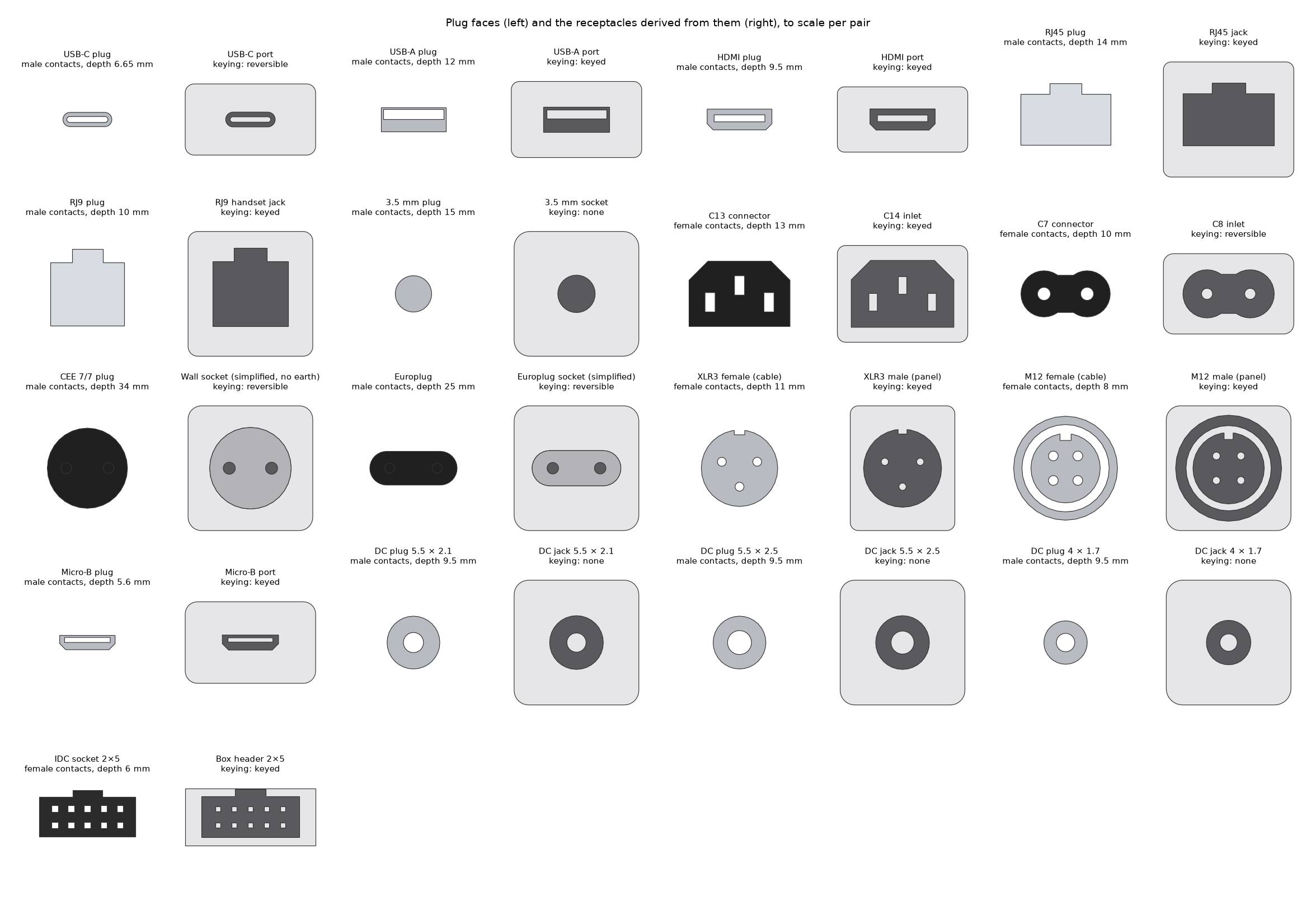
filaire connectors: the plug seen from its tip (left) and the fixed
receptacle seen from the front (right): opening in dark, pins and tongues in
light grey.
Dimensions come from published figures where they could be found (USB-C
receptacle opening and insertion length, HDMI plug and receptacle, RJ45 and
RJ9 widths and heights, 3.5 mm diameter and length, CEE 7 pins and recess
depth, IEC 60320 pin spacing, Micro-B receptacle opening, DC barrel diameters
and the 4.0 × 1.7 mm barrel length); the others (XLR, M12, IDC, C13 face,
Micro-B chamfers, 5.5 mm barrel length, inner cavities, overmolds) are approximate and marked so in
connectors.py, each with its sources. The
standards themselves were not consulted. Connectors are simplified: no
latches that move, no threads, no contacts inside the holes, no logos.
Outputs (per preset, under output/<preset>/)
| File | Content |
|---|---|
filaire_<preset>.usdc |
the cables (OpenUSD, Blender: File > Import > USD) |
sockets.usdc |
one fixed receptacle per connector family used by the cables |
cables.csv |
per cable: layout, length, ends, colour, modulus, densities, stiffness, segments, masses |
summary.json |
counts by layout, end and colour; length, mass, stiffness and segment ranges |
sheet.png |
top view (filaire preview) |
sim_test/sim_test.json |
MuJoCo report (filaire sim-test) |
sim_test/blender_setup.json, sim_test/blender_naive.json |
Blender reports and their scenes (filaire blender-test) |
OpenUSD layout
Z up, metres, kilograms, /World the default prim.
/World
  /PhysicsScene                  gravity
  /Looks, /PhysicsMaterials      UsdPreviewSurface materials; friction and restitution
  /Cables/<cable>                Xform, PhysicsArticulationRootAPI, filaire:* attributes,
                                 variant sets "end_a" and "end_b"
    /Segments/seg_000 …          rigid bodies (RigidBodyAPI, MassAPI, PhysxRigidBodyAPI), x along the cable
      /Visual                    ONE mesh: the piece of tube this segment carries
      /Collision                 Capsule along x (round, coiled) or Cube (flat, figure-8), purpose guide
    /Joints/joint_000 …          PhysicsJoint: translations locked (coiled: transX free),
                                 drives rotX (twist), rotY, rotZ (bending) [, transX (coil)]
    /End_A, /End_B               filled by the selected variant:
      /Body                      rigid body of the connector or stripped end
        /Visual                  ONE mesh, a GeomSubset per material (shell, body, cores, copper)
        /Collision/hull_00 …     convex parts (MeshCollisionAPI convexHull, purpose guide)
        /MateFrame               origin on the mating plane, +Z = insertion direction
      /Attach                    PhysicsFixedJoint to the end segment
  /Ground                        collision box, its top face at z = 0
Each rigid body has exactly one visual mesh, as in Quincaillerie: Blender
and other DCCs import one object per body, so a rigid body set on it moves
the whole part. Each segment spans the chord between its two joints, so
neighbouring segments meet exactly at their joint even on a tight curve.
Every collider carries PhysxCollisionAPI offsets and every body
PhysxRigidBodyAPI iterations, read by Isaac Sim and ignored elsewhere.
Without physics (--no-physics, write_outputs(…, physics=False)):
each cable is one mesh, /World/Cables/<cable>/Visual, each end a Body
with its Visual and MateFrame; no rigid bodies, colliders, joints,
physics materials, physics scene or ground. The filaire:* attributes stay.
OpenUSD compliance. filaire.validate.validate(file) runs every
validator of OpenUSD's UsdValidation registry (composition, stage
metadata, geometry and subsets, material bindings, shaders, UsdPhysics
bodies, colliders, joints and articulations) on each end variant of each
cable; the tests and CI require no error and no warning, with and without
physics.
Selecting a variant (end_b = "usb_c_inline", "cut"…) swaps the end, its
collision parts and its joint. Angular drives use UsdPhysics units
(stiffness per degree); the same values per radian and the rod's stiffness
are kept as engine-neutral attributes:
| Attribute (on the cable) | Content |
|---|---|
filaire:bendingStiffness |
E·I about the width axis and about the height axis (N·m²) |
filaire:torsionalStiffness |
G·J (N·m²) |
filaire:jointStiffness |
per joint: twist, bend y, bend z (N·m/rad) |
filaire:youngsModulus, filaire:shearModulus, filaire:linearDensity |
material (Pa, kg/m) |
filaire:segmentLength, filaire:segmentCount, filaire:restShape |
discretisation; rest shape is straight |
filaire:dampingTime |
joint damping = stiffness × 0.01 s |
filaire:coil:*, filaire:axialStiffness |
coiled cords: coil diameter, pitch, turns, wire length; spring k (N/m) |
filaire:length, filaire:layout, filaire:profile, filaire:jacket, … |
what the cable is |
Attribute (on a MateFrame) |
Content |
|---|---|
filaire:connector, filaire:name, filaire:standard |
family and name (usb_c, "USB-C plug") |
filaire:role, filaire:mount, filaire:contactGender |
plug / receptacle, cable / panel, male / female |
filaire:insertionDepth, filaire:clearance, filaire:keying |
for insertion tasks (m) |
Physics model
- Rod. The cable is a chain of N rigid segments (length ≈ 1.5 cable
widths, at most 400 per cable). Consecutive segments share a joint at
their common end point with three rotational springs: twist
G·J / L, bendingE·I_y / LandE·I_z / L, the discrete Kirchhoff rod.E·IandG·Jcome from the cross-section (polygon second moments, so a flat ribbon is a hundred times softer across its thickness than across its width) and an effective modulus drawn per cable;G = E / (2 (1 + ν)), ν = 0.45. The rest shape is straight; the authored pose (slack, coiled) is a deformed state. - Coiled cords are modelled along their axis, as a helical spring seen
as a rod (Wahl's close-coiled formulas): bending
2 E I p / (π D (2 + ν)), twistE I p / (π D), and an axial spring4 G J / (π D³ n)shared by freetransXjoints. The coil itself is in the visual mesh. - Masses from the linear density; connectors from the volume of their parts and an effective density; inertia tensors from the meshes.
Blender
Blender's USD importer reads geometry and materials but ignores UsdPhysics: imported as is, a cable is a heap of loose tube pieces and its connectors fall off (see the comparison below). The add-on, adapted from Quincaillerie's, sets the physics up once and for all:
filaire blender-addonwritesfilaire_physics.zip.- In Blender (4.4 or later): Edit > Preferences > Get Extensions > Install from Disk, pick the zip.
- File > Import > Universal Scene Description, as usual: every segment and connector gets its rigid body, every joint its constraint. Press Play.
On import it moves each body's origin to its centre of mass (Blender uses
the origin as centre of mass), makes its collision shape a compound of the
USD shapes (capsules, boxes and convex hulls rebuilt from the file), sets
mass, friction and small collision margins, turns the cable joints into
Generic Spring constraints with the USD drives' stiffness and damping
(translations locked; a coiled cord's axial spring kept) and the connectors'
fixed joints into Fixed constraints, and runs the rigid body world at 4000
substeps per second for the light segments. The same file runs as a script
(blender -b -P filaire_physics.py -- file.usdc) without installing.
Bullet takes a spring's rest position from the first frame, so in Blender a cable keeps the shape it was generated in (coiled, slack) as its rest shape, where the file and MuJoCo say straight: a coiled cable stays coiled.
MuJoCo checks
filaire sim-test output/<preset> reads the OpenUSD files back (not the
generator's objects) and runs, on CPU:
| Check | What | Pass when |
|---|---|---|
| drop | the first cables, with their selected ends, lifted 1 cm and dropped for 3 s in their authored layout | finite, ground penetration below half the cable radius after the impact, all bodies slower than 5 cm/s at the end |
| sag | a sample of the cable clamped at one end, sagging ≈ 10 % of its length under its own weight; E·I read back from the joint drives |
tip deflection within 5 % of w L⁴ / (8 E I) |
| coil | coiled cords: the coil hanging from its top | extension within 5 % of W / (2 k) |
| insertion | each plug pushed along its axis (5 N max) into the fixed receptacle and the receptacle on a cable, at 0°, 90° and 180° | goes fully in at the angles its keying allows, stopped before 60 % of the depth at the others |
For speed, the drop test simulates the cable with at most 60 links (groups
of segments merged, springs in series, same E·I) and without the twist
hinge: in generalised coordinates a chain's mass matrix is dense and a step
costs the cube of its joints. Each joint gets an armature (added inertia)
and critical damping so that stiff, light links stay stable with a 1 ms
step; neither changes a static equilibrium, which is what the sag and coil
checks compare.
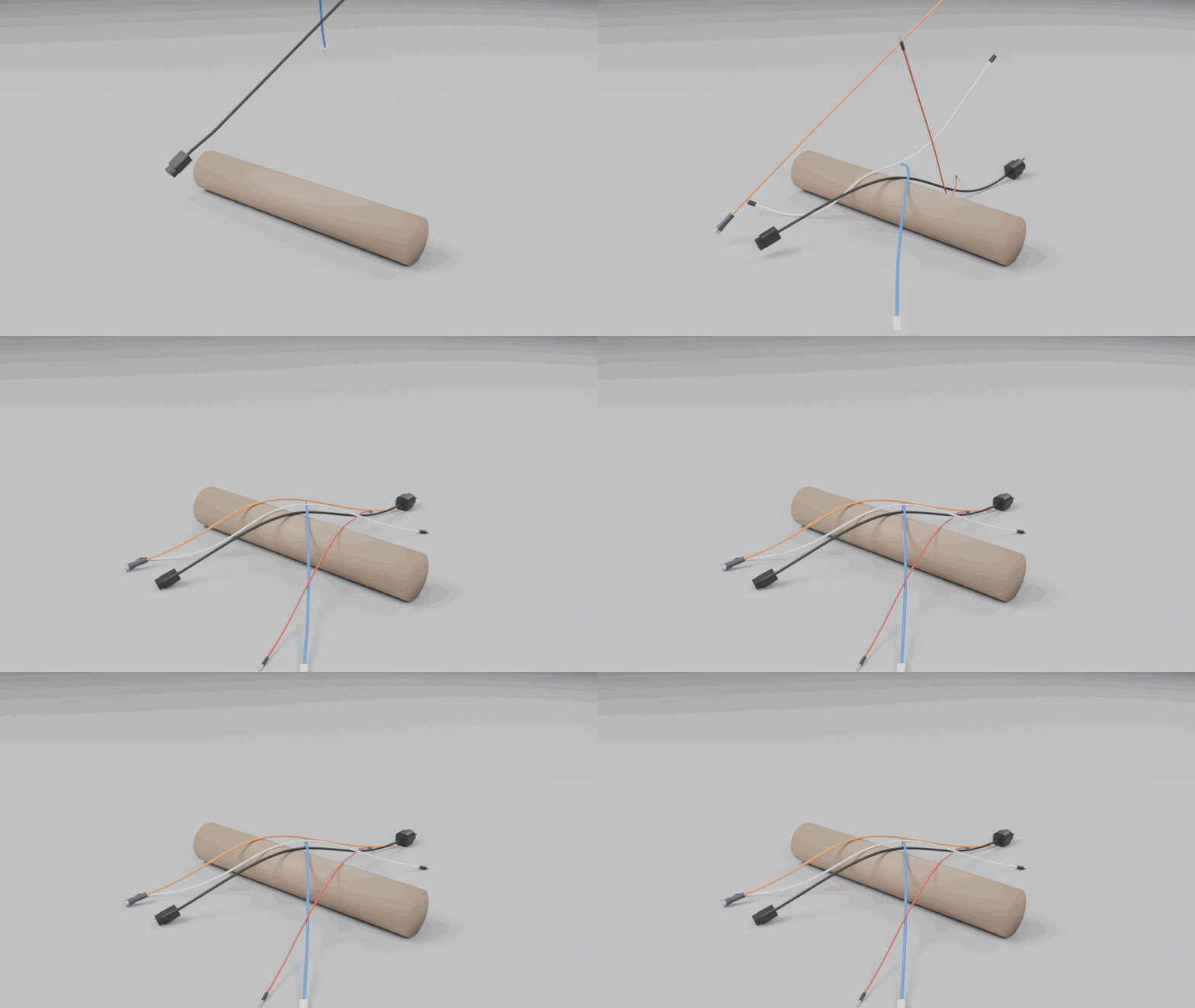
Power cord, Cat 6, USB-C, 3.5 mm jack and M12 sensor cable (70 cm),
steeply tilted and dropped together onto a bar: one end hits first, the
cables fold over the bar and over each other, connectors attached, and come
to rest. Simulated in MuJoCo from the OpenUSD files (rest shape straight,
60 links per cable, 0.5 ms step), rendered in Blender:
scripts/drop_gif.py.
Results
filaire generate --preset <p> --count 3 (1 m cables, seed 1) then
filaire sim-test output/<p> --cables 3, MuJoCo 3.17, one CPU core:
| Preset | Segments | E·I (N·m²) |
Mass with ends (g) | Drop (max speed, penetration) | Stiffness check | Insertion |
|---|---|---|---|---|---|---|
power_c13 |
104 | 0.0049–0.0073 | 119–187 | 3/3 (0.004 m/s, 0.10 mm) | sag −0.8 % | C13 panel + inline, CEE 7/7 ✓ |
power_c7 |
98 | 0.00066–0.00098 | 49–67 | 3/3 (0.002 m/s, 0.06 mm) | sag −0.8 % | C7, Europlug ✓ |
dc_barrel |
139 | 0.00016–0.00026 | 30–33 | 3/3 (0.012 m/s, 0.09 mm) | sag −0.8 % | three DC jacks ✓ |
usb_c |
167 | 0.00050–0.00080 | 46–50 | 3/3 (0.013 m/s, 0.18 mm) | sag −0.8 % | USB-C panel + inline ✓ |
usb_a_to_c |
175 | 0.00041–0.00065 | 43–46 | 3/3 (0.004 m/s, 0.18 mm) | sag −0.8 % | USB-A, USB-C ✓ |
usb_micro |
190 | 0.00029–0.00051 | 38–40 | 3/3 (0.004 m/s, 0.10 mm) | sag −0.8 % | USB-A, Micro-B ✓ |
ethernet |
111 | 0.0050–0.0072 | 61–70 | 3/3 (0.005 m/s, 0.07 mm) | sag −0.8 % | RJ45 panel + inline ✓ |
hdmi |
95 | 0.0094–0.0139 | 99–107 | 3/3 (0.005 m/s, 0.09 mm) | sag −0.8 % | HDMI panel + inline ✓ |
audio_jack |
190 | 0.00022–0.00036 | 20–22 | 3/3 (0.003 m/s, 0.13 mm) | sag −0.8 % | 3.5 mm panel + inline ✓ |
xlr_mic |
111 | 0.0013–0.0022 | 147–151 | 3/3 (0.007 m/s, 0.06 mm) | sag −0.8 % | XLR3 panel + inline ✓ |
speaker_wire |
104 | 0.00042–0.00067 | 52–55 | 3/3 (0.024 m/s, 0.07 mm) | sag −0.8 % | (stripped / cut ends) |
m12_sensor |
133 | 0.0015–0.0023 | 65–68 | 3/3 (0.004 m/s, 0.03 mm) | sag −0.8 % | M12 ✓ |
ribbon_idc |
52 | 0.00011–0.00017 | 14–16 | 3/3 (0.007 m/s, 0.06 mm) | sag −0.8 % | IDC ✓ |
coiled_handset |
59 | (coil) | 130–139 | 3/3 (0.004 m/s, 0.07 mm) | coil −0.0 % | RJ9 ✓ |
Every keyed connector was stopped at 90° and 180° (at most 12 % of its depth, the IDC socket's flat face entering a little before its key meets the header), every reversible one went in at 180°, the 3.5 mm jack at every angle, like the DC barrels. The sag is 0.8 % under the linear beam formula for every cable: the geometric nonlinearity of a 10 % deflection, the same for all since the sample length is scaled to the stiffness. Generation takes 1–4 s per preset (3 cables), the checks 15–30 s (a minute for the coiled cords).
Blender checks
filaire blender-test output/<preset> builds, for each tested cable, a scene
that references the cable file, keeps that cable (with its selected ends),
lifts it 2 cm and drops it on the ground, then simulates it in Blender
(Bullet) through the add-on, in its own process:
| Check | Pass when |
|---|---|
| joints hold | the two bodies of every joint meet within 0.5 mm at its anchor, the connectors' fixed joints included |
| at rest on the ground | no point more than 0.5 mm under the ground, every body slower than 5 cm/s after 1.5 s |
--mode naive imports the same scene the way one would by hand (File >
Import > USD, every mesh an active rigid body, the ground passive) and
reports how far neighbouring pieces drift apart.
filaire generate --preset <p> --count 2 (1 m cables, seed 1), then
filaire blender-test output/<p> --cables 2 and --mode naive on the
first cable, Blender 5.2 (bpy), one CPU core:
| Preset | Through the add-on | Bodies | Widest joint gap (mm) | Lowest point (mm) | Rigid bodies by hand: pieces drifted apart (mm) | Time per cable (s) |
|---|---|---|---|---|---|---|
power_c13 |
2/2 | 106 | 0.005 | −0.09 | 145 | 18 |
power_c7 |
2/2 | 100 | 0.006 | +0.02 | 180 | 17 |
dc_barrel |
2/2 | 141 | 0.009 | +0.05 | 174 | 30 |
usb_c |
2/2 | 169 | 0.005 | +0.04 | 58 | 42 |
usb_a_to_c |
2/2 | 177 | 0.005 | +0.04 | 32 | 44 |
usb_micro |
2/2 | 192 | 0.006 | +0.04 | 35 | 47 |
ethernet |
2/2 | 113 | 0.005 | +0.01 | 40 | 21 |
hdmi |
2/2 | 97 | 0.002 | +0.03 | 40 | 16 |
audio_jack |
2/2 | 192 | 0.006 | +0.04 | 162 | 48 |
xlr_mic |
2/2 | 113 | 0.008 | −0.03 | 1634 | 21 |
speaker_wire |
2/2 | 105 | < 0.001 | +0.05 | 10 | 18 |
m12_sensor |
2/2 | 135 | 0.007 | +0.02 | 818 | 25 |
ribbon_idc |
2/2 | 54 | < 0.001 | −0.05 | 1240 | 7 |
coiled_handset |
2/2 | 61 | 0.104 (axial spring) | −0.10 | 2193 | 10 |
Through the add-on every cable holds together and comes to rest (a coiled cord's joints stretch along its axial spring, by design). Set up by hand, the pieces are independent: they spread over the floor, and where a heavy connector or a coil's overlapping pieces push on them, they are thrown metres away. The checks found a real defect of the first beta: on tight curves the rigid segments, as long as the arc they stand for, overlapped their neighbours by up to 0.4 mm at the joints; each segment now spans the chord between its joints.
Limits
- Not calibrated. Moduli and densities are orders of magnitude; no
cable's
E·Iwas measured. The sag check proves the export is consistent with the model, not that the model matches a real cable. - Approximate connectors. See Connectors: simplified outlines, no moving latches, threads or contacts; several dimensions not from a source.
- Elastic, straight rest shape. No plastic set (a real cable keeps its coils), no initial tension in coiled cords, no knots.
- Isaac Sim not tested here. The files follow the standard
UsdPhysicsschemas (rigid bodies, D6 joints with drives, articulation root, convex hulls) and carry PhysX attributes; they are checked in MuJoCo and Blender but have not been loaded in Isaac Sim / PhysX (no NVIDIA GPU), where drive units and articulation behaviour may need adjusting. - Rest shape differs in Blender. See Blender: Bullet's springs rest in the first frame's pose, the generated one.
- Visual per segment. Each segment carries its piece of tube, so a simulated cable shows small creases at the joints when it bends.
Roadmap
- Calibration against measured bending stiffness (three-point bending or cantilever tests) for a few real cables per preset.
- Plastic set and pre-coiled rest shapes; tied bundles and hanks.
- A PhysX test in Isaac Sim, and MJCF export with MuJoCo's cable plugin.
- More connectors (Schuko and French sockets with their earth contacts, D-sub with its screws, DisplayPort, M8) and snap-fit latches.
- Insertion tasks: forces, misalignment tolerances, success labels.
Development
The project follows GitHub Flow:
mainis always releasable and protected: changes reach it only through pull requests, nobody pushes to it directly.- Every change starts on a short-lived branch from
main, named after its type:feat/<name>,fix/<name>,docs/<name>,ci/<name>, … - Push the branch and open a pull request into
main; CI runs on it. - Merge when CI is green, then delete the branch.
Releasing is a change like any other: on a chore/release-X.Y.Z branch, bump
version in pyproject.toml and move the Unreleased entries of
CHANGELOG.md under the new version; merge the pull request, then tag
vX.Y.Z on main. The release workflow builds the packages and attaches
them to the GitHub release.
A versioned pre-push hook refuses direct pushes to main. Enable it once per
clone with git config core.hooksPath .githooks (emergency override:
ALLOW_MAIN_PUSH=1 git push).
The README images are made by scripts/: make_logo.py (logo),
readme_images.py (Blender renders through bpy of every preset and every
connector family, connector sheet, GitHub social preview
docs/images/social_preview.png, to upload in the repository's Settings >
General > Social preview), drop_gif.py (the MuJoCo drop animation).
Continuous integration
| Workflow | When | What |
|---|---|---|
ci.yml |
every push to main, every pull request |
ruff check and ruff format --check; pytest on Python 3.10–3.13 (Linux) and 3.12 (macOS, Windows); a command-line smoke test with the OpenUSD validators; the MuJoCo checks of every preset; the Blender checks of every preset through the add-on (with the bpy module, Python 3.13), and for comparison the same with rigid bodies set by hand; reports kept as run artifacts; build the wheel and sdist, twine check, install the wheel in a clean environment. |
release.yml |
a pushed tag v* |
checks the tag matches the version in pyproject.toml, tests, builds, then creates the GitHub release with the packages and the Blender add-on attached and the notes taken from CHANGELOG.md. Versions with a, b or rc are marked as pre-releases. |
| Dependabot | monthly | pull requests to update the GitHub Actions and the Python dependencies. |
License
MIT © 2026 Daniel Régis Sarmento Caon
The logo is drawn from DejaVu Sans Bold outlines (Bitstream Vera license), converted to paths, so it displays without the font installed.
Filaire is part of Primvaria, physics-ready variability for Physical AI, in OpenUSD: pip install primvaria installs the whole suite.
1 maintainer

Metadata
1 maintainer
Release files for filaire 0.2.0b1
For a detailed explanation of source distributions (sdists) and built distributions (wheels), please see the package formats documentation.
Source distribution (sdist)
| File | Size | Uploaded | Provenance | Actions |
|---|---|---|---|---|
| filaire-0.2.0b1.tar.gz | 104.1 kB | With provenance | Details for filaire-0.2.0b1.tar.gz |
Built distribution (wheel)
| File | Interpreter | ABI | Platform | Actions Reset |
|---|---|---|---|---|
| filaire-0.2.0b1-py3-none-any.whl | Python 3 | none | any | Details for filaire-0.2.0b1-py3-none-any.whl |
Total release size: 186.5 kB
Release files / filaire-0.2.0b1.tar.gz
| Download URL | filaire-0.2.0b1.tar.gz |
|---|---|
| Size | 104.1 kB |
| Tags | Source |
|
SHA-256 checksum How to use checksums |
a1f60e8c8054a73a74cf76610480427d459d210837412f4bee3c72a886920c68
|
|
BLAKE2b-256 checksum How to use checksums |
381c88e921f7c9e06d099738849ce5094d32b33da5637db00b3462a91f67da88
|
| Upload date | |
|
Uploaded using Trusted Publishing? What is trusted publishing? |
Yes |
| Uploaded via |
twine/7.0.0 CPython/3.13.16
|
Provenance
Provenance describes where a file came from. On PyPI, provenance is shared via attestations, which provide a verifiable record of the build or publishing details. View details, limitations and caveats.


PyPI Publish Attestation
PyPI verified that this artifact, at this checksum, originated from the publisher listed below.
Signed by GitHub Actions, verified by PyPI on Oct 29, 2026.
Transparency logRelease files / filaire-0.2.0b1-py3-none-any.whl
| Download URL | filaire-0.2.0b1-py3-none-any.whl |
|---|---|
| Size | 82.4 kB |
| Tags | Python 3 |
|
SHA-256 checksum How to use checksums |
25240601b4d655342230a0943698dff44e52633e4cf5934796466f124283b2cc
|
|
BLAKE2b-256 checksum How to use checksums |
c3dec9b1bf32cfb02a42eec94e0a5d4f0d708f38eae6f28b4914a34ee542f82a
|
| Upload date | |
|
Uploaded using Trusted Publishing? What is trusted publishing? |
Yes |
| Uploaded via |
twine/7.0.0 CPython/3.13.16
|
Provenance
Provenance describes where a file came from. On PyPI, provenance is shared via attestations, which provide a verifiable record of the build or publishing details. View details, limitations and caveats.
PyPI Publish Attestation
PyPI verified that this artifact, at this checksum, originated from the publisher listed below.
Signed by GitHub Actions, verified by PyPI on Oct 29, 2026.
Transparency logSecurity for filaire 0.2.0b1
Provenance
Provenance describes where a file came from. On PyPI, provenance is shared via attestations, which provide a verifiable record of the build or publishing details. View details, limitations and caveats.
Full provenance
All 2 files in this release have been uploaded with provenance metadata.
Attestation for filaire-0.2.0b1.tar.gz
PyPI Publish Attestation
PyPI verified that this artifact, at this checksum, originated from the publisher listed below.
Signed by GitHub Actions, verified by PyPI on Oct 29, 2026.
Transparency logA note on package security
PyPI is a repository for distributing packages, not a service for auditing them. While third-party security researchers and our staff do their best to detect and remove malicious packages, PyPI cannot guarantee the quality, security or suitability of any given package.
To learn more about protecting yourself from malicious actors, visit our package security documentation.













