
This release is a pre-release and may not be stable for production use.
Fileglancer

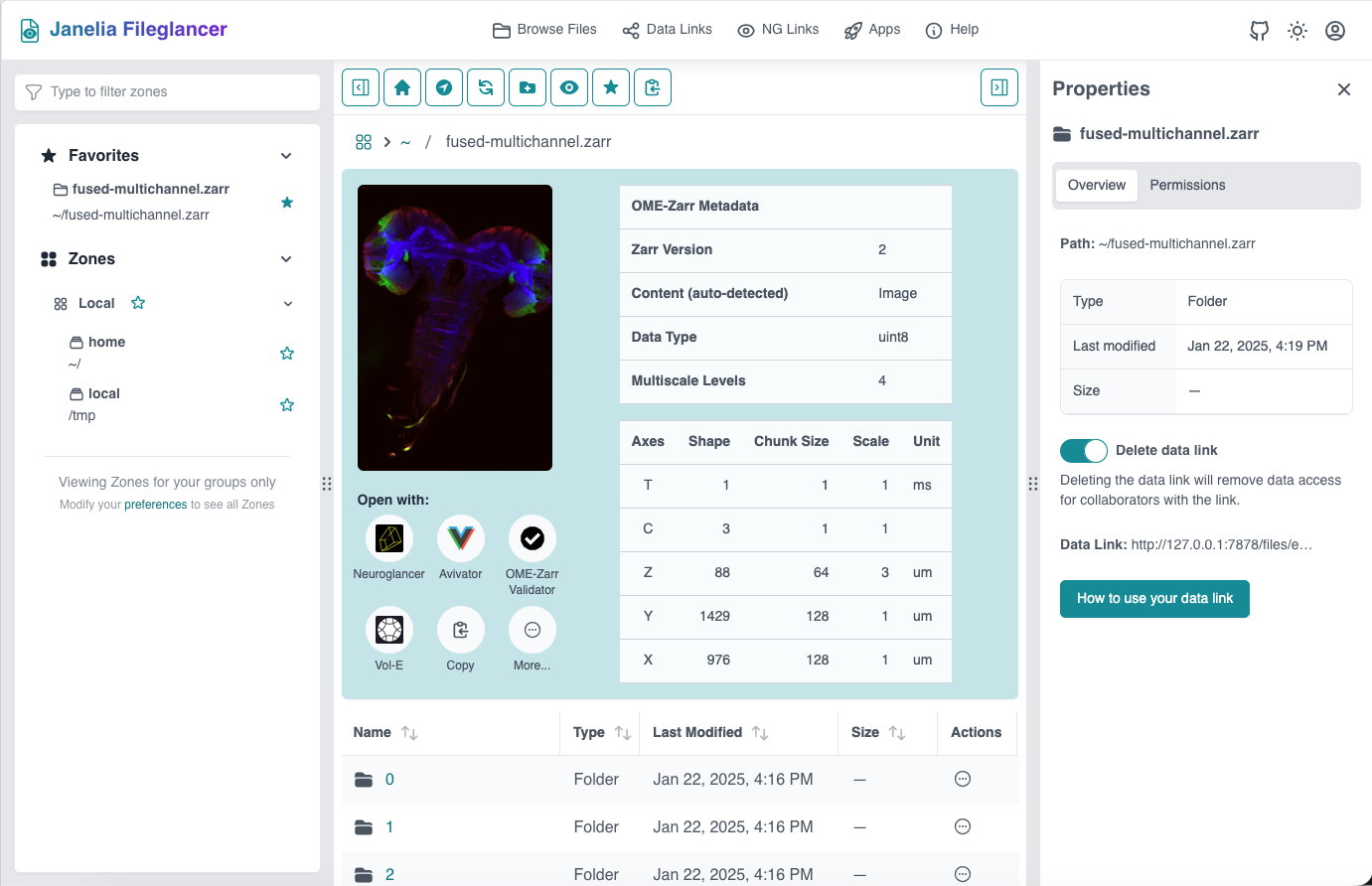
Fileglancer is a web application designed to allow researchers to easily browse, share, and manage large scientific imaging data using OME-NGFF (i.e. OME-Zarr). Our goal is to reduce the friction experienced by users who want to easily share their data with colleagues at their institution. Simply browse to your data, click on the Neuroglancer link, and send that link to your collaborator.
Core features:
- Browse and manage files on network file shares (NFS) using an intuitive web UI
- Create shareable Data Links for any file share path, allowing web-based anonymous access to your data
- Shareable links to Neuroglancer and other viewers
- Run Apps (compute jobs) on any infrastructure supported by py-cluster-api
- Integration with the x2s3 proxy service, to easily share data on the internet
See the documentation for more information.
Installation
Personal Deployment
Fileglancer can be run in a manner similar to Jupyter notebooks, by starting a web server from the command-line:
# Install from PyPI
pip install fileglancer

# Start the server
fileglancer start
This will start your personal server locally and open a web browser with Fileglancer loaded. By default, only your home directory (~/) will be browsable. You can browse and view your own data this way, but links to data will only work as long as your server is running. To share data reliably with others, you will need a persistent shared deployment.
Shared Deployments
Fileglancer is primarily intended for shared deployments on an intranet. This allows groups of users to share data easily. If you are on the internal Janelia network navigate to "fileglancer.int.janelia.org" in your web browser and login with your Okta credentials. If you are outside of Janelia, you'll need to ask your System Administrator to install Fileglancer on a server on your institution's network.
Software Architecture
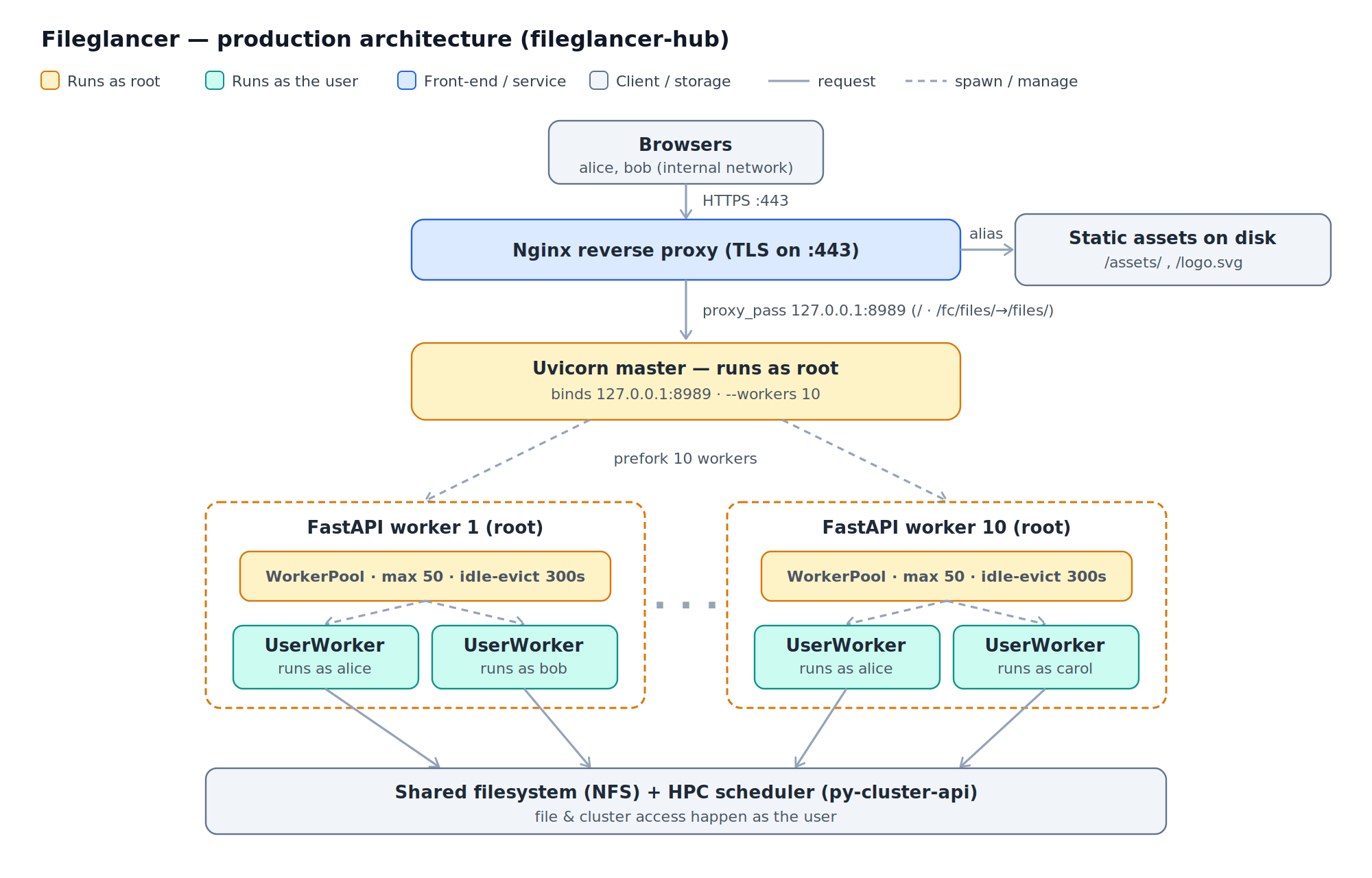
Fileglancer has a React front-end and a FastAPI backend. Uvicorn is used to manage the set of FastAPI workers. Each FastAPI worker manages a worker pool of user-specific worker processes that run as the user, inspired by JupyterHub's method of spinning up individual user servers using setuid. This allows each logged in user to access their resources on the network file systems and submit jobs to a compute cluster. The backend database access is managed by SQLAlchemy, which supports many databases including Sqlite and Postgresql.
Documentation
Related repositories
- fileglancer-hub - Production deployment files
- fileglancer-janelia - Janelia-specific customizations
- fileglancer-docs - Documentation website


Release files for fileglancer 4.1.0a3
For a detailed explanation of source distributions (sdists) and built distributions (wheels), please see the package formats documentation.
Source distribution (sdist)
| File | Size | Uploaded | Provenance | Actions |
|---|---|---|---|---|
| fileglancer-4.1.0a3.tar.gz | 10.0 MB | Without provenance | Details for fileglancer-4.1.0a3.tar.gz |
Built distribution (wheel)
| File | Interpreter | ABI | Platform | Actions Reset |
|---|---|---|---|---|
| fileglancer-4.1.0a3-py3-none-any.whl | Python 3 | none | any | Details for fileglancer-4.1.0a3-py3-none-any.whl |
Total release size: 18.7 MB
Release files / fileglancer-4.1.0a3.tar.gz
| Download URL | fileglancer-4.1.0a3.tar.gz |
|---|---|
| Size | 10.0 MB |
| Tags | Source |
|
SHA-256 checksum How to use checksums |
f2f6224253661c1642da29d620fc481a59dc2738c8fdc54cb5991d695fb3c414
|
|
BLAKE2b-256 checksum How to use checksums |
b6d14b93530c2a9d18096d1d657105d3b654044b466092f2f490605b1d8b609f
|
| Upload date | |
|
Uploaded using Trusted Publishing? What is trusted publishing? |
No |
| Uploaded via |
twine/7.0.0 CPython/3.14.7
|
Release files / fileglancer-4.1.0a3-py3-none-any.whl
| Download URL | fileglancer-4.1.0a3-py3-none-any.whl |
|---|---|
| Size | 8.7 MB |
| Tags | Python 3 |
|
SHA-256 checksum How to use checksums |
23b1752ec8f7ed6ede7fa820873a8ad3b4d1a530a1d5d5a5b388bab38ad0962b
|
|
BLAKE2b-256 checksum How to use checksums |
972cc82edf4a40434585e4afe9d446d0e3fb934972d3343bca3ab0a03db0f6ea
|
| Upload date | |
|
Uploaded using Trusted Publishing? What is trusted publishing? |
No |
| Uploaded via |
twine/7.0.0 CPython/3.14.7
|
Security for fileglancer 4.1.0a3
Provenance
Provenance describes where a file came from. On PyPI, provenance is shared via attestations, which provide a verifiable record of the build or publishing details. View details, limitations and caveats.
No provenance found
None of the files in this release were uploaded with provenance metadata.
A note on package security
PyPI is a repository for distributing packages, not a service for auditing them. While third-party security researchers and our staff do their best to detect and remove malicious packages, PyPI cannot guarantee the quality, security or suitability of any given package.
To learn more about protecting yourself from malicious actors, visit our package security documentation.














