
finances


See where your money goes from your own bank statements and exports. No bank login, no Plaid, no account linking, no cloud. Everything runs on your machine and nothing is uploaded anywhere.
uvx finances demo && uvx finances web --db demo.db --open # try it on made-up data
or install it: uv tool install finances / pipx install finances / pip install finances.
The thing that makes it different: a statement prints its own totals, so the extraction can be proved correct. Every figure this produces traces back to a line on a statement, and the tool tells you when it cannot.
$ finances check

Store       finances.db
Rows        1180 transactions, 2025-01-03 to 2025-12-29
Statements  36

Reconciled  36/36 (100%)

Every statement reconciles and no months are missing. The totals downstream
are traceable to a statement line.
A tool built on a bank API cannot do this. It receives a feed of transactions with no independent total to check them against, so a dropped charge or a flipped sign is invisible. Here the statement is the ground truth, and reconciliation is enforced rather than assumed.
Running it
Install from PyPI, or use Docker. Either way you end up at the same dashboard
on http://localhost:8787.
Try it first, with made-up data
Nobody should have to hand over a year of bank statements to find out whether
a tool is any good. demo writes twelve months of an invented checking account
and credit card — paychecks, rent, a subscription that raises its price, a
holiday spike — into a separate demo.db. It goes through the same
reconciliation and categorizer as a real statement.
# nothing to install permanently: uvx runs it from PyPI
uvx finances demo
uvx finances web --db demo.db --open

# or with Docker
docker compose --profile demo up demo        # then open http://localhost:8787
With your statements
Install it once. It needs Python 3.12+ (uv fetches it for you if needed); the dashboard comes prebuilt inside the package, so there is nothing else to set up.
uv tool install finances                 # or: pipx install finances
                                         # or: pip install finances

mkdir -p PDFs                            # drop statement PDFs and bank exports here
finances pipeline PDFs/                  # parse, categorize, check, report
finances import PDFs/                    # any CSV / OFX / CAMT.053 / MT940 files too
finances web --open                      # the dashboard
Upgrade with uv tool upgrade finances (or pipx upgrade finances). Your data
is never inside the package: the store is finances.db in the folder you run
from (or FINANCES_DB), and your statements stay wherever you put them.
Any folder layout works — subfolders are searched too. Tested against Amex, Chase (card and checking), Capital One and Discover. For any other bank, use its export (below), or let a local model read the PDF.
Always look at the check verdict at the end before trusting anything
else. If it does not say 100%, the numbers downstream are built on a bad
extraction, and every other report will tell you so too.
Any bank: CSV, OFX/QFX, CAMT.053, MT940
Nearly every bank lets you download your transactions. import reads those
files, works out the columns, the date format, the decimal separator and which
way the amounts are signed, and checks them against whatever balances the file
carries:
finances import ~/Downloads/activity.csv
finances import exports/                 # a whole folder, any mix of formats
| Format | Who exports it | How it is checked |
|---|---|---|
| CSV with a running balance | most bank accounts | every row has to move the balance by exactly its amount |
| CSV without one | most card sites | imported, and marked unverified — honestly |
| OFX / QFX / QBO | US banks ("Quicken" / "Money" download) | each export's opening balance must equal the previous export's closing balance |
| CAMT.053 | European banks (ISO 20022 XML) | opening balance + every booked entry = closing balance |
| MT940 | European banks (SWIFT) | opening balance + every entry = closing balance |
Headers are recognised in English, German, French, Spanish, Italian, Dutch and
the Nordic languages, 1.234,56 and 05.01.2026 are read the European way, and
a summary block above the header (Bank of America does this) is skipped. When
downloads overlap, rows already in the store for that account are skipped, not
counted twice. If a CSV is ambiguous, say so: --sign out-negative,
--date-format %d.%m.%Y, --account 1234 --issuer "My Bank" --kind card.
A bank the parser does not know: a local model, checked
finances parse PDFs/ --llm
When a statement's layout is not understood (nothing extracted, or the
extraction does not reconcile), its text goes to a model running on your
machine — Ollama, LM Studio or llama.cpp — which lists the transaction rows.
The statement's printed totals are still read by the deterministic parser, so
the model never supplies both the answer and the check: its rows are kept only
if they add up to those totals. Otherwise they are discarded and the statement
stays marked as a mismatch. FINANCES_LLM_FALLBACK=1 turns this on for the
dashboard's uploads too.
With Docker
mkdir -p PDFs                            # drop your statement PDFs in here
docker compose up                        # then open http://localhost:8787
On start the container parses whatever is in ./PDFs (unchanged files are
skipped), categorizes it, prints the check verdict and serves the dashboard.
The store and every generated report land in ./data. Every command works the
same way inside it:
docker compose run --rm finances check
docker compose run --rm finances cashflow
docker compose run --rm finances ask --example top-merchants
The port is published on 127.0.0.1 only, and .dockerignore is a whitelist:
your PDFs and database are never sent to the Docker daemon or baked into an
image.
The dashboard
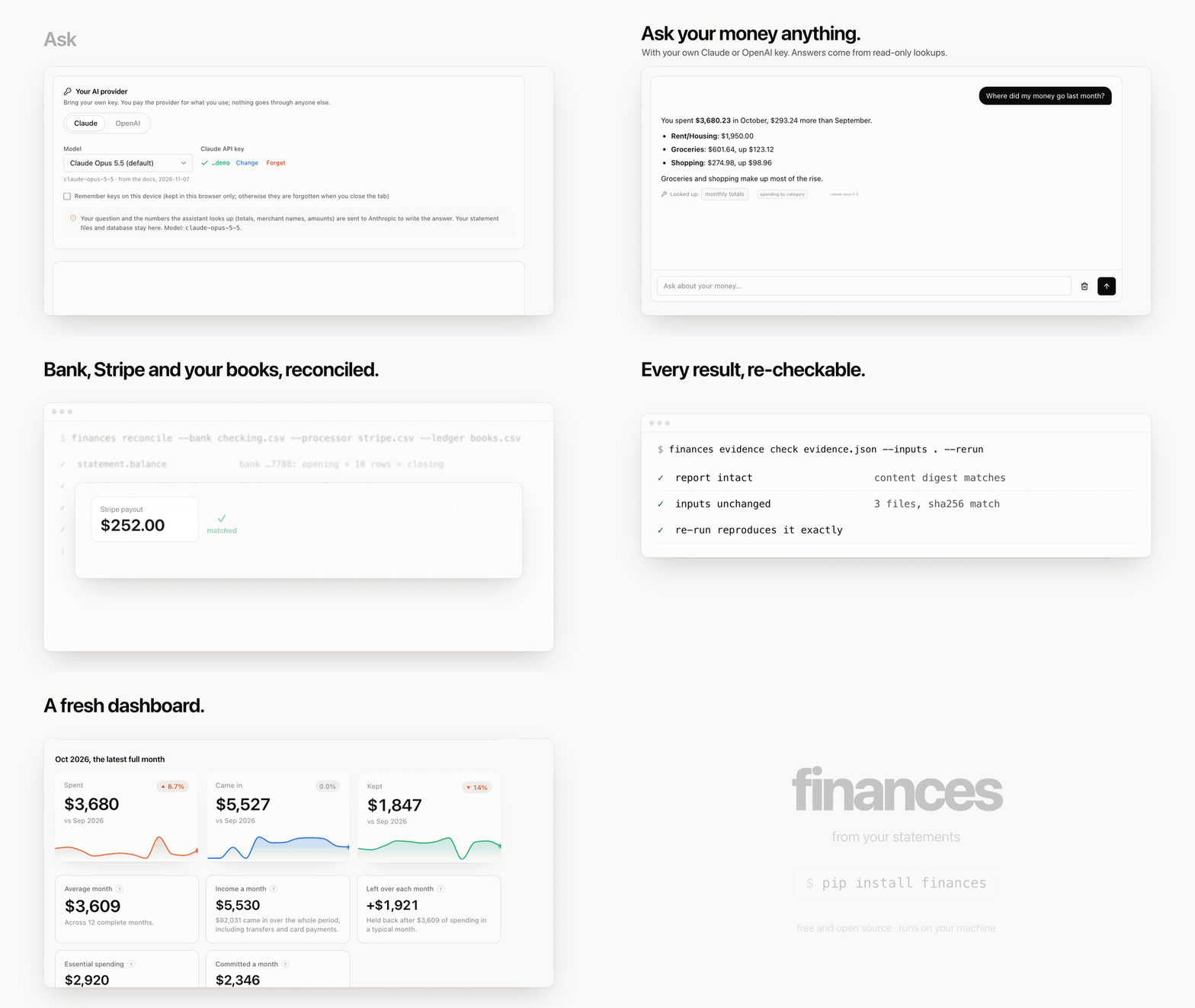
Your statements, the reconciliation verdict for each one, spending by month and category, detected subscriptions, and a searchable transaction table. You can drag new statement PDFs or bank exports straight onto it: they are read on drop, and the reply tells you how many transactions came out and whether the file checks out.
- Wrapped — your year in money: where it went, your regular, the month that got away from you, what subscriptions cost you all year, and how much of it traces back to a statement that reconciles.
- Budgets & goals — a monthly limit per category, projected to the end of the month so you hear about it before it is broken; savings goals against the surplus your statements actually show.
- Cancel these — recurring charges ranked by what dropping them saves, with the reason each one is there (a price that went up, three services doing one job). Mark one cancelled and any charge after that date is flagged.
- Net worth — what you own minus what you owe, month by month, from the balance each statement closed on. Brokerage statements (Fidelity, Vanguard, Schwab and others) count by their account value, not their trades.
- Card payments — each card's due date, balance and minimum, and whether what you have paid since covers it.
- Recategorize in bulk — tick rows on the transactions page and move them to a category; "remember" teaches the categorizer those merchants for good.
- The original, one click away — every statement, every transaction and every amount in an Ask answer opens the PDF it came from, at its page.
- Excel — the header's Excel button downloads everything as a workbook.
Keeping it up to date without a bank login
- Downloads, watched. Turn it on from the Statements page (or run
finances watch) and any statement or bank export you download is added on arrival. Only files that arrive afterwards count, and anything that is not a statement (a receipt, a ticket, a random CSV) is left alone. - When the next one is out. Each account shows when its next statement should be ready, with a link to that bank's statements page and the steps to get there; the Overview says when one is waiting. The bank guide covers 24 banks, checked against their own help pages.
- A live feed, if you want one. SimpleFIN Bridge
links your banks for $1.50 a month (paid to them) and gives you a token to
paste on the Statements page, or into
finances feed connect TOKEN. This month's charges show up before the statement exists, marked "live". When the statement arrives, its rows (checked against its printed totals) replace the feed's, and the page says how many of the feed's rows the statement confirmed. No bank password ever reaches this app. - Scanned statements. A PDF with no text layer is read with OCR (install
ocrmypdf) and then checked like any other: rows that do not add up to the printed totals are kept, but marked as read from a scan and needing a look. - What was in the box. Drop Amazon's order history (Account > Request your
data > Your Orders) and each Amazon charge shows the items in it, matched to
the cent. Any shop works with a
date,store,item,amountCSV. - On your phone. The phone button in the header opens a read-only view on your home Wi-Fi: scan the code, and a partner can look too. Nothing changes from the phone, and turning it off ends access.
How often does the parser get your bank right? finances accuracy counts, per
bank, how many statements reconciled on the first try. It contains only bank
names and counts, so it is safe to share.
The server makes no outbound requests, binds to localhost, and refuses any request that does not come from a page on localhost — so another website open in the same browser cannot read your transactions from it.
Working on the code itself? See Developing below.
Or stay in the terminal
finances analyze            # where the money went
finances wrapped            # your year in money
finances budget             # this month against your limits
finances budget cancel      # the subscriptions worth cancelling
finances cashflow           # the next 60 days
finances audit              # the reckoning
finances cpi                # your own inflation rate
finances backtest           # how accurate are the forecasts
finances ask "how much did I spend on coffee in March"
finances on its own lists every command; finances <command> --help shows
that tool's own options. If you did not install it, put uvx in front of any
command: uvx finances check.
Configuration
Everything is a flag, and the few things you would otherwise repeat on every command are also environment variables:
| Variable | Default | What it sets |
|---|---|---|
FINANCES_DB |
finances.db |
the store every command reads and writes |
FINANCES_PDF_DIR |
./PDFs |
where dashboard uploads are saved |
FINANCES_HOST / FINANCES_PORT |
127.0.0.1 / 8787 |
where finances web listens |
FINANCES_CURRENCY |
USD (or finances fx --base) |
the currency every total is reported in |
FINANCES_LLM_ENDPOINT |
Ollama, LM Studio, llama.cpp on localhost | the model server for ask, enrich and parse --llm |
FINANCES_LLM_FALLBACK |
off | 1 lets a local model read unknown PDF layouts, uploads included |
FINANCES_PLAN |
plan.json |
where savings goals are kept |
FINANCES_WEB_DIST |
web/dist, or the copy inside the package |
a prebuilt dashboard to serve |
Command reference
| Command | What it does | Writes |
|---|---|---|
parse PDFs/ |
extract transactions from statement PDFs (--llm for unknown layouts) |
finances.db |
import exports/ |
bank CSV, OFX/QFX, CAMT.053 and MT940 files | finances.db |
check |
reconciliation and coverage report | — |
categorize apply |
label transactions, write back to the store | finances.db |
analyze |
spending dashboard | finance_dashboard.html, insights.md |
cashflow |
daily balance projection with a low-point warning | cashflow.html |
plan status |
savings goals against your real surplus | plan.json |
budget |
monthly limits per category; budget cancel for the cancel list |
finances.db |
wrapped |
your year in money | — |
export beancount |
beancount, hledger/ledger, YNAB or Actual files | the file you name |
mcp |
let Claude and other AI assistants read the store (read-only) | — |
verify |
check statements and exports on their own, with an evidence report | the JSON you name |
reconcile |
match bank, processor and ledger records; explain what does not match | the JSON you name |
evidence check |
re-check an evidence report: digest, input files, re-run | — |
fx |
base currency and exchange rates | finances.db |
audit |
a strict grandfather goes through your statements | auditor_ledger.json |
cpi |
personal inflation, per merchant and per category | cpi.html |
backtest |
grades the forecasts against what actually happened | backtest.html |
ask "..." |
plain-English questions, answered offline | — |
anonymize |
a copy safe to share | transactions_shareable.csv |
enrich |
local-LLM merchant cleanup | finances.db |
web |
serve the browser dashboard, with PDF drag-and-drop (--clients DIR for a practice) |
— |
watch |
add new statements from Downloads as they arrive | finances.db |
feed connect TOKEN |
optional live feed through SimpleFIN Bridge, checked by statements | finances.db |
items orders.csv |
the items behind Amazon (or any shop's) charges | finances.db |
accuracy |
how often each bank's statements reconcile on the first try | — |
client intake NAME DIR |
for bookkeepers: read a client's folder; client workpapers NAME |
the client's folder |
demo |
a year of made-up statements, to try everything on | demo.db |
pipeline PDFs/ |
parse + categorize + analyze in one run | all of the above |
Every command accepts either the SQLite store or a CSV, interchangeably:
finances analyze --db finances.db
finances analyze cleanedData/transactions.csv
Things you will probably need
# Encrypted PDFs
finances parse PDFs/ --password 1234

# A statement extracted wrong — see what the parser saw
finances parse "PDFs/one bad file.pdf" --dump-columns

# Fail the build if anything does not reconcile (for a cron job)
finances check --strict

# Re-parse everything, ignoring the cache
finances parse PDFs/ --force

# Tell it your take-home pay, so it can work out what is left over
finances analyze --income 6200

# Teach the categorizer, biggest money first
finances categorize review
Hand it to the tool you already use
This gets complete, checked transactions out of statements. Budgeting apps and plain-text ledgers are better at other things, so it hands the rows over:
finances export beancount -o money.beancount --balances
finances export hledger   -o money.journal   --balances   # ledger-cli reads it too
finances export ynab      -o exports/        # one CSV per account
finances export actual    -o exports/
finances export xlsx      -o finances.xlsx   # Excel, Numbers, LibreOffice, Google Sheets
The Excel workbook has five sheets: every transaction (money out and money in in separate columns), month by month, categories, subscriptions, and each statement with whether it matched its printed totals. The dashboard's spreadsheet button downloads the same file.
With --balances, every reconciled statement's closing balance becomes a
balance assertion, so bean-check or hledger check re-verifies the whole
history independently of this tool. Card payments from checking go through an
Assets:Transfers account, so they net to zero instead of counting twice.
Coming from Mint, YNAB, Monarch, Copilot or Tiller
Bring your history with you. Export your transactions from the app you are leaving and import the file as it is:
finances import ~/Downloads/transactions.csv
The app is recognised from the file's columns, every account in it becomes its own account here, and each app's sign convention is handled (Mint's debit/credit column, YNAB's outflow and inflow, Copilot's spending-is-positive). Where the app labelled something as pay, a transfer, a refund or a card payment, that label is kept, so it never counts as spending. These exports carry no balances, so those rows are marked as unverified; once your own bank statements cover the same months, those are what get checked.
More than one currency
Each transaction keeps the currency its file was in. Totals are reported in one base currency, at rates you set — there is no rate feed, because nothing here goes online:
finances fx --base EUR            # report in euros
finances fx USD=0.92 GBP=1.17     # 1 USD is 0.92 of the base currency
finances fx                       # what is set, and what is still missing
Rows in a currency with no rate are left out of the totals and counted, and the dashboard says so, rather than quietly adding euros to dollars.
Verify and reconcile: the engine underneath
finances.verify is the part of this project other software can use. It reads
bank statements and exports, Stripe payout reports and accounting ledgers, and
checks whatever can be checked independently. It matches records across
sources and writes an evidence report: every record says where it came from
(page and line, CSV row, OFX FITID, camt reference), and every check and match
says which rule decided it, on which inputs, with the expected and computed
amounts.
finances reconcile --bank checking.csv --processor stripe_payouts.csv \
                   --ledger general_ledger.csv --ledger-account Checking \
                   --json evidence.json --sarif exceptions.sarif
Matching
  bank~ledger          7 matched, 1 needs_review, 3 unmatched
  bank~processor       2 matched

Needs a decision (1)
  bank      2026-10-06      252.00 USD  STRIPE TRANSFER
  ledger    2026-10-06      260.00 USD  Stripe payout
  > The difference, 8.00 USD, equals the processing fees on payout po_1Q8AbcD
    (3 transactions). The books show more than the bank received: the deposit
    looks recorded before fees.
- Matching runs in tiers: shared references first, then exact amounts within a date window (one-to-one, solved exactly), then grouped settlements (a deposit that paid several invoices, a payout made of many charges). Near misses come last. Those are never matched automatically: they go to review, with the difference explained when something known accounts for it.
- Each check gets one of five statuses (
verified,mismatch,unverifiable,needs_review,incomplete), never a single score. A CSV with no balances is reportedunverifiable, not verified. - Exact money:
Decimaland ISO 4217 minor units, with zero tolerance unless you set one. - Reproducible: the same inputs and options give the same content digest.
finances evidence check evidence.json --inputs ./ --rerunconfirms the report is intact, that the files still hash the same, and that re-running reproduces it.
The digest proves the files have not changed since the run. It does not prove a statement is genuine.
From Python:
from finances.verify import VerificationEngine

eng = VerificationEngine()
eng.add("checking.csv", role="bank")
eng.add("stripe_payouts.csv")                    # recognised as a processor report
eng.add("general_ledger.csv", role="ledger", account="Checking")
report = eng.run()
for m in report.needs_review():
    print(m.pair, m.difference, m.explanation)
report.save("evidence.json")
The research behind the design (record-linkage theory, subset-sum limits, W3C PROV, in-toto, SARIF, audit evidence standards) and the roadmap are in docs/verification-engine.md.
For bookkeepers: a store per client
finances client intake "Acme Bakery" ~/Downloads/acme-2026   # every statement in the folder
finances client workpapers "Acme Bakery"                       # the reconciliation, to file
finances web --clients clients                                 # switch clients in the dashboard
Each client is its own folder, with its own store, statements and taught
categories, under clients/. Intake reads every statement and export in a
folder and says, per file, whether it reconciles. The workpapers are a
workbook a reviewer can sign off: each statement's opening and closing
balance, the total it prints against the total read from it, the difference,
the verdict, the file's SHA-256, and empty "Reviewed by" and "Date" columns;
then the exceptions (statements that do not add up, months with no
statement) and every transaction with the page it came from. Client data never
leaves the machine.
Ask questions in the dashboard, with your own key
The dashboard's Ask page answers questions about your money with your own Claude or OpenAI API key, or with a model running on your own computer. Pick a provider, paste a key, and ask "where did my money go last month?" or "which subscriptions should I cancel?". Under each answer you can see which lookups the model made.
The model gets the same read-only tools as finances mcp below, so every number
it gives you comes from your reconciled store, and it cannot change anything.
Every amount is checked. After the model answers, each amount it wrote is
looked for in what its lookups returned. A charge links to the statement page
it is printed on; a total says which lookup it came from; a difference names the
two figures it is the difference of; and an amount that is not in your data is
underlined as such. Each answer gets a badge: Verified when every amount was
found and every statement behind it reconciles, Unverified when any amount
came from the model rather than your data. This needs nothing from the model,
so it works the same for a small local model. A model on your own machine is
the default.
The key stays in your browser: it is forgotten when you close the tab, unless
you tick "Remember keys on this device". Each question carries the key to the
local server, which passes it on to the provider and never writes it down. To
use a key from the server instead, set ANTHROPIC_API_KEY or OPENAI_API_KEY
before finances web. Setting OPENAI_BASE_URL points the OpenAI option at
any server that speaks Chat Completions, such as Ollama, LM Studio, vLLM or
OpenRouter.
The model menu lists each provider's current models, taken from their own model pages (Claude Opus 5.5, Fable 5.1, Sonnet 5.5 and Haiku 5.5; GPT-6 Astra, GPT-6.1 Sol, GPT-6.1 Terra and GPT-6 Luna). "Other model ID…" takes any model the menu does not list yet.
The conversation is kept with your data, so it is still there when you come back; the trash button under it deletes it, after asking once. Only the most recent turns are sent with each new question.
Local model: pick "Local model" and the page finds Ollama, LM Studio, a llama.cpp server or vLLM on this machine (or type its address), and lists the models it serves. No key is needed and nothing leaves your network; addresses outside it are refused. A model that cannot call tools still answers: the main figures are looked up first and handed to it with the question. Local models are slower; a 10B model takes about 15–20 seconds on a recent laptop.
With Claude or OpenAI, your question and what the tools return (totals, merchant names, amounts) are sent to the provider so it can write the answer. Your statements and database stay on your machine.
Ask Claude (or any AI assistant) about your money
finances mcp lets an AI assistant read your store through
MCP, so you can ask in plain English, inside
an app you already use:
- "Where did my money go in March compared to February?"
- "Which subscriptions went up in price this year, and what would cancelling them save?"
- "Can I afford a $2,000 trip in January without dropping below $1,000 in checking?"
- "Draft an email disputing the duplicate $89 charge from Oct 14."
The assistant calls tools like spending_by_category, search_transactions,
subscriptions, cancel_list, cashflow_forecast, anomalies, wrapped and
check, and answers from the reconciled numbers instead of guessing. There is
also a read-only query tool that takes a SQL SELECT, with the same guard
finances ask uses. Nothing it does can change your data, and getting data in
works exactly as before: statements and exports you download yourself.
Claude Desktop: add this to claude_desktop_config.json (Settings →
Developer → Edit Config), using the absolute path to your store, then restart
Claude:
{
  "mcpServers": {
    "finances": {
      "command": "uvx",
      "args": ["finances", "mcp", "--db", "/Users/you/finances/finances.db"]
    }
  }
}
Claude Code:
claude mcp add finances -- uvx finances mcp --db /Users/you/finances/finances.db
Any other MCP client (Cursor, Windsurf, LM Studio, …) takes the same command.
Know where the answers go. Your store stays on your disk, but a cloud assistant (Claude, ChatGPT, …) receives what each tool returns (totals, merchant names, amounts) in order to write its reply. To keep everything on your machine, use an MCP client running a local model, such as LM Studio.
Asking questions offline
ask needs a local model server. Without one, --sql and --examples still
work:
finances ask --examples
finances ask --sql "SELECT category, SUM(amount) FROM transactions GROUP BY 1 ORDER BY 2 DESC"
With one:
brew install ollama && ollama pull llama3.1:8b
finances ask "what did I spend on delivery last month" --explain
Something in the 3B–8B range is plenty. Avoid reasoning models here — they take
minutes per question for no benefit on this task. Pick explicitly with
--model llama3.1:8b.
If something goes wrong
| Symptom | Cause and fix |
|---|---|
finances.db does not exist |
Run parse first. |
check reports mismatches |
The extraction is wrong for those files. Run finances parse <file> --dump-columns to see the columns it found, or --llm to let a local model try. |
| A bank is not supported | Download its CSV/OFX export and finances import it, or ask for the bank. |
check reports gaps |
A statement month is missing from your folder. Totals are being computed on incomplete data. |
Lots of Uncategorized |
categorize review to teach it, or enrich to use a local LLM. |
cashflow will not project |
It could not find a checking-account balance. Pass --balance 2400. |
| Amounts look wrong | Almost always a column-detection problem. --dump-columns, then --amount-col last or second-last to override. |
How it fits together
PDFs ─────▶ parse.py ───┐
   (llm_parse.py, checked)  ├──▶ finances.db ──▶ engine.py ──▶ every other tool
exports ─▶ importer.py ─┘          │                 │
                                   │          the read model: what counts as
       each file checked against   │          spending, which months are complete,
       its own totals or balances  │          what repeats, what is verified
                                   └──▶ export.py ──▶ beancount, hledger, YNAB, Actual
finances/          the package — one module per tool, plus the shared core below
  cli.py           `finances <command>`: the front door, dispatches to each tool
  parse.py         PDFs -> the store, reconciling each statement as it goes
  importer.py      bank exports (CSV, OFX, CAMT.053, MT940) -> the store, balance-checked
  llm_parse.py     a local model for unknown PDF layouts, kept only if it reconciles
  engine.py        the read model every tool shares
  export.py        the store -> beancount, hledger, YNAB, Actual
  mcp_server.py    the store as read-only tools for AI assistants (MCP over stdio)
  chat.py          the dashboard's Ask page: your own Claude or OpenAI key, read-only tools
  verify/          the verification engine: adapters, checks, matching, evidence reports
  api.py           the dashboard's JSON API and static server
  demo.py          the made-up store
  ...              analyze, cashflow, cpi, backtest, ask, planner, anonymize, ...
web/               the dashboard (React + Vite), served by `finances web`
tests/             stdlib unittest, no test dependencies
docker/  Dockerfile  docker-compose.yml
Every module still runs on its own too: python -m finances.parse --help.
models.py— one definition of a transaction and a statement. The SQLite schema and the CSV columns are both generated from it, so adding a field is a single edit and the store migrates itself.database.py— the store, plus a content-hash cache so re-running the parser skips files that have not changed.utils.py— money, date and merchant parsing, the debt formulas, and the recurring-charge detector.engine.py— the semantics. Everything downstream agrees about what a month, a surplus and a subscription are because they all ask this.
What it does that other tools do not
Proves its own numbers. Extracted charges are checked against the total the statement prints for itself, and the verdict is stored, not just displayed. Missing statement months are detected and reported as gaps, so an average is never quietly computed over incomplete data.
This is not decorative. Building it found a noise filter matching the month "Apr" and discarding entire statements, sign inversions on two issuers, a year-rollover that dated 62 transactions to the wrong December, and a primary key that silently dropped 41 of one statement's 181 transactions. All of them looked fine in a dashboard. None survive a reconciliation check.
Tells you about next month, not just last month. cashflow projects the
daily balance forward from known recurring charges and detected paycheck
cadence — distinguishing semi-monthly from biweekly, because biweekly gives you
three-paycheck months and that changes the answer. It reports a band rather than
a line and says plainly that it is not a confidence interval.
Measures your inflation, not the country's. cpi weights per-category price
changes by your spending and tracks per-merchant prices over time, against real
BLS Consumer Expenditure and CPI-U reference data shipped with the project.
Grades its own forecasts. backtest walks forward month by month, predicts
each month using only data from before it, and scores nine predictors against
what happened. It refuses to name a winner when the sample cannot support one.
Makes your data shareable. anonymize has four levels up to fully
synthetic, and proves what survived — per-category totals are printed side by
side so you can see which figures are still exactly true.
Categorization
Rules, in order, first hit wins. Every answer records which rule fired and how confident it is:
- what you taught it (
learned_rules.json, always wins) - context rules —
COSTCO+GASis fuel,UBER+EATSis delivery - bank phrases — a deposit account names its own transaction type
- brand table, exact token match, never substring
- keyword rules, word-boundary regex
- issuer MCC labels, where the statement prints its own category
- behaviour — cadence and amount, when the name says nothing
Scored against 159 real-shaped descriptors with processor prefixes, glued city/state suffixes and issuer preambles:
$ finances categorize eval
  correct         159  100.0%
  wrong             0    0.0%   <- these corrupt analysis
  left unknown      0    0.0%   <- these are honest
Developing
git clone https://github.com/roshanlam/finances && cd finances
uv sync                                  # editable install into .venv
uv run finances demo                     # `uv run` uses the checkout's code
uv run python -m unittest discover tests
In a checkout the dashboard needs Node 20+: uv run finances web builds it on
first run. While working on the frontend, run uv run finances web in one
terminal and cd web && npm run dev in another, then use
http://localhost:5173 (it proxies /api through).
Releasing a new version:
# bump `version` in pyproject.toml and add a CHANGELOG.md entry, then
rm -rf dist finances/web_dist
(cd web && npm ci && npm run build) && cp -r web/dist finances/web_dist
uv build && uv publish
427 tests, no test dependencies. The parser's golden-file tests skip when
PDFs/ is empty, so a fresh clone runs the rest. The golden-file harness
records per-statement extraction totals so a parser change that moves a number
is visible:
uv run python tests/run.py --update-golden   # after a deliberate change
uv run python tests/run.py --check-golden    # exits 1 on drift
Privacy
Your statements and the store never leave the machine. PDFs/, *.db, the
generated dashboards and anonymize_map.json are all gitignored. The map file
is what turns MERCHANT_007 back into a real name — keep it, do not share it.
ask, enrich and parse --llm talk only to a model server on localhost.
Nothing else in the project makes a network request at all. finances mcp
makes none either, but whatever assistant you connect to it sees the results
of the tools it calls; see Ask Claude. See
SECURITY.md for how the dashboard is locked to your own machine
and how to report a problem.
Not financial advice
Arithmetic on your own statements. The forecasts are extrapolations of your past
spending and say so, backtest will tell you how wrong they have been, and none
of it knows anything about your life beyond what the statements print.
License
MIT. See LICENSE.
1 maintainer

Metadata
1 maintainer
Release files for finances 0.5.0
For a detailed explanation of source distributions (sdists) and built distributions (wheels), please see the package formats documentation.
Source distribution (sdist)
| File | Size | Uploaded | Provenance | Actions |
|---|---|---|---|---|
| finances-0.5.0.tar.gz | 763.9 kB | Without provenance | Details for finances-0.5.0.tar.gz |
Built distribution (wheel)
| File | Interpreter | ABI | Platform | Actions Reset |
|---|---|---|---|---|
| finances-0.5.0-py3-none-any.whl | Python 3 | none | any | Details for finances-0.5.0-py3-none-any.whl |
Total release size: 1.5 MB
Release files / finances-0.5.0.tar.gz
| Download URL | finances-0.5.0.tar.gz |
|---|---|
| Size | 763.9 kB |
| Tags | Source |
|
SHA-256 checksum How to use checksums |
693454afb35825e9d91066c973e0f66c4782361db8a73c8881698a9797b79ed0
|
|
BLAKE2b-256 checksum How to use checksums |
3f929becb19aad86aeb5aa2fce45d73b14c176de5038d78a639e12343cb87683
|
| Upload date | |
|
Uploaded using Trusted Publishing? What is trusted publishing? |
No |
| Uploaded via |
uv/0.13.5 {"installer":{"name":"uv","version":"0.13.5","subcommand":["publish"]},"python":null,"implementation":{"name":null,"version":null},"distro":{"name":"macOS","version":null,"id":null,"libc":null},"system":{"name":null,"release":null},"cpu":null,"openssl_version":null,"setuptools_version":null,"rustc_version":null,"ci":null}
|
Release files / finances-0.5.0-py3-none-any.whl
| Download URL | finances-0.5.0-py3-none-any.whl |
|---|---|
| Size | 706.4 kB |
| Tags | Python 3 |
|
SHA-256 checksum How to use checksums |
dc756648beea211cb8bfeb794a88129ad8cfc2649da4608659a438635918688f
|
|
BLAKE2b-256 checksum How to use checksums |
0e814d2e263bf8da924d6701581a25e6f7d502ac97a73aae656295de655877b5
|
| Upload date | |
|
Uploaded using Trusted Publishing? What is trusted publishing? |
No |
| Uploaded via |
uv/0.13.5 {"installer":{"name":"uv","version":"0.13.5","subcommand":["publish"]},"python":null,"implementation":{"name":null,"version":null},"distro":{"name":"macOS","version":null,"id":null,"libc":null},"system":{"name":null,"release":null},"cpu":null,"openssl_version":null,"setuptools_version":null,"rustc_version":null,"ci":null}
|
Security for finances 0.5.0
Provenance
Provenance describes where a file came from. On PyPI, provenance is shared via attestations, which provide a verifiable record of the build or publishing details. View details, limitations and caveats.
No provenance found
None of the files in this release were uploaded with provenance metadata.
A note on package security
PyPI is a repository for distributing packages, not a service for auditing them. While third-party security researchers and our staff do their best to detect and remove malicious packages, PyPI cannot guarantee the quality, security or suitability of any given package.
To learn more about protecting yourself from malicious actors, visit our package security documentation.














