
🤖 Built with Claude. This project was developed heavily with Claude (Anthropic's AI assistant) using Claude Code.
Financial Planner
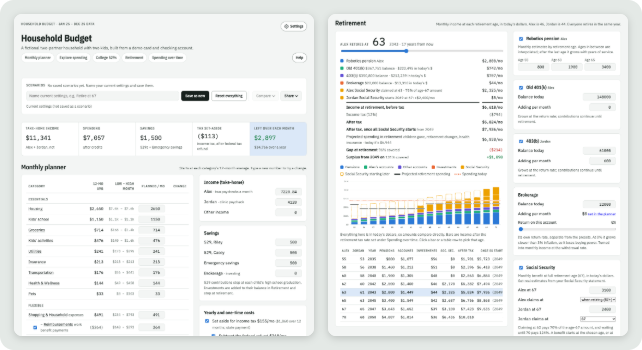
A private, local household budget and long-term planner. Point it at the CSV exports from your bank and credit cards, describe your household (in the app or in YAML), and explore your monthly budget, college savings, retirement and how spending changes over time.
Full documentation: the wiki.
Contents
Features
- Monthly planner: every category at its average; change any number and see what's left over.
- Explore spending: monthly charts, top merchants and every transaction.
- College 529s: a projection for each child against the cost of college.
- Retirement: income at each retirement age from pensions, accounts, investments and Social Security.
- Spending over time: how costs change as children leave home and after retiring.
- Scenarios: save, compare and share what-ifs, or share the whole plan as one file.
- Settings and categorizing in the app: no YAML editing required (but it's there if you want it).
Privacy first
Everything runs on your computer and nothing is uploaded. Your plan folder holds real financial data: keep it out of public repositories and off the internet, and use generic names (Partner A, Child 1). See Privacy and Safety.
Quick start
Install pixi, then:
git clone https://github.com/brookisme/financial_planner.git
cd financial_planner
pixi run demo
Your browser opens at http://127.0.0.1:8765 with a fictional demo household.
Your own plan
pixi run financial_plan init ~/MyFinancialPlan    # create a plan folder
pixi run financial_plan start ~/MyFinancialPlan   # open it
Put your bank and card CSV exports in ~/MyFinancialPlan/data/, then click the gear (Settings)
at the top right to add your household, connect the CSVs and categorize. On a Mac,
pixi run financial_plan launcher adds a Financial Planner app to Applications (menu-bar icon,
opens in the browser). A no-code download is described in the
Desktop App page.
Step-by-step guide: Quick Start. Want an AI assistant to set it up with you? See LLM_SETUP.md.
Commands
| Command | What it does |
|---|---|
financial_plan init [dir] [--demo] |
Create a plan folder (blank, or a copy of the demo). |
financial_plan start [dir] |
Open the app. |
financial_plan validate [dir] |
Check the config and CSVs. |
financial_plan inspect-csv FILE |
Show a CSV's columns and a suggested source entry. |
financial_plan export [dir] / import FILE |
Share a whole plan (config + data) as one .zip. |
financial_plan categorize [dir] [--unmatched] |
Category averages; rows no rule caught. |
financial_plan launcher |
Mac: add Financial Planner.app to /Applications. Elsewhere: a desktop shortcut. |
Details: Command Line.
Development
pixi run -e dev test-all     # Python + forecast-math tests
pixi run -e dev web-build    # rebuild the web app
See Development.
License
BSD 3-Clause. Not financial advice: projections are rough and depend on the assumptions you enter.
1 maintainer

Metadata
1 maintainer
Release files for financial-planner 0.1.0
For a detailed explanation of source distributions (sdists) and built distributions (wheels), please see the package formats documentation.
Source distribution (sdist)
| File | Size | Uploaded | Provenance | Actions |
|---|---|---|---|---|
| financial_planner-0.1.0.tar.gz | 393.4 kB | Without provenance | Details for financial_planner-0.1.0.tar.gz |
Built distribution (wheel)
| File | Interpreter | ABI | Platform | Actions Reset |
|---|---|---|---|---|
| financial_planner-0.1.0-py3-none-any.whl | Python 3 | none | any | Details for financial_planner-0.1.0-py3-none-any.whl |
Total release size: 655.9 kB
Release files / financial_planner-0.1.0.tar.gz
| Download URL | financial_planner-0.1.0.tar.gz |
|---|---|
| Size | 393.4 kB |
| Tags | Source |
|
SHA-256 checksum How to use checksums |
a0457cd9cf484481fa6218cfffa5431efc978bb5f902c41462558473e72bdc92
|
|
BLAKE2b-256 checksum How to use checksums |
84c4e59480c5df625e70c0f3d6531ab9c50e521c32ac3ecdebe2c6e5f8f4366b
|
| Upload date | |
|
Uploaded using Trusted Publishing? What is trusted publishing? |
No |
| Uploaded via |
twine/7.0.0 CPython/3.13.18
|
Release files / financial_planner-0.1.0-py3-none-any.whl
| Download URL | financial_planner-0.1.0-py3-none-any.whl |
|---|---|
| Size | 262.4 kB |
| Tags | Python 3 |
|
SHA-256 checksum How to use checksums |
cede1a569830e8f470b074a54ee2100497426b17254f2e307ed8ae93ce28c931
|
|
BLAKE2b-256 checksum How to use checksums |
792eae061ba0e251d93eb071a4413264bff58719ea1d46f57753782be8d5be7b
|
| Upload date | |
|
Uploaded using Trusted Publishing? What is trusted publishing? |
No |
| Uploaded via |
twine/7.0.0 CPython/3.13.18
|
Security for financial-planner 0.1.0
Provenance
Provenance describes where a file came from. On PyPI, provenance is shared via attestations, which provide a verifiable record of the build or publishing details. View details, limitations and caveats.
No provenance found
None of the files in this release were uploaded with provenance metadata.
A note on package security
PyPI is a repository for distributing packages, not a service for auditing them. While third-party security researchers and our staff do their best to detect and remove malicious packages, PyPI cannot guarantee the quality, security or suitability of any given package.
To learn more about protecting yourself from malicious actors, visit our package security documentation.














