
findimage - 在大图中找小图
本项目不是图像搜索,不能从一堆图片中找到相似的那张,而是从一张大图中定位给定模板小图的位置。
find the template image (smaller) in a source image (bigger)
以前这种功能,我都是用aircv实现的,但网易这个项目很久没有维护了,提交PR也没人处理,所以单独做了一个。 原项目还有一些别的图像处理API,本项目专注于找小图功能,所以干脆就叫findimage。
和原aircv相比,findimage有以下这些改进:
- 支持直接传入灰度图(虽然函数内调用opencv的时候,都是使用灰度图完成的,原aircv项目却要求传入的图片必须包含bgr三个通道,不然会报错)
- 支持背景透明的图片
- 优化了find_all_template方法的性能,用numpy的切片赋值代替floodFill方法来避免重叠,大概会缩短1/4的总体查找时间
安装
pip install findimage
使用示例1
比如我们对“思否”课程菜单截图如下:
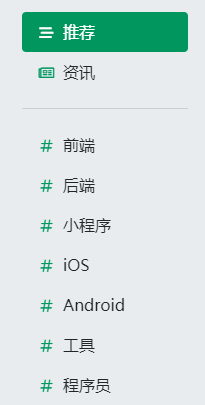
我们想从中找到#的位置,可以提供一张小模板图:

然后调用find_template方法:
from cv2 import cv2
from findimage import find_template

image_origin = cv2.imread('seg_course_whole_page.png')
image_template = cv2.imread('seg_sharp.png')

match_result = find_template(image_origin, image_template)
得到的match_result,标识了第一个#在源图中的中心点位置,矩形区域四角坐标 和 匹配度。
{
    "result": (x,y),        #tuple,表示识别结果的中心点
    "rectangle":[            #二位数组,表示识别结果的矩形四个角
        [left, top],
        [left, bottom],
        [right, top],
        [right, bottom]
    ],
    "confidence": percentage   #识别结果的匹配度,在-1~1之间,越大匹配度越高, 如果为1,表示按像素严格匹配
}
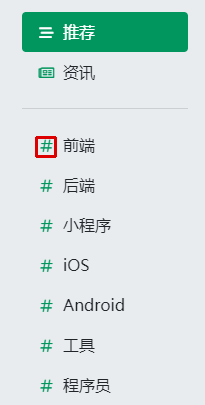
我们可以用这个结果,在源图上标识出匹配的位置:
img_result = image_origin.copy()
rect = match_result['rectangle']
cv2.rectangle(img_result, (rect[0][0], rect[0][1]), (rect[3][0], rect[3][1]), (0, 0, 220), 2)
cv2.imwrite('find_all_template_result.en.png', img_result)
结果如下图所示:
使用示例2——指定匹配度
find_template方法有一个threshold参数,如果设置了这个值,那么只有大于指定匹配度的图像,才能被查找出来:
match_result = find_template(image_origin, image_template, 0.8)
这个参数的取值范围是0~1,缺省值是0.5,这个值设置得越低,越容易找到结果,但也越容易找错;设置得越高,结果匹配越准确,但也可能找不到结果
使用示例3——查找所有结果
一张大图上不一定只有一个小图匹配结果,也可能有多个,如果需要返回多个结果,可以使用find_all_template方法:
from cv2 import cv2
import time

from findimage import find_all_template

image_origin = cv2.imread('seg_course_menu.png')
image_template = cv2.imread('seg_sharp.png')

start_time = time.time()
# 查找所有匹配
match_results = find_all_template(image_origin, image_template, 0.8, 50)
print("total time: {}".format(time.time() - start_time))

# 绘制结果图
img_result = image_origin.copy()
for match_result in match_results:
    rect = match_result['rectangle']
    cv2.rectangle(img_result, (rect[0][0], rect[0][1]), (rect[3][0], rect[3][1]), (0, 0, 220), 2)
cv2.imwrite('find_all_template_result.en.png', img_result)
find_all_template方法,提供一个额外的maxcnt参数,用于限制最多查找多少个结果,缺省为0(即不限),以上代码会把所有结果绘制出来:
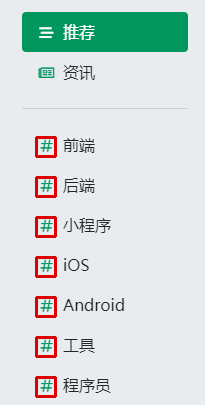
1 maintainer

Metadata
1 maintainer
Release files for findimage 0.2.0
For a detailed explanation of source distributions (sdists) and built distributions (wheels), please see the package formats documentation.
Source distribution (sdist)
| File | Size | Uploaded | |
|---|---|---|---|
| findimage-0.2.0.tar.gz | 10.7 kB | Details |
Built distribution (wheel)
| File | Interpreter | ABI | Platform | Reset |
|---|---|---|---|---|
| findimage-0.2.0-py3-none-any.whl | Python 3 | none | any | Details |
Total release size: 21.5 kB
Release files / findimage-0.2.0.tar.gz
| Download URL | findimage-0.2.0.tar.gz |
|---|---|
| Size | 10.7 kB |
| Tags | Source |
|
SHA-256 checksum How to use checksums |
6fa1ed22a9e0ff52747366166a33db103d21aaac6fa69b8b61763ec53449191c
|
|
BLAKE2b-256 checksum How to use checksums |
0dc22513677a7dffdb387e210cc7be33cf1c3712f525c6be0f5c5055d49a37e0
|
| Upload date | |
|
Uploaded using Trusted Publishing? What is trusted publishing? |
No |
| Uploaded via |
twine/4.0.0 CPython/3.9.13
|
Release files / findimage-0.2.0-py3-none-any.whl
| Download URL | findimage-0.2.0-py3-none-any.whl |
|---|---|
| Size | 10.8 kB |
| Tags | Python 3 |
|
SHA-256 checksum How to use checksums |
0152bf14946f4df9c7df7629fd0b81a865505266a16435a3fb446a2bf6573bc2
|
|
BLAKE2b-256 checksum How to use checksums |
e6a9c8f3ce0535fb1addf55de39cf5a7e11a1e4698d22166ece73090e20b0b42
|
| Upload date | |
|
Uploaded using Trusted Publishing? What is trusted publishing? |
No |
| Uploaded via |
twine/4.0.0 CPython/3.9.13
|














