
to find a template image(smaller) in a source image(bigger)

Project description
findimage - 在大图中找小图
本项目不是图像搜索,不能从一堆图片中找到相似的那张,而是从一张大图中定位给定模板小图的位置。
find the template image (smaller) in a source image (bigger)
以前这种功能,我都是用aircv实现的,但网易这个项目很久没有维护了,提交PR也没人处理,所以单独做了一个。 原项目还有一些别的图像处理API,本项目专注于找小图功能,所以干脆就叫findimage。
To find a template image(smaller) in a source image(bigger)
This project is generated from https://github.com/NetEaseGame/aircv.git, which is not maintained for a long time.
There are several improvements and changes in this projects:
- support finding grayscale image, either source or template
- support finding image with transparent channel
- optimized the performance of find_all, use numpy slicing set data instead of floodFill
- removed methods that are not related to finding images
示例
比如我们对“思否”课程菜单截图如下:
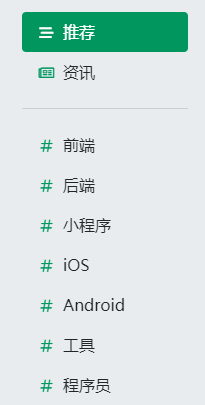
我们想从中找到#的位置,可以提供一张小模板图:

然后调用find_template方法:
from cv2 import cv2
from findimage import find_template

image_origin = cv2.imread('seg_course_whole_page.png')
image_template = cv2.imread('seg_sharp.png')

match_result = find_template(image_origin, image_template)
得到的match_result,标识了第一个#在源图中的中心点位置,矩形区域四角坐标 和 匹配度。
{
    "result": (x,y),        #tuple,表示识别结果的中心点
    "rectangle":[            #二位数组,表示识别结果的矩形四个角
        [left, top],
        [left, bottom],
        [right, top],
        [right, bottom]
    ],
    "confidence": percentage   #识别结果的匹配度,在-1~1之间,越大匹配度越高, 如果为1,表示按像素严格匹配
}
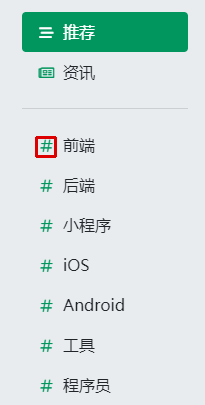
我们可以用这个结果,在源图上标识出匹配的位置:
img_result = image_origin.copy()
rect = match_result['rectangle']
cv2.rectangle(img_result, (rect[0][0], rect[0][1]), (rect[3][0], rect[3][1]), (0, 0, 220), 2)
cv2.imwrite('result.png', img_result)
结果如下图所示:
Release history Release notifications | RSS feed


Download files
Download the file for your platform. If you're not sure which to choose, learn more about installing packages.
Source Distribution
Built Distribution
Filter files by name, interpreter, ABI, and platform.
If you're not sure about the file name format, learn more about wheel file names.
Copy a direct link to the current filters
File details
Details for the file findimage-0.1.1.tar.gz.
File metadata
- Download URL: findimage-0.1.1.tar.gz
- Upload date:
- Size: 8.6 kB
- Tags: Source
- Uploaded using Trusted Publishing? No
- Uploaded via: twine/3.7.1 importlib_metadata/4.10.0 pkginfo/1.8.2 requests/2.27.1 requests-toolbelt/0.9.1 tqdm/4.62.3 CPython/3.7.4
File hashes
| Algorithm | Hash digest | |
|---|---|---|
| SHA256 |
019bbe3f359af56d2105f9f794f5570bc5162d61e70f6afce1e194435ade6e1a
|
|
| MD5 |
199975349f635178d145eff32ab10872
|
|
| BLAKE2b-256 |
fe3b1705d4099f322f8482a30c57e76190bd7c3349446e61eb6c14d94250e216
|
File details
Details for the file findimage-0.1.1-py3-none-any.whl.
File metadata
- Download URL: findimage-0.1.1-py3-none-any.whl
- Upload date:
- Size: 8.9 kB
- Tags: Python 3
- Uploaded using Trusted Publishing? No
- Uploaded via: twine/3.7.1 importlib_metadata/4.10.0 pkginfo/1.8.2 requests/2.27.1 requests-toolbelt/0.9.1 tqdm/4.62.3 CPython/3.7.4
File hashes
| Algorithm | Hash digest | |
|---|---|---|
| SHA256 |
319c0124ff7f37e993a8104daea53d9d5b90e672a3c0a45d666270294b74b78f
|
|
| MD5 |
01093bff2aaf391f35473ac841894902
|
|
| BLAKE2b-256 |
cd831812aceba53dc431d2eca0d8f7b4b7424e52bfec14808674fa3d5a6c5434
|






