
FineST: Fine-grained Spatial Transcriptomic

Project description
This software package implements FineST (Fine-grained Spatial Transcriptomics), which identifies super-resolved ligand-receptor interactions with spatial co-expression refining spot to sub-spot or single-cell resolution.
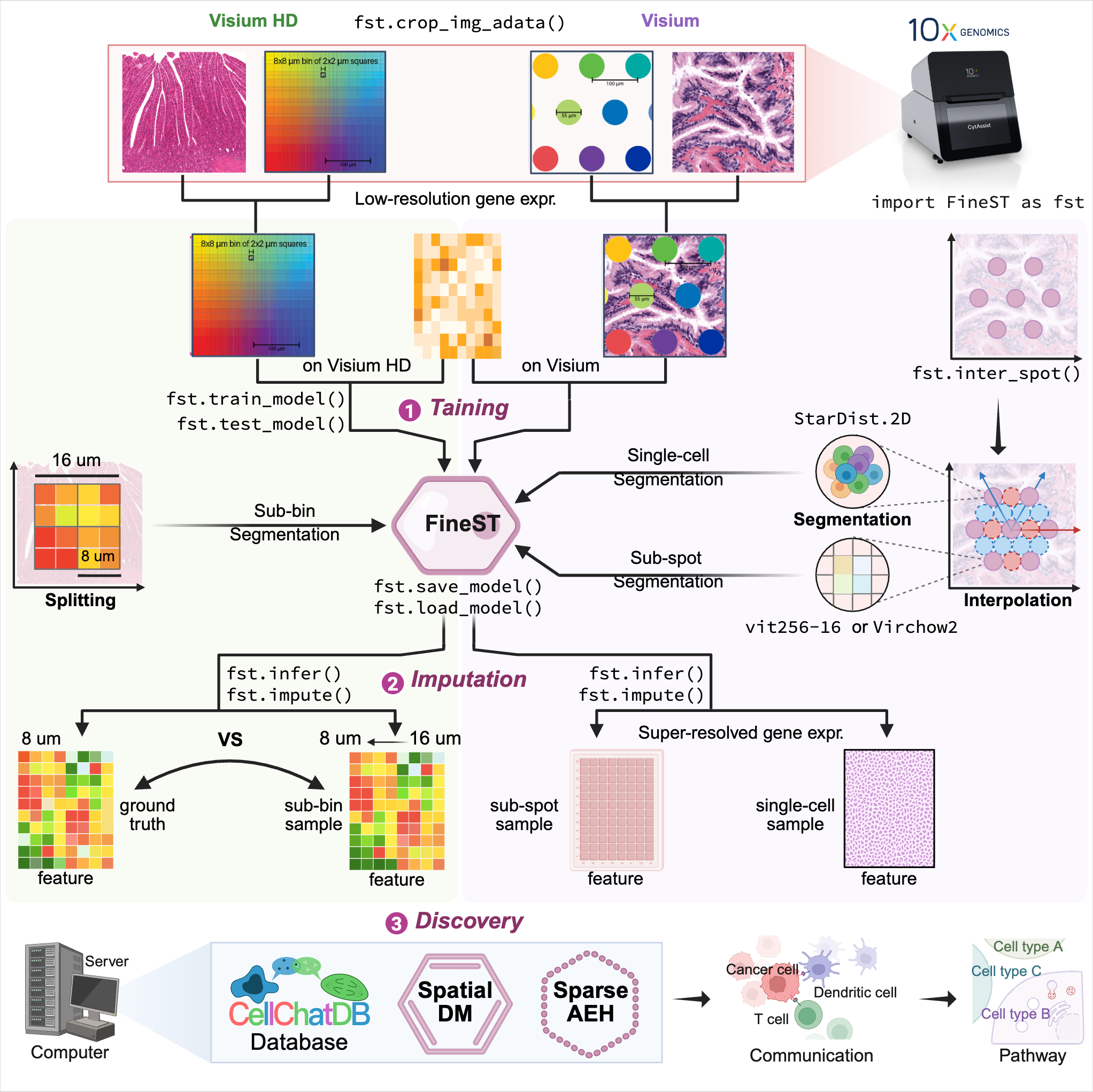
FineST comprises three components (Training-Imputation-Discovery) after HE image feature extraction:
Step0: HE image feature extraction
Step1: Training FineST on the within spots
Step2: Super-resolution spatial RNA-seq imputation at sub-spot or single-cell level
Step3: Fast fine-grained ligand-receptor pair and cell-cell communication pattern discovery
Installation using Conda
git clone https://github.com/StatBiomed/FineST.git
conda create --name FineST python=3.8
conda activate FineST
cd FineST
pip install -r requirements.txt
Verify the installation using the following command:
python
>>> import torch
>>> print(torch.__version__)
2.1.2+cu121 (or your installed version)
>>> print(torch.cuda.is_available())
True
FineST package is available through PyPI.
pip install -U FineST

## Alternatively, install from GitHub for latest version:
pip install -U git+https://github.com/StatBiomed/FineST
The FineST conda environment can be used for the following Tutorial by:
python -m pip install ipykernel
python -m ipykernel install --user --name=FineST
Tutorial notebooks:
NPC_Train_Impute_demo.ipynb (using Virchow2; requires Hugging Face token, approval may take days)
NPC_Train_Impute_demo_HIPT.ipynb (using HIPT; recommended for quick start)
ROI selection via Napair
To analyze a specific region of interest (ROI), use napari to select the region:
from PIL import Image
Image.MAX_IMAGE_PIXELS = None
import matplotlib.pyplot as plt
import napari

image = plt.imread("FineST_tutorial_data/20210809-C-AH4199551.tif")
viewer = napari.view_image(image, channel_axis=2, ndisplay=2)
napari.run()
Quick guide:
A shapes layer is automatically added when opening napari
Use the Add Polygons tool to draw ROI(s) on the HE image
Optionally rename the ROI layer for clarity
For detailed instructions and ROI extraction using fst.crop_img_adata(), see the tutorial or video guide.
Get Started for Visium or Visium HD data
The tutorial includes:
Visium: 10x Visium human nasopharyngeal carcinoma (NPC) data
Visium HD: 10x Visium HD human colorectal cancer (CRC) data (16-um bin) [Sample P2 CRC]
Data Download
Download Visum FineST_tutorial_data from Google Drive or via command line:
python -m pip install gdown
gdown --folder https://drive.google.com/drive/folders/1rZ235pexAMVvRzbVZt1ONOu7Dcuqz5BD?usp=drive_link
Fast Run for Demo
bash test_demo.shNote: The demo uses HIPT for image features, which is faster and doesn’t need Hugging Face token.
For using Virchow2 (may require a token and take longer; in paper), see the detailed manual below.
The demo uses the Visium NPC dataset; for Visium HD CRC data, follow the manual for Step 0-1-2.
The demo runs Step 0-1; for Step 2, plese replace the trained weight_save_path with your own.
Step0: HE image feature extraction
For Visium data, extract image features for both within-spots and between-spots.
For Visium HD data, extract features directly from continuous squares.
Option A: Extract image features for within-spots (Visium)
For Visium (55um spot diameter, 100um center-to-center distance), extract image features of original (within) spots:
## Option A: Using HIPT (recommended for quick start, no token required)
python ./demo/Image_feature_extraction.py \
   --dataset NPC \
   --position_path FineST_tutorial_data/spatial/tissue_positions_list.csv \
   --rawimage_path FineST_tutorial_data/20210809-C-AH4199551.tif \
   --scale_image False \
   --method HIPT \
   --patch_size 64 \
   --output_img FineST_tutorial_data/ImgEmbeddings/pth_64_16_image \
   --output_pth FineST_tutorial_data/ImgEmbeddings/pth_64_16 \
   --logging FineST_tutorial_data/ImgEmbeddings/Logging/ \
   --scale 0.5  # default is 0.5
## Option B: Using Virchow2 (requires Hugging Face token)
python ./demo/Image_feature_extraction.py \
--dataset NPC \
--position_path FineST_tutorial_data/spatial/tissue_positions_list.csv \
--rawimage_path FineST_tutorial_data/20210809-C-AH4199551.tif \
--scale_image False \
--method Virchow2 \
--patch_size 112 \
--output_img FineST_tutorial_data/ImgEmbeddings/pth_112_14_image \
--output_pth FineST_tutorial_data/ImgEmbeddings/pth_112_14 \
--logging FineST_tutorial_data/ImgEmbeddings/Logging/ \
--scale 0.5 # default is 0.5Option B: Extract image features for bin-squares (Visium HD)
For Visium HD (continuous squares without gaps), extract image features directly:
python ./demo/Image_feature_extraction.py \
   --dataset HD_CRC_16um \
   --position_path ./Dataset/CRC/square_016um/tissue_positions.parquet \
   --rawimage_path ./Dataset/CRC/square_016um/Visium_HD_Human_Colon_Cancer_tissue_image.btf \
   --scale_image True \
   --method Virchow2 \
   --output_img ./Dataset/CRC/HIPT/HD_CRC_16um_pth_28_14_image \
   --output_pth ./Dataset/CRC/HIPT/HD_CRC_16um_pth_28_14 \
   --patch_size 28 \
   --logging ./Logging/HIPT_HD_CRC_16um/ \
   --scale 0.5  # default is 0.5
Note: Visium HD uses .parquet for positions and .btf for images, while Visium uses .csv and .tif.
Step1: Training FineST on the within spots
Option A: Visium
Train FineST model on within-spots to learn the mapping from image features to gene expression.
## HIPT with Visium16 (patch_size=64)
python ./demo/Step1_FineST_train_infer.py \
   --system_path '/home/lingyu/ssd/Python/FineST/FineST/' \
   --parame_path 'parameter/parameters_NPC_HIPT.json' \
   --dataset_class 'Visium16' \
   --image_class 'HIPT' \
   --gene_selected 'CD70' \
   --LRgene_path 'FineST/datasets/LR_gene/LRgene_CellChatDB_baseline_human.csv' \
   --visium_path 'FineST_tutorial_data/spatial/tissue_positions_list.csv' \
   --image_embed_path 'FineST_tutorial_data/ImgEmbeddings/pth_64_16' \
   --spatial_pos_path 'FineST_tutorial_data/OrderData/position_order.csv' \
   --reduced_mtx_path 'FineST_tutorial_data/OrderData/matrix_order.npy' \
   --figure_save_path 'FineST_tutorial_data/Figures/' \
   --save_data_path 'FineST_tutorial_data/SaveData/' \
   --patch_size 64 \
   --weight_w 0.5
## Virchow2 with Visium64 (patch_size=112)
python ./demo/Step1_FineST_train_infer.py \
--system_path '/home/lingyu/ssd/Python/FineST_submit/FineST/' \
--parame_path 'FineST_tutorial_data/parameter/parameters_NPC_virchow2.json' \
--dataset_class 'Visium64' \
--image_class 'Virchow2' \
--gene_selected 'CD70' \
--LRgene_path 'FineST_tutorial_data/LRgene/LRgene_CellChatDB_baseline.csv' \
--visium_path 'FineST_tutorial_data/spatial/tissue_positions_list.csv' \
--image_embed_path 'FineST_tutorial_data/ImgEmbeddings/pth_112_14' \
--spatial_pos_path 'FineST_tutorial_data/OrderData/position_order.csv' \
--reduced_mtx_path 'FineST_tutorial_data/OrderData/matrix_order.npy' \
--figure_save_path 'FineST_tutorial_data/Figures/' \
--save_data_path 'FineST_tutorial_data/SaveData/' \
--patch_size 112 \
--weight_w 0.5Key parameters:
--dataset_class: 'Visium16' (HIPT, patch_size=64), 'Visium64' (Virchow2, patch_size=112), or 'VisiumHD'
--image_class: 'HIPT' or 'Virchow2' (must match Step0)
--weight_save_path: (optional) Path to pre-trained weights to skip training
Expected output:
Average correlation of all spots: ~0.85
Average correlation of all genes: ~0.88
Output files:
Figures/weights[timestamp]/: Trained model weights (.pt) and logs (.log)
Figures/Results[timestamp].log: Complete execution log
Figures/: Visualization plots (.pdf, .svg)
SaveData/: Processed AnnData files (adata_count.h5ad, adata_norml.h5ad, adata_infer.h5ad, etc.)
OrderData/position_order.csv: Ordered tissue positions
OrderData/matrix_order.npy: Ordered gene expression matrix
Option B: Visium HD
python ./demo/Step1_FineST_train_infer.pyStep2: Super-resolution spatial RNA-seq imputation (Visium)
Step2_High_resolution_imputation.py predicts super-resolved gene expression using image segmentation (Geometric sub-spot level or Nuclei single-cell level).
For Visium data (~5k spots, 55-um spot diameter, 100-um center-to-center distance), first interpolate additional spots between the original spots to increase resolution.
Setp2.0: Interpolate between spots
## Interpolate spots in horizontal and vertical directions
python ./demo/Spot_interpolation.py \
   --position_path FineST_tutorial_data/spatial/tissue_positions_list.csv
Input: tissue_positions_list.csv (original within-spots)
Output: tissue_positions_list_add.csv (interpolated between-spots, ~3x original)
Option A: sub-spot resolution
Setp A1: Extract image features for between-spots
## Option A: Using HIPT
python ./demo/Image_feature_extraction.py \
   --dataset NEW_NPC \
   --position_path FineST_tutorial_data/spatial/tissue_positions_list_add.csv  \
   --rawimage_path FineST_tutorial_data/20210809-C-AH4199551.tif \
   --scale_image False \
   --method HIPT \
   --patch_size 64 \
   --output_img FineST_tutorial_data/ImgEmbeddings/NEW_pth_64_16_image \
   --output_pth FineST_tutorial_data/ImgEmbeddings/NEW_pth_64_16 \
   --logging FineST_tutorial_data/ImgEmbeddings/Logging/ \
   --scale 0.5  # Optional, default is 0.5
## Option B: Using Virchow2
python ./demo/Image_feature_extraction.py \
--dataset NEW_NPC \
--position_path FineST_tutorial_data/spatial/tissue_positions_list_add.csv \
--rawimage_path FineST_tutorial_data/20210809-C-AH4199551.tif \
--scale_image False \
--method Virchow2 \
--patch_size 112 \
--output_img FineST_tutorial_data/ImgEmbeddings/NEW_pth_112_14_image \
--output_pth FineST_tutorial_data/ImgEmbeddings/NEW_pth_112_14 \
--logging FineST_tutorial_data/ImgEmbeddings/
--scale 0.5 # Optional, default is 0.5Setp A2: Imputation at sub-spot resolution
This step supposes that the trained weight (i.e. weight_save_path in Step1) has been saved, just run the following.
## Option A: Using HIPT
python ./demo/Step2_High_resolution_imputation.py \
   --system_path '/home/lingyu/ssd/Python/FineST_submit/FineST/' \
   --parame_path 'parameter/parameters_NPC_HIPT.json' \
   --dataset_class 'Visium16' \
   --gene_selected 'CD70' \
   --LRgene_path 'FineST/datasets/LR_gene/LRgene_CellChatDB_baseline_human.csv' \
   --visium_path 'FineST_tutorial_data/spatial/tissue_positions_list.csv' \
   --imag_within_path 'FineST_tutorial_data/ImgEmbeddings/pth_64_16' \
   --imag_betwen_path 'FineST_tutorial_data/ImgEmbeddings/NEW_pth_64_16' \
   --spatial_pos_path 'FineST_tutorial_data/OrderData/position_order_all.csv' \
   --weight_save_path 'FineST_tutorial_data/Figures/weights20260204191708183236' \
   --figure_save_path 'FineST_tutorial_data/Figures/' \
   --adata_all_supr_path 'FineST_tutorial_data/SaveData/adata_imput_all_subspot.h5ad' \
   --adata_all_spot_path 'FineST_tutorial_data/SaveData/adata_imput_all_spot.h5ad'
## Option B: Using Virchow2
python ./demo/Step2_High_resolution_imputation.py \
--system_path '/home/lingyu/ssd/Python/FineST_submit/FineST/' \
--parame_path 'FineST_tutorial_data/parameter/parameters_NPC_virchow2.json' \
--dataset_class 'Visium64' \
--gene_selected 'CD70' \
--LRgene_path 'FineST_tutorial_data/LRgene/LRgene_CellChatDB_baseline.csv' \
--visium_path 'FineST_tutorial_data/spatial/tissue_positions_list.csv' \
--imag_within_path 'FineST_tutorial_data/ImgEmbeddings/pth_112_14' \
--imag_betwen_path 'FineST_tutorial_data/ImgEmbeddings/NEW_pth_112_14' \
--spatial_pos_path 'FineST_tutorial_data/OrderData/position_order_all.csv' \
--weight_save_path 'FineST_tutorial_data/Figures/weights20260204191708183236' \
--figure_save_path 'FineST_tutorial_data/Figures/' \
--adata_all_supr_path 'FineST_tutorial_data/SaveData/adata_imput_all_subspot.h5ad' \
--adata_all_spot_path 'FineST_tutorial_data/SaveData/adata_imput_all_spot.h5ad'Input files:
parameters_NPC_P10125.json: The model parameters.
LRgene_CellChatDB_baseline.csv: The genes involved in Ligand or Receptor from CellChatDB.
tissue_positions_list.csv: It can be found in the spatial folder of 10x Visium outputs.
AH_Patient1_pth_112_14: Image feature of within-spots from Image_feature_extraction.py.
NEW_AH_Patient1_pth_112_14: Image feature of between-spots from Image_feature_extraction.py.
20240125140443830148: The trained weights from Step1.
Output files:
patient1_adata_all.h5ad: High-resolution gene expression, at sub-spot level (16x3x resolution).
patient1_adata_all_spot.h5ad: High-resolution gene expression, at spot level (3x resolution).
Option B: single-cell resolution
Setp B1: Nuclei segmentation (for single-cell level)
python ./demo/StarDist_nuclei_segmente.py \
   --tissue NPC_allspot_p075 \
   --out_dir FineST_tutorial_data/NucleiSegments \
   --adata_path FineST_tutorial_data/SaveData/adata_imput_all_spot.h5ad \
   --img_path FineST_tutorial_data/20210809-C-AH4199551.tif \
--prob_thresh 0.75Note: Some times users may need to adjust the --prob_thresh parameter to get better segmentation results.
The smaller the --prob_thresh, the more nuclei will be segmented, and vice versa. For NPC, the value is 0.75.
Setp B2: Extract image features for single-nuclei
## Option A: Using HIPT
python ./demo/Image_feature_extraction.py \
   --dataset sc_NPC \
   --position_path FineST_tutorial_data/NucleiSegments/NPC_allspot_p075/position_all_tissue_sc.csv  \
   --rawimage_path FineST_tutorial_data/20210809-C-AH4199551.tif \
   --scale_image False \
   --method HIPT \
   --patch_size 16 \
   --output_img FineST_tutorial_data/ImgEmbeddings/sc_pth_16_16_image \
   --output_pth FineST_tutorial_data/ImgEmbeddings/sc_pth_16_16 \
   --logging FineST_tutorial_data/ImgEmbeddings/
   --scale 0.5  # Optional, default is 0.5
## Option B: Using Virchow2
python ./demo/Image_feature_extraction.py \
--dataset sc_NPC \
--position_path FineST_tutorial_data/NucleiSegments/NPC_allspot_p075/position_all_tissue_sc.csv \
--rawimage_path FineST_tutorial_data/20210809-C-AH4199551.tif \
--scale_image False \
--method Virchow2 \
--patch_size 14 \
--output_img FineST_tutorial_data/ImgEmbeddings/sc_pth_14_14_image \
--output_pth FineST_tutorial_data/ImgEmbeddings/sc_pth_14_14 \
--logging FineST_tutorial_data/ImgEmbeddings/
--scale 0.5 # Optional, default is 0.5Setp B3: Imputation at single-cell resolution
When obtained the sc Patient1 pth 16 16 i.e., the image feature of single-nuclei from Image_feature_extraction.py, just run the following.
python ./demo/Step2_High_resolution_imputation.py \
   --system_path '/home/lingyu/ssd/Python/FineST_submit/FineST/' \
   --parame_path 'parameter/parameters_NPC_HIPT.json' \
   --dataset_class 'VisiumSC' \
   --gene_selected 'CD70' \
   --LRgene_path 'FineST/datasets/LR_gene/LRgene_CellChatDB_baseline_human.csv' \
   --image_embed_path_sc 'FineST_tutorial_data/ImgEmbeddings/sc_pth_16_16' \
   --spatial_pos_path_sc 'FineST_tutorial_data/OrderData/position_order_sc.csv' \
   --weight_save_path 'FineST_tutorial_data/Figures/weights20260204191708183236' \
   --figure_save_path 'FineST_tutorial_data/Figures/' \
   --adata_super_path_sc 'FineST_tutorial_data/SaveData/adata_imput_all_sc.h5ad'
Step3: Fine-grained LR pair and CCC pattern discovery
This step is based on SpatialDM and SparseAEH (developed by our Lab).
SpatialDM: for significant fine-grained ligand-receptor pair selection.
SparseAEH: for fast cell-cell communication pattern discovery, 1000 times speedup to SpatialDE.
Detailed Manual
The full manual is at FineST tutorial for installation, tutorials and examples.
Spot interpolation for Visium datasets.
Step1 and Step2 Train FineST and impute super-resolved spatial gene expression.
Step3 Fine-grained ligand-receptor (LR) pair and CCC pattern discovery.
Downstream analysis Cell type deconvolution, ROI region cropping, cell-cell colocalization.
Performance evaluation of FineST vs (TESLA and iSTAR).
Inference comparison of FineST vs iStar (only LR genes).
Citation
If you use FineST (Accepted in principle by Nature Comm) in your research, please cite:
@misc{FineST,
   author={Li, Lingyu and Wang, Tianjie and Liang, Zhuo and Yu, Huajian and Ma, Stephanie and Yu, Lequan and Huang, Yuanhua},
   title={{FineST: Contrastive learning integrates histology and spatial transcriptomics for nuclei-resolved ligand-receptor analysis}},
   year={2026},
   note = {\url{https://github.com/StatBiomed/FineST}}
}
Contact Information
Please contact Lingyu Li (lingyuli@hku.hk) or Yuanhua Huang (yuanhua@hku.hk) if any enquiry.
Release history Release notifications | RSS feed


Download files
Download the file for your platform. If you're not sure which to choose, learn more about installing packages.
Source Distribution
Built Distribution
Filter files by name, interpreter, ABI, and platform.
If you're not sure about the file name format, learn more about wheel file names.
Copy a direct link to the current filters
File details
Details for the file finest-0.1.3.tar.gz.
File metadata
- Download URL: finest-0.1.3.tar.gz
- Upload date:
- Size: 78.1 kB
- Tags: Source
- Uploaded using Trusted Publishing? No
- Uploaded via: twine/5.1.1 CPython/3.8.2
File hashes
| Algorithm | Hash digest | |
|---|---|---|
| SHA256 |
9f7becee36b3113eb43b1c1121482b597a1e1b9dbc003fa2e5def07ed836db4f
|
|
| MD5 |
86cd0597c5b4e631dbeae42514da6c13
|
|
| BLAKE2b-256 |
a3d29d2e80508c1a1203780ea522b5787ab4aad3b1fa6d4f8ea11529cb9641f1
|
File details
Details for the file finest-0.1.3-py3-none-any.whl.
File metadata
- Download URL: finest-0.1.3-py3-none-any.whl
- Upload date:
- Size: 93.0 kB
- Tags: Python 3
- Uploaded using Trusted Publishing? No
- Uploaded via: twine/5.1.1 CPython/3.8.2
File hashes
| Algorithm | Hash digest | |
|---|---|---|
| SHA256 |
440144979a37bbf8e30e998f6a7cd1a52fbeef8f4e8b09c57a92122a9a4ee316
|
|
| MD5 |
7d3b76a6144097367b8eb73795e4ca0a
|
|
| BLAKE2b-256 |
8dca2ba6632316580e8afb0c0a122efa9f2227b9845de9ebf52838270a1c0629
|






