
FinLab
Backtesting and research toolkit for Taiwan equities, with data and market support for the US, Japan, Korea, and Hong Kong.



FinLab gives you market, fundamental, and alternative data through one function, a pandas-based FinLabDataFrame that aligns daily, monthly, and quarterly data automatically, and a Cython backtest engine that produces an interactive report.
Features
- Data access:
data.get()loads prices, financial statements, monthly revenue, institutional flows, and more as a date × symbol table. Browse the catalog at studio.finlab.finance/chat/database. - Frequency alignment: quarterly and monthly data are aligned to each company's disclosure date when combined with daily data, so a report is not used before it was published.
- Backtesting:
sim()runs portfolio backtests with rebalancing schedules, transaction costs, stop-loss and take-profit rules, and position limits. - Reports: an interactive report with the equity curve, drawdowns, yearly and monthly returns, trades, and risk metrics.
- Charts: candlesticks with indicators, market treemaps, and fundamental radar charts built on Plotly.
- Markets: Taiwan stocks and convertible bonds, plus US, Japan, Korea, Hong Kong, and UK equities and funds.
- Live trading: turn a backtest into orders through supported Taiwan and US brokers.
Installation
pip install finlab
FinLab supports Python 3.10 to 3.14. Log in once to store your credentials:
python -m finlab login
In Google Colab, call finlab.login() instead. For servers and CI, see authentication.
Quickstart
Select the 20 companies with the strongest recent revenue growth, keep those trading above their 60-day average, and rebalance monthly:
from finlab import data
from finlab.backtest import sim

close = data.get('price:收盤價')  # daily close
revenue = data.get('monthly_revenue:當月營收')  # monthly revenue

growth = revenue.average(3) / revenue.average(12)
position = growth.is_largest(20) & (close > close.average(60))

report = sim(position, resample='M')
report.display()
Monthly revenue is aligned to its reporting deadline and combined with daily prices automatically. report.display() opens the interactive report in Jupyter; use report.to_html('report.html') elsewhere.
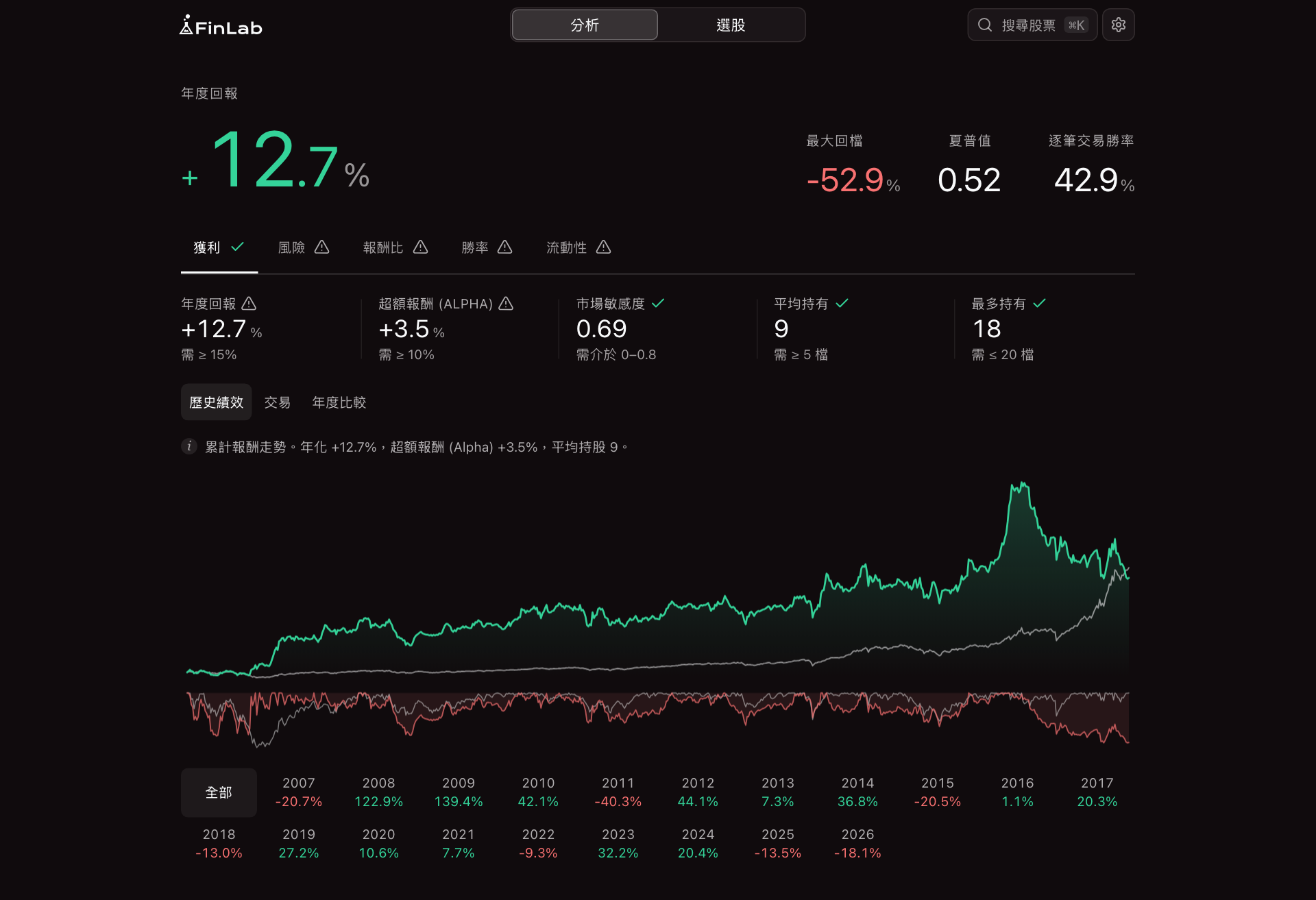
Illustrative in-sample backtest. Past results do not indicate future returns.
The report
The report opens on the performance view. Five scorecards (profit, risk, risk-adjusted return, win rate, liquidity) each check the strategy against a threshold and open their own charts:
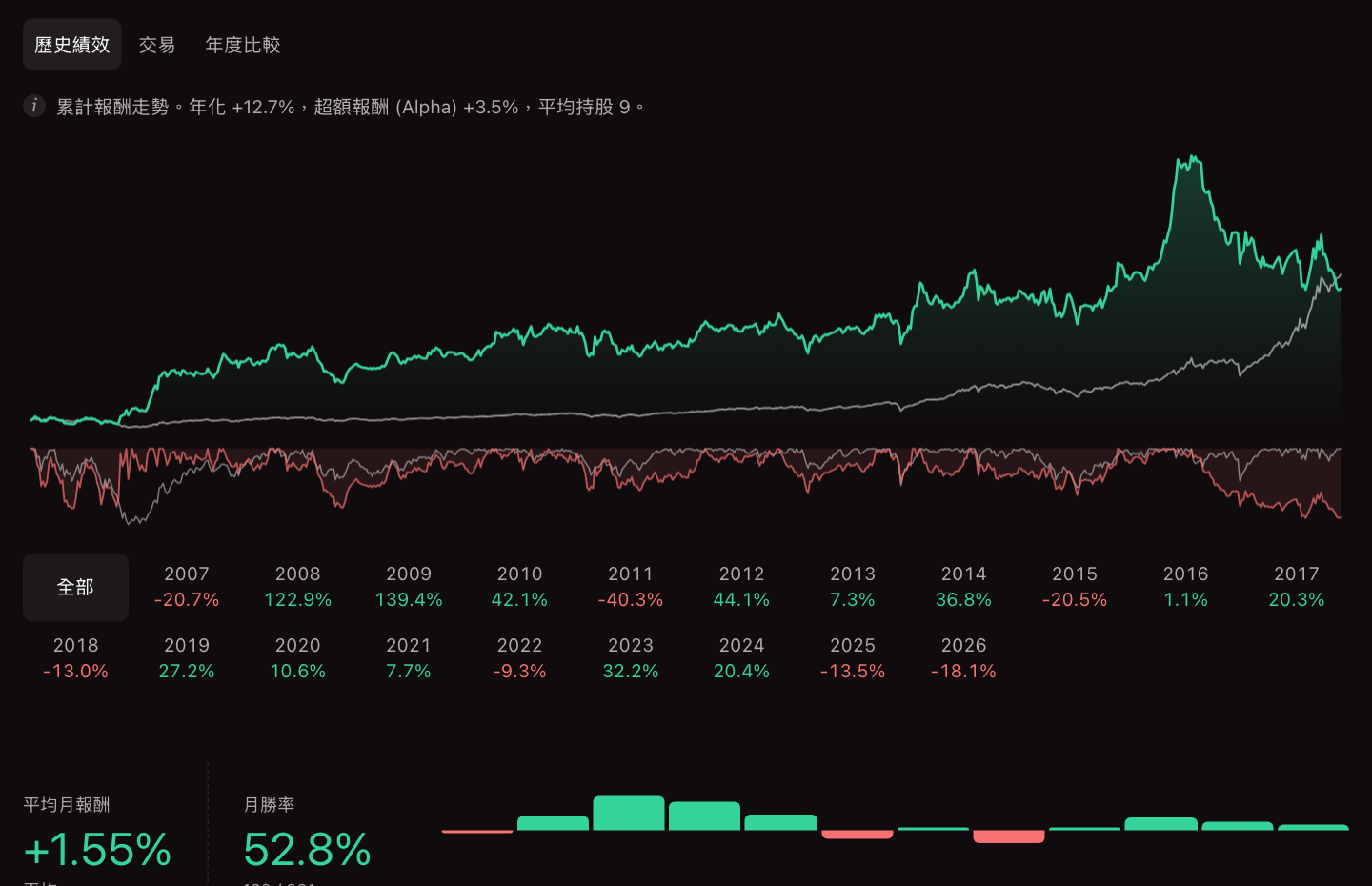 Performance |
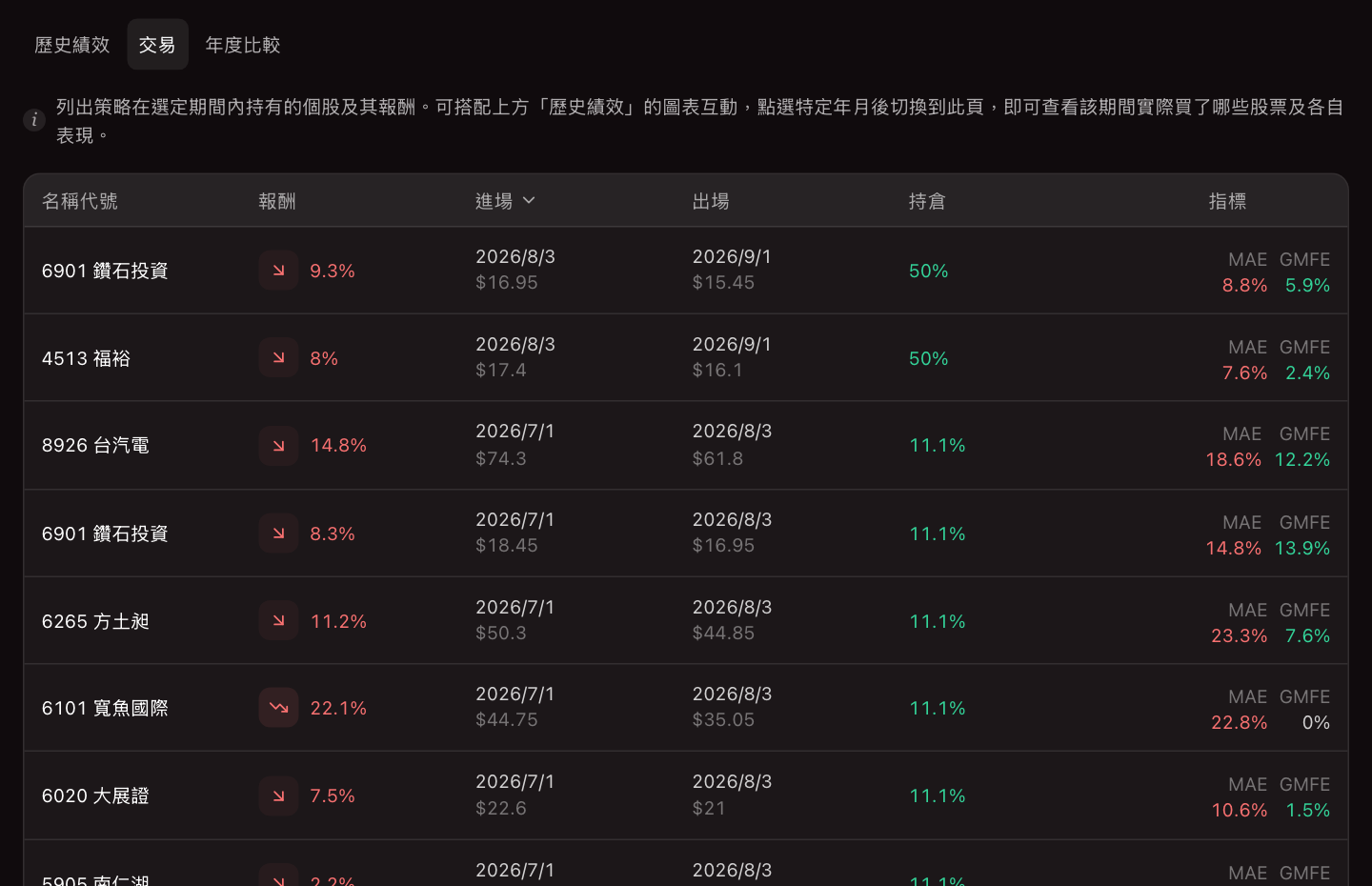 Trades |
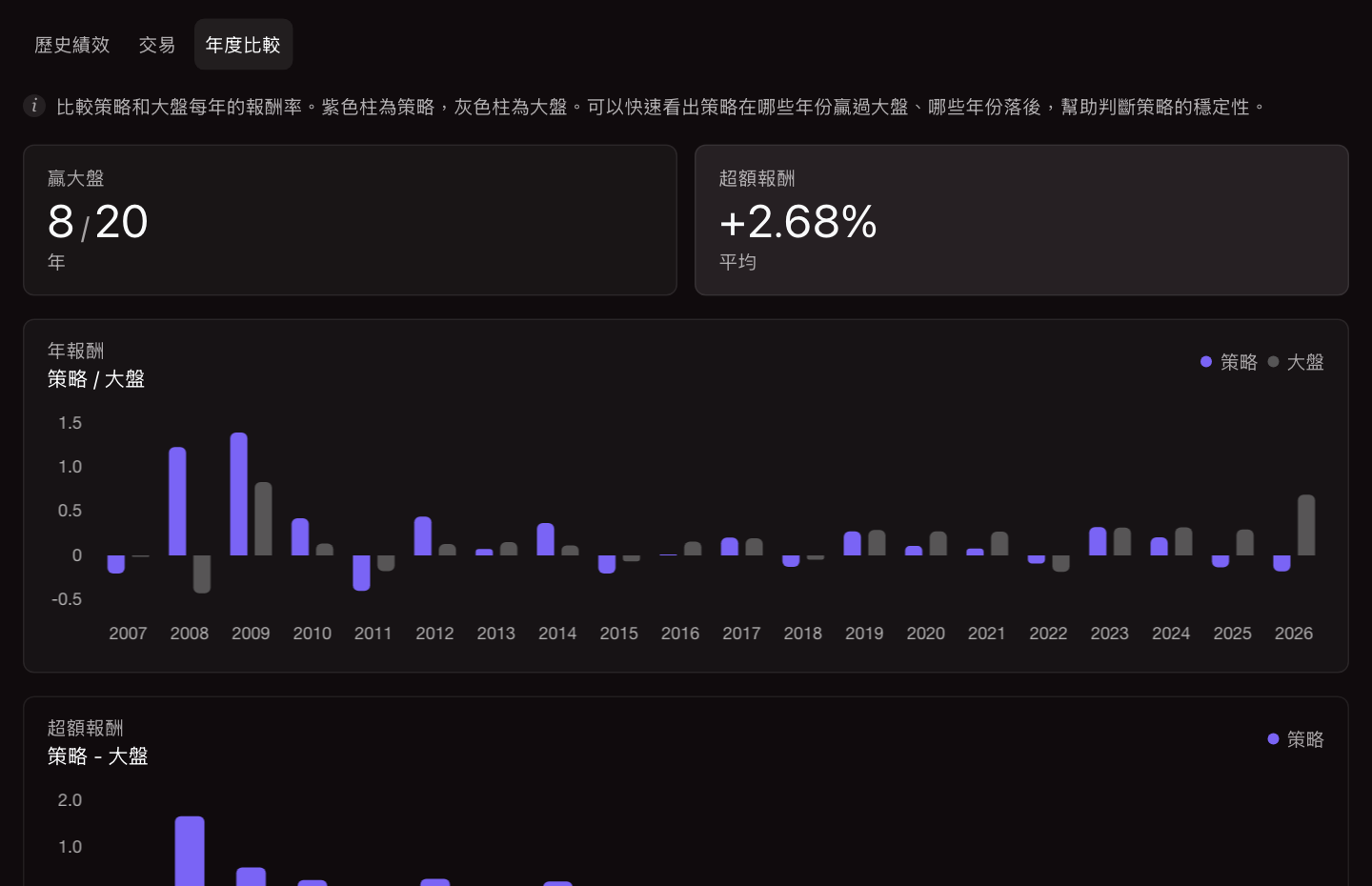 Strategy vs. benchmark by year |
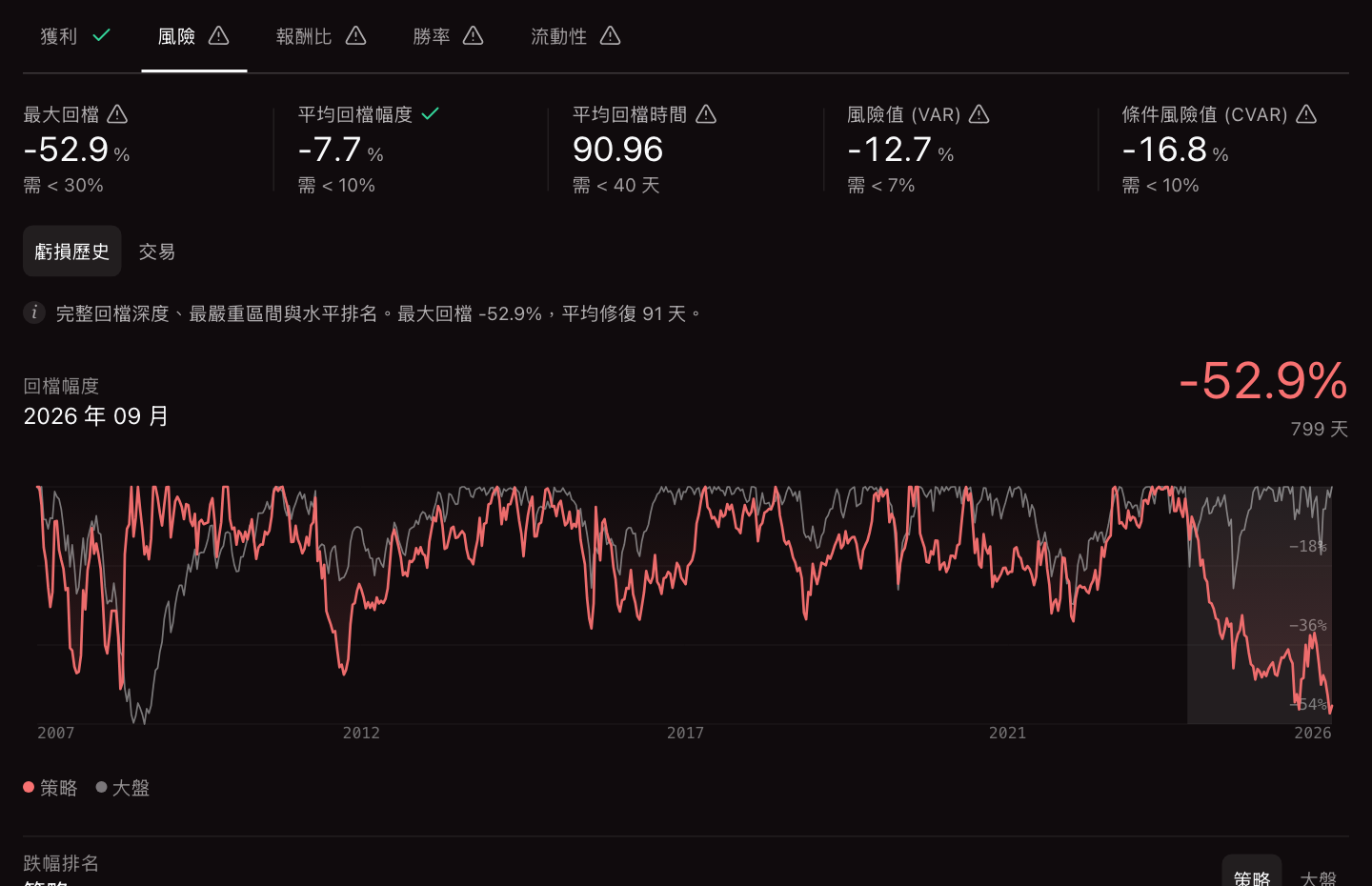 Risk |
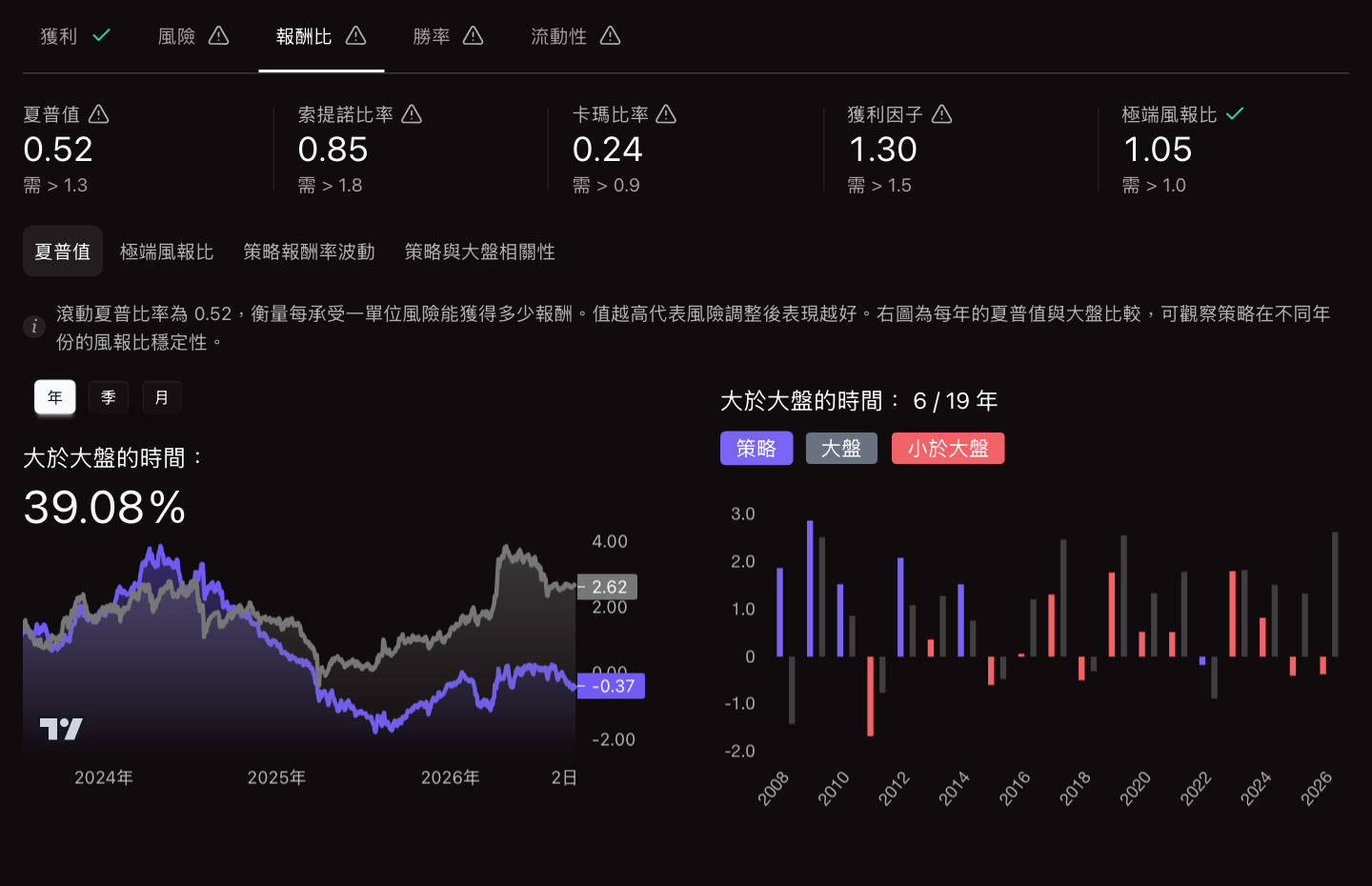 Risk-adjusted return |
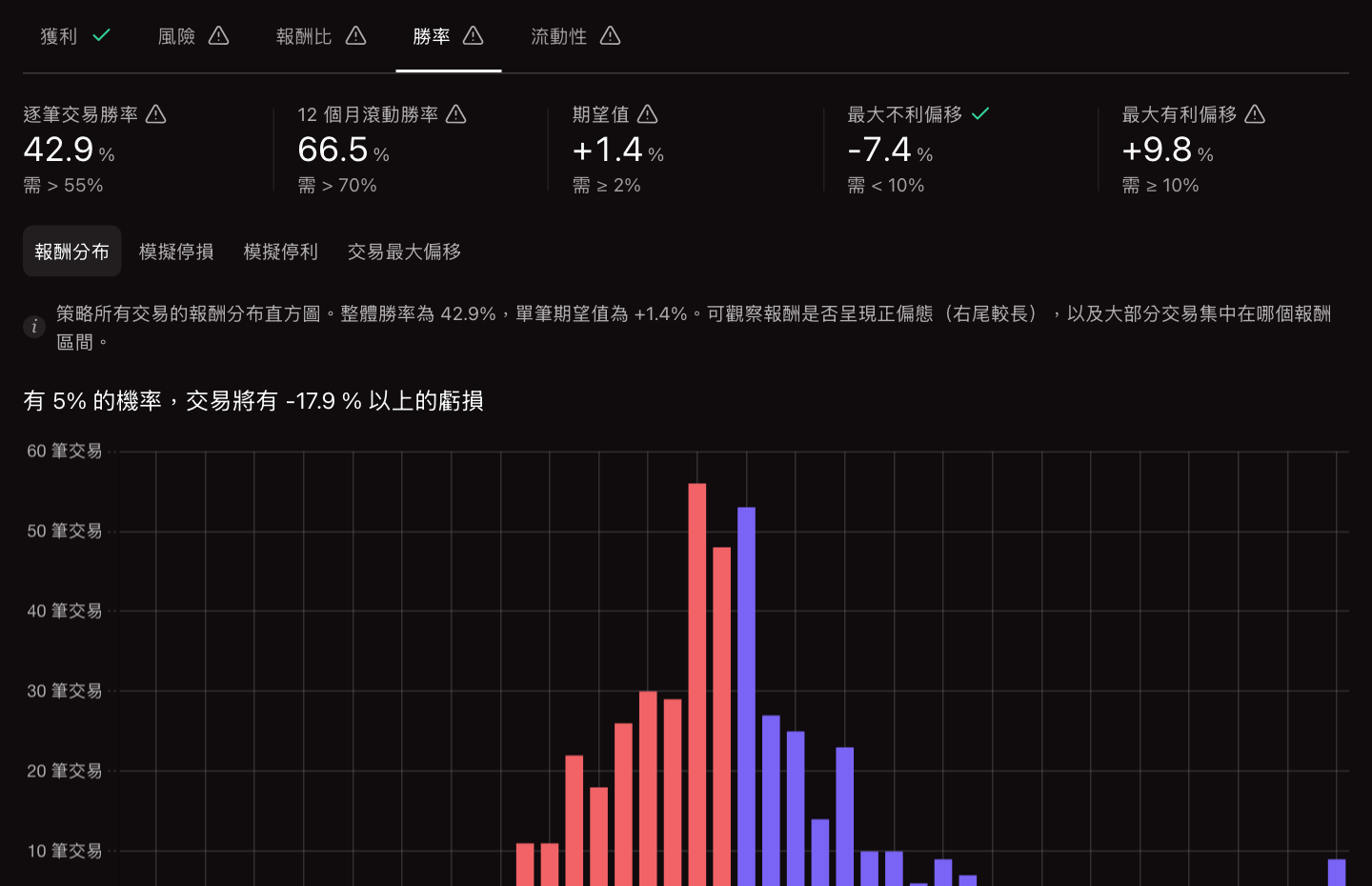 Win rate |
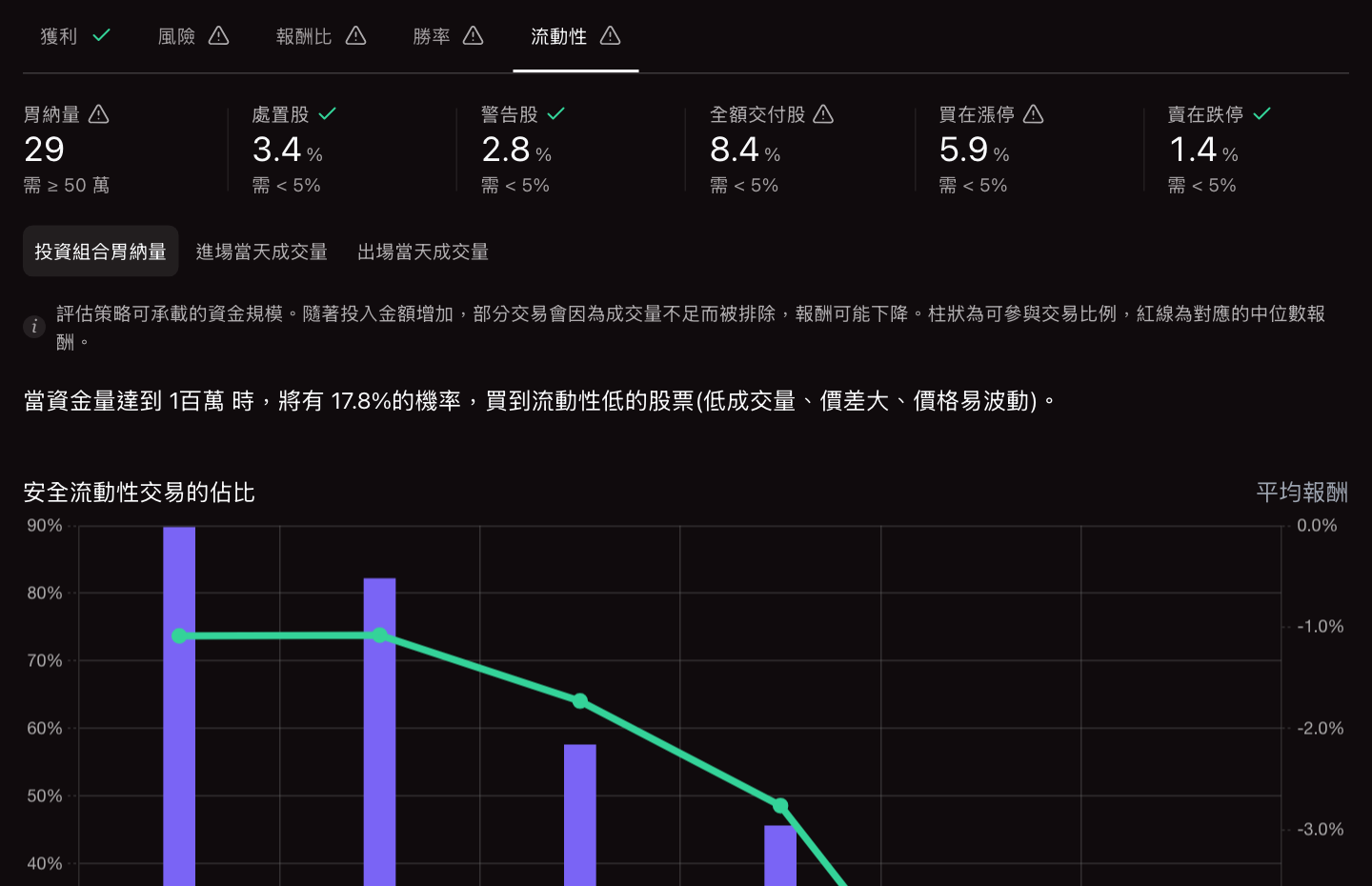 Liquidity and capacity |
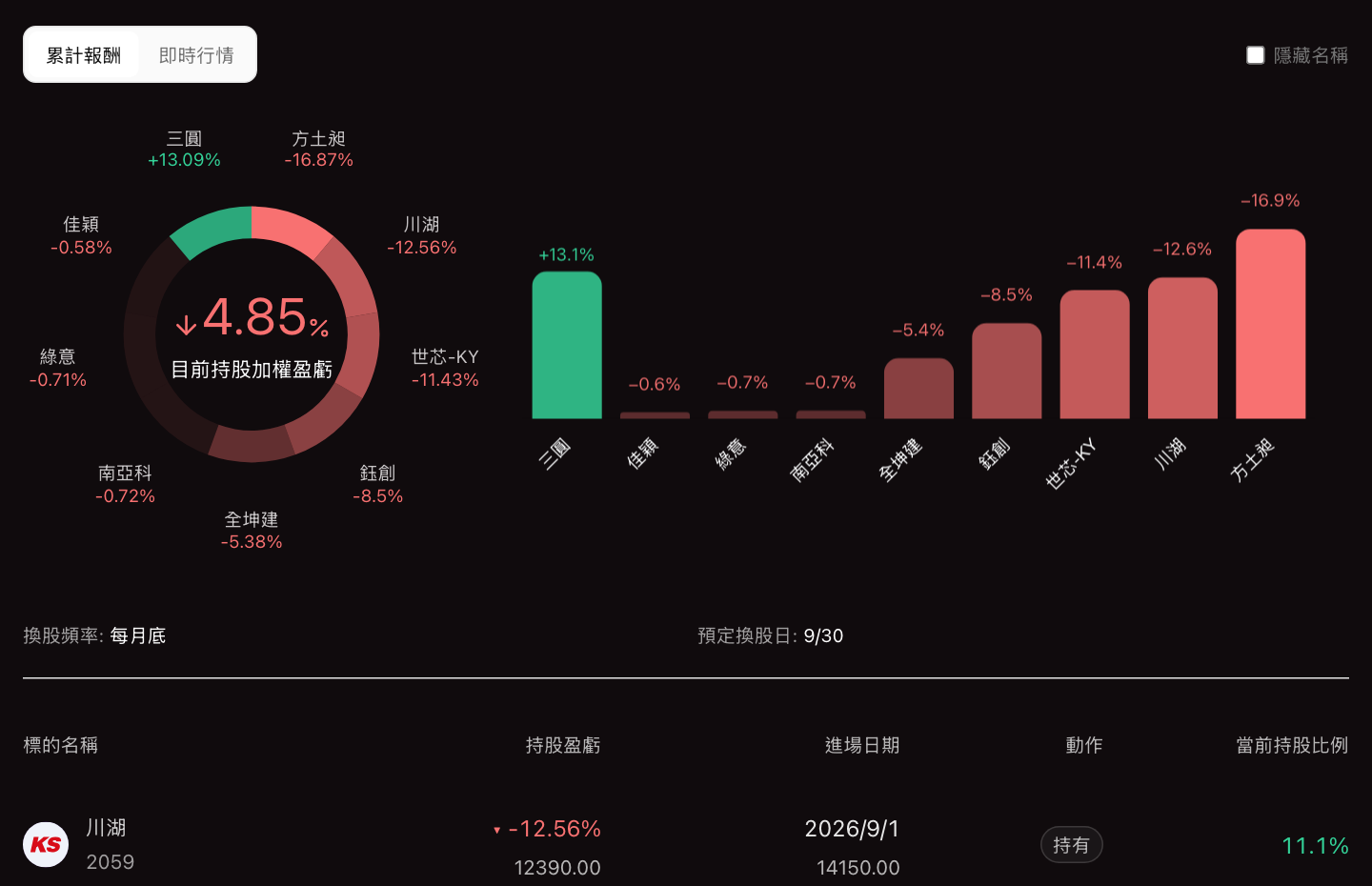 Current holdings |
Search any stock from the report (⌘K) to open its chart, fundamentals, revenue, institutional flows, and margin data beside the results:
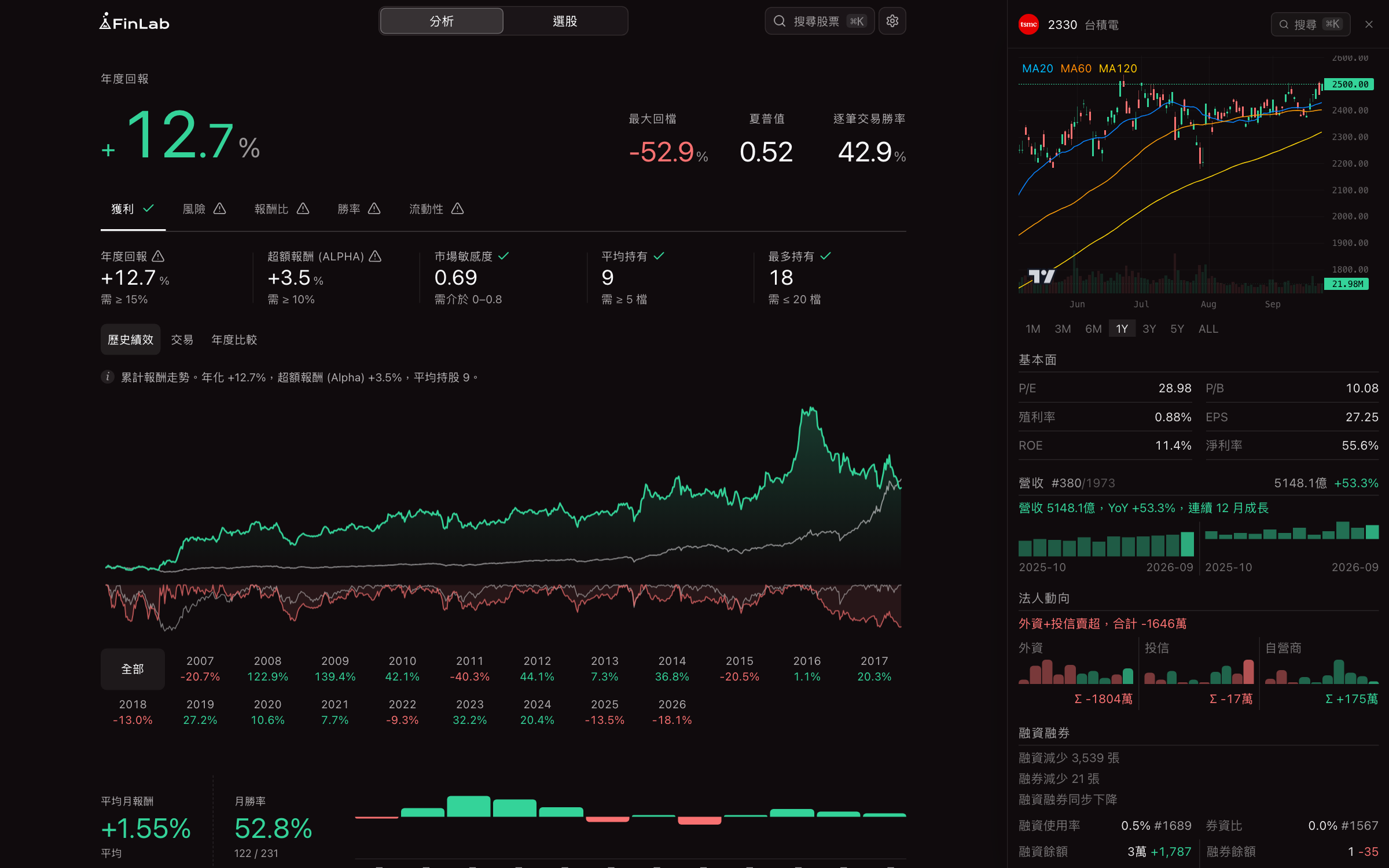
Working with data
Each data.get() call returns a FinLabDataFrame: dates as the index, symbols as the columns. Tables of different frequencies combine directly, and FinLab aligns quarterly and monthly values to their publication dates first.
from finlab import data

close = data.get('price:收盤價')  # daily
revenue = data.get('monthly_revenue:當月營收')  # monthly
roe = data.get('fundamental_features:ROE稅後')  # quarterly

uptrend = close > close.average(60)
growing = (revenue.average(3) / revenue.average(12)).rise(3)
quality = roe.rank(axis=1, pct=True) > 0.7

position = uptrend & growing & quality & revenue.average(3).is_largest(100)

print(position.sum(axis=1).tail())  # stocks selected on each of the last five days
Output:
date
2026-09-17    17
2026-09-18    20
2026-09-21    22
2026-09-22    22
2026-09-23    22
dtype: int64
Frequently used methods include average, rise, fall, sustain, is_largest, is_smallest, industry_rank, and hold_until. See the FinLabDataFrame reference.
Backtest options and results
sim() accepts rebalancing frequency, execution price, position limits, exits, and trading costs:
from finlab.backtest import sim

report = sim(
    position,
    resample='W',  # rebalance weekly
    trade_at_price='open',  # execute at the next open
    position_limit=0.1,  # at most 10% per stock
    stop_loss=0.08,
    take_profit=0.3,
    fee_ratio=1.425 / 1000,
    tax_ratio=3 / 1000,
)

stats = report.get_stats()  # CAGR, max drawdown, Sharpe, ...
print({k: round(stats[k], 3) for k in ['cagr', 'max_drawdown', 'daily_sharpe']})

trades = report.get_trades()  # one row per trade
print(trades[['stock_id', 'entry_date', 'exit_date', 'return']].dropna().tail(3))

print(report.next_weights.head(3))  # target weights for the next rebalance
Output (illustrative in-sample backtest):
{'cagr': 0.148, 'max_drawdown': -0.255, 'daily_sharpe': 0.92}
            stock_id entry_date  exit_date    return
trade_index
7980            3231 2026-09-14 2026-09-21  0.028918
7981            5434 2026-09-14 2026-09-21  0.024809
7982            6505 2026-09-14 2026-09-21  0.046099
symbol
2301 光寶科    0.045455
2303 聯電     0.045455
2308 台達電    0.045455
Name: 2026-09-27 00:00:00, dtype: float64
From backtest to orders
Convert the latest target weights into share quantities and place orders through a broker account:
from finlab.online.order_executor import Position, OrderExecutor
from finlab.online.sinopac_account import SinopacAccount

position = Position.from_report(
    report, 1_000_000, odd_lot=True
)  # TWD 1M, odd lots allowed
executor = OrderExecutor(position, account=SinopacAccount())
print(position)  # target lots per stock
executor.create_orders(view_only=True)  # preview before sending
Output, for an account with no current holdings (quantities in lots; 1 lot = 1,000 shares):
symbol stock_id quantity order_condition
  2301     2301    0.175            CASH
  2303     2303    0.312            CASH
  2330     2330     0.02            CASH
  2357     2357    0.052            CASH
  2377     2377    0.326            CASH
   ... (15 more stocks)
BUY         2615       X 0.429      @ 113.5        CASH
BUY         2330       X 0.02       @ 2500.0       CASH
BUY         3034       X 0.09       @ 545.0        CASH
BUY         3037       X 0.045      @ 1160.0       CASH
BUY         3044       X 0.092      @ 543.0        CASH
... (15 more orders)
Supported brokers: SinoPac, Fubon, Masterlink, E.SUN (Fugle), and Pocket for Taiwan; Charles Schwab for the US. Each broker requires its own SDK and credentials; see the order API guide.
Charts
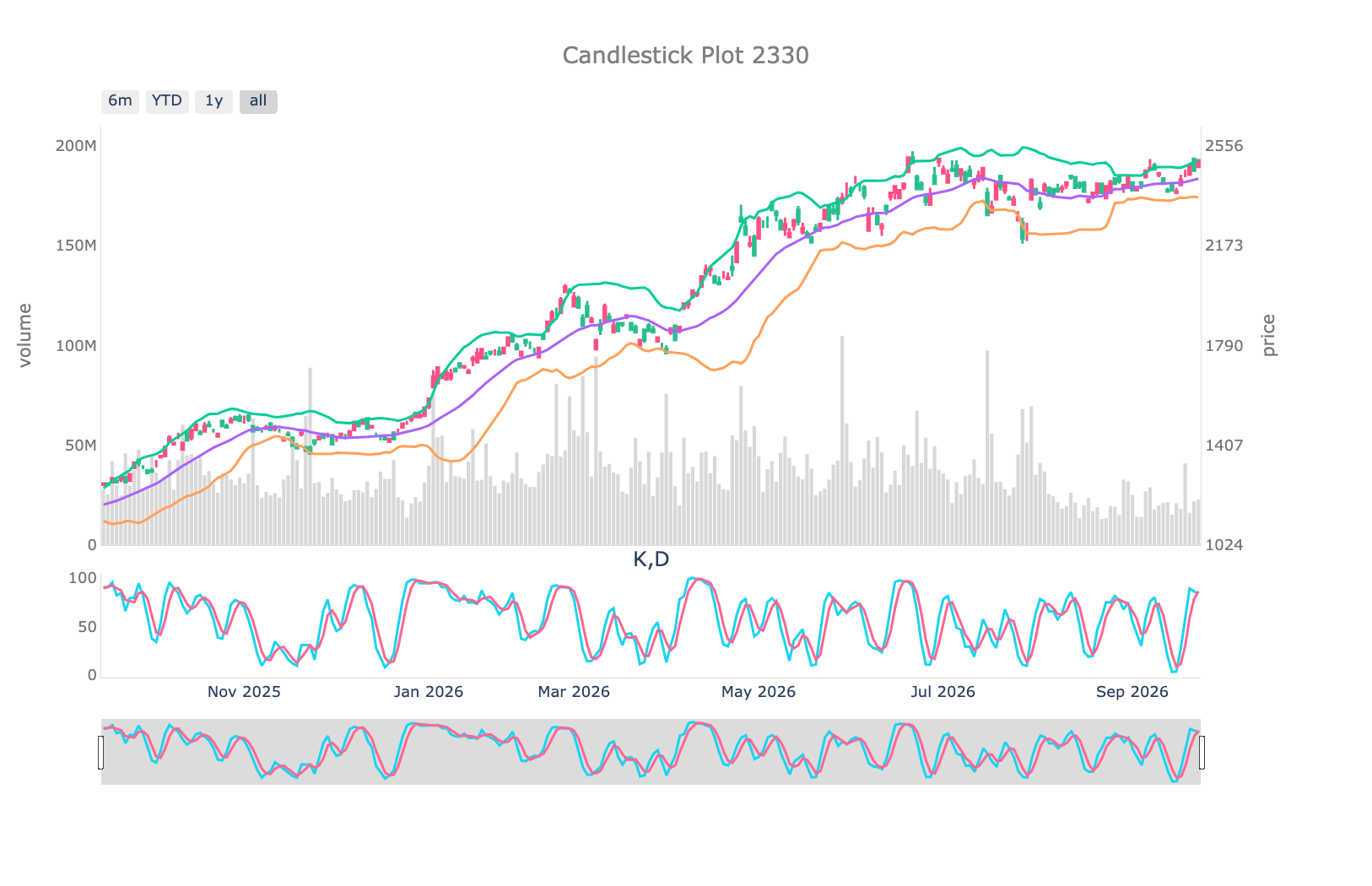
Candlesticks with Bollinger Bands, volume, and KD for any Taiwan stock:
from finlab.plot import plot_tw_stock_candles

plot_tw_stock_candles('2330', recent_days=250)
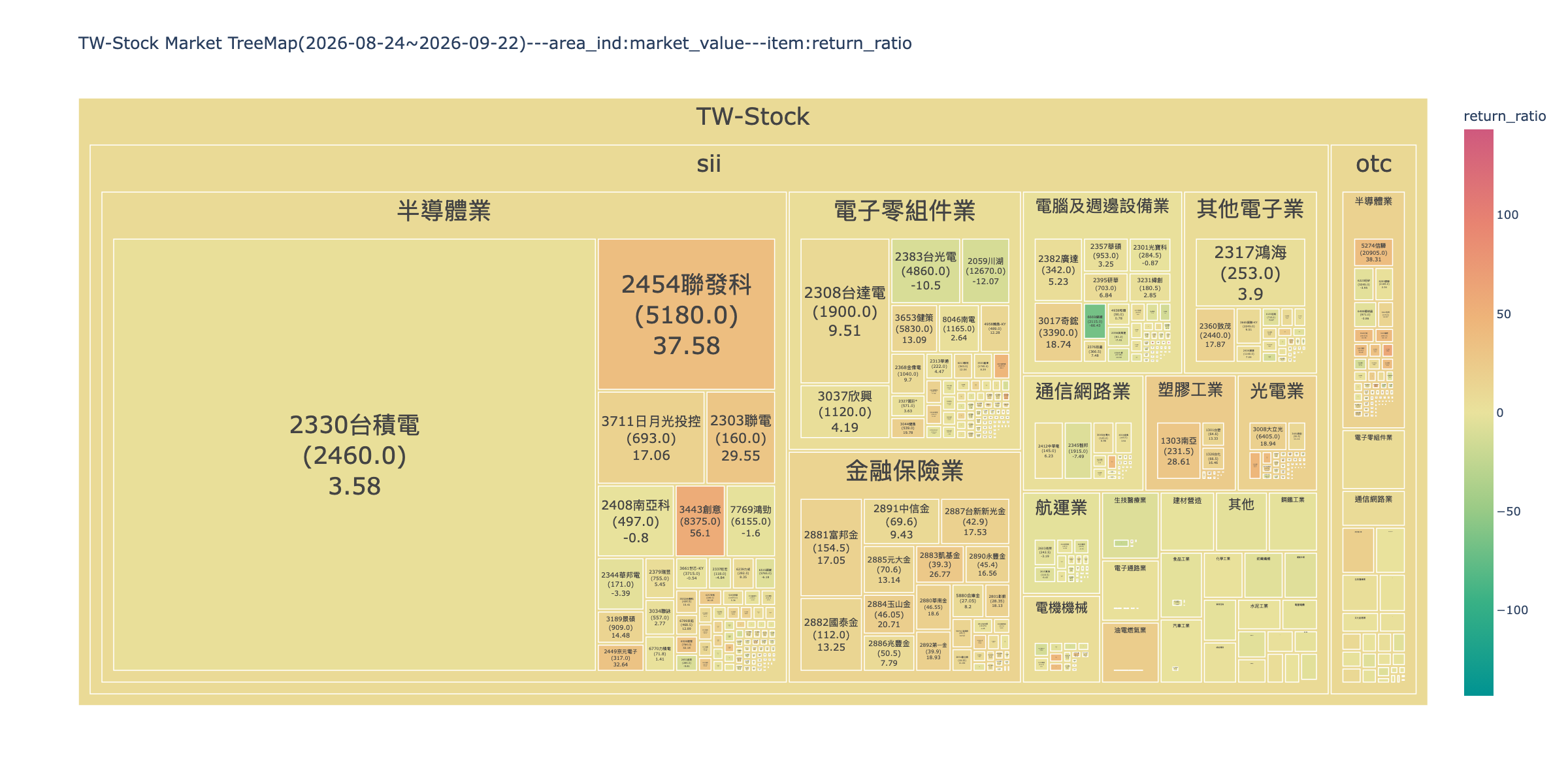
A market treemap sized by market value and colored by return over a period:
from finlab.plot import plot_tw_stock_treemap

plot_tw_stock_treemap(
    start='2026-08-24', end='2026-09-22', area_ind='market_value', item='return_ratio'
)
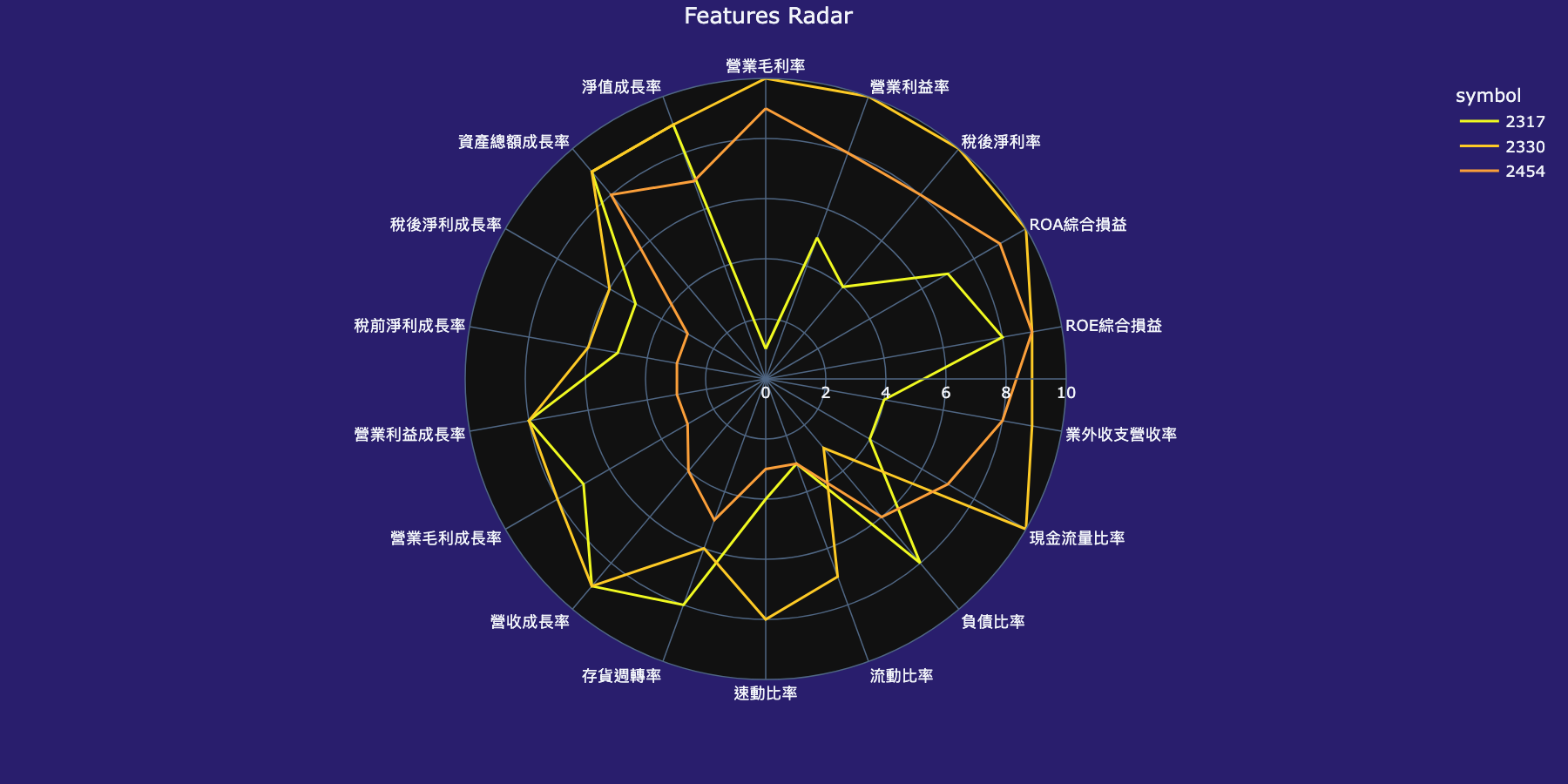
Fundamental decile ranks for a group of stocks:
from finlab.plot import plot_tw_stock_radar

plot_tw_stock_radar(portfolio=['2330', '2454', '2317'])
Other markets
Switch the data source with data.set_market() and pass the matching market to sim():
from finlab import data
from finlab.backtest import sim
from finlab.markets.us import USMarket

data.set_market('us')
close = data.get('price:adj_close')

position = close == close.rolling(200).max()  # 200-day high
report = sim(
    position,
    resample='2W',
    position_limit=0.2,
    stop_loss=0.2,
    market=USMarket(),
    fee_ratio=0.001,
    tax_ratio=0,
)

print(close.shape)  # (dates, symbols)
print(position.iloc[-1].sum(), 'stocks at a 200-day high on', position.index[-1].date())
Output:
(2696, 10460)
95 stocks at a 200-day high on 2026-09-22
Market classes are available for Taiwan (TWMarket), US (USMarket), Japan (JPMarket), Korea (KRMarket), Hong Kong (HKMarket), and the UK (UKMarket), with fund variants for ETFs.
Documentation
- Getting started
- API reference: data, FinLabDataFrame, backtest, plot
- FAQ
- Changelog
- 中文文件:finlab.finance/docs
Support
Ask questions and report problems in the FinLab Discord.
License
GPL-3.0-or-later. See LICENSE.
Disclaimer
FinLab is software for research and education. Nothing in this package or its documentation is investment advice. Backtest results depend on data quality and modeling assumptions and do not predict future performance. You are responsible for your own trading decisions.
1 maintainer

Metadata
1 maintainer
Release files for finlab 2.2.10
For a detailed explanation of source distributions (sdists) and built distributions (wheels), please see the package formats documentation.
Built distributions (wheels)
| File | Reset | |||
|---|---|---|---|---|
| finlab-2.2.10-cp314-cp314-win_amd64.whl | CPython 3.14 | CPython 3.14 | Windows x86-64 | Details |
| finlab-2.2.10-cp314-cp314-manylinux_2_24_x86_64.manylinux_2_28_x86_64.whl | CPython 3.14 | CPython 3.14 | Linux glibc 2.28+ x86-64, Linux glibc 2.24+ x86-64 | Details |
| finlab-2.2.10-cp314-cp314-manylinux_2_24_aarch64.manylinux_2_28_aarch64.whl | CPython 3.14 | CPython 3.14 | Linux glibc 2.24+ ARM64, Linux glibc 2.28+ ARM64 | Details |
| finlab-2.2.10-cp314-cp314-macosx_10_15_universal2.whl | CPython 3.14 | CPython 3.14 | macOS 10.15+ universal2 (ARM64, x86-64) | Details |
| finlab-2.2.10-cp313-cp313-win_amd64.whl | CPython 3.13 | CPython 3.13 | Windows x86-64 | Details |
| finlab-2.2.10-cp313-cp313-manylinux_2_24_x86_64.manylinux_2_28_x86_64.whl | CPython 3.13 | CPython 3.13 | Linux glibc 2.24+ x86-64, Linux glibc 2.28+ x86-64 | Details |
| finlab-2.2.10-cp313-cp313-manylinux_2_24_aarch64.manylinux_2_28_aarch64.whl | CPython 3.13 | CPython 3.13 | Linux glibc 2.24+ ARM64, Linux glibc 2.28+ ARM64 | Details |
| finlab-2.2.10-cp313-cp313-macosx_10_15_universal2.whl | CPython 3.13 | CPython 3.13 | macOS 10.15+ universal2 (ARM64, x86-64) | Details |
| finlab-2.2.10-cp312-cp312-win_amd64.whl | CPython 3.12 | CPython 3.12 | Windows x86-64 | Details |
| finlab-2.2.10-cp312-cp312-manylinux_2_24_x86_64.manylinux_2_28_x86_64.whl | CPython 3.12 | CPython 3.12 | Linux glibc 2.28+ x86-64, Linux glibc 2.24+ x86-64 | Details |
| finlab-2.2.10-cp312-cp312-manylinux_2_24_aarch64.manylinux_2_28_aarch64.whl | CPython 3.12 | CPython 3.12 | Linux glibc 2.24+ ARM64, Linux glibc 2.28+ ARM64 | Details |
| finlab-2.2.10-cp312-cp312-macosx_10_15_universal2.whl | CPython 3.12 | CPython 3.12 | macOS 10.15+ universal2 (ARM64, x86-64) | Details |
| finlab-2.2.10-cp311-cp311-win_amd64.whl | CPython 3.11 | CPython 3.11 | Windows x86-64 | Details |
| finlab-2.2.10-cp311-cp311-manylinux_2_24_x86_64.manylinux_2_28_x86_64.whl | CPython 3.11 | CPython 3.11 | Linux glibc 2.24+ x86-64, Linux glibc 2.28+ x86-64 | Details |
| finlab-2.2.10-cp311-cp311-manylinux_2_24_aarch64.manylinux_2_28_aarch64.whl | CPython 3.11 | CPython 3.11 | Linux glibc 2.24+ ARM64, Linux glibc 2.28+ ARM64 | Details |
| finlab-2.2.10-cp311-cp311-macosx_10_15_universal2.whl | CPython 3.11 | CPython 3.11 | macOS 10.15+ universal2 (ARM64, x86-64) | Details |
| finlab-2.2.10-cp310-cp310-win_amd64.whl | CPython 3.10 | CPython 3.10 | Windows x86-64 | Details |
| finlab-2.2.10-cp310-cp310-manylinux_2_24_x86_64.manylinux_2_28_x86_64.whl | CPython 3.10 | CPython 3.10 | Linux glibc 2.28+ x86-64, Linux glibc 2.24+ x86-64 | Details |
| finlab-2.2.10-cp310-cp310-manylinux_2_24_aarch64.manylinux_2_28_aarch64.whl | CPython 3.10 | CPython 3.10 | Linux glibc 2.24+ ARM64, Linux glibc 2.28+ ARM64 | Details |
| finlab-2.2.10-cp310-cp310-macosx_10_15_universal2.whl | CPython 3.10 | CPython 3.10 | macOS 10.15+ universal2 (ARM64, x86-64) | Details |
Total release size: 101.8 MB
Release files / finlab-2.2.10-cp314-cp314-win_amd64.whl
| Download URL | finlab-2.2.10-cp314-cp314-win_amd64.whl |
|---|---|
| Size | 2.3 MB |
| Tags | CPython 3.14 Windows x86-64 |
|
SHA-256 checksum How to use checksums |
83f39218a86880de89dbd25b9461cfa8dbaff8243794c18b34a69e95a0740a28
|
|
BLAKE2b-256 checksum How to use checksums |
c00a567f47dea4d69a6245e91a771a37b0286ac0d9260226f7c13eeaa900e180
|
| Upload date | |
|
Uploaded using Trusted Publishing? What is trusted publishing? |
No |
| Uploaded via |
twine/7.0.0 CPython/3.13.3
|
Release files / finlab-2.2.10-cp314-cp314-manylinux_2_24_x86_64.manylinux_2_28_x86_64.whl
| Download URL | finlab-2.2.10-cp314-cp314-manylinux_2_24_x86_64.manylinux_2_28_x86_64.whl |
|---|---|
| Size | 7.7 MB |
| Tags | CPython 3.14 Linux glibc 2.24+ x86-64 Linux glibc 2.28+ x86-64 |
|
SHA-256 checksum How to use checksums |
c4222250d6143bd9e7eb8d29a050639aa22f8e889de1ba56b84fbb5ba75e7946
|
|
BLAKE2b-256 checksum How to use checksums |
52a0f53618e5c98b93f566a412e0ffabbc8490f3636c58286c6e6e2121fda01c
|
| Upload date | |
|
Uploaded using Trusted Publishing? What is trusted publishing? |
No |
| Uploaded via |
twine/7.0.0 CPython/3.13.3
|
Release files / finlab-2.2.10-cp314-cp314-manylinux_2_24_aarch64.manylinux_2_28_aarch64.whl
| Download URL | finlab-2.2.10-cp314-cp314-manylinux_2_24_aarch64.manylinux_2_28_aarch64.whl |
|---|---|
| Size | 7.4 MB |
| Tags | CPython 3.14 Linux glibc 2.24+ ARM64 Linux glibc 2.28+ ARM64 |
|
SHA-256 checksum How to use checksums |
2ddaf8b71c1b368ee944767975a242df6e961802526c867b1bc1bc404b68eeb0
|
|
BLAKE2b-256 checksum How to use checksums |
1fb7601b5eea2110cecf24b106e83aeb264232b0b154b43306eef05f78ebb0fd
|
| Upload date | |
|
Uploaded using Trusted Publishing? What is trusted publishing? |
No |
| Uploaded via |
twine/7.0.0 CPython/3.13.3
|
Release files / finlab-2.2.10-cp314-cp314-macosx_10_15_universal2.whl
| Download URL | finlab-2.2.10-cp314-cp314-macosx_10_15_universal2.whl |
|---|---|
| Size | 3.0 MB |
| Tags | CPython 3.14 macOS 10.15+ universal2 (ARM64, x86-64) |
|
SHA-256 checksum How to use checksums |
5c8514df3f2a3302a0bdb862b633ea3aafcb8014d732200834617146066dbcec
|
|
BLAKE2b-256 checksum How to use checksums |
27c18eb4cde602f92be8e428ff315e95872a3aa4bfcbed90b09a70e99e521ef9
|
| Upload date | |
|
Uploaded using Trusted Publishing? What is trusted publishing? |
No |
| Uploaded via |
twine/7.0.0 CPython/3.13.3
|
Release files / finlab-2.2.10-cp313-cp313-win_amd64.whl
| Download URL | finlab-2.2.10-cp313-cp313-win_amd64.whl |
|---|---|
| Size | 2.3 MB |
| Tags | CPython 3.13 Windows x86-64 |
|
SHA-256 checksum How to use checksums |
48035673c206af4ea7e44ae71e830b7a1b690444bc4054bfe394887f4ccb6965
|
|
BLAKE2b-256 checksum How to use checksums |
7bb02f86a8ff213161164874848a322d7e16d726a597271b7fd7ccdb89457851
|
| Upload date | |
|
Uploaded using Trusted Publishing? What is trusted publishing? |
No |
| Uploaded via |
twine/7.0.0 CPython/3.13.3
|
Release files / finlab-2.2.10-cp313-cp313-manylinux_2_24_x86_64.manylinux_2_28_x86_64.whl
| Download URL | finlab-2.2.10-cp313-cp313-manylinux_2_24_x86_64.manylinux_2_28_x86_64.whl |
|---|---|
| Size | 7.7 MB |
| Tags | CPython 3.13 Linux glibc 2.24+ x86-64 Linux glibc 2.28+ x86-64 |
|
SHA-256 checksum How to use checksums |
28ff7ea5097dfae7245cb059fd33012ae092f26e3eb6ccb638e14e008daee3c3
|
|
BLAKE2b-256 checksum How to use checksums |
bfc4e0c06b37cf47b92e1e9b8e10ba06e159c8b5f6b1a6c89a1b2380057f16e7
|
| Upload date | |
|
Uploaded using Trusted Publishing? What is trusted publishing? |
No |
| Uploaded via |
twine/7.0.0 CPython/3.13.3
|
Release files / finlab-2.2.10-cp313-cp313-manylinux_2_24_aarch64.manylinux_2_28_aarch64.whl
| Download URL | finlab-2.2.10-cp313-cp313-manylinux_2_24_aarch64.manylinux_2_28_aarch64.whl |
|---|---|
| Size | 7.5 MB |
| Tags | CPython 3.13 Linux glibc 2.24+ ARM64 Linux glibc 2.28+ ARM64 |
|
SHA-256 checksum How to use checksums |
b0968b796abc57ab0630f25091a05dad5f3cbc630aa0cbaf75fd1f5b6ea629f3
|
|
BLAKE2b-256 checksum How to use checksums |
3a969861b2ee61b3f04601cf094e9bb8fef7f0b38aa9f63fcd8a229e9b958dfc
|
| Upload date | |
|
Uploaded using Trusted Publishing? What is trusted publishing? |
No |
| Uploaded via |
twine/7.0.0 CPython/3.13.3
|
Release files / finlab-2.2.10-cp313-cp313-macosx_10_15_universal2.whl
| Download URL | finlab-2.2.10-cp313-cp313-macosx_10_15_universal2.whl |
|---|---|
| Size | 3.0 MB |
| Tags | CPython 3.13 macOS 10.15+ universal2 (ARM64, x86-64) |
|
SHA-256 checksum How to use checksums |
ed12e3a4df98455b05be3eb562ad54936c9c0871f46b208ceb46a50cf20e5013
|
|
BLAKE2b-256 checksum How to use checksums |
2efbef6b2d8a1e6e5c3edebcc854051cd599fc85ffd21907a81976ffba04d2fd
|
| Upload date | |
|
Uploaded using Trusted Publishing? What is trusted publishing? |
No |
| Uploaded via |
twine/7.0.0 CPython/3.13.3
|
Release files / finlab-2.2.10-cp312-cp312-win_amd64.whl
| Download URL | finlab-2.2.10-cp312-cp312-win_amd64.whl |
|---|---|
| Size | 2.3 MB |
| Tags | CPython 3.12 Windows x86-64 |
|
SHA-256 checksum How to use checksums |
d512b1a6bdfc554f9fbb8618fb5bf7b76dca2b79d6892b08563867ef5f201a35
|
|
BLAKE2b-256 checksum How to use checksums |
50b6be04a22a455afeb0af5c5e19e769a2f8617b2c3e0a88df5bbd8dc7e1cf62
|
| Upload date | |
|
Uploaded using Trusted Publishing? What is trusted publishing? |
No |
| Uploaded via |
twine/7.0.0 CPython/3.13.3
|
Release files / finlab-2.2.10-cp312-cp312-manylinux_2_24_x86_64.manylinux_2_28_x86_64.whl
| Download URL | finlab-2.2.10-cp312-cp312-manylinux_2_24_x86_64.manylinux_2_28_x86_64.whl |
|---|---|
| Size | 7.7 MB |
| Tags | CPython 3.12 Linux glibc 2.24+ x86-64 Linux glibc 2.28+ x86-64 |
|
SHA-256 checksum How to use checksums |
27deca414f869097f3a572994fccc56856b6f0b679e0b0b306c2f81c70a76dfc
|
|
BLAKE2b-256 checksum How to use checksums |
11a0fe709cf842fa14cc9b963b130a5cfe42ca33e766d3152be7e34537387b30
|
| Upload date | |
|
Uploaded using Trusted Publishing? What is trusted publishing? |
No |
| Uploaded via |
twine/7.0.0 CPython/3.13.3
|
Release files / finlab-2.2.10-cp312-cp312-manylinux_2_24_aarch64.manylinux_2_28_aarch64.whl
| Download URL | finlab-2.2.10-cp312-cp312-manylinux_2_24_aarch64.manylinux_2_28_aarch64.whl |
|---|---|
| Size | 7.4 MB |
| Tags | CPython 3.12 Linux glibc 2.24+ ARM64 Linux glibc 2.28+ ARM64 |
|
SHA-256 checksum How to use checksums |
b34cf8a2738ccca568254baacc61a44373edb5a13431c1d3f6dd2b93e7ff76f9
|
|
BLAKE2b-256 checksum How to use checksums |
5b8d3c4f8fdfcb139db82277eba2865a89b88da5335be0a6caf03cf4d6766655
|
| Upload date | |
|
Uploaded using Trusted Publishing? What is trusted publishing? |
No |
| Uploaded via |
twine/7.0.0 CPython/3.13.3
|
Release files / finlab-2.2.10-cp312-cp312-macosx_10_15_universal2.whl
| Download URL | finlab-2.2.10-cp312-cp312-macosx_10_15_universal2.whl |
|---|---|
| Size | 3.1 MB |
| Tags | CPython 3.12 macOS 10.15+ universal2 (ARM64, x86-64) |
|
SHA-256 checksum How to use checksums |
eee712c5351700e21cf6c6ae5c7d935aaa2d1f1b1c811cf119821a06058dbb0c
|
|
BLAKE2b-256 checksum How to use checksums |
69c18304c3ed6533f89e2ac58421537c0bf7dc8b4b4bfd759915afac4cc35eb8
|
| Upload date | |
|
Uploaded using Trusted Publishing? What is trusted publishing? |
No |
| Uploaded via |
twine/7.0.0 CPython/3.13.3
|
Release files / finlab-2.2.10-cp311-cp311-win_amd64.whl
| Download URL | finlab-2.2.10-cp311-cp311-win_amd64.whl |
|---|---|
| Size | 2.3 MB |
| Tags | CPython 3.11 Windows x86-64 |
|
SHA-256 checksum How to use checksums |
3b7e255b85db8a725e76c3ceceafccd795529c54d4bf7ac2a8c49b6f8fcfa9b8
|
|
BLAKE2b-256 checksum How to use checksums |
2b9599d9ef76ecf3dd85c4a3e4db8dfd5221187581a618d8413683c90cfc2b77
|
| Upload date | |
|
Uploaded using Trusted Publishing? What is trusted publishing? |
No |
| Uploaded via |
twine/7.0.0 CPython/3.13.3
|
Release files / finlab-2.2.10-cp311-cp311-manylinux_2_24_x86_64.manylinux_2_28_x86_64.whl
| Download URL | finlab-2.2.10-cp311-cp311-manylinux_2_24_x86_64.manylinux_2_28_x86_64.whl |
|---|---|
| Size | 7.8 MB |
| Tags | CPython 3.11 Linux glibc 2.24+ x86-64 Linux glibc 2.28+ x86-64 |
|
SHA-256 checksum How to use checksums |
910e1c6c97691e08812797367fe912fa7a77b1c3e903227a35d7006b80b5c603
|
|
BLAKE2b-256 checksum How to use checksums |
1ca4e2fe071a2a2e0d3ef473978feb500ebff22a87ad835ae059b5e6f677a44a
|
| Upload date | |
|
Uploaded using Trusted Publishing? What is trusted publishing? |
No |
| Uploaded via |
twine/7.0.0 CPython/3.13.3
|
Release files / finlab-2.2.10-cp311-cp311-manylinux_2_24_aarch64.manylinux_2_28_aarch64.whl
| Download URL | finlab-2.2.10-cp311-cp311-manylinux_2_24_aarch64.manylinux_2_28_aarch64.whl |
|---|---|
| Size | 7.5 MB |
| Tags | CPython 3.11 Linux glibc 2.24+ ARM64 Linux glibc 2.28+ ARM64 |
|
SHA-256 checksum How to use checksums |
646e09751c3d7fb8f1c76d796b6d5c9b0384e808de497da1cb86644d74cf9e0e
|
|
BLAKE2b-256 checksum How to use checksums |
e23a64eeb264587334af629d2663b7cae4ca659262e3bfa3c17726cdf0f578e7
|
| Upload date | |
|
Uploaded using Trusted Publishing? What is trusted publishing? |
No |
| Uploaded via |
twine/7.0.0 CPython/3.13.3
|
Release files / finlab-2.2.10-cp311-cp311-macosx_10_15_universal2.whl
| Download URL | finlab-2.2.10-cp311-cp311-macosx_10_15_universal2.whl |
|---|---|
| Size | 3.1 MB |
| Tags | CPython 3.11 macOS 10.15+ universal2 (ARM64, x86-64) |
|
SHA-256 checksum How to use checksums |
676be1323aee7eb4970057d908cbe71e2f0ddea5950530837b9a9e7d13524574
|
|
BLAKE2b-256 checksum How to use checksums |
c3e26cc4bdb89524a089108838c48e34bef4cb36f879547232792b8ce6060b89
|
| Upload date | |
|
Uploaded using Trusted Publishing? What is trusted publishing? |
No |
| Uploaded via |
twine/7.0.0 CPython/3.13.3
|
Release files / finlab-2.2.10-cp310-cp310-win_amd64.whl
| Download URL | finlab-2.2.10-cp310-cp310-win_amd64.whl |
|---|---|
| Size | 2.3 MB |
| Tags | CPython 3.10 Windows x86-64 |
|
SHA-256 checksum How to use checksums |
7d46db6088556dc1045acac0992b30c9ec5444e2e208aff3a199e1df4746abf1
|
|
BLAKE2b-256 checksum How to use checksums |
fa2ba2e3e745297e11a6ddb85297ddfb1d7d40baa4da5f04628f1e905c82999a
|
| Upload date | |
|
Uploaded using Trusted Publishing? What is trusted publishing? |
No |
| Uploaded via |
twine/7.0.0 CPython/3.13.3
|
Release files / finlab-2.2.10-cp310-cp310-manylinux_2_24_x86_64.manylinux_2_28_x86_64.whl
| Download URL | finlab-2.2.10-cp310-cp310-manylinux_2_24_x86_64.manylinux_2_28_x86_64.whl |
|---|---|
| Size | 7.3 MB |
| Tags | CPython 3.10 Linux glibc 2.24+ x86-64 Linux glibc 2.28+ x86-64 |
|
SHA-256 checksum How to use checksums |
3de80dbfe476b3d14ab9ecb9904eec5db49db73406337157360e6d647e13b75b
|
|
BLAKE2b-256 checksum How to use checksums |
0fce0f7df5b70ccd016f86c2171f19ba11c91439ec0b1f2e69970d87e665c653
|
| Upload date | |
|
Uploaded using Trusted Publishing? What is trusted publishing? |
No |
| Uploaded via |
twine/7.0.0 CPython/3.13.3
|
Release files / finlab-2.2.10-cp310-cp310-manylinux_2_24_aarch64.manylinux_2_28_aarch64.whl
| Download URL | finlab-2.2.10-cp310-cp310-manylinux_2_24_aarch64.manylinux_2_28_aarch64.whl |
|---|---|
| Size | 7.0 MB |
| Tags | CPython 3.10 Linux glibc 2.24+ ARM64 Linux glibc 2.28+ ARM64 |
|
SHA-256 checksum How to use checksums |
65b6113c00bc4e4a5c9a2e25907407265788bfa1b1f13ace900e55c268060111
|
|
BLAKE2b-256 checksum How to use checksums |
89f44937ff4841af7e997889b2aaeac1fed1028742d18cb5de849affd18418b0
|
| Upload date | |
|
Uploaded using Trusted Publishing? What is trusted publishing? |
No |
| Uploaded via |
twine/7.0.0 CPython/3.13.3
|
Release files / finlab-2.2.10-cp310-cp310-macosx_10_15_universal2.whl
| Download URL | finlab-2.2.10-cp310-cp310-macosx_10_15_universal2.whl |
|---|---|
| Size | 3.1 MB |
| Tags | CPython 3.10 macOS 10.15+ universal2 (ARM64, x86-64) |
|
SHA-256 checksum How to use checksums |
1ff1b1d5a90cc05ea863316659af0c39c9fddd4bf0b4c3d3c7611b04b356d200
|
|
BLAKE2b-256 checksum How to use checksums |
88d27058abcd482f4b32cece36afb231c7557881a2802c0b8c59a3fa2e320920
|
| Upload date | |
|
Uploaded using Trusted Publishing? What is trusted publishing? |
No |
| Uploaded via |
twine/7.0.0 CPython/3.13.3
|
Security for finlab 2.2.10
Provenance
Provenance describes where a file came from. On PyPI, provenance is shared via attestations, which provide a verifiable record of the build or publishing details. View details, limitations and caveats.
No provenance found
None of the files in this release were uploaded with provenance metadata.
A note on package security
PyPI is a repository for distributing packages, not a service for auditing them. While third-party security researchers and our staff do their best to detect and remove malicious packages, PyPI cannot guarantee the quality, security or suitability of any given package.














