
finshare
专业的金融数据获取工具库
A Professional Financial Data Fetching Toolkit for Python
📖 在线文档 • 官网 • GitHub • Discord • 问题反馈


📖 在线文档
详细使用文档请访问: 👉 finshare 文档网站
文档网站包含:
- 完整的 API 参考
- 快速开始指南
- 数据源说明
- 常见问题解答
- 更多代码示例
🚀 快速开始
import finshare as fs

# 获取历史K线
df = fs.get_historical_data('000001.SZ', start='2024-01-01', end='2024-12-31')

# 获取实时快照
snapshot = fs.get_snapshot_data('000001.SZ')

# 批量获取快照
snapshots = fs.get_batch_snapshots(['000001.SZ', '600519.SH'])

print(df.head())
✨ 核心特性
- 📊 多数据源 - 东方财富、Yahoo Finance、腾讯、新浪、通达信、BaoStock
- 🔄 自动故障切换 - 数据源失败时自动切换备用源
- 📈 统一数据格式 - 所有数据源返回统一格式
- ⚡ 高性能 - 优化的数据获取性能
- 🔧 简单易用 - 简洁的 API 设计,开箱即用
- 🌍 多市场支持 - A股、港股、美股、期货、基金
📦 安装
pip install finshare
📚 支持的数据类型
| 类别 | 功能 |
|---|---|
| 股票 | K线、实时快照、资金流向、龙虎榜、融资融券 |
| 基金 | 净值、信息、列表、ETF、LOF |
| 期货 | K线、实时快照 |
| 证券列表 | 股票列表、ETF列表、LOF列表、期货列表 |
🛠️ 用 finshare 创建工具
finshare 不仅是一个数据库,更是一个可以快速构建金融工具的基础库。以下是几个示例:
1. 行情看板 (finboard)
# finboard - 实时行情看板
# 基于 Streamlit + finshare 构建

import streamlit as st
import finshare as fs
import plotly.graph_objects as go

# 获取自选股行情
stocks = ['000001.SZ', '600519.SH', '300750.SZ']
data = fs.get_batch_snapshots(stocks)

# 显示行情
for code, snap in data.items():
    st.metric(code, snap.last_price, f"{snap.change_pct:.2f}%")

# K线图
kline = fs.get_historical_data('600519.SH', start='2024-01-01')
fig = go.Figure(data=[go.Candlestick(
    x=kline['trade_date'],
    open=kline['open_price'],
    high=kline['high_price'],
    low=kline['low_price'],
    close=kline['close_price']
)])
st.plotly_chart(fig)
效果预览:
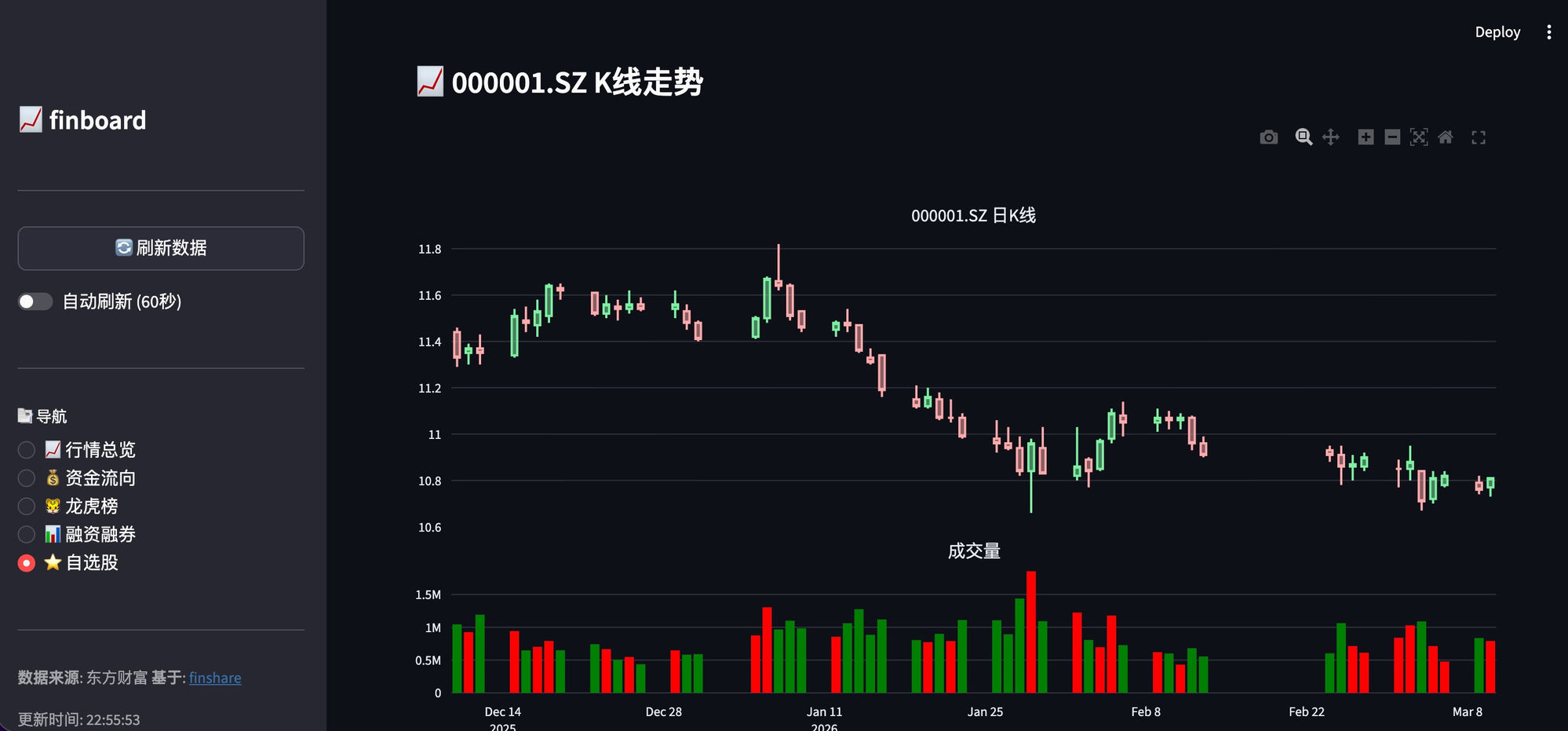
📦 项目地址: finboard
2. 选股器
# 条件选股器
import finshare as fs
import pandas as pd

# 获取全部股票列表
stocks = fs.get_stock_list()

# 筛选条件
# 1. 涨幅 > 5%
# 2. 成交额 > 1亿
# 3. 换手率 > 10%

filtered = stocks[
    (stocks['change_pct'] > 5) &
    (stocks['amount'] > 1e8) &
    (stocks.get('turnover_rate', 0) > 10)
]

print(f"符合条件的股票: {len(filtered)} 只")
print(filtered[['code', 'name', 'change_pct']])
3. 价格提醒机器人
# 微信/钉钉价格提醒
import finshare as fs
import requests
import time

# 监控股票
WATCH_LIST = ['000001.SZ', '600519.SH']
PRICE_ALERTS = {
    '600519.SH': {'high': 2000, 'low': 1800},  # 茅台
}

def send_alert(code, price, alert_type):
    """发送钉钉消息"""
    webhook = "YOUR_DINGTALK_WEBHOOK"
    msg = {
        "msgtype": "text",
        "text": {
            "content": f"🚨 {code} 价格{alert_type}提醒!当前价格: {price}"
        }
    }
    requests.post(webhook, json=msg)

# 持续监控
while True:
    snapshots = fs.get_batch_snapshots(WATCH_LIST)
    for code, snap in snapshots.items():
        if code in PRICE_ALERTS:
            alerts = PRICE_ALERTS[code]
            if snap.last_price >= alerts.get('high'):
                send_alert(code, snap.last_price, "突破")
            elif snap.last_price <= alerts.get('low'):
                send_alert(code, snap.last_price, "跌破")
    time.sleep(60)  # 每分钟检查一次
4. 数据导出工具
# 导出历史数据到 Excel
import finshare as fs

codes = ['000001.SZ', '600519.SH', '601318.SH']

with pd.ExcelWriter('stock_data.xlsx') as writer:
    for code in codes:
        df = fs.get_historical_data(code, start='2020-01-01')
        df.to_excel(writer, sheet_name=code, index=False)

print("数据已导出到 stock_data.xlsx")
5. 实时行情 API
# Flask API 服务
from flask import Flask, jsonify
import finshare as fs

app = Flask(__name__)

@app.route('/quote/<code>')
def get_quote(code):
    snapshot = fs.get_snapshot_data(code)
    return jsonify({
        'code': snapshot.code,
        'price': snapshot.last_price,
        'change_pct': snapshot.change_pct,
        'volume': snapshot.volume
    })

@app.route('/kline/<code>')
def get_kline(code):
    df = fs.get_historical_data(code, start='2024-01-01')
    return jsonify(df.to_dict(orient='records'))

if __name__ == '__main__':
    app.run(host='0.0.0.0', port=5000)
6. 更多创意
| 工具 | 描述 |
|---|---|
| 📊 量化回测 | 使用历史数据进行策略回测 |
| 📈 自动交易 | 条件触发自动买卖 |
| 🔔 新闻监控 | 监控个股相关新闻 |
| 📱 小程序 | 微信/支付宝小程序展示行情 |
| 📊 Excel插件 | Excel 实时看盘 |
📖 更多示例
查看 examples 目录获取更多示例代码。
🌟 相关项目
| 项目 | 描述 |
|---|---|
| finboard | 实时行情看板 |
| finscreener | 智能选股器 |
| finquant | 量化回测框架 |
| finshare-skills | OpenClaw AI 助手技能 |
| meepoquant | 免费量化回测平台 |
🙏 致谢
参照的开源项目
本项目在设计思路和 API 风格上参考了以下优秀的开源项目:
| 项目 | 描述 |
|---|---|
| akshare | 专业的金融数据开源库,为本项目提供了重要参考 |
数据源网站
感谢以下数据源网站提供的免费 API 接口:
| 数据源 | 用途 |
|---|---|
| 东方财富 | A股行情、财务数据、龙虎榜、融资融券 |
| 腾讯财经 | 港股行情、实时报价 |
| 新浪财经 | 港股行情、实时报价 |
| 通达信 | 行情数据 |
| BaoStock | 证券数据 |
| 天天基金 | 基金净值数据 |
🤝 贡献
欢迎贡献代码!查看 贡献指南。
📄 许可证
MIT License - 详见 LICENSE
⭐ 如果这个项目对你有帮助,请给我们一个 Star!
🤖 由 米波量化 团队开发
1 maintainer

Release files for finshare 2.1.0
For a detailed explanation of source distributions (sdists) and built distributions (wheels), please see the package formats documentation.
Source distribution (sdist)
| File | Size | Uploaded | |
|---|---|---|---|
| finshare-2.1.0.tar.gz | 140.2 kB | Details |
Built distribution (wheel)
| File | Interpreter | ABI | Platform | Reset |
|---|---|---|---|---|
| finshare-2.1.0-py3-none-any.whl | Python 3 | none | any | Details |
Total release size: 304.8 kB














