
Financial Time Series Plotting Libarary

Project description
Fintime
Financial time series plotting libarary built on Matplotlib.
- Visual elements as standalone objects (Artists).
- Composite structures (Grid, Subplots, Panels) organise multiple plots within a figure.
- Branched propagation of data and configurations to sub-components, enabling overrides at any level.
- Dynamic sizing and spacing of components.
Table of content
Installation
pip install fintime
Examples
Data
Fintime expects data to be organized as a flat mapping, such as a dictionary, containing NumPy arrays. The example below demonstrates the generation of mock OHLCV data with intervals of 1, 10, 30, and 300 seconds. This data will be used in the following examples.
from fintime.mock.data import generate_random_trade_ticks
from fintime.mock.data import to_timebar

ticks = generate_random_trade_ticks(seed=1)
datas = {f"{span}s": to_timebar(ticks, span=span) for span in [1, 10, 30, 300]}

# inspect the data
for feat, array in datas["10s"].items():
    print(feat.ljust(6), repr(array[:2]))

# Expected output:
# --> dt     array(['2024-03-03T21:00:00.000'], dtype='datetime64[ms]')
# --> open   array([101.62])
# --> high   array([101.92])
# --> low    array([101.59])
# --> close  array([101.6])
# --> vol    array([2941])
Single plot
Let's proceed and plot candlesticks and volume bars with 10s span.
from matplotlib.pylab import plt
from fintime.plot import plot, Panel
from fintime.artists import CandleStick, Volume

fig = plot(
    specs=[Panel(artists=[CandleStick()]), Panel(artists=[Volume()])],
    data=datas['10s'],
    title="single plot",
)
plt.show()

Note: Panels act as the canvas for either one Axes or two twinx Axes. Visually stacked vertically, a list of panels shares the x-axis. An artist is an element that can be drawn within a panel.
Multi Plot
Displaying multiple plots within a single figure is achieved by passing a list of Subplots (rather than Panels) to the plot function. In the following example, we will plot time bars with spans of 1, 30, and 300 seconds and override some configurations.
from fieldconfig import Config
from fintime.plot import Subplot

cfg_dark = Config(create_intermediate_attributes=True)
cfg_dark.panel.facecolor = "#36454F"
cfg_dark.candlestick.body.relwidth = 0.9
cfg_dark.candlestick.wick.color = "lightgray"
cfg_dark.candlestick.wick.linewidth = 2.0

subplots = [
    Subplot(
        [
            Panel(artists=[CandleStick(data=datas["1s"])]),
            Panel(artists=[Volume(data=datas["1s"])]),
        ]
    ),
    Subplot(
        [
            Panel(artists=[CandleStick(config={"candlestick.body.up_color": "black"})]),
            Panel(artists=[Volume()]),
        ],
        data=datas["30s"],
    ),
    Subplot(
        [
            Panel(artists=[CandleStick()]),
            Panel(artists=[Volume()]),
        ],
        data=datas["300s"],
        config=cfg_dark,
    ),
]

fig = plot(subplots, title="multi plot")
plt.show()

Standalone use of artists
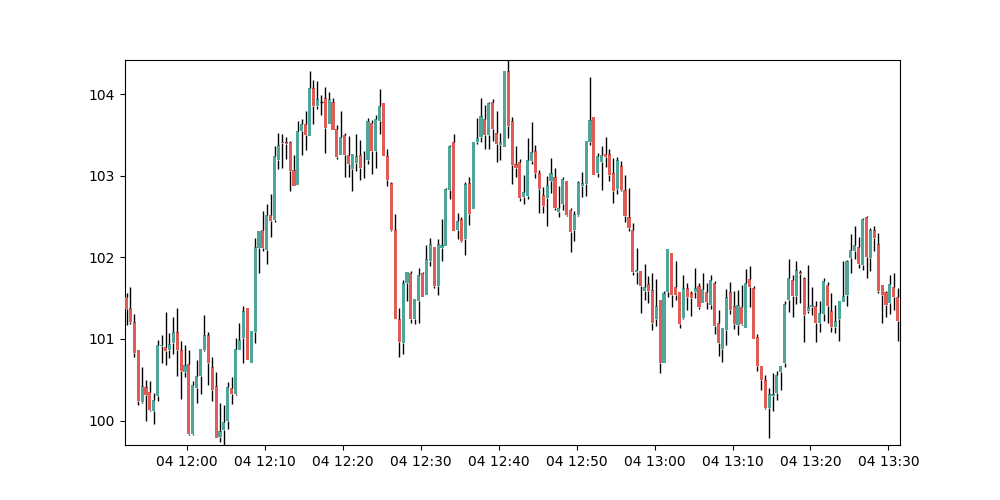
You also have the option to have Artists draw on your own Axes.
import matplotlib.pyplot as plt
from fintime.artists import CandleStick
from fintime.config import get_config

data = datas["30s"]
fig = plt.Figure(figsize=(10, 5))
axes = fig.subplots()
axes.set_xlim(min(data["dt"]), max(data["dt"]))
axes.set_ylim(min(data["low"]), max(data["high"]))

cs_artist = CandleStick(data=data, config=get_config())
cs_artist.draw(axes)
plt.show()
Configuration
Fintime provides granular control over configurations through its 'config' argument, available in the plot function, subplot, panel, and artists classes. These configurations are propagated downward to sub-components, including updates along each branch.
Fintime uses FieldConfig for configurations, and, as demonstrated in the Multi Plot example it supports updates by passing a new Config object or a dictionary, whether flat or nested.
The available configuration options can be displayed using:
from fintime.config import get_config

cfg = get_config()
for k, v in cfg.to_flat_dict().items():
    print(k.ljust(30), v)

# Expected output:
# --> figure.layout                  tight
# --> figure.facecolor               #f9f9f9
# --> figure.title.fontsize          22
# --> figure.title.fontweight        bold
# --> figure.title.y                 0.98
# --> panel.facecolor                white
# --> xaxis.tick.nudge               0
# --> candlestick.panel.height       9.0
# --> candlestick.panel.width        None
# --> ...
Upcoming features
- Axes labels and legend
- Custom y-tick formatting
- More artists:
- lines
- diverging bars
- trade annotations with collision control
- trading session shading
- and more


Download files
Download the file for your platform. If you're not sure which to choose, learn more about installing packages.
Source Distribution
Built Distribution
Filter files by name, interpreter, ABI, and platform.
If you're not sure about the file name format, learn more about wheel file names.
Copy a direct link to the current filters
File details
Details for the file fintime-0.1.1.tar.gz.
File metadata
- Download URL: fintime-0.1.1.tar.gz
- Upload date:
- Size: 31.4 kB
- Tags: Source
- Uploaded using Trusted Publishing? No
- Uploaded via: poetry/1.8.2 CPython/3.12.2 Linux/6.5.0-21-generic
File hashes
| Algorithm | Hash digest | |
|---|---|---|
| SHA256 |
a9a246f44ed75357be67f30385ac18f07a5f0a5e8b55314cc588fbd1e7009159
|
|
| MD5 |
c4c828b9157c907ab04bb4b1836a8562
|
|
| BLAKE2b-256 |
61a2cf915970f8ca2b4cda3834a11b99081430c876591c964e88e07b6326e81c
|
File details
Details for the file fintime-0.1.1-py3-none-any.whl.
File metadata
- Download URL: fintime-0.1.1-py3-none-any.whl
- Upload date:
- Size: 14.0 kB
- Tags: Python 3
- Uploaded using Trusted Publishing? No
- Uploaded via: poetry/1.8.2 CPython/3.12.2 Linux/6.5.0-21-generic
File hashes
| Algorithm | Hash digest | |
|---|---|---|
| SHA256 |
b441a3aaa9094785f383b8092d419526d18fd67e500fa7c64ae859660b7df23e
|
|
| MD5 |
5c0eadf7edd10491fbed844a62576f57
|
|
| BLAKE2b-256 |
a2d3802d46e822fa5464aa907a5a78f6dda03c4655c093676b863dd09b015590
|






