
Fitbit CLI



This is not an official Fitbit CLI
Archived: The legacy Fitbit Web API and OAuth 2.0 endpoints were decommissioned on October 30, 2026, so this tool no longer works. This repository is archived and no further releases will be made.
Alternative: Google Health CLI (
ghealth) — a CLI for the Google Health API, covering sleep, heart rate, SpO2, HRV, activity and more.
Access your Fitbit data directly from your terminal 💻. View 💤 sleep logs, ❤️ heart rate, 🏋️♂️ activity levels, 🩸 SpO2, and more, all presented in a simple, easy-to-read table format!
AI agent-friendly 🤖 — since v1.6.0, use
--jsonfor minimized, token-efficient JSON output or--raw-jsonfor the full Fitbit API response. No spinners, pure JSON.

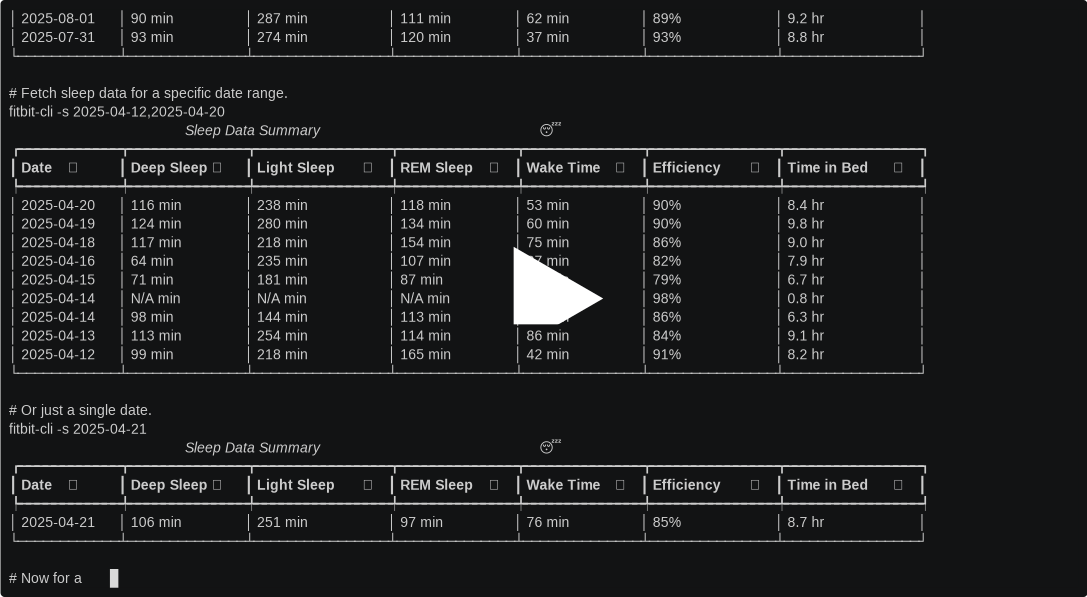
Supported Web APIs
Only
GETAPIs are supported!
Usage Guide
- Install the Fitbit CLI
python -m pip install fitbit-cli
- See Help
fitbit-cli -h
usage: fitbit-cli [-h] [-i] [-j] [-r] [-s [DATE[,DATE]|RELATIVE]] [-o [DATE[,DATE]|RELATIVE]] [-e [DATE[,DATE]|RELATIVE]] [-a [DATE[,DATE]|RELATIVE]]
                  [-b [DATE[,DATE]|RELATIVE]] [-H [DATE[,DATE]|RELATIVE]] [-B [DATE[,DATE]|RELATIVE]]
                  [-t [DATE[,DATE]|RELATIVE]] [-u] [-d] [-v]

Fitbit CLI -- Access your Fitbit data at your terminal.

options:
  -h, --help            show this help message and exit
  -i, --init-auth       Initialize Fitbit iterative authentication setup
  -j, --json            Output table data as JSON.
  -r, --raw-json        Output raw JSON from the Fitbit API.
  -v, --version         Show fitbit-cli version

APIs:
  Specify a date, date range (YYYY-MM-DD[,YYYY-MM-DD]), or relative date.
  Relative dates: yesterday, last-week, last-month, last-N-days/weeks/months (e.g., last-2-days).
  If not provided, defaults to today's date.

  -s, --sleep [DATE[,DATE]|RELATIVE]
                        Show Sleep Log by Date Range.
  -o, --spo2 [DATE[,DATE]|RELATIVE]
                        Show SpO2 Summary by Interval.
  -e, --heart [DATE[,DATE]|RELATIVE]
                        Show Heart Rate Time Series by Date Range.
  -a, --active-zone [DATE[,DATE]|RELATIVE]
                        Show AZM Time Series by Interval.
  -b, --breathing-rate [DATE[,DATE]|RELATIVE]
                        Show Breathing Rate Summary by Interval.
  -H, --hrv [DATE[,DATE]|RELATIVE]
                        Show HRV Summary by Interval.
  -B, --body [DATE[,DATE]|RELATIVE]
                        Show Body Time Series for Weight, BMI, and Body Fat.
  -t, --activities [DATE[,DATE]|RELATIVE]
                        Show Daily Activity Summary.
  -u, --user-profile    Show Profile.
  -d, --devices         Show Devices.
-
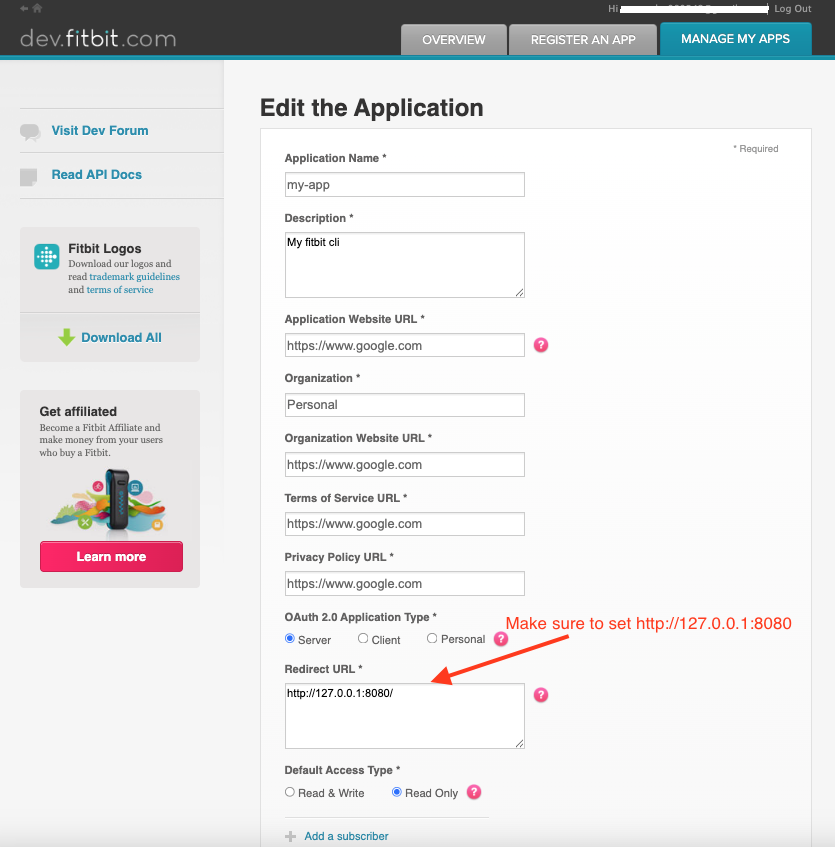
Register Fitbit App
- Go to https://dev.fitbit.com/apps
- Click on "REGISTER AN APP" tab
- Follow below example and register an app
-
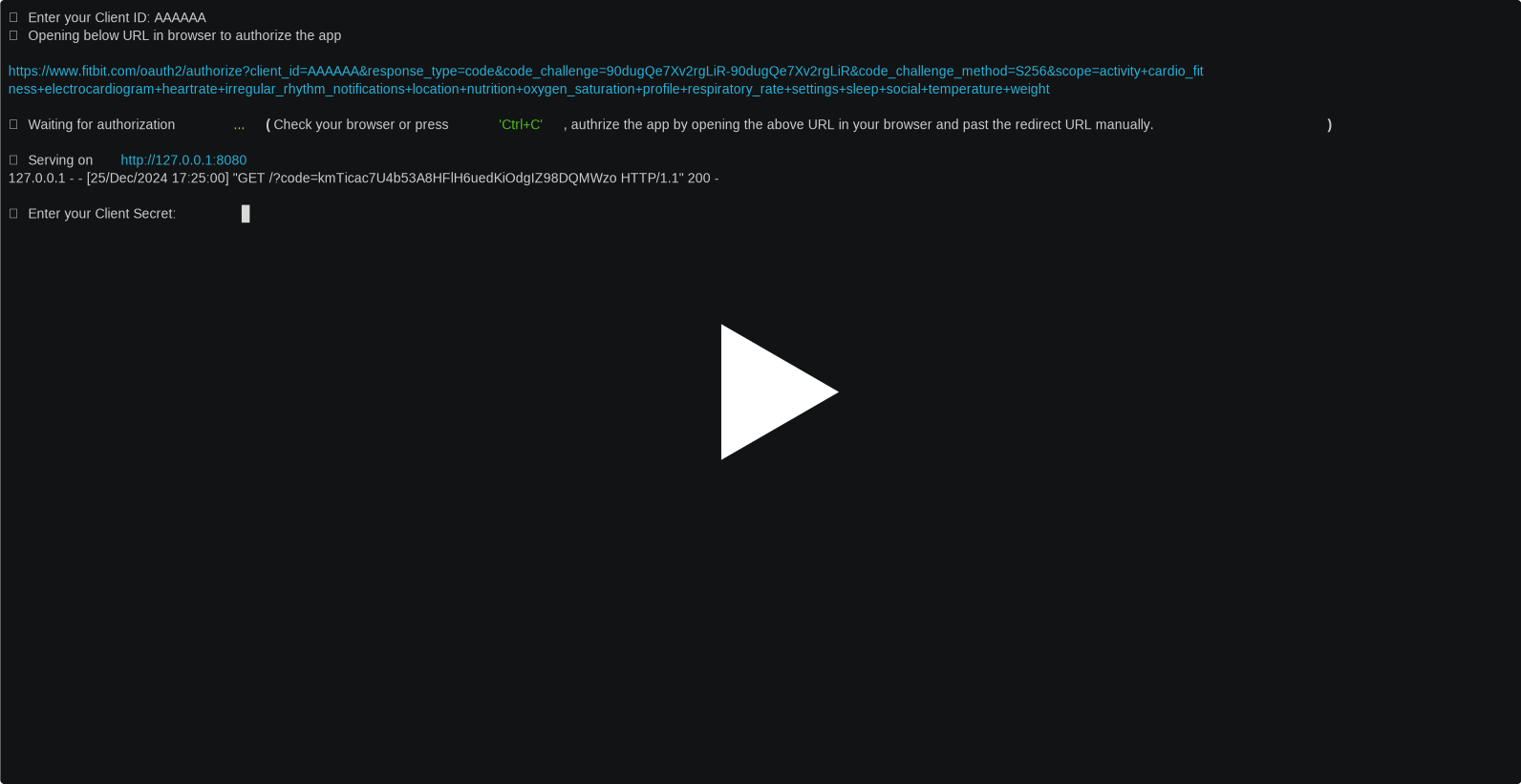
Run the following command to set up interactive authentication and store the Fitbit token locally
fitbit-cli --init-auth
-
Start using it 😎
fitbit-cli -s
                                            Sleep Data Summary 😴
┏━━━━━━━━━━━━┳━━━━━━━━━━━━━━┳━━━━━━━━━━━━━━━━┳━━━━━━━━━━━━━━┳━━━━━━━━━━━━━━┳━━━━━━━━━━━━━━━┳━━━━━━━━━━━━━━━━┓
┃ Date 📆    ┃ Deep Sleep 🛏 ┃ Light Sleep 💤 ┃ REM Sleep 🌙 ┃ Wake Time ⏰ ┃ Efficiency 💯 ┃ Time in Bed 🕐 ┃
┡━━━━━━━━━━━━╇━━━━━━━━━━━━━━╇━━━━━━━━━━━━━━━━╇━━━━━━━━━━━━━━╇━━━━━━━━━━━━━━╇━━━━━━━━━━━━━━━╇━━━━━━━━━━━━━━━━┩
│ 2025-05-03 │ 129 min      │ 271 min        │ 140 min      │ 66 min       │ 57%           │ 10.1 hr        │
└────────────┴──────────────┴────────────────┴──────────────┴──────────────┴───────────────┴────────────────┘
NOTE: The token is valid for only 8 hours, fitbit-cli automatically refreshes the token when it expires.
Local Development
git clone git@github.com:veerendra2/fitbit-cli.git
cd fitbit-cli

python -m venv venv
source venv/bin/activate
python -m pip install -e .

deactivate
1 maintainer

Metadata
1 maintainer
Release files for fitbit-cli 1.9.1
For a detailed explanation of source distributions (sdists) and built distributions (wheels), please see the package formats documentation.
Source distribution (sdist)
| File | Size | Uploaded | Provenance | Actions |
|---|---|---|---|---|
| fitbit_cli-1.9.1.tar.gz | 21.1 kB | Without provenance | Details for fitbit_cli-1.9.1.tar.gz |
Release files / fitbit_cli-1.9.1.tar.gz
| Download URL | fitbit_cli-1.9.1.tar.gz |
|---|---|
| Size | 21.1 kB |
| Tags | Source |
|
SHA-256 checksum How to use checksums |
1752b338740eed610178d69388c83f5b240eff92119eb6aaa9c8b5c0ec6513e5
|
|
BLAKE2b-256 checksum How to use checksums |
0c7c388c09921623fa6b0f5b87be50a437fdbd44ac74094e277f4a0bcaab4626
|
| Upload date | |
|
Uploaded using Trusted Publishing? What is trusted publishing? |
No |
| Uploaded via |
twine/7.0.0 CPython/3.14.10
|
Security for fitbit-cli 1.9.1
Provenance
Provenance describes where a file came from. On PyPI, provenance is shared via attestations, which provide a verifiable record of the build or publishing details. View details, limitations and caveats.
No provenance found
None of the files in this release were uploaded with provenance metadata.
A note on package security
PyPI is a repository for distributing packages, not a service for auditing them. While third-party security researchers and our staff do their best to detect and remove malicious packages, PyPI cannot guarantee the quality, security or suitability of any given package.
To learn more about protecting yourself from malicious actors, visit our package security documentation.














