
Extremely fast bert tokenizer

Project description
The world's fastest CPU tokenizer library!
EFFICIENT AND OPTIMIZED TOKENIZER ENGINE FOR LLM INFERENCE SERVING
FlashTokenizer is a high-performance tokenizer implementation in C++ of the BertTokenizer used for LLM inference. It has the highest speed and accuracy of any tokenizer, such as FlashAttention and FlashInfer, and is 10 times faster than BertTokenizerFast in transformers.
[!NOTE]
Why?
We need a tokenizer that is faster, more accurate, and easier to use than Huggingface's BertTokenizerFast. (link1, link2, link3)
PaddleNLP's BertTokenizerFast achieves a 1.2x performance improvement by implementing Huggingface's Rust version in
C++. However, using it requires installing both the massive PaddlePaddle and PaddleNLP packages.Tensorflow-text's FastBertTokenizer actually demonstrates slower performance in comparison.
Microsoft's Blingfire takes over 8 hours to train on custom data and shows relatively lower accuracy.
Rapid's cuDF provides a GPU-based BertTokenizer, but it suffers from accuracy issues.
Unfortunately, FastBertTokenizer and BertTokenizers developed in
C#and cannot be used inPython. (As a side note, I don't know C#, but I believe once something is implemented in C#, it shouldn't have "Fast" in its name.)This is why we developed
FlashTokenizer. It can be easily installed viapipand is developed in C++ for straightforward maintenance. Plus, it guarantees extremely fast speeds. We've created an implementation that's faster than Blingfire and easier to use. FlashTokenizer is implemented using the LinMax Tokenizer proposed in Fast WordPiece Tokenization, enabling tokenization in linear time. Finally It supports parallel processing at the C++ level for batch encoding, delivering outstanding speed.
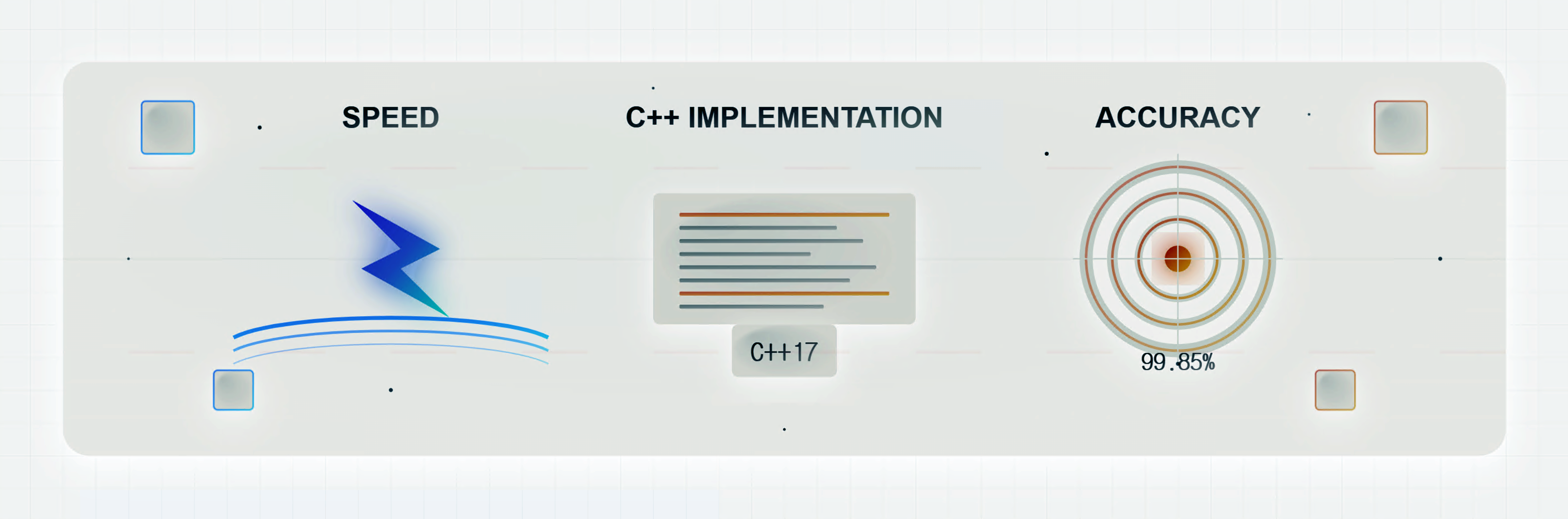



FlashTokenizer includes the following core features
[!TIP]
Implemented in C++17.
- MacOS:
g++(14.2.0)orclang++(16.0.0).- Windows:
g++(8.1.0)-MinGW64or,Visual Studio 2019.- Ubuntu:
g++(11.4.0)orclang++(14.0.0).Equally fast in Python via pybind11.
Support for parallel processing at the C++ level using OPENMP.
News
[!IMPORTANT]
[Mar 22 2025]
- Added DFA to AC Trie.
[Mar 21 2025]
- Improving Tokenizer Accuracy
[Mar 19 2025]
- Memory reduction and slight performance improvement by applying LinMaxMatching from Aho–Corasick algorithm.
- Improved branch pipelining of all functions and force-inline applied.
- Removed unnecessary operations of
WordpieceTokenizer(Backward).- Optimizing all functions to operate except for Bloom filter is faster than caching.
punctuation,control, andwhitespaceare defined as constexprs in advance and used as Bloom filters.- Reduce unnecessary memory allocation with statistical memory profiling.
- In ✨FlashTokenizer✨,
bert-base-uncasedcan process 35K texts per second on a single core, with an approximate processing time of 28ns per text.[Mar 18 2025]
- Improvements to the accuracy of the BasicTokenizer have improved the overall accuracy and, in particular, produce more accurate results for Unicode input.
[Mar 14 2025]
- The performance of the
WordPieceTokenizerandWordPieceBackwordTokenizerhas been improved using Trie, which was introduced in Fast WordPiece Tokenization.- Using
FastPoolAllocatorinstd::listimproves performance in SingleEncoding, but it is not thread-safe, sostd::list<std::string>is used as is in BatchEncoding. In BatchEncoding,OPENMPis completely removed and onlystd::threadis used.[Mar 10 2025]
- Performance improvements through faster token mapping with robin_hood and memory copy minimization with std::list.
Token Ids Map Table Performance Test.
Token and Ids Map used the fastest
robin_hood::unordered_flat_map<std::string, int>.[Mar 09 2025] Completed development of flash-tokenizer for BertTokenizer.
1. Installation
Requirements
Windows(AMD64),MacOS(ARM64),Ubuntu(x86-64).g++/clang++/MSVC.- python 3.9 ~ 3.12.
Install from PIP
# Windows(Visual Studio)
pip install -U flash-tokenizer
# Ubuntu
sudo apt install gcc g++ make cmake -y
pip install setuptools wheel build pybind11
CC=gcc CXX=g++ pip install -U flash-tokenizer
# MacOS
brew install gcc
CC=gcc CXX=g++ pip install -U flash-tokenizer
Install from Source
git clone https://github.com/NLPOptimize/flash-tokenizer
cd flash-tokenizer
pip install .
2. Sample
from flash_tokenizer import BertTokenizerFlash
from transformers import BertTokenizer

titles = [
    'is there any doubt about it "None whatsoever"',
    "세상 어떤 짐승이 이를 드러내고 사냥을 해? 약한 짐승이나 몸을 부풀리지, 진짜 짐승은 누구보다 침착하지.",
    'そのように二番目に死を偽装して生き残るようになったイタドリがどうして初めて見る自分をこんなに気遣ってくれるのかと尋ねると「私が大切にする人たちがあなたを大切にするから」と答えては'
]

vocab_file = "sample/vocab.txt"

tokenizer1 = BertTokenizerFlash(vocab_file, do_lower_case=False)
tokenizer2 = BertTokenizer(vocab_file, do_lower_case=False)

for title in titles:
    print(title)
    print(tokenizer1.tokenize(title))
    print(tokenizer2.tokenize(title))
    ids1 = tokenizer1(title, max_length=512, padding="longest").input_ids[0]
    ids2 = tokenizer2(title, max_length=512, padding="longest").input_ids
    print(ids1)
    print(ids2)
is there any doubt about it "None whatsoever"
['is', 'there', 'any', 'doubt', 'about', 'it', '"', 'None', 'what', '##so', '##ever', '"']
['is', 'there', 'any', 'doubt', 'about', 'it', '"', 'None', 'what', '##so', '##ever', '"']
[101, 10124, 11155, 11178, 86697, 10978, 10271, 107, 86481, 12976, 11669, 23433, 107, 102]
[101, 10124, 11155, 11178, 86697, 10978, 10271, 107, 86481, 12976, 11669, 23433, 107, 102]

세상 어떤 짐승이 이를 드러내고 사냥을 해? 약한 짐승이나 몸을 부풀리지, 진짜 짐승은 누구보다 침착하지.
['세', '##상', '어떤', '짐', '##승', '##이', '이를', '드', '##러', '##내', '##고', '사', '##냥', '##을', '해', '?', '약', '##한', '짐', '##승', '##이나', '몸', '##을', '부', '##풀', '##리', '##지', ',', '진', '##짜', '짐', '##승', '##은', '누', '##구', '##보다', '침', '##착', '##하지', '.']
['세', '##상', '어떤', '짐', '##승', '##이', '이를', '드', '##러', '##내', '##고', '사', '##냥', '##을', '해', '?', '약', '##한', '짐', '##승', '##이나', '몸', '##을', '부', '##풀', '##리', '##지', ',', '진', '##짜', '짐', '##승', '##은', '누', '##구', '##보다', '침', '##착', '##하지', '.']
[101, 9435, 14871, 55910, 9710, 48210, 10739, 35756, 9113, 30873, 31605, 11664, 9405, 118729, 10622, 9960, 136, 9539, 11102, 9710, 48210, 43739, 9288, 10622, 9365, 119407, 12692, 12508, 117, 9708, 119235, 9710, 48210, 10892, 9032, 17196, 80001, 9783, 119248, 23665, 119, 102]
[101, 9435, 14871, 55910, 9710, 48210, 10739, 35756, 9113, 30873, 31605, 11664, 9405, 118729, 10622, 9960, 136, 9539, 11102, 9710, 48210, 43739, 9288, 10622, 9365, 119407, 12692, 12508, 117, 9708, 119235, 9710, 48210, 10892, 9032, 17196, 80001, 9783, 119248, 23665, 119, 102]

そのように二番目に死を偽装して生き残るようになったイタドリがどうして初めて見る自分をこんなに気遣ってくれるのかと尋ねると「私が大切にする人たちがあなたを大切にするから」と答えては
['その', '##ように', '二', '番', '目', 'に', '死', 'を', '偽', '装', 'して', '生', 'き', '残', 'る', '##ようになった', '##イ', '##タ', '##ド', '##リ', '##が', '##ど', '##う', '##して', '初', 'めて', '見', 'る', '自', '分', 'を', '##こ', '##んな', '##に', '気', '遣', 'って', '##く', '##れる', '##のか', '##と', '尋', 'ね', '##ると', '「', '私', 'が', '大', '切', 'にする', '人', 'たちが', '##あ', '##な', '##た', '##を', '大', '切', 'にする', '##から', '」', 'と', '答', 'えて', '##は']
['その', '##ように', '二', '番', '目', 'に', '死', 'を', '偽', '装', 'して', '生', 'き', '残', 'る', '##ようになった', '##イ', '##タ', '##ド', '##リ', '##が', '##ど', '##う', '##して', '初', 'めて', '見', 'る', '自', '分', 'を', '##こ', '##んな', '##に', '気', '遣', 'って', '##く', '##れる', '##のか', '##と', '尋', 'ね', '##ると', '「', '私', 'が', '大', '切', 'にする', '人', 'たちが', '##あ', '##な', '##た', '##を', '大', '切', 'にする', '##から', '」', 'と', '答', 'えて', '##は']
[101, 11332, 24273, 2150, 5632, 5755, 1943, 4805, 1980, 2371, 7104, 11592, 5600, 1913, 4814, 1975, 27969, 15970, 21462, 15713, 21612, 10898, 56910, 22526, 22267, 2547, 19945, 7143, 1975, 6621, 2534, 1980, 28442, 60907, 11312, 4854, 7770, 14813, 18825, 58174, 75191, 11662, 3456, 1945, 100812, 1890, 5949, 1912, 3197, 2535, 84543, 2179, 78776, 111787, 22946, 20058, 11377, 3197, 2535, 84543, 16867, 1891, 1940, 6076, 27144, 11588, 102]
[101, 11332, 24273, 2150, 5632, 5755, 1943, 4805, 1980, 2371, 7104, 11592, 5600, 1913, 4814, 1975, 27969, 15970, 21462, 15713, 21612, 10898, 56910, 22526, 22267, 2547, 19945, 7143, 1975, 6621, 2534, 1980, 28442, 60907, 11312, 4854, 7770, 14813, 18825, 58174, 75191, 11662, 3456, 1945, 100812, 1890, 5949, 1912, 3197, 2535, 84543, 2179, 78776, 111787, 22946, 20058, 11377, 3197, 2535, 84543, 16867, 1891, 1940, 6076, 27144, 11588, 102]
3. Other Implementations





Most BERT-based models use the WordPiece Tokenizer, whose code can be found here. (A simple implementation of Huggingface can be found here).
Since the BertTokenizer is a CPU intensive algorithm, inference can be a bottleneck, and unoptimized tokenizers can be severely slow. A good example is the BidirectionalWordpieceTokenizer introduced in KR-BERT. Most of the code is the same, but the algorithm traverses the sub token backwards and writes a larger value compared to the forward traversal. The paper claims accuracy improvements, but it's hard to find other quantitative metrics, and the accuracy improvements aren't significant, and the tokenizer is seriously slowed down.
- transformers (Rust Impl, PyO3)
- paddlenlp (C++ Impl, pybind)
- tensorflow-text (C++ Impl, pybind)
- blingfire (C++ Impl, Native binary call)
Most developers will either use transformers.BertTokenizer or transformers.AutoTokenizer, but using AutoTokenizer will return transformers.BertTokenizerFast.
Naturally, it's faster than BertTokenizer, but the results aren't exactly the same, which means you're already giving up 100% accuracy starting with the tokenizer.
BertTokenizer is not only provided by transformers. PaddleNLP and tensorflow-text also provide BertTokenizer.
Then there's Blingfire, which is developed by Microsoft and is being abandoned.
PaddleNLP requires PaddlePaddle and provides tokenizer functionality starting with version 3.0rc. You can install it as follows
##### Install PaddlePaddle, PaddleNLP
python -m pip install paddlepaddle==3.0.0b1 -i https://www.paddlepaddle.org.cn/packages/stable/cpu/
pip install --upgrade paddlenlp==3.0.0b3
##### Install transformers
pip install transformers==4.47.1
##### Install tf-text
pip install tensorflow-text==2.18.1
##### Install blingfire
pip install blingfire
With the exception of blingfire, vocab.txt is all you need to run the tokenizer right away. (blingfire also requires only vocab.txt and can be used after 8 hours of learning).
The implementations we'll look at in detail are PaddleNLP's BertTokenizerFast and blingfire.
blingfire: Uses a Deterministic Finite State Machine (DFSM) to eliminate one linear scan and unnecessary comparisons, resulting in a time of O(n), which is impressive.- Advantages: 5-10x faster than other implementations.
- Disadvantages: Long training time (8 hours) and lower accuracy than other implementations. (+Difficult to get help due to de facto development hiatus).
PaddleNLP: As shown in the experiments below, PaddleNLP is always faster than BertTokenizerFast (HF) to the same number of decimal places, and is always faster on any OS, whether X86 or Arm.- Advantages: Internal implementation is in C++ Compared to
transformers.BertTokenizerFastimplemented in Rust, it is 1.2x faster while outputting exactly the same values.- You can't specify
pt(pytorch tensor)inreturn_tensors, but this is not a problem.
- You can't specify
- Disadvantages: none, other than the need to install PaddlePaddle and PaddleNLP.
- Advantages: Internal implementation is in C++ Compared to
4. Performance test
4.1 Performance test (Single text encoding)
Accuracy is the result of measuring google's BertTokenizerFast as a baseline. If even one of the input_ids is incorrect, the answer is considered incorrect.


Tokenizer Performance Comparison
google-bert/bert-base-cased
| Tokenizer | Elapsed Time | texts | Accuracy |
|---|---|---|---|
| BertTokenizerFast(Huggingface) | 84.3700s | 1,000,000 | 99.9226% |
| BertTokenizerFast(PaddleNLP) | 75.6551s | 1,000,000 | 99.9226% |
| FastBertTokenizer(Tensorflow) | 219.1259s | 1,000,000 | 99.9160% |
| Blingfire | 13.6183s | 1,000,000 | 99.8991% |
| FlashBertTokenizer | 8.1968s | 1,000,000 | 99.8216% |
google-bert/bert-base-uncased
| Tokenizer | Elapsed Time | texts | Accuracy |
|---|---|---|---|
| BertTokenizerFast(Huggingface) | 91.7882s | 1,000,000 | 99.9326% |
| BertTokenizerFast(PaddleNLP) | 83.6839s | 1,000,000 | 99.9326% |
| FastBertTokenizer(Tensorflow) | 204.2240s | 1,000,000 | 99.1379% |
| Blingfire | 13.2374s | 1,000,000 | 99.8588% |
| FlashBertTokenizer | 7.6313s | 1,000,000 | 99.6884% |
google-bert/bert-base-multilingual-cased
| Tokenizer | Elapsed Time | texts | Accuracy |
|---|---|---|---|
| BertTokenizerFast(Huggingface) | 212.1570s | 2,000,000 | 99.7964% |
| BertTokenizerFast(PaddleNLP) | 193.9921s | 2,000,000 | 99.7964% |
| FastBertTokenizer(Tensorflow) | 394.1574s | 2,000,000 | 99.7892% |
| Blingfire | 38.9013s | 2,000,000 | 99.9780% |
| FlashBertTokenizer | 20.4570s | 2,000,000 | 99.8970% |
beomi/kcbert-base
| Tokenizer | Elapsed Time | texts | Accuracy |
|---|---|---|---|
| BertTokenizerFast(Huggingface) | 52.5744s | 1,000,000 | 99.6754% |
| BertTokenizerFast(PaddleNLP) | 44.8943s | 1,000,000 | 99.6754% |
| FastBertTokenizer(Tensorflow) | 198.0270s | 1,000,000 | 99.6639% |
| Blingfire | 13.0701s | 1,000,000 | 99.9434% |
| FlashBertTokenizer | 5.2601s | 1,000,000 | 99.9484% |
microsoft/llmlingua-2-bert-base-multilingual-cased-meetingbank
| Tokenizer | Elapsed Time | texts | Accuracy |
|---|---|---|---|
| BertTokenizerFast(Huggingface) | 208.8858s | 2,000,000 | 99.7964% |
| BertTokenizerFast(PaddleNLP) | 192.6593s | 2,000,000 | 99.7964% |
| FastBertTokenizer(Tensorflow) | 413.2010s | 2,000,000 | 99.7892% |
| Blingfire | 39.3765s | 2,000,000 | 99.9780% |
| FlashBertTokenizer | 22.8820s | 2,000,000 | 99.8970% |
KR-BERT
| Tokenizer | Elapsed Time | texts | Accuracy |
|---|---|---|---|
| BertTokenizerBidirectional(KR-BERT Original) | 128.3320s | 1,000,000 | 100.0000% |
| FlashBertTokenizer(Bidirectional) | 10.4492s | 1,000,000 | 99.9631% |
%%{ init: { "er" : { "layoutDirection" : "LR" } } }%%
erDiagram
    Text ||--o{ Preprocess : tokenize
    Preprocess o{--|| Inference : memcpy_h2d
    Inference o{--|| Postprocess : memcpy_d2h
6. Compatibility
FlashBertTokenizer can be used with any framework. CUDA version compatibility for each framework is also important for fast inference of LLMs.
- PyTorch no longer supports installation using conda.
- ONNXRUNTIME is separated by CUDA version.
- PyTorch is also looking to ditch CUDA 12.x in favor of the newer CUDA 12.8. However, the trend is to keep CUDA 11.8 in all frameworks.
- CUDA 12.x was made for the newest GPUs, Hopper and Blackwell, and on GPUs like Volta, CUDA 11.8 is faster than CUDA 12.x.
| DL Framework | Version | OS | CPU | CUDA 11.8 | CUDA 12.3 | CUDA 12.4 | CUDA 12.6 | CUDA 12.8 |
|---|---|---|---|---|---|---|---|---|
| PyTorch | 2.6 | Linux, Windows | ⚪ | ⚪ | ❌ | ⚪ | ⚪ | ❌ |
| PyTorch | 2.7 | Linux, Windows | ⚪ | ⚪ | ❌ | ❌ | ⚪ | ⚪ |
| ONNXRUNTIME(11) | 1.20.x | Linux, Windows | ⚪ | ⚪ | ❌ | ❌ | ❌ | ❌ |
| ONNXRUNTIME(12) | 1.20.x | Linux, Windows | ⚪ | ❌ | ⚪ | ⚪ | ⚪ | ⚪ |
| PaddlePaddle | 3.0-beta | Linux, Windows | ⚪ | ⚪ | ❌ | ❌ | ❌ | ❌ |
7. GPU Tokenizer
Here is an example of installing and running cuDF in Run State of the Art NLP Workloads at Scale with RAPIDS, HuggingFace, and Dask. (It's incredibly fast)
You can run WordPiece Tokenizer on GPUs on rapids(cudf).
As you can see in how to install rapids, it only supports Linux and the CUDA version is not the same as other frameworks, so docker is the best choice, which is faster than CPU for batch processing but slower than CPU for streaming processing.
There are good example codes and explanations in the[ blog](https://developer.nvidia.com/blog/run-state-of-the-art-nlp-workloads-at-scale-with-rapids-huggingface-and-dask/#:~:text=,and then used in subsequent). To use cuDF, you must first convert vocab.txt to hash_vocab as shown below. The problem is that the hash_vocab function cannot convert multilingual. Therefore, the WordpieceTokenizer of cuDF cannot be used if there are any characters other than English/Chinese in the vocab.
import cudf
from cudf.utils.hash_vocab_utils import hash_vocab
hash_vocab('bert-base-cased-vocab.txt', 'voc_hash.txt')
TODO
- BidirectionalWordPieceTokenizer
- BatchEncoder with Multithreading.
- Replace
std::listtoboost::intrusive::list. -
MaxMatch-Dropout: Subword Regularization for WordPiece Option. - Use stack memory for reduce memory allocation. (C-Style, alloca, _alloca)
-
Support for parallel processing option for single encode. -
circle.ai- Implement distribution of compiled wheel packages for installation.
- SIMD
-
CUDA Version.
Acknowledgement
FlashTokenizer is inspired by FlashAttention, FlashInfer, FastBertTokenizer and tokenizers-cpp projects.
Performance comparison
- https://fastberttokenizer.gjung.com/ (C# Impl)
- https://github.com/huggingface/tokenizers (Rust Impl)
- BPE
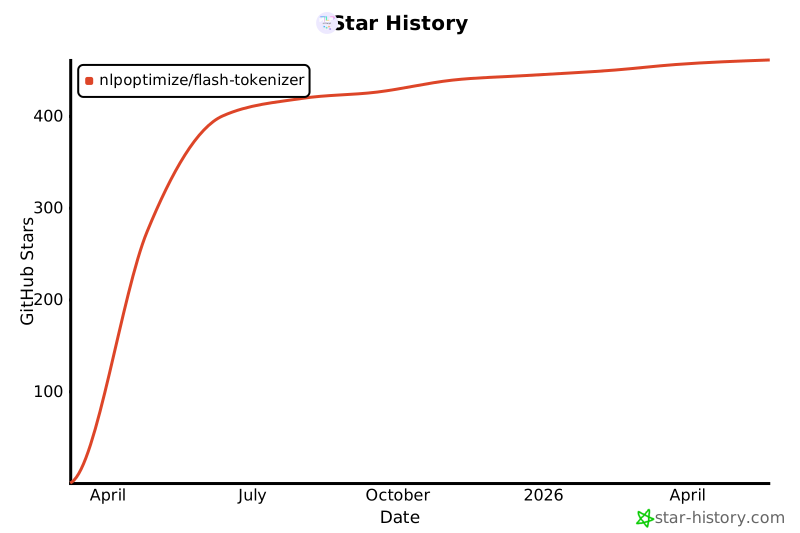
Star History
References
- https://medium.com/@techhara/which-bert-tokenizer-is-faster-b832aa978b46
- https://medium.com/@atharv6f_47401/wordpiece-tokenization-a-bpe-variant-73cc48865cbf
- https://www.restack.io/p/transformer-models-bert-answer-fast-berttokenizerfast-cat-ai
- https://medium.com/@anmolkohli/my-notes-on-bert-tokenizer-and-model-98dc22d0b64
- https://nocomplexity.com/documents/fossml/nlpframeworks.html
- https://github.com/martinus/robin-hood-hashing
Release history Release notifications | RSS feed


Download files
Download the file for your platform. If you're not sure which to choose, learn more about installing packages.
Source Distribution
Built Distribution
Filter files by name, interpreter, ABI, and platform.
If you're not sure about the file name format, learn more about wheel file names.
Copy a direct link to the current filters
File details
Details for the file flash_tokenizer-1.1.5.tar.gz.
File metadata
- Download URL: flash_tokenizer-1.1.5.tar.gz
- Upload date:
- Size: 6.6 MB
- Tags: Source
- Uploaded using Trusted Publishing? No
- Uploaded via: twine/6.1.0 CPython/3.12.2
File hashes
| Algorithm | Hash digest | |
|---|---|---|
| SHA256 |
7e99c2967b02e1f849be87a4264603fab8c3fe41cdddcec3acbd01e180f4ea07
|
|
| MD5 |
d03a339e5b111a4dc246cc7a36072bf2
|
|
| BLAKE2b-256 |
dc4c7ebf2fab856da4c7037841fdcb383f9c2763a3ad668376c410c91b0df5f1
|
File details
Details for the file flash_tokenizer-1.1.5-cp312-cp312-macosx_15_0_arm64.whl.
File metadata
- Download URL: flash_tokenizer-1.1.5-cp312-cp312-macosx_15_0_arm64.whl
- Upload date:
- Size: 200.3 kB
- Tags: CPython 3.12, macOS 15.0+ ARM64
- Uploaded using Trusted Publishing? No
- Uploaded via: twine/6.1.0 CPython/3.12.2
File hashes
| Algorithm | Hash digest | |
|---|---|---|
| SHA256 |
b35a6e777d5c5dc45a29a1657e16a117e026ddab62d83a798740a194c229a40c
|
|
| MD5 |
f65c5ac3745c4dd41dfcb5367f9521ab
|
|
| BLAKE2b-256 |
7e19737d2a639bc693851713dcfc5ab3aecd419a9cae0d7b9c178c330ab84c33
|






