
Python Flask logging handler to group messages on Google Cloud Platform

Project description
Flask extension that allows log lines emitted within a request handler to display/render together.
Normally, when using Google Cloud Logging libraries ( google-cloud-logging and CloudLoggingHander), each log entry that gets emitted is displayed separately within the Logging UI. However, its desireable to group all logs together that logically belong that way in an HTTP Request. For a given HTTP Request into FLask, this extension displays all the logs ‘together’ below the parent request.
For example, in the following snippet, all log lines will appear under one top-level HTTP Request within Google Cloud Logging:
@app.route('/')
def default():
  app.logger.setLevel(logging.INFO)
  app.logger.info("I met a traveller from an antique land,")
  app.logger.info("Who said: Two vast and trunkless legs of stone")
  app.logger.info("Stand in the desert... near them, on the sand,")
  app.logger.info("Half sunk, a shattered visage lies, whose frown,")
  app.logger.info("And wrinkled lip, and sneer of cold command,")
  app.logger.info("Tell that its sculptor well those passions read")
  app.logger.info("Which yet survive, stamped on these lifeless things,")
  app.logger.info("The hand that mocked them and the heart that fed;")

  app.logger.info("And on the pedestal these words appear:")
  app.logger.error("'My name is Ozymandias, king of kings;")
  app.logger.error("Look on my works, ye Mighty, and despair!'")
  app.logger.info("Nothing beside remains. Round the decay")
  app.logger.info("Of that colossal wreck, boundless and bare")
  app.logger.info("The lone and level sands stretch far away.")

  app.logger.info( { "author": {
                                 "firstName": "PERCY",
                                 "lastName": "SHELLEY"
                               },
                     "title": "Ozymandias"
                   } )
  return 'ok'
as in
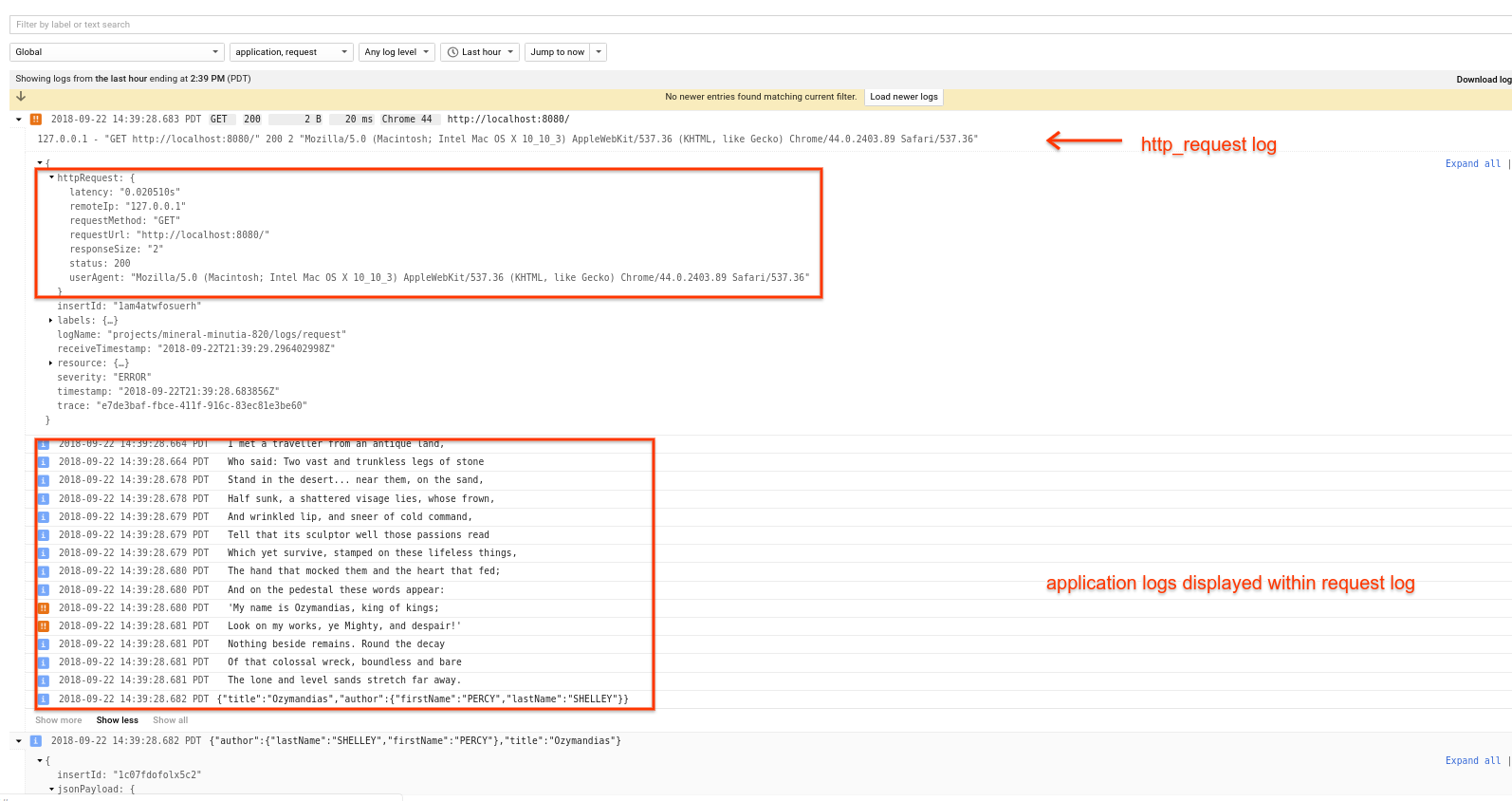
Note, that the application log entry does appear in the unfiltered logs still but users will ‘see’ all the log lines associated with the parent http_request.
What makes this possible is attaching the traceID field to each application log entry as well as emitting the parent http_request. Google cloud logging will use the traceID and “collapse” them together.
Usage
To use this, you need a Google Cloud Platform project first.
Install gcloud sdk to test locally or run in an envionment where Application Default Credentials is setup.
A trace header value must also get sent
Release history Release notifications | RSS feed


Download files
Download the file for your platform. If you're not sure which to choose, learn more about installing packages.
Source Distribution
File details
Details for the file flask-gcp-log-groups-0.0.3.tar.gz.
File metadata
- Download URL: flask-gcp-log-groups-0.0.3.tar.gz
- Upload date:
- Size: 7.5 kB
- Tags: Source
- Uploaded using Trusted Publishing? No
- Uploaded via: Python-urllib/2.7
File hashes
| Algorithm | Hash digest | |
|---|---|---|
| SHA256 |
57cd36b2f26151ea43aec58576edec7d8ee8336c5329631a7fd6bbc7eb688e82
|
|
| MD5 |
bcdedf05aa668f862991315b5ba516e7
|
|
| BLAKE2b-256 |
a22c9251c5b1da5c259c57814ddfed45cd61fc47a99b7662368bf1b7fdf9be89
|






