
flet-extended-interactive-viewer


Flet-Extended-Interactive-Viewer is a powerful 2D navigation control for Flet that adds synchronized scrollbars and enhanced transformation control to the standard InteractiveViewer.
[!IMPORTANT] Update: Upgraded to Flet v0.84.0 and introduced customizable scrollbar thumb colors via
thumbs_color.
Key Features:
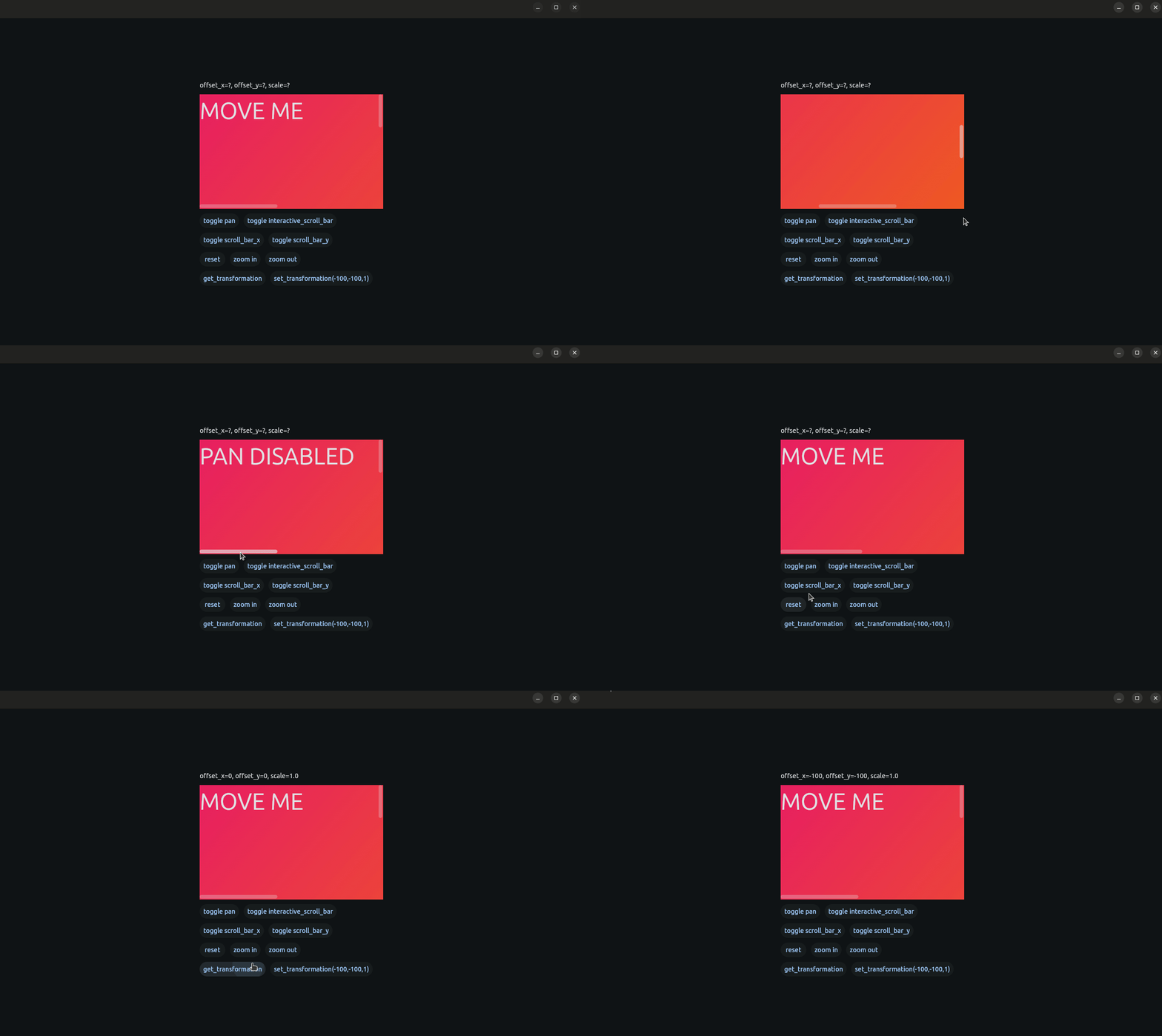
- Synchronized XY Scrollbars: Real-time visual feedback and manual scrolling for both axes, perfectly synced with panning and zoom.
- Granular Navigation: Toggle panning, scroll-axis visibility, and scrollbar interaction independently to suit your tool's needs.
- Precision Zooming: Smooth zoom control via mouse/touchpad or function calls, with optional constraints to keep content within the viewport.
- Transformation API: Direct programmatic access to current offsets (X, Y) and scale factors for real-time UI synchronization.
- Flexible Layouts: Supports both constrained and unconstrained content, making it ideal for everything from document viewers to infinite canvas editors.
Overview
This extension was developed as part of a Bachelor Thesis, supervised by Erik Kubaczka at the Self-Organizing Systems Lab of the Technical University Darmstadt. FletExtendedInteractiveViewer is a powerful control for Flet which enables the user to customize an interactive content view experience.
Documentation
Documentation to this package can be found here.
Example
Demo
Code
import flet as ft

from flet_extended_interactive_viewer import FletExtendedInteractiveViewer, FEIUpdateEvent


def main(page: ft.Page):
    page.vertical_alignment = ft.MainAxisAlignment.CENTER
    page.horizontal_alignment = ft.CrossAxisAlignment.CENTER
    text = ft.Text("MOVE ME",size=50)

    def on_click(ex:FletExtendedInteractiveViewer=None,text_move:ft.Text=None):
        if ex.pan_enabled:
            ex.pan_enabled = False
            text_move.value = "PAN DISABLED"
        else:
            ex.pan_enabled = True
            text_move.value = "MOVE ME"
        ex.update()
        text_move.update()

    def on_update(e: FEIUpdateEvent):
        print((e.offset_x,e.offset_y,e.scale))


    def toggle_scroll_x(ex:FletExtendedInteractiveViewer=None):
        ex.x_scroll_enabled = not ex.x_scroll_enabled
        ex.update()
    def toggle_scroll_y(ex: FletExtendedInteractiveViewer = None):
        ex.y_scroll_enabled = not ex.y_scroll_enabled
        ex.update()

    def toggle_interactive(ex: FletExtendedInteractiveViewer = None):
        ex.interactive_scroll_enabled = not ex.interactive_scroll_enabled
        ex.update()

    fei = FletExtendedInteractiveViewer(
        content=ft.Container(text,width=900,height=800,gradient=ft.LinearGradient(
            begin=ft.Alignment.TOP_LEFT,
            end=ft.Alignment.BOTTOM_RIGHT,
            colors=[ft.Colors.PINK, ft.Colors.ORANGE_700],
        )),
        on_interaction_update=on_update,
        width=400, height=250
    )

    async def reset():
        await fei.reset(400)

    async def zoom_in():
        await fei.zoom(1.25)

    async def zoom_out():
        await fei.zoom(0.75)

    text_x_y_scale = ft.Text("offset_x=?, offset_y=?, scale=?")

    async def get_transformation_click():
        x, y, scale = await fei.get_transformation_data()
        text_x_y_scale.value = f"offset_x={round(x)}, offset_y={round(y)}, scale={scale}"
        text_x_y_scale.update()

    async def set_transformation_data():
        await fei.set_transformation_data(offset_x=-100, offset_y=-100, scale=1.0)

    page.add(ft.Row([
        ft.Column([text_x_y_scale,
                   fei,
                   ft.Row([ft.Button("toggle pan", on_click=lambda e, ex=fei, text_move=text:on_click(ex, text_move)), ft.Button("toggle interactive_scroll_bar", on_click=lambda e, ex=fei:toggle_interactive(ex))]), ft.Row([ft.Button("toggle scroll_bar_x", on_click=lambda e, ex=fei:toggle_scroll_x(ex)), ft.Button("toggle scroll_bar_y", on_click=lambda e, ex=fei:toggle_scroll_y(ex))]),
                   ft.Row([ft.Button("reset",on_click=reset),ft.Button("zoom in",on_click=zoom_in),ft.Button("zoom out",on_click=zoom_out)]),
                   ft.Row([ft.Button("get_transformation", on_click=get_transformation_click), ft.Button("set_transformation(-100,-100,1)", on_click=set_transformation_data)]),
                   ],alignment=ft.MainAxisAlignment.CENTER)],alignment=ft.MainAxisAlignment.CENTER),

    )


ft.run(main)
Installation
[!WARNING] Custom Control: This extension requires a one-time build. It will NOT work with the default
flet runcommand unless you have previously built the app for your platform.
To install the flet-extended-interactive-viewer package:
-
Using
uv:uv add flet-extended-interactive-viewer
-
Using
pip:pip install flet-extended-interactive-viewer
After this, you will have to manually add this package to your
requirements.txtorpyproject.toml. -
Using
poetry:poetry add flet-extended-interactive-viewer
Build your app:
-
Using Linux:
flet build linux -v
-
Using Mac:
flet build macos -v
-
Using Windows:
flet build windows -v
License
This project is licensed under the MIT license – see the LICENSE file for details.
Feedback & Contributions
Report bugs or suggest features via GitHub Issues.
1 maintainer

Metadata
1 maintainer
Release files for flet-extended-interactive-viewer 0.2.1
For a detailed explanation of source distributions (sdists) and built distributions (wheels), please see the package formats documentation.
Source distribution (sdist)
| File | Size | Uploaded | |
|---|---|---|---|
| flet_extended_interactive_viewer-0.2.1.tar.gz | 17.9 kB | Details |
Built distribution (wheel)
| File | Interpreter | ABI | Platform | Reset |
|---|---|---|---|---|
| flet_extended_interactive_viewer-0.2.1-py3-none-any.whl | Python 3 | none | any | Details |
Total release size: 37.3 kB
Release files / flet_extended_interactive_viewer-0.2.1.tar.gz
| Download URL | flet_extended_interactive_viewer-0.2.1.tar.gz |
|---|---|
| Size | 17.9 kB |
| Tags | Source |
|
SHA-256 checksum How to use checksums |
313287d030758a09745b1f1a72d1e608d19e05108e752c881e72471b5d60a8f5
|
|
BLAKE2b-256 checksum How to use checksums |
5a73ab400b8423e12a89fdfcd9cc78af0d237d22fb17547de0ef6b363ce2a8dc
|
| Upload date | |
|
Uploaded using Trusted Publishing? What is trusted publishing? |
No |
| Uploaded via |
twine/6.2.0 CPython/3.13.13
|
Release files / flet_extended_interactive_viewer-0.2.1-py3-none-any.whl
| Download URL | flet_extended_interactive_viewer-0.2.1-py3-none-any.whl |
|---|---|
| Size | 19.4 kB |
| Tags | Python 3 |
|
SHA-256 checksum How to use checksums |
4ae624bceda7cdf2d1c3c3166e4378716254d134ba25dd2ed1a543526afaf2a0
|
|
BLAKE2b-256 checksum How to use checksums |
b441fe15061399fd583a12df69551cf24a3f56e6482f075177986d70c175b8d4
|
| Upload date | |
|
Uploaded using Trusted Publishing? What is trusted publishing? |
No |
| Uploaded via |
twine/6.2.0 CPython/3.13.13
|














