
FletExtendedInteractiveViewer is a powerful 2D navigation control for Flet that adds synchronized scrollbars and enhanced transformation control to the standard InteractiveViewer.

Project description
flet-extended-interactive-viewer


Flet-Extended-Interactive-Viewer is a powerful 2D navigation control for Flet that adds synchronized scrollbars and enhanced transformation control to the standard InteractiveViewer.
[!IMPORTANT] Update: Upgraded to Flet v0.84.0 and introduced customizable scrollbar thumb colors via
thumbs_color.
🌟 Key Features:
- Synchronized XY Scrollbars: Real-time visual feedback and manual scrolling for both axes, perfectly synced with panning and zoom.
- Granular Navigation: Toggle panning, scroll-axis visibility, and scrollbar interaction independently to suit your tool's needs.
- Precision Zooming: Smooth zoom control via mouse/touchpad or function calls, with optional constraints to keep content within the viewport.
- Transformation API: Direct programmatic access to current offsets (X, Y) and scale factors for real-time UI synchronization.
- Flexible Layouts: Supports both constrained and unconstrained content, making it ideal for everything from document viewers to infinite canvas editors.
ℹ️ Overview
This extension was developed as part of a Bachelor Thesis, supervised by Erik Kubaczka at the Self-Organizing Systems Lab of the Technical University Darmstadt. FletExtendedInteractiveViewer is a powerful control for Flet which enables the user to customize an interactive content view experience.
📖 Documentation
Documentation to this package can be found here.
🚀 Example
Demo
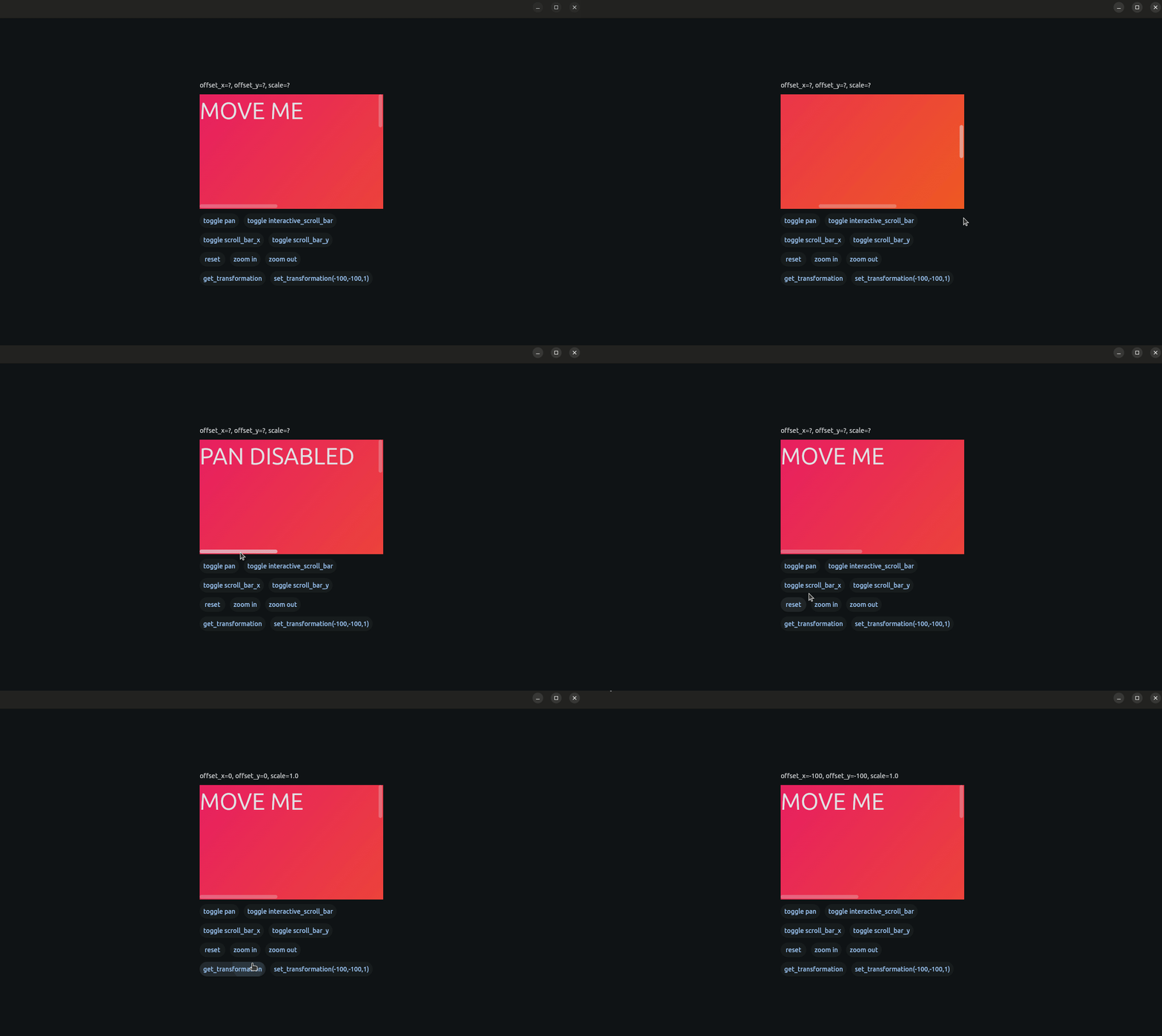
Code
import flet as ft

from flet_extended_interactive_viewer import FletExtendedInteractiveViewer, FEIUpdateEvent


def main(page: ft.Page):
    page.vertical_alignment = ft.MainAxisAlignment.CENTER
    page.horizontal_alignment = ft.CrossAxisAlignment.CENTER
    text = ft.Text("MOVE ME",size=50)

    def on_click(ex:FletExtendedInteractiveViewer=None,text_move:ft.Text=None):
        if ex.pan_enabled:
            ex.pan_enabled = False
            text_move.value = "PAN DISABLED"
        else:
            ex.pan_enabled = True
            text_move.value = "MOVE ME"
        ex.update()
        text_move.update()

    def on_update(e: FEIUpdateEvent):
        print((e.offset_x,e.offset_y,e.scale))


    def toggle_scroll_x(ex:FletExtendedInteractiveViewer=None):
        ex.x_scroll_enabled = not ex.x_scroll_enabled
        ex.update()
    def toggle_scroll_y(ex: FletExtendedInteractiveViewer = None):
        ex.y_scroll_enabled = not ex.y_scroll_enabled
        ex.update()

    def toggle_interactive(ex: FletExtendedInteractiveViewer = None):
        ex.interactive_scroll_enabled = not ex.interactive_scroll_enabled
        ex.update()

    fei = FletExtendedInteractiveViewer(
        content=ft.Container(text,width=900,height=800,gradient=ft.LinearGradient(
            begin=ft.Alignment.TOP_LEFT,
            end=ft.Alignment.BOTTOM_RIGHT,
            colors=[ft.Colors.PINK, ft.Colors.ORANGE_700],
        )),
        on_interaction_update=on_update,
        width=400, height=250
    )

    async def reset():
        await fei.reset(400)

    async def zoom_in():
        await fei.zoom(1.25)

    async def zoom_out():
        await fei.zoom(0.75)

    text_x_y_scale = ft.Text("offset_x=?, offset_y=?, scale=?")

    async def get_transformation_click():
        x, y, scale = await fei.get_transformation_data()
        text_x_y_scale.value = f"offset_x={round(x)}, offset_y={round(y)}, scale={scale}"
        text_x_y_scale.update()

    async def set_transformation_data():
        await fei.set_transformation_data(offset_x=-100, offset_y=-100, scale=1.0)

    page.add(ft.Row([
        ft.Column([text_x_y_scale,
                   fei,
                   ft.Row([ft.Button("toggle pan", on_click=lambda e, ex=fei, text_move=text:on_click(ex, text_move)), ft.Button("toggle interactive_scroll_bar", on_click=lambda e, ex=fei:toggle_interactive(ex))]), ft.Row([ft.Button("toggle scroll_bar_x", on_click=lambda e, ex=fei:toggle_scroll_x(ex)), ft.Button("toggle scroll_bar_y", on_click=lambda e, ex=fei:toggle_scroll_y(ex))]),
                   ft.Row([ft.Button("reset",on_click=reset),ft.Button("zoom in",on_click=zoom_in),ft.Button("zoom out",on_click=zoom_out)]),
                   ft.Row([ft.Button("get_transformation", on_click=get_transformation_click), ft.Button("set_transformation(-100,-100,1)", on_click=set_transformation_data)]),
                   ],alignment=ft.MainAxisAlignment.CENTER)],alignment=ft.MainAxisAlignment.CENTER),

    )


ft.run(main)
⬇️ Installation
[!WARNING] Custom Control: This extension requires a one-time build. It will NOT work with the default
flet runcommand unless you have previously built the app for your platform.
To install the flet-extended-interactive-viewer package:
-
Using
uv:uv add flet-extended-interactive-viewer
-
Using
pip:pip install flet-extended-interactive-viewer
After this, you will have to manually add this package to your
requirements.txtorpyproject.toml. -
Using
poetry:poetry add flet-extended-interactive-viewer
Build your app:
-
Using Linux:
flet build linux -v
-
Using Mac:
flet build macos -v
-
Using Windows:
flet build windows -v
📝 License
This project is licensed under the MIT license – see the LICENSE file for details.
💭 Feedback & Contributions
Report bugs or suggest features via GitHub Issues.


Download files
Download the file for your platform. If you're not sure which to choose, learn more about installing packages.
Source Distribution
Built Distribution
Filter files by name, interpreter, ABI, and platform.
If you're not sure about the file name format, learn more about wheel file names.
Copy a direct link to the current filters
File details
Details for the file flet_extended_interactive_viewer-0.2.0.tar.gz.
File metadata
- Download URL: flet_extended_interactive_viewer-0.2.0.tar.gz
- Upload date:
- Size: 18.0 kB
- Tags: Source
- Uploaded using Trusted Publishing? No
- Uploaded via: twine/6.2.0 CPython/3.13.12
File hashes
| Algorithm | Hash digest | |
|---|---|---|
| SHA256 |
8fb395aa2fa5e3be3c0b76a893ec22d91bfe4c063f832a27a14d7de62d0ae0d1
|
|
| MD5 |
aa8b60b7063c675d5ca924919b7b4c76
|
|
| BLAKE2b-256 |
8dec39031af42b1a48ca9ea467a4aa002441c0271d75f96e6c2ad85d8245494f
|
File details
Details for the file flet_extended_interactive_viewer-0.2.0-py3-none-any.whl.
File metadata
- Download URL: flet_extended_interactive_viewer-0.2.0-py3-none-any.whl
- Upload date:
- Size: 19.4 kB
- Tags: Python 3
- Uploaded using Trusted Publishing? No
- Uploaded via: twine/6.2.0 CPython/3.13.12
File hashes
| Algorithm | Hash digest | |
|---|---|---|
| SHA256 |
f4e96636c74d51886f0bd2107df485d6515f61509cd58f03f02ef92078977102
|
|
| MD5 |
3dde1dbea214d0eeee5deb1403c42ee2
|
|
| BLAKE2b-256 |
3c69b3e5312e428571c75b1a92323e5c4edb51f74f81b6238428f032e74f4ef0
|






