
Execution graph debugger — see what your agent / pipeline actually does.

Project description
Local-first visual debugger for Python agents.
One HTML file. No cloud, no account. See LLM calls, tool calls, branches, errors, tokens, and cost.



Part of the Loom stack — local HTML traces for long-running agent loops.
Loom stack
Overview: kroq86.github.io/loom-stack — packages, flow, audience, quick start.
Three composable packages for long-running async agent loops. Each does one job; compose them as needed.
| Package | Install | Job |
|---|---|---|
| loom-tailcalls | pip install loom-tailcalls |
Write stack-safe transition loops (@tailrec, @tailstream) |
| flow-xray ← this repo | pip install flow-xray |
Export local HTML traces (LLM/tool calls, branches, errors) |
| loom-runner | pip install loom-runner |
Checkpoint/resume in SQLite; CLI inspect (explain, history, …) |
@tailrec agent loop  →  loom-runner run/resume  →  --trace trace.html
     (shape)                  (durability)              (flow-xray)
This repo traces Python call graphs into one local HTML file. Use standalone with @trace, or via loom-runner --trace on checkpointed agent runs — no cloud account required.
from flow_xray import trace

@trace
def call_llm(prompt):
    return openai.chat(prompt)

@trace
def agent(query):
    plan = call_llm(f"plan: {query}")
    return call_llm(f"answer based on: {plan}")

result = trace.run(agent, "weather in Tokyo?")
result.to_html("trace.html")
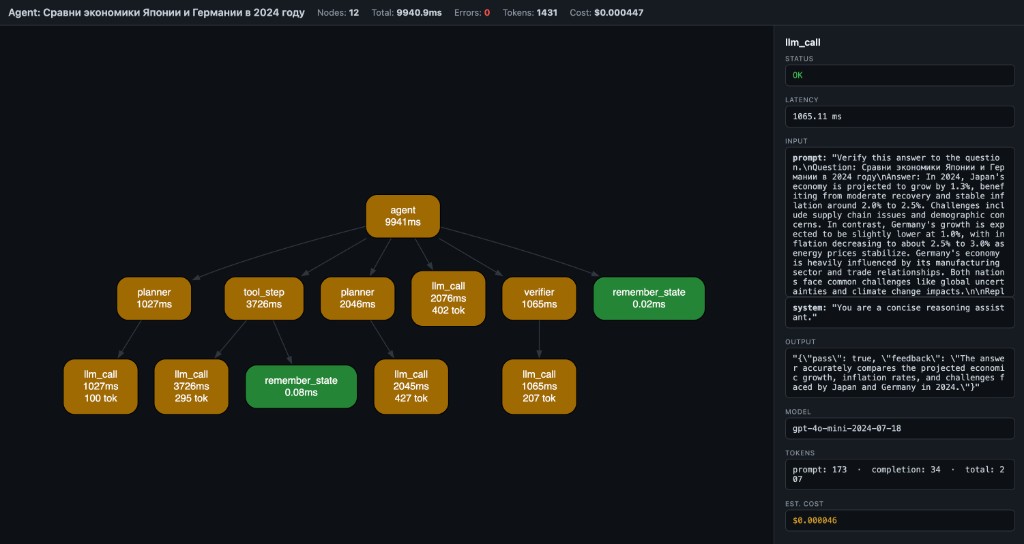
Open trace.html — you get a local debug artifact with:
- LLM calls
- tool calls
- branches and nested steps
- errors and retries
- tokens and estimated cost
- graph, timeline, overview, and raw trace views
No server, no account, no log viewer — one local HTML file.
The main use case
Your agent's final answer looks fine, but you do not trust the middle.
You want to see:
- which LLM calls happened
- which tool calls ran
- where the run branched or nested
- where an error or retry happened
- where tokens and cost accumulated
flow-xray is built for that exact debugging job.
Who this is for
flow-xray is most useful for:
- LangGraph users who want local tracing without hosted tooling
- LangChain users debugging tool calls and intermediate steps
- developers building Python tool-calling agents
- people who want one local trace artifact they can inspect or share after redaction
Install
pip install flow-xray
30-second quickstart
Create demo_trace.py:
from flow_xray import trace

@trace
def fetch_profile(user_id):
    return {"id": user_id, "plan": "pro"}

@trace
def answer_question(user_id):
    profile = fetch_profile(user_id)
    return f"user {profile['id']} is on {profile['plan']}"

result = trace.run(answer_question, 42)
result.to_html("demo_trace.html")
Run it:
python demo_trace.py
Open demo_trace.html in your browser. You should see one root node (answer_question) and one child node (fetch_profile).
When to use what
Use trace.run(...) when
- you control the function call directly
- you want the clearest Python API
- you want full control over arguments and return values
- you are tracing inside tests, scripts, notebooks, or app code
from flow_xray import trace

@trace
def pipeline(x):
    return x * 2

result = trace.run(pipeline, 5)
result.to_html("pipeline.html")
Use flow-xray run ... when
- you already have a Python script on disk
- you want a quick local trace without editing much code
- the traced calls already happen at module scope when the file is executed
flow-xray run my_agent.py --html trace.html
Usage
Decorator + trace.run
from flow_xray import trace

@trace
def step_a(x):
    return x + 1

@trace
def pipeline(x):
    return step_a(x) * 2

result = trace.run(pipeline, 5)
result.to_html("pipeline.html")
CLI
flow-xray run my_agent.py --html trace.html
The script must use @trace on the functions you want captured.
CLI onboarding
flow-xray run executes the file inside a trace session, but it does not enter if __name__ == "__main__" blocks.
That means:
- if your traced function call happens at module scope,
flow-xray runcan capture it directly - if your traced function call only happens inside
main()guarded byif __name__ == "__main__", the CLI may produce0 nodes
If you hit 0 nodes, use one of these fixes:
- Move a traced demo call to module scope for local debugging.
- Call
trace.run(...)inside the script instead. - Keep using the Python API directly from a small wrapper script.
Example that works with flow-xray run:
from flow_xray import trace

@trace
def step():
    return 1

step()
Example that will usually show 0 nodes with flow-xray run:
from flow_xray import trace

@trace
def step():
    return 1

if __name__ == "__main__":
    step()
Async support
@trace works with async def out of the box — no extra config:
from flow_xray import trace
import asyncio

@trace
async def call_api(query):
    await asyncio.sleep(0.1)  # simulate async I/O
    return {"answer": query}

@trace
async def agent(query):
    result = await call_api(query)
    return result["answer"]

result = trace.run(lambda: asyncio.run(agent("hello")))
result.to_html("async_trace.html")
Token / cost tracking
Token usage and estimated cost are auto-extracted from OpenAI response objects, or you can set them manually:
@trace
def call_llm(prompt):
    resp = openai.chat.completions.create(...)
    trace.meta(model=resp.model,
               prompt_tokens=resp.usage.prompt_tokens,
               completion_tokens=resp.usage.completion_tokens)
    return resp.choices[0].message.content
Redaction and share-safe traces
Use decorator options when a trace may contain secrets or bulky payloads:
from flow_xray import trace

@trace(redact={"api_key", "authorization"}, capture_output=False)
def call_service(api_key, payload):
    ...
redact={...}masks matching argument names and nested dict keys as[redacted]capture_output=Falsekeeps the real return value in Python, but stores[redacted]in the HTML trace
Safety and sharing
flow-xray serializes trace data into the generated HTML file.
By default, that can include:
- function names
- bound inputs
- outputs
- exceptions
- attached
trace.meta(...)fields - token and cost metadata
Use the privacy controls when you want a trace that is safer to share:
redact={...}hides matching input names and nested dict keys as[redacted]capture_output=Falsekeeps the real Python return value, but writes[redacted]into the HTML trace
Treat trace files as local debugging artifacts unless you have explicitly reviewed or redacted their contents. A trace is generally safer to share when you have:
- redacted secrets, auth headers, API keys, or user data
- hidden sensitive outputs with
capture_output=False - checked the generated HTML once before posting it publicly
Why not LangSmith or plain logs?
Use flow-xray when you want
- local-first debugging
- one HTML file you can open immediately
- graph and timeline views, not only logs
- no account and no hosted tracing requirement
Use plain logs when you want
- quick event-level debugging
- a tiny amount of output
- no structured trace at all
Use hosted tracing tools when you want
- team dashboards
- long-term trace storage
- production monitoring
- centralized evaluation workflows
flow-xray is best when your question is:
What actually happened inside this Python agent run, locally, right now?
What you see
- Nodes = function calls (name + latency + tokens)
- Edges = caller → callee
- Green = OK, Red = error, Yellow = slow (>1s)
- Header = total nodes, latency, tokens, estimated cost
- Click a node → side panel shows inputs, output, error, timing, model, tokens, cost
Why this exists
Langfuse, Helicone, LangSmith — they give you timelines and logs.
But when your agent pipeline branches, retries, or chains 6 tools — you don't need another table. You need a graph.
flow-xray is not an agent framework. It's the layer below them — like Chrome DevTools is to browsers.
Docs
Compatibility
- Python 3.10, 3.11, 3.12, 3.13, 3.14 — tested
- Sync and async functions — both supported
- Any Python code — not limited to LLM calls; works with any function you decorate
- Frameworks — works alongside LangGraph, CrewAI, OpenAI SDK, or plain Python
How it works
@trace wraps functions (sync and async). When called inside a trace.run() session (or flow-xray run CLI), it records:
- function name
- bound arguments
- return value or exception
- wall-clock latency
- token usage and estimated cost (auto or manual)
- parent/child relationships (call stack → DAG)
result.to_html() embeds the trace as JSON in a self-contained HTML page that renders via WASM Graphviz (CDN, works offline after first load).
The trace viewer also includes search, zoom/reset controls, and copy-details for the currently selected node.
Also included
Scalar autodiff core (micrograd-style Value graph with DOT/JSON export and stepping debugger) lives under flow-xray dot CLI and from flow_xray import Value. See examples/ and plan.md.
License
MIT
Release history Release notifications | RSS feed


Download files
Download the file for your platform. If you're not sure which to choose, learn more about installing packages.
Source Distribution
Built Distribution
Filter files by name, interpreter, ABI, and platform.
If you're not sure about the file name format, learn more about wheel file names.
Copy a direct link to the current filters
File details
Details for the file flow_xray-0.3.4.tar.gz.
File metadata
- Download URL: flow_xray-0.3.4.tar.gz
- Upload date:
- Size: 28.6 kB
- Tags: Source
- Uploaded using Trusted Publishing? No
- Uploaded via: twine/6.1.0 CPython/3.13.12
File hashes
| Algorithm | Hash digest | |
|---|---|---|
| SHA256 |
75c533f1f5c820bbf1f5594a2ae91366dd95d2cb936c9c912bf98a9dbc208682
|
|
| MD5 |
81e2bc18f94fc5a3bb78722478beac83
|
|
| BLAKE2b-256 |
591689bfad5b7126eaac7aaf3169df4f3abf5641b05360dcf02bab5ed8e2f9b6
|
File details
Details for the file flow_xray-0.3.4-py3-none-any.whl.
File metadata
- Download URL: flow_xray-0.3.4-py3-none-any.whl
- Upload date:
- Size: 32.5 kB
- Tags: Python 3
- Uploaded using Trusted Publishing? No
- Uploaded via: twine/6.1.0 CPython/3.13.12
File hashes
| Algorithm | Hash digest | |
|---|---|---|
| SHA256 |
5b2a87e305e36e971e8737c3f6e4655e270007e3c084b256985814423eec5d37
|
|
| MD5 |
4671b7374c63321e6b2faaebd0e88d51
|
|
| BLAKE2b-256 |
c9c433dbd19f84e510e86caec75a680c21d23abfe6263f36c1569416eef4d650
|






