
FlowSurgeon — framework-agnostic profiling middleware for Python (WSGI & ASGI).

Project description

FlowSurgeon
Framework-agnostic profiling middleware for Python — drop-in debug UI for Flask and FastAPI.



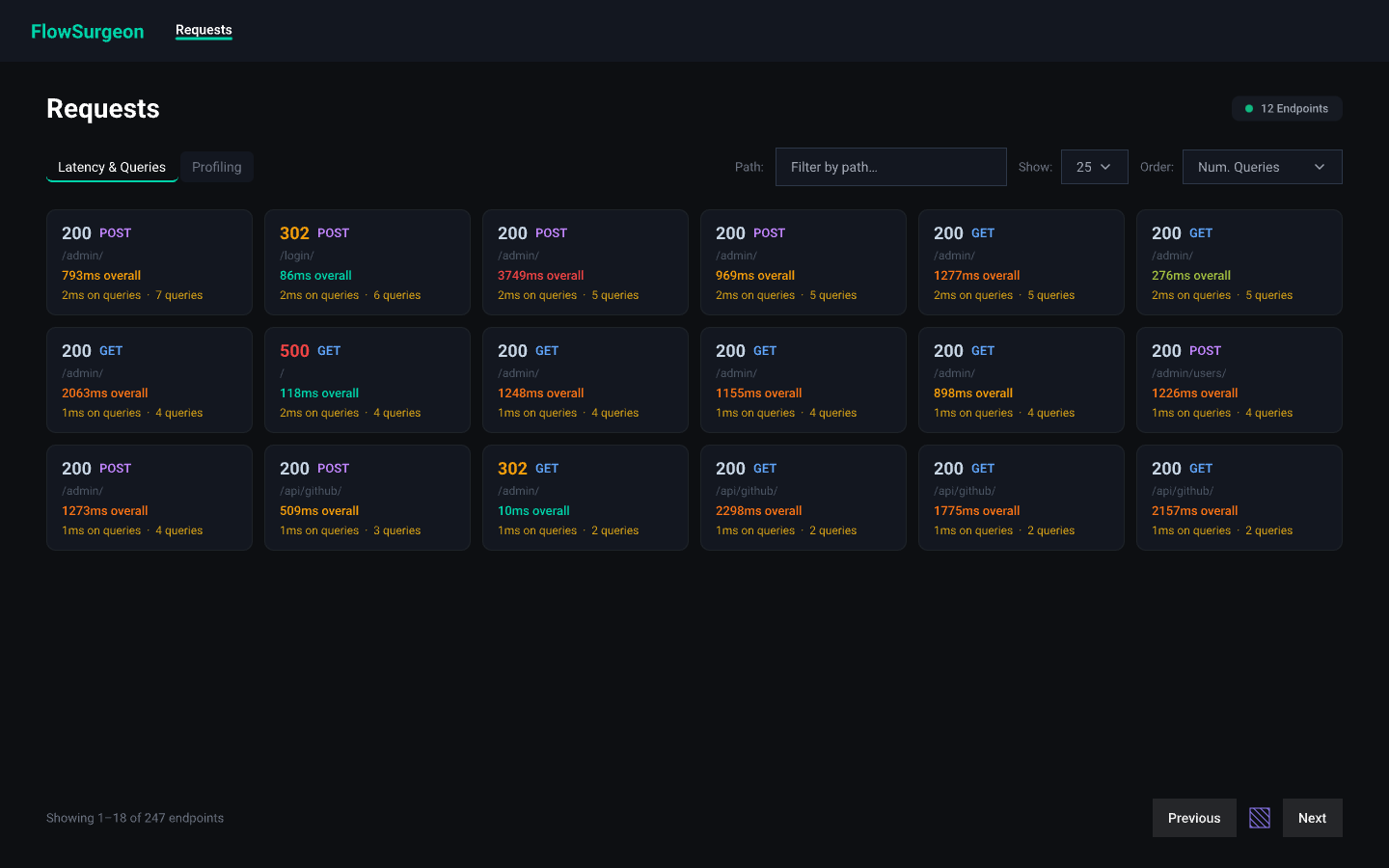
FlowSurgeon wraps your existing WSGI or ASGI app with a single line. It injects a collapsible debug panel into every HTML response and stores a full request history — timing, headers, SQL queries, response bodies — in a local SQLite database, with a built-in dark-themed UI at /flowsurgeon.
Features
- Zero application changes — wraps any WSGI or ASGI callable
- Auto-detect WSGI vs ASGI via the
FlowSurgeon()factory - Inline debug panel injected before
</body>in every HTML response - Built-in history UI at
/flowsurgeon— no extra server needed - Request grid view — browse captured requests sorted by query count, duration, or path
- SQL query tracking via SQLAlchemy and DB-API 2.0 (sqlite3, psycopg2, …)
- Profiling tab — call-stack profiling per endpoint (coming soon)
- Route auto-discovery from Flask (
url_map) and FastAPI/Starlette (app.routes) - Response body capture — stores up to 128 KB for text/JSON/XML responses
- SQLite persistence with auto-pruning (configurable max records)
- Sensitive header redaction —
Authorization,Cookie,Set-Cookiestripped by default FLOWSURGEON_ENABLEDenv var — safe to ship in codebase; disabled by default
Installation
# Recommended
uv add flowsurgeon

# pip
pip install flowsurgeon
Requires Python 3.12+. The only runtime dependency is jinja2.
Quick start
FastAPI / Starlette (ASGI)
from fastapi import FastAPI
from flowsurgeon import FlowSurgeon, Config

_app = FastAPI()

app = FlowSurgeon(
    _app,
    config=Config(enabled=True),
)

@_app.get("/books")
async def books():
    return {"books": ["Clean Code", "Refactoring"]}
uvicorn myapp:app --reload
# Debug UI → http://127.0.0.1:8000/flowsurgeon
Flask (WSGI)
from flask import Flask
from flowsurgeon import FlowSurgeon, Config

app = Flask(__name__)

app.wsgi_app = FlowSurgeon(
    app.wsgi_app,
    config=Config(enabled=True),
)
flask run
# Debug UI → http://127.0.0.1:5000/flowsurgeon
SQL query tracking
SQLAlchemy
from sqlalchemy import create_engine
from flowsurgeon import FlowSurgeon, Config
from flowsurgeon.trackers.sqlalchemy import SQLAlchemyTracker

engine = create_engine("sqlite:///mydb.db")
tracker = SQLAlchemyTracker(engine, capture_stacktrace=False)

app = FlowSurgeon(
    asgi_app,
    config=Config(enabled=True),
    trackers=[tracker],
)
DB-API 2.0 (sqlite3, psycopg2, …)
import sqlite3
from flowsurgeon import FlowSurgeon, Config
from flowsurgeon.trackers import DBAPITracker

raw_conn = sqlite3.connect("mydb.db")
tracker = DBAPITracker(raw_conn)
conn = tracker.connection  # use this instead of raw_conn everywhere

app = FlowSurgeon(
    wsgi_app,
    config=Config(enabled=True),
    trackers=[tracker],
)
DBAPITracker works via a transparent proxy — replace your connection object with tracker.connection and every cursor().execute() call is automatically timed and recorded.
Configuration
from flowsurgeon import Config

Config(
    # Master switch — default False. Also controlled by FLOWSURGEON_ENABLED env var.
    enabled=True,

    # Only serve the debug panel to requests from these hosts.
    allowed_hosts=["127.0.0.1", "::1", "localhost"],

    # SQLite file for request history storage.
    db_path="flowsurgeon.db",

    # Prune oldest records when this limit is exceeded.
    max_stored_requests=1000,

    # URL prefix for the built-in debug UI.
    debug_route="/flowsurgeon",

    # Headers replaced with "[redacted]" before storage.
    strip_sensitive_headers=["authorization", "cookie", "set-cookie"],

    # SQL query tracking options.
    track_queries=True,
    slow_query_threshold_ms=100.0,
    capture_query_stacktrace=False,

    # Manually register routes shown in the UI before any traffic.
    # Flask and FastAPI routes are auto-discovered; use this for other cases.
    known_routes=[("GET", "/health"), ("POST", "/webhooks/stripe")],
)
Debug UI
| URL | Description |
|---|---|
/flowsurgeon |
Requests grid — all captured requests with latency and query info |
/flowsurgeon?view=profiling |
Profiling tab (coming soon) |
/flowsurgeon?q=/books |
Filter requests by path |
/flowsurgeon?order=duration |
Sort by duration (also: queries, path) |
/flowsurgeon/{request_id} |
Request detail: headers, response body, SQL, tracebacks |
Requests view
Displays all captured requests as a card grid, sorted by number of queries by default. Each card shows: status code, HTTP method, path, total duration, query time and count. Supports filtering by path and ordering by query count, duration, or path.
Request detail — three tabs
- Details — stat cards (status, duration, SQL count, SQL time); request headers; response headers and body (up to 128 KB for text/JSON content types)
- SQL — every captured query with timing,
slowbadge (exceeds threshold),dupbadge (same SQL run more than once), and bound params - Traceback — Python stack trace per query (requires
capture_query_stacktrace=True)
Running the examples
# FastAPI + SQLAlchemy
uv run --group examples uvicorn examples.fastapi.demo_fastapi:app --reload

# Flask + DB-API (sqlite3)
uv run --group examples python examples/flask/demo_flask.py
Debug UI:
- FastAPI → http://127.0.0.1:8000/flowsurgeon
- Flask → http://127.0.0.1:5000/flowsurgeon
Both demos expose these routes:
| Route | What it demonstrates |
|---|---|
GET /books |
Normal query — 1 SQL |
GET /books/{id} |
Parametrised query |
GET /books/duplicates |
Same query twice → dup badge |
GET /books/slow |
Query exceeds threshold → slow badge |
GET /slow |
Slow endpoint, no SQL |
GET /boom |
500 error |
Environment variable
# Enable without modifying code
FLOWSURGEON_ENABLED=1 uvicorn myapp:app
Keep enabled=False (the default) so the middleware is a no-op in production, and flip it on per-environment via the env var or your settings layer.
License


Download files
Download the file for your platform. If you're not sure which to choose, learn more about installing packages.
Source Distribution
Built Distribution
Filter files by name, interpreter, ABI, and platform.
If you're not sure about the file name format, learn more about wheel file names.
Copy a direct link to the current filters
File details
Details for the file flowsurgeon-0.4.1.tar.gz.
File metadata
- Download URL: flowsurgeon-0.4.1.tar.gz
- Upload date:
- Size: 80.9 kB
- Tags: Source
- Uploaded using Trusted Publishing? Yes
- Uploaded via: uv/0.10.9 {"installer":{"name":"uv","version":"0.10.9","subcommand":["publish"]},"python":null,"implementation":{"name":null,"version":null},"distro":{"name":"Ubuntu","version":"24.04","id":"noble","libc":null},"system":{"name":null,"release":null},"cpu":null,"openssl_version":null,"setuptools_version":null,"rustc_version":null,"ci":true}
File hashes
| Algorithm | Hash digest | |
|---|---|---|
| SHA256 |
980f9030a41a35a425235dda1995540f05ae801b89c86fa68700f251f5625bfb
|
|
| MD5 |
2a69487c633b1784f7bffc51f862640c
|
|
| BLAKE2b-256 |
bec5423921454d062c3ebebfa5a5441950d3ed4c453faeebaca2bf764185a080
|
File details
Details for the file flowsurgeon-0.4.1-py3-none-any.whl.
File metadata
- Download URL: flowsurgeon-0.4.1-py3-none-any.whl
- Upload date:
- Size: 91.4 kB
- Tags: Python 3
- Uploaded using Trusted Publishing? Yes
- Uploaded via: uv/0.10.9 {"installer":{"name":"uv","version":"0.10.9","subcommand":["publish"]},"python":null,"implementation":{"name":null,"version":null},"distro":{"name":"Ubuntu","version":"24.04","id":"noble","libc":null},"system":{"name":null,"release":null},"cpu":null,"openssl_version":null,"setuptools_version":null,"rustc_version":null,"ci":true}
File hashes
| Algorithm | Hash digest | |
|---|---|---|
| SHA256 |
84998690e276a88bc2d50bf2b942cc2ef35b713e038a14cf1afdab4603655ea4
|
|
| MD5 |
fc45f336a8b715f8c856643cdcf0783b
|
|
| BLAKE2b-256 |
e1284c0258067345ce428b70e918a614b15d261a0e4c946cee5ec2b731cc3013
|






