

Introduction
The motion controller project FluidNC allows for the expansion of functionality using its channels protocol. In addition to receiving GRBL g-codes and extension commands over a UART channel, FluidNC will provide a stream of data that follows the GRBL Line Protocol and FluidNC's serial protocol. This data can be used to update a display, control other devices, etc. Over a UART channel, FluidNC will also send initialization information that describes how the channel listener (aka expander) should configure itself so that it can receive specific control commands.
FluidPy is a python library that provides an interface for interacting with FluidNC's serial protocol.
Platforms
FluidPy is currently supported on Python 3.10+, MicroPython and CircuitPython which enables interfacing with the FluidNC controller on multiple platforms including microcontrollers, single board computers (with a GPIO header such as a RaspberryPi) or even full desktop computers (with a serial to USB adapter).
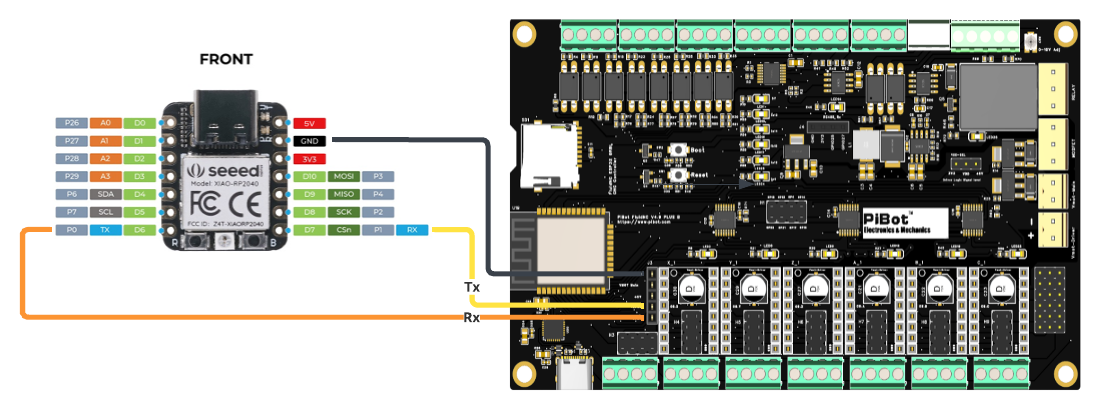
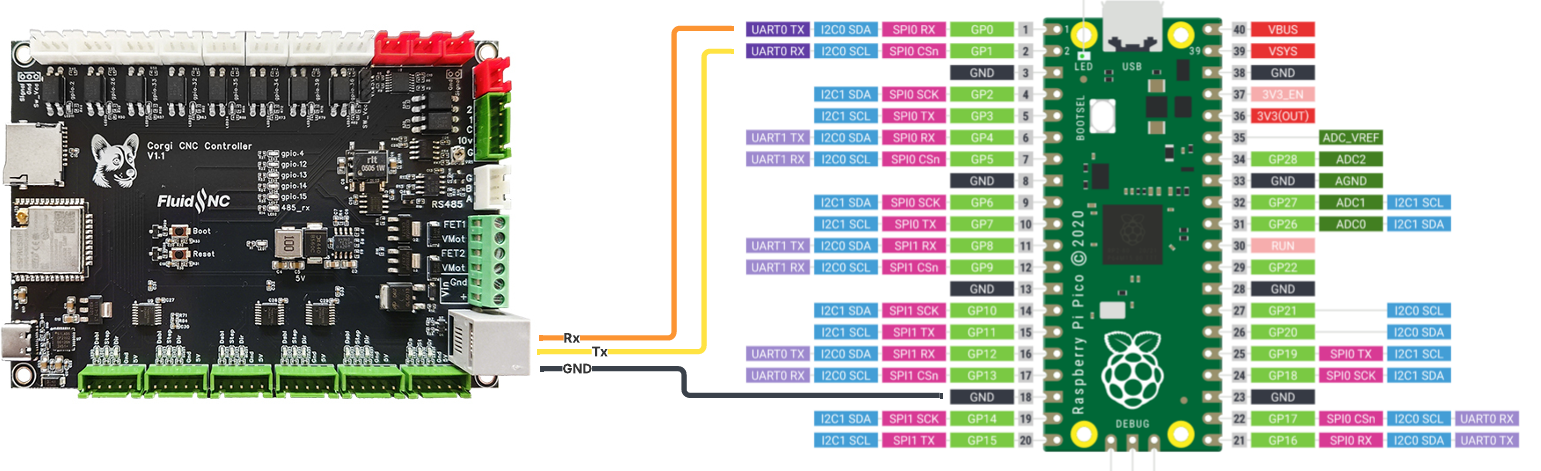
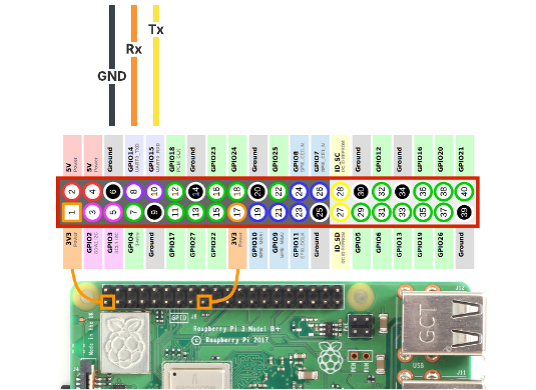
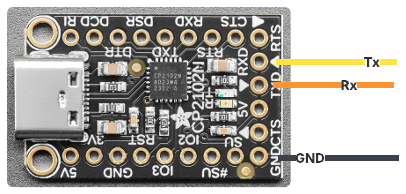
Wiring diagrams are below for a few example platforms. When defining the uart section in your FluidNC config, note the Tx pin of the controller connects to the Rx pin of the expander microcontroller; and the controller's Rx pin to the expander's Tx pin.
Getting started...
Additional details can be found at read the docs.
...with microcontrollers
CircuitPython can be run on a wide range of microcontrollers.
- Install CircuitPython per the instructions on the CircuitPython website.
- Clone this repository and copy the contents of
src/fluidpyto thelib/fluidpydirectory of your CircuitPython device. - Copy
examples/cpy_example/main.pytomain.pyon your device (deletecode.pyif it exists).
...with computers
- Create a new python virtual environment:
python -m venv .venv; source .venv/bin/activate - Install the fluidpy library:
pip install fluidpy - Copy
examples/py_example.pyto your project directory asmain.py.
Connections
Note: Microcontrollers can be powered by the +5V from the UART header or the RJ12 connector, but should not be connected while communicating with the microcontroller via USB.
1 maintainer

Metadata
1 maintainer
Release files for fluidpy 0.2.0
For a detailed explanation of source distributions (sdists) and built distributions (wheels), please see the package formats documentation.
Source distribution (sdist)
| File | Size | Uploaded | |
|---|---|---|---|
| fluidpy-0.2.0.tar.gz | 17.7 kB | Details |
Built distribution (wheel)
| File | Interpreter | ABI | Platform | Reset |
|---|---|---|---|---|
| fluidpy-0.2.0-py3-none-any.whl | Python 3 | none | any | Details |
Total release size: 33.8 kB
Release files / fluidpy-0.2.0.tar.gz
| Download URL | fluidpy-0.2.0.tar.gz |
|---|---|
| Size | 17.7 kB |
| Tags | Source |
|
SHA-256 checksum How to use checksums |
2e66bc77436a24870f11ab1aa6ee169ed41b7231a6c490369fedc18cb07852bf
|
|
BLAKE2b-256 checksum How to use checksums |
e3ccbfd1d76eb4578489be04e6326243b263ed7fac6ed629437fe5bc7fe0300c
|
| Upload date | |
|
Uploaded using Trusted Publishing? What is trusted publishing? |
No |
| Uploaded via |
uv/0.7.4
|
Release files / fluidpy-0.2.0-py3-none-any.whl
| Download URL | fluidpy-0.2.0-py3-none-any.whl |
|---|---|
| Size | 16.2 kB |
| Tags | Python 3 |
|
SHA-256 checksum How to use checksums |
726a37d60604c41158360cef72bc369dc4be16a84f8316a286f724e25f213d94
|
|
BLAKE2b-256 checksum How to use checksums |
9e6b23eefcabd39594e3ad94c496b81e1a6cdf4636cc9ac9230ef880e38910b6
|
| Upload date | |
|
Uploaded using Trusted Publishing? What is trusted publishing? |
No |
| Uploaded via |
uv/0.7.4
|














