
Library to interact with FluidNC's channel protocol.

Project description

Introduction
The motion controller project FluidNC allows for the expansion of functionality using its channels protocol. In addition to receiving GRBL g-codes and extension commands over a UART channel, FluidNC will provide a stream of data that follows the GRBL Line Protocol and FluidNC's serial protocol. This data can be used to update a display, control other devices, etc. Over a UART channel, FluidNC will also send initialization information that describes how the channel listener (aka expander) should configure itself so that it can receive specific control commands.
FluidPy is a python library that provides an interface for interacting with FluidNC's serial protocol.
Platforms
FluidPy is currently supported on Python 3.10+, MicroPython and CircuitPython which enables interfacing with the FluidNC controller on multiple platforms including microcontrollers, single board computers (with a GPIO header such as a RaspberryPi) or even full desktop computers (with a serial to USB adapter).
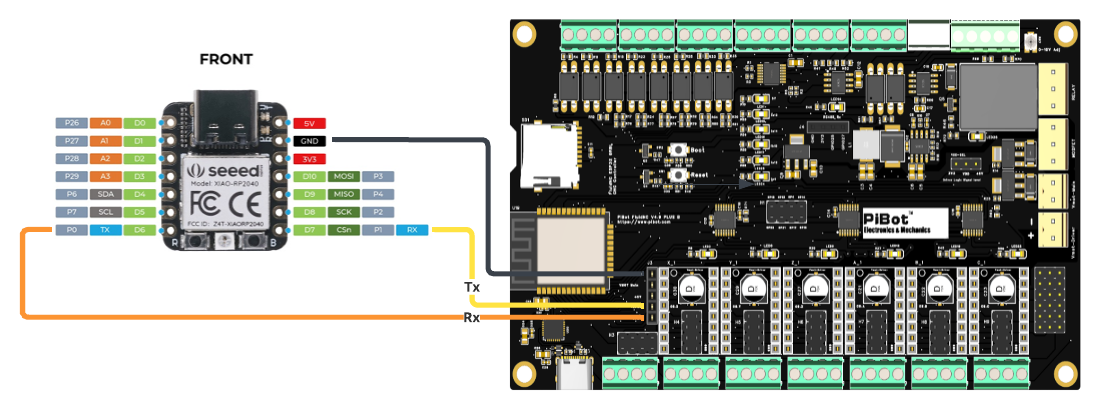
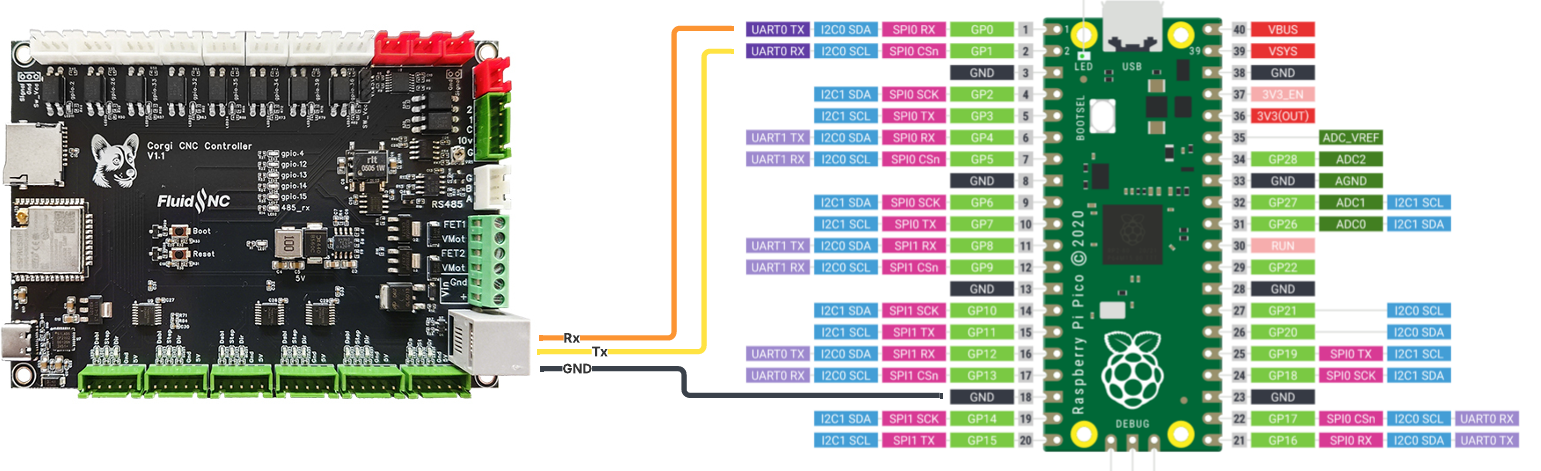
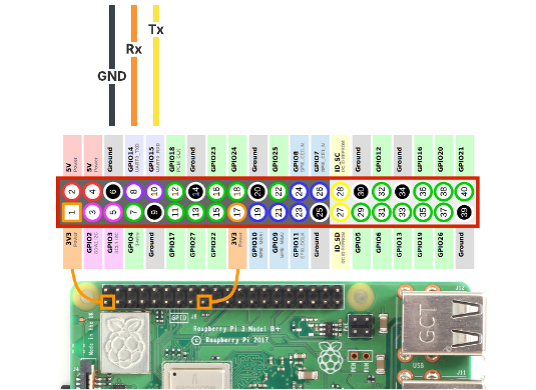
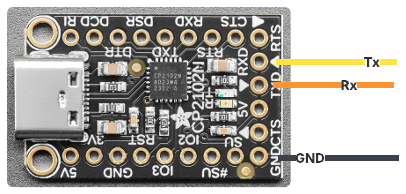
Wiring diagrams are below for a few example platforms. When defining the uart section in your FluidNC config, note the Tx pin of the controller connects to the Rx pin of the expander microcontroller; and the controller's Rx pin to the expander's Tx pin.
Getting started...
Additional details can be found on the read the docs.
...with microcontrollers
CircuitPython can be run on a wide range of microcontrollers.
- Install CircuitPython per the instructions on the CircuitPython website.
- Clone this repository and copy the contents of
src/fluidpyto thelib/fluidpydirectory of your CircuitPython device. - Copy
examples/cpy_example/main.pytomain.pyon your device (deletecode.pyif it exists).
...with computers
- Create a new python virtual environment:
python -m venv .venv; source .venv/bin/activate - Install the fluidpy library:
pip install fluidpy - Copy
examples/py_example.pyto your project directory asmain.py.
Connections
Note: Microcontrollers can be powered by the +5V from the UART header or the RJ12 connector, but should not be connected while communicating with the microcontroller via USB.
Release history Release notifications | RSS feed


Download files
Download the file for your platform. If you're not sure which to choose, learn more about installing packages.
Source Distribution
Built Distribution
Filter files by name, interpreter, ABI, and platform.
If you're not sure about the file name format, learn more about wheel file names.
Copy a direct link to the current filters
File details
Details for the file fluidpy-0.1.0.tar.gz.
File metadata
- Download URL: fluidpy-0.1.0.tar.gz
- Upload date:
- Size: 17.6 kB
- Tags: Source
- Uploaded using Trusted Publishing? No
- Uploaded via: uv/0.7.4
File hashes
| Algorithm | Hash digest | |
|---|---|---|
| SHA256 |
7b97f10ad0dc9a9000a330b3d32b425e6f40f4d30e5118fe618418642ab2ba82
|
|
| MD5 |
43ce14d0fbb68b21fa516775ef4d9ce4
|
|
| BLAKE2b-256 |
2b81e01cfa27fc23468cdc72d6e98b198ab568bb4eec79373788c48c1c0ed56e
|
File details
Details for the file fluidpy-0.1.0-py3-none-any.whl.
File metadata
- Download URL: fluidpy-0.1.0-py3-none-any.whl
- Upload date:
- Size: 16.1 kB
- Tags: Python 3
- Uploaded using Trusted Publishing? No
- Uploaded via: uv/0.7.4
File hashes
| Algorithm | Hash digest | |
|---|---|---|
| SHA256 |
2c855c2ae183b2c3fac26b8bb7e093b2e8692a6fcebbbce3269441bda6379f16
|
|
| MD5 |
88d002e3bcb136ae6f50c91f8d56d9e1
|
|
| BLAKE2b-256 |
a41196b607e96830fbf64839b710a3a82ee64f8dfbb0c3f74e9a8f73a83aaaa1
|






