
Fluid Property Diagrams
Create custom and beautiful Fluid Property Diagrams with fluprodia. The package implements fluid property data from CoolProp [1]. Plotting is handled by matplotlib [2], all calculations are performed with numpy [3]. The list of fluids available can be found at CoolProp.
fluprodia is licensed under the MIT software license.
docs |
|
|---|---|
package |
    |

Installation
pip install fluprodiaUsage
To create a diagram import the library, specify unit system and isolines to be calculated and run the calculation:
>>> from fluprodia import FluidPropertyDiagram
>>> import matplotlib.pyplot as plt
>>> import numpy as np

>>> diagram = FluidPropertyDiagram(fluid='H2O')
>>> diagram.set_unit_system(T='°C', h='kJ/kg', p='bar')
>>> Q = np.linspace(0, 1, 11)
>>> T = np.arange(25, 501, 25)
>>> p = np.geomspace(0.01, 1000, 6)
>>> v = np.geomspace(0.001, 10, 5)
>>> s = np.linspace(1000, 10000, 10)
>>> h = np.linspace(0, 3600, 19)
>>> diagram.set_isolines(Q=Q, T=T, p=p, v=v, s=s, h=h)
>>> diagram.calc_isolines()
Then you can plot the data to different types of plots, e.g. logph diagram:
>>> fig, ax = plt.subplots(1, figsize=(8, 5))
>>> diagram.draw_isolines(diagram_type='logph', fig=fig, ax=ax, x_min=0, x_max=3000, y_min=0.01, y_max=1000)
>>> plt.tight_layout()
>>> fig.savefig('logph_diagram_H2O.svg')
>>> fig.savefig('logph_diagram_H2O.png', dpi=300)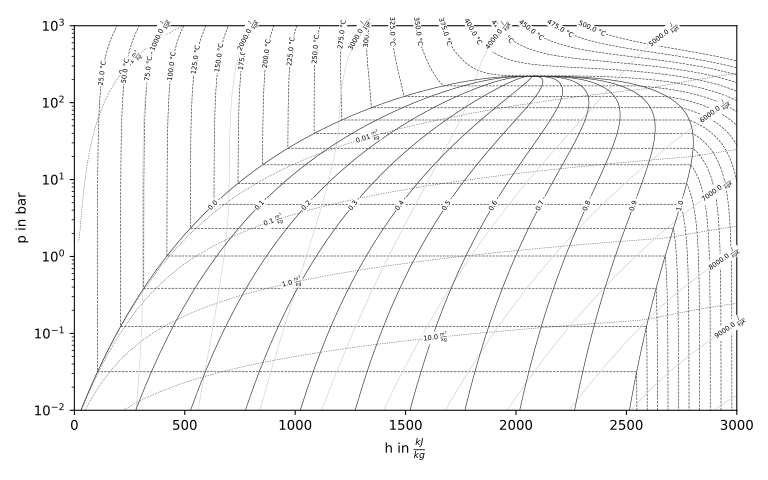
Or, a Ts-diagram:
>>> fig, ax = plt.subplots(1, figsize=(8, 5))
>>> diagram.draw_isolines(diagram_type='Ts', fig=fig, ax=ax, x_min=0, x_max=8000, y_min=0, y_max=700)
>>> plt.tight_layout()
>>> fig.savefig('Ts_diagram_H2O.svg')
>>> fig.savefig('Ts_diagram_H2O.png', dpi=300)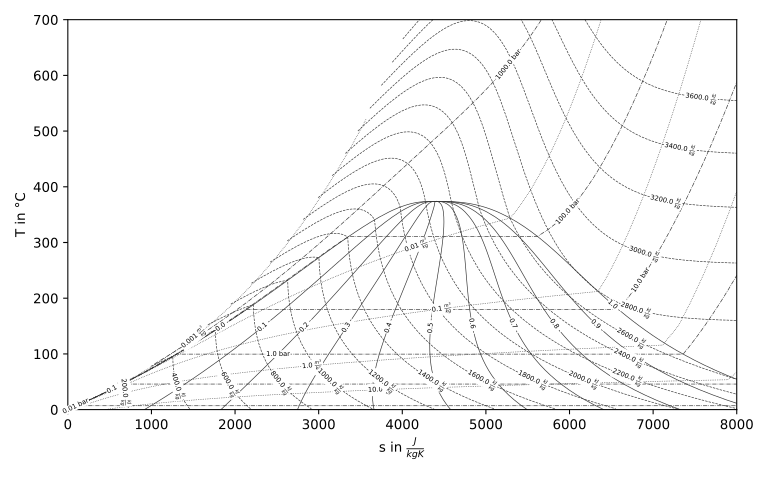
The fluids are available through CoolProp. To generate a diagram for a new fluid simply change the name. Isolines come with defaults as well.
>>> diagram = FluidPropertyDiagram(fluid='R290')
>>> diagram.set_unit_system(T='°C', h='kJ/kg', p='bar')
>>> diagram.calc_isolines()
>>> fig, ax = plt.subplots(1, figsize=(8, 5))
>>> diagram.draw_isolines(diagram_type='logph', fig=fig, ax=ax, x_min=0, x_max=800, y_min=1e-1, y_max=1e2)
>>> plt.tight_layout()
>>> fig.savefig('logph_diagram_R290.png', dpi=300)
>>> fig.savefig('logph_diagram_R290.svg')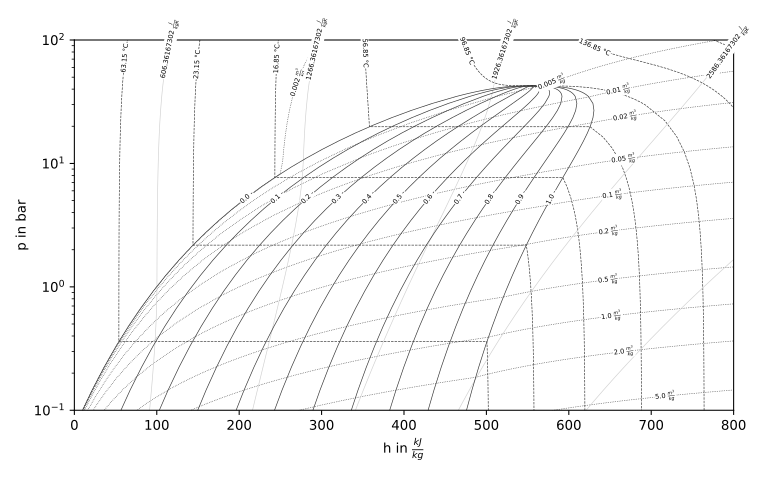
You can change the back-end of CoolProp, e.g. to use REFPROP:
diagram = FluidPropertyDiagram(fluid='R290', backend='REFPROP')Documentation
For further examples and usage please refer to the online documentation at https://fluprodia.readthedocs.io/.
Citation
Every version of fluprodia is archived at zenodo. You can cite the latest or a specific version. For citation info and more details please go to the zenodo entry of fluprodia.
References
This software depends on the packages CoolProp, matplolib and numpy.
1 maintainer

Metadata
1 maintainer
Release files for fluprodia 4.3
For a detailed explanation of source distributions (sdists) and built distributions (wheels), please see the package formats documentation.
Source distribution (sdist)
| File | Size | Uploaded | |
|---|---|---|---|
| fluprodia-4.3.tar.gz | 1.2 MB | Details |
Built distribution (wheel)
| File | Interpreter | ABI | Platform | Reset |
|---|---|---|---|---|
| fluprodia-4.3-py3-none-any.whl | Python 3 | none | any | Details |
Total release size: 1.2 MB
Release files / fluprodia-4.3.tar.gz
| Download URL | fluprodia-4.3.tar.gz |
|---|---|
| Size | 1.2 MB |
| Tags | Source |
|
SHA-256 checksum How to use checksums |
4fe8382239789b1e08ad7e5ead52bd9cccb15a935217117388073a044d007f6b
|
|
BLAKE2b-256 checksum How to use checksums |
cb858f899172807cd18274e255586c8d8d76f694eb04a5366b010e9e62e7df04
|
| Upload date | |
|
Uploaded using Trusted Publishing? What is trusted publishing? |
No |
| Uploaded via |
twine/7.0.0 CPython/3.13.6
|
Release files / fluprodia-4.3-py3-none-any.whl
| Download URL | fluprodia-4.3-py3-none-any.whl |
|---|---|
| Size | 22.9 kB |
| Tags | Python 3 |
|
SHA-256 checksum How to use checksums |
bbba609b798246a9a959f210962f4a424476d879e4ecd084a39d725d9bc98fea
|
|
BLAKE2b-256 checksum How to use checksums |
4d886475d693774133161ae91f7e77cda701d208184c64eb80ee83a8a2d1d469
|
| Upload date | |
|
Uploaded using Trusted Publishing? What is trusted publishing? |
No |
| Uploaded via |
twine/7.0.0 CPython/3.13.6
|














