
AI agent that turns natural language into executable automation. 412 batteries included.

Project description

flyto-ai
Natural language → executable automation workflows
Most AI agents have the LLM write shell commands and pray. flyto-ai uses 412 pre-built, schema-validated modules instead.



The Problem
Most AI agents have the LLM generate shell commands or raw code on every run. This means:
- Non-deterministic — the same prompt can produce different commands each time
- No validation — wrong flags, hallucinated APIs, subtle bugs only found at runtime
- Not reusable — each execution is ephemeral, nothing saved for next time
- Expensive — LLM spends tokens figuring out how to execute, not just what to execute
The Fix
flyto-ai flips the model: the LLM never writes code. It searches and selects from 412 pre-built modules, fills in parameters (validated against schemas), and executes them deterministically. Every run produces a reusable YAML workflow.
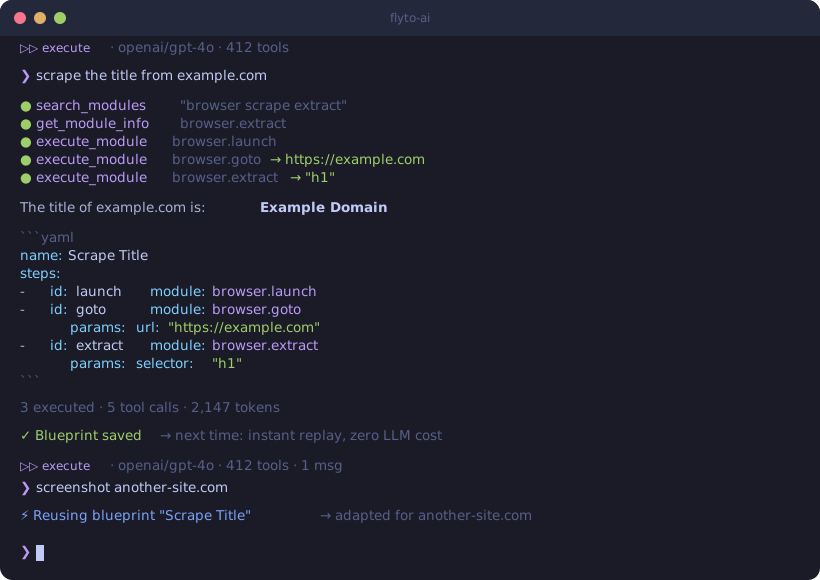
❯ scrape the title from example.com

Result: "Example Domain"
name: Scrape Title
params:
  url: "https://example.com"
steps:
  - id: launch
    module: browser.launch
  - id: goto
    module: browser.goto
    params:
      url: "${{params.url}}"
  - id: extract
    module: browser.extract
    params:
      selector: "h1"
Quick Start
pip install flyto-ai
playwright install chromium     # download browser for web automation
export OPENAI_API_KEY=sk-...   # or ANTHROPIC_API_KEY
flyto-ai
One install, one command — interactive chat with 412 automation modules, browser automation, and self-learning blueprints.
How It's Different
The core difference is what the LLM does during execution:
| Traditional AI agents | flyto-ai | |
|---|---|---|
| LLM's job | Write shell/Python code from scratch | Select modules + fill params |
| Execution | subprocess.run(llm_output) |
execute_module("browser.extract", {validated_params}) |
| Validation | None — errors at runtime | Schema validation before execution |
| Determinism | Same prompt → different code | Same module + params → same result |
| Output | One-time result | Result + reusable YAML workflow |
| Learning | None | Self-learning blueprints (zero LLM replay) |
| Cost per replay | Full LLM inference again | $0 (saved blueprint, no LLM) |
Use Cases
Web Scraping
❯ extract all product names and prices from example-shop.com/products
name: Scrape Products
params:
  url: "https://example-shop.com/products"
steps:
  - id: launch
    module: browser.launch
  - id: goto
    module: browser.goto
    params:
      url: "${{params.url}}"
  - id: extract
    module: browser.extract
    params:
      selector: ".product"
      fields:
        name: ".product-name"
        price: ".product-price"
Form Automation
❯ log in to staging.example.com, fill the contact form, and take a screenshot
name: Fill Contact Form
steps:
  - id: launch
    module: browser.launch
  - id: login
    module: browser.login
    params:
      url: "https://staging.example.com/login"
      username_selector: "#email"
      password_selector: "#password"
      submit_selector: "button[type=submit]"
  - id: fill
    module: browser.form
    params:
      url: "https://staging.example.com/contact"
      fields:
        name: "Test User"
        message: "Hello from flyto-ai"
  - id: proof
    module: browser.screenshot
API Monitoring + Notification
❯ check if https://api.example.com/health returns 200, if not send a Slack message
name: Health Check Alert
params:
  endpoint: "https://api.example.com/health"
steps:
  - id: check
    module: http.get
    params:
      url: "${{params.endpoint}}"
  - id: notify
    module: notification.slack
    params:
      webhook_url: "${{params.slack_webhook}}"
      message: "Health check failed: ${{steps.check.status_code}}"
    condition: "${{steps.check.status_code}} != 200"
412 Batteries Included
Powered by flyto-core — 412 automation modules across 55 categories:
| Category | Modules | Examples |
|---|---|---|
| Browser | 39 | launch, goto, click, type, extract, screenshot, wait |
| Atomic | 35 | reusable building-block operations |
| Flow | 23 | conditionals, loops, branching, error handling |
| Cloud | 14 | S3, GCS, cloud storage and APIs |
| Data | 13 | JSON, CSV, parsing, transformation |
| Array | 12 | filter, map, sort, flatten, unique |
| String | 11 | split, replace, template, regex, slugify |
| Productivity | 10 | email, calendar, document integrations |
| Image | 9 | resize, crop, convert, watermark, compress |
| HTTP / API | 9 | GET, POST, download, upload, GraphQL |
| Notification | 9 | email, Slack, Telegram, webhook |
| + 44 more | 200+ | database, crypto, docker, k8s, testing, ... |
Browse available modules:
flyto-ai version # Shows installed module count
Self-Learning Blueprints
The agent remembers what works. Good workflows are automatically saved as blueprints — reusable patterns that make future tasks faster and free.
First time:  "screenshot example.com" → 15s (discover modules, build from scratch)
Second time: "screenshot another.com" → 3s  (reuse learned blueprint, zero LLM cost)
How it works (closed-loop, no LLM involved):
- Execution succeeds with 3+ steps → auto-saved as blueprint (score 70)
- Blueprint reused successfully → score +5
- Blueprint fails → score -10
- Score < 10 → auto-retired, never suggested again
flyto-ai blueprints                             # View learned blueprints
flyto-ai blueprints --export > blueprints.yaml  # Export for sharing
Claude Code Agent
Use Claude Code as a coding worker with automatic verification loops:
pip install flyto-ai[agent]   # Installs claude-agent-sdk

# Basic — Claude Code writes code, no verification
flyto-ai code "fix the login form validation" --dir ./my-project

# With verification — screenshot + visual comparison after each fix attempt
flyto-ai code "match the Figma design for the login page" \
  --dir ./my-project \
  --verify screenshot \
  --verify-args '{"url": "http://localhost:3000/login"}' \
  --reference ./figma-login.png \
  --max-attempts 3

# JSON output for CI/CD
flyto-ai code "add unit tests for auth module" --dir ./project --json
How it works:
Phase 1: Gather codebase context from flyto-indexer
Phase 2: Claude Code writes code (with Guardian safety hooks)
Phase 3: Run verification recipe (browser screenshot + text extraction)
Phase 4: LLM visual comparison (actual vs reference)
  → Failed → feed back to Claude Code (Phase 2)
  → Passed → return result
Features:
- Guardian hooks — blocks dangerous operations (rm -rf, .env writes, credential access)
- Evidence trail — every tool call logged to
~/.flyto/evidence/<session>/evidence.jsonl - Budget control —
--budget 5.0caps spending per task - Indexer integration — flyto-indexer provides codebase context + mounts as MCP server
- Session resume — feedback loop reuses the same Claude Code session for full context
# Python API
from flyto_ai import ClaudeCodeAgent, AgentConfig
from flyto_ai.agents import CodeTaskRequest

agent = ClaudeCodeAgent(config=AgentConfig.from_env())
result = await agent.run(CodeTaskRequest(
    message="fix the login page",
    working_dir="/path/to/project",
    verification_recipe="screenshot",
    verification_args={"url": "http://localhost:3000/login"},
    reference_image="./figma-login.png",
))
print(result.ok, result.attempts, result.files_changed)
CLI
flyto-ai                                     # Interactive chat — executes tasks directly
flyto-ai chat "scrape example.com"           # One-shot execute mode
flyto-ai chat "scrape example.com" --plan    # YAML-only mode (don't execute)
flyto-ai chat "take screenshot" -p ollama    # Use Ollama (no API key needed)
flyto-ai chat "..." --webhook https://...    # POST result to webhook
flyto-ai code "fix bug" --dir ./project      # Claude Code Agent mode
flyto-ai serve --port 8080                   # HTTP server for triggers
flyto-ai blueprints                          # List learned blueprints
flyto-ai version                             # Version + dependency status
Interactive Mode
Just run flyto-ai — multi-turn conversation with up/down arrow history:
$ flyto-ai

  _____ _       _        ____       _    ___
 |  ___| |_   _| |_ ___ |___ \     / \  |_ _|
 | |_  | | | | | __/ _ \  __) |   / _ \  | |
 |  _| | | |_| | || (_) |/ __/   / ___ \ | |
 |_|   |_|\__, |\__\___/|_____|  /_/   \_\___|
           |___/

  v0.6.0  Interactive Mode
  Provider: openai  Model: gpt-4o  Tools: 412

  ⏵⏵ execute · openai/gpt-4o · 412 tools
❯ scrape the title from example.com

  ○ browser.launch
  ○ browser.goto
  ○ browser.extract

  The title of example.com is: **Example Domain**

  3 executed · 5 tool calls

  ⏵⏵ execute · openai/gpt-4o · 412 tools · 1 msgs
❯ now also take a screenshot

❯ /mode
Switched to: plan-only (YAML output)
Commands: /clear, /mode, /history, /version, /help, /exit
Webhook & HTTP Server
Send results anywhere:
flyto-ai chat "scrape example.com" --webhook https://hook.site/xxx
Accept triggers from anywhere:
flyto-ai serve --port 8080

# From Slack, n8n, Make, or any HTTP client:
curl -X POST http://localhost:8080/chat \
  -H "Content-Type: application/json" \
  -d '{"message": "take a screenshot of example.com"}'

# Execute mode (default) or plan-only:
curl -X POST http://localhost:8080/chat \
  -H "Content-Type: application/json" \
  -d '{"message": "scrape example.com", "mode": "yaml"}'
Python API
from flyto_ai import Agent, AgentConfig

agent = Agent(config=AgentConfig.from_env())

# Execute mode (default) — runs modules and returns results
result = await agent.chat("extract all links from https://example.com")
print(result.message)            # Result + YAML workflow
print(result.execution_results)  # Module execution results

# Plan-only mode — generates YAML without executing
result = await agent.chat("extract all links from example.com", mode="yaml")
print(result.message)            # YAML workflow only
Multi-Provider
Works with any LLM provider:
export OPENAI_API_KEY=sk-...          # OpenAI models
export ANTHROPIC_API_KEY=sk-ant-...   # Anthropic models
flyto-ai chat "..." -p ollama         # Local models (Llama, Mistral, etc.)
flyto-ai chat "..." --model <name>    # Any specific model
Security
- Workflows are auditable — YAML is human-readable, reviewable, and version-controllable
- Module policies — whitelist/denylist categories (e.g. block
file.*ordatabase.*) - Sensitive param redaction — API keys and passwords are masked in tool call logs
- Local-first — blueprints stored in local SQLite, nothing sent to third parties
- Webhook output — structured JSON only, no raw credentials in payload
Architecture
User message
  → LLM (OpenAI / Anthropic / Ollama)
    → Function calling: search_modules, get_module_info, execute_module, ...
      → 412 flyto-core modules (schema-validated, deterministic)
      → Self-learning blueprints (closed-loop, zero LLM)
      → Browser page inspection
    → Execute mode: run modules, return results + YAML
    → Plan mode: YAML validation loop (auto-retry on errors)
  → Structured output (results + reusable workflow)

Claude Code Agent (flyto-ai code):
  → Phase 1: flyto-indexer gathers codebase context
  → Phase 2: Claude Agent SDK spawns Claude Code
      → PreToolUse hook: Guardian blocks dangerous ops
      → PostToolUse hook: Evidence trail logging
      → MCP: flyto-indexer available for code intelligence
  → Phase 3: YAML recipe verification (browser automation)
  → Phase 4: LLM visual comparison (screenshot vs Figma)
  → Loop: failed → feedback → Phase 2 | passed → done
Telegram Bot Gateway
Run Claude Code from your phone via Telegram — read/write files, run commands, multi-turn conversation with full context. Also supports flyto-ai agent automation via /agent.
# 1. Install
pip install flyto-ai[agent,serve]
npm install -g @anthropic-ai/claude-code   # Claude Code CLI (required by SDK)

# 2. Set tokens
export TELEGRAM_BOT_TOKEN=123456:ABC-DEF       # from @BotFather
export TELEGRAM_ALLOWED_CHATS=your_chat_id      # optional whitelist
export ANTHROPIC_API_KEY=sk-ant-...

# 3. Start server
flyto-ai serve --host 0.0.0.0 --port 7411 --dir /path/to/your/project

# 4. Register webhook (once)
curl "https://api.telegram.org/bot$TELEGRAM_BOT_TOKEN/setWebhook?url=https://your-domain/telegram"

# 5. Open Telegram → send any message → Claude Code replies with streaming
The --dir flag sets the default working directory for Claude Code. You can change it later with /cd in the chat.
Bot Commands
| Command | Description |
|---|---|
| (plain text) | Claude Code — read/write files, run commands, multi-turn conversation |
/agent <msg> |
flyto-ai agent automation (browser, scraper, etc.) |
/cd <path> |
Change Claude Code working directory |
/model <name> |
Switch model (sonnet/opus/haiku) |
/cancel |
Interrupt Claude Code or cancel agent task |
/clear |
Clear session |
/status |
View active/recent tasks |
/cost |
View token spending |
/yaml |
List learned blueprints |
/help |
Show command list |
Features
- Claude Code as default — plain text messages go to Claude Code CLI, with full file read/write, command execution, and persistent multi-turn context
- Real-time streaming — CLI output streams to Telegram by editing the status message in real time
- CLI-agnostic —
CLIProfileabstraction supports any AI CLI (Claude, Codex, Gemini, etc.) - MCP tools built-in — Claude Code inherits your MCP config (flyto-core 412 modules, flyto-indexer, etc.)
- Session resume — each chat maintains a CLI session; context is preserved across messages
- flyto-ai agent via
/agent— browser automation, scraping, and 412-module workflows remain available as a slash command - Persistent job queue — agent tasks survive server restarts, with status tracking
- Mid-execution steering — send a message while an agent task is running to redirect it
| Variable | Purpose | Required |
|---|---|---|
TELEGRAM_BOT_TOKEN |
Bot token from @BotFather | Yes (for /telegram) |
TELEGRAM_ALLOWED_CHATS |
Comma-separated chat_id whitelist | No (empty = allow all) |
Action Assistant (v0.10.0)
The Action Assistant is a 7-layer middleware system that makes browser automation reliable without hardcoding any site-specific logic into the system prompt.
AssistantMiddleware
Seven layers of system intelligence that run automatically on every tool call:
- Blueprint Guard — enforces blueprint-first routing; the agent must follow a matching blueprint before improvising
- Snapshot Guard — ensures the agent always has a fresh page snapshot before acting
- Param Auto-Correction — fixes common parameter mistakes (wrong field names, missing required fields) before they reach the module
- Circuit Breaker — detects infinite retry loops on failing or empty modules and stops execution early
- Anti-Bot Detection — recognizes bot-detection pages (Cloudflare, CAPTCHA) and switches strategy
- Selector Healing — when a selector fails, attempts alternative selectors before giving up
- Output Auto-Save — automatically persists structured output (screenshots, extracted data) to disk
Key Features
- ask_user tool — pauses execution mid-flow to request user credentials, choices, or confirmation. The agent waits for the user's response before continuing.
- Vault auto-fill — encrypted local credential storage. Credentials entered once are securely saved and auto-filled on repeat visits to the same site.
- Preference learning — remembers non-sensitive choices (seat type, meal preference, sort order, etc.) so the agent does not ask again.
- Blueprint-first routing — 33 seed blueprints cover common workflows. The system enforces blueprint selection at the middleware level, not via prompt instructions.
- Zero hardcoded prompt — no module names, no site names, no selectors in the system prompt. All domain knowledge lives in blueprints and middleware.
- Circuit breaker — stops infinite retry when a module keeps failing or returns empty results. Prevents wasted tokens and stuck sessions.
- Credential masking — passwords and secrets are never exposed in LLM context. The vault injects credentials at execution time, after the LLM has selected the action.
Environment Variables
| Variable | Description |
|---|---|
FLYTO_AI_PROVIDER |
openai, anthropic, or ollama |
FLYTO_AI_API_KEY |
API key (or use provider-specific vars below) |
FLYTO_AI_MODEL |
Model name override |
OPENAI_API_KEY |
Fallback for OpenAI provider |
ANTHROPIC_API_KEY |
Fallback for Anthropic provider |
FLYTO_AI_BASE_URL |
Custom API endpoint (OpenAI-compatible) |
TELEGRAM_BOT_TOKEN |
Telegram Bot token for /telegram webhook |
TELEGRAM_ALLOWED_CHATS |
Comma-separated Telegram chat_id whitelist |
FLYTO_AI_CC_MAX_BUDGET |
Claude Code Agent max budget in USD (default: 5.0) |
FLYTO_AI_CC_MAX_TURNS |
Claude Code Agent max turns (default: 30) |
FLYTO_AI_CC_MAX_FIX_ATTEMPTS |
Claude Code Agent max fix attempts (default: 3) |
License
Apache-2.0 — use it commercially, fork it, build on it.
Release history Release notifications | RSS feed


Download files
Download the file for your platform. If you're not sure which to choose, learn more about installing packages.
Source Distribution
Built Distribution
Filter files by name, interpreter, ABI, and platform.
If you're not sure about the file name format, learn more about wheel file names.
Copy a direct link to the current filters
File details
Details for the file flyto_ai-0.10.9.tar.gz.
File metadata
- Download URL: flyto_ai-0.10.9.tar.gz
- Upload date:
- Size: 4.5 MB
- Tags: Source
- Uploaded using Trusted Publishing? No
- Uploaded via: twine/6.2.0 CPython/3.10.6
File hashes
| Algorithm | Hash digest | |
|---|---|---|
| SHA256 |
85292a04ba306331563d0fda0aad0ac5eabd1a44d402b932f491dea9ae161a55
|
|
| MD5 |
1eded466e0a4bb8c3473ee586da4b75f
|
|
| BLAKE2b-256 |
fd24b8a7ec53f11fd80daad4dcc6947d333163836b7b462e2feb09d623473ac0
|
File details
Details for the file flyto_ai-0.10.9-py3-none-any.whl.
File metadata
- Download URL: flyto_ai-0.10.9-py3-none-any.whl
- Upload date:
- Size: 216.4 kB
- Tags: Python 3
- Uploaded using Trusted Publishing? No
- Uploaded via: twine/6.2.0 CPython/3.10.6
File hashes
| Algorithm | Hash digest | |
|---|---|---|
| SHA256 |
98218d5f9f93c328b22b559b31f20be16a1ab2668a50cc873730bafbf3757557
|
|
| MD5 |
9f29ab38545637c23f080788b7418c07
|
|
| BLAKE2b-256 |
931fb89bf88cd1c2c0e3f0ca775007b2e4dcda3131d96d3435c5468ceb6b222b
|






