
AI agent that turns natural language into executable automation. 415 batteries included.

Project description

flyto-ai
Natural language → executable automation workflows
aider writes code. open-interpreter runs code. flyto-ai builds & runs workflows.



What is flyto-ai?
An AI agent that turns natural language into real results + reusable automation workflows.
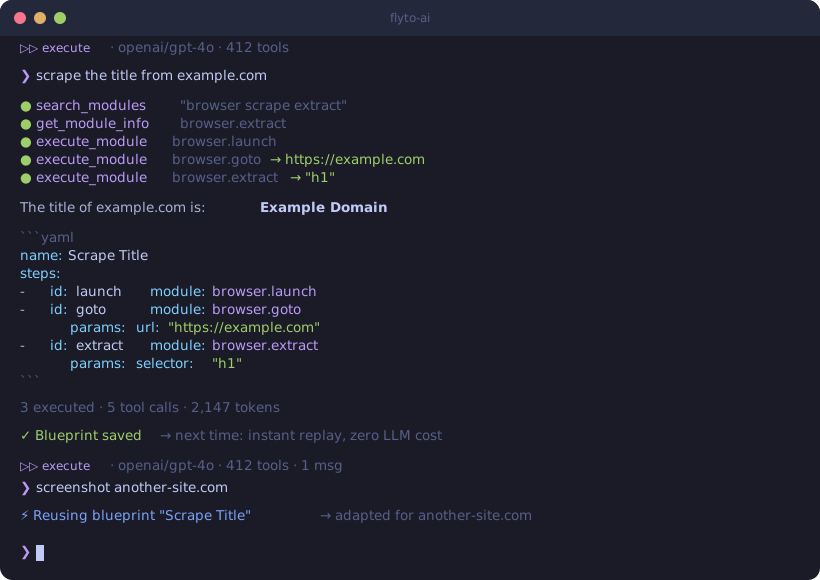
Say "scrape the title from example.com" — the agent executes it immediately and gives you the result, plus a YAML workflow you can save, share, schedule, and run again.
❯ scrape the title from example.com

Result: "Example Domain"

```yaml
name: Scrape Title
params:
  url: "https://example.com"
steps:
  - id: launch
    module: browser.launch
  - id: goto
    module: browser.goto
    params:
      url: "${{params.url}}"
  - id: extract
    module: browser.extract
    params:
      selector: "h1"
Quick Start
pip install flyto-ai
playwright install chromium     # download browser for web automation
export OPENAI_API_KEY=sk-...   # or ANTHROPIC_API_KEY
flyto-ai
One install, one command — interactive chat with 412 automation modules, browser automation, and self-learning blueprints.
Why flyto-ai?
| aider | open-interpreter | flyto-ai | |
|---|---|---|---|
| Output | Code changes (git diff) | One-time code execution | Results + reusable YAML workflows |
| Tools | Your codebase | Raw Python/JS/Shell | 412 pre-built modules |
| Learns | No | No | Yes — self-learning blueprints |
| Reusable | Yes (code) | No (ephemeral) | Yes (save, share, schedule) |
| Webhook/API | No | No | Yes |
| For | Developers | Power users | Developers & ops automation |
| License | Apache-2.0 | AGPL-3.0 | Apache-2.0 |
Use Cases
Web Scraping
❯ extract all product names and prices from example-shop.com/products
name: Scrape Products
params:
  url: "https://example-shop.com/products"
steps:
  - id: launch
    module: browser.launch
  - id: goto
    module: browser.goto
    params:
      url: "${{params.url}}"
  - id: extract
    module: browser.extract
    params:
      selector: ".product"
      fields:
        name: ".product-name"
        price: ".product-price"
Form Automation
❯ log in to staging.example.com, fill the contact form, and take a screenshot
name: Fill Contact Form
steps:
  - id: launch
    module: browser.launch
  - id: login
    module: browser.login
    params:
      url: "https://staging.example.com/login"
      username_selector: "#email"
      password_selector: "#password"
      submit_selector: "button[type=submit]"
  - id: fill
    module: browser.form
    params:
      url: "https://staging.example.com/contact"
      fields:
        name: "Test User"
        message: "Hello from flyto-ai"
  - id: proof
    module: browser.screenshot
API Monitoring + Notification
❯ check if https://api.example.com/health returns 200, if not send a Slack message
name: Health Check Alert
params:
  endpoint: "https://api.example.com/health"
steps:
  - id: check
    module: http.get
    params:
      url: "${{params.endpoint}}"
  - id: notify
    module: notification.slack
    params:
      webhook_url: "${{params.slack_webhook}}"
      message: "Health check failed: ${{steps.check.status_code}}"
    condition: "${{steps.check.status_code}} != 200"
412 Batteries Included
Powered by flyto-core — 412 automation modules across 78 categories:
| Category | Modules | Examples |
|---|---|---|
| Browser | 38 | launch, goto, click, type, extract, screenshot, wait |
| HTTP / API | 15 | GET, POST, download, upload, GraphQL |
| String | 12 | split, replace, template, regex, slugify |
| Image | 10 | resize, crop, convert, watermark, compress |
| File | 9 | read, write, copy, zip, CSV, JSON |
| Database | 6 | query, insert, SQLite, PostgreSQL |
| Notification | 5 | email, Slack, Telegram, webhook |
| + 71 more | 317 | array, math, crypto, convert, flow, ... |
Browse available modules:
flyto-ai version # Shows installed module count
Self-Learning Blueprints
The agent remembers what works. Good workflows are automatically saved as blueprints — reusable patterns that make future tasks faster.
First time:  "screenshot example.com" → 15s (discover modules, build from scratch)
Second time: "screenshot another.com" → 3s  (reuse learned blueprint)
When are blueprints saved?
- Only after validation passes + execution succeeds
- Trivial 1-2 step workflows are skipped
- Each blueprint has a score based on success/fail ratio — bad ones decay naturally
- Stored locally in
~/.flyto/blueprints.db
flyto-ai blueprints                             # View learned blueprints
flyto-ai blueprints --export > blueprints.yaml  # Export for sharing
CLI
flyto-ai                                     # Interactive chat — executes tasks directly
flyto-ai chat "scrape example.com"           # One-shot execute mode
flyto-ai chat "scrape example.com" --plan    # YAML-only mode (don't execute)
flyto-ai chat "take screenshot" -p ollama    # Use Ollama (no API key needed)
flyto-ai chat "..." --webhook https://...    # POST result to webhook
flyto-ai serve --port 8080                   # HTTP server for triggers
flyto-ai blueprints                          # List learned blueprints
flyto-ai version                             # Version + dependency status
Interactive Mode
Just run flyto-ai — multi-turn conversation with up/down arrow history:
$ flyto-ai

  _____ _       _        ____       _    ___
 |  ___| |_   _| |_ ___ |___ \     / \  |_ _|
 | |_  | | | | | __/ _ \  __) |   / _ \  | |
 |  _| | | |_| | || (_) |/ __/   / ___ \ | |
 |_|   |_|\__, |\__\___/|_____|  /_/   \_\___|
           |___/

  v0.4.4  Interactive Mode
  Provider: openai  Model: gpt-4o  Tools: 412

  ⏵⏵ execute · openai/gpt-4o · 412 tools
❯ scrape the title from example.com

  ○ browser.launch
  ○ browser.goto
  ○ browser.extract

  The title of example.com is: **Example Domain**

  3 executed · 5 tool calls

  ⏵⏵ execute · openai/gpt-4o · 412 tools · 1 msgs
❯ now also take a screenshot

❯ /mode
Switched to: plan-only (YAML output)
Commands: /clear, /mode, /history, /version, /help, /exit
Webhook & HTTP Server
Send results anywhere:
flyto-ai chat "scrape example.com" --webhook https://hook.site/xxx
Accept triggers from anywhere:
flyto-ai serve --port 8080

# From Slack, n8n, Make, or any HTTP client:
curl -X POST http://localhost:8080/chat \
  -H "Content-Type: application/json" \
  -d '{"message": "take a screenshot of example.com"}'

# Execute mode (default) or plan-only:
curl -X POST http://localhost:8080/chat \
  -H "Content-Type: application/json" \
  -d '{"message": "scrape example.com", "mode": "yaml"}'
Python API
from flyto_ai import Agent, AgentConfig

agent = Agent(config=AgentConfig.from_env())

# Execute mode (default) — runs modules and returns results
result = await agent.chat("extract all links from https://example.com")
print(result.message)            # Result + YAML workflow
print(result.execution_results)  # Module execution results

# Plan-only mode — generates YAML without executing
result = await agent.chat("extract all links from example.com", mode="yaml")
print(result.message)            # YAML workflow only
Multi-Provider
Works with any LLM provider:
export OPENAI_API_KEY=sk-...          # OpenAI models
export ANTHROPIC_API_KEY=sk-ant-...   # Anthropic models
flyto-ai chat "..." -p ollama         # Local models (Llama, Mistral, etc.)
flyto-ai chat "..." --model <name>    # Any specific model
Security
- Workflows are auditable — YAML is human-readable, reviewable, and version-controllable
- Module policies — whitelist/denylist categories (e.g. block
file.*ordatabase.*) - Sensitive param redaction — API keys and passwords are masked in tool call logs
- Local-first — blueprints stored in local SQLite, nothing sent to third parties
- Webhook output — structured JSON only, no raw credentials in payload
Architecture
User message
  → LLM (OpenAI / Anthropic / Ollama)
    → Function calling: search_modules, get_module_info, execute_module, ...
      → 412 flyto-core modules
      → Self-learning blueprints
      → Browser page inspection
    → Execute mode: run modules, return results + YAML
    → Plan mode: YAML validation loop (auto-retry on errors)
  → Structured output (results + reusable workflow)
Environment Variables
| Variable | Description |
|---|---|
FLYTO_AI_PROVIDER |
openai, anthropic, or ollama |
FLYTO_AI_API_KEY |
API key (or use provider-specific vars below) |
FLYTO_AI_MODEL |
Model name override |
OPENAI_API_KEY |
Fallback for OpenAI provider |
ANTHROPIC_API_KEY |
Fallback for Anthropic provider |
FLYTO_AI_BASE_URL |
Custom API endpoint (OpenAI-compatible) |
License
Apache-2.0 — use it commercially, fork it, build on it.
Release history Release notifications | RSS feed


Download files
Download the file for your platform. If you're not sure which to choose, learn more about installing packages.
Source Distribution
Built Distribution
Filter files by name, interpreter, ABI, and platform.
If you're not sure about the file name format, learn more about wheel file names.
Copy a direct link to the current filters
File details
Details for the file flyto_ai-0.5.2.tar.gz.
File metadata
- Download URL: flyto_ai-0.5.2.tar.gz
- Upload date:
- Size: 83.2 kB
- Tags: Source
- Uploaded using Trusted Publishing? No
- Uploaded via: twine/6.2.0 CPython/3.10.6
File hashes
| Algorithm | Hash digest | |
|---|---|---|
| SHA256 |
6ce9936b9666f8962e462cedcd8967ef6f02bd922a7e198e98666a7707986af4
|
|
| MD5 |
4ccda4c01b18dd4525eb76465297665d
|
|
| BLAKE2b-256 |
9f917e35ba854056d8f7b09f64d127d3ca461597dc75da6a26e49326c6782e04
|
File details
Details for the file flyto_ai-0.5.2-py3-none-any.whl.
File metadata
- Download URL: flyto_ai-0.5.2-py3-none-any.whl
- Upload date:
- Size: 39.8 kB
- Tags: Python 3
- Uploaded using Trusted Publishing? No
- Uploaded via: twine/6.2.0 CPython/3.10.6
File hashes
| Algorithm | Hash digest | |
|---|---|---|
| SHA256 |
2cf512cfbb8f9a76224e596a520f103b72273284b446f039330ec363771bd733
|
|
| MD5 |
d259de5e1cc3d921dd1713d8e1fc727b
|
|
| BLAKE2b-256 |
8fbf45bb1765f1302b80a6ce54a7d62fcc3b7eab4a5a733e37722583db41a96a
|






