
foamToPython



foamToPython is a high-performance Python package for reading and writing OpenFOAM field data and performing Proper Orthogonal Decomposition (POD) analysis. It provides a fast and efficient interface between OpenFOAM simulations and Python/NumPy, supporting both serial and parallel case formats.
Why foamToPython?
🚀 Performance
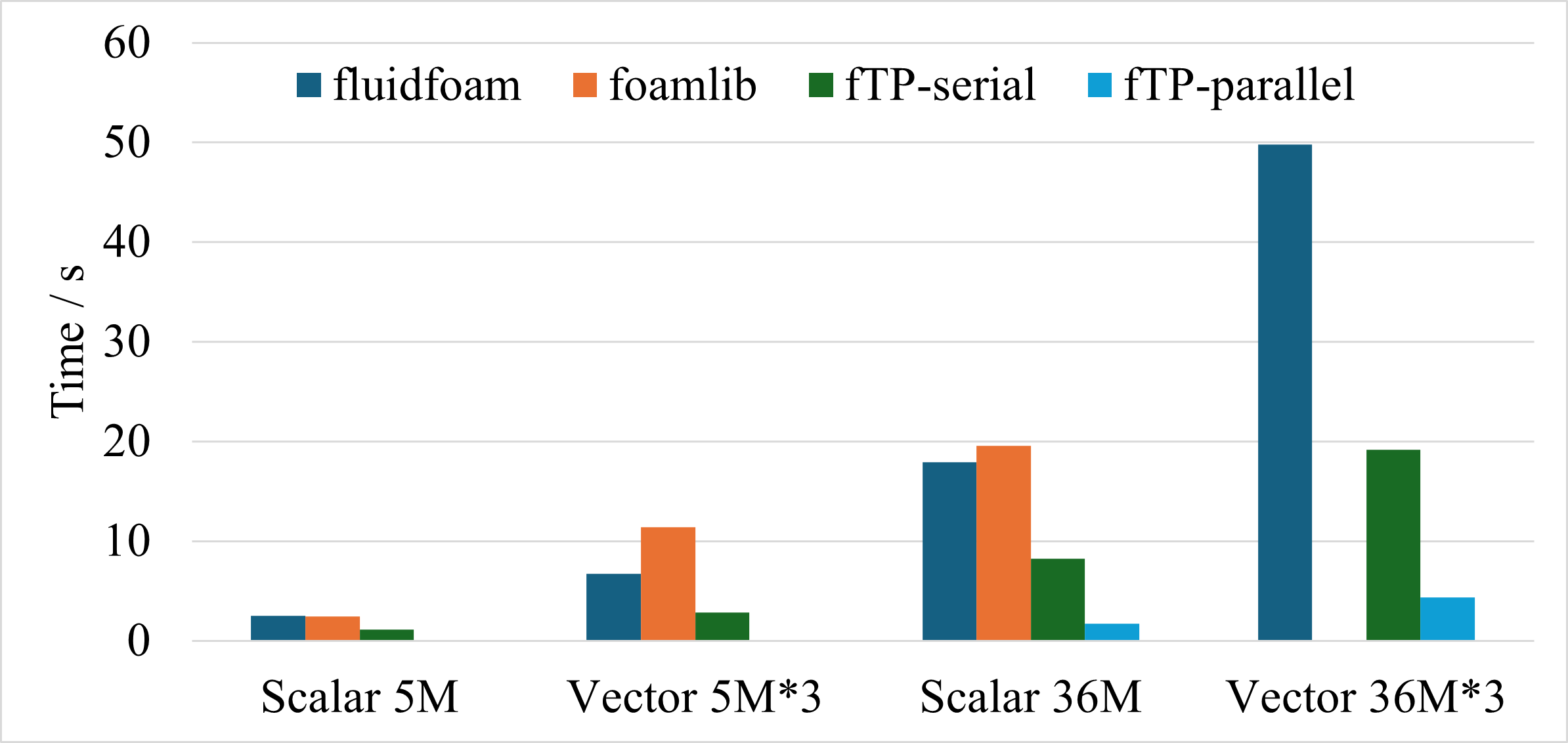
~10x faster than popular alternatives like FluidFoam and foamlib when reading fields, especially for large-scale parallel cases.
✨ Key Features
- High Performance: Optimized I/O operations for reading OpenFOAM fields
- Parallel Support: Seamlessly handles both serial and parallel OpenFOAM cases
- Field Types: Supports scalar and vector fields (volScalarField, volVectorField)
- Flexible Interface: Read uniform and non-uniform internal fields
- POD Analysis: Built-in Proper Orthogonal Decomposition for modal analysis
- NumPy Integration: Direct conversion to/from NumPy arrays
- Simple API: Easy-to-use, Pythonic interface
Performance Comparison
The following benchmark demonstrates foamToPython's superior performance across different scenarios:
Benchmark Details
The comparison was performed under four different conditions:
- Scalar fields with 5 million cells
- Vector fields with 5 million cells
- Scalar fields with 36 million cells
- Vector fields with 36 million cells
Test Environment: Intel Xeon Platinum 8358 CPU (64 cores @ 2.60GHz), 256GB RAM, Red Hat Enterprise Linux
foamToPython shows its greatest advantage when reading large parallel cases with 36 million cells, achieving approximately 10x speedup over FluidFoam and foamlib.
Note: The compared packages offer additional functionalities not currently included in foamToPython. PyFoam was excluded due to version compatibility issues.
Installation
From PyPI (Recommended)
pip install foamToPython
From Source
pip install git+https://github.com/Ruansh233/foamToPython.git
Development Installation
git clone https://github.com/Ruansh233/foamToPython.git
cd foamToPython
pip install -e .
Quick Start
from foamToPython import OFField

# Read a velocity field from an OpenFOAM case
U = OFField('case/1/U', 'vector', read_data=True)

# Access internal field data (returns NumPy array)
velocity_data = U.internalField

# Access boundary field data (returns dict)
inlet_velocity = U.boundaryField['inlet']['value']

# Modify the field and write it back
U.internalField *= 1.5  # Scale velocity by 1.5
U.writeField('case/2/U')
Usage Guide
Reading OpenFOAM Fields
Basic Field Reading
The OFField class is the main interface for reading OpenFOAM fields. It supports both scalar and vector fields with uniform or non-uniform internal fields.
from foamToPython import OFField

# Read a vector field (e.g., velocity)
U = OFField('case/1/U', 'vector', read_data=True)

# Read a scalar field (e.g., pressure)
p = OFField('case/1/p', 'scalar', read_data=True)
Arguments:
filename: Path to the field filedata_type: Field type -"scalar","vector", or"label"read_data: Whether to read the field immediately (default:False)parallel: Whether the case is run in parallel (default:False)
Lazy Loading
For large cases, you can defer reading until needed:
# Initialize without reading
U = OFField('case/1/U', 'vector', read_data=False)

# Data is automatically read when accessed
velocity = U.internalField  # Triggers reading
Reading Parallel Cases
# Read from a parallel case
U = OFField('case/1/U', 'vector', parallel=True)

# Internal field is stored as a list (one per processor)
velocity_proc0 = U.internalField[0]
velocity_proc1 = U.internalField[1]
# ... etc.
Accessing Field Data
Internal Field
# Get internal field as NumPy array
U_internal = U.internalField

# For uniform fields, length is 1
# For non-uniform fields, shape is (n_cells, n_components)
print(U_internal.shape)  # e.g., (1000000, 3) for vector field
Boundary Field
# Access boundary data (returns dictionary)
boundaries = U.boundaryField

# Get specific patch
inlet_data = U.boundaryField['inlet']

# Check boundary type
bc_type = inlet_data['type']  # e.g., 'fixedValue', 'zeroGradient'

# Access boundary values (for fixedValue type)
inlet_velocity = inlet_data['value']  # NumPy array
Writing OpenFOAM Fields
Basic Writing
# Modify field data
U.internalField *= 2.0

# Write to new time directory
U.writeField('case/2/U')
Writing API Options
# Method 1: Single path (case/time/field)
U.writeField('case/2/U')

# Method 2: Explicit arguments
U.writeField('case', timeDir=2, fieldName='U')
Both forms write to the same OpenFOAM field destination.
Writing Parallel Cases
# Works automatically for parallel cases
U_parallel = OFField('case/1/U', 'vector', parallel=True)
U_parallel.writeField('case/2/U')
OpenFOAM Cavity Validation Example
The repository includes a real OpenFOAM validation example for the v2312
icoFoam/cavity tutorial. It runs the serial cavity case, validates read/write
round trips for U and p, decomposes the latest time, and validates parallel
processor fields:
pip install foamlib
python3 examples/validate_cavity_serial_parallel.py
By default the example uses:
examples/cavity
It runs OpenFOAM commands via foamlib using the OpenFOAM environment already
available in your current shell. If OpenFOAM is not sourced/installed, the
script exits with a message telling you to install/source OpenFOAM first. Use
--work-dir to choose where the temporary validation case is written.
Reading Lists and ListLists
Reading Simple Lists
from foamToPython import readList

# Read a list field
boundary_data = readList("0/boundaryField", "scalar")
Reading ListList Data
from foamToPython import readListList

# Read cellZones (ListList format)
cellZones = readListList("constant/polyMesh/cellZones", "label")
Proper Orthogonal Decomposition (POD)
foamToPython includes built-in POD capabilities through the PODmodes class in the PODopenFOAM submodule.
Performing POD Analysis
from foamToPython import OFField
from foamToPython.PODmodes import PODmodes

# Read multiple snapshots (time steps)
snapshots = []
for time in ['1', '2', '3', '4', '5']:
    U = OFField(f'case/{time}/U', 'vector', read_data=True)
    snapshots.append(U)

# Create POD analysis
pod = PODmodes(
    snapshots,
    POD_algo='eigen',  # or 'svd'
    rank=10            # number of modes to compute
)

# Access POD modes and coefficients
modes = pod.modes
coefficients = pod.coefficients
singular_values = pod.singular_values
Arguments:
U: List ofOFFieldinstances or NumPy array of snapshotsPOD_algo: Algorithm for POD computation -"eigen"(default) or"svd"rank: Number of modes to compute (default: 10)
Exporting POD Modes
# Export modes in OpenFOAM format
pod.writeModes(
    outputDir='POD_modes',
    fieldName='U_mode'
)

# Modes are written to: POD_modes/1/U_mode, POD_modes/2/U_mode, ..., POD_modes/10/U_mode
Arguments:
outputDir: Directory to write the modesfieldName: Name for the mode fields (optional)
The exported modes can be visualized directly in ParaView using the standard OpenFOAM reader.
Examples
Example 1: Basic Field Manipulation
from foamToPython import OFField

# Read velocity field
U = OFField('case/100/U', 'vector')

# Scale the velocity field
U.internalField *= 1.2

# Write to new time directory
U.writeField('case/120/U')

print(f"Velocity field shape: {U.internalField.shape}")
print(f"Boundary patches: {list(U.boundaryField.keys())}")
Example 2: Working with Parallel Cases
from foamToPython import OFField
import numpy as np

# Read from parallel case (e.g., decomposed with 4 processors)
p = OFField('case/final/p', 'scalar', parallel=True)

# Concatenate data from all processors
p_combined = np.concatenate([p.internalField[i] for i in range(4)])

# Compute statistics
print(f"Global min pressure: {p_combined.min()}")
print(f"Global max pressure: {p_combined.max()}")
print(f"Mean pressure: {p_combined.mean()}")
Example 3: POD-based Flow Analysis
from foamToPython import OFField
from foamToPython.PODmodes import PODmodes
import numpy as np

# Read snapshot series
times = np.arange(0, 10, 0.5)
snapshots = [OFField(f'case/{t}/U', 'vector') for t in times]

# Perform POD
pod = PODmodes(snapshots, POD_algo='svd', rank=5)

# Analyze energy content
energy = pod.singular_values**2
total_energy = energy.sum()
cumulative_energy = np.cumsum(energy) / total_energy

print("Energy captured by each mode:")
for i, e in enumerate(cumulative_energy):
    print(f"Mode {i+1}: {e*100:.2f}%")

# Export dominant modes
pod.writeModes('POD_analysis', fieldName='U_pod')
Example 4: Batch Processing
from foamToPython import OFField
import glob

# Process all time directories
case_path = 'case'
time_dirs = sorted(glob.glob(f'{case_path}/[0-9]*'))

for time_dir in time_dirs:
    # Read field
    U = OFField(f'{time_dir}/U', 'vector')

    # Compute velocity magnitude
    U_mag = np.linalg.norm(U.internalField, axis=1)

    print(f"Time {time_dir.split('/')[-1]}: "
          f"Max velocity = {U_mag.max():.3f} m/s")
Supported Field Types
- Scalar Fields:
volScalarField(e.g., pressure, temperature) - Vector Fields:
volVectorField(e.g., velocity) - Label Fields: Integer fields (e.g., cell labels)
- Uniform Fields: Fields with constant values
- Non-uniform Fields: Fields with spatially varying values
Performance Tips
- Use
read_data=Falsefor large cases if you don't need immediate access - Parallel cases are currently slower than serial - reconstruction before reading may be faster for small processor counts
- Pre-allocate arrays when processing multiple time steps
- Use NumPy operations directly on
internalFieldfor vectorized performance
Known Limitations
- Parallel case reading is functional but slower than serial; performance improvements are planned
- Currently focuses on
volScalarFieldandvolVectorField; support for other field types coming soon - Writing capabilities are optimized for internal and boundary fields; some advanced OpenFOAM features may not be fully supported
Roadmap
- Improve parallel case reading performance
- Support for additional field types (tensor fields, etc.)
- Mesh reading capabilities
- Integration with visualization tools
- Extended POD features (SPOD, DMD)## Contributing
Contributions are welcome! If you'd like to contribute, please:
- Fork the repository
- Create a feature branch (
git checkout -b feature/amazing-feature) - Commit your changes (
git commit -m 'Add amazing feature') - Push to the branch (
git push origin feature/amazing-feature) - Open a Pull Request
Please ensure your code follows the existing style and includes appropriate tests.
Citation
If you use foamToPython in your research, please cite:
@software{foamToPython2024,
  author = {Ruan, Shenhui},
  title = {foamToPython: High-Performance OpenFOAM Field Reader for Python},
  year = {2024},
  url = {https://github.com/Ruansh233/foamToPython}
}
License
This project is licensed under the MIT License - see the LICENSE file for details.
Author
Shenhui Ruan
Email: shenhui.ruan@kit.edu
GitHub: @Ruansh233
Related Projects
- PODImodels - POD-based interpolation models for reduced-order modeling
- localMode - Local mode analysis tools
- FluidFoam - Alternative OpenFOAM reader
- foamlib - Another OpenFOAM interface for Python
Acknowledgments
This package was developed to provide high-performance data exchange between OpenFOAM and Python for CFD post-processing and reduced-order modeling applications.
Support
If you encounter any issues or have questions:
- Open an issue on GitHub
- Contact: shenhui.ruan@kit.edu
Star ⭐ the repository if you find foamToPython useful!
1 maintainer

Metadata
1 maintainer
Release files for foamToPython 0.0.2
For a detailed explanation of source distributions (sdists) and built distributions (wheels), please see the package formats documentation.
Source distribution (sdist)
| File | Size | Uploaded | |
|---|---|---|---|
| foamtopython-0.0.2.tar.gz | 30.2 kB | Details |
Built distribution (wheel)
| File | Interpreter | ABI | Platform | Reset |
|---|---|---|---|---|
| foamtopython-0.0.2-py3-none-any.whl | Python 3 | none | any | Details |
Total release size: 55.6 kB
Release files / foamtopython-0.0.2.tar.gz
| Download URL | foamtopython-0.0.2.tar.gz |
|---|---|
| Size | 30.2 kB |
| Tags | Source |
|
SHA-256 checksum How to use checksums |
aed3859f0197b051da72234fe5f24516d2403ce10eac3ff6d0a760a5a136c6d6
|
|
BLAKE2b-256 checksum How to use checksums |
8c06b94936cf007d875d17fe4b46c7fc38f83b73e5f5b81bd74af79729f7b696
|
| Upload date | |
|
Uploaded using Trusted Publishing? What is trusted publishing? |
No |
| Uploaded via |
twine/6.2.0 CPython/3.12.3
|
Release files / foamtopython-0.0.2-py3-none-any.whl
| Download URL | foamtopython-0.0.2-py3-none-any.whl |
|---|---|
| Size | 25.4 kB |
| Tags | Python 3 |
|
SHA-256 checksum How to use checksums |
4e7bc78d9acaf577d80fec71343d648166818f61e8eff748a0bf49d28ec83f3f
|
|
BLAKE2b-256 checksum How to use checksums |
b18fe9bdfbccc2613ff0c05d2be5822309a480d4fe0a273d923b86317f451dfe
|
| Upload date | |
|
Uploaded using Trusted Publishing? What is trusted publishing? |
No |
| Uploaded via |
twine/6.2.0 CPython/3.12.3
|














