
A py package to read and write OpenFOAM data

Project description
foamToPython is an ongoing repository to read and write the OpenFOAM field and numpy array. You can also perform Proper Orthogonal Decomposition (POD) to OpenFOAM fields with this package. It can handle both serial and parallel OpenFOAM case. The package is developed in Python 3.8+ and depends on numpy.
Features
It is about 10 times faster than two widely used packages, FluidFoam and foamlib, in reading fields. Moreover, it is capable to read and write parallel OpenFOAM case. The comparison of the performance is shown in the following figure.
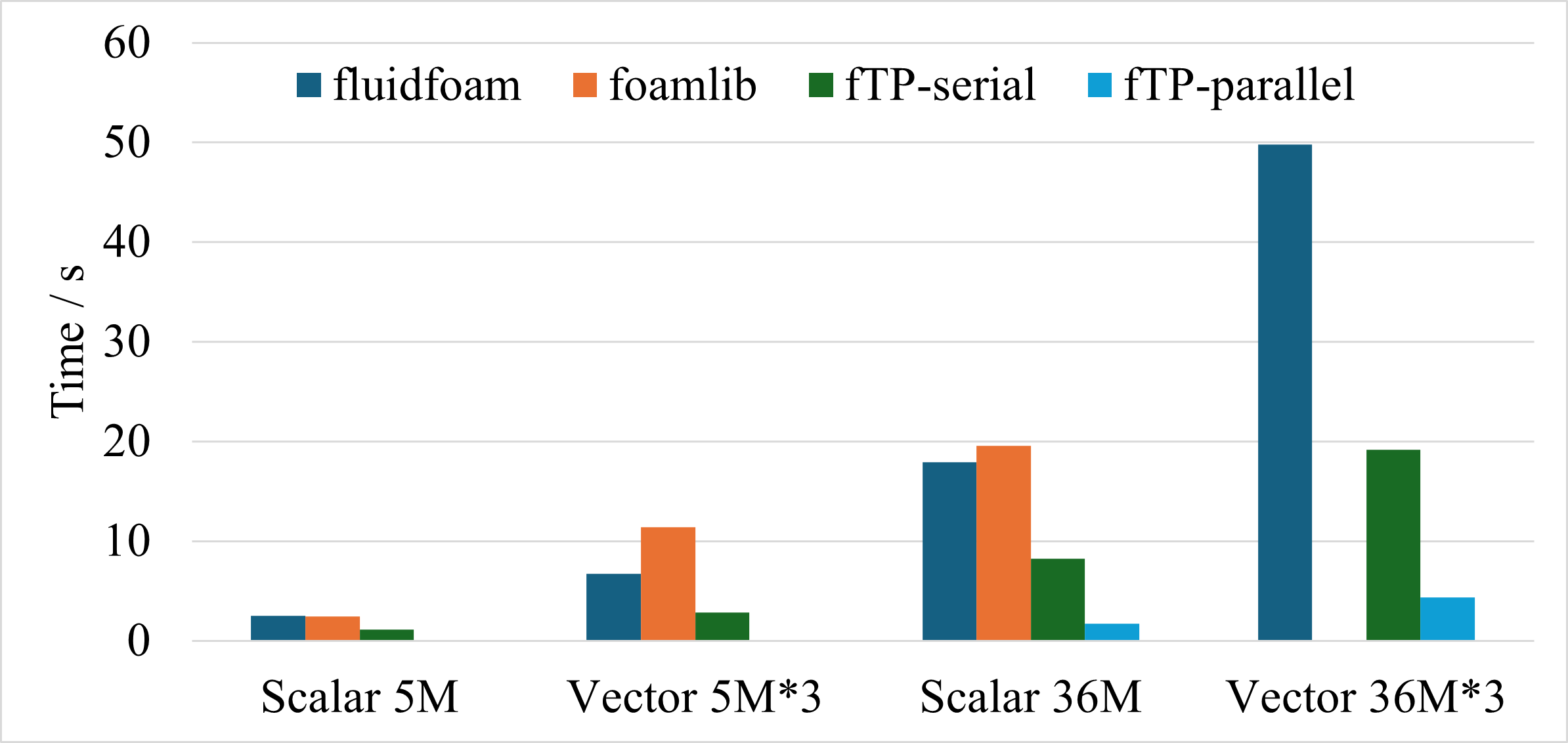
The comparsion is performed for 4 conditions.
- Scalar fields with 5 million cells.
- Vector fields with 5 million cells.
- Scalar fields with 36 million cells.
- Vector fields with 36 million cells.
This test is performed on a cluster node with Intel Xeon Platinum 8358 CPU 64 cores @ 2.60GHz, 256GB RAM, and Red Hat Enterprise Linux.
foamToPython is ten times faster than FluidFoam and foamlib when reading parallel case with 36 million cells. Note that the aforementioned packages have more functions compared to the current library. PyFoam is not involved in the comparsion due to the problem of version compatibility.
Installation
You can install the package via pip:
pip install foamToPython
Or you can clone the repository and install it manually:
pip install git+https://github.com/Ruansh233/foamToPython.git
Usage and Examples
OFField class
The class could read OpenFOAM fields. It can process volScalarField or volVectorField, either uniform or non-uniform internalField.
read field, e.g., U
U = readOFData.OFField('case/1/U', 'vector', read_data=True)
The arguments are:
- filename: the path of the field file.
- data_type: the type of the field, e.g., "scalar", "vector", "label".
- read_data: whether to read the field when initializing the class.
- parallel: whether the case is run in parallel.
If read_data is False, the field will not be read when initializing the class. You can use U._readField() to read it later, or access U.internalField or U.boundaryField, which will trigger the reading of the field.
The package can read parallel case, e.g., U = readOFData.OFField('case/1/U', 'vector', parallel=True).
load internalField and boundaryField
U_cell = U.internalField
U_boundary = U.boundaryField
- U_cell is a numpy array, store the fields values. The length is 1 for the uniform internal field.
- U_boundary is a dict store each patches. For each patch, it contain type for the type of boundary. If the type is fixedValue, the numpy array can be accessed by the key value. For example:
U.boundaryField['velocityInlet']['value']
For parallel case, both internalField and boundaryField are read from all processors and stored as lists. For example, U.internalField[0] is the internalField from processor 0.
writeField
You can modify the data of U and then write it as OF field.
The arguments are:
- path: the path to write the field. It can contain
<timeDir>and<fieldName>, which will be replaced by the argumentstimeDirandfieldNameif provided. - timeDir: the time directory to write the field. Default is
None. - fieldName: the name of the field to write. Default is
None.
Same function can be used to write parallel case, e.g., U.writeField('case/<timeDir>/<fieldName>').
Therefore, you can use two types of inputs, e.g.,
U.writeField('case/<timeDir>/<fieldName>').U.writeField('case/test', timeDir=<timeDir>, fieldName=<fieldName>). Note thattimeDirandfieldNameare needed when using Paraview to read the fields.
readList function
The function could read field value like velocity and pressure. The data type are: "lable", "scalar", "vector".
For example: U = readList("1/U", "vector").
readListList function
The function could read ListList, like the cellZones file. The data type are: "lable", "scalar", "vector".
For example: cellZones = readList("constant/polyMesh/cellZones", "label").
Perform POD to openfoam fields.
Please check the submodule PODopenFOAM and the class under it PODmodes, which can be called foamToPython.PODmodes. It can be created as,
pod = PODmodes(U, POD_algo=<POD_algo>, rank=<rank>).
The arguments are:
- U: the OFField class instance, which contains the data to perform POD.
- POD_algo: the algorithm to perform POD, can be "svd" or "eigen". Default is "eigen".
- rank: the number of modes to compute. Default is 10, which means 10 modes are computed.
The modes can be exported with OpenFOAM format using
pod.writeModes(outputDir, fieldName=<fieldName>).
The arguments are:
- outputDir: the directory to write the modes. The modes will be written in folders
outputDir/1,outputDir/2, ...,outputDir/rank. - fieldName: the name of the field to write. Default is
None.
Parallel case
The package can read and write parallel case. However, the speed is slower than the serial case, and it will be improved in the future.
Release history Release notifications | RSS feed


Download files
Download the file for your platform. If you're not sure which to choose, learn more about installing packages.
Source Distribution
Built Distribution
Filter files by name, interpreter, ABI, and platform.
If you're not sure about the file name format, learn more about wheel file names.
Copy a direct link to the current filters
File details
Details for the file foamtopython-0.0.1.tar.gz.
File metadata
- Download URL: foamtopython-0.0.1.tar.gz
- Upload date:
- Size: 25.2 kB
- Tags: Source
- Uploaded using Trusted Publishing? No
- Uploaded via: twine/6.2.0 CPython/3.13.2
File hashes
| Algorithm | Hash digest | |
|---|---|---|
| SHA256 |
ff2cf1afe564c8a48ae5037b099d4c4c7f4741415dacb1448e49f90224ae45a4
|
|
| MD5 |
59181292ba18063d491bd2613340e74a
|
|
| BLAKE2b-256 |
8f59409bb6534418ff4309a81138512d55ba76bd5495980c48eb4310eb47f7a3
|
File details
Details for the file foamtopython-0.0.1-py3-none-any.whl.
File metadata
- Download URL: foamtopython-0.0.1-py3-none-any.whl
- Upload date:
- Size: 24.6 kB
- Tags: Python 3
- Uploaded using Trusted Publishing? No
- Uploaded via: twine/6.2.0 CPython/3.13.2
File hashes
| Algorithm | Hash digest | |
|---|---|---|
| SHA256 |
fb3b5ea9014ec8625d107589ad0820f25f3e0039a61e19b79f0b3126a2ae28e7
|
|
| MD5 |
09cf8432a301c7d8a86979354cf81704
|
|
| BLAKE2b-256 |
842ca95fc11a28fc7e34a7ee2d8771c53597c3b99c0ce2fe12f1e1c002ea2c81
|






