














foamlib is a modern Python package that provides an elegant, streamlined interface for interacting with OpenFOAM. It's designed to make OpenFOAM-based workflows more accessible, reproducible, and precise for researchers and engineers.
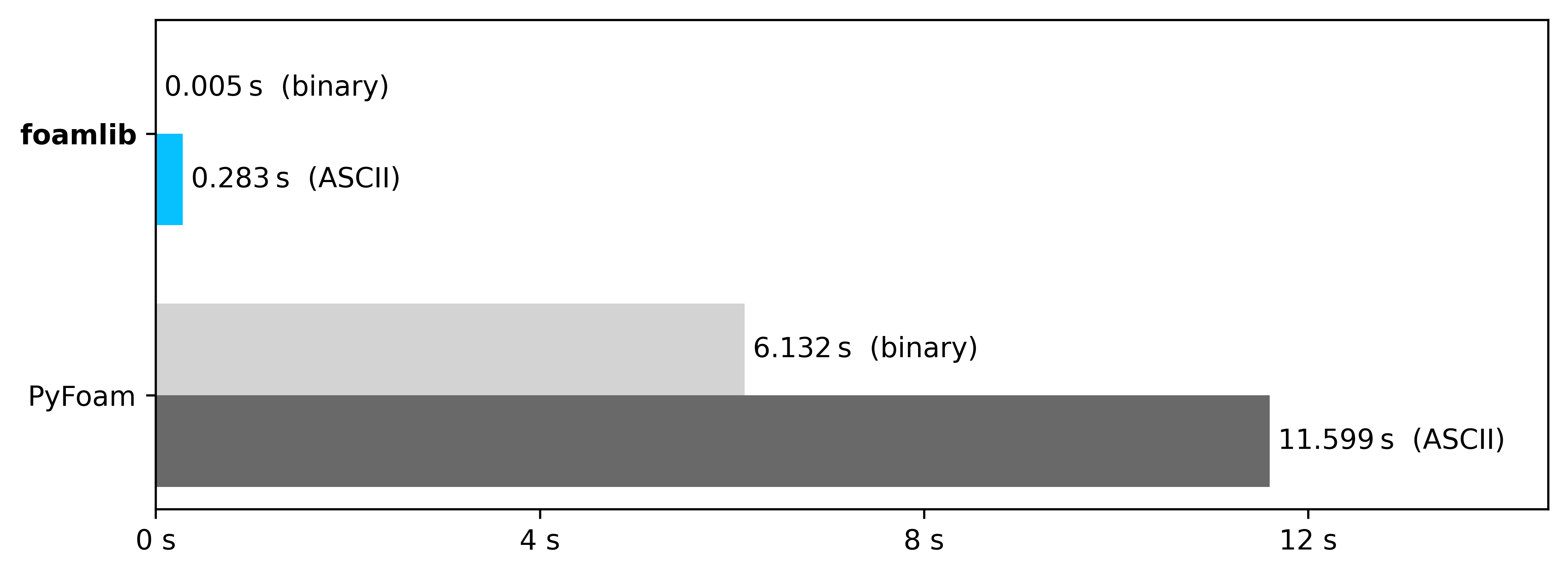
Loading a volVectorField with one million cells1
👋 Introduction
foamlib is a Python package designed to simplify and streamline OpenFOAM workflows. It provides:
- 🗄️ Effortless file handling: Read and write OpenFOAM configuration and field files via intuitive
dict-like Python classes - ⚡ High performance: Powered by our custom parser with seamless support for both ASCII and binary formats with or without compression
- 🔄 Async support: Run exactly as many cases in parallel as your hardware can handle with foamlib's
asynciointegration - 🎯 Type safety: A rigorously typed API for the best coding experience
- ⚙️ Workflow automation: Reduce boilerplate code for pre/post-processing and simulation management
- 🧩 Fully compatible: Works with OpenFOAM from both openfoam.com and openfoam.org
- And more!
Compared to PyFoam and other similar tools like fluidfoam, fluidsimfoam, and Ofpp, foamlib offers significant advantages in performance, usability, and modern Python compatibility.
🧱 Core components
foamlib provides these key classes for different aspects of OpenFOAM workflow automation:
📄 File handling
FoamFile- Read and edit OpenFOAM configuration files as if they were PythondictsFoamFieldFile- Handle field files with support for ASCII and binary formats (with or without compression)
📁 Case management
FoamCase- Configure, run, and access results of OpenFOAM casesAsyncFoamCase- Asynchronous version for running multiple cases concurrentlyAsyncSlurmFoamCase- Specialized for Slurm-based HPC clusters
📦 Installation
Choose your preferred installation method:
| ✨ pip | pip install foamlib |
| 🐍 conda | conda install -c conda-forge foamlib |
| 🍺 Homebrew | brew install gerlero/openfoam/foamlib |
| 🐳 Docker | docker pull microfluidica/foamlib |
🚀 Quick start
Here's a simple example to get you started:
import os
from pathlib import Path
from foamlib import FoamCase

# Clone and run a case
my_case = FoamCase(
    Path(os.environ["FOAM_TUTORIALS"]) / "incompressible/simpleFoam/pitzDaily"
).clone("myCase")
my_case.run()

# Access results
latest_time = my_case[-1]
pressure = latest_time["p"].internal_field
velocity = latest_time["U"].internal_field

print(f"Max pressure: {max(pressure)}")
print(f"Velocity at first cell: {velocity[0]}")

# Clean up
my_case.clean()
📚 More usage examples
🐑 Clone a case
import os
from pathlib import Path
from foamlib import FoamCase

pitz_tutorial = FoamCase(
    Path(os.environ["FOAM_TUTORIALS"]) / "incompressible/simpleFoam/pitzDaily"
)
my_pitz = pitz_tutorial.clone("myPitz")
🏃 Run the case and access results
# Run the simulation
my_pitz.run()

# Access the latest time step
latest_time = my_pitz[-1]
p = latest_time["p"]
U = latest_time["U"]

print(f"Pressure field: {p.internal_field}")
print(f"Velocity field: {U.internal_field}")
🧹 Clean up and modify settings
# Clean the case
my_pitz.clean()

# Modify control settings
my_pitz.control_dict["writeInterval"] = 10
my_pitz.control_dict["endTime"] = 2000
📝 Batch file modifications
# Make multiple file changes efficiently
with my_pitz.fv_schemes as f:
    f["gradSchemes"]["default"] = f["divSchemes"]["default"]
    f["snGradSchemes"]["default"] = "uncorrected"
🔢 Direct field file access without FoamCase
import numpy as np
from foamlib import FoamFieldFile

# Read field data directly
U = FoamFieldFile("0/U")
print(f"Velocity field shape: {np.shape(U.internal_field)}")
print(f"Boundaries: {list(U.boundary_field)}")
⏳ Run multiple cases in parallel
In an asyncio context (e.g. asyncio REPL or Jupyter notebook):
from foamlib import AsyncFoamCase

case1 = AsyncFoamCase("path/to/case1")
case2 = AsyncFoamCase("path/to/case2")

await AsyncFoamCase.run_all([case1, case2])
Note: outside of an asyncio context, you can use asyncio.run().
🎯 Full optimization run on a Slurm-based HPC cluster
import os
from pathlib import Path
from foamlib import AsyncSlurmFoamCase
from scipy.optimize import differential_evolution

# Set up base case for optimization
base = AsyncSlurmFoamCase(
    Path(os.environ["FOAM_TUTORIALS"]) / "incompressible/simpleFoam/pitzDaily"
)


async def objective_function(x):
    """Objective function for optimization."""
    async with base.clone() as case:
        # Set inlet velocity based on optimization parameters
        case[0]["U"].boundary_field["inlet"].value = [x[0], 0, 0]

        # Run with fallback to local execution if Slurm unavailable
        await case.run(fallback=True)

        # Return objective (minimize velocity magnitude at outlet)
        return abs(case[-1]["U"].internal_field[0][0])


# Run optimization with parallel jobs
result = differential_evolution(
    objective_function,
    bounds=[(-1, 1)],
    workers=AsyncSlurmFoamCase.map,  # Enables concurrent evaluations
    polish=False,
)
print(f"Optimal inlet velocity: {result.x[0]}")
📄 Create Python-based run/Allrun scripts
#!/usr/bin/env python3
"""Run the OpenFOAM case in this directory."""

from pathlib import Path
from foamlib import FoamCase

# Initialize case from this directory
case = FoamCase(Path(__file__).parent)

# Adjust simulation parameters
case.control_dict["endTime"] = 1000
case.control_dict["writeInterval"] = 100

# Run the simulation
print("Starting OpenFOAM simulation...")
case.run()
print("Simulation completed successfully!")
📘 Documentation
For more details on how to use foamlib, check out the documentation.
🙋 Support
If you have any questions or need help, feel free to open a discussion.
If you believe you have found a bug in foamlib, please open an issue.
🧑💻 Contributing
You're welcome to contribute to foamlib! Check out the contributing guidelines for more information.
🖋️ Citation
foamlib has been published in the Journal of Open Source Software!
If you use foamlib in your research, please remember to cite our paper:
Gerlero, G. S., & Kler, P. A. (2025). foamlib: A modern Python package for working with OpenFOAM. Journal of Open Source Software, 10(109), 7633. https://doi.org/10.21105/joss.07633
📋 BibTeX
@article{foamlib,
    author = {Gerlero, Gabriel S. and Kler, Pablo A.},
    doi = {10.21105/joss.07633},
    journal = {Journal of Open Source Software},
    month = may,
    number = {109},
    pages = {7633},
    title = {{foamlib: A modern Python package for working with OpenFOAM}},
    url = {https://joss.theoj.org/papers/10.21105/joss.07633},
    volume = {10},
    year = {2025}
}
👟 Footnotes
[1] foamlib 1.7.3 vs. PyFoam 2026.6 (Python 3.14.6) on an M3 MacBook Air. Benchmark script.
1 maintainer

Metadata
1 maintainer
Release files for foamlib 1.9.0
For a detailed explanation of source distributions (sdists) and built distributions (wheels), please see the package formats documentation.
Source distribution (sdist)
| File | Size | Uploaded | Provenance | Actions |
|---|---|---|---|---|
| foamlib-1.9.0.tar.gz | 73.8 kB | Without provenance | Details for foamlib-1.9.0.tar.gz |
Built distribution (wheel)
| File | Interpreter | ABI | Platform | Actions Reset |
|---|---|---|---|---|
| foamlib-1.9.0-py3-none-any.whl | Python 3 | none | any | Details for foamlib-1.9.0-py3-none-any.whl |
Total release size: 155.6 kB
Release files / foamlib-1.9.0.tar.gz
| Download URL | foamlib-1.9.0.tar.gz |
|---|---|
| Size | 73.8 kB |
| Tags | Source |
|
SHA-256 checksum How to use checksums |
75fbc95e4e57cce279fc8005154c46378b43c8a634fc561c825ca35419a705ab
|
|
BLAKE2b-256 checksum How to use checksums |
3565ee302f75454f9d47961473b5c5649e58f2af1352fdfa2a34d6fb3f6df0fa
|
| Upload date | |
|
Uploaded using Trusted Publishing? What is trusted publishing? |
Yes |
| Uploaded via |
uv/0.13.1 {"installer":{"name":"uv","version":"0.13.1","subcommand":["publish"]},"python":null,"implementation":{"name":null,"version":null},"distro":{"name":"Ubuntu","version":"24.04","id":"noble","libc":null},"system":{"name":null,"release":null},"cpu":null,"openssl_version":null,"setuptools_version":null,"rustc_version":null,"ci":true}
|
Release files / foamlib-1.9.0-py3-none-any.whl
| Download URL | foamlib-1.9.0-py3-none-any.whl |
|---|---|
| Size | 81.9 kB |
| Tags | Python 3 |
|
SHA-256 checksum How to use checksums |
f9efed569dbe40bfb646ba386cc62d3f9c73d88ae0411ad90fec9db680d47fe0
|
|
BLAKE2b-256 checksum How to use checksums |
171c5993e66cacce8d60c8c44fa580b8d4b6244cfa38a2f288e60f5f09963fdf
|
| Upload date | |
|
Uploaded using Trusted Publishing? What is trusted publishing? |
Yes |
| Uploaded via |
uv/0.13.1 {"installer":{"name":"uv","version":"0.13.1","subcommand":["publish"]},"python":null,"implementation":{"name":null,"version":null},"distro":{"name":"Ubuntu","version":"24.04","id":"noble","libc":null},"system":{"name":null,"release":null},"cpu":null,"openssl_version":null,"setuptools_version":null,"rustc_version":null,"ci":true}
|
Security for foamlib 1.9.0
Provenance
Provenance describes where a file came from. On PyPI, provenance is shared via attestations, which provide a verifiable record of the build or publishing details. View details, limitations and caveats.
No provenance found
None of the files in this release were uploaded with provenance metadata.
A note on package security
PyPI is a repository for distributing packages, not a service for auditing them. While third-party security researchers and our staff do their best to detect and remove malicious packages, PyPI cannot guarantee the quality, security or suitability of any given package.
To learn more about protecting yourself from malicious actors, visit our package security documentation.














