
Foghorn is a fast, pluggable DNS server that caches, filters, routes, and bends DNS to your will. Up- and down-stream UDP, TCP, DoT, and DoH. DNSEC. Because DNS should do what you want.

Project description
Foghorn

Foghorn is a modern, highly configurable, pluggable, and observable DNS utility server.
Supporting upstream and downstream in UDP, TCP, DoT, and DoH (HTTP or HTTPs w/ cert and key for downstream).
By default it acts as a caching forwarding DNS server with DNSSEC support.
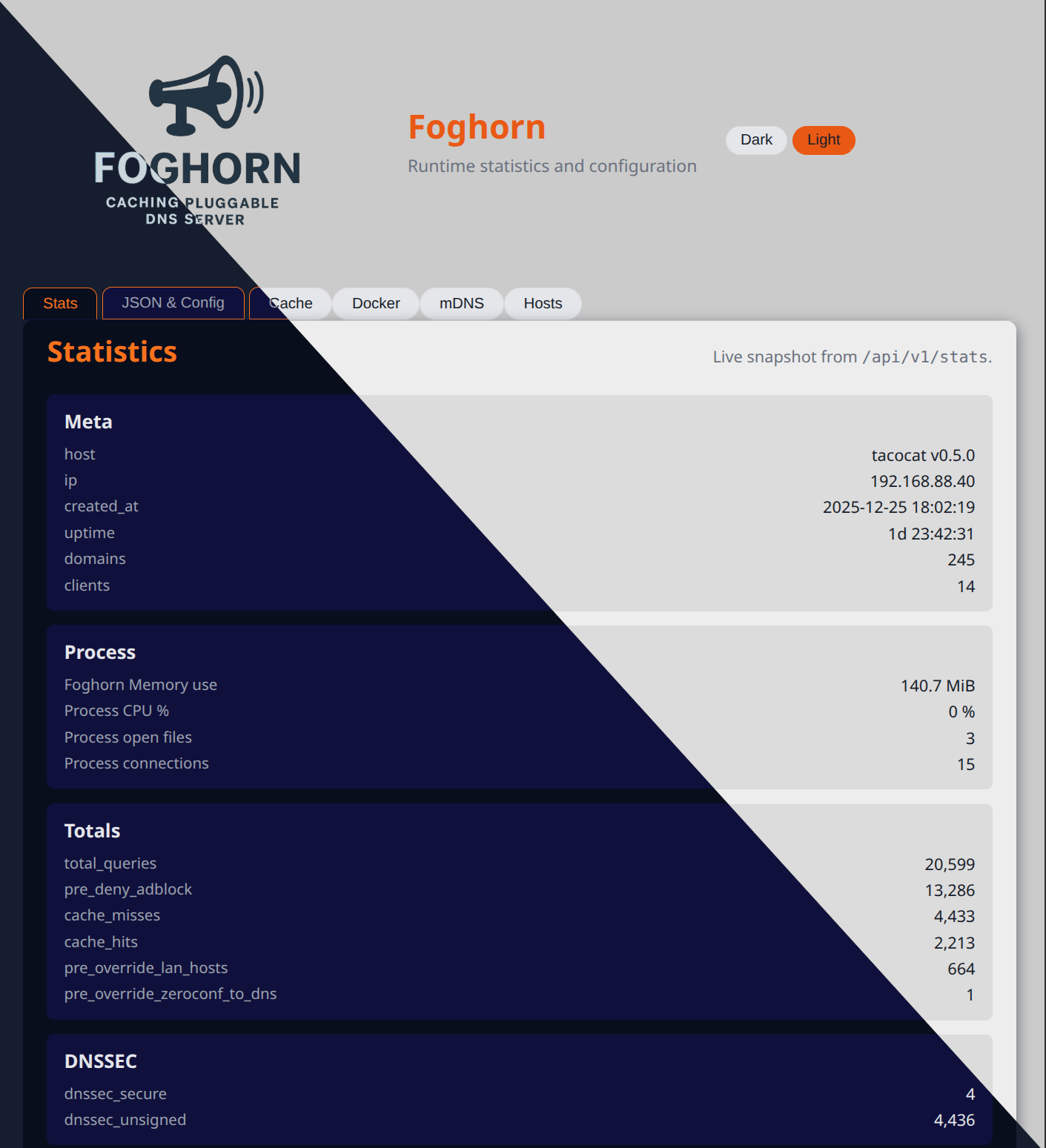
Tons of knobs and settings to perfect it for your needs. You can tune upstream strategy, concurrency, and health behavior directly from configuration, while monitoring real-time upstream status and response codes via a versioned /api/v1 admin API and associated UI. Foghorn exposes rich statistics for DNSSEC, rate limiting, upstream health, and more, with both snapshot and persistent storage options.
Configurations support variables which can be set in the command line, and environment variable, or the config file. In that order of precendence. Variables can, for example, define your lan domain or define CIDRs so they can be referred to by name instead of copying the CIDR lists each time.
You can use this to apply different settings to otherwise identical configurations, or in CI/CD systems.
Plugins are where the magic happens. The plugin architecture enables advanced behaviors without forking core code. An example of making a pihole replacement walks you through building a simple config that downloads ad/malware lists, filters them, and optionally add your /etc/hosts or other records.
Plugins can be instantiated multiple times with different settings. A "priority" field controls the order of execution. Further control is available by breaking it down into "setup_priorty", "pre_priority", and "post_priority". Lower is more imporatant.
Even the cache type and backend can be set globally and per plugin. In-memory-ttl is the default, other options include sqlite and redis/valkey. Caching can be disabled with the None cache. Multiple servers using the same valkey server share cache results.
There's a lot to configure so there's a schema for the configuration. If you run the Foghorn webserver it will also be served from there, ensuring your schema matches your version.
Plugin Overview
Plugins are where the magic happens.
Each plugin can can be configured with:
logging:it's logging confingtargets:- select incoming CIDR range, and qtype apply different rules to different CIDRs.priority- A shortcut for settingsetup_,pre_and,postrun time priorities.enabled- disable a plugin without removing or commenting out the codecomment- a free form text
Foghorn comes with a fair amount of plugins by default:
AccessControlPlugin- CIDR based access control.DockerHosts- Automatically create DNS names for Docker containers and expose container metadata over TXT records.DnsPrefetchPlugin- Keep frequently requested names warm in the cache by issuing background prefetches.EtcHosts- Map/etc/hosts(or other hostfiles) to DNS records, with reverse PTRs.ExamplesPlugin- Demonstration policies and rewrites for learning and experimentation. (EXAMPLE, not for production.)FileDownloader- Download block lists and other files so that other plugins (like Filter) can consume them from disk.FilterPlugin- Block ads, malware, and other domains via inline or file-backed rules, keywords, regexps, and IP-based actions.FlakyServer- Simulate unreliable upstreams with timeouts, malformed responses, and wire-level fuzzing for resilience testing.GreylistPlugin- Temporarily delay or block newly seen domains. (EXAMPLE, not for production.)MdnsBridgePlugin- Rebroadcast mDNS (sd-dns, zeroconf, avahi, ".local") records over DNS so non-mDNS clients can discover services. Requires being on the host network,--host=netif using docker (e.g.:dig PTR _airplay._tcp.localto find AirPlay hosts anddig TXT host_name._airplay._tcp.localfor details.)NewDomainFilterPlugin- Example plugin that blocks recently-registered domains using WHOIS metadata.RateLimitPlugin- Dynamic or static rate limiting with learned baselines and per-key profiles.UpstreamRouterPlugin- Redirect queries to different upstreams based on domain or suffix (for example, VPN-only or LAN-only zones).ZoneRecords- Serve static records or authoritative zones from one or more local files.
"Denied" queries can return be REFUSED, SERVFAIL, NODATA, or a specific ip (or invalid ip like 0.0.0.0)
With special thanks to Fiona Weatherwax for their contributions and inspiration, to the dnslib team for the low level / on wire primitives, and to dnspython for the DNSSEC implementation. Additional shout outs to the whole python community, and the teams of fastapi, pydantic, black, ruff, pytest, and every other giant on whose shoulders I stand.
For developer documentation (architecture, transports, plugin internals, testing), see README-DEV.md.
AI
Also thanks to my junior developer, AI via warp.dev, who keeps my docstrings and unit tests up to date, creates good commit messages, and other janitorial tasks. Also a lot of help with the HTML/JS. Because I'm just not good at it.
Index
Features
- DNS Caching: Speeds up DNS resolution by caching responses from upstream servers.
- Extensible Plugin System: Easily add custom logic to control DNS resolution.
- Flexible Configuration: Configure listeners, upstream resolvers (UDP/TCP/DoT/DoH), and plugins using YAML.
- Built-in Plugins:
- Access Control (AccessControlPlugin): CIDR-based allow/deny (allowlist/blocklist terminology in docs).
- DockerHosts: Create DNS records for Docker containers, reverse PTRs, and TXT metadata for service discovery and health checks.
- DnsPrefetchPlugin (EXAMPLE, not for production): Inspect cache statistics and prefetch hot domains so answers stay warm.
- EtcHosts: Answer queries based on host file(s) such as
/etc/hosts, including reverse PTRs. - ExamplesPlugin (EXAMPLE, not for production): Demonstration policies and rewrites (length limits, subdomain caps, IP rewrites) for experimentation.
- FileDownloader: Download block lists and related files for downstream plugins like Filter.
- FilterPlugin: Block ads, malware, or anything else using inline or file-backed rules, regexps, keywords, and IP actions.
- FlakyServer: Simulate a malfunctioning DNS server or bad network connection with configurable failures and fuzzed responses.
- GreylistPlugin (EXAMPLE, not for production): Temporarily greylist newly seen domains before allowing them.
- MdnsBridgePlugin: Rebroadcast mDNS (sd-dns, zeroconf, avahi, ".local") over DNS so non-mDNS clients can discover services. Requires being on the host network.
- NewDomainFilterPlugin: Example plugin that blocks recently-registered domains using WHOIS data.
- RateLimitPlugin: Adaptive or static rate limiting, by client, domain, or client-domain.
- UpstreamRouterPlugin: Route queries to different upstream servers by domain or suffix.
- ZoneRecords: Serve static DNS records and authoritative zones from one or more files, with optional live reload on change.
- Examples:
- dnsprefetch: Read statistics and try to keep the cache warm for oft accessed domains.
- Examples: Showcase of simple policies and rewrites.
- New Domain Filter: Block recently registered domains. Do NOT use for production. Use a real RDAP server instead.
- Greylist: Temporarily block newly seen domain, and the original inspiration for the project: part of an anti-phishing / anti-malware layer.
Note about mDNS / MdnsBridgePlugin The mDNS bridge plugin (
MdnsBridgePlugin, aliasmdns) relies on multicast DNS on the local layer‑2 network. When you run Foghorn inside Docker and want mDNS discovery to work, the container must share the host network (for example,--net=hoston Linux). If you use the default bridged Docker network, mDNS traffic will not be visible to the container and the plugin will not see any services.
Installation
Use a virtual environment (I use venv):
python3 -m venv venv
source venv/bin/activate
pip install .
# Optional for development:
pip install -e '.[dev]'
Usage
Create a config.yaml, then run:
foghorn --config /path/to/config.yaml
Alternatively, run as a module:
python -m foghorn.main --config /path/to/config.yaml
The server will start listening for DNS queries on the configured host and port.
Docker
Foghorn is available on Docker Hub at zallison/foghorn:latest.
Using the pre-built image:
docker run -d -p 5335:5335/udp \
  -v /path/to/your/config/:/foghorn/config/ \
  zallison/foghorn:latest
Building locally:
[cp /path/to/your/config.yaml ./config/config.yaml] # Optional
docker build -t my/foghorn .
docker run -d -p 5353:5353/udp my/foghorn
Important: Mount your config.yaml to /foghorn/config/config.yaml inside the container unless you've built your own image that contains your config.
If you need to expose additional listeners (TCP/DoT/DoH), add the corresponding port mappings:
docker run -d \
  -p 5335:5335 \
  -p 8853:8853/tcp \
  -p 5380:5380/tcp \
  -v /path/to/your/config.yaml:/foghorn/config/config.yaml \
  zallison/foghorn:latest
DNSSEC modes
dnssec:
  mode: passthrough            # ignore | passthrough | validate
  validation: upstream_ad      # upstream_ad | local   (local = experimental)
  udp_payload_size: 1232
- ignore: do not advertise DO; DNSSEC data not requested.
- passthrough: advertise DO and return DNSSEC records; forward AD bit if upstream set it.
- validate:
- upstream_ad: require upstream AD bit (recommended for now)
- local (experimental): perform local DNSSEC validation.
Configuration
Configuration is handled through a config.yaml file. The primary top-level sections are listen, upstreams, cache, foghorn, plugins, and statistics.
Statistics and persistence backends
The statistics block controls in-memory counters and optional persistent storage of counts and the raw query log. A minimal configuration looks like:
statistics:
  enabled: true
  interval_seconds: 300
  persistence:
    enabled: true
    db_path: ./config/var/stats.db
    batch_writes: true
By default, persistence uses a single SQLite backend. Advanced users can configure one or more statistics/query-log backends via statistics.persistence.backends while keeping the legacy db_path fields for backward compatibility:
statistics:
  enabled: true
  interval_seconds: 300
  persistence:
    enabled: true
    # Optional multi-backend configuration (writes fan out; reads use the primary).
    primary_backend: mysql_analytics        # optional logical name or backend alias
    backends:
      - name: sqlite_mirror
        backend: sqlite
        config:
          db_path: ./config/var/stats.db
          batch_writes: true
          batch_time_sec: 15.0
          batch_max_size: 1000
      - name: mysql_analytics
        backend: mysql
        config:
          host: 127.0.0.1
          port: 3306
          user: foghorn
          password: change-me
          database: foghorn_stats
Semantics:
- When
backendsis omitted, the legacy single-SQLite configuration is used (db_path, batch_writes, batch_time_sec, batch_max_size). - When
backendscontains a single entry, that backend is used for both reads and writes. - When
backendshas multiple entries:- Writes (counts and query log) are fanned out to all backends.
- Reads (health checks, counts export, query log/aggregations) go to the primary backend.
- The primary defaults to the first configured backend;
primary_backendcan override this by logical name or backend alias.
backend accepts short aliases like sqlite, mysql, or mariadb, or a dotted import path to a custom BaseStatsStoreBackend implementation.
The cache section selects the DNS response cache implementation (default: in-memory TTL):
cache:
  module: in_memory_ttl
  config: {}
The foghorn section also exposes optional cache prefetch / stale‑while‑revalidate knobs that work together with the shared resolver.
listen
You can enable one or more listeners. UDP is enabled by default; TCP, DoT, and DoH are optional and supported.
The default ports (UDP/TCP 5333, DoT 8853, DoH 5380, admin webserver 5380) are chosen to be above 1024 so that Foghorn can be run as a non-root user without special capabilities.
listen:
  udp:
	enabled: true
	host: 127.0.0.1
	port: 5335
  tcp:
	enabled: false
	host: 127.0.0.1
	port: 5335
  dot:
	enabled: false
	host: 127.0.0.1
	port: 8853
	cert_file: /path/to/cert.pem
	key_file: /path/to/key.pem
  doh:
	enabled: false
	host: 127.0.0.1
	port: 5443
	# Optional TLS
	# cert_file: /path/to/cert.pem
	# key_file: /path/to/key.pem
Note: The DoH listener is served by a dedicated FastAPI app using uvicorn in a
single background thread. TLS is applied via cert_file/key_file. Behavior is
RFC 8484‑compatible and unchanged from previous releases; only the runtime
implementation has changed.
upstreams
You can mix transports per upstream. If transport is omitted it defaults to UDP.
upstreams:
  - host: 1.1.1.1
	port: 853
	transport: dot
	tls:
	  server_name: cloudflare-dns.com
	  verify: true
	pool:
	  max_connections: 64
	  idle_timeout_ms: 30000
  - host: 8.8.8.8
	port: 53
	# transport: udp (default)
	pool:
	  max_connections: 32
	  idle_timeout_ms: 15000
  - transport: doh
	url: https://dns.google/dns-query
	method: POST   # or GET
	headers:
	  user-agent: foghorn
	tls:
	  verify: true
	  # ca_file: /etc/ssl/certs/ca-certificates.crt
plugins
This section is a list of plugins to load. Each plugin has a module and a config section. You can also specify a plugin as a short string alias.
You can use short aliases instead of full dotted paths:
- access_control or acl -> foghorn.plugins.access_control.AccessControlPlugin
- new_domain_filter or new_domain -> foghorn.plugins.new_domain_filter.NewDomainFilterPlugin
- upstream_router or router -> foghorn.plugins.upstream_router.UpstreamRouterPlugin
- filter -> foghorn.plugins.filter.FilterPlugin
- rate_limit or ratelimit -> foghorn.plugins.rate_limit.RateLimitPlugin
- docker-hosts, docker_hosts or docker -> foghorn.plugins.docker-hosts.DockerHosts
Examples of plugin entries:
- As a dict with module/config:
{ module: acl, config: {...} } - As a plain alias string:
acl(no config)
Base plugin targeting (targets / targets_ignore)
All plugins that inherit from BasePlugin support optional, shared client‑targeting
knobs in their config block:
targets(optional): list of CIDR/IP strings (or a single string) specifying which client networks this plugin should apply to.targets_ignore(optional): list of CIDR/IP strings to exclude from targeting, even when they matchtargets.targets_cache_ttl_seconds(optional, default 300): TTL in seconds for an in‑memory cache of per‑client targeting decisions; longer values reduce CPU when many queries arrive from the same clients.
Semantics:
- When neither
targetsnortargets_ignoreis set, the plugin applies to all clients (default behavior). - When only
targetsis set, the plugin applies only to clients whose IP is contained in at least one listed CIDR/IP. - When only
targets_ignoreis set, the plugin applies to all clients except those intargets_ignore(inverted logic). - When both are set,
targets_ignorewins: clients in that list are skipped even if they match an entry intargets.
These knobs are honored by core plugins such as AccessControl, Filter,
Greylist, NewDomainFilter, UpstreamRouter, FlakyServer, Examples, and
EtcHosts. See example_configs/ (for example kitchen_sink.yaml and
plugin_rate_limit.yaml) for usage patterns.
A minimal plugin entry using all common BasePlugin-wide options looks like:
plugins:
  - module: some_plugin
	name: example_plugin
	enabled: true
	comment: "Demo plugin using common BasePlugin options"
	pre_priority: 40
	post_priority: 60
	setup_priority: 50
	config:
	  # BasePlugin-wide options
	  logging:
		level: debug
		stderr: true
		file: ./logs/example_filter.log
		syslog:
		  address: /dev/log
		  facility: user
	  targets:
		- 10.0.0.0/8
		- 192.0.2.1
	  targets_ignore:
		- 10.0.5.0/24
	  targets_cache_ttl_seconds: 600
	  target_qtypes:
		- A
		- AAAA

	  abort_on_failure: true  # used by some plugins during setup()
Plugin priorities and setup_priority
Plugins support three priority knobs in their config (all optional, integers 1–255):
pre_priority: controls the order ofpre_resolvehooks; lower values run first.post_priority: controls the order ofpost_resolvehooks; lower values run first.setup_priority: controls the order of one-timesetup()calls during startup; lower values run first.
setup_priority is only used for plugins that override BasePlugin.setup. Its value is resolved as:
- Use the explicit
setup_priorityfrom config if provided. - Otherwise, reuse the config’s
pre_priorityvalue for setup-aware plugins. - Otherwise, fall back to the plugin’s class-level default (50).
This lets you, for example, have a FileDownloader plugin run its setup early (to download lists) and a Filter plugin run slightly later to load those lists from disk.
AccessControlPlugin
This plugin provides access control based on the client's IP address.
Configuration:
default: The default action to take if no rule matches (allowordeny).allow: A list of CIDR ranges to allow.deny: A list of CIDR ranges to deny. Deny rules take precedence over allow rules.
Example (full path):
plugins:
  - module: foghorn.plugins.access_control.AccessControlPlugin
	config:
	  default: allow
	  allow:
		- "192.168.0.0/16"
		- "10.0.0.0/8"
	  deny:
		- "203.0.113.0/24"
Example (short alias):
plugins:
  - module: acl
	config:
	  default: allow
	  allow:
		- "192.168.0.0/16"
NewDomainFilterPlugin (EXAMPLE, not for production)
This plugin blocks domains that were registered recently by checking the domain's creation date using whois.
Configuration:
threshold_days: The minimum age of a domain in days. Domains younger than this will be blocked.timeout_ms: The timeout in milliseconds forwhoisqueries.
Example (full path):
plugins:
  - module: foghorn.plugins.new_domain_filter.NewDomainFilterPlugin
	config:
	  threshold_days: 7
	  timeout_ms: 2000
Example (short alias):
plugins:
  - module: new_domain
	config:
	  threshold_days: 14
RateLimitPlugin
This plugin provides adaptive or fixed per-key DNS rate limiting, backed by a sqlite database. It can key profiles by client IP, client+domain, or domain only, and it learns a baseline requests-per-second (RPS) for each key.
Configuration (subset):
mode:per_client,per_client_domain, orper_domain.window_seconds: measurement window length in seconds.warmup_windows: number of completed windows to observe before enforcing.alpha: EWMA factor when the new window's RPS is >= the current average (ramp-up speed).alpha_down: optional EWMA factor when the new window's RPS is < the current average (ramp-down speed). If omitted, it defaults toalpha.burst_factor: multiplier over the learned average when computingallowed_rps.min_enforce_rps: lower bound onallowed_rps.global_max_rps: optional hard upper bound onallowed_rps(0 disables).db_path: sqlite file storing learned profiles.deny_response: how to answer when a query is rate-limited (mirrors FilterPlugin:nxdomain,refused,servfail,noerror_empty/nodata, orip).
To make the limiter behave like a "dumb" fixed-rate limiter, set
min_enforce_rps and global_max_rps to the same value; in that case the
learned average no longer affects the enforcement threshold.
See example_configs/plugin_rate_limit.yaml for concrete profiles (solo user,
home network, SMB) and notes on static vs adaptive behavior.
UpstreamRouterPlugin
This plugin routes queries to different upstream DNS servers based on the queried domain.
Configuration:
routes: A list of routing rules. Each rule can have adomain(for exact matches) or asuffix(for suffix matches) and a list ofupstreamsservers to route to.
Example (full path):
plugins:
  - module: foghorn.plugins.upstream_router.UpstreamRouterPlugin
	config:
	  routes:
		- domain: "internal.corp.com"
		  upstreams:
			- host: 10.0.0.1
			  port: 53
		- suffix: ".dev.example.com"
		  upstreams:
			- host: 192.168.1.1
			  port: 53
Example (short alias):
plugins:
  - module: router
	config:
	  routes:
		- suffix: "corp"
		  upstreams:
			- host: 10.0.0.53
			  port: 53
FilterPlugin
This plugin provides flexible filtering of DNS queries based on domain names, patterns, keywords, and response IPs.
Configuration:
- blocked_domains: list of exact domain names to block.
- blocked_patterns: list of regular expressions to match against the domain name.
- blocked_keywords: list of keywords to block if they appear anywhere in the domain name.
- blocked_ips: list of IP addresses or CIDR ranges to control post‑resolution behavior; each entry supports action deny, remove, or replace (with replace_with).
File-backed inputs (support globs):
- allowed_domains_files, blocked_domains_files
- blocked_patterns_files
- blocked_keywords_files
- blocked_ips_files
Formats supported per file (auto-detected line-by-line):
- Plain text (default): a single value per line; blank lines and lines starting with '#' are ignored
- JSON Lines (JSONL): one JSON object per line with the following schemas
- Domains: {"domain": "example.com", "mode": "allow|deny"} (mode optional; defaults to the file-level mode implied by which key you used)
- Patterns: {"pattern": "^ads\.", "flags": ["IGNORECASE"]} (flags optional; defaults to IGNORECASE)
- Keywords: {"keyword": "tracker"}
- IPs: {"ip": "203.0.113.0/24", "action": "deny|remove|replace", "replace_with": "IP"}
Note: JSONL is only supported in FilterPlugin file-backed inputs (the *_files keys above). The core YAML config does not accept JSONL.
Load order and precedence for domains (last write wins):
- allowed_domains_files
- blocked_domains_files
- inline allowed_domains
- inline blocked_domains
Example (short alias):
plugins:
  - module: filter
	config:
	  # Pre-resolve (domain) filtering
	  blocked_domains:
		- "malware.com"
		- "phishing-site.org"

	  blocked_patterns:
		- ".*\\.porn\\..*"

	  blocked_keywords:
		- "gambling"

	  # Post-resolve (IP) filtering
	  blocked_ips:
		- ip: "1.2.3.4"
		  action: "deny" # Deny the whole response
		- ip: "8.8.8.0/24"
		  action: "remove" # Remove just this A/AAAA record

	  # File-backed examples (globs allowed)
	  allowed_domains_files:
		- config/allow.txt
		- config/allow.d/*.list
	  blocked_domains_files:
		- config/block.txt
		- config/block.d/*.txt
	  blocked_patterns_files:
		- config/patterns/*.re
	  blocked_keywords_files:
		- config/keywords.txt
	  blocked_ips_files:
		- config/ips.txt
		- config/ips.d/*.csv
JSON Lines examples for files
- Domains (allowed_domains_files or blocked_domains_files):
{"domain": "good.com", "mode": "allow"}
{"domain": "bad.com", "mode": "deny"}
{"domain": "neutral.com"}
- Patterns (blocked_patterns_files):
{"pattern": "^ads\\.", "flags": ["IGNORECASE"]}
{"pattern": "^track\\.", "flags": []}
- Keywords (blocked_keywords_files):
{"keyword": "tracker"}
{"keyword": "analytics"}
- IPs (blocked_ips_files):
{"ip": "192.0.2.1", "action": "deny"}
{"ip": "198.51.100.0/24", "action": "remove"}
{"ip": "203.0.113.5", "action": "replace", "replace_with": "127.0.0.1"}
Notes:
- Plain-text lines continue to work alongside JSON Lines within the same file.
- Unknown actions default to deny (logged). Invalid JSON/regex/IP lines are logged and skipped.
FileDownloader plugin
Download domain-only blocklists from well-known sources to local files so the Filter plugin can load them.
Notes:
- Works with domain-per-line lists (e.g., Firebog "just domains"). Hosts-formatted lists (with IPs) are not supported without preprocessing.
- Runs early (pre_priority 15) so files are present before Filter executes.
Configuration:
urls: List of HTTP(S) URLs to domain-only lists (comments with#allowed).url_files: List of file paths, each containing one URL per line (supports#comments and blank lines).download_path: Directory to write files (default./config/var/lists).interval_days: Optional periodic refresh interval (in days) while the server runs.
Filenames are unique and stable per-URL: {base}-{sha1(url)[:12]}{ext}. If the URL has no extension, none is added ({base}-{hash}). Each file begins with a header line: # YYYY-MM-DD HH:MM - URL.
Example:
plugins:
  - module: file_downloader
	pre_priority: 15
	config:
	  download_path: ./config/var/lists
	  interval_days: 1
	  urls:
		- https://v.firebog.net/hosts/AdguardDNS.txt
		- https://v.firebog.net/hosts/Easylist.txt
		- https://v.firebog.net/hosts/Prigent-Ads.txt
		- https://v.firebog.net/hosts/Prigent-Malware.txt

  - module: filter
	pre_priority: 20
	config:
	  default: deny
	  blocklist_files:
		- ./config/var/lists/AdguardDNS-*.txt
		- ./config/var/lists/Easylist-*.txt
		- ./config/var/lists/Prigent-Ads-*.txt
		- ./config/var/lists/Prigent-Malware-*.txt
DockerHosts plugin
The DockerHosts plugin answers selected queries directly from Docker metadata.
It discovers containers via the Docker CLI on one or more endpoints, extracts
hostnames plus IPv4/IPv6 addresses, and serves forward and reverse entries from
an in-memory map that is periodically refreshed.
In addition to A/AAAA/PTR records, DockerHosts publishes per-container TXT
metadata and an optional aggregate _containers.<suffix> TXT record summarizing
all containers. TXT lines include fields such as:
name,id(short container ID)ans4,ans6(effective answer IPs)ports(host listening ports derived fromNetworkSettings.Ports)health,project-name,serviceint4,int6,nets, andendpoint
TXT output can be extended (or replaced) with additional key/value pairs drawn
from docker inspect via two configuration keys:
txt_fields: list of mappings with:name: TXT key name (for exampleimage,project).path: minimal JSONPath-like expression into the inspect JSON (for exampleConfig.Image,State.Health.Status,Config.Labels.com.docker.compose.project).
txt_fields_replace(bool, defaultfalse): whentrueand at least onetxt_fieldsentry resolves for a container, only those custom key/value pairs are emitted in its TXT summary; otherwise they are appended to the built-in summary.
path supports a small, predictable subset of JSONPath:
- Optional leading
$/$.(ignored when present). - Dot-separated dict traversal, for example
Config.Image,State.Health.Status,NetworkSettings.Networks.bridge.IPAddress. - Integer segments applied to lists (for example
Config.Env.0). - Special handling for Docker labels whose keys contain dots via
Config.Labels.<full-label-key>, such asConfig.Labels.com.docker.compose.project.
Configuration keys
plugins:
  - module: docker-hosts
	config:
	  # Optional: list of Docker endpoints; defaults to the local Unix socket
	  endpoints:
		- unix:///var/run/docker.sock
		# Example TCP endpoints (remote Docker daemons or proxies):
		# - tcp://127.0.0.1:2375
		# - tcp://docker-host.internal:2375
		# - tcp://10.0.0.10:2376

	  # Optional: docker CLI binary; defaults to "docker"
	  docker_binary: docker

	  # TTL for A/AAAA/PTR answers served by this plugin (seconds; default 300)
	  ttl: 300

	  # Background refresh interval in seconds. When set to 0, only the
	  # initial mapping from setup() is used and no periodic refresh occurs.
	  reload_interval_seconds: 60

	  # Optional per-family host IP overrides. When set, these are used in
	  # place of per-container addresses so that clients reach the host even
	  # if container networks are not routable.
	  # use_ipv4: 192.0.2.10
	  # use_ipv6: 2001:db8::10

	  # Optional: add extra TXT fields from docker inspect, or replace the
	  # built-in TXT summary entirely when txt_fields_replace is true.
	  # txt_fields:
	  #   - name: image
	  #     path: Config.Image
	  #   - name: project
	  #     path: Config.Labels.com.docker.compose.project
	  # txt_fields_replace: false
module may be any of:
- Full dotted path:
foghorn.plugins.docker-hosts.DockerHosts - Alias:
docker-hosts,docker_hosts, ordocker
DockerHosts inspects all containers on each endpoint, building:
- forward maps from hostname (case-insensitive) to IPv4/IPv6 addresses
- reverse maps from both IPv4 and IPv6 addresses to hostnames using RFC-compliant in-addr.arpa and ip6.arpa reverse names
During pre_resolve, the plugin:
- answers A queries from the IPv4 map (
QTYPE.A) - answers AAAA queries from the IPv6 map (
QTYPE.AAAA) - answers PTR queries when the reverse lookup matches a known address
If a container is missing a hostname or has no usable IP addresses, DockerHosts logs a warning and skips that container. If no containers across all endpoints have usable hostname/IP combinations, it logs a summary warning after reload.
ZoneRecords plugin
The ZoneRecords plugin answers selected queries directly from one or more
local files, and can act as an authoritative server for configured zones while
still bypassing upstream resolvers and the cache for those names.
Record file format
Each non-empty, non-comment line in a records file must be:
<domain>|<qtype>|<ttl>|<value>
domain: hostname (with or without trailing dot); stored and matched case-insensitively.qtype: mnemonic (for exampleA,AAAA,TXT,CNAME) or numeric type code.ttl: non-negative integer TTL in seconds.value: RDATA for the given type (for example an IP forA/AAAA, a target name forCNAME, the text forTXT, and so on).
Lines beginning with # (after stripping leading whitespace), or that are
empty after removing inline # comments, are ignored.
When the same (domain, qtype) appears multiple times (even across multiple
files), the first TTL is kept and values are de-duplicated while preserving
first-seen ordering. This ordering is reflected in the final DNS answer.
Configuration keys
plugins:
  - module: zone
	config:
	  # Provide one or more records files; lines use:
	  #   <domain>|<qtype>|<ttl>|<value>
	  # example.com|A|300|192.0.2.10
	  file_paths:
		- ./config/custom-records.txt
		- ./config/custom-records-extra.txt

	  # Optional: add or override entries directly in config using the same
	  # line format; these are merged after file-backed records with
	  # first-TTL-wins and de-duplicated values.
	  # records:
	  #   - example.com|A|300|192.0.2.20
	  #   - www.example.com|CNAME|300|example.com.

	  # Optional: control how filesystem changes are detected
	  watchdog_enabled: true                        # default true when omitted
	  watchdog_min_interval_seconds: 1.0            # minimum time between reloads
	  watchdog_poll_interval_seconds: 0.0           # >0 enables stat-based polling
module may be any of:
- Full dotted path:
foghorn.plugins.zone-records.ZoneRecords - Alias:
zone,zone_records,custom, orrecords
When watchdog_enabled is true and the optional watchdog dependency is
installed, the plugin watches the parent directories of all configured records
files and reloads them when changed. When
watchdog_poll_interval_seconds > 0, a lightweight polling loop supplements
filesystem events, which is useful in some container or network filesystem
setups where file change notifications are unreliable.
DnsPrefetchPlugin (EXAMPLE, not for production)
The DnsPrefetchPlugin runs a background worker that periodically inspects
statistics (primarily cache_hit_domains, with top_domains as a fallback) and
issues synthetic DNS queries for the hottest domains and qtypes so that cache
entries stay warm.
Configuration keys
plugins:
  - module: dns_prefetch
	config:
	  interval_seconds: 60        # how often to run a prefetch cycle
	  prefetch_top_n: 100         # max domains considered each cycle
	  max_consecutive_misses: 5   # stop prefetching if no hits are ever seen
	  qtypes: ["A", "AAAA"]       # record types to prefetch
Notes:
- The plugin never modifies individual client queries; it only issues background prefetches.
- Statistics must be enabled for the plugin to be effective (see
example_configs/prefetch.yamlfor a minimal example).
Cache plugins
Foghorn caches DNS responses via a configurable cache plugin under the top-level cache: key.
Built-in cache plugins:
in_memory_ttl(default): in-process TTL cachesqlite3: persistent on-disk TTL cache (SQLite)redis/valkey: Redis-compatible remote cache (requires the optional Python dependencyredis)none: disables caching
Examples (complete runnable configs) are available in:
example_configs/cache_in_memory_ttl.yamlexample_configs/cache_sqlite3.yamlexample_configs/cache_redis.yamlexample_configs/cache_none.yaml
Minimal config snippets:
in_memory_ttl (default):
cache:
  module: in_memory_ttl
  config:
	min_cache_ttl: 60
sqlite3 (persistent on-disk cache):
cache:
  module: sqlite3
  config:
	db_path: ./config/var/dbs/dns_cache.db
	namespace: dns_cache
	min_cache_ttl: 60
redis / valkey (remote cache):
cache:
  module: redis
  config:
	url: redis://127.0.0.1:6379/0
	namespace: foghorn:dns_cache:
	min_cache_ttl: 60
none (disable caching):
cache:
  module: none
Notes:
min_cache_ttlis a cache-expiry floor used by the resolver; it does not rewrite TTLs inside DNS answers.
Complete config.yaml Example
Here is a complete config.yaml file that shows how plugin priorities (including setup_priority) work:
# Example configuration for the DNS caching server

# Global timeout and upstream behaviour knobs
foghorn:
  timeout_ms: 2000
  upstream_strategy: failover
  upstream_max_concurrent: 1
  use_asyncio: true

  # asyncio can fail under a number of strict container rules.
  # Check SECCOMP setting or run with --privileged.
  # On false or asyncio fails, we fall back to a threaded HTTP server.

listen:
  # Listener config; UDP is enabled by default.
  udp:
	enabled: true
	host: 127.0.0.1
	port: 5335
  tcp:
	enabled: false
	host: 127.0.0.1
	port: 5335
  dot:
	enabled: false
	host: 127.0.0.1
	port: 8853
	# cert_file: /path/to/cert.pem
	# key_file: /path/to/key.pem
  doh:
	enabled: false
	host: 127.0.0.1
	port: 5380
	# Optional TLS for DoH
	# cert_file: /path/to/cert.pem
	# key_file: /path/to/key.pem

# Multiple upstream DNS servers.  See `foghorn` setting for more information
# All upstreams share a single timeout (foghorn.timeout_ms) per attempt).
upstreams:
  - host: 8.8.8.8
	port: 53
	transport: udp
  - host: 1.1.1.1
	port: 853
	transport: dot
	tls:
	  server_name: cloudflare-dns.com
	  verify: true
	  # ca_file: /etc/ssl/certs/ca-certificates.crt
  - transport: doh
	url: https://dns.google/dns-query
	method: POST
	headers:
	  user-agent: FoghornDNS
	tls:
	  verify: true
	  # ca_file: /etc/ssl/certs/ca-certificates.crt

# Cache configuration
cache:
  module: in_memory_ttl
  config:
	# Minimum cache TTL (in seconds) applied to ***all*** cached responses.
	# - For NOERROR with answers: cache TTL = max(min(answer TTLs), min_cache_ttl)
	# - For NOERROR with no answers, NXDOMAIN, and SERVFAIL: cache TTL = min_cache_ttl
	# Note: TTL field in the DNS response is not rewritten; this controls cache expiry only.
	min_cache_ttl: 60

# Optional DNSSEC configuration
# dnssec:
#   mode: passthrough            # ignore | passthrough | validate
#   validation: upstream_ad      # upstream_ad | local (local is experimental)
#   udp_payload_size: 1232

# Logging configuration
logging:
  level: debug            # Available levels: debug, info, warn, error, crit
  stderr: true            # Log to stderr (default: true)
  file: /tmp/foghorn.log  # Optional: also log to this file
  syslog: false           # Optional: also log to syslog

# Statistics (optional)
statistics:
  enabled: false
  interval_seconds: 10
  reset_on_log: false
  include_qtype_breakdown: true
  include_top_clients: true
  include_top_domains: true
  top_n: 10
  track_latency: true
  # When true, either SIGUSR1 or SIGUSR2 will reset in-memory statistics before
  # notifying plugins.
  # sigusr2_resets_stats: true
  # Optional display-only ignore filters for top lists. These do not affect
  # totals or persisted aggregates; they only hide entries from the
  # top_clients/top_domains/top_subdomains sections exposed via /stats.
  # ignore:
  #   # IPs/CIDRs to hide from top_clients only.
  #   top_clients:
  #     - 192.168.0.0/16
  #     - 10.0.0.0/8
  #
  #   # Base domains to hide from top_domains and, when subdomains list is
  #   # empty, from top_subdomains as well. Matching is exact by default.
  #   top_domains:
  #     - example.internal
  #   # Matching mode for top_domains: "exact" (default) or "suffix".
  #   # In suffix mode, a base domain D is ignored when D == value or
  #   # D ends with "." + value.
  #   top_domains_mode: suffix
  #
  #   # Full qnames to hide from top_subdomains. When this list is empty,
  #   # the values from top_domains are reused as the ignore set.
  #   top_subdomains:
  #     - dev.example.internal
  #   # Matching mode for top_subdomains: "exact" (default) or "suffix".
  #   # In suffix mode, a subdomain name N is ignored when N == value or
  #   # N ends with "." + value.
  #   top_subdomains_mode: suffix

plugins:
  # New-domain filter: simple pre-resolve policy plugin.
  - module: new_domain
	config:
	  threshold_days: 14

  # Greylist plugin.
  - module: greylist
	config:
	  duration_seconds: 60
	  # duration_hours: 1  # Only if duration_seconds isn't provided
	  # db_path: ./greylist.db

  # Upstream router: route queries to specific upstreams by suffix.
  # Uses the modern "upstreams" list format only.
  - module: router
	config:
	  routes:
		- suffix: ".mylan"
		  upstreams:
			- host: 192.168.1.1
			  port: 53
		- suffix: "corp.internal"
		  upstreams:
			- host: 10.0.0.1
			  port: 53
			- host: 10.0.0.2
			  port: 53

  # FileDownloader: runs early in the setup phase to download blocklists
  # that the Filter plugin will read from disk.
  - module: file_downloader
	config:
	  # setup_priority controls when setup() runs relative to other plugins.
	  # Lower numbers run earlier. FileDownloader defaults to 15.
	  setup_priority: 15
	  download_path: ./config/var/lists
	  interval_seconds: 3600
	  urls:
		- https://v.firebog.net/hosts/AdguardDNS.txt
		- https://v.firebog.net/hosts/Easylist.txt
		- https://v.firebog.net/hosts/Prigent-Ads.txt
		- https://v.firebog.net/hosts/Prigent-Malware.txt

  # Filter plugin: loads domain lists and applies domain/IP filtering.
  - module: filter
	  # pre_priority for setupable plugins, or to the class default (50).
	  setup_priority: 20

	  # Pre-resolve (domain) filtering
	  blocked_domains:
		- "malware.com"
		- "phishing-site.org"
		- "spam.example"

	  blocked_patterns:
		- ".*\\.porn\\..*"      # Block any domain with "porn" in subdomain
		- "casino[0-9]+\\..*"   # Block casino1.com, casino2.net, etc.
		- ".*adult.*"           # Block domains containing "adult"

	  blocked_keywords:
		- "porn"
		- "gambling"
		- "casino"
		- "malware"
		- "phishing"

	  # Optional: file-backed allow/block inputs (globs allowed)
	  # allowed_domains_files:
	  #   - config/allow.txt
	  #   - config/allow.d/*.list
	  # blocked_domains_files:
	  #   - config/block.txt
	  #   - config/block.d/*.txt
	  # blocked_patterns_files:
	  #   - config/patterns/*.re
	  # blocked_keywords_files:
	  #   - config/keywords.txt
	  # blocked_ips_files:
	  #   - config/ips.txt

	  # Post-resolve (IP) filtering with per-IP actions
	  blocked_ips:
		# Remove just the matching IP(s)
		- ip: "23.220.75.245/16"
		  action: "remove"
		# Deny entire response if any returned IPs are found
		- ip: "1.2.3.4"
		  action: "deny"

  # Examples plugin: demonstrates additional policies and rewrites.
  - module: foghorn.plugins.examples.ExamplesPlugin
	config:
	  # Pre-resolve policy
	  max_subdomains: 5
	  max_length_no_dots: 50
	  base_labels: 2

	  # Post-resolve IP rewrite rules
	  rewrite_first_ipv4:
		- apply_to_qtypes: ["A"]
		  ip_override: 127.0.0.1
		- apply_to_qtypes: ["AAAA"]
		  ip_override: ::1
Logging
Foghorn includes configurable logging with bracketed level tags and UTC timestamps. Example output:
2025-10-24T05:56:01Z [info] foghorn.main: Starting Foghorn on 127.0.0.1:5354
2025-10-24T05:56:01Z [debug] foghorn.server: Query from 127.0.0.1: example.com 1
2025-10-24T05:56:02Z [warn] foghorn.plugins.new_domain_filter: Domain example-new.com blocked (age: 3 days, threshold: 7)
See README-DEV.md for advanced logging and statistics options.
Use Cases
- Local development resolver
- Serve only localhost.
- Use DoT/DoH for upstream encrypted DNS.
- Route VPN-only domains over the VPN.
- Useful for dev machines that need split-horizon resolution.
- LAN resolver / name service
- Serve the whole LAN.
- Honor and serve entries from /etc/hosts or a centralized hosts file.
- Optionally publish mDNS or integrate with local DHCP for dynamic names.
- Office caching recursive resolver
- High-performance caching recursive resolver for an office.
- Backed by Redis (or in-process cache) for TTL-sensitive caching.
- Use DockerHosts to resolve container names to services in the office network.
- Authoritative DNS server
- Serve authoritative records for one or more zones.
- Stand-alone deployment recommended for reliability and security.
- Useful for small orgs or lab domains.
- DNS-based load balancer / aggregator
- Aggregate/cache results from multiple upstreams and upstream pools.
- Implement simple health checks and weighted round-robin via plugins.
- Reduce latency and offload upstream queries.
- Lab & resilience testing harness
- Enable FlakyServer plugin to inject seedable, randomized failures (timeouts, malformed responses, truncated answers) and wire-level fuzzing.
- Useful for testing client resilience, retries, and fallback behavior.
- Client access control & policy enforcement
- Restrict query types (e.g., deny MX lookups for certain subnets).
- Block or allow specific domains or categories (allowlist/blacklist semantics).
- Force IPv6-only by denying A and allowing AAAA for specific clients or groups.
- Limit new employees to a curated set of sites during onboarding.
- Custom behavior via plugins
- Write plugins to transform queries/responses: redirect domains, synthesize records, perform per-client logic, integrate with external APIs (auth, telemetry, IP reputation).
- Drop the "Plugin" suffix in names (e.g., UpstreamRouter → UpstreamRouter) if you prefer.
- Split-horizon / multi-homed environments
- Serve different answers based on client subnet, VLAN, or AD site.
- Route internal names to private IPs while exposing public records externally.
- Privacy-forward resolver for teams
- Strip or minimize query metadata, forward queries via encrypted channels (DoH/DoT), and optionally log only aggregates to external telemetry.
- Useful for remote teams with privacy requirements.
License
MIT, see LICENSE file.


Download files
Download the file for your platform. If you're not sure which to choose, learn more about installing packages.
Source Distribution
Built Distribution
Filter files by name, interpreter, ABI, and platform.
If you're not sure about the file name format, learn more about wheel file names.
Copy a direct link to the current filters
File details
Details for the file foghorn-0.5.4.tar.gz.
File metadata
- Download URL: foghorn-0.5.4.tar.gz
- Upload date:
- Size: 4.6 MB
- Tags: Source
- Uploaded using Trusted Publishing? No
- Uploaded via: twine/6.2.0 CPython/3.13.11
File hashes
| Algorithm | Hash digest | |
|---|---|---|
| SHA256 |
764c3a6c8b3ac084eb641c8764b8978c75a0eacf17aa0a2ebcbc99c0f2c27946
|
|
| MD5 |
b74be59f7c0a98f323ae0886bc5cdd74
|
|
| BLAKE2b-256 |
3a3bf020d0d8d97e5515b46420bd97aea3fac35c74ec4722989344db070f2fdc
|
File details
Details for the file foghorn-0.5.4-py3-none-any.whl.
File metadata
- Download URL: foghorn-0.5.4-py3-none-any.whl
- Upload date:
- Size: 4.5 MB
- Tags: Python 3
- Uploaded using Trusted Publishing? No
- Uploaded via: twine/6.2.0 CPython/3.13.11
File hashes
| Algorithm | Hash digest | |
|---|---|---|
| SHA256 |
5beb1f8ffad8c54aaf05949baf7442f3d3d5aeae250be686587a4edf54d48b85
|
|
| MD5 |
21777db6bddca1dcdb76f0b81c089ceb
|
|
| BLAKE2b-256 |
78aa0a4b11b9321e75933b9bd1a7bbfb092d245b5ba6026a4f396273b6cf1fa2
|






