
foldmetrics: unified confidence metrics & interface contacts for structure-prediction models
| Testing |  |
|---|---|
| Package |    |
| Meta |   |
🧬 What is it?
foldmetrics ingests the raw output folders of the mainstream structure
predictors — AlphaFold2 / AlphaFold-Multimer, ColabFold, AlphaFold3, Boltz,
Chai-1, Protenix, OpenDDE, HelixFold3, SeedFold — and computes a consistent set of quality metrics for
monomers and complexes (protein, nucleic acid and small-molecule ligands),
for a single model or whole batches:
| Metric | What it tells you | Source |
|---|---|---|
ptm, iptm |
global / interface predicted TM-score | read from tool output |
ranking_score |
tool-native model ranking (AF3 ranking_score, Boltz confidence_score, Chai aggregate_score, AF2 ranking_confidence) |
read from tool output |
plddt_mean |
mean per-token pLDDT | computed |
iplddt |
mean pLDDT over interface residues (contact atoms within 8 Å across chains) | computed |
pae_mean, ipae_mean |
mean PAE (all off-diagonal / inter-chain blocks) | computed |
ipsae |
interface score from PAE with per-residue d0 (Dunbrack 2025) | computed |
pdockq |
interface score from contacts + pLDDT (Bryant 2022) | computed |
pdockq2 |
interface score from contacts + pLDDT + PAE (Zhu 2023) | computed |
lis |
Local Interaction Score from PAE (Kim 2024) | computed |
dockq |
true interface accuracy vs a reference structure (Basu & Wallner 2016) | computed, optional |
Beyond scores it extracts confident interface contacts (with ready-to-open PyMOL/ChimeraX sessions) and renders publication-oriented figures.
Point it at whatever the engine wrote — its own output tree, untouched. To produce those predictions in the first place, foldrunner enumerates the pairs, computes each MSA once and drives all of these engines from one panel; its output is what foldmetrics reads here.
📦 Installation
pip install foldmetrics
With DockQ support (reference-based scoring):
pip install "foldmetrics[dockq]"
Development install:
git clone https://github.com/ChiaChunL/foldmetrics.git
cd foldmetrics
pip install -e ".[dev]"
⚡ Quickstart
CLI (foldmetrics, short alias fmx):
Every command below runs as-is from a clone, against the bundled real
examples — swap examples/data for your own prediction folders or files:
# score everything (tools are auto-detected and can be mixed)
fmx score examples/data -o metrics.tsv --interfaces interfaces.tsv --plot plots/

# one metric only — every metric name is also a subcommand
fmx ipsae examples/data
fmx score examples/data --metrics ipsae,pdockq2,lis

# campaign view: aggregate seeds/samples per target and tool
fmx score preds/ --by-target summary_by_target.tsv

# confident interface contacts: table + figure + PyMOL/ChimeraX sessions
fmx contacts examples/data/af3_server -o contacts.tsv --plot plots/

# DockQ: the AlphaFold2 model against the AlphaFold-Server model as reference
fmx dockq examples/data/af2_multimer --ref examples/data/af3_server/fold_barnase_barstar_s318_model_0.cif

# what would be scored?
fmx detect examples/data
Python:
import foldmetrics as fmx

df = fmx.evaluate("examples/data")  # one row per model
print(df[["model", "tool", "iptm", "ipsae", "pdockq2"]].round(3))
#                                model       tool   iptm  ipsae  pdockq2
#           model_1_multimer_v3_pred_0 alphafold2  0.937  0.897    0.952
#                    mpro_nirmatrelvir alphafold3  0.970  0.836      NaN
#    fold_barnase_barstar_s318_model_0 alphafold3  0.930  0.890    0.944
#              barnase_barstar_model_0      boltz  0.959  0.935    0.939

dfi = fmx.evaluate_interfaces("examples/data")  # one row per chain pair
agg = fmx.aggregate_by_target(df)  # one row per target+tool over all models
pred = fmx.load_predictions("examples/data")[0]
contacts = fmx.find_contacts(pred, dist_cutoff=8.0, pae_cutoff=12.0)
More recipes live in examples/ — real example predictions are included there, so every command runs as-is straight after cloning.
🛠️ Command-line reference
paths accepts anything: a directory (scanned recursively; different
tools can be mixed freely), one specific model file, or several paths at
once.
| Option | Commands | Meaning |
|---|---|---|
paths |
all | prediction files and/or directories to process |
--tool NAME |
all | restrict to one tool (colabfold, alphafold2, alphafold3, boltz, chai, protenix, opendde, helixfold3, seedfold); default auto-detects |
-o, --out FILE |
score, metric subcommands, contacts, dockq | write the result table; format follows the extension (.tsv/.csv/.json) |
--interfaces FILE |
score, metric subcommands | also write the per chain-pair table |
--metrics LIST |
score | report only these metrics, e.g. --metrics ipsae,pdockq2 |
--by-target [FILE] |
score | also print (and optionally write) the per-target/tool aggregate over seeds and samples |
--target-pattern REGEX |
score | rewrite the inferred target from a regex, to unify job names that differ between tools |
--plot DIR |
score, metric subcommands, contacts | write figures into DIR (contacts also writes a .pml) |
--pae-cutoff Å |
score family (default 10, for ipSAE) · contacts (default 12; negative disables) | PAE confidence threshold |
--dist-cutoff Å |
score family, contacts (default 8) | contact-atom distance threshold |
--renderer {auto,pymol,trace} |
score family, plot, contacts | structure panel renderer (PyMOL vs fast trace) |
--format {png,pdf,svg} / --dpi N |
plot | figure file format and resolution |
--ref FILE |
dockq | reference structure to compare against (required) |
--mapping A:A,B:D |
dockq | model:reference chain pairing |
--best-mapping |
dockq | try every chain assignment, keep the best (homo-multimers) |
--small-molecule |
dockq | also score small-molecule ligand poses |
--no-align / --low-memory / --capri-peptide |
dockq | skip alignment · reduce memory · peptide criteria |
fmx <command> --help prints the complete option list for any command.
Shell tab-completion is available via pip install "foldmetrics[completion]"
followed by activate-global-python-argcomplete.
Screening many seeds and samples
Large campaigns produce many models per complex. --by-target collapses
them into one row per target and tool — model count, mean/std/max ipTM
and ipSAE, best pDockQ2, and the name of the best model (by
ranking_score, else ipSAE, else ipTM):
         target       tool  n_models                         best_model  iptm_mean  iptm_std  ipsae_mean  ipsae_max
barnase_barstar alphafold3        16 barnase_barstar_seed-1030_sample-2      0.930     0.000       0.888      0.893
The standard deviations show how stable the prediction is across seeds —
a low mean with high spread is a very different situation from a
consistently low one. The same table is available in Python as
fmx.aggregate_by_target(df).
The target is inferred from the job directory, so tools that were given
different job names for the same complex (1brs here, 1brs_barnase_barstar
there) land in different rows. --target-pattern reduces the names to the
part that identifies the complex, which puts every method back on one row:
fmx score runs/ --target-pattern '^(\w{4})' --by-target by_target.tsv
The first capturing group becomes the new target; names the pattern does
not match are left alone. In Python: fmx.apply_target_pattern(df, pattern).
🖼️ Visualization
--plot DIR (on score and every metric subcommand) or the plot
subcommand renders figures that adapt automatically to the shape of the
batch:
| Input shape | Figures written into DIR |
|---|---|
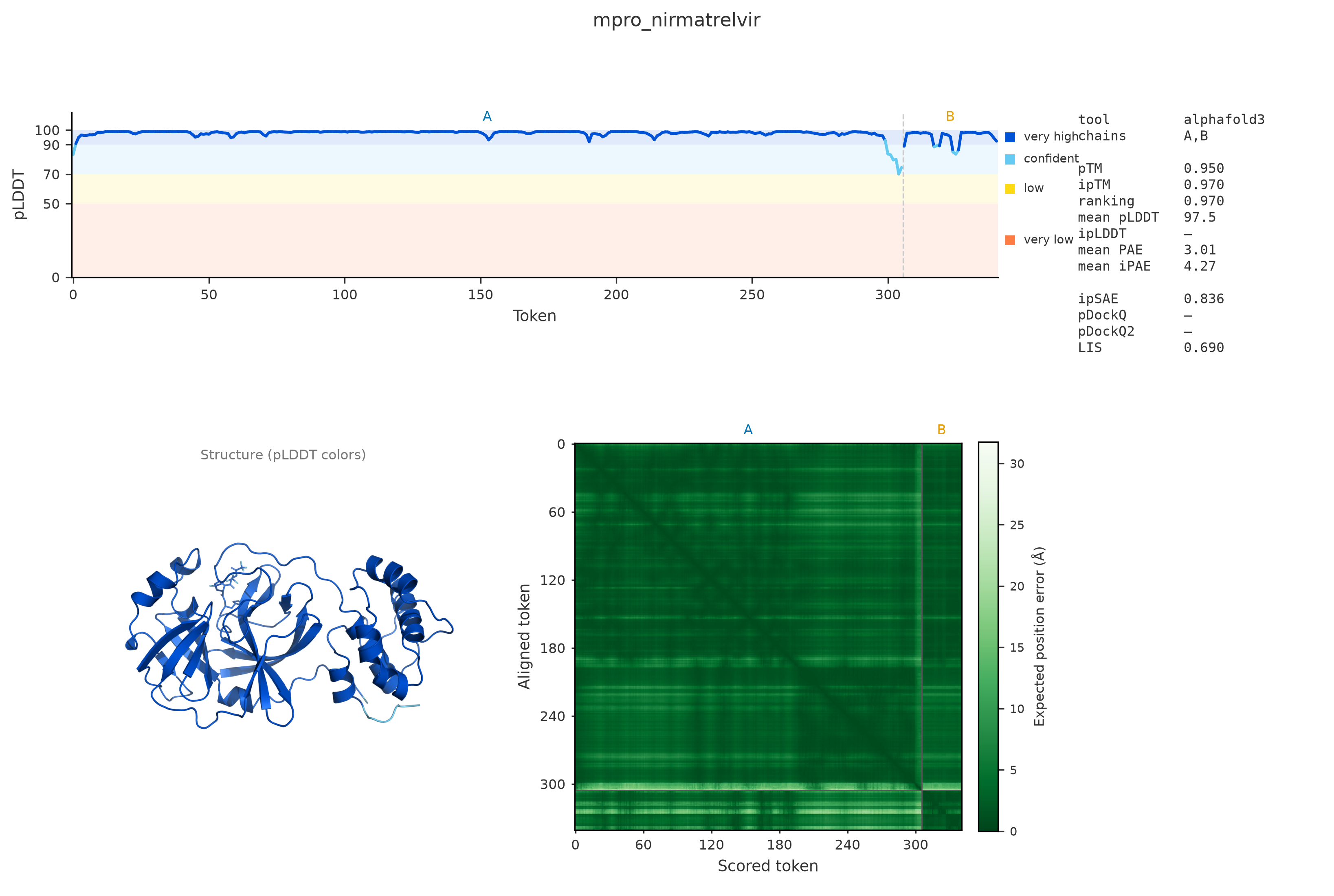
| every model | <model>.png — pLDDT-colored structure + pLDDT track + PAE heatmap + metrics panel |
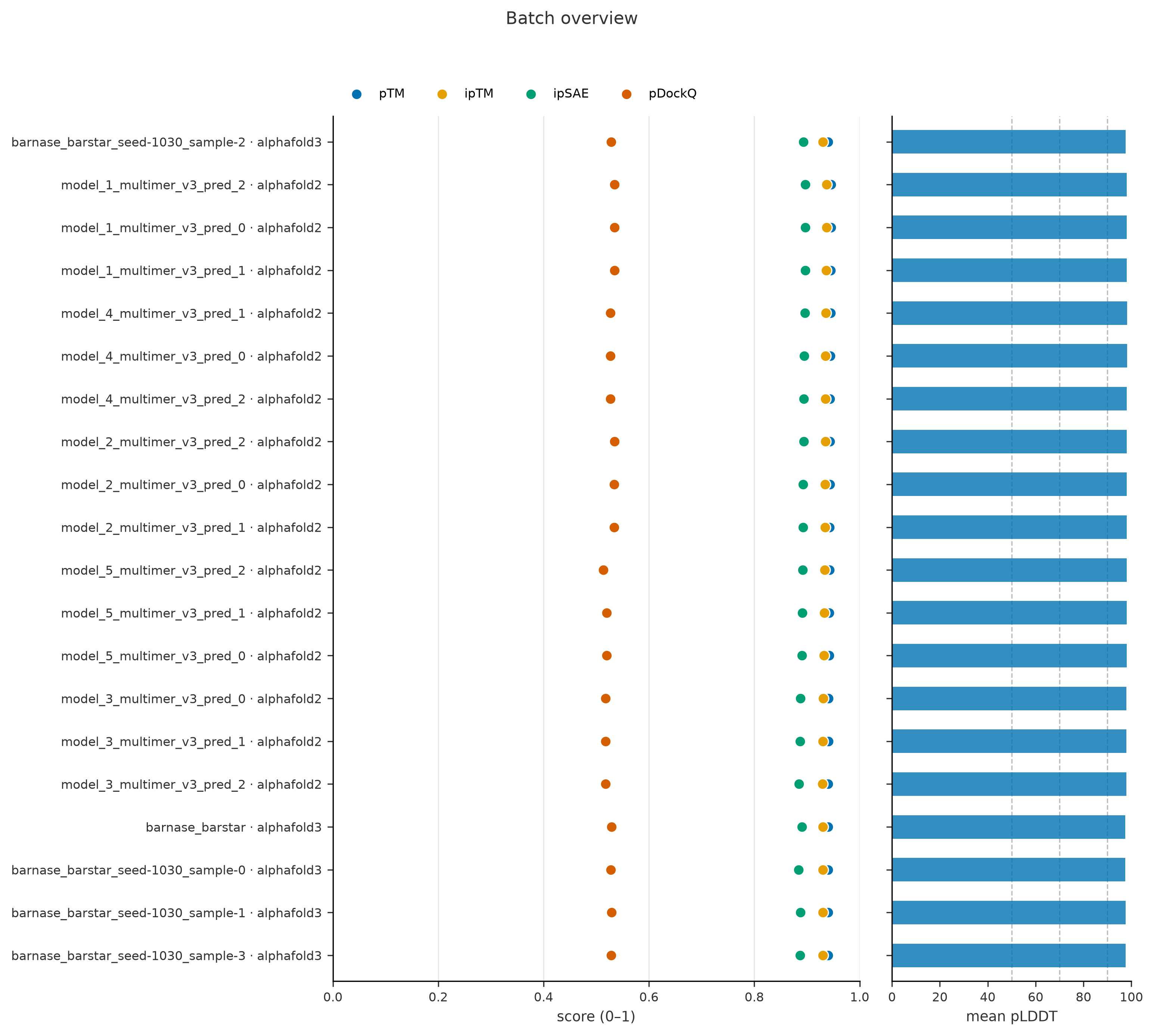
| more than one model | plus batch_overview.png — ranked confidence dot plot + mean pLDDT bars |
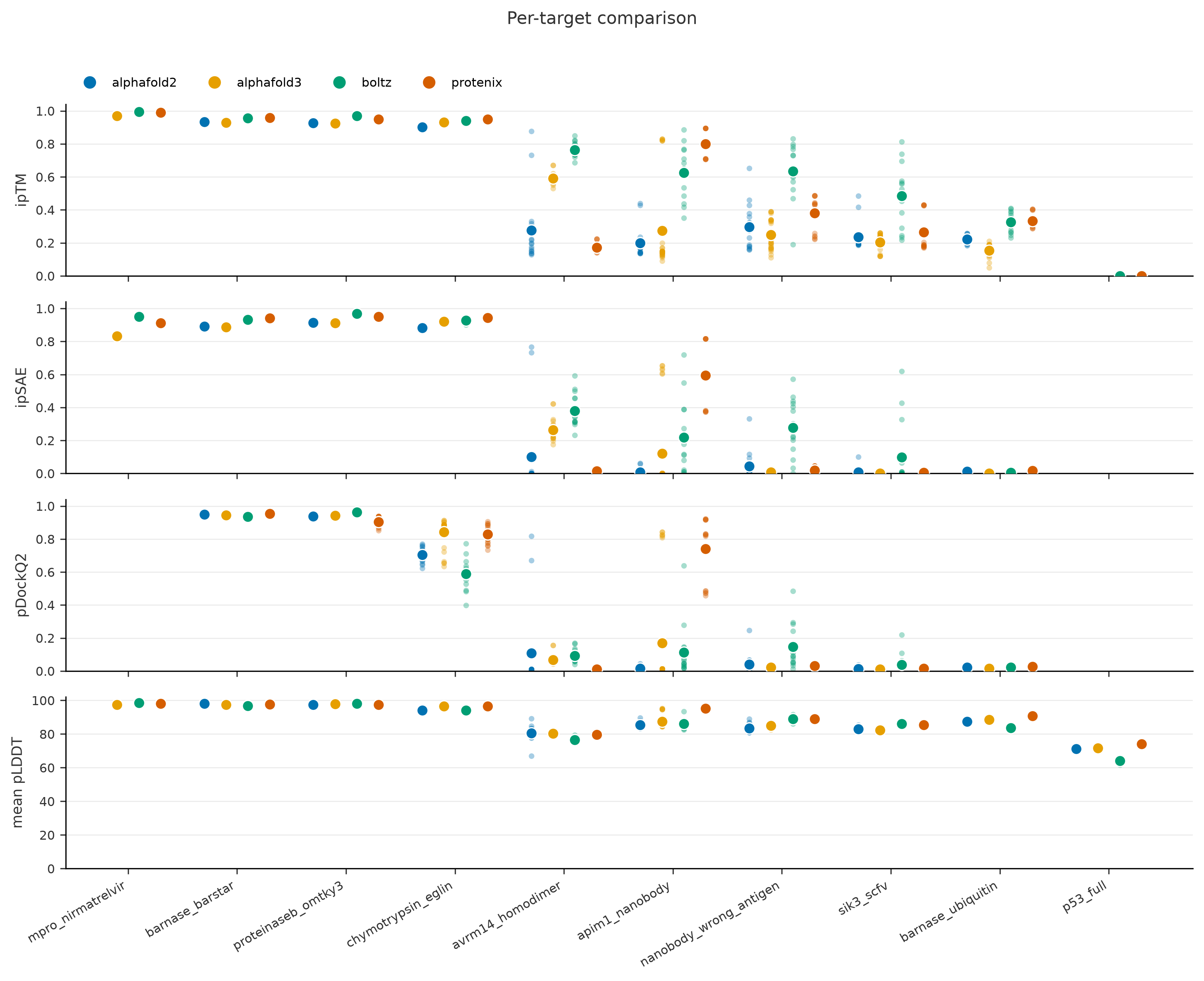
| more than one target and/or tool | plus comparison.png — one panel per metric, grouped by target, one color per tool |
The structure panel renders via headless PyMOL when installed
(--renderer pymol|trace overrides; FOLDMETRICS_PYMOL sets the path).
plot also takes --format png|pdf|svg and --dpi.
Single model (AlphaFold3, SARS-CoV-2 Mpro + nirmatrelvir):
Targets × methods comparison (real batch: 10 complexes × 4 tools):
Batch overview (one target, AlphaFold2 + AlphaFold3 models):
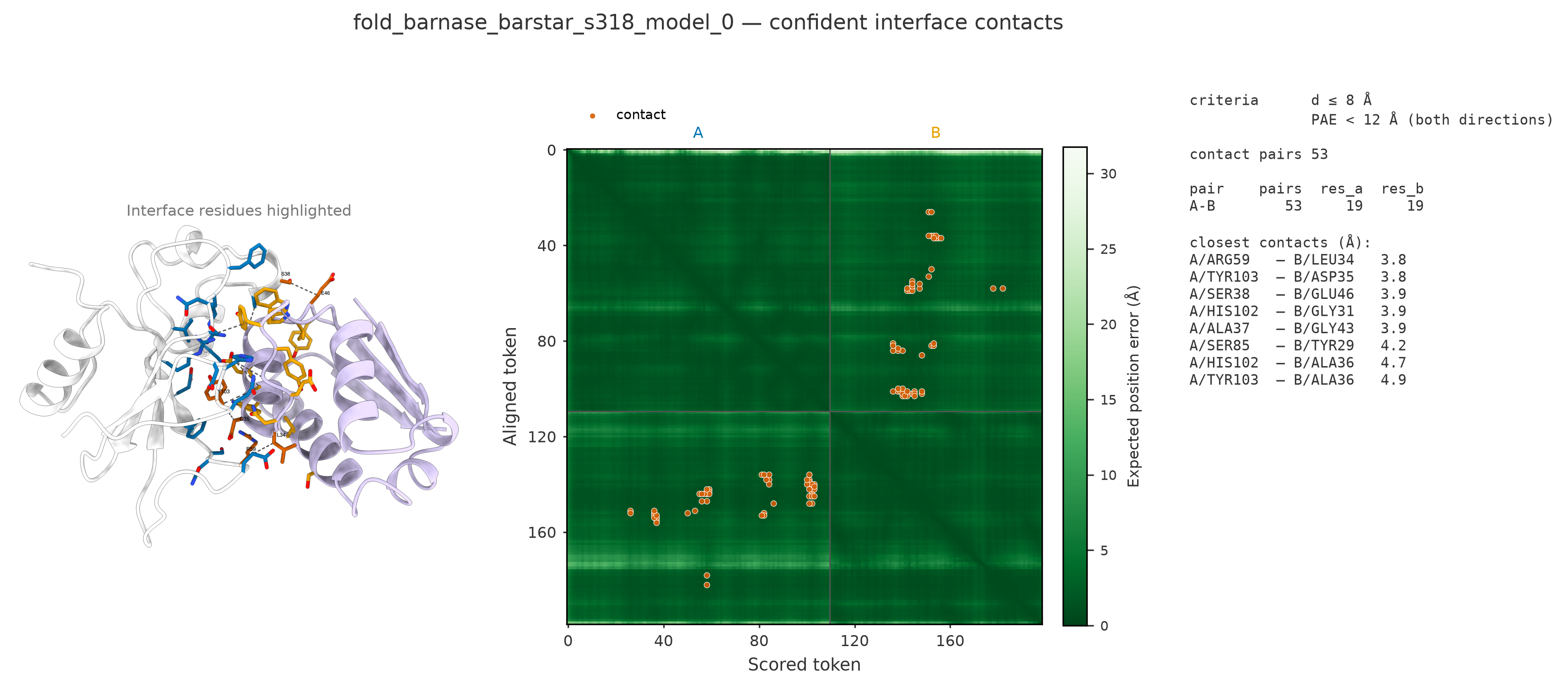
🤝 Confident interface contacts
A contact is an inter-chain residue (or ligand-atom) pair within
--dist-cutoff 8 Å whose
PAE is below
--pae-cutoff 12 Å in both directions (negative disables the PAE
filter).
fmx contacts examples/data/af3_server -o contacts.tsv --plot plots/
-o writes the contact table; --plot DIR adds, per model:
*_contacts.png— the figure below*_contacts.pse/*_contacts.cxs— PyMOL / ChimeraX sessions: double-click to open the styled interface scene, withif_A/if_B/hotspots/interfaceselections ready (--no-sessionsskips)*_contacts.pml/*_contacts.cxc— the same scene as plain scripts, always written
🎯 DockQ against a reference
When an experimental (or otherwise trusted) structure exists, fmx dockq
computes the actual interface accuracy via the official DockQ
implementation (install with pip install "foldmetrics[dockq]"):
fmx dockq preds/ --ref 1brs.pdb -o dockq.tsv
fmx dockq preds/ --ref native.cif --mapping A:A,B:D   # explicit chain pairing
fmx dockq preds/ --ref homodimer.cif --best-mapping   # search all assignments
fmx dockq preds/ --ref complex.cif --small-molecule   # score ligand poses too
Reports DockQ, fnat, iRMSD, LRMSD, the CAPRI-style class and the chain
mapping used, per interface. Chains are matched by name when both
structures share names, otherwise by order — mmCIF label vs auth chain ids
differ between tools, so check the mapping column. Override explicitly
with --mapping MODEL:REF,..., or let --best-mapping try every
assignment and keep the best total DockQ (recommended for homo-multimers;
refused above 5 chains). Additional switches: --no-align (skip sequence
alignment when residue numbering already matches), --low-memory (huge
complexes), --capri-peptide (protein–peptide criteria).
📊 How to read the scores
| Score | Guidance | Basis |
|---|---|---|
| pLDDT | > 90 very high (side chains reliable); 70–90 backbone confident; 50–70 low; < 50 likely disordered | AlphaFold confidence bands (Jumper 2021) |
| pTM / ipTM | > 0.8 confident; 0.6–0.8 gray zone, inspect; < 0.6 likely wrong (interface) | AlphaFold-Multimer / AF3 guidance |
| PAE | < 5 Å: relative placement of the two positions is reliable; > ~15 Å: unreliable | AlphaFold documentation |
| pDockQ | > 0.23 acceptable or better; > 0.5 confident | Bryant 2022 |
| pDockQ2 | estimates DockQ, so DockQ classes apply: < 0.23 incorrect; ≥ 0.23 acceptable; ≥ 0.49 medium; ≥ 0.80 high | Zhu 2023; Basu & Wallner 2016 |
| ipSAE | no published universal cutoff; in our 720-model validation known binders scored ≥ 0.88 and decoys ≤ 0.10 — values above ≈ 0.5 indicate a confidently predicted interface | Dunbrack 2025 + our validation |
| LIS | higher is better; the authors propose ≈ 0.2 as the interaction cutoff | Kim 2024 |
| DockQ | < 0.23 incorrect; 0.23–0.49 acceptable; 0.49–0.80 medium; ≥ 0.80 high | Basu & Wallner 2016 (CAPRI classes) |
pDockQ2 has two established readings
Zhu 2023 fixes pDockQ2's fitted sigmoid and its PAE term, but not which atom defines a contact, which atom's pLDDT to read, or whether the partner chain contributes to the pLDDT average. Implementations diverge:
| contact atom | pLDDT | interface residues | |
|---|---|---|---|
Dunbrack ipsae.py, ColabFold — our default |
CB (CA for Gly) | that residue's CB | union of both chains, counted once |
the paper's own pdockq2.py (variant="zhu2023") |
CA | that residue's CA | scored chain only, weighted by contacts |
The gap is ~0.005 on real AlphaFold3 output, because CA and CB contacts
describe different interfaces (33 vs 53 pairs on barnase–barstar). It only
matters for engines with per-atom pLDDT: pDockQ2 was fitted on
AlphaFold2, where pLDDT is constant within a residue and all readings
coincide. Pass variant= to foldmetrics.metrics.pdockq2_asym to choose;
pdockq2_ab/pdockq2_ba are the per-chain values the paper defines, and
the aggregate pdockq2 is their maximum, which is our convention — the
paper defines no interface-level aggregate.
Single scores can mislead — pDockQ ignores PAE and can stay deceptively high on confidently-folded but wrongly-docked chains, which pDockQ2/ipSAE expose. Read them together (that is rather the point of this package).
🧰 Supported tools and files
| Tool | Detected files | pTM/ipTM | pLDDT | PAE |
|---|---|---|---|---|
| ColabFold | *_scores_rank_*.json + *_(un)relaxed_rank_*.pdb |
yes | yes | yes |
| AlphaFold2 (pickle layout) | result_model_*.pkl + unrelaxed_*.pdb / ranked_*.pdb |
yes | yes | yes |
| AlphaFold2 (JSON layout) | iptm_ptm.json + confidence_*.json / pae_*.json + unrelaxed_*.cif/.pdb |
yes | yes | yes |
| AlphaFold3 (server/local) | *model*.cif + *summary_confidences*.json + *confidences*/full_data*.json |
yes | yes | yes |
| Boltz-1/2 | confidence_*_model_*.json + *_model_*.cif + pae_*.npz / plddt_*.npz |
yes | yes | yes |
| Chai-1 | scores.model_idx_*.npz + pred.model_idx_*.cif + pae_model_idx_*.npz |
yes | yes | yes |
| Protenix | *summary_confidence*.json + matching .cif (+ *full_data*.json with token_pair_pae) |
yes | yes | yes |
| OpenDDE | Protenix layout and keys; told apart by the mmCIF data block ..._predicted_by_opendde |
yes | yes | yes |
| HelixFold3 | <job>/<job>-pred-<I>-<S>/all_results.json + predicted_structure.cif (the -rank<N> copies are dropped) |
yes | yes | yes |
| SeedFold | confidence_*_model_*.json + *_model_*.cif (Boltz-shaped, no .npz) |
yes | yes | no |
Native per-tool extras (e.g. Boltz complex_iplddt/ligand_iptm, AF3
chain_pair_pae_min, Chai clash flags) are preserved on
Prediction.extras and chain-pair ipTM is surfaced as iptm_native in the
interface table.
Forks are a real problem here: OpenDDE writes Protenix's exact layout, file
names and confidence keys, and SeedFold writes Boltz's. They are separated by
whatever provenance the output actually carries — the mmCIF data block for the
Protenix family, the absence of Boltz's own .npz files for SeedFold — never
by guessing from the directory name.
✅ Validation
- Numerical parity with the
ipsae.pyreference implementation (Dunbrack Lab) verified digit-for-digit on real AlphaFold3 server output: ipSAE (both directions and d0chn variant), pDockQ, pDockQ2 and LIS all match to 6 decimal places at the default cutoffs (10/10). - Batch-tested on 720+ real predictions across AlphaFold2-Multimer, AlphaFold3 (server + local), Boltz-2, Chai-1, ColabFold, Protenix, OpenDDE and SeedFold — including protein–small-molecule complexes, homodimers, monomers and negative controls — with zero parse errors; known binders score ipSAE 0.9+, decoy pairs < 0.1, monomers report NA. On one panel of three two-chain complexes, OpenDDE and Protenix given the same MSAs agree to within 0.02 on pTM, ipTM, ipSAE, pDockQ2 and pLDDT — two independent parses of two engines' own output.
- Layout-tested on native, untouched output directories from every
supported engine, including multi-seed/multi-sample campaigns where the
seed directory sits above the job directory; each engine's duplicate
copies of the same model (AF2
ranked_*, AF3's top-level model, HelixFold3's-rank<N>directories) are counted once. HelixFold3 is so far validated at this level only: its file layout and key names come from a real run, but that run was made without MSAs, so its confidence values were not in a regime worth checking. - Cross-implementation agreement: on real ColabFold 1.6 output our ipSAE/pDockQ/pDockQ2 reproduce ColabFold's own embedded values to ~1e-5 (bounded only by the 2-decimal PAE rounding in its JSON) — a CI regression test enforces this parity on every commit.
📋 What each metric needs
The structure file is always required (it defines chains and tokens); the
table shows which additional inputs each metric consumes. When an input is
missing the metric is NA and a note lands in the warnings column —
nothing crashes.
| Metric (= subcommand) | pLDDT | Coordinates | PAE | Source |
|---|---|---|---|---|
ptm, iptm, ranking |
– | – | – | read from the tool's confidence file |
plddt (mean pLDDT, ipLDDT) |
yes | ipLDDT only | – | B-factors, or the tool's pLDDT file |
pae (mean PAE, inter-chain PAE) |
– | – | yes | tool's PAE matrix |
pdockq |
yes | yes | – | contacts at 8 Å between CB/C3' atoms |
pdockq2 |
yes | yes | yes | |
ipsae, lis |
– | – | yes | chain mapping from the structure |
contacts |
reported | yes | recommended | distance always; PAE filter when present |
dockq |
– | yes | – | plus a reference structure (--ref) |
📁 Outputs and paths
- Summary table → stdout;
-o FILEwrites it. The extension picks the format:.tsv(default),.csv,.json; missing values areNA. --interfaces FILE→ the per chain-pair table (same formats).--plot DIR→ figures as described under Visualization;contacts --plotadds<model>_contacts.png+<model>_contacts.pml. Model names are sanitized ([^\w.-]→_) for use as filenames.plot -o DIRdefaults to./foldmetrics_plots/.- Exit codes:
0success,1nothing recognized/found,2bad arguments or missing optional dependency.
💡 Conventions worth knowing
- Tokens. Standard residues are one token; ligands and modified residues are one token per heavy atom (AF3-style), so token-level PAE matrices line up across tools. pLDDT is stored on the 0–100 scale everywhere (Boltz 0–1 values are rescaled).
- Complex-level interface metrics are the best interface. For >2 chains,
ipsae/pdockq/pdockq2/lisin the summary table are the maximum over chain pairs; use--interfacesfor the full breakdown. - Ligand interfaces.
pdockq/pdockq2/iplddtare defined for polymer–polymer interfaces only. For chain pairs involving a ligand chain,ipsae/lisare computed over ligand atom tokens (experimental) and markedipsae_mode = "tokens"in the interface table. ranking_scoreis comparable across tools. It is each tool's own ranking number, kept on 0–1. Some AlphaFold builds writeranking_confidenceas a percentage (27.7for0.8·ipTM + 0.2·pTM = 0.277); that is rescaled, with the value as written preserved inPrediction.extras["alphafold2_ranking_confidence_raw"]. An AF2 monomer run is the exception the tool itself defines: thereranking_confidenceis the mean pLDDT, and it stays on the pLDDT scale.- The
targetis the job directory, not the complex. Seed and sample directories are stripped, so all models of one job aggregate together, but two tools given different job names for the same complex stay separate until you pass--target-pattern. - Missing data degrades gracefully. No PAE → PAE-based metrics are NaN
and a note lands in the
warningscolumn; nothing crashes. - Directionality. PAE is asymmetric, so
pdockq2/ipsae/lishave two directional values; the interface table reports both (*_ab,*_ba) plus the aggregate used everywhere else (max for ipSAE/pDockQ2, mean for LIS, matching the reference implementations).
📚 References
- Jumper J et al. Highly accurate protein structure prediction with AlphaFold. Nature 596, 583–589 (2021). — pLDDT / PAE and their confidence bands
- Bryant P, Pozzati G, Elofsson A. Improved prediction of protein-protein interactions using AlphaFold2. Nat Commun 13, 1265 (2022). — pDockQ
- Zhu W, Shenoy A, Kundrotas P, Elofsson A. Evaluation of AlphaFold-Multimer prediction on multi-chain protein complexes. Bioinformatics 39, btad424 (2023). — pDockQ2
- Dunbrack RL. ipSAE: scoring pairwise interactions in AlphaFold models. bioRxiv (2025). — ipSAE
- Kim AR et al. Enhanced protein-protein interaction discovery via AlphaFold-Multimer. bioRxiv (2024). — LIS
- Basu S, Wallner B. DockQ: A quality measure for protein-protein docking models. PLoS ONE 11, e0161879 (2016); Mirabello C, Wallner B. DockQ v2. Bioinformatics (2024). — DockQ
📄 License
1 maintainer

Download files
Download the file for your platform. If you're not sure which to choose, learn more about installing packages.
Source Distribution
Built Distribution
Filter files by name, interpreter, ABI, and platform.
If you're not sure about the file name format, learn more about wheel file names.
Copy a direct link to the current filters
File details
Details for the file foldmetrics-0.1.8.tar.gz.
File metadata
- Download URL: foldmetrics-0.1.8.tar.gz
- Upload date:
- Size: 72.4 kB
- Tags: Source
- Uploaded using Trusted Publishing? Yes
- Uploaded via:
twine/7.0.0 CPython/3.13.14
File hashes
| Algorithm | Hash digest | |
|---|---|---|
| SHA256 |
b12e09115b6af181875cd0842328685afb6dcb1d250286360d549303ca71ac7e
|
|
| MD5 |
8f47d43fe8c3379eaba2eb307e2a1964
|
|
| BLAKE2b-256 |
ba36012fc46fb0b87aae42ced8b7cb42bf8b0b7ed12468295b7e39736eb006e7
|
Provenance
The following attestation bundles were made for foldmetrics-0.1.8.tar.gz:
Publisher:
publish.yml on ChiaChunL/foldmetrics
-
Statement:
-
Statement type:
https://in-toto.io/Statement/v1 -
Predicate type:
https://docs.pypi.org/attestations/publish/v1 -
Subject name:
foldmetrics-0.1.8.tar.gz -
Subject digest:
b12e09115b6af181875cd0842328685afb6dcb1d250286360d549303ca71ac7e - Sigstore transparency entry: 2611024835
- Sigstore integration time:
-
Permalink:
ChiaChunL/foldmetrics@97ff8be322498c8306997833ed05d3a03fe4f500 -
Branch / Tag:
refs/tags/v0.1.8 - Owner: https://github.com/ChiaChunL
-
Access:
public
-
Token Issuer:
https://token.actions.githubusercontent.com -
Runner Environment:
github-hosted -
Publication workflow:
publish.yml@97ff8be322498c8306997833ed05d3a03fe4f500 -
Trigger Event:
push
-
Statement type:
File details
Details for the file foldmetrics-0.1.8-py3-none-any.whl.
File metadata
- Download URL: foldmetrics-0.1.8-py3-none-any.whl
- Upload date:
- Size: 67.2 kB
- Tags: Python 3
- Uploaded using Trusted Publishing? Yes
- Uploaded via:
twine/7.0.0 CPython/3.13.14
File hashes
| Algorithm | Hash digest | |
|---|---|---|
| SHA256 |
a9f72663ff00d6e40c3fe80c2da3721afdfe17e08c2c900f34d7e5d320052a0a
|
|
| MD5 |
05c49195cf89cca6d22848a4ab4e5183
|
|
| BLAKE2b-256 |
0030affae8c1498bc9cdb3c5b8b8f277cfd69b44fef828110a58ce34e5e95cc1
|
Provenance
The following attestation bundles were made for foldmetrics-0.1.8-py3-none-any.whl:
Publisher:
publish.yml on ChiaChunL/foldmetrics
-
Statement:
-
Statement type:
https://in-toto.io/Statement/v1 -
Predicate type:
https://docs.pypi.org/attestations/publish/v1 -
Subject name:
foldmetrics-0.1.8-py3-none-any.whl -
Subject digest:
a9f72663ff00d6e40c3fe80c2da3721afdfe17e08c2c900f34d7e5d320052a0a - Sigstore transparency entry: 2611024955
- Sigstore integration time:
-
Permalink:
ChiaChunL/foldmetrics@97ff8be322498c8306997833ed05d3a03fe4f500 -
Branch / Tag:
refs/tags/v0.1.8 - Owner: https://github.com/ChiaChunL
-
Access:
public
-
Token Issuer:
https://token.actions.githubusercontent.com -
Runner Environment:
github-hosted -
Publication workflow:
publish.yml@97ff8be322498c8306997833ed05d3a03fe4f500 -
Trigger Event:
push
-
Statement type:














