
Folios







A lightweight Model Context Protocol (MCP) server for querying your local library of documents.

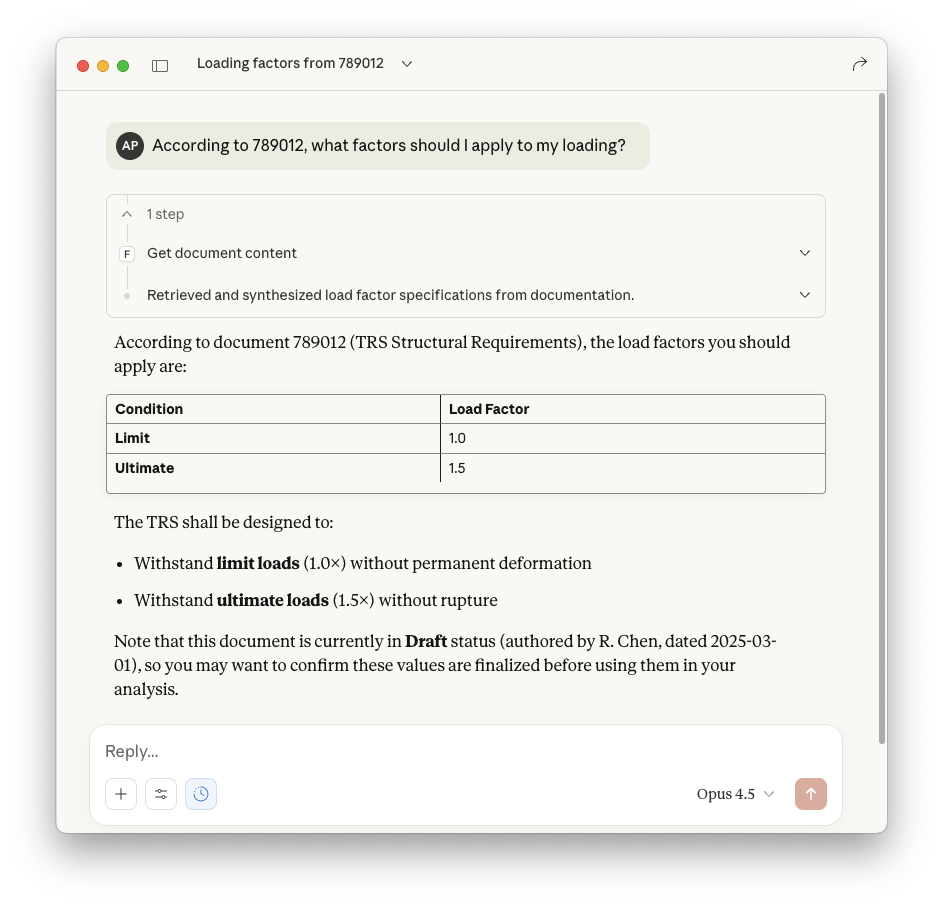
What problem does Folios solve?
AI agents working on engineering tasks often need access to internal documents—design practices, guidelines, specifications—typically stored in document management systems (PLM, QMS...). While RAG (Retrieval Augmented Generation) can provide this functionality, it's complex to set up and maintain.
Why not access the documents directly? LLM context windows are big enough to handle these documents, or at least whole sections. Also, the master information lives in these documents anyway, AIs or RAGs won't replace the quality processes companies already use to manage knowledge. Giving agents read-only access to the source library is a more straightforward approach. However, enterprise document repositories often have restricted APIs or require privileged access that's difficult to obtain.
Folios solves this by providing a simple MCP server that points to a folder of Markdown files. If you're developing agentic workflows and need to mock or prototype document access before integrating with complex enterprise systems, Folios lets AI assistants query documents with minimal setup.
No RAG pipelines, no finetuning, no extra steps. From source to context window.
Features
- Zero Config - Just point to a folder of Markdown files and go
- Local First - Your documents stay on your machine or network, no cloud dependencies
- Flexible Metadata - Use any YAML metadata fields your workflow needs
- Versioned Documents - Store multiple versions with simple
{id}_v{version}.mdnaming - Chapter Extraction - Retrieve specific sections without loading entire documents
- Version Diffing - Compare changes between document versions, grouped by chapter
- MCP Resources - Browse documents as native MCP resources
One-liner to install, run and configure
uvx folios --path /path/to/your/documents
Quick guide to get started
1. Create your documents folder
Any normal local folder will do. Documents follow the naming convention {id}_v{version}.md:
documents/
├── 123456_v1.md      # Design Practice (v1)
├── 123456_v2.md      # Design Practice (v2)
├── 200001_v1.md      # Material Specification
├── 200002_v1.md      # Procedure
└── 789012_v1.md      # Technical Requirements
2. Add YAML metadata to each document
Metadata is flexible - include any fields your workflow requires:
---
author: "J. Smith"
date: "2025-01-15"
document_type: "Design Practice"
status: "Approved"
reviewer: "A. Johnson"
---

# Stress Analysis Design Practice

Lorem ipsum dolor sit amet, consectetur adipiscing elit.

## Background

More text here...
Only an H1 title and the {id}_v{version}.md filename pattern are required. Metadata is optional—missing fields show "NA" in responses.
3. Run the server
You can run folios directly with one terminal command:
uvx folios --path /path/to/your/documents
alternatively, you can add it to your LLM Client MCP configuration:
{
  "mcpServers": {
    "folios": {
      "command": "uvx",
      "args": ["folios", "--path", "/path/to/your/documents"]
    }
  }
}
We have tested it with Claude Desktop and the GitHub Copilot Extension for VS Code, but it should work with any MCP-compatible client.
MCP Tools
| Tool | Parameters | Description |
|---|---|---|
get_document_content |
document_id, version? |
Retrieve document content (latest if version omitted) |
get_document_metadata |
document_id, version? |
Get metadata including auto-parsed chapters |
get_chapter_content |
document_id, chapter_title, version? |
Retrieve content of a specific chapter (H2 section) |
diff_document_versions |
document_id, from_version, to_version |
Diff between two versions, grouped by chapter |
browse_catalog |
status?, document_type?, author? |
List documents with optional filters |
list_revisions |
document_id |
List all versions of a document |
Document Schema
Core Metadata Fields
These fields are always present in metadata responses:
| Field | Type | Description |
|---|---|---|
id |
int | Unique document identifier (from filename) |
version |
int | Version number (from filename) |
title |
str | Document title (from H1 heading) |
author |
str | Document author ("NA" if not in metadata) |
date |
str | Publication date ("NA" if not in metadata) |
chapters |
list | Auto-parsed from H2 headings |
Dynamic Fields
Any additional YAML fields are included in metadata responses. Common examples:
document_type- Document type (Design Practice, Guideline, etc.)status- Document status (Draft, Approved, etc.)reviewer,approver- Approval workflow fields- Custom fields for your specific workflow
Configuration
Documents Path
Provide the documents folder path via CLI flag or environment variable:
| Option | Description |
|---|---|
--path |
Path to documents folder (CLI flag) |
FOLIOS_PATH |
Path to documents folder (environment variable) |
Limitations
Folios is intentionally minimal. It does not provide:
- Full-text search - Use
browse_catalogfilters or let your LLM search within retrieved content - Write operations - Documents are read-only; edit them with your normal tools
- Authentication - No access control; secure your documents folder via filesystem permissions
- Real-time updates - Schema discovery happens at startup; restart to pick up new documents
- Non-Markdown formats - Only
.mdfiles are supported
Development
git clone https://github.com/alex-pradas/folios
cd folios
uv sync

# Run locally
FOLIOS_PATH=./examples/documents uv run folios

# Run tests
uv run pytest
License
This project is licensed under the terms of the MIT license.
1 maintainer

Metadata
1 maintainer
Release files for folios 0.9.2
For a detailed explanation of source distributions (sdists) and built distributions (wheels), please see the package formats documentation.
Source distribution (sdist)
| File | Size | Uploaded | Provenance | |
|---|---|---|---|---|
| folios-0.9.2.tar.gz | 368.2 kB | With provenance | Details |
Built distribution (wheel)
| File | Interpreter | ABI | Platform | Reset |
|---|---|---|---|---|
| folios-0.9.2-py3-none-any.whl | Python 3 | none | any | Details |
Total release size: 384.1 kB
Release files / folios-0.9.2.tar.gz
| Download URL | folios-0.9.2.tar.gz |
|---|---|
| Size | 368.2 kB |
| Tags | Source |
|
SHA-256 checksum How to use checksums |
3bc37260b9f73d6aa0da75337d489fd8a407ae3fd3fc7a989e7e39ae0a6d0148
|
|
BLAKE2b-256 checksum How to use checksums |
1105733f9dae58da8bcd13e612851773b3765e9704b809cd5dfb3893095e8dbe
|
| Upload date | |
|
Uploaded using Trusted Publishing? What is trusted publishing? |
Yes |
| Uploaded via |
twine/7.0.0 CPython/3.13.14
|
Provenance
Provenance describes where a file came from. On PyPI, provenance is shared via attestations, which provide a verifiable record of the build or publishing details. View details, limitations and caveats.


PyPI Publish Attestation
PyPI verified that this artifact, at this checksum, originated from the publisher listed below.
Signed by GitHub Actions, verified by PyPI on Oct 1, 2026.
Transparency logRelease files / folios-0.9.2-py3-none-any.whl
| Download URL | folios-0.9.2-py3-none-any.whl |
|---|---|
| Size | 15.9 kB |
| Tags | Python 3 |
|
SHA-256 checksum How to use checksums |
117efb8b73cfefc5d223e31bc7b93ef74a20ac02f775f132f3d5656a6e1f765c
|
|
BLAKE2b-256 checksum How to use checksums |
27879cbf46c5d685860144c76e84b05210f24e3d45cfa096743044761360fc8e
|
| Upload date | |
|
Uploaded using Trusted Publishing? What is trusted publishing? |
Yes |
| Uploaded via |
twine/7.0.0 CPython/3.13.14
|
Provenance
Provenance describes where a file came from. On PyPI, provenance is shared via attestations, which provide a verifiable record of the build or publishing details. View details, limitations and caveats.
PyPI Publish Attestation
PyPI verified that this artifact, at this checksum, originated from the publisher listed below.
Signed by GitHub Actions, verified by PyPI on Oct 1, 2026.
Transparency logSecurity for folios 0.9.2
Provenance
Provenance describes where a file came from. On PyPI, provenance is shared via attestations, which provide a verifiable record of the build or publishing details. View details, limitations and caveats.
Full provenance
All 2 files in this release have been uploaded with provenance metadata.
Attestation for folios-0.9.2.tar.gz
PyPI Publish Attestation
PyPI verified that this artifact, at this checksum, originated from the publisher listed below.
Signed by GitHub Actions, verified by PyPI on Oct 1, 2026.
Transparency logA note on package security
PyPI is a repository for distributing packages, not a service for auditing them. While third-party security researchers and our staff do their best to detect and remove malicious packages, PyPI cannot guarantee the quality, security or suitability of any given package.
To learn more about protecting yourself from malicious actors, visit our package security documentation.














